radio CADILLAC CTS 2012 2.G Workshop Manual
[x] Cancel search | Manufacturer: CADILLAC, Model Year: 2012, Model line: CTS, Model: CADILLAC CTS 2012 2.GPages: 496, PDF Size: 6.36 MB
Page 230 of 496

Black plate (34,1)Cadillac CTS/CTS-V Owner Manual (Include Mex) - 2012
7-34 Infotainment System
3.5 mm Jack
Connect a 3.5 mm (1/8 in) cable to
the auxiliary input jack to use a
portable audio player.
Playback of an audio device that is
connected to the 3.5 mm (1/8 in)
jack can only be controlled using
the controls on the device.
VOL/
O(Volume/Power):Turn
clockwise or counterclockwise to
increase or decrease the volume of
the portable player. Use the portable
device to make additional volume
adjustments.
CD or CD/AUX (CD/Auxiliary):
Press to play a CD when a portable
audio device is playing. Press again
to start playing audio from the
connected portable audio player.
If a portable audio player is not
connected, “No Aux Device”
displays.
USB Port
The USB connector uses the USB
standards, 1.1 and 2.0.
USB Supported Devices
.USB Flash Drives
.Portable USB Hard Drives
.Fifth generation or later iPods*
.First, Second, or Third
generation iPod nanos*
.iPod classics*
*For proper operation, make sure
the iPod has the latest firmware
from Apple
®. The iPod firmware can
be updated using the latest iTunes
application. See www.apple.com/
itunes.
Connecting a USB Storage Device
Connect the USB storage device to
the USB port located in the center
console. Some USB devices may
not be supported. Playing an MP3/WMA from a USB
Storage Device
See
MP3 on page 7‑24 for more
information.
Connecting an iPod
To connect the iPod, connect one
end of the special iPod connection
cable to the iPod’s dock connector.
Connect the other end to both the
USB port and the auxiliary input jack
located in the center console. The
USB port and the auxiliary input jack
are located in the center console
bin. If the vehicle is on and the USB
connection works, a GM logo may
appear on the iPod. The iPod's
music information will be shown on
the radio’s display and the music
begins playing through the vehicle's
audio system.
The iPod's battery charges while it
is connected to the vehicle and if
the ignition is turned to ACC/
ACCESSORY or ON/RUN. It can
also be left connected to the vehicle
after the vehicle is turned off. With
the vehicle turned off, the iPod will
Page 231 of 496
Black plate (35,1)Cadillac CTS/CTS-V Owner Manual (Include Mex) - 2012
Infotainment System 7-35
automatically be powered off and
will not charge or draw power from
the vehicle's battery.
A standard iPod USB cable, like the
one that came with the iPod, cannot
be used to connect an iPod to the
vehicle. The special iPod
connection cable that came
equipped with the vehicle or that
was made available from your
dealer must be used to command
and control an iPod.
Use a standard 3.5 mm (1/8 in)
stereo cable to connect an older
iPod model that is not supported,
or if the special iPod connection
cable is missing. Command and
control of the iPod using the
infotainment control buttons and
knobs is not supported when only a
3.5 mm (1/8 in) stereo cable is used.Commanding and Controlling
an iPod
An iPod can be controlled by using
the radio buttons and knobs; the
song information shows on the
infotainment system's display. To
connect and control the iPod using
the radio controls, use the special
iPod connection cable that came as
standard equipment with the vehicle
as part of the USB option. The
special iPod connection cable can
also be purchased or made
available from your dealer. See
your dealer for more information.
Use the MENU/SELECT knob to
bring up the iPod Menu and select
Songs, Artists, Albums, Playlists,
and Audio Books to play from
the iPod.
Disconnecting an iPod
To properly dismount the iPod USB
device before disconnecting from
the vehicle, press the softkey under
the EJECT tab on the infotainment
display screen during iPod
playback.Phone
Bluetooth
For vehicles equipped with
Bluetooth capability, the system
can interact with many cell phones,
allowing:
.Placement and receipt of calls in
a hands-free mode.
.Sharing of the cell phone’s
address book or contact list with
the vehicle.
To minimize driver distraction,
before driving, and with the vehicle
parked:
.Become familiar with the
features of the cell phone.
Organize the phone book and
contact lists clearly and delete
duplicate or rarely used entries.
If possible, program speed dial
or other shortcuts.
.Review the controls and
operation of the infotainment
system.
Page 238 of 496
Black plate (42,1)Cadillac CTS/CTS-V Owner Manual (Include Mex) - 2012
7-42 Infotainment System
Transferring Audio to the
Bluetooth System from a Cell
Phone
During a call with the audio on the
cell phone, press
b/gfor
two seconds. For vehicles with a
navigation system say “Hands Free”
after the tone. The audio transfers
to the vehicle. If the audio does not
transfer to the vehicle, use the audio
transfer feature on the cell phone.
See your cell phone manufacturer's
user guide for more information.
Voice Pass‐Thru
Voice Pass‐Thru allows access to
the voice recognition commands on
the cell phone. See the cell phone
manufacturer's user guide to see if
the cell phone supports this feature.
This feature can be used to verbally
access contacts stored in the cell
phone.
1. Press and hold
b/gfor
two seconds.
2. Say “Bluetooth.” This command
can be skipped. 3. Say
“Voice.” The system
responds with “OK, accessing
.The cell phone's normal
prompt messages will go
through their cycle
according to the phone's
operating instructions.
Dual Tone Multi‐Frequency
(DTMF) Tones
The Bluetooth system can send
numbers and the numbers stored as
name tags during a call. You can
use this feature when calling a
menu‐driven phone system.
Account numbers can also be
stored for use.
To send a number or name tag
during a call:
1. Press
b/g.
2. Say “Dial.”
3. Say the number or name tag to send.
Clearing the System
Unless information is deleted out of
the in‐vehicle Bluetooth system, it
will be retained indefinitely. This
includes all saved name tags in the
phone book and phone pairing
information. For information on how
to delete this information, see the
previous sections on “Deleting a
Paired Phone” and“Storing and
Deleting Phone Numbers.”
Other Information
The Bluetooth®word mark and
logos are owned by the Bluetooth®
SIG, Inc. and any use of such marks
by General Motors is under license.
Other trademarks and trade names
are those of their respective owners.
See Radio Frequency Statement on
page 13‑21 for information
regarding Part 15 of the Federal
Communications Commission (FCC)
rules and Industry Canada
Standards RSS-GEN/210/220/310.
Page 246 of 496

Black plate (4,1)Cadillac CTS/CTS-V Owner Manual (Include Mex) - 2012
8-4 Climate Controls
Recirculation is not available in the
defrost mode and automatically
turns off 10 minutes after defog is
selected. This helps to limit window
fogging in the vehicle.
Using recirculation for long periods
of time could cause the air inside
the vehicle to become too dry or
stuffy. To prevent this from
happening, after the air in the
vehicle has cooled, select outside
air or press the auto button.
F(Outside Air):Press to turn
on the outside air. An indicator light
turns on. The outside air mode pulls
fresh air from outside the vehicle.
Outside air is always selected in
defrost mode to prevent fogging.
Rear Window Defogger
The rear window defogger uses a
warming grid to remove fog or frost
from the rear window. It only works
when the ignition is in ON/RUN.
=(Rear Window Defogger):
Press to turn the rear window
defogger on or off. The rear window defogger stays on
for about 15 minutes, before turning
off if the vehicle is moving at a
slower speed. At higher speeds, the
rear window defogger may stay on
continuously. With each additional
press, the defogger runs for about
10 minutes. The defogger can also
be turned off by turning off the
engine.
The heated outside rearview mirrors
turn on when the rear window
defogger button is on and helps to
clear fog or frost from the surface of
the mirrors. See
Heated Mirrors on
page 2‑28.
Notice: Do not try to clear frost
or other material from the inside
of the front windshield and rear
window with a razor blade or
anything else that is sharp. This
may damage the rear window
defogger grid and affect your
radio's ability to pick up stations
clearly. The repairs would not be
covered by your warranty.
z/{(Heated and Ventilated
Seats): Press to heat or ventilate
the seat. See Heated and Ventilated
Front Seats on page 3‑10.
Remote Start Climate Control
Operation: For vehicles with
remote vehicle start, the climate
control system automatically heats
and cools the vehicle based on the
temperature inside and outside of
the vehicle. The climate control
displays will be blank. See Remote
Vehicle Start on page 2‑12.
In cold weather the windshield
defroster and/or rear window
defogger automatically turn on.
If the vehicle has heated seats, they
will also turn on.
When the ignition is turned to ON/
RUN, the climate control system
returns to the settings used before
the vehicle was last turned off. The
heated seats will turn off,
if equipped.
Page 252 of 496
Black plate (2,1)Cadillac CTS/CTS-V Owner Manual (Include Mex) - 2012
9-2 Driving and Operating
Fuel
Fuel . . . . . . . . . . . . . . . . . . . . . . . . . 9-50
Recommended Fuel . . . . . . . . . 9-51
Gasoline Specifications(U.S. and Canada Only) . . . . 9-51
California Fuel
Requirements . . . . . . . . . . . . . . 9-51
Fuels in Foreign Countries . . . 9-52
Fuel Additives . . . . . . . . . . . . . . . 9-52
Filling the Tank . . . . . . . . . . . . . . 9-53
Filling a Portable Fuel Container . . . . . . . . . . . . . . . . . . . 9-55
Towing
General TowingInformation . . . . . . . . . . . . . . . . . 9-55
Driving Characteristics and Towing Tips . . . . . . . . . . . . . . . . 9-56
Trailer Towing (CTS-V and Coupe) . . . . . . . . . . . . . . . . . . . . . 9-59
Trailer Towing (Except CTS-V and Coupe) . . . . . . . . . . . . . . . . 9-59
Towing Equipment . . . . . . . . . . . 9-61
Conversions and Add-Ons
Add-On Electrical Equipment . . . . . . . . . . . . . . . . . 9-61
Driving Information
Distracted Driving
Distraction comes in many forms
and can take your focus from the
task of driving. Exercise good
judgment and do not let other
activities divert your attention
away from the road. Many local
governments have enacted laws
regarding driver distraction. Become
familiar with the local laws in
your area.
To avoid distracted driving, always
keep your eyes on the road, hands
on the wheel, and mind on the drive.
.Do not use a phone in
demanding driving situations.
Use a hands-free method to
place or receive necessary
phone calls.
.Watch the road. Do not
read, take notes, or look up
information on phones or other
electronic devices.
.Designate a front seat
passenger to handle potential
distractions.
.Become familiar with vehicle
features before driving, such
as programming favorite radio
stations and adjusting climate
control and seat settings.
Program all trip information into
any navigation device prior to
driving.
.Wait until the vehicle is parked
to retrieve items that have fallen
to the floor.
.Stop or park the vehicle to tend
to children.
.Keep pets in an appropriate
carrier or restraint.
.Avoid stressful conversations
while driving, whether with a
passenger or on a cell phone.
Page 267 of 496
Black plate (17,1)Cadillac CTS/CTS-V Owner Manual (Include Mex) - 2012
Driving and Operating 9-17
key is all the way in. If it is and
you have a manual transmission
vehicle, turn the steering wheel
left and right while you turn the
key hard. If none of this works,
then the vehicle needs service.
A (STOPPING THE ENGINE/
LOCK/OFF):When the vehicle is
stopped, turn the ignition switch to
LOCK/OFF to turn the engine off.
Retained Accessory Power (RAP)
will remain active. See Retained
Accessory Power (RAP) on
page 9‑22 for more information.
This is the only position in which the
key can be removed. This position
locks the ignition and shift lever on
automatic transmission vehicles,
and the ignition and steering wheel
on manual transmission vehicles.
Do not turn the engine off when the
vehicle is moving. This will cause a
loss of power assist in the brake
and steering systems and disable
the airbags. If the vehicle must be shut off in an
emergency:
1. Brake using a firm and steady
pressure. Do not pump the
brakes repeatedly. This may
deplete power assist, requiring
increased brake pedal force.
2. Shift the vehicle to neutral. This can be done while the vehicle is
moving. After shifting to neutral,
firmly apply the brakes and steer
the vehicle to a safe location.
3. Come to a complete stop. Shift to P (Park) with an automatic
transmission, or Neutral with a
manual transmission. Turn the
ignition to LOCK/OFF.
4. Set the parking brake. See Parking Brake (Manual) on
page 9‑34 orParking Brake
(Electric) on page 9‑35{WARNING
Turning off the vehicle while
moving may cause loss of power
assist in the brake and steering
systems and disable the airbags.
While driving, only shut the
vehicle off in an emergency.
If the vehicle cannot be pulled
over, and must be shut off while
driving, turn the ignition to ACC/
ACCESSORY.
The ignition switch can bind in the
LOCK/OFF position with the wheels
turned off center. If this happens,
move the steering wheel from right
to left while turning the key to ACC/
ACCESSORY. If this does not work,
then the vehicle needs service.
B (ACC/ACCESSORY): This
position lets you use things like the
radio and the windshield wipers
when the engine is off. This position
allows you to turn off the engine.
Page 269 of 496
Black plate (19,1)Cadillac CTS/CTS-V Owner Manual (Include Mex) - 2012
Driving and Operating 9-19
Using a tool to force the ignition
control knob from its cylinder could
damage it.
Make sure the keyless access
transmitter is inside the vehicle
when trying to turn the ignition
control knob.
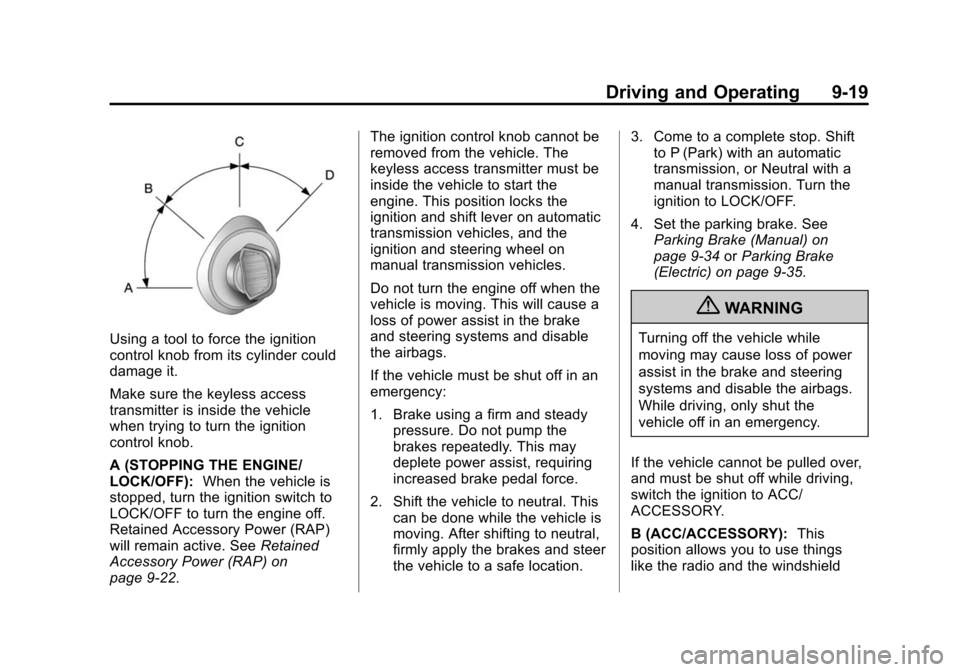
A (STOPPING THE ENGINE/
LOCK/OFF):When the vehicle is
stopped, turn the ignition switch to
LOCK/OFF to turn the engine off.
Retained Accessory Power (RAP)
will remain active. See Retained
Accessory Power (RAP) on
page 9‑22. The ignition control knob cannot be
removed from the vehicle. The
keyless access transmitter must be
inside the vehicle to start the
engine. This position locks the
ignition and shift lever on automatic
transmission vehicles, and the
ignition and steering wheel on
manual transmission vehicles.
Do not turn the engine off when the
vehicle is moving. This will cause a
loss of power assist in the brake
and steering systems and disable
the airbags.
If the vehicle must be shut off in an
emergency:
1. Brake using a firm and steady
pressure. Do not pump the
brakes repeatedly. This may
deplete power assist, requiring
increased brake pedal force.
2. Shift the vehicle to neutral. This can be done while the vehicle is
moving. After shifting to neutral,
firmly apply the brakes and steer
the vehicle to a safe location. 3. Come to a complete stop. Shift
to P (Park) with an automatic
transmission, or Neutral with a
manual transmission. Turn the
ignition to LOCK/OFF.
4. Set the parking brake. See Parking Brake (Manual) on
page 9‑34 orParking Brake
(Electric) on page 9‑35.
{WARNING
Turning off the vehicle while
moving may cause loss of power
assist in the brake and steering
systems and disable the airbags.
While driving, only shut the
vehicle off in an emergency.
If the vehicle cannot be pulled over,
and must be shut off while driving,
switch the ignition to ACC/
ACCESSORY.
B (ACC/ACCESSORY): This
position allows you to use things
like the radio and the windshield
Page 297 of 496

Black plate (47,1)Cadillac CTS/CTS-V Owner Manual (Include Mex) - 2012
Driving and Operating 9-47
SBZA is designed to ignore
stationary objects; however, the
system may occasionally light up
due to guard rails, signs, trees,
shrubs, and other stationary objects.
This is normal system operation; the
vehicle does not need service.
SBZA does not operate when the
left or right corners of the rear
bumper are covered with mud,
dirt, snow, ice, or slush, or in
heavy rainstorms. For cleaning
instructions, seeExterior Care on
page 10‑110. If the infotainment
display still shows the SIDE
BLIND ZONE ALERT SYSTEM
TEMPORARILY UNAVAILABLE
message after cleaning the bumper,
see your dealer.
The SBZA displays may remain on
if a trailer is attached to the vehicle,
or a bicycle or object is extending
out to either side of the vehicle. When SBZA is disabled for any
reason other than the driver turning
it off, the driver will not be able to
turn SBZA back on using the DIC.
The SIDE BLIND ZONE ALERT ON
option will not be selectable if the
conditions for normal system
operation are not met. Until normal
operating conditions for SBZA are
met, you should not rely upon SBZA
while driving.
SBZA Messages
The following messages may
appear on the infotainment display:
SIDE BLIND ZONE ALERT
SYSTEM OFF:
This message
indicates that the driver has turned
the system off.
SIDE BLIND ZONE ALERT
SYSTEM TEMPORARILY
UNAVAILABLE: This message
indicates that the SBZA system is
disabled because the sensor is
blocked and cannot detect vehicles
in the blind zone. The sensor may be blocked by mud, dirt, snow, ice,
or slush. This message may also
activate during heavy rain or due to
road spray. The vehicle does not
need service. For cleaning, see
Exterior Care on page 10‑110.
SERVICE SIDE BLIND ZONE
ALERT SYSTEM:
If this message
appears, both SBZA displays will
remain on indicating there is a
problem with the SBZA system.
If these displays remain on after
continued driving, the system needs
service. Take the vehicle to your
dealer.
FCC Information
See Radio Frequency Statement on
page 13‑21 for information
regarding Part 15 of the Federal
Communications Commission (FCC)
rules and Industry Canada
Standards RSS-GEN/210/220/310.
Page 368 of 496
Black plate (56,1)Cadillac CTS/CTS-V Owner Manual (Include Mex) - 2012
10-56 Vehicle Care
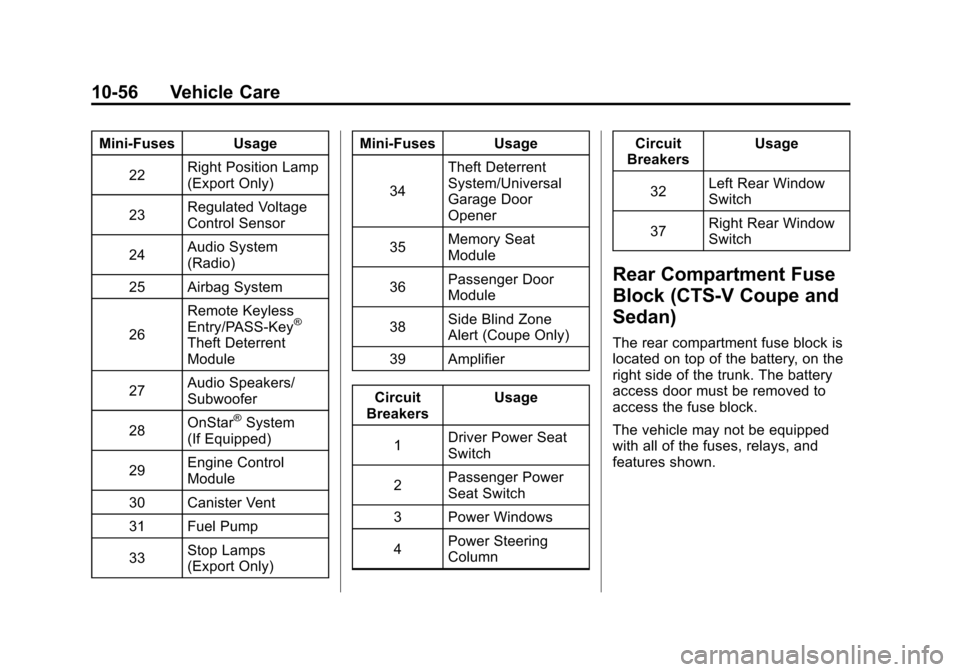
Mini‐Fuses Usage22 Right Position Lamp
(Export Only)
23 Regulated Voltage
Control Sensor
24 Audio System
(Radio)
25 Airbag System
26 Remote Keyless
Entry/PASS‐Key
®
Theft Deterrent
Module
27 Audio Speakers/
Subwoofer
28 OnStar
®System
(If Equipped)
29 Engine Control
Module
30 Canister Vent
31 Fuel Pump
33 Stop Lamps
(Export Only) Mini‐Fuses Usage
34 Theft Deterrent
System/Universal
Garage Door
Opener
35 Memory Seat
Module
36 Passenger Door
Module
38 Side Blind Zone
Alert (Coupe Only)
39 Amplifier
Circuit
Breakers Usage
1 Driver Power Seat
Switch
2 Passenger Power
Seat Switch
3 Power Windows
4 Power Steering
Column Circuit
Breakers Usage
32 Left Rear Window
Switch
37 Right Rear Window
Switch
Rear Compartment Fuse
Block (CTS-V Coupe and
Sedan)
The rear compartment fuse block is
located on top of the battery, on the
right side of the trunk. The battery
access door must be removed to
access the fuse block.
The vehicle may not be equipped
with all of the fuses, relays, and
features shown.
Page 370 of 496

Black plate (58,1)Cadillac CTS/CTS-V Owner Manual (Include Mex) - 2012
10-58 Vehicle Care
Mini‐Fuses Usage22 Right Position Lamp
(Export Only)
23 Regulated Voltage
Control Sensor
24 Audio System
(Radio)
25 Airbag System
26 Remote Keyless
Entry/PASS‐Key
®
Theft Deterrent
Module
27 Audio Speakers/
Subwoofer
28 OnStar
®System
(If Equipped)
29 Engine Control
Module
30 Canister Vent
31 Rear Differential
Cooling Pump
33 Stop Lamps
(Export Only) Mini‐Fuses Usage
34 Theft Deterrent
System/Universal
Garage Door
Opener
35 Memory Seat
Module
36 Passenger Door
Module
38 Side Blind Zone
Alert (Coupe Only)
39 Amplifier
Circuit
Breakers Usage
1 Driver Power Seat
Switch
2 Passenger Power
Seat Switch
3 Power Windows
4 Power Steering
Column Circuit
Breakers Usage
32 Left Rear Window
Switch
37 Right Rear Window
Switch
Rear Compartment Fuse
Block (CTS Wagon)
This fuse block is on the right side
of the vehicle, behind the trim panel
in the rear compartment.
The vehicle may not be equipped
with all of the fuses, relays, and
features shown.