service CADILLAC CTS 2012 2.G Workshop Manual
[x] Cancel search | Manufacturer: CADILLAC, Model Year: 2012, Model line: CTS, Model: CADILLAC CTS 2012 2.GPages: 496, PDF Size: 6.36 MB
Page 260 of 496

Black plate (10,1)Cadillac CTS/CTS-V Owner Manual (Include Mex) - 2012
9-10 Driving and Operating
Blizzard Conditions
Being stuck in snow can be a
serious situation. Stay with the
vehicle unless there is help nearby.
If possible, use theRoadside
Service (U.S. and Canada) on
page 13‑7 orRoadside Service
(Mexico) on page 13‑9. To get help
and keep everyone in the
vehicle safe:
.Turn on the hazard warning
flashers.
.Tie a red cloth to an outside
mirror.
{WARNING
Snow can trap engine exhaust
under the vehicle. This may
cause exhaust gases to get
inside. Engine exhaust contains
carbon monoxide (CO) which
cannot be seen or smelled. It can
cause unconsciousness and even
death.
(Continued)
WARNING (Continued)
If the vehicle is stuck in the snow:
.Clear away snow from around
the base of your vehicle,
especially any that is blocking
the exhaust pipe.
.Check again from time to
time to be sure snow does
not collect there.
.Open a window about 5 cm
(2 in) on the side of the
vehicle that is away from the
wind to bring in fresh air.
.Fully open the air outlets on
or under the instrument
panel.
.Adjust the climate control
system to a setting that
circulates the air inside the
vehicle and set the fan speed
to the highest setting. See
“Climate Control Systems” in
the Index.
(Continued)
WARNING (Continued)
For more information about
carbon monoxide, see Engine
Exhaust on page 9‑26.
Run the engine for short periods
only as needed to keep warm, but
be careful.
To save fuel, run the engine for only
short periods as needed to warm
the vehicle and then shut the engine
off and close the window most of
the way to save heat. Repeat this
until help arrives but only when you
feel really uncomfortable from the
cold. Moving about to keep warm
also helps.
If it takes some time for help to
arrive, now and then when you run
the engine, push the accelerator
pedal slightly so the engine runs
faster than the idle speed. This
keeps the battery charged to restart
the vehicle and to signal for help
with the headlamps. Do this as little
as possible to save fuel.
Page 267 of 496
Black plate (17,1)Cadillac CTS/CTS-V Owner Manual (Include Mex) - 2012
Driving and Operating 9-17
key is all the way in. If it is and
you have a manual transmission
vehicle, turn the steering wheel
left and right while you turn the
key hard. If none of this works,
then the vehicle needs service.
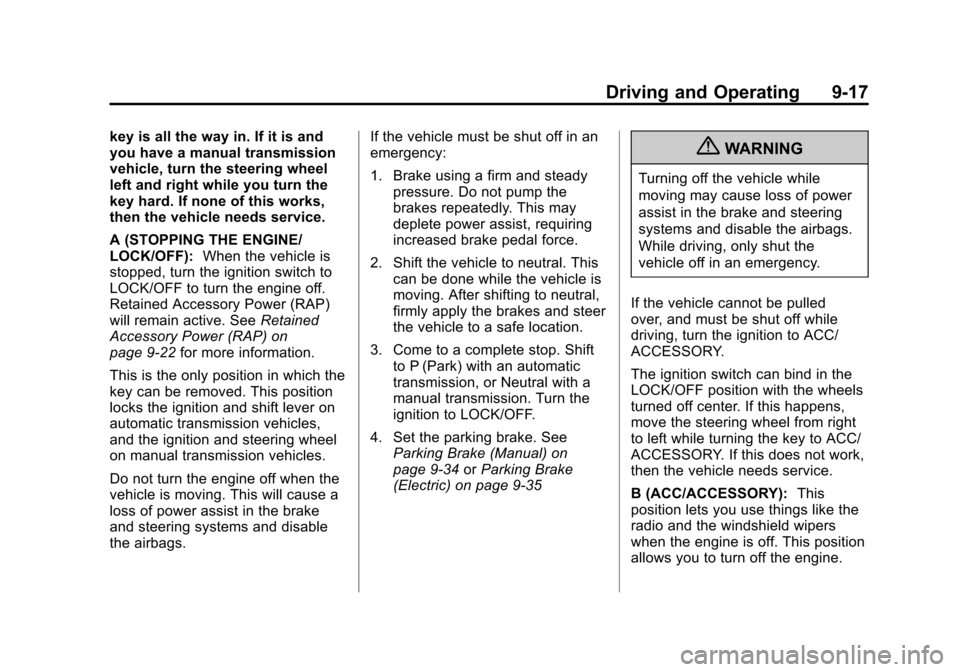
A (STOPPING THE ENGINE/
LOCK/OFF):When the vehicle is
stopped, turn the ignition switch to
LOCK/OFF to turn the engine off.
Retained Accessory Power (RAP)
will remain active. See Retained
Accessory Power (RAP) on
page 9‑22 for more information.
This is the only position in which the
key can be removed. This position
locks the ignition and shift lever on
automatic transmission vehicles,
and the ignition and steering wheel
on manual transmission vehicles.
Do not turn the engine off when the
vehicle is moving. This will cause a
loss of power assist in the brake
and steering systems and disable
the airbags. If the vehicle must be shut off in an
emergency:
1. Brake using a firm and steady
pressure. Do not pump the
brakes repeatedly. This may
deplete power assist, requiring
increased brake pedal force.
2. Shift the vehicle to neutral. This can be done while the vehicle is
moving. After shifting to neutral,
firmly apply the brakes and steer
the vehicle to a safe location.
3. Come to a complete stop. Shift to P (Park) with an automatic
transmission, or Neutral with a
manual transmission. Turn the
ignition to LOCK/OFF.
4. Set the parking brake. See Parking Brake (Manual) on
page 9‑34 orParking Brake
(Electric) on page 9‑35{WARNING
Turning off the vehicle while
moving may cause loss of power
assist in the brake and steering
systems and disable the airbags.
While driving, only shut the
vehicle off in an emergency.
If the vehicle cannot be pulled
over, and must be shut off while
driving, turn the ignition to ACC/
ACCESSORY.
The ignition switch can bind in the
LOCK/OFF position with the wheels
turned off center. If this happens,
move the steering wheel from right
to left while turning the key to ACC/
ACCESSORY. If this does not work,
then the vehicle needs service.
B (ACC/ACCESSORY): This
position lets you use things like the
radio and the windshield wipers
when the engine is off. This position
allows you to turn off the engine.
Page 268 of 496

Black plate (18,1)Cadillac CTS/CTS-V Owner Manual (Include Mex) - 2012
9-18 Driving and Operating
C (ON/RUN):This position is for
driving. It is the position the ignition
switch returns to after the engine
starts, and the key is released. This
position can also be used for
service and diagnostics, and to
verify the proper operation of the
malfunction indicator lamp as may
be required for emission inspection
purposes.
To shift the transmission out of
P (Park), the ignition key has to be
in ACC/ACCESSORY or ON/RUN.
The battery could be drained if the
key is left in the ACC/ACCESSORY
or ON/RUN position with the engine
off. The vehicle might not start if the
battery is allowed to drain for an
extended period of time.
D (START): This position starts the
engine. When the engine starts,
release the key. The ignition switch
returns to ON/RUN for driving.
A warning tone will sound when the
driver door is opened, the ignition is
in ACC/ACCESSORY or LOCK/
OFF, and the key is in the ignition.Key Lock Release
Vehicles with an automatic
transmission are equipped with an
electronic key lock release system.
The key lock release is designed to
prevent ignition key removal unless
the shift lever is in P (Park).
The key lock release is always
functional except in the case of an
uncharged or low voltage (less than
9‐volt) battery. If the vehicle has an
uncharged battery or a battery with low voltage, try charging or jump
starting the battery. See
Jump
Starting on page 10‑104.
If charging or jump starting the
battery does not work, locate the
hole below the ignition lock. Insert a
flat bladed tool or another key from
the key chain into the opening.
When the lever can be felt, actuate
the lever away from the driver, and
remove the key from the ignition.
Ignition Positions
(Keyless Access)
The ignition control knob can be
turned to four different positions.
To shift out of P (Park), the ignition
must be in ON/RUN or ACC/
ACCESSORY and the regular brake
pedal must be applied.
Page 270 of 496
Black plate (20,1)Cadillac CTS/CTS-V Owner Manual (Include Mex) - 2012
9-20 Driving and Operating
wipers when the engine is off. This
position will allow you to turn off the
engine.
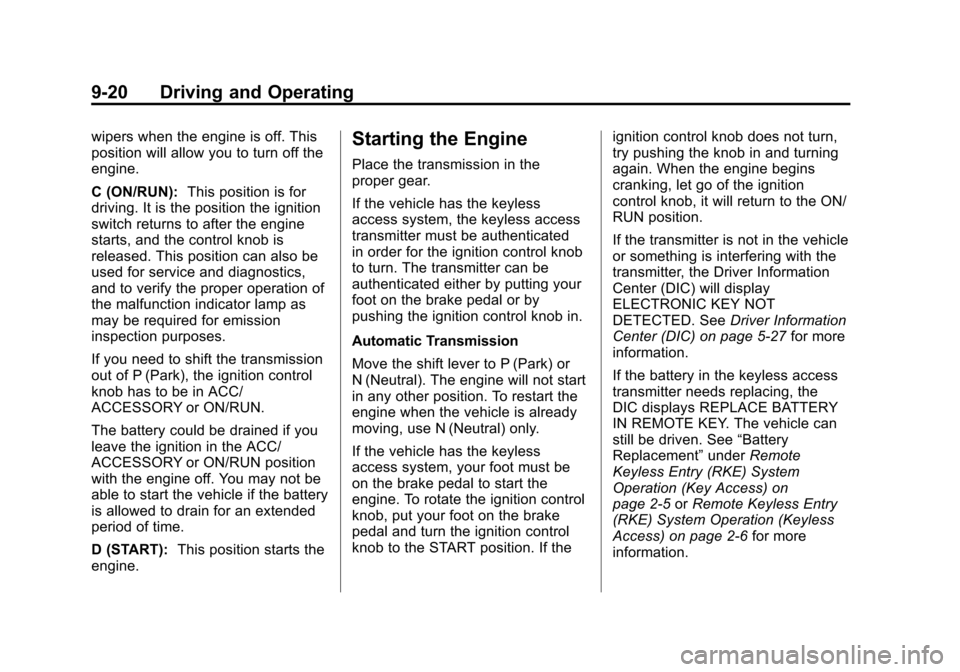
C (ON/RUN):This position is for
driving. It is the position the ignition
switch returns to after the engine
starts, and the control knob is
released. This position can also be
used for service and diagnostics,
and to verify the proper operation of
the malfunction indicator lamp as
may be required for emission
inspection purposes.
If you need to shift the transmission
out of P (Park), the ignition control
knob has to be in ACC/
ACCESSORY or ON/RUN.
The battery could be drained if you
leave the ignition in the ACC/
ACCESSORY or ON/RUN position
with the engine off. You may not be
able to start the vehicle if the battery
is allowed to drain for an extended
period of time.
D (START): This position starts the
engine.Starting the Engine
Place the transmission in the
proper gear.
If the vehicle has the keyless
access system, the keyless access
transmitter must be authenticated
in order for the ignition control knob
to turn. The transmitter can be
authenticated either by putting your
foot on the brake pedal or by
pushing the ignition control knob in.
Automatic Transmission
Move the shift lever to P (Park) or
N (Neutral). The engine will not start
in any other position. To restart the
engine when the vehicle is already
moving, use N (Neutral) only.
If the vehicle has the keyless
access system, your foot must be
on the brake pedal to start the
engine. To rotate the ignition control
knob, put your foot on the brake
pedal and turn the ignition control
knob to the START position. If the ignition control knob does not turn,
try pushing the knob in and turning
again. When the engine begins
cranking, let go of the ignition
control knob, it will return to the ON/
RUN position.
If the transmitter is not in the vehicle
or something is interfering with the
transmitter, the Driver Information
Center (DIC) will display
ELECTRONIC KEY NOT
DETECTED. See
Driver Information
Center (DIC) on page 5‑27 for more
information.
If the battery in the keyless access
transmitter needs replacing, the
DIC displays REPLACE BATTERY
IN REMOTE KEY. The vehicle can
still be driven. See “Battery
Replacement” underRemote
Keyless Entry (RKE) System
Operation (Key Access) on
page 2‑5 orRemote Keyless Entry
(RKE) System Operation (Keyless
Access) on page 2‑6 for more
information.
Page 275 of 496
Black plate (25,1)Cadillac CTS/CTS-V Owner Manual (Include Mex) - 2012
Driving and Operating 9-25
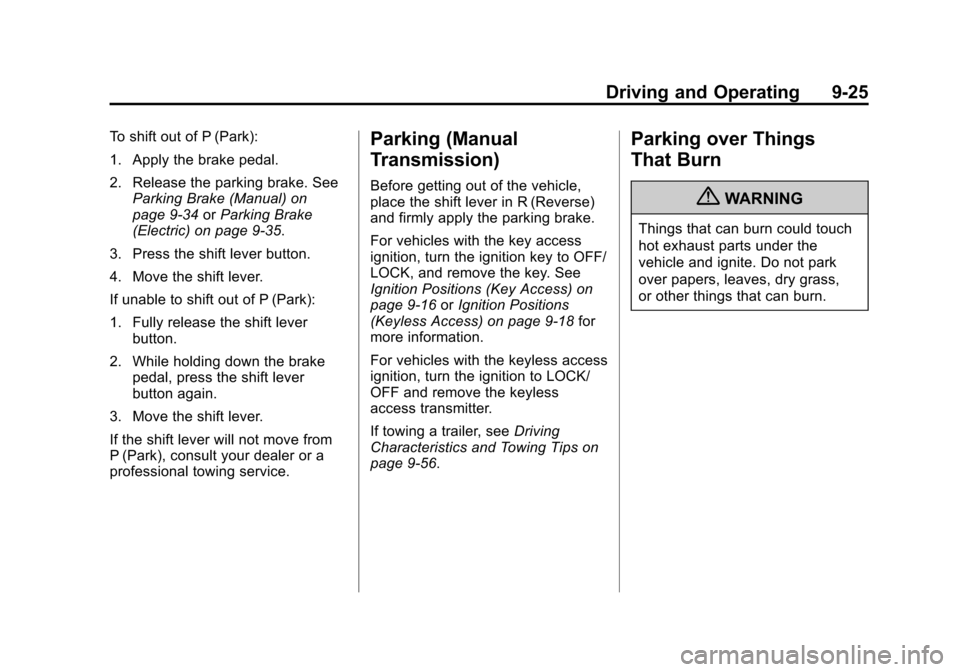
To shift out of P (Park):
1. Apply the brake pedal.
2. Release the parking brake. SeeParking Brake (Manual) on
page 9‑34 orParking Brake
(Electric) on page 9‑35.
3. Press the shift lever button.
4. Move the shift lever.
If unable to shift out of P (Park):
1. Fully release the shift lever button.
2. While holding down the brake pedal, press the shift lever
button again.
3. Move the shift lever.
If the shift lever will not move from
P (Park), consult your dealer or a
professional towing service.Parking (Manual
Transmission)
Before getting out of the vehicle,
place the shift lever in R (Reverse)
and firmly apply the parking brake.
For vehicles with the key access
ignition, turn the ignition key to OFF/
LOCK, and remove the key. See
Ignition Positions (Key Access) on
page 9‑16 orIgnition Positions
(Keyless Access) on page 9‑18 for
more information.
For vehicles with the keyless access
ignition, turn the ignition to LOCK/
OFF and remove the keyless
access transmitter.
If towing a trailer, see Driving
Characteristics and Towing Tips on
page 9‑56.
Parking over Things
That Burn
{WARNING
Things that can burn could touch
hot exhaust parts under the
vehicle and ignite. Do not park
over papers, leaves, dry grass,
or other things that can burn.
Page 285 of 496
Black plate (35,1)Cadillac CTS/CTS-V Owner Manual (Include Mex) - 2012
Driving and Operating 9-35
have the vehicle serviced. See
Brake System Warning Light on
page 5‑22for more information.
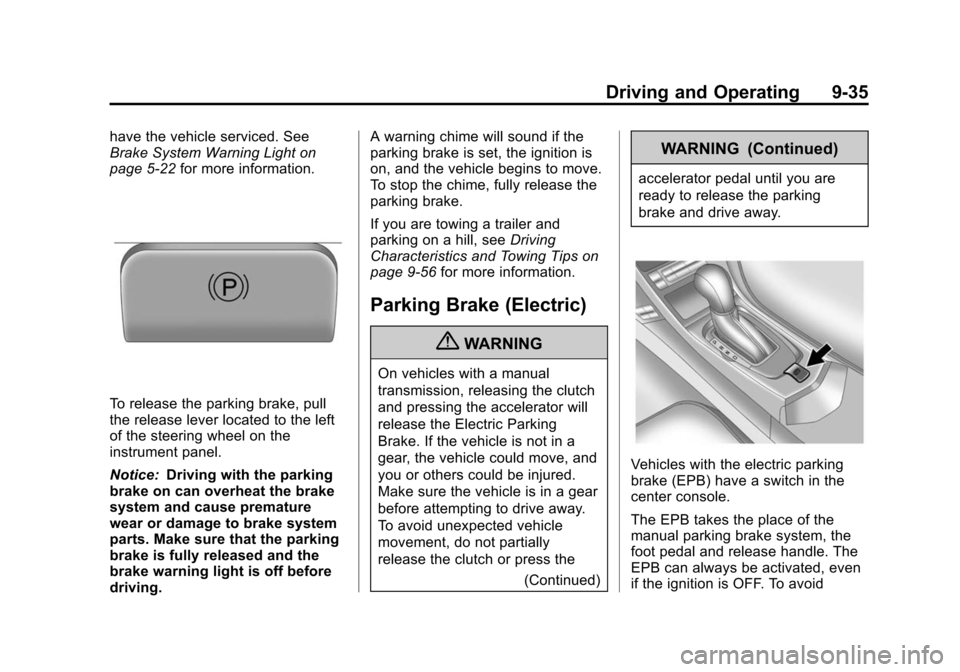
To release the parking brake, pull
the release lever located to the left
of the steering wheel on the
instrument panel.
Notice:Driving with the parking
brake on can overheat the brake
system and cause premature
wear or damage to brake system
parts. Make sure that the parking
brake is fully released and the
brake warning light is off before
driving. A warning chime will sound if the
parking brake is set, the ignition is
on, and the vehicle begins to move.
To stop the chime, fully release the
parking brake.
If you are towing a trailer and
parking on a hill, see
Driving
Characteristics and Towing Tips on
page 9‑56 for more information.
Parking Brake (Electric)
{WARNING
On vehicles with a manual
transmission, releasing the clutch
and pressing the accelerator will
release the Electric Parking
Brake. If the vehicle is not in a
gear, the vehicle could move, and
you or others could be injured.
Make sure the vehicle is in a gear
before attempting to drive away.
To avoid unexpected vehicle
movement, do not partially
release the clutch or press the
(Continued)
WARNING (Continued)
accelerator pedal until you are
ready to release the parking
brake and drive away.
Vehicles with the electric parking
brake (EPB) have a switch in the
center console.
The EPB takes the place of the
manual parking brake system, the
foot pedal and release handle. The
EPB can always be activated, even
if the ignition is OFF. To avoid
Page 286 of 496

Black plate (36,1)Cadillac CTS/CTS-V Owner Manual (Include Mex) - 2012
9-36 Driving and Operating
draining the battery, do not operate
the EPB too often without the
engine running.
The system has two warning lights
and five Driver Information Center
(DIC) messages. SeeBrake System
Warning Light on page 5‑22 and
Driver Information Center (DIC) on
page 5‑27 for more information. In
case of insufficient electrical power,
the EPB cannot be applied or
released.
EPB Apply
The EPB can be applied any time
the vehicle is stopped. The EPB is
applied by momentarily lifting up on
the EPB switch. Once fully applied,
the BRAKE light will be on, and the
DIC message PARK BRAKE SET
will be displayed. While the brake is
being applied, the status light will
flash until full apply is reached.
If the light does not come on,
or remains flashing, you need to
have the vehicle serviced. Do not
drive the vehicle if the BRAKE light is flashing. See your dealer. See
Brake System Warning Light on
page 5‑22
for more information.
If the EPB is applied while the
vehicle is in motion, a chime will
sound, and the DIC message
RELEASE PARK BRAKE SWITCH
will be displayed. The vehicle will
decelerate as long as the switch is
held in the up position. Releasing
the EPB switch during the
deceleration will release the parking
brake. If the switch is held in the up
position until the vehicle comes to a
stop, the EPB will remain applied.
If the BRAKE light is on, either the
EPB is applied, or there is a failure
in the hydraulic brake system.
If this light is flashing continuously,
the EPB is only partially applied or
released, or there is a problem with
the EPB. The DIC message
SERVICE PARK BRAKE will be
displayed. If this light is flashing
continuously, release the EPB, and attempt to apply it again. If this light
continues to flash, do not drive the
vehicle. See your dealer.
If the yellow light is on, the EPB has
detected an error in another system
and is operating with reduced
functionality. To apply the EPB when
this light is on, lift up on the EPB
switch and hold it in the up position.
Full application of the parking brake
by the EPB system may take a
longer period of time than normal
when this light is on. Continue to
hold the switch until the BRAKE
light remains on. If the yellow light is
on, see your dealer.
If the EPB fails to apply, the rear
wheels should be blocked to
prevent vehicle movement.
EPB Release
To release the EPB, turn the ignition
switch to the ON/RUN position,
apply and hold the brake pedal, and
push down momentarily on the EPB
switch. If you attempt to release
the EPB without the brake pedal
applied, a chime will sound, and the
Page 288 of 496

Black plate (38,1)Cadillac CTS/CTS-V Owner Manual (Include Mex) - 2012
9-38 Driving and Operating
Ride Control Systems
Traction Control
System (TCS)
The vehicle has a Traction Control
System (TCS) that limits wheel
spin. This is especially useful in
slippery road conditions. On a
rear-wheel-drive vehicle, the system
operates if it senses that one or
both of the rear wheels are spinning
or beginning to lose traction. On an
All-Wheel-Drive (AWD) vehicle, the
system will operate if it senses that
any of the wheels are spinning or
beginning to lose traction. When this
happens, the system brakes the
spinning wheel(s) and/or reduces
engine power to limit wheel spin.
The system may be heard or felt
while it is working, but this is
normal.The TCS/StabiliTrak light flashes
when the traction control system is
limiting wheel spin.
The TCS/StabiliTrak light comes on
and the SERVICE TRACTION
CONTROL message will be
displayed in the DIC if there is a
problem with the traction control
system. When the TCS/StabiliTrak
light is on, the system will not limit
wheel spin. Adjust your driving
accordingly. SeeTraction Control
System (TCS)/StabiliTrak
®Light on
page 5‑24 for more information.
TCS automatically comes on
whenever the vehicle is started.
To limit wheel spin, especially in
slippery road conditions, the system
should always be left on, but it may
be necessary to turn the system off if the vehicle is stuck in sand, mud
or snow and rocking the vehicle is
required. See
If the Vehicle Is Stuck
on page 9‑11 for more information.
See Winter Driving on page 9‑9 for
information on using TCS when
driving in snowy or icy conditions.
The TCS/StabiliTrak button is
located on the instrument panel
(CTS) or the steering
wheel (CTS-V).
Press and release the TCS/
StabiliTrak button and the traction
control system will turn off and
TRACTION CONTROL OFF will
be displayed in the DIC. Press the
button again to turn the system back
on. For information on turning
StabiliTrak off and on, see
StabiliTrak System following.
Page 289 of 496
Black plate (39,1)Cadillac CTS/CTS-V Owner Manual (Include Mex) - 2012
Driving and Operating 9-39
Adding non‐dealer accessories can
affect your vehicle's performance.
SeeAccessories and Modifications
on page 10‑3 for more information.
StabiliTrak®System
The vehicle has an electronic
stability control system called
StabiliTrak. It is an advanced
computer controlled system that
assists with directional control of the
vehicle in difficult driving conditions.
StabiliTrak activates when the
system senses a discrepancy
between the intended path and the
direction the vehicle is actually
traveling. StabiliTrak selectively
applies braking pressure at any one
of the vehicle's brakes to help steer
the vehicle in the direction which
you are steering.When the system activates, this
warning light flashes on the
instrument panel. A noise may be
heard or a vibration may be felt in
the brake pedal. This is normal.
Continue to steer the vehicle in the
intended direction.
If there is a problem detected with
StabiliTrak, SERVICE
STABILITRAK displays on the
Driver Information Center (DIC) and
the TCS/StabiliTrak warning light
comes on the instrument panel
cluster. When this message and
light displays, the system is not
operational. Driving should be adjusted accordingly. See
Driver
Information Center (DIC) on
page 5‑27 and Messages and
Traction Control System (TCS)/
StabiliTrak
®Light on page 5‑24 for
more information.
The TCS/StabiliTrak button is
located on the instrument panel
(CTS) or the steering
wheel (CTS-V).
StabiliTrak comes on automatically
whenever the vehicle is started. The
system should be left on to help
assist with directional control of the
vehicle.
Page 294 of 496

Black plate (44,1)Cadillac CTS/CTS-V Owner Manual (Include Mex) - 2012
9-44 Driving and Operating
Object Detection
Systems
Ultrasonic Parking Assist
If available, the Ultrasonic Rear
Parking Assist (URPA) system
assists the driver with parking
and avoiding objects while in
R (Reverse). URPA operates at
speeds less than 8 km/h (5 mph).
The sensors on the rear bumper
detect objects up to 2.5 m (8 ft)
behind the vehicle, and at least
25 cm (10 in) off the ground.
{WARNING
The URPA system does not
detect pedestrians, bicyclists,
animals, or any other objects
located below the bumper or that
are too close or too far from the
vehicle. To prevent injury, death,
or vehicle damage, even with(Continued)
WARNING (Continued)
URPA, always check behind the
vehicle and check all mirrors
before backing.
How the System Works
URPA comes on automatically
when the shift lever is moved into
R (Reverse). A single tone sounds
to indicate the system is working.
URPA operates only at speeds less
than 8 km/h (5 mph).
An obstacle is indicated by audible
beeps. The interval between the
beeps becomes shorter as the
vehicle gets closer to the obstacle.
When the distance is less than
30 cm (12 in), the beeping is a
continuous tone for five seconds.
To be detected, objects must be at
least 25 cm (10 in) off the ground
and below trunk or liftgate level.
Objects must also be within 2.5 m (8 ft) of the rear bumper. This
distance may be less during warmer
or humid weather.
Turning the System On and Off
The system can be disabled through
the Driver Information Center (DIC).
See
“Parking Assist” underDriver
Information Center (DIC) on
page 5‑27 for more information.
URPA defaults to the on setting
each time the vehicle is started.
When the System Does Not
Seem to Work Properly
The following messages may be
displayed on the DIC:
PARKING ASSIST OFF: This
message occurs if the driver
disables the system or if vehicle is
driven above 8 km/h (5 mph) in
R (Reverse).
SERVICE PARKING ASSIST: If
this message occurs, take the
vehicle to your dealer to repair the
system.