light CADILLAC CTS 2012 2.G Repair Manual
[x] Cancel search | Manufacturer: CADILLAC, Model Year: 2012, Model line: CTS, Model: CADILLAC CTS 2012 2.GPages: 496, PDF Size: 6.36 MB
Page 178 of 496

Black plate (50,1)Cadillac CTS/CTS-V Owner Manual (Include Mex) - 2012
5-50 Instruments and Controls
Press the customization button until
Factory Settings appears on the
DIC display. Press the set/reset
button once to access the settings
for this feature. Then press the
menu up/down button to scroll
through the following settings.
Restore All (default):The
customization features will be set
to their factory default settings.
No Change: The customization
features will not be set to their
factory default settings.
To select a setting, press the set/
reset button while the desired
setting is displayed on the DIC.
Keyless Locking
If the vehicle has the keyless
access system, this feature allows
you to select whether the doors
automatically lock during normal
vehicle exit. When the ignition is
turned off and all doors become
closed, the vehicle will determine
how many keyless access
transmitters remain in the vehicle interior. If at least one keyless
access transmitter has been
removed from the interior of the
vehicle, the doors will lock after
several seconds.
For example, if there are two
keyless access transmitters in the
vehicle and one is removed, the
other will be locked in. The keyless
access transmitter locked in the
vehicle can still be used to start
the vehicle or unlock the doors,
if needed. A person approaching the
outside of the locked vehicle without
an authorized keyless access
transmitter, however, will not be
able to open the door, even with a
transmitter in the vehicle. See the
keyless access information for
Remote Keyless Entry (RKE)
System Operation (Key Access) on
page 2‑5
orRemote Keyless Entry
(RKE) System Operation (Keyless
Access) on page 2‑6 for more
information.
You may temporarily disable the
keyless locking feature by pressing
the door unlock switch for three seconds on an open door. To
enable keyless locking, transition
the power mode from off.
To select whether the horn sounds
or the lights flash when the vehicle
is locked, see
“Remote Door Lock”
earlier in this section.
Press the customization button until
Keyless Locking appears on the
DIC display. Press the set/reset
button once to access the settings
for this feature. Then press the
menu up/down button to scroll
through the following settings.
Off (default): The keyless locking
feature will be disabled.
On: The keyless locking feature will
be enabled.
The doors will automatically lock
several seconds after you turn the
ignition off, remove a keyless
access transmitter from the interior
of the vehicle, and close all of the
doors.
Page 179 of 496

Black plate (51,1)Cadillac CTS/CTS-V Owner Manual (Include Mex) - 2012
Instruments and Controls 5-51
No Change:No change will be
made to this feature. The current
setting will remain.
To select a setting, press the set/
reset button while the desired
setting is displayed on the DIC.
Keyless Unlock
If the vehicle has the keyless
access system, this feature allows
you to select which doors will
automatically unlock when you
approach the vehicle with the
keyless access transmitter and
open the driver door. See the
keyless access information for
Remote Keyless Entry (RKE)
System Operation (Key Access) on
page 2‑5 orRemote Keyless Entry
(RKE) System Operation (Keyless
Access) on page 2‑6 for more
information.
To select whether the lights flash
when the vehicle is unlocked, see
“Remote Door Unlock” earlier in this
section. Press the customization button until
Keyless Unlock appears on the DIC
display. Press the set/reset button
once to access the settings for this
feature. Then press the menu up/
down button to scroll through the
following settings.
Entry Door Only:
Only the driver
door will automatically unlock when
you approach the vehicle with the
keyless access transmitter and
open the driver door.
All Doors (default): All doors will
automatically unlock when you
approach the vehicle with the
keyless access transmitter and
open the driver door.
No Change: No change will be
made to this feature. The current
setting will remain.
To select a setting, press the set/
reset button while the desired
setting is displayed on the DIC. Chime Volume
This feature allows you to select the
volume level of the chime.
Press the customization button until
Chime Volume appears on the DIC
display. Press the set/reset button
once to access the settings for this
feature. Then press the menu up/
down button to scroll through the
following settings.
Normal:
The chime volume will be
set to a normal level.
Loud: The chime volume will be
set to a loud level.
No Change: No change will be
made to this feature. The current
setting will remain.
There is no default for chime
volume. The volume will stay at the
last known setting.
To select a setting, press the set/
reset button while the desired
setting is displayed on the DIC.
Page 182 of 496

Black plate (54,1)Cadillac CTS/CTS-V Owner Manual (Include Mex) - 2012
5-54 Instruments and Controls
Do not use the Universal Home
Remote with any garage door
opener that does not have the stop
and reverse feature. This includes
any garage door opener model
manufactured before April 1, 1982.
Read the instructions completely
before attempting to program the
Universal Home Remote. Because
of the steps involved, it may be
helpful to have another person
available to assist you with
programming the Universal Home
Remote.
Keep the original hand-held
transmitter for use in other vehicles
as well as for future Universal Home
Remote programming. It is also
recommended that upon the sale
of the vehicle, the programmed
Universal Home Remote buttons
should be erased for security
purposes. See“Erasing Universal
Home Remote Buttons” later in this
section. When programming a garage door,
park outside of the garage. Park
directly in line with and facing the
garage door opener motor-head
or gate motor-head. Be sure that
people and objects are clear of the
garage door or gate that is being
programmed.
It is recommended that a new
battery be installed in your
hand-held transmitter for quicker
and more accurate transmission of
the radio-frequency signal.
Programming the Universal
Home Remote System
For questions or help programming
the Universal Home Remote
System, call 1‐800‐355‐3515 or go
to www.homelink.com.
Programming a garage door opener
involves time-sensitive actions, so
read the entire procedure before
starting. Otherwise, the device will
time out and the procedure will have
to be repeated.To program up to three devices:
1. From inside the vehicle, press
and hold down the two outside
buttons at the same time,
releasing only when the
Universal Home Remote
indicator light begins to flash,
after 20 seconds. This step will
erase the factory settings or all
previously programmed buttons.
Do not hold down the buttons for
longer than 30 seconds and do
not repeat this step to program
the remaining two Universal
Home Remote buttons.
2. Hold the end of your hand-held transmitter about 3 to 8 cm
(1 to 3 in) away from the
Universal Home Remote buttons
while keeping the indicator light
Page 183 of 496

Black plate (55,1)Cadillac CTS/CTS-V Owner Manual (Include Mex) - 2012
Instruments and Controls 5-55
in view. The hand-held
transmitter was supplied by the
manufacturer of your garage
door opener receiver (motor
head unit).
3. At the same time, press and hold both the Universal Home
Remote button to be used to
control the garage door and the
hand-held transmitter button. Do
not release the Universal Home
Remote button or the hand-held
transmitter button until Step 4
has been completed.
Some entry gates and garage
door openers may require
substitution of Step 3 with the
procedure noted in “Gate
Operator and Canadian
Programming” later in this
section.
4. The indicator light on the Universal Home Remote will
flash slowly at first and then
rapidly after Universal Home
Remote successfully receives the frequency signal from the
hand-held transmitter. Release
both buttons.
5. Press and hold the newly trained Universal Home Remote button
and observe the indicator light.
.If the indicator light stays
on continuously, the
programming is complete
and the garage door should
move when the Universal
Home Remote button is
pressed and released.
There is no need to
continue programming
Steps 6 through 8.
.If the Universal Home
Remote indicator light
blinks rapidly for
two seconds and then turns
to a constant light, continue
with the programming
Steps 6 through 8.
It may be helpful to have
another person assist with
the remaining steps.
6. After Steps 1 through 5 havebeen completed, locate inside
the garage the garage door
opener receiver (motor-head
unit). Locate the “Learn”or
“Smart” button. The name and
color of the button may vary by
manufacturer.
7. Firmly press and release the “Learn” or“Smart” button. After
you press this button, you will
have 30 seconds to complete
Step 8.
Page 184 of 496
Black plate (56,1)Cadillac CTS/CTS-V Owner Manual (Include Mex) - 2012
5-56 Instruments and Controls
8. Immediately return to thevehicle. Firmly press and hold
the Universal Home Remote
button, selected in Step 3 to
control the garage door, for
two seconds, and then release
it. If the garage door does not
move, press and hold the same
button a second time for
two seconds, and then release
it. Again, if the door does not
move, press and hold the same
button a third time for
two seconds, and then release.
The Universal Home Remote
should now activate the
garage door.
To program the remaining two
Universal Home Remote buttons,
begin with Step 2 of “Programming
the Universal Home Remote
System.” Do not repeat Step 1, as
this will erase all previous
programming from the Universal
Home Remote buttons.Gate Operator and Canadian
Programming
If you have questions or need help
programming the Universal Home
Remote System, call
1-800-355-3515 or go to
www.homelink.com.
Canadian radio-frequency laws
require transmitter signals to time
out or quit after several seconds of
transmission. This may not be long
enough for Universal Home Remote
to pick up the signal during
programming. Similarly, some U.S.
gate operators are manufactured to
time out in the same manner.
If you live in Canada, or you are
having difficulty programming a gate
operator or garage door opener by
using the “Programming the Universal Home Remote System”
procedures, regardless of where
you live, replace Step 3 under
“Programming the Universal Home
Remote System”
with the following:
Continue to press and hold the
Universal Home Remote button
while you press and release every
two seconds (cycle) the hand-held
transmitter button until the
frequency signal has been
successfully accepted by the
Universal Home Remote. The
Universal Home Remote indicator
light will flash slowly at first and then
rapidly. Proceed with Step 4 under
“Programming the Universal Home
Remote System” to complete the
training procedure.
Page 185 of 496
Black plate (57,1)Cadillac CTS/CTS-V Owner Manual (Include Mex) - 2012
Instruments and Controls 5-57
Universal Remote System
Operation
Using Universal Remote
Press and hold the appropriate
Universal Remote button for at least
half of a second. The indicator light
will come on while the signal is
being transmitted.
Erasing Universal Remote
Buttons
All programmed buttons should be
erased when the vehicle is sold or
the lease ends.
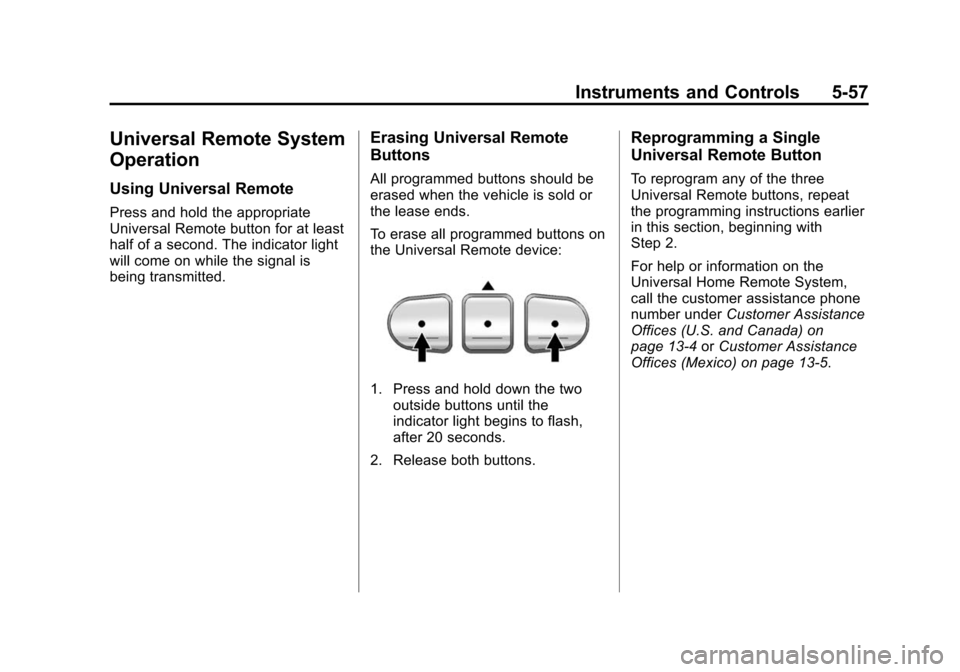
To erase all programmed buttons on
the Universal Remote device:
1. Press and hold down the twooutside buttons until the
indicator light begins to flash,
after 20 seconds.
2. Release both buttons.
Reprogramming a Single
Universal Remote Button
To reprogram any of the three
Universal Remote buttons, repeat
the programming instructions earlier
in this section, beginning with
Step 2.
For help or information on the
Universal Home Remote System,
call the customer assistance phone
number under Customer Assistance
Offices (U.S. and Canada) on
page 13‑4 orCustomer Assistance
Offices (Mexico) on page 13‑5.
Page 187 of 496
Black plate (1,1)Cadillac CTS/CTS-V Owner Manual (Include Mex) - 2012
Lighting 6-1
Lighting
Exterior Lighting
Exterior Lamp Controls . . . . . . . . 6-1
Exterior Lamps OffReminder . . . . . . . . . . . . . . . . . . . . 6-2
Headlamp High/Low-Beam Changer . . . . . . . . . . . . . . . . . . . . . 6-2
Flash-to-Pass . . . . . . . . . . . . . . . . . 6-2
Daytime Running Lamps (DRL) . . . . . . . . . . . . . . . . 6-3
Automatic Headlamp System . . . . . . . . . . . . . . . . . . . . . . 6-4
Adaptive Forward Lighting (AFL) . . . . . . . . . . . . . . . 6-5
Hazard Warning Flashers . . . . . 6-5
Turn and Lane-Change Signals . . . . . . . . . . . . . . . . . . . . . . 6-5
Fog Lamps . . . . . . . . . . . . . . . . . . . . 6-6
Interior Lighting
Instrument Panel Illumination Control . . . . . . . . . . . . . . . . . . . . . . 6-7
Reading Lamps . . . . . . . . . . . . . . . 6-7
Lighting Features
Entry Lighting . . . . . . . . . . . . . . . . . 6-7
Exit Lighting . . . . . . . . . . . . . . . . . . . 6-8
Parade Dimming . . . . . . . . . . . . . . 6-8
Battery Load Management . . . . 6-8
Battery Power Protection . . . . . . 6-9
Exterior Lighting Battery Saver . . . . . . . . . . . . . . . . . . . . . . . . 6-9
Exterior Lighting
Exterior Lamp Controls
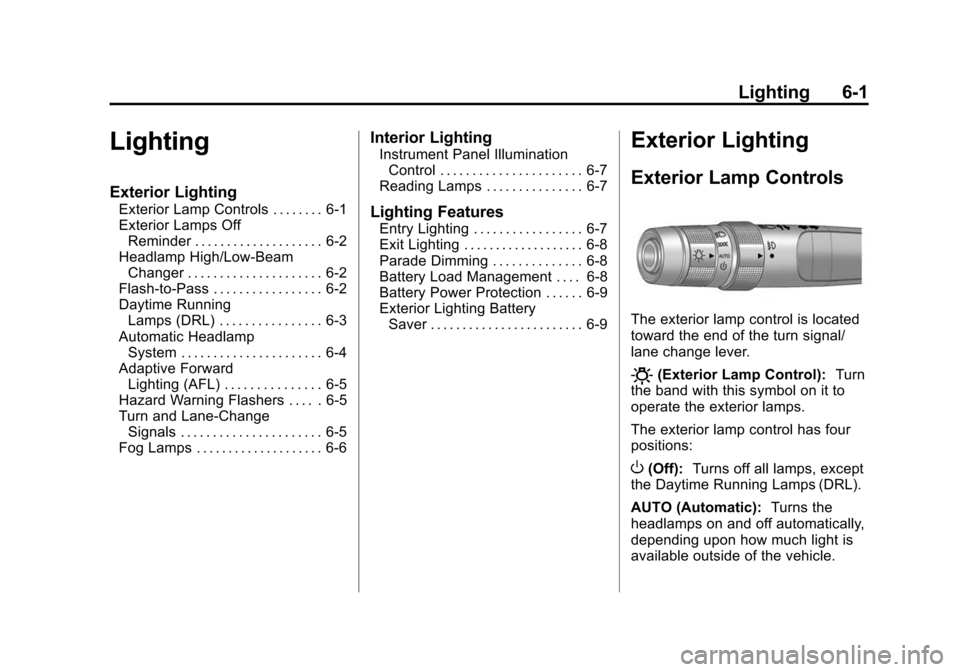
The exterior lamp control is located
toward the end of the turn signal/
lane change lever.
O(Exterior Lamp Control): Turn
the band with this symbol on it to
operate the exterior lamps.
The exterior lamp control has four
positions:
O(Off): Turns off all lamps, except
the Daytime Running Lamps (DRL).
AUTO (Automatic): Turns the
headlamps on and off automatically,
depending upon how much light is
available outside of the vehicle.
Page 188 of 496
Black plate (2,1)Cadillac CTS/CTS-V Owner Manual (Include Mex) - 2012
6-2 Lighting
;(Parking Lamps):Turns on the
parking lamps together with the
following:
.Sidemarker Lamps
.Taillamps
.License Plate Lamps
.Instrument Panel Lights
5(Headlamps): Turns on the
headlamps, together with the
previously listed lamps and lights.
Exterior Lamps Off
Reminder
A warning chime will sound if the
exterior lamp control is left on in
either the headlamp or parking lamp
position and the driver door is
opened with the ignition off.
Headlamp High/
Low-Beam Changer
Push the turn signal/lane change
lever away from you to turn the high
beams on. Pull the lever toward you
and then release it to return to low
beams.
If the vehicle is turned off while the
high beams are on, they will come
on the next time the vehicle is
started.
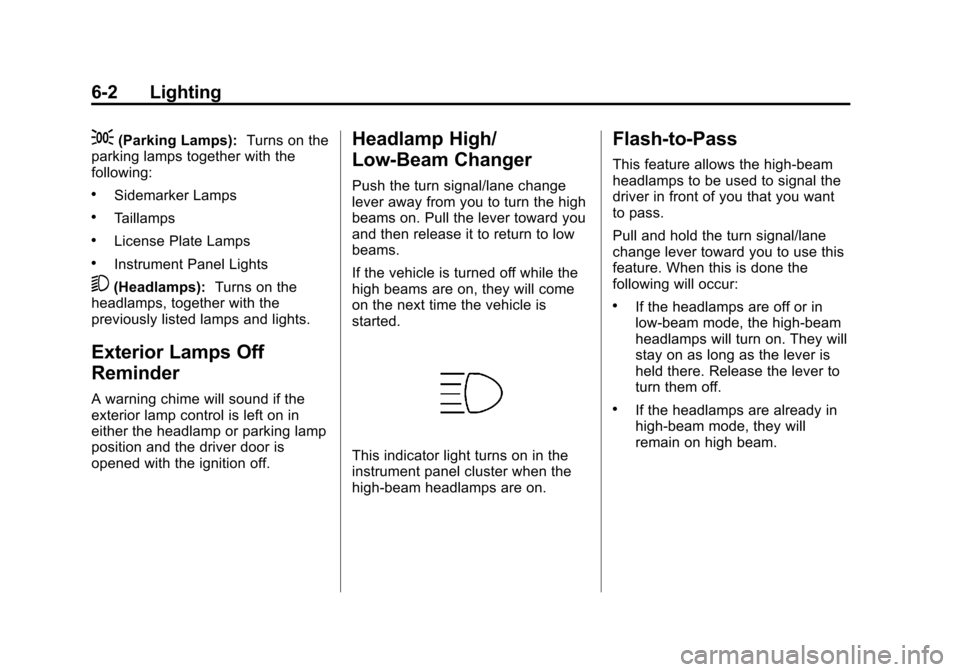
This indicator light turns on in the
instrument panel cluster when the
high‐beam headlamps are on.
Flash-to-Pass
This feature allows the high-beam
headlamps to be used to signal the
driver in front of you that you want
to pass.
Pull and hold the turn signal/lane
change lever toward you to use this
feature. When this is done the
following will occur:
.If the headlamps are off or in
low-beam mode, the high-beam
headlamps will turn on. They will
stay on as long as the lever is
held there. Release the lever to
turn them off.
.If the headlamps are already in
high-beam mode, they will
remain on high beam.
Page 189 of 496

Black plate (3,1)Cadillac CTS/CTS-V Owner Manual (Include Mex) - 2012
Lighting 6-3
Daytime Running
Lamps (DRL)
Daytime Running Lamps (DRL) can
make it easier for others to see the
front of your vehicle during the day.
Fully functional daytime running
lamps are required on all vehicles
first sold in Canada.
The DRL system will make either
the reduced intensity low‐beam
headlamps or dedicated DRLs come
on when the following conditions
are met:
.It is still daylight and the ignition
is in ON/RUN or START.
.The exterior lamp control is inPor AUTO and the headlamps
are off.
.The automatic transmission is
not in P (Park). When DRLs are on, only the
reduced intensity low‐beam
headlamps or dedicated DRLs will
be on. The other exterior lamps and
the instrument panel cluster will not
be on.
When the exterior lamp control is in
AUTO and it is dark enough outside,
the DRL turn off and the low-beam
headlamps will turn on. When it is
bright enough outside, the low-beam
headlamps will go off, and the DRL
will turn back on. If the vehicle is
started in a dark garage, the
automatic headlamp system comes
on immediately. Once the vehicle
leaves the garage, it takes about
one minute for the automatic
headlamp system to change to DRL
if it is light outside. During that
delay, the instrument panel cluster
may not be as bright as usual. Make
sure the instrument panel brightness
lever is in the full bright position.
See
Instrument Panel Illumination
Control on page 6‑7.
Turning the exterior lamp control to
off or to the low-beam headlamp
position will turn off the DRL. If the
parking lamps or the fog lamps were
turned on instead, the DRL will still
turn off.
This will work regardless of gear
position and whether or not the
parking brake is set.
Page 190 of 496

Black plate (4,1)Cadillac CTS/CTS-V Owner Manual (Include Mex) - 2012
6-4 Lighting
Automatic Headlamp
System
When it is dark enough outside, the
automatic headlamp system turns
on the headlamps at the normal
brightness, along with the taillamps,
sidemarker, parking lamps, and the
instrument panel lights. The radio
lights will also be dim.
To turn off the automatic headlamp
system, turn the exterior lamps
switch to the off position and then
release it.
The vehicle has a light sensor
located on the top of the instrument
panel in the defroster grille which
regulates when the automatic
headlamps turn on. Do not cover
the sensor, otherwise the
headlamps will come on whenever
the ignition is on.
The system may also turn on the
headlamps when driving through a
parking garage, heavy overcast
weather, or a tunnel. This is normal.If the vehicle is started in a dark
garage, the automatic headlamp
system will come on immediately.
Once the vehicle leaves the garage,
it takes approximately one minute
for the automatic headlamp system
to change if it is bright enough
outside. During that delay, the
instrument panel cluster may not be
as bright as usual. Make sure the
instrument panel brightness control
is in the full bright position. See
Instrument Panel Illumination
Control on page 6‑7.
To idle the vehicle with the
automatic headlamp system off,
turn the control to the off position.
The headlamps will also stay on
after you exit the vehicle. This
feature can be programmed using
the Driver Information Center (DIC).
See
Vehicle Personalization on
page 5‑46.
The regular headlamp system can
be turned on when needed.