light CADILLAC CTS 2012 2.G Manual Online
[x] Cancel search | Manufacturer: CADILLAC, Model Year: 2012, Model line: CTS, Model: CADILLAC CTS 2012 2.GPages: 496, PDF Size: 6.36 MB
Page 215 of 496

Black plate (19,1)Cadillac CTS/CTS-V Owner Manual (Include Mex) - 2012
Infotainment System 7-19
To use the TUNE/TONE knob or the
MENU/SELECT knob:
Turn the TUNE/TONE knob or the
MENU/SELECT knob to highlight
the desired track, then press the
TUNE/TONE knob or MENU/
SELECT knob to select the track.
Fast Forward and Rewind
sREV (Fast Reverse):Press
and hold to reverse playback quickly
within a track. Sound is heard at a
reduced volume and the elapsed
time of the track displays. Release
to resume playing the track.
\FWD (Fast Forward): Press
and hold to advance playback
quickly within a track. Sound is
heard at a reduced volume and the
elapsed time of the track displays.
Release to resume playing the
track.
Playing Tracks in Random Order
Press the softkey under the Shuffle
tab to play the tracks of a CD in
random order. Press again to turn
Shuffle off. Shuffle Off displays. For vehicles with a Radio with
Six-Disc CD player, the shuffle
feature only works on the disc
that is currently playing.
Playing an MP3/WMA Disc
CD players with the MP3 feature are
capable of playing an MP3/WMA
CD-R or CD-RW disc. See
MP3 on
page 7‑24 for more information.
Disc Messages
DISC ERROR: If this message
displays and/or the disc ejects, it
could be for one of the following
reasons:
.The radio system does not
support the playlist format, the
compressed audio format, or the
data file format.
.It is very hot. When the
temperature returns to normal,
the disc should play.
.The road is very rough. When
the road becomes smoother, the
disc should play.
.The disc is dirty, scratched, wet,
or upside down.
.The air is very humid. If so, wait
about an hour and try again.
.There was a problem while
burning the disc.
.The label is caught in the
CD/DVD-A player.
If the disc is not playing correctly,
for any other reason, try a known
good disc.
If any error occurs repeatedly or if
an error cannot be corrected,
contact your dealer. If the radio
displays an error message, write it
down and provide it to your dealer
when reporting the problem.
CD/DVD Player
The infotainment system's CD/DVD
player can play audio discs and
MP3 discs.
Discs that are 8 cm (3 in) in
diameter will not work in the
CD/DVD player.
Page 216 of 496

Black plate (20,1)Cadillac CTS/CTS-V Owner Manual (Include Mex) - 2012
7-20 Infotainment System
The CD/DVD player does not
support the playback of DVD video
discs. If a DVD video disc is
inserted into the player, the radio
displays“Read Error Please Check
Disc” and ejects the disc.
Care of CDs and DVDs
If playing a CD/DVD, the sound
quality can be reduced due to disc
quality, the method of recording, the
quality of the music that has been
recorded, and the way the disc
has been handled. Handle discs
carefully. Store CDs and DVDs
in their original cases or other
protective cases and away from
direct sunlight and dust. The CD/
DVD player scans the bottom
surface of the disc. If the surface of
a disc is damaged, such as cracked,
broken, or scratched, the disc may
not play properly or not at all. Do
not touch the bottom side of a disc
while handling it; this could damage
the surface. Pick up discs by
grasping the outer edges or the
edge of the hole and the outer edge. If the surface of a disc is soiled,
take a soft, lint‐free cloth or dampen
a clean, soft cloth in a mild, neutral
detergent solution mixed with water,
and clean it. Make sure the wiping
process starts from the center to
the edge.
Care of the CD/DVD Player
Do not add a label to a disc; it could
get caught in the CD/DVD player.
If a label is needed, label the top of
the recorded disc with a
marking pen.
The use of disc lens cleaners for
discs is not advised, due to the risk
of contaminating the lens of the disc
optics with lubricants internal to the
CD/DVD player mechanism.
Notice:
If a label is added to a
disc, or more than one disc is
inserted into the slot at a time,
or an attempt is made to play
scratched or damaged discs,
the CD/DVD player could be
damaged. While using the CD/
DVD player, use only discs in
good condition without any label, load one dosc at a time, and keep
the CD/DVD player and the
loading slot free of foreign
materials, liquids, and debris.
Control Buttons
The knobs and buttons used to
control the CD/DVD player are:
CD/AUX (CD/Auxiliary):
Press to
switch between CD/DVD, auxiliary
input, and USB devices.
¨SEEK or©SEEK: Press to
select tracks.
TUNE/TONE: Turn and then press
to select tracks.
MENU/SELECT: Turn and then
press to select.
r/j(Play/Pause): Press to pause
and restart CD or DVD playback.
sREV (Fast Reverse): In CD or
MP3 playback mode, press and
hold to reverse playback quickly
within a track. Sound is heard at a
reduced volume. When released,
normal playback resumes and the
elapsed time of the track displays.
Page 217 of 496

Black plate (21,1)Cadillac CTS/CTS-V Owner Manual (Include Mex) - 2012
Infotainment System 7-21
In DVD‐Audio playback mode, press
once to change playback to a speed
of 2X. Each successive press
changes playback to a speed of 4X,
10X, or 21X. Press
r/jto resume
normal playback.
\FWD (Fast Forward): In CD or
MP3 playback mode, press and
hold to advance playback quickly
within a track. Sound is heard at a
reduced volume. When released,
normal playback resumes and the
elapsed time of the track displays.
In DVD‐Audio playback mode, press
once to change playback to a speed
of 2X. Each successive press
changes playback to a speed of 4X,
10X, or 21X. Press
r/jto resume
normal playback.
Z(Eject): Press to eject the disc.
Inserting a Disc
With the printed side facing up,
insert a disc into the audio CD/DVD
slot until it is drawn in. The disc
track number and a Shuffle tab
display and playback begins.
If the ignition or radio is turned off
while a disc is in the player, it stays
in the player. When the ignition or
radio is turned on, the disc starts
playing where it stopped, if it was
the last selected audio source.
Playing a CD
Selecting a CD Track
Tracks can be selected using the
seek buttons, TUNE/TONE knob,
or MENU/SELECT knob.
To use the seek buttons:
Press
©SEEK to go to the start of
the current track, if more than
five seconds have played. Press
¨
SEEK to go to the next track. If©
SEEK or¨SEEK is held, or
pressed multiple times, the player
continues moving backward or
forward through the tracks on
the CD.
To use the TUNE/TONE knob:
Turn the TUNE/TONE knob to
highlight the desired track, then
press the TUNE/TONE knob to
select the track.
To use the MENU/SELECT knob:
Turn the MENU/SELECT knob to
highlight the desired track, then
press the MENU/SELECT knob to
select the track.
Fast Forward and Rewind
sREV (Fast Reverse): Press
and hold to reverse playback quickly
within a track. Sound is heard at a
reduced volume and the elapsed
time of the track displays. Release
to resume playing the track.
Page 218 of 496

Black plate (22,1)Cadillac CTS/CTS-V Owner Manual (Include Mex) - 2012
7-22 Infotainment System
\FWD (Fast Forward):Press
and hold to advance playback
quickly within a track. Sound is
heard at a reduced volume and the
elapsed time of the track displays.
Release to resume playing the
track.
Playing Tracks in Random Order
Press the softkey under the Shuffle
tab to play the tracks of a CD in
random order. Press again to turn
Shuffle off. Shuffle Off displays.
Playing a DVD-A (Audio) Disc
The Radio with DVD Audio, HDD,
and USB is capable of playing DVD
audio discs in the Bose
®5.1 Cabin
surround sound system.
Insert the DVD audio disc into the
CD/DVD player. DVD Audio
displays and playback begins. The
Group and track number display
during playback. Selecting a DVD‐A Track
Tracks can be selected using the
seek buttons, or the TUNE/
TONE knob.
To use the seek buttons:
Press
©SEEK to go to the start of
the current track, if more than
five seconds have played. Press
¨
SEEK to go to the next track. If©
SEEK or¨SEEK is held,
or pressed multiple times, the player
continues moving backward or
forward through the tracks within the
current group.
To use the TUNE/TONE knob:
Turn the TUNE/TONE knob to
display a list of all tracks in all
groups on the DVD audio disc and
to highlight tracks. Stop turning the
TUNE/TONE knob or press the
TUNE/TONE knob to start playback
of the highlighted track. To use the MENU/SELECT knob:
Press the softkey under the Menu
tab to display a list of all Groups. To
change Groups, turn the MENU/
SELECT knob to highlight the
desired Group. Press the MENU/
SELECT knob to select it. Playback
begins from track 1 of the
highlighted Group.
Fast Forward and RewindsREV (Fast Reverse):
Press to
reverse playback quickly within a
track. Sound is heard at a reduced
volume. Press once to change
playback to a speed of 2X. Each
successive press changes playback
to a speed of 4X, 10X, or 21X.
Press
r/jto resume normal
playback.
\FWD (Fast Forward): Press to
advance playback quickly within a
track. Sound is heard at a reduced
volume. Press once to change
playback to a speed of 2X. Each
successive press changes playback
Page 222 of 496
Black plate (26,1)Cadillac CTS/CTS-V Owner Manual (Include Mex) - 2012
7-26 Infotainment System
Playlists can be changed by
pressing the next and previous
folder button.
When play enters a new folder, the
display does not automatically show
the new folder name unless the
folder mode has been chosen as
the default display. The new track
name displays.
File System and Naming
The song name contained in the
ID3 tag displays. If the song name is
not in the ID3 tag, the radio displays
the file name without the extension.
Track names longer than
32 characters are shortened. Parts
of words on the last page of text
and the extension of the file name
are not displayed.
The HDD Radio will display file
names with the extension.Preprogrammed Playlists
Preprogrammed playlists created
using WinAmp™, MusicMatch™,
or Real Jukebox™
software can be
accessed, however they cannot be
edited using the radio. These
playlists are special folders
containing compressed audio song
files. Playlists must have a file
extension of PLS or M3U.
Playlists can be selected using the
previous and next folder buttons.
Tracks can be changed by pressing
the seek buttons or turning the
TUNE/TONE knob. Songs are
played sequentially; press
sREV
or
\FWD to reverse or advance
through the playing song.
The HDD Radio does not support
preprogrammed playlists. To create
a playlist on the HDD radio from
songs recorded to the HDD, see
Hard Drive Device (HDD) on
page 7‑28.
Playing an MP3/WMA from a
Disc or a USB Storage Device
Selecting an MP3 Track
Tracks can be selected using the
seek buttons, the TUNE/TONE
knob, or the softkeys below the
folder tabs on the infotainment
display.
To use the seek buttons:
Press the
©SEEK button to go to
the start of the current track, if more
than five seconds have played.
Press the
¨SEEK button to go to
the next track. If
©SEEK or¨SEEK
is held, or pressed multiple times,
the player continues moving
backward or forward through the
tracks on the disc.
To use the TUNE/TONE knob:
Turn the TUNE/TONE knob to
highlight the desired track, then
press the TUNE/TONE knob to
select the track.
Page 223 of 496
Black plate (27,1)Cadillac CTS/CTS-V Owner Manual (Include Mex) - 2012
Infotainment System 7-27
To use the softkeys below the
folder tabs:
SFolder (Previous Folder): Press
the softkey under the Folder tab to
go to the first track in the previous
folder.
Folder T(Next Folder): Press the
softkey under the Folder tab to go to
the first track in the next folder.
Fast Forward and Rewind
sREV (Fast Reverse): Press
and hold to reverse playback quickly
within a track. Sound is heard at a
reduced volume and the elapsed
time of the track displays. Release
to resume playing the track.
\FWD (Fast Forward): Press
and hold to advance playback
quickly within a track. Sound is
heard at a reduced volume and the
elapsed time of the track displays.
Release to resume playing the
track. Searching for MP3 Tracks
Tracks can be searched for by using
the menu system.
To use the menu system:
1. Press the MENU/SELECT knob
to display the MP3 Menu.
2. Turn the MENU/SELECT knob to highlight an option from the MP3
Menu. The available options are:
.Playlists*
.Tracks
.Folders
.Artists
.Albums
.Song Titles
.AudioBook
3. Press the MENU/SELECT knob to select the desired option.
*The HDD Radio does not support
preprogrammed playlists. To create
a playlist on the HDD radio from songs recorded to the HDD, see
Hard Drive Device (HDD) on
page 7‑28.
Quick Jump
To scroll up or down the list of
Artists, Albums, or Song Titles,
press and hold the softkey located
under the FWD or REV tab.
To jump to the beginning, middle,
or last section of the list:
.Press the first softkey located
under the display to go to the
beginning section of the list.
.Press the second softkey
located under the display to go
to the middle section of the list.
.Press the third softkey located
under the display to go to the
last section of the list.
Playing Tracks in Random Order
Press the softkey under the Shuffle
tab to play the tracks of the current
folder in random order. Press again
to turn Shuffle off. Shuffle Off
displays.
Page 225 of 496
Black plate (29,1)Cadillac CTS/CTS-V Owner Manual (Include Mex) - 2012
Infotainment System 7-29
is not found in the Gracenote
Database and it does not have
CD-text information, the radio will
record the audio CD with all song,
artist, album and genre names as
“NO INFO.”
Songs recorded with“NO INFO”to
the HDD will be hard to sort,
identify, and select. To make HDD
navigation easier, CDs with “NO
INFO” can first be converted to MP3
format with Tag information on a
home computer and then recorded
to the HDD from an MP3 disc or
USB device.
Occasionally, the radio may find
more than one match in the
Gracenote Database for an audio
CD that has been recorded. If this
happens, the radio will display
“Multi‐Hit” for the name information
when the songs are selected from
the HDD. With a “Multi‐Hit”song
playing, press the button below the
EDIT tab to bring up the list of
multiple names found in the
Gracenote Database. Use the MENU/SELECT knob to highlight
and select the correct name for the
“Multi‐Hit”
recorded CD.
The Gracenote Database stored on
the HDD can be updated so that it
includes name information for more
recently released audio CDs. See
your dealer for more information on
Gracenote Database updates for the
HDD radio.
Recording from MP3/WMA
Discs or USB
REC (Record): Press to start
recording tracks from an MP3/WMA
disc or a USB device (excluding
iPods) while it is playing. The radio
has the option to record the current
track playing or all tracks from the
CD. Press the softkey under the
desired record option.
The last radio station that was on
begins playing and a status bar
appears on the top of the display
when the recording process starts.
The status bar disappears when the
process has ended. The recorded
songs are now available. AAC and OGG Vorbis file types are
not fully supported. These file types
may or may not play and may be
shown without Tag information.
Without Tag information available,
these file types may be identified
only by file name.
AudioBooks from www.audible.com
can also be transferred to the HDD
using the record function. See
“AudioBook”
later in this section for
more information.
USB Host Support
The USB connector uses the USB
standards, 1.1 and 2.0.
USB Supported Devices
.USB Flash Drives
.Portable USB Hard Drives
Playing from the Hard Drive
Device
HDD (Hard Drive Device): Press
the HDD button to start playing
tracks from the HDD. HDD displays
and playback resumes from where it
was last stopped.
Page 226 of 496
Black plate (30,1)Cadillac CTS/CTS-V Owner Manual (Include Mex) - 2012
7-30 Infotainment System
HDD Playback Mode
The infotainment system displays the current HDD playback mode. The
following table shows the display mode options and what happens as the
mode is displayed:Mode When Displayed
Shuffle System is randomly playing back all HDD
content.
Artist System is playing back content by a selected
artist in alphabetical order.
Album System is playing back content from a selected
album in track order.
Genre System is playing back content in a selected genre in alphabetical order.
Song System is playing back all songs in alphabetical order.
Playlist System is playing back all songs from the selected playlist in the order they were added.
AudioBook System is playing back AudioBook content. HDD Menu
1. Press the MENU/SELECT knob
to display the HDD Menu.
2. Turn the MENU/SELECT knob to highlight an option from the HDD
Menu. The available options are:
.Shuffle Songs
.Playlist
.Artists
.Albums
.Song Titles
.Genres
.Recently Saved
.AudioBook
3. Press the MENU/SELECT knob to select the desired option.
Quick Jump
To scroll up or down the list of
Artists, Albums, or Song Titles,
press and hold the softkey under
the FWD or REV tab.
Page 228 of 496
Black plate (32,1)Cadillac CTS/CTS-V Owner Manual (Include Mex) - 2012
7-32 Infotainment System
device that is connected. The
Vehicle Identification Number (VIN)
is required in order to activate the
vehicle.
Saving HDD Favorites
Press the FAV button to change
between favorite modes during HDD
playback. The following favorite
modes are supported:
.Playlists
.Artists
.Albums
.GenresFavorites can be saved by pressing and holding the softkey under the
favorites selection. Store favorites according to the following table:
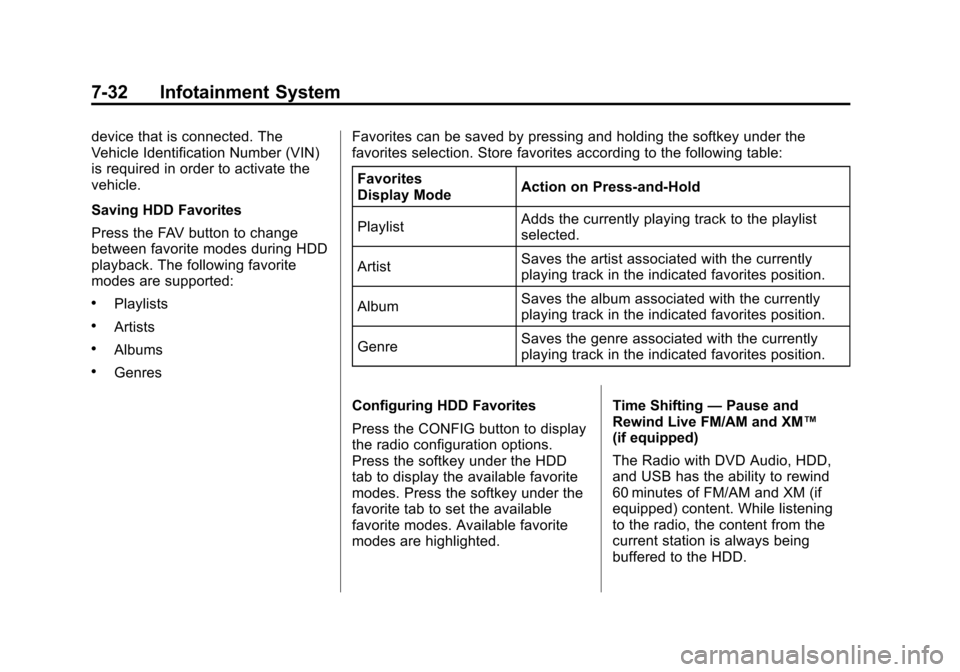
Favorites
Display Mode Action on Press-and-Hold
Playlist Adds the currently playing track to the playlist
selected.
Artist Saves the artist associated with the currently
playing track in the indicated favorites position.
Album Saves the album associated with the currently
playing track in the indicated favorites position.
Genre Saves the genre associated with the currently
playing track in the indicated favorites position.
Configuring HDD Favorites
Press the CONFIG button to display
the radio configuration options.
Press the softkey under the HDD
tab to display the available favorite
modes. Press the softkey under the
favorite tab to set the available
favorite modes. Available favorite
modes are highlighted. Time Shifting
—Pause and
Rewind Live FM/AM and XM™
(if equipped)
The Radio with DVD Audio, HDD,
and USB has the ability to rewind
60 minutes of FM/AM and XM (if
equipped) content. While listening
to the radio, the content from the
current station is always being
buffered to the HDD.
Page 244 of 496

Black plate (2,1)Cadillac CTS/CTS-V Owner Manual (Include Mex) - 2012
8-2 Climate Controls
K. Outside Air
L. Rear Window Defogger
Automatic Operation
AUTO (Automatic):The system
automatically controls fan speed, air
delivery, and air conditioning in
order to heat or cool the vehicle to
the desired temperature. When the
indicator light is on, the system is in
full automatic operation. If the air
delivery mode or fan setting is
manually adjusted, the auto
indicator turns off and displays will
show the selected settings.
1. Press the AUTO button.
2. Adjust the temperature to a comfortable setting between
21°C (70°F) and 27°C (80°F).
Choosing the coldest or warmest
temperature setting will not
cause the system to heat or cool
any faster.
To avoid blowing cold air in cold
weather, the system delays
turning on the fan until warm air is available. The system starts
out blowing air at the floor, but
can automatically change modes
as the vehicle warms up to
maintain the chosen temperature
setting. The length of time
needed for warm up depends on
the outside temperature and the
length of time that has elapsed
since the vehicle was last driven.
3. Wait for the system to regulate. This may take from 10 to
30 minutes. Then adjust the
temperature, if necessary.
English can be changed to metric
units through the Driver Information
Center (DIC). See Driver
Information Center (DIC) on
page 5‑27.
Q/R(Temperature Control): The
temperature can be adjusted
separately for the driver and the
passenger. Press to increase or
decrease the automatic temperature
settings. PASS (Passenger Climate
Control):
Press to set a different
temperature for the passenger.
Then adjust the passenger
temperature buttons to a
comfortable setting.
Pressing the PASS button again
automatically sets the passenger's
temperature to the driver's setting.
Turning the passenger's
temperature display off does not
shut the passenger's climate control
system off.
Manual Operation
O(Power): Press to turn the
climate control system on or off.
When the climate control system is
turned off the air inlet defaults to
outside air.
D C(Fan Control): Press the
buttons to increase or decrease the
fan speed. Pressing either button
cancels automatic fan control. Press
AUTO to return to automatic