trunk CADILLAC CTS 2012 2.G Owners Manual
[x] Cancel search | Manufacturer: CADILLAC, Model Year: 2012, Model line: CTS, Model: CADILLAC CTS 2012 2.GPages: 496, PDF Size: 6.36 MB
Page 7 of 496
Black plate (1,1)Cadillac CTS/CTS-V Owner Manual (Include Mex) - 2012
In Brief 1-1
In Brief
Instrument Panel
Instrument Panel . . . . . . . . . . . . . . 1-2
Initial Drive Information
Initial Drive Information . . . . . . . . 1-4
Starting the Engine . . . . . . . . . . . 1-4
Remote Keyless Entry (RKE)System . . . . . . . . . . . . . . . . . . . . . . 1-4
Remote Vehicle Start . . . . . . . . . 1-5
Door Locks . . . . . . . . . . . . . . . . . . . 1-6
Liftgate . . . . . . . . . . . . . . . . . . . . . . . . 1-7
Trunk Release . . . . . . . . . . . . . . . . 1-7
Windows . . . . . . . . . . . . . . . . . . . . . . 1-8
Seat Adjustment . . . . . . . . . . . . . . 1-8
Memory Features . . . . . . . . . . . . . 1-9
Heated and Ventilated Seats . . . . . . . . . . . . . . . . . . . . . . . 1-10
Head Restraint Adjustment . . . . . . . . . . . . . . . . . 1-11
Safety Belts . . . . . . . . . . . . . . . . . . 1-11 Passenger Sensing
System . . . . . . . . . . . . . . . . . . . . . 1-11
Mirror Adjustment . . . . . . . . . . . . 1-12
Steering Wheel Adjustment . . . . . . . . . . . . . . . . . 1-12
Interior Lighting . . . . . . . . . . . . . . 1-13
Exterior Lighting . . . . . . . . . . . . . 1-13
Windshield Wiper/Washer . . . . 1-14
Climate Controls . . . . . . . . . . . . . 1-15
Transmission . . . . . . . . . . . . . . . . 1-16
Vehicle Features
Radio(s) . . . . . . . . . . . . . . . . . . . . . 1-16
Satellite Radio . . . . . . . . . . . . . . . 1-17
Portable Audio Devices . . . . . . 1-17
Bluetooth
®. . . . . . . . . . . . . . . . . . . 1-17
Mobile Apps . . . . . . . . . . . . . . . . . 1-17
Steering Wheel Controls . . . . . 1-18
Cruise Control . . . . . . . . . . . . . . . 1-18
Navigation System . . . . . . . . . . . 1-19
Driver Information
Center (DIC) . . . . . . . . . . . . . . . 1-19
Rear Vision Camera (RVC) . . . . . . . . . . . . . 1-20 Ultrasonic Parking Assist . . . . 1-20
Storage Compartments . . . . . . 1-20
Power Outlets . . . . . . . . . . . . . . . 1-21
Universal Remote System . . . 1-21
Sunroof . . . . . . . . . . . . . . . . . . . . . . 1-21
Performance and Maintenance
Traction Control
System (TCS) . . . . . . . . . . . . . . 1-22
StabiliTrak
®System . . . . . . . . . 1-22
Tire Pressure Monitor . . . . . . . . 1-23
Tire Sealant and Compressor Kit . . . . . . . . . . . . . 1-23
Engine Oil Life System . . . . . . 1-23
Driving for Better Fuel Economy . . . . . . . . . . . . . . . . . . . 1-24
Roadside Service . . . . . . . . . . . . 1-24
OnStar
®. . . . . . . . . . . . . . . . . . . . . 1-25
Page 11 of 496
Black plate (5,1)Cadillac CTS/CTS-V Owner Manual (Include Mex) - 2012
In Brief 1-5
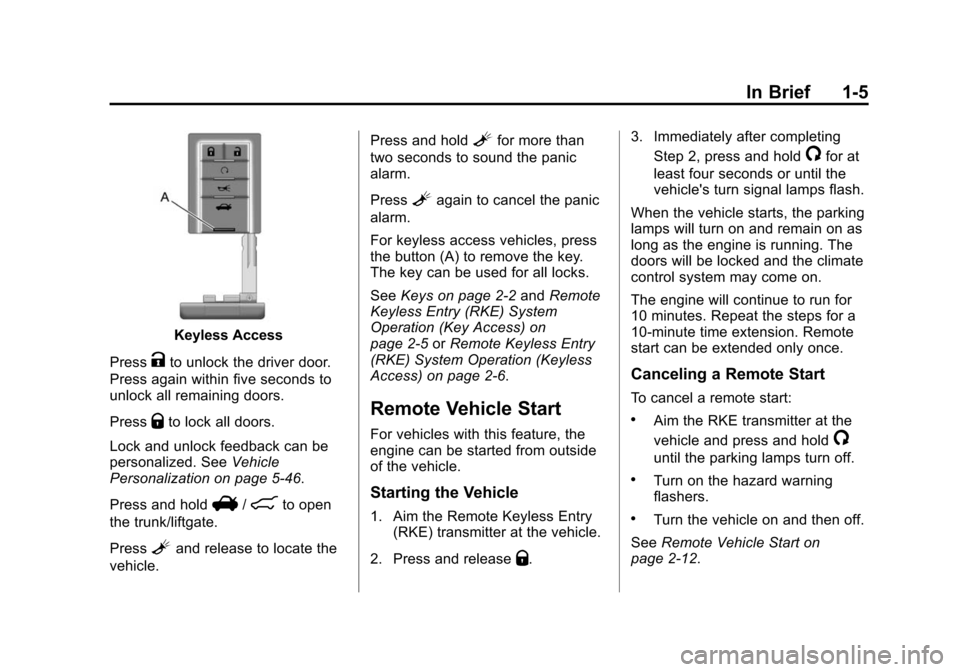
Keyless Access
Press
Kto unlock the driver door.
Press again within five seconds to
unlock all remaining doors.
Press
Qto lock all doors.
Lock and unlock feedback can be
personalized. See Vehicle
Personalization on page 5‑46.
Press and hold
V/8to open
the trunk/liftgate.
Press
Land release to locate the
vehicle. Press and hold
Lfor more than
two seconds to sound the panic
alarm.
Press
Lagain to cancel the panic
alarm.
For keyless access vehicles, press
the button (A) to remove the key.
The key can be used for all locks.
See Keys on page 2‑2 andRemote
Keyless Entry (RKE) System
Operation (Key Access) on
page 2‑5 orRemote Keyless Entry
(RKE) System Operation (Keyless
Access) on page 2‑6.
Remote Vehicle Start
For vehicles with this feature, the
engine can be started from outside
of the vehicle.
Starting the Vehicle
1. Aim the Remote Keyless Entry (RKE) transmitter at the vehicle.
2. Press and release
Q. 3. Immediately after completing
Step 2, press and hold
/for at
least four seconds or until the
vehicle's turn signal lamps flash.
When the vehicle starts, the parking
lamps will turn on and remain on as
long as the engine is running. The
doors will be locked and the climate
control system may come on.
The engine will continue to run for
10 minutes. Repeat the steps for a
10-minute time extension. Remote
start can be extended only once.
Canceling a Remote Start
To cancel a remote start:
.Aim the RKE transmitter at the
vehicle and press and hold
/
until the parking lamps turn off.
.Turn on the hazard warning
flashers.
.Turn the vehicle on and then off.
See Remote Vehicle Start on
page 2‑12.
Page 12 of 496

Black plate (6,1)Cadillac CTS/CTS-V Owner Manual (Include Mex) - 2012
1-6 In Brief
Door Locks
To lock or unlock a door manually:
Sedan and Wagon Base Model
From the inside, use the door lock
knob on the top of doors.
Sedan and Wagon Uplevel Model
From the inside, for a front door pull
the door handle. Pulling the door
handle again unlatches the door.
For a rear door use the door lock
knob on the top of the door.
Coupe Model
To open a door from the inside,
push the door latch button. Or, pull
the manual door release handle on
the driver side floor. SeeDoor Locks
(Sedan and Wagon) on page 2‑14
or Door Locks (Coupe) on
page 2‑15. Sedan and Wagon Model
From the outside, turn the key
toward the front or rear of the
vehicle, or press
QorKon the
Remote Keyless Entry (RKE)
transmitter. See Remote Keyless
Entry (RKE) System Operation (Key
Access) on page 2‑5 orRemote
Keyless Entry (RKE) System
Operation (Keyless Access) on
page 2‑6.
Coupe Model
From the outside, use the key to
unlock the trunk than pull the
manual door release handle. See
Door Locks (Sedan and Wagon) on
page 2‑14 orDoor Locks (Coupe)
on page 2‑15.
Or, press
QorKon the
RKE transmitter. See Remote
Keyless Entry (RKE) System
Operation (Key Access) on
page 2‑5 orRemote Keyless Entry
(RKE) System Operation (Keyless
Access) on page 2‑6.
Power Door Locks
Sedan/Wagon Shown, Coupe
Similar
Q:Press to lock the doors.
K: Press to unlock the doors.
See Power Door Locks on
page 2‑16.
Page 13 of 496

Black plate (7,1)Cadillac CTS/CTS-V Owner Manual (Include Mex) - 2012
In Brief 1-7
Liftgate
Power Liftgate
Vehicles with an automatic
transmission must be in P (Park)
and a manual transmission must
be in Neutral to operate the power
liftgate.To open the liftgate from inside,
select the mode then press the
center of the button. See
Liftgate on
page 2‑20 for more information on
programming the height opening
settings.
To open the liftgate with the Remote
Keyless Entry (RKE) transmitter,
press and hold
8on the
RKE transmitter.
To open the liftgate from outside the
vehicle, press the touch pad on the
outside liftgate handle.
Manual Operation of the Power
Liftgate
With the vehicle in P (Park), turn the
liftgate mode switch to OFF and
unlock the doors. Press the touch
pad under the liftgate handle and
pull up on the handle. To close the
liftgate, pull down on the pull cup.
See Liftgate on page 2‑20.
Trunk Release
The remote trunk release button
is on the driver door, inside the
storage compartment under the
armrest.
Vehicles with an automatic
transmission, the shift lever must be
in P (Park) or N (Neutral). Vehicles
with a manual transmission, the shift
lever must be in Neutral, and the
parking brake set .
Page 14 of 496

Black plate (8,1)Cadillac CTS/CTS-V Owner Manual (Include Mex) - 2012
1-8 In Brief
The trunk may be opened by
pressing the remote trunk release
button on the driver door, or
Von
the Remote Keyless Entry (RKE)
transmitter, or the trunk release
button located on the rear of the
trunk above the license plate.
Vehicles with the Keyless Access
System, if the vehicle is locked, the
keyless access transmitter must be
within 1 m (3 ft) of the trunk for it to
be recognized, then the trunk can
be opened by the trunk release
button located above the license
plate. See Trunk (Sedan, Coupe) on
page 2‑18 for more information.
Windows
Sedan Driver Side Shown, Wagon
and Coupe Similar
The driver power window switches
controls all the windows. The
passenger switch only controls
that window.
Press the switch down to lower
the window. Pull the switch up to
raise it.
For more information, see Power
Windows on page 2‑30.
Seat Adjustment
Power Seats
Seat Position
To adjust the seat:
.Move the seat forward or
rearward by moving the
horizontal control forward or
rearward.
.Raise or lower the front or rear
part of the seat cushion by
moving the front or rear of the
horizontal control up or down.
Page 33 of 496

Black plate (1,1)Cadillac CTS/CTS-V Owner Manual (Include Mex) - 2012
Keys, Doors, and Windows 2-1
Keys, Doors, and
Windows
Keys and Locks
Keys . . . . . . . . . . . . . . . . . . . . . . . . . . 2-2
Remote Keyless Entry (RKE)System . . . . . . . . . . . . . . . . . . . . . . 2-4
Remote Keyless Entry (RKE) System Operation (Key
Access) . . . . . . . . . . . . . . . . . . . . . 2-5
Remote Keyless Entry (RKE) System Operation (Keyless
Access) . . . . . . . . . . . . . . . . . . . . . 2-6
Remote Vehicle Start . . . . . . . . 2-12
Door Locks (Sedan and Wagon) . . . . . . . . . . . . . . . . . . . . 2-14
Door Locks (Coupe) . . . . . . . . . 2-15
Central Door Unlocking System . . . . . . . . . . . . . . . . . . . . . 2-16 Power Door Locks . . . . . . . . . . . 2-16
Delayed Locking . . . . . . . . . . . . . 2-17
Automatic Door Locks . . . . . . . 2-17
Lockout Protection . . . . . . . . . . . 2-17
Safety Locks (Sedan and
Wagon) . . . . . . . . . . . . . . . . . . . . 2-18Doors
Trunk (Sedan, Coupe) . . . . . . . 2-18
Liftgate . . . . . . . . . . . . . . . . . . . . . . 2-20
Vehicle Security
Vehicle Security . . . . . . . . . . . . . . 2-24
Anti-theft Alarm System . . . . . . 2-24
Immobilizer . . . . . . . . . . . . . . . . . . 2-25
Immobilizer Operation(Key Access) . . . . . . . . . . . . . . . 2-25
Immobilizer Operation (Keyless Access) . . . . . . . . . . . 2-26
Exterior Mirrors
Convex Mirrors . . . . . . . . . . . . . . 2-28
Power Mirrors . . . . . . . . . . . . . . . . 2-28
Folding Mirrors . . . . . . . . . . . . . . . 2-28
Heated Mirrors . . . . . . . . . . . . . . . 2-28
Interior Mirrors
Automatic Dimming RearviewMirror . . . . . . . . . . . . . . . . . . . . . . . 2-29
Windows
Windows . . . . . . . . . . . . . . . . . . . . . 2-29
Power Windows . . . . . . . . . . . . . 2-30
Sun Visors . . . . . . . . . . . . . . . . . . . 2-32
Roof
Sunroof . . . . . . . . . . . . . . . . . . . . . . 2-32
Page 35 of 496

Black plate (3,1)Cadillac CTS/CTS-V Owner Manual (Include Mex) - 2012
Keys, Doors, and Windows 2-3
Key Access
This key is used for the driver door,
ignition, and glove box.Keyless Access
This key, located inside the
transmitter, is used for the driver
door, glove box, and rear seat
pass-through door. See “Rear Seat
Pass-Through” underTrunk (Sedan,
Coupe) on page 2‑18 for more
information.Keyless Access
If the vehicle has the Keyless
Access System, the transmitter has
a thin button (A) near the bottom of
the transmitter used to remove the
key. Press (A) and pull the key out.
Do not pull the key out without
pressing the button.
Page 37 of 496

Black plate (5,1)Cadillac CTS/CTS-V Owner Manual (Include Mex) - 2012
Keys, Doors, and Windows 2-5
Remote Keyless Entry
(RKE) System Operation
(Key Access)
The Remote Keyless Entry (RKE)
transmitter works up to 20 m
(65 ft) away.
Other conditions can affect the
performance of the transmitter. See
Remote Keyless Entry (RKE)
System on page 2‑4.
Wagon Similar
Do not pull on the chrome base of
the transmitter.
Q(Lock): Press to lock all of the
doors.
If enabled through the Driver
Information Center (DIC), the
parking lamps may flash once to
indicate locking has occurred. The
horn may chirp when
Qis pressed
again within five seconds. See
Vehicle Personalization on
page 5‑46 for additional information.
K(Unlock): Press to unlock the
driver door. If
Kis pressed again
within five seconds, all remaining
doors unlock. The interior lamps
come on and stay on for 20 seconds
or until the ignition is turned on.
If enabled through the DIC, the
parking lamps flash twice to indicate
unlocking has occurred. See Vehicle
Personalization on page 5‑46.
V/8(Remote Trunk/Liftgate
Release): Press and hold for about
one second to unlock the trunk/
liftgate. The automatic transmission must be in P (Park) or the manual
transmission must be in Neutral with
the parking brake set.
L(Vehicle Locator/Panic
Alarm): Press and release to
locate the vehicle. The turn signal
lamps flash and the horn sounds
three times.
Press and hold
Lfor more
than two seconds to activate the
panic alarm. The turn signal lamps
flash and the horn sounds for
30 seconds. The alarm turns off
when the ignition is moved to
START or
Lis pressed again. The
ignition must be in LOCK/OFF for
the panic alarm to work.
The vehicle comes with two
transmitters. Each transmitter will
have a number on top of it,
“1” or“2.” These numbers
correspond to the driver of the
vehicle. For example, the memory
seat position for driver 1 will be
recalled when using the transmitter
labeled “1,”if enabled through the
DIC. See Memory Seats on
Page 38 of 496

Black plate (6,1)Cadillac CTS/CTS-V Owner Manual (Include Mex) - 2012
2-6 Keys, Doors, and Windows
page 3‑8andVehicle
Personalization on page 5‑46 for
more information.
Programming Transmitters to
the Vehicle
Only RKE transmitters programmed
to the vehicle will work. If a
transmitter is lost or stolen, a
replacement can be purchased and
programmed through your dealer.
When the replacement transmitter is
programmed to the vehicle, all
remaining transmitters must also be
programmed. Any lost or stolen
transmitters no longer work once the
new transmitter is programmed.
Each vehicle can have up to eight
transmitters programmed to it.
Battery Replacement
Replace the battery if the REPLACE
BATTERY IN REMOTE KEY
message displays in the DIC. See
“Replace Battery In Remote Key”
under Key and Lock Messages on
page 5‑37 for additional information. Notice:
When replacing the
battery, do not touch any of the
circuitry on the transmitter. Static
from your body could damage the
transmitter.
To replace the battery:
1. Separate the transmitter with a flat, thin object inserted into the
notch, located above the
metal base.
2. Remove the old battery. Do not use a metal object. 3. Insert the new battery, positive
side facing up. Replace with a
CR2032 or equivalent battery.
4. Snap the transmitter back together.
Remote Keyless Entry
(RKE) System Operation
(Keyless Access)
The Keyless Access System
transmitter will work up to 60 m
(195 ft) away.
The Keyless Access System locks
and unlocks the doors and trunk
without pressing the buttons on the
keyless access transmitter. The
keyless access transmitter must be
within 1 m (3 ft) of the door or trunk
being opened.
Page 39 of 496

Black plate (7,1)Cadillac CTS/CTS-V Owner Manual (Include Mex) - 2012
Keys, Doors, and Windows 2-7
Keyless Unlocking
With the keyless access transmitter
within 1 m (3 ft), approach the front
door and pull the handle to unlock
and open the door. On some
models there is a touch sensor on
the door handle. If the transmitter is
recognized, the door will unlock
and open.
To access the rear doors first, pull
the rear door handle once to unlock
all doors and a second time to open
the door.
Entering any door other than the
driver door will cause all of the
doors to unlock. This is not
customizable.
To customize which doors unlock
when the driver door is opened, see
“Keyless Unlock”underVehicle
Personalization on page 5‑46. Keyless Locking
The doors lock after several
seconds if all doors are closed
and at least one keyless access
transmitter has been removed from
the interior of the vehicle. To
customize if the doors automatically
lock upon exiting the vehicle, see
“Keyless Locking”
underVehicle
Personalization on page 5‑46.
Keyless Trunk/Liftgate Opening
Press the trunk/liftgate release
button located above the license
plate to open the trunk/liftgate if the
keyless access transmitter is within
range. See Trunk (Sedan, Coupe)
on page 2‑18 for additional
information.
There are other conditions that
affect the performance of the
transmitter. See Remote Keyless
Entry (RKE) System on page 2‑4.
With Remote Start Shown, without
and Wagon Similar
Q(Lock): Press once to lock the
doors. The turn signal indicators
flash. When
Qis pressed twice, the
turn signal indicators flash twice,
and the horn sounds once to
confirm locking.
To program the vehicle so the turn
signal indicators do not flash and
the horn does not sound when
pressing
Qon the keyless access
transmitter, see “Remote Door
Lock Feedback” underVehicle
Personalization on page 5‑46.