automatic transmission CADILLAC CTS 2013 2.G User Guide
[x] Cancel search | Manufacturer: CADILLAC, Model Year: 2013, Model line: CTS, Model: CADILLAC CTS 2013 2.GPages: 478, PDF Size: 7.7 MB
Page 51 of 478

Black plate (21,1)Cadillac CTS/CTS-V Owner Manual - 2013 - crc2 - 8/22/12
Keys, Doors, and Windows 2-21
Do not force the liftgate open or
closed during a power cycle.
The power liftgate may be
temporarily disabled under extreme
temperatures or low battery
conditions. If this occurs, the liftgate
can still be operated manually.
If the transmission is shifted out of
P (Park) while the power function is
in progress, the liftgate power
function will continue to completion.
If the transmission is shifted out of
P (Park) and the vehicle accelerates
before the power liftgate latch is
closed, the liftgate may reverse to
the open position. Cargo could fall
out of the vehicle. Close and latch
the power liftgate before driving.
If the liftgate is powered open and
the liftgate support struts have lost
pressure, the turn signals will flash
and a chime will sound. The liftgate
will stay open, and then slowly
close. See your dealer for service
before using the liftgate.Obstacle Detection Features
If the liftgate encounters an obstacle
during a power open or close cycle,
a warning chime will sound and the
liftgate will automatically reverse
direction to the full closed or open
position. After removing the
obstacle, the power liftgate
operation can be used again. If the
liftgate encounters multiple
obstacles on the same power cycle,
the power function will deactivate.
After removing the obstacles, the
liftgate will resume normal power
operation.
The vehicle has pinch sensors on
the side edges of the liftgate. If an
object is caught between the liftgate
and the body and presses against
this sensor, the liftgate will reverse
direction and open fully. The liftgate
will remain open until it is activated
again or closed manually.
Setting the Power Liftgate
Intermediate Mode
To change the liftgate stop position:
1. Turn the liftgate switch to eitherthe MAX, or the ¾ mode position
and power open the liftgate.
2. Stop the liftgate movement at the desired height by pressing
any button that operates the
power liftgate, or the touch pad.
Manually adjust the liftgate
position if required.
3. Press and hold the button on the liftgate adjacent to the latch until
the turn signals flash and a beep
sounds to indicate that the new
setting is recorded.
When power opened with the ¾
mode selected, the liftgate stops at
the new set position.
Page 52 of 478
Black plate (22,1)Cadillac CTS/CTS-V Owner Manual - 2013 - crc2 - 8/22/12
2-22 Keys, Doors, and Windows
If an audible and visual response is
not received when setting the
intermediate stop position, the
liftgate height is below the ¾ open
height minimum, approximately
1.52 m (5 ft) at the edge of the
liftgate.
Manual Operation of Power
Liftgate
To change the liftgate to manual
operation, with the vehicle in
P (Park) for an automatic
transmission or Neutral for a manual
transmission, turn the mode selector
switch to OFF.
With the power liftgate disabled and
all of the doors unlocked, the liftgate
can be manually opened and
closed. Manual operation of a
vehicle with a power liftgate requires
more effort than a standard
non-power liftgate.To open the liftgate, press the touch
pad under the liftgate handle and
lift. To close the liftgate, use the pull
cup. With the power liftgate
disabled, the liftgate electric latch
will still power latch once contact is
made with the striker. Always close
the liftgate before driving.
If the RKE button is pressed while
power operation is disabled, the turn
signals will flash and the liftgate will
not move.
The liftgate has an electric latch.
If the battery is disconnected or has
low voltage, the liftgate will not
open. The liftgate will resume
operation when the battery is
reconnected and charged.
Vehicle Security
This vehicle has theft-deterrent
features; however, they do not make
the vehicle impossible to steal.
Vehicle Alarm System
This vehicle may have an anti-theft
alarm system.
The security light, located in the
instrument panel cluster, comes on
when the system is arming.
Arming the System
To arm the system, do one of the
following:
1. Close all of the windows and
doors, then lock the doors with
the RKE transmitter.
Page 70 of 478
Black plate (8,1)Cadillac CTS/CTS-V Owner Manual - 2013 - crc2 - 8/22/12
3-8 Seats and Restraints
B(Exit Button):Moves the driver
seat and/or power steering column
to the exit position. See “Exit Recall”
later in this section.
Storing Memory Positions
To save into memory:
1. Adjust the driver seat, outside
mirrors, and the power steering
column (if equipped) to the
desired driving positions.
2. Press and hold “1”until two
beeps sound.
3. Repeat for a second driver using “2.”
The vehicle comes with two Remote
Keyless Entry (RKE) transmitters.
Each transmitter has a number
“1” or“2” on it. These numbers
correspond to “1”and “2”on the
driver door. The current driver is
identified when
Kon the RKE
transmitter is pressed, or when
“1” or“2” on the driver door is
pressed. To recall, press and release
“1”
or“2.” The vehicle must be in
P (Park) for an automatic
transmission, or the parking brake
must be applied for a manual
transmission. A single beep sounds
when the button is pressed. The
seat, outside mirrors, and/or power
steering column move to the
position previously stored for the
identified driver.
Automatic Entry Recall
If entry/exit recall is programmed on
in the vehicle personalization menu,
automatic entry recall occurs when
the ignition is turned on. See
Vehicle Personalization on
page 5‑45.
To stop recall movement, press one
of the power seat, memory,
or outside mirror buttons, or the
power steering column switch (if
equipped).
If something has blocked the driver
seat or the steering column while
recalling a memory position, the
recall may stop. Remove the obstruction; then press the
appropriate control for the area that
is not recalling for two seconds. Try
recalling the memory position again
by pressing the appropriate memory
button. If the memory position is still
not recalling, see your dealer for
service.
Exit Recall
B(Exit Button):
Press to move
the driver seat back a preset
distance and/or the power steering
column (if equipped) up and
forward. A single beep sounds when
the exit feature activates. The
vehicle must be in P (Park) for an
automatic transmission, or the
parking brake must be applied for a
manual transmission.
If entry/exit recall is programmed on
in the vehicle personalization menu,
automatic seat and/or steering
column movement occurs upon
leaving the vehicle, if the following
conditions are met. See Vehicle
Personalization on page 5‑45.
Page 71 of 478
Black plate (9,1)Cadillac CTS/CTS-V Owner Manual - 2013 - crc2 - 8/22/12
Seats and Restraints 3-9
On vehicles with Remote Keyless
Entry (RKE), automatic exit recall
movements occur when the ignition
key is removed.
On vehicles with Remote Keyless
Access, automatic exit recall
movements occur when the
following steps are completed:
1. The ignition is turned on forvehicles with an automatic
transmission, or the engine is
started on vehicles with a
manual transmission.
2. The automatic transmission is shifted out of P (Park), or the
parking brake is released on
vehicles with a manual
transmission.
3. The automatic transmission is shifted back into P (Park), or the
parking brake is re-engaged on
vehicles with a manual
transmission.
4. The ignition is turned off.
5. The driver door is opened. Steps 2 and 3 are intended to reflect
that the vehicle has been moved.
If the vehicle is not moved or the
steps above are not performed,
automatic exit recall movement will
not occur. In this case, press
Bto
activate exit recall movements.
If something has blocked the driver
seat while recalling the exit position,
the recall may stop. Remove the
obstruction; then press and hold the
power seat control rearward for
two seconds. Try recalling the exit
position again. If the exit position is
still not recalling, see your dealer for
service.
Heated and Ventilated
Front Seats
{WARNING
If you cannot feel temperature
change or pain to the skin, the
seat heater may cause burns. To
reduce the risk of burns, people
with such a condition should use
care when using the seat heater,
especially for long periods of
time. Do not place anything on
the seat that insulates against
heat, such as a blanket, cushion,
cover, or similar item. This may
cause the seat heater to
overheat. An overheated seat
heater may cause a burn or may
damage the seat.
Page 130 of 478
Black plate (8,1)Cadillac CTS/CTS-V Owner Manual - 2013 - crc2 - 8/22/12
5-8 Instruments and Controls
To adjust for compass variance, use
the following procedure:
Compass Variance (Zone)
Procedure
1. Do not set the compass zonewhen the vehicle is moving. On
an automatic transmission
vehicle, only set it when the
vehicle is in P (Park). On a
manual transmission vehicle,
only set it when the vehicle is
stopped.
Press
Tuntil PRESSVTO
CHANGE COMPASS ZONE
displays.
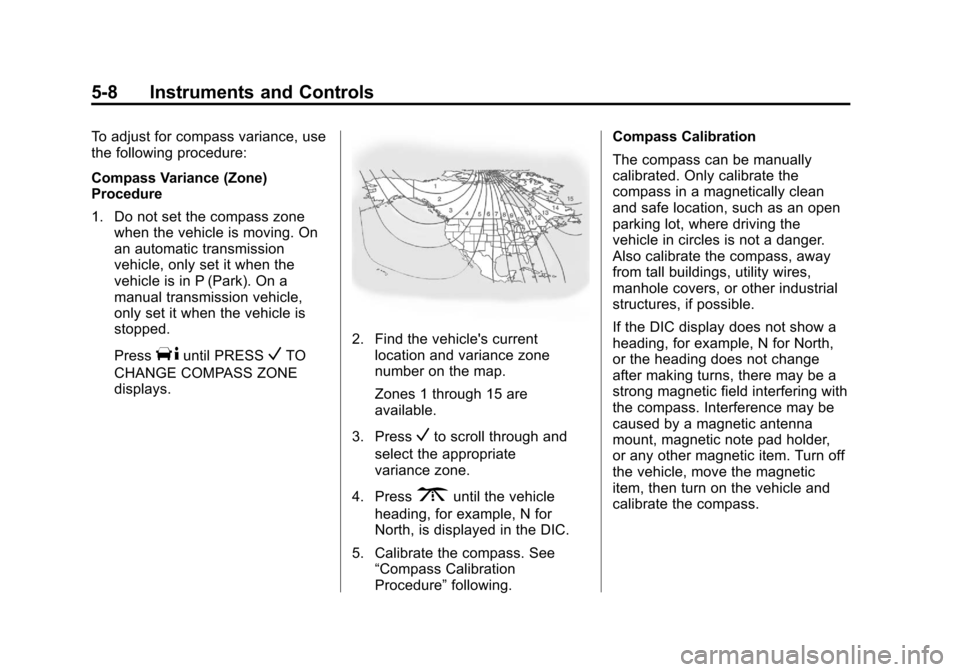
2. Find the vehicle's current location and variance zone
number on the map.
Zones 1 through 15 are
available.
3. Press
Vto scroll through and
select the appropriate
variance zone.
4. Press
3until the vehicle
heading, for example, N for
North, is displayed in the DIC.
5. Calibrate the compass. See “Compass Calibration
Procedure” following. Compass Calibration
The compass can be manually
calibrated. Only calibrate the
compass in a magnetically clean
and safe location, such as an open
parking lot, where driving the
vehicle in circles is not a danger.
Also calibrate the compass, away
from tall buildings, utility wires,
manhole covers, or other industrial
structures, if possible.
If the DIC display does not show a
heading, for example, N for North,
or the heading does not change
after making turns, there may be a
strong magnetic field interfering with
the compass. Interference may be
caused by a magnetic antenna
mount, magnetic note pad holder,
or any other magnetic item. Turn off
the vehicle, move the magnetic
item, then turn on the vehicle and
calibrate the compass.
Page 135 of 478
Black plate (13,1)Cadillac CTS/CTS-V Owner Manual - 2013 - crc2 - 8/22/12
Instruments and Controls 5-13
Speedometer
The speedometer shows the
vehicle's speed in either kilometers
per hour (km/h) or miles per
hour (mph).
Odometer
The odometer shows how far the
vehicle has been driven, in either
kilometers or miles.
This vehicle has a tamper‐resistant
odometer. The digital odometer will
read 999,999 if it is turned back.
If the vehicle needs a new odometer
installed, it must be set to the
mileage total of the old odometer.
If that is not possible, then it must
be set at zero and a label must be
put on the driver door to show the
old mileage reading when the new
odometer was installed.
Trip Odometer
The trip odometer can record the
number of kilometers or miles
traveled for up to two trips.The trip odometer is part of the
Driver Information Center (DIC); for
more information see
Driver
Information Center (DIC) on
page 5‑27.
For vehicles that have the
navigation system, see the
navigation manual for more
information.
Tachometer
The tachometer displays the engine
speed in revolutions per
minute (rpm).
Notice: If the engine is operated
with the tachometer in the shaded
warning area, the vehicle could
be damaged, and the damages
would not be covered by the
vehicle warranty. Do not operate
the engine with the tachometer in
the shaded warning area.
The CTS-V tachometer has tracer
lights that follow the movement of
the tachometer indicator. The tracer
lights also flash when it is time to
up-shift to avoid the engine speed limit. See
Automatic Transmission
on page 9‑25 orManual
Transmission on page 9‑29 for more
information.
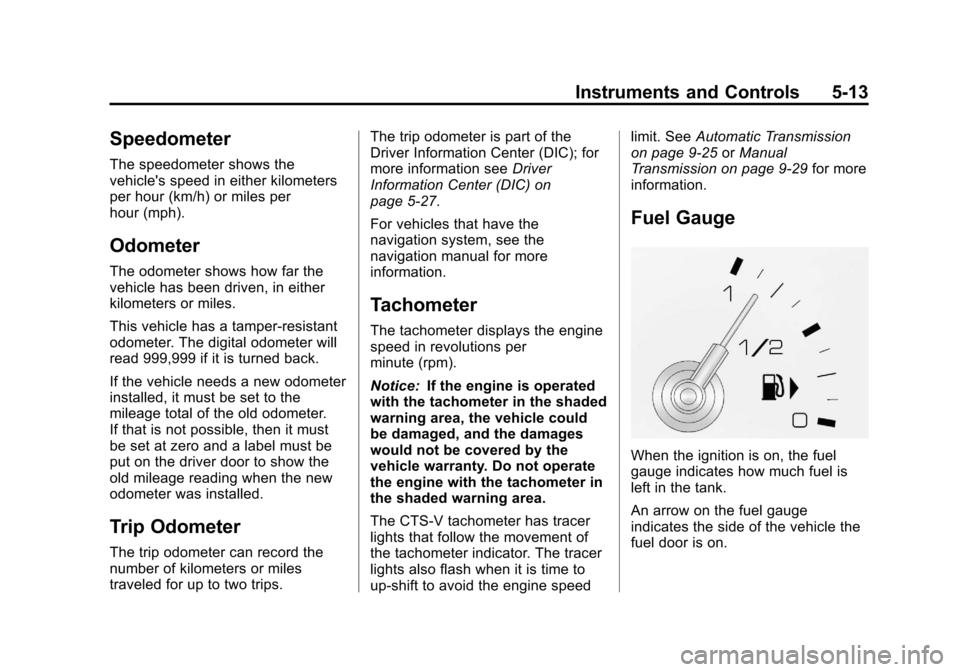
Fuel Gauge
When the ignition is on, the fuel
gauge indicates how much fuel is
left in the tank.
An arrow on the fuel gauge
indicates the side of the vehicle the
fuel door is on.
Page 137 of 478
Black plate (15,1)Cadillac CTS/CTS-V Owner Manual - 2013 - crc2 - 8/22/12
Instruments and Controls 5-15
Engine Speed Limiter
This feature prevents the engine
speed from reaching an unsafe
level. If the level is too high, the
throttle closes or limits the fuel
supply until the engine speed
returns to a safe level. Throttle
operation and fuel supply return to
normal when engine speed is
lowered.
For the CTS-V, the tachometer
tracer lights flash prior to reaching
engine speed limit. The tracer lights
also flash on automatic transmission
vehicles while in the DSC or Tap
Shift modes.
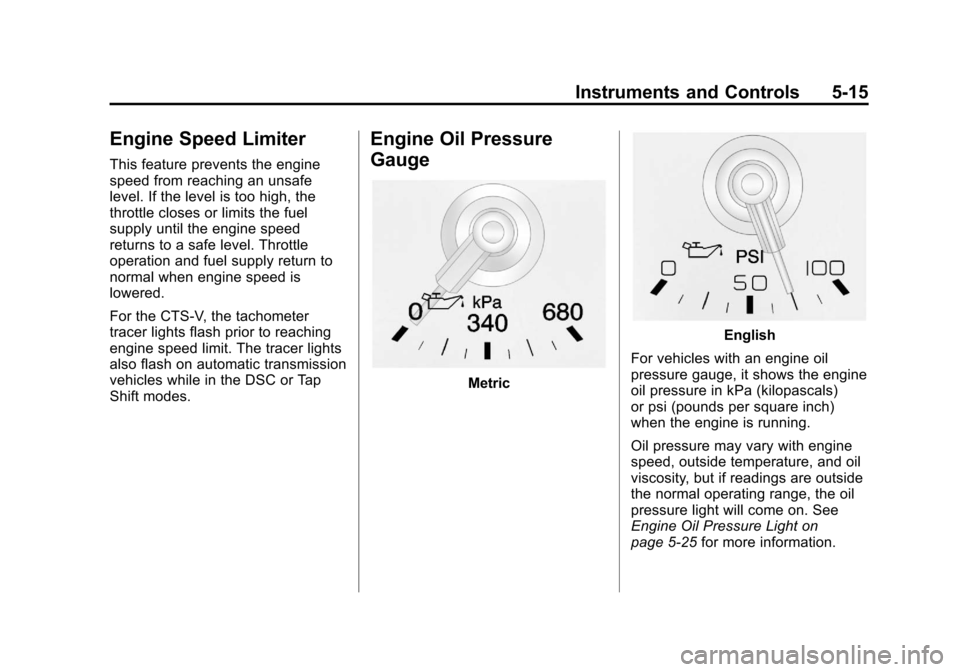
Engine Oil Pressure
Gauge
Metric
English
For vehicles with an engine oil
pressure gauge, it shows the engine
oil pressure in kPa (kilopascals)
or psi (pounds per square inch)
when the engine is running.
Oil pressure may vary with engine
speed, outside temperature, and oil
viscosity, but if readings are outside
the normal operating range, the oil
pressure light will come on. See
Engine Oil Pressure Light on
page 5‑25 for more information.
Page 145 of 478

Black plate (23,1)Cadillac CTS/CTS-V Owner Manual - 2013 - crc2 - 8/22/12
Instruments and Controls 5-23
SeeBrake Assist (Except CTS-V)
on page 9‑35 for more information.
Antilock Brake System
(ABS) Warning Light
The Antilock Brake System (ABS),
this light comes on briefly when the
engine is started.
If the light does not come on, have it
fixed so it will be ready to warn if
there is a problem.
If the ABS light stays on, turn the
ignition off. If the light comes on
while driving, stop as soon as it is
safely possible and turn the ignition
off. A chime may also sound when
the light comes on steady. If this
happens, start the engine again to
reset the system. If the ABS light
stays on, or comes on again while driving, the vehicle needs service.
If the regular brake system warning
light is not on, the vehicle still has
brakes, but not antilock brakes.
If the regular brake system warning
light is also on, the vehicle does not
have antilock brakes and there is a
problem with the regular brakes.
See
Brake System Warning Light on
page 5‑22.
For vehicles with a Driver
Information Center (DIC), see Driver
Information Center (DIC) on
page 5‑27 for all brake-related DIC
messages.
Up-Shift Light
The vehicle may have an up-shift
light. It indicates when to shift to the
next higher gear for best fuel
economy. See
Manual Transmission on
page 9‑29 for more information.
For the CTS-V, the tracer lights
function as a performance up-shift
light.
The tracers flash to indicate when to
shift to the next higher gear to avoid
the engine speed limit. See
Automatic Transmission on
page 9‑25 orManual Transmission
on page 9‑29 for more information.
StabiliTrak®OFF Light
This light comes on briefly while
starting the engine. If it does not,
have the vehicle serviced by your
dealer.
Page 154 of 478

Black plate (32,1)Cadillac CTS/CTS-V Owner Manual - 2013 - crc2 - 8/22/12
5-32 Instruments and Controls
BATTERY VOLTS LOW
This message displays when the
electrical system is charging less
than 10 volts or the battery has
been drained.
If this message appears
immediately after starting the
engine, it is possible that the
generator can still recharge the
battery. The battery should recharge
while driving, but may take a few
hours to do so. Consider using an
auxiliary charger to boost the
battery after returning home or
arriving at a final destination. Make
sure you follow the manufacturer's
instructions.
If this message appears while
driving or after starting the vehicle
and stays on, have it checked
immediately to determine the cause
of this problem.
To help the generator recharge the
battery quickly, reduce the load on
the electrical system by turning off
the accessories.The normal battery voltage range is
11.5 to 15.5 volts. Monitor battery
voltage on the DIC by pressing the
vehicle information button until
Battery Voltage is displayed.
SERVICE BATTERY
CHARGING SYSTEM
This message displays when there
is a problem with the generator and
battery charging systems. Driving
with this problem could drain the
battery. Turn off all unnecessary
accessories. Stop and turn off the
vehicle as soon as it is safe to do
so. Have the electrical system
checked by your dealer. Under
certain conditions, the charging
system light may also turn on in the
instrument cluster. See
Charging
System Light on page 5‑19.
Brake System Messages
PARK BRAKE RELEASED
For vehicles with the electric parking
brake, this message displays when
the parking brake has been released from the set position. See
the electric parking brake
information under
Parking Brake
(Electric) on page 9‑33 orParking
Brake (Manual) on page 9‑32.
PARK BRAKE SET
For vehicles with the electric parking
brake, this message displays when
the parking brake has been applied
to the set position. See the electric
parking brake information under
Parking Brake (Electric) on
page 9‑33 orParking Brake
(Manual) on page 9‑32.
PRESS BRAKE TO START
ENGINE (AUTOMATIC
TRANSMISSION ONLY)
If the vehicle has the keyless
access system, this message
displays if you try to start the engine
without having the brake pressed.
The brake needs to be pressed
when starting the engine. See
Ignition Positions (Keyless Access)
on page 9‑15 orIgnition Positions
(Key Access) on page 9‑17.
Page 166 of 478
Black plate (44,1)Cadillac CTS/CTS-V Owner Manual - 2013 - crc2 - 8/22/12
5-44 Instruments and Controls
If a tire pressure message appears
on the DIC, stop as soon as you
can. Inflate the tires by adding air
until the tire pressure is equal to the
values shown on the Tire and
Loading Information label. SeeTires
on page 10‑58, Vehicle Load Limits
on page 9‑10, and Tire Pressure on
page 10‑66.
If the vehicle does not have a spare
tire, the message will display USE
INFLATOR KIT IN TRUNK. Use the
inflator kit to inflate the tires to the
correct pressure. See Tire Sealant
and Compressor Kit on page 10‑82
for more information.
More than one tire pressure
message can be received at a time.
To read the other messages, press
the set/reset button.
The DIC display also shows the tire
pressure values. See Driver
Information Center (DIC) on
page 5‑27.Transmission Messages
DIFFERENTIAL HOT, REDUCE
SPEED (CTS-V ONLY)
This message displays and a chime
sounds if the differential fluid
temperature exceeds 150°C
(300°F). Driving aggressively or at
high speeds can cause the
differential fluid temperature to be
higher than normal. If this message
appears, you may continue to drive
at a slower speed. If you have been
operating the vehicle under normal
driving conditions, the vehicle may
need service. See your dealer for an
inspection.
To acknowledge the message, press
V. The message reappears and a
chime sounds every two minutes
until this condition changes. If you
do not clear the message, it will
remain on until the condition
changes.
SERVICE TRANSMISSION
This message displays when there
is a problem with the vehicle's
transmission. Have the vehicle
serviced by your dealer.
SHIFT TO PARK (AUTOMATIC
TRANSMISSION ONLY)
If the vehicle has the keyless
access system, this message
displays if the vehicle is not in
P (Park) while the engine is being
turned off. The vehicle will be in
ACC/ACCESSORY. Once the shift
lever is moved to P (Park), the
ignition needs to be turned off. If the
ignition is not turned off, the vehicle
will remain in ACC/ACCESSORY.
To avoid draining the battery, turn
the ignition off before leaving the
vehicle.