automatic transmission CADILLAC CTS 2013 2.G Owner's Manual
[x] Cancel search | Manufacturer: CADILLAC, Model Year: 2013, Model line: CTS, Model: CADILLAC CTS 2013 2.GPages: 478, PDF Size: 7.7 MB
Page 167 of 478

Black plate (45,1)Cadillac CTS/CTS-V Owner Manual - 2013 - crc2 - 8/22/12
Instruments and Controls 5-45
SPORT MODE
This message displays when the
vehicle is in sport mode. The
transmission gear position will also
be displayed when DSC is in use.
SeeManual Mode on page 9‑26 for
more information.
TRANSMISSION HOT IDLE
ENGINE
This message displays when the
transmission fluid in the vehicle is
too hot. Stop the vehicle and allow it
to idle until the transmission cools
down or until this message is
removed.
Vehicle Speed Messages
ICE POSSIBLE DRIVE
WITH CARE
This message displays when the
outside temperature is cold enough
to create icy road conditions. Adjust
your driving accordingly.
SPEED LIMITED TO
XXX KM/H (MPH)
This message displays when the
vehicle speed is limited to 128 km/h
(80 mph) because the vehicle
detects a problem in the speed
variable assist steering or magnetic
ride control systems. Have the
vehicle serviced by your dealer.
Washer Fluid Messages
WASHER FLUID LOW ADD
FLUID
This message displays when the
vehicle is low on windshield washer
fluid. Refill the windshield washer
fluid reservoir as soon as possible.
See Washer Fluid on page 10‑23 for
more information.
Vehicle
Personalization
Vehicle customization allows certain
features to be programmed for one
preferred setting.
Only the customization options
available will be displayed on
the DIC.
The default settings were preset
when the vehicle left the factory, but
may have been changed.
The customization preferences are
automatically recalled.
To change customization
preferences, use the following
procedure.
Entering the Feature
Settings Menu
1. Turn the ignition on.
To avoid excessive drain on the
battery, it is recommended that
the headlamps are turned off.
Page 169 of 478

Black plate (47,1)Cadillac CTS/CTS-V Owner Manual - 2013 - crc2 - 8/22/12
Instruments and Controls 5-47
Shift Out Of Park (default on
Automatic Transmission)
(Automatic Transmission Only):
The vehicle's doors automatically
lock when the doors are closed and
the vehicle is shifted out of P (Park).
At Vehicle Speed (default on
Manual Transmission):The
vehicle's doors automatically lock
when the vehicle speed is above
8 km/h (5 mph) for three seconds.
No Change: No change will be
made to this feature. The current
setting will remain.
To select a setting, press the set/
reset button while the desired
setting is displayed on the DIC.
Auto Door Unlock
This feature allows you to select
whether or not the door(s) will
automatically unlock. It also allows
you to select which doors and when
they will automatically unlock. See
Automatic Door Locks on page 2‑15
for more information. Press the customization button until
Auto Door Unlock appears on the
DIC display. Press the set/reset
button once to access the settings
for this feature. Then press the
menu up/down button to scroll
through the following settings.
Off:
None of the doors will
automatically unlock.
Driver Only At Off: Only the driver
door will unlock when the ignition is
turned off.
All At Off (default on Manual
Transmission): All of the doors will
unlock when the ignition is
turned off.
All In Park (default on Automatic
Transmission) (Automatic
Transmission Only): All of the
doors will unlock when the vehicle is
shifted into P (Park).
No Change: No change will be
made to this feature. The current
setting will remain. To select a setting, press the set/
reset button while the desired
setting is displayed on the DIC.
Remote Door Lock Feedback
This feature allows you to select the
type of feedback you will receive
when locking the vehicle with the
Remote Keyless Entry (RKE) or
keyless access transmitter, or when
the vehicle is automatically locked
using the Keyless Locking feature.
You will not receive feedback when
locking the vehicle with the
transmitter if the doors are open.
See
Remote Keyless Entry (RKE)
System Operation (Key Access) on
page 2‑4 orRemote Keyless Entry
(RKE) System Operation (Keyless
Access) on page 2‑6, or “Keyless
Locking” later in this section for
more information.
Press the customization button until
Remote Door Lock appears on the
DIC display. Press the set/reset
button once to access the settings
Page 181 of 478

Black plate (3,1)Cadillac CTS/CTS-V Owner Manual - 2013 - crc2 - 8/22/12
Lighting 6-3
The DRL system will make either
the reduced intensity low-beam
headlamps or dedicated DRLs come
on when the following conditions
are met:
.It is still daylight and the ignition
is in ON/RUN or START.
.The exterior lamp control is inPor AUTO and the headlamps
are off.
.The automatic transmission is
not in P (Park).
When DRLs are on, only the
reduced intensity low-beam
headlamps or dedicated DRLs will
be on. The other exterior lamps and
the instrument cluster will not be on.
When the exterior lamp control is in
AUTO and it is dark enough outside,
the DRL turn off and the low-beam
headlamps will turn on. When it is
bright enough outside, the low-beam
headlamps will go off, and the DRL
will turn back on. If the vehicle is
started in a dark garage, the
automatic headlamp system comes on immediately. Once the vehicle
leaves the garage, it takes about
one minute for the automatic
headlamp system to change to DRL
if it is light outside. During that
delay, the instrument cluster may
not be as bright as usual. Make sure
the instrument panel brightness
knob is in the full bright position.
See
Instrument Panel Illumination
Control on page 6‑6.
Turning the exterior lamp control to
off or to the low-beam headlamp
position will turn off the DRL. If the
parking lamps or the fog lamps were
turned on instead, the DRL will still
turn off.
This will work regardless of gear
position and whether or not the
parking brake is set.
When the DRL are active and a turn
signal is operated, the DRL on the
side the turn signal is activated, will
turn off until the turn signal is
turned off.
Automatic Headlamp
System
When it is dark enough outside, the
automatic headlamp system turns
on the headlamps at the normal
brightness, along with the taillamps,
sidemarker, parking lamps, and the
instrument panel lights. The radio
lights will also be dim.
To turn off the automatic headlamp
system, turn the exterior lamp
control to the off position and then
release it.
The vehicle has a light sensor on
the top of the instrument panel in
the defroster grille which regulates
when the automatic headlamps turn
Page 182 of 478

Black plate (4,1)Cadillac CTS/CTS-V Owner Manual - 2013 - crc2 - 8/22/12
6-4 Lighting
on. Do not cover the sensor,
otherwise the headlamps will come
on whenever the ignition is on.
The system may also turn on the
headlamps when driving through a
parking garage, heavy overcast
weather, or a tunnel. This is normal.
If the vehicle is started in a dark
garage, the automatic headlamp
system will come on immediately.
Once the vehicle leaves the garage,
it takes approximately one minute
for the automatic headlamp system
to change if it is bright enough
outside. During that delay, the
instrument cluster may not be as
bright as usual. Make sure the
instrument panel brightness control
is in the full bright position. See
Instrument Panel Illumination
Control on page 6‑6.
To idle the vehicle with the
automatic headlamp system off, turn
the control to the off position.The headlamps will also stay on
after you exit the vehicle. This
feature can be programmed using
the Driver Information Center (DIC).
See
Vehicle Personalization on
page 5‑45.
The regular headlamp system can
be turned on when needed.
Lights On with Wipers
If the windshield wipers are
activated in daylight with the engine
on, and the exterior lamp control is
in AUTO, the headlamps, parking
lamps, and other exterior lamps
come on. The transition time for the
lamps coming on varies based on
wiper speed. When the wipers are
not operating, these lamps turn off.
Move the exterior lamp control to
P
or;to disable this feature.
Adaptive Forward
Lighting (AFL)
The Adaptive Forward Lighting
System (AFL) pivots the headlamps
horizontally to provide greater road
illumination while turning. To enable
AFL, set the exterior lamp control on
the turn signal lever to the AUTO
position. Moving the switch out of
the AUTO position will deactivate
the system. AFL will operate when
the vehicle speed is greater than
3 km/h (2 mph). AFL will not operate
when the transmission is in
R (Reverse). AFL is not immediately
operable after starting the vehicle;
driving a short distance is required
to calibrate the AFL. See Exterior
Lamp Controls on page 6‑1.
Page 243 of 478

Black plate (1,1)Cadillac CTS/CTS-V Owner Manual - 2013 - crc2 - 8/22/12
Driving and Operating 9-1
Driving and
Operating
Driving Information
Distracted Driving . . . . . . . . . . . . . 9-2
Defensive Driving . . . . . . . . . . . . . 9-3
Drunk Driving . . . . . . . . . . . . . . . . . 9-3
Control of a Vehicle . . . . . . . . . . . 9-3
Braking . . . . . . . . . . . . . . . . . . . . . . . 9-3
Steering . . . . . . . . . . . . . . . . . . . . . . . 9-4
Off-Road Recovery . . . . . . . . . . . . 9-4
Loss of Control . . . . . . . . . . . . . . . . 9-5
Competitive Driving . . . . . . . . . . . 9-5
Driving on Wet Roads . . . . . . . . . 9-6
Highway Hypnosis . . . . . . . . . . . . 9-7
Hill and Mountain Roads . . . . . . 9-7
Winter Driving . . . . . . . . . . . . . . . . . 9-8
If the Vehicle Is Stuck . . . . . . . . . 9-9
Vehicle Load Limits . . . . . . . . . . 9-10
Starting and Operating
New Vehicle Break-In . . . . . . . . 9-14
Ignition Positions (KeylessAccess) . . . . . . . . . . . . . . . . . . . . 9-15
Ignition Positions (Key Access) . . . . . . . . . . . . . . . . . . . . 9-17
Starting the Engine . . . . . . . . . . 9-19 Retained Accessory
Power (RAP) . . . . . . . . . . . . . . . 9-21
Engine Coolant Heater . . . . . . . 9-21
Shifting Into Park . . . . . . . . . . . . 9-22
Shifting out of Park . . . . . . . . . . 9-23
Parking (Manual Transmission) . . . . . . . . . . . . . . 9-23
Parking over Things That Burn . . . . . . . . . . . . . . . . . . 9-23
Engine Exhaust
Engine Exhaust . . . . . . . . . . . . . . 9-24
Running the Vehicle WhileParked . . . . . . . . . . . . . . . . . . . . . 9-24
Automatic Transmission
Automatic Transmission . . . . . 9-25
Manual Mode . . . . . . . . . . . . . . . . 9-26
Manual Transmission
Manual Transmission . . . . . . . . 9-29
Drive Systems
All-Wheel Drive . . . . . . . . . . . . . . 9-31
Brakes
Antilock BrakeSystem (ABS) . . . . . . . . . . . . . . 9-31
Parking Brake (Manual) . . . . . . 9-32
Parking Brake (Electric) . . . . . . 9-33
Brake Assist (Except CTS-V) . . . . . . . . . . . . 9-35
Ride Control Systems
Traction ControlSystem (TCS) . . . . . . . . . . . . . . 9-35
StabiliTrak
®System . . . . . . . . . 9-36
Competitive Driving Mode . . . 9-37
Magnetic Ride Control . . . . . . . 9-38
Limited-Slip Rear Axle . . . . . . . 9-38
Cruise Control
Cruise Control . . . . . . . . . . . . . . . 9-39
Object Detection Systems
Ultrasonic Parking Assist . . . . 9-41
Side Blind Zone Alert (SBZA) . . . . . . . . . . . . . . . 9-42
Rear Vision Camera (RVC) . . . . . . . . . . . . . 9-45
Fuel
Fuel . . . . . . . . . . . . . . . . . . . . . . . . . 9-47
Recommended Fuel . . . . . . . . . 9-47
Gasoline Specifications . . . . . . 9-48
Page 257 of 478
Black plate (15,1)Cadillac CTS/CTS-V Owner Manual - 2013 - crc2 - 8/22/12
Driving and Operating 9-15
manual transmission, shift to the
next lower gear. This rule
applies at all times, not just
during the break-in period.
.Do not participate in track
events, sport driving schools,
or similar activities during this
break–in period.
.Check engine oil with every
refueling and add if necessary.
Oil and fuel consumption may be
higher than normal during the
first 2 414 km (1,500 miles).
.To break in new tires, drive at
moderate speeds and avoid hard
cornering for the first
322 km (200 miles). New tires do
not have maximum traction and
may tend to slip.
.New brake linings also need a
break–in period. Avoid making
hard stops during the first
322 km (200 miles). This is
recommended every time brake
linings are replaced.
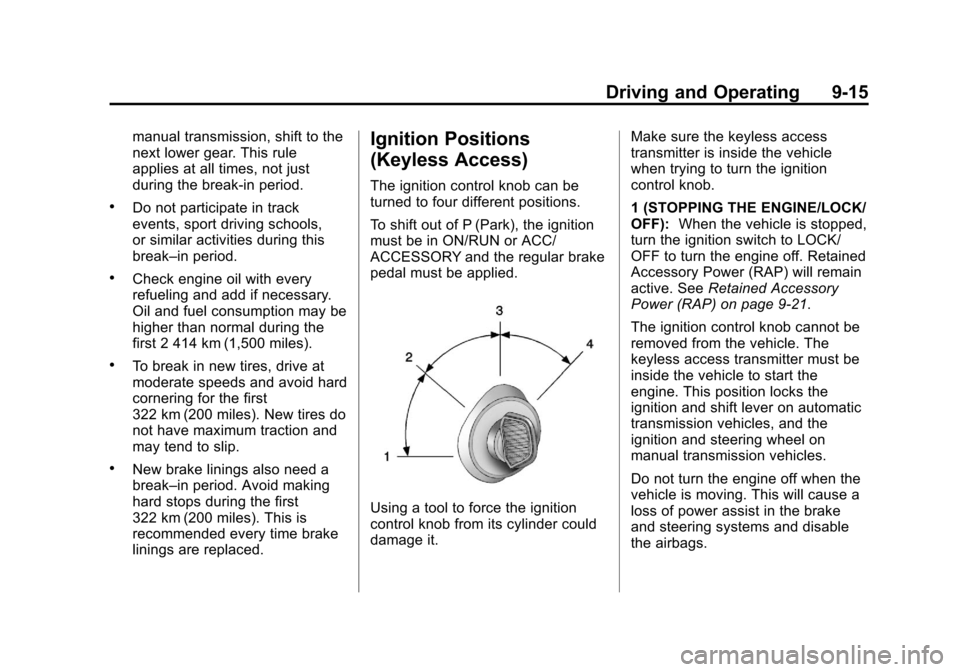
Ignition Positions
(Keyless Access)
The ignition control knob can be
turned to four different positions.
To shift out of P (Park), the ignition
must be in ON/RUN or ACC/
ACCESSORY and the regular brake
pedal must be applied.
Using a tool to force the ignition
control knob from its cylinder could
damage it.Make sure the keyless access
transmitter is inside the vehicle
when trying to turn the ignition
control knob.
1 (STOPPING THE ENGINE/LOCK/
OFF):
When the vehicle is stopped,
turn the ignition switch to LOCK/
OFF to turn the engine off. Retained
Accessory Power (RAP) will remain
active. See Retained Accessory
Power (RAP) on page 9‑21.
The ignition control knob cannot be
removed from the vehicle. The
keyless access transmitter must be
inside the vehicle to start the
engine. This position locks the
ignition and shift lever on automatic
transmission vehicles, and the
ignition and steering wheel on
manual transmission vehicles.
Do not turn the engine off when the
vehicle is moving. This will cause a
loss of power assist in the brake
and steering systems and disable
the airbags.
Page 258 of 478

Black plate (16,1)Cadillac CTS/CTS-V Owner Manual - 2013 - crc2 - 8/22/12
9-16 Driving and Operating
If the vehicle must be shut off in an
emergency:
1. Brake using a firm and steadypressure. Do not pump the
brakes repeatedly. This may
deplete power assist, requiring
increased brake pedal force.
2. Shift the vehicle to neutral. This can be done while the vehicle is
moving. After shifting to neutral,
firmly apply the brakes and steer
the vehicle to a safe location.
3. Come to a complete stop. Shift to P (Park) with an automatic
transmission, or Neutral with a
manual transmission. Turn the
ignition to LOCK/OFF.
4. Set the parking brake. See Parking Brake (Electric) on
page 9‑33 orParking Brake
(Manual) on page 9‑32.{WARNING
Turning off the vehicle while
moving may cause loss of power
assist in the brake and steering
systems and disable the airbags.
While driving, only shut the
vehicle off in an emergency.
If the vehicle cannot be pulled over,
and must be shut off while driving,
switch the ignition to ACC/
ACCESSORY.
2 (ACC/ACCESSORY): This
position allows you to use things
like the radio and the windshield
wipers when the engine is off. This
position will allow you to turn off the
engine.
3 (ON/RUN): This position is for
driving. It is the position the ignition
switch returns to after the engine
starts, and the control knob is
released. This position can also be
used for service and diagnostics,
and to verify the proper operation of the malfunction indicator lamp as
may be required for emission
inspection purposes.
If you need to shift the transmission
out of P (Park), the ignition control
knob has to be in ACC/
ACCESSORY or ON/RUN.
The battery could be drained if you
leave the ignition in the ACC/
ACCESSORY or ON/RUN position
with the engine off. You may not be
able to start the vehicle if the battery
is allowed to drain for an extended
period of time.
4 (START):
This position starts the
engine.
Page 259 of 478
Black plate (17,1)Cadillac CTS/CTS-V Owner Manual - 2013 - crc2 - 8/22/12
Driving and Operating 9-17
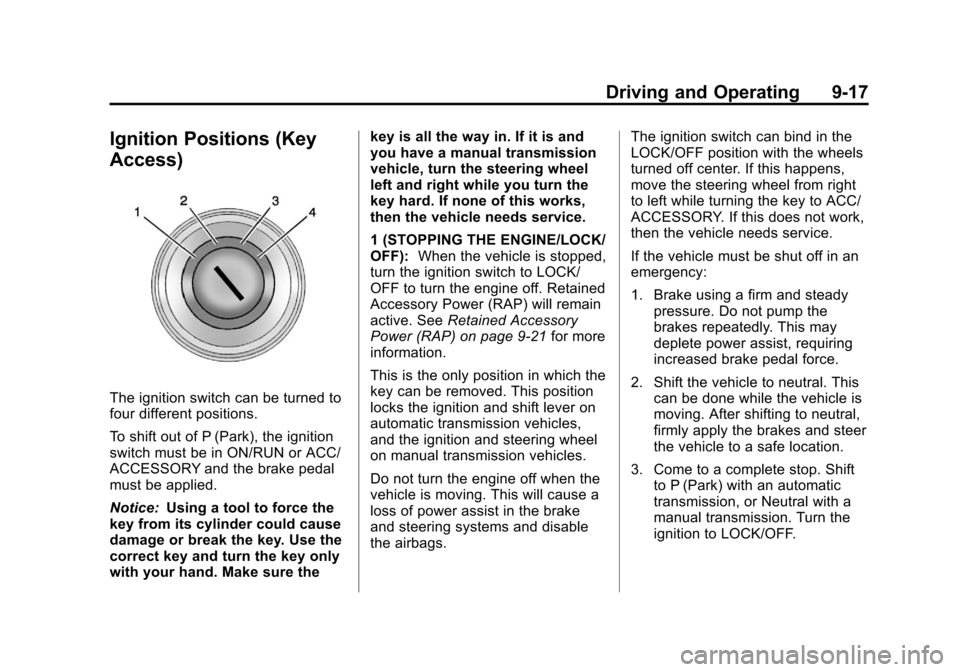
Ignition Positions (Key
Access)
The ignition switch can be turned to
four different positions.
To shift out of P (Park), the ignition
switch must be in ON/RUN or ACC/
ACCESSORY and the brake pedal
must be applied.
Notice:Using a tool to force the
key from its cylinder could cause
damage or break the key. Use the
correct key and turn the key only
with your hand. Make sure the key is all the way in. If it is and
you have a manual transmission
vehicle, turn the steering wheel
left and right while you turn the
key hard. If none of this works,
then the vehicle needs service.
1 (STOPPING THE ENGINE/LOCK/
OFF):
When the vehicle is stopped,
turn the ignition switch to LOCK/
OFF to turn the engine off. Retained
Accessory Power (RAP) will remain
active. See Retained Accessory
Power (RAP) on page 9‑21 for more
information.
This is the only position in which the
key can be removed. This position
locks the ignition and shift lever on
automatic transmission vehicles,
and the ignition and steering wheel
on manual transmission vehicles.
Do not turn the engine off when the
vehicle is moving. This will cause a
loss of power assist in the brake
and steering systems and disable
the airbags. The ignition switch can bind in the
LOCK/OFF position with the wheels
turned off center. If this happens,
move the steering wheel from right
to left while turning the key to ACC/
ACCESSORY. If this does not work,
then the vehicle needs service.
If the vehicle must be shut off in an
emergency:
1. Brake using a firm and steady
pressure. Do not pump the
brakes repeatedly. This may
deplete power assist, requiring
increased brake pedal force.
2. Shift the vehicle to neutral. This can be done while the vehicle is
moving. After shifting to neutral,
firmly apply the brakes and steer
the vehicle to a safe location.
3. Come to a complete stop. Shift to P (Park) with an automatic
transmission, or Neutral with a
manual transmission. Turn the
ignition to LOCK/OFF.
Page 260 of 478

Black plate (18,1)Cadillac CTS/CTS-V Owner Manual - 2013 - crc2 - 8/22/12
9-18 Driving and Operating
4. Set the parking brake. SeeParking Brake (Electric) on
page 9‑33 orParking Brake
(Manual) on page 9‑32.
{WARNING
Turning off the vehicle while
moving may cause loss of power
assist in the brake and steering
systems and disable the airbags.
While driving, only shut the
vehicle off in an emergency.
If the vehicle cannot be pulled over,
and must be shut off while driving,
turn the ignition to ACC/
ACCESSORY.
2 (ACC/ACCESSORY): This
position lets you use things like the
radio and the windshield wipers
when the engine is off. This position
allows you to turn off the engine.
3 (ON/RUN): This position is for
driving. It is the position the ignition
switch returns to after the engine
starts, and the key is released. This position can also be used for
service and diagnostics, and to
verify the proper operation of the
malfunction indicator lamp as may
be required for emission inspection
purposes.
To shift the transmission out of
P (Park), the ignition key has to be
in ACC/ACCESSORY or ON/RUN.
The battery could be drained if the
key is left in the ACC/ACCESSORY
or ON/RUN position with the engine
off. The vehicle might not start if the
battery is allowed to drain for an
extended period of time.
4 (START):
This position starts the
engine. When the engine starts,
release the key. The ignition switch
returns to ON/RUN for driving.
A warning tone will sound when the
driver door is opened, the ignition is
in ACC/ACCESSORY or LOCK/
OFF, and the key is in the ignition.
Key Lock Release
Vehicles with an automatic
transmission are equipped with an
electronic key lock release system.
The key lock release is designed to
prevent ignition key removal unless
the shift lever is in P (Park).
The key lock release is always
functional except in the case of an
uncharged or low voltage (less than
9-volt) battery. If the vehicle has an
uncharged battery or a battery with
Page 261 of 478

Black plate (19,1)Cadillac CTS/CTS-V Owner Manual - 2013 - crc2 - 8/22/12
Driving and Operating 9-19
low voltage, try charging or jump
starting the battery. SeeJump
Starting on page 10‑99.
If charging or jump starting the
battery does not work, locate the
hole below the ignition lock. Insert a
flat bladed tool or another key from
the key chain into the opening.
When the lever can be felt, actuate
the lever away from the driver, and
remove the key from the ignition.
Starting the Engine
Place the transmission in the
proper gear.
If the vehicle has the keyless
access system, the keyless access
transmitter must be authenticated in
order for the ignition control knob to
turn. The transmitter can be
authenticated either by putting your
foot on the brake pedal or by
pushing the ignition control knob in. Automatic Transmission
Move the shift lever to P (Park) or
N (Neutral). The engine will not start
in any other position. To restart the
engine when the vehicle is already
moving, use N (Neutral) only.
If the vehicle has the keyless
access system, your foot must be
on the brake pedal to start the
engine. To rotate the ignition control
knob, put your foot on the brake
pedal and turn the ignition control
knob to the START position. If the
ignition control knob does not turn,
try pushing the knob in and turning
again. When the engine begins
cranking, let go of the ignition
control knob, it will return to the ON/
RUN position.
If the transmitter is not in the vehicle
or something is interfering with the
transmitter, the Driver Information
Center (DIC) will display
ELECTRONIC KEY NOT
DETECTED. See
Driver Information
Center (DIC) on page 5‑27 for more
information. If the battery in the keyless access
transmitter needs replacing, the DIC
displays REPLACE BATTERY IN
REMOTE KEY. The vehicle can still
be driven. See
“Battery
Replacement” underRemote
Keyless Entry (RKE) System
Operation (Key Access) on
page 2‑4 orRemote Keyless Entry
(RKE) System Operation (Keyless
Access) on page 2‑6 for more
information.
Notice: Do not try to shift to
P (Park) if the vehicle is moving.
If you do, you could damage the
transmission. Shift to P (Park)
only when the vehicle is stopped.
Manual Transmission
The shift lever should be in neutral
position and the parking brake
engaged. Hold the clutch pedal
down to the floor and start the
engine. The vehicle will not start if
the clutch pedal is not all the
way down.