oil CADILLAC CTS 2013 2.G User Guide
[x] Cancel search | Manufacturer: CADILLAC, Model Year: 2013, Model line: CTS, Model: CADILLAC CTS 2013 2.GPages: 478, PDF Size: 7.7 MB
Page 153 of 478
Black plate (31,1)Cadillac CTS/CTS-V Owner Manual - 2013 - crc2 - 8/22/12
Instruments and Controls 5-31
Oil Pressure (CTS-V Only)
This display shows the oil pressure
in either kilopascals (kPa) or pounds
per square inch (psi).
Lateral Acceleration (CTS-V Only)
Lateral Acceleration measures the
force of a turn or corner. For
example, when turning right, it
forces to the left. This gauge
displays the“g”force from 0.0 g
to 2.0 g.
Blank Display
This display shows no information.
DIC Compass
The vehicle may have a compass in
the Driver Information Center (DIC).
See Compass on page 5‑7 for
information.
Vehicle Messages
Messages displayed on the DIC
indicate the status of the vehicle or
some action that may be needed to
correct a condition. Multiple
messages may appear one after
another.
The messages that do not require
immediate action can be
acknowledged and cleared by
pressing
V(Set/Reset).
The messages that require
immediate action cannot be cleared
until that action is performed.
All messages should be taken
seriously; clearing the message
does not correct the problem.
The following are the possible
messages and some information
about them.
Battery Voltage and
Charging Messages
BATTERY SAVER ACTIVE
This message displays when the
system detects that the battery
voltage is dropping below expected
levels. The battery saver system
starts reducing certain features of
the vehicle that may be noticeable.
At the point that the features are
disabled, this message is displayed.
It means that the vehicle is trying to
save the charge in the battery.
Turn off all unnecessary
accessories to allow the battery to
recharge.
The normal battery voltage range is
11.5 to 15.5 volts. You can monitor
battery voltage on the DIC by
pressing the vehicle information
button until Battery Voltage is
displayed.
Page 157 of 478

Black plate (35,1)Cadillac CTS/CTS-V Owner Manual - 2013 - crc2 - 8/22/12
Instruments and Controls 5-35
If this message continues to appear,
have the system repaired by your
dealer as soon as possible to avoid
damage to the engine.
ENGINE OVERHEATED IDLE
ENGINE
Notice:If you drive the vehicle
while the engine is overheating,
severe engine damage may
occur. If an overheat warning
appears on the instrument cluster
and/or DIC, stop the vehicle as
soon as possible. Do not increase
the engine speed above normal
idling speed. See Engine
Overheating on page 10‑21 for
more information.
This message displays when the
engine coolant temperature is too
hot. Stop and allow the vehicle to
idle until it cools down. If the
message does not clear in a few
minutes or if the overheat light stays
on, shut the vehicle off and have it
serviced before driving again. See
Engine Coolant Temperature
Warning Light on page 5‑24. See
Overheated Engine Protection
Operating Mode on page 10‑22 for
information on driving to a safe
place in an emergency.
Engine Oil Messages
CHANGE ENGINE OIL SOON
When this message displays, it
means that service is required for
the vehicle. See your dealer. See
Maintenance Schedule on
page 11‑3 andEngine Oil on
page 10‑9.
When you reset the CHANGE
ENGINE OIL SOON message by
clearing it from the display, you still
must reset the engine oil life system
separately. For more information on
resetting the engine oil life system,
see Engine Oil Life System on
page 10‑11.
ENGINE OIL LOW ADD OIL
On some vehicles, this message
displays if the oil level in the vehicle
is low. Check the oil level before
filling to the recommended level. You may need to let the vehicle cool
or warm up and cycle the ignition to
be sure this message clears. If the
oil is not low and this message
continues to be displayed, take the
vehicle to your dealer for service.
This message clears itself after
10 seconds, until the next ignition
cycle. See
Engine Oil on page 10‑9.
OIL PRESSURE LOW STOP
ENGINE
Notice:If you drive the vehicle
while the engine oil pressure is
low, severe engine damage may
occur. If a low oil pressure
warning appears on the
instrument cluster and/or DIC,
stop the vehicle as soon as
possible. Do not drive the vehicle
until the cause of the low oil
pressure is corrected. See Engine
Oil on page 10‑9 for more
information.
This message displays when the
vehicle's engine oil pressure is low.
The oil pressure light may also
appear on the instrument cluster.
Page 158 of 478

Black plate (36,1)Cadillac CTS/CTS-V Owner Manual - 2013 - crc2 - 8/22/12
5-36 Instruments and Controls
SeeEngine Oil Pressure Light on
page 5‑25. See Engine Oil on
page 10‑9.
Stop the vehicle immediately, as
engine damage can result from
driving a vehicle with low oil
pressure. Have the vehicle serviced
by your dealer as soon as possible
when this message is displayed.
Engine Power Messages
ENGINE POWER IS REDUCED
This message displays when the
engine power is being reduced to
protect the engine from damage.
There could be several malfunctions
that might cause this message.
Reduced engine power can affect
the vehicle's ability to accelerate.
If this message is on, but there is no
reduction in performance, proceed
to your destination. The
performance may be reduced the
next time the vehicle is driven. The
vehicle may be driven at a reduced
speed while this message is on, but
acceleration and speed may be reduced. Anytime this message
stays on, take the vehicle to your
dealer for service as soon as
possible.
Fuel System Messages
FUEL LEVEL LOW
This message displays when the
vehicle is low on fuel. Refill the fuel
tank as soon as possible. A chime
may sound when this message
displays. See
Filling the Tank on
page 9‑49.
TIGHTEN GAS CAP
This message displays when the
fuel cap has not been fully
tightened. Recheck the fuel cap to
ensure that it is on and tightened
properly.
Key and Lock Messages
ACCESSORY MODE ACTIVE
If the vehicle has the keyless
access system, this message
displays when the accessory mode is active. See
Ignition Positions
(Keyless Access) on page 9‑15 or
Ignition Positions (Key Access) on
page 9‑17 for more information.
ELECTRONIC KEY ALREADY
KNOWN
If the vehicle has the keyless
access system, this message
displays if you try to match a
transmitter that has already been
learned. See the keyless access
information for Remote Keyless
Entry (RKE) System Operation (Key
Access) on page 2‑4 orRemote
Keyless Entry (RKE) System
Operation (Keyless Access) on
page 2‑6 for more information.
Page 162 of 478

Black plate (40,1)Cadillac CTS/CTS-V Owner Manual - 2013 - crc2 - 8/22/12
5-40 Instruments and Controls
after continued driving, the system
needs service. Take the vehicle to
your dealer.
SIDE BLIND ZONE ALERT
SYSTEM OFF
This message indicates that the
driver has turned the system off.
SIDE BLIND ZONE ALERT
SYSTEM TEMPORARILY
UNAVAILABLE
This message indicates that the
SBZA system is disabled because
the sensor is blocked and cannot
detect vehicles in the blind zone.
The sensor may be blocked by mud,
dirt, snow, ice, or slush. This
message may also activate during
heavy rain or due to road spray. The
vehicle does not need service. For
cleaning, seeExterior Care on
page 10‑105.
Ride Control System
Messages
ALL WHEEL DRIVE OFF
If the vehicle has the All-Wheel
Drive (AWD) system, this message
displays when there is a temporary
condition making the AWD system
unavailable. The vehicle will run in
2WD. This could be caused by:
.Loss of wheel or vehicle speed
.AWD system overheat
.Certain vehicle electrical
conditions
This message turns off when the
above conditions are no longer
present and the warning message is
reset.
To reset the warning message, turn
the ignition off and then back on
again after 30 seconds. If the
message stays on, see your dealer
right away. See All-Wheel Drive on
page 9‑31.
SERVICE ALL WHEEL DRIVE
This message displays if a problem
occurs with the All-Wheel Drive
(AWD) system. The vehicle will run
in 2WD. This could be caused by:
.An electronics problem
.An AWD system oil overheat
.Worn out or overheated clutch
plates
.Various electrical issues
If this message appears, stop as
soon as possible and turn off the
ignition for 30 seconds. Restart the
vehicle and check for the message
on the DIC display. If the message
still displays or appears again when
you begin driving, the system needs
service. See your dealer right away.
SERVICE POWER STEERING
This message displays if a problem
is detected with the speed variable
assist steering system. When this
message is displayed, you may
notice that the effort required to
steer the vehicle increases or feels
Page 204 of 478
Black plate (16,1)Cadillac CTS/CTS-V Owner Manual - 2013 - crc2 - 8/22/12
7-16 Infotainment System
Notice:Do not apply aftermarket
glass tinting with metallic film.
The metallic film in some tinting
materials will interfere with or
distort the incoming radio
reception. Any damage caused to
the backglass antenna due to
metallic tinting materials will not
be covered by the vehicle
warranty.
Multi-Band Antenna
The roof antenna is for OnStar,
SiriusXM®Satellite Radio, and GPS
(Global Positioning System). Keep
clear of obstructions for clear
reception. If the vehicle has a
sunroof, and it is open, reception
can also be affected.
Audio Players
CD Player
The infotainment system's CD
player can play audio CDs and
MP3 CDs.
CDs that are 8 cm (3 in) in diameter
will not work in the CD player.
Care of CDs
If playing a CD, the sound quality
can be reduced due to disc quality,
the method of recording, the quality
of the music that has been
recorded, and the way the disc has
been handled. Handle discs
carefully. Store CDs in their original
cases or other protective cases and
away from direct sunlight and dust.
The CD player scans the bottom
surface of the disc. If the surface of
a disc is damaged, such as cracked,
broken, or scratched, the disc may
not play properly or not at all. Do
not touch the bottom side of a disc
while handling it; this could damage the surface. Pick up discs by
grasping the outer edges or the
edge of the hole and the outer edge.
If the surface of a disc is soiled,
take a soft, lint-free cloth or dampen
a clean, soft cloth in a mild, neutral
detergent solution mixed with water,
and clean it. Make sure the wiping
process starts from the center to
the edge.
Care of the CD Player
Do not add a label to a disc; it could
get caught in the CD player. If a
label is needed, label the top of the
recorded disc with a marking pen.
The use of disc lens cleaners for
discs is not advised, due to the risk
of contaminating the lens of the disc
optics with lubricants internal to the
CD player mechanism.
Notice:
If a label is added to a
CD, more than one CD is inserted
into the slot at a time, or an
attempt is made to play scratched
or damaged CDs, the CD player
could be damaged. While using
Page 207 of 478
Black plate (19,1)Cadillac CTS/CTS-V Owner Manual - 2013 - crc2 - 8/22/12
Infotainment System 7-19
Disc Messages
DISC ERROR:If this message
displays and/or the disc ejects, it
could be for one of the following
reasons:
.The radio system does not
support the playlist format, the
compressed audio format, or the
data file format.
.It is very hot. When the
temperature returns to normal,
the disc should play.
.The road is very rough. When
the road becomes smoother, the
disc should play.
.The disc is dirty, scratched, wet,
or upside down.
.The air is very humid. If so, wait
about an hour and try again.
.There was a problem while
burning the disc.
.The label is caught in the CD/
DVD-A player. If the disc is not playing correctly, for
any other reason, try a known
good disc.
If any error occurs repeatedly or if
an error cannot be corrected,
contact your dealer. If the radio
displays an error message, write it
down and provide it to your dealer
when reporting the problem.
CD/DVD Player
The infotainment system's CD/DVD
player can play audio discs and
MP3 discs.
Discs that are 8 cm (3 in) in
diameter will not work in the CD/
DVD player.
The CD/DVD player does not
support the playback of DVD video
discs. If a DVD video disc is
inserted into the player, the radio
displays
“Read Error Please Check
Disc” and ejects the disc. Care of CDs and DVDs
If playing a CD/DVD, the sound
quality can be reduced due to disc
quality, the method of recording, the
quality of the music that has been
recorded, and the way the disc has
been handled. Handle discs
carefully. Store CDs and DVDs in
their original cases or other
protective cases and away from
direct sunlight and dust. The CD/
DVD player scans the bottom
surface of the disc. If the surface of
a disc is damaged, such as cracked,
broken, or scratched, the disc may
not play properly or not at all. Do
not touch the bottom side of a disc
while handling it; this could damage
the surface. Pick up discs by
grasping the outer edges or the
edge of the hole and the outer edge.
If the surface of a disc is soiled,
take a soft, lint-free cloth or dampen
a clean, soft cloth in a mild, neutral
detergent solution mixed with water,
and clean it. Make sure the wiping
process starts from the center to
the edge.
Page 247 of 478

Black plate (5,1)Cadillac CTS/CTS-V Owner Manual - 2013 - crc2 - 8/22/12
Driving and Operating 9-5
2. Turn the steering wheel aboutone-eighth of a turn, until the
right front tire contacts the
pavement edge.
3. Turn the steering wheel to go straight down the roadway.
Loss of Control
Skidding
There are three types of skids that
correspond to the vehicle's three
control systems:
.Braking Skid —wheels are not
rolling.
.Steering or Cornering Skid —
too much speed or steering in a
curve causes tires to slip and
lose cornering force.
.Acceleration Skid —too much
throttle causes the driving
wheels to spin. Defensive drivers avoid most skids
by taking reasonable care suited to
existing conditions, and by not
overdriving those conditions. But
skids are always possible.
If the vehicle starts to slide, follow
these suggestions:
.Ease your foot off the
accelerator pedal and steer the
way you want the vehicle to go.
The vehicle may straighten out.
Be ready for a second skid if it
occurs.
.Slow down and adjust your
driving according to weather
conditions. Stopping distance
can be longer and vehicle
control can be affected when
traction is reduced by water,
snow, ice, gravel, or other
material on the road. Learn to
recognize warning clues
—such
as enough water, ice, or packed
snow on the road to make a
mirrored surface —and slow
down when you have any doubt.
.Try to avoid sudden steering,
acceleration, or braking,
including reducing vehicle speed
by shifting to a lower gear. Any
sudden changes could cause
the tires to slide.
Remember: Antilock brakes help
avoid only the braking skid.
Competitive Driving
Competitive driving may affect the
vehicle warranty. See the warranty
book before using the vehicle for
competitive driving.
Notice: If you use your vehicle
for competitive driving, the
engine may use more oil than it
would with normal use. Low oil
levels can damage the engine. Be
sure to check the oil level often
during competitive driving and
keep the level at or near the
upper mark that shows the proper
operating range on the engine oil
dipstick. For information on how
to add oil, see Engine Oil on
page 10‑9.
Page 248 of 478

Black plate (6,1)Cadillac CTS/CTS-V Owner Manual - 2013 - crc2 - 8/22/12
9-6 Driving and Operating
CTS‐V Only: Be sure to check the
oil level often during racing, track
testing or other competitive driving
and keep the level at or near the
upper mark that shows the proper
operating range on the engine oil
dipstick.
For competitive driving, it is
recommended that the brake fluid
be replaced with a high performance
brake fluid that has a dry boiling
point greater than 279°C (534°F).
After conversion to the high
performance brake fluid, follow the
brake fluid service
recommendations outlined by the
fluid manufacturer. Do not use
silicone or DOT‐5 brake fluids.
HF V6 Engine Only: Be sure to
check the oil level often during
racing, track testing or other
competitive driving and keep the
level at or near 0.5 L (0.5 qt) above
the upper mark that shows the
proper operating range on the
engine oil dipstick. For racing, tracktesting or other competitive driving
an engine oil cooler must be
installed.
Driving on Wet Roads
Rain and wet roads can reduce
vehicle traction and affect your
ability to stop and accelerate.
Always drive slower in these types
of driving conditions and avoid
driving through large puddles and
deep‐standing or flowing water.
{WARNING
Wet brakes can cause crashes.
They might not work as well in a
quick stop and could cause
pulling to one side. You could
lose control of the vehicle.
After driving through a large
puddle of water or a car/vehicle
wash, lightly apply the brake
pedal until the brakes work
normally.
(Continued)
WARNING (Continued)
Flowing or rushing water creates
strong forces. Driving through
flowing water could cause the
vehicle to be carried away. If this
happens, you and other vehicle
occupants could drown. Do not
ignore police warnings and be
very cautious about trying to drive
through flowing water.
Hydroplaning
Hydroplaning is dangerous. Water
can build up under the vehicle's
tires so they actually ride on the
water. This can happen if the road is
wet enough and you are going fast
enough. When the vehicle is
hydroplaning, it has little or no
contact with the road.
There is no hard and fast rule about
hydroplaning. The best advice is to
slow down when the road is wet.
Page 257 of 478
Black plate (15,1)Cadillac CTS/CTS-V Owner Manual - 2013 - crc2 - 8/22/12
Driving and Operating 9-15
manual transmission, shift to the
next lower gear. This rule
applies at all times, not just
during the break-in period.
.Do not participate in track
events, sport driving schools,
or similar activities during this
break–in period.
.Check engine oil with every
refueling and add if necessary.
Oil and fuel consumption may be
higher than normal during the
first 2 414 km (1,500 miles).
.To break in new tires, drive at
moderate speeds and avoid hard
cornering for the first
322 km (200 miles). New tires do
not have maximum traction and
may tend to slip.
.New brake linings also need a
break–in period. Avoid making
hard stops during the first
322 km (200 miles). This is
recommended every time brake
linings are replaced.
Ignition Positions
(Keyless Access)
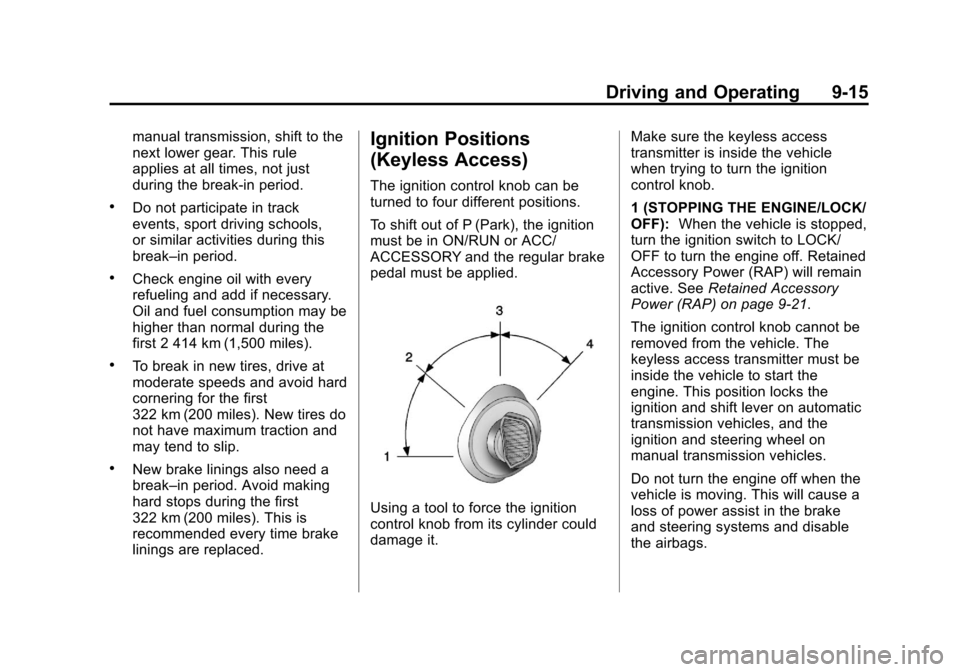
The ignition control knob can be
turned to four different positions.
To shift out of P (Park), the ignition
must be in ON/RUN or ACC/
ACCESSORY and the regular brake
pedal must be applied.
Using a tool to force the ignition
control knob from its cylinder could
damage it.Make sure the keyless access
transmitter is inside the vehicle
when trying to turn the ignition
control knob.
1 (STOPPING THE ENGINE/LOCK/
OFF):
When the vehicle is stopped,
turn the ignition switch to LOCK/
OFF to turn the engine off. Retained
Accessory Power (RAP) will remain
active. See Retained Accessory
Power (RAP) on page 9‑21.
The ignition control knob cannot be
removed from the vehicle. The
keyless access transmitter must be
inside the vehicle to start the
engine. This position locks the
ignition and shift lever on automatic
transmission vehicles, and the
ignition and steering wheel on
manual transmission vehicles.
Do not turn the engine off when the
vehicle is moving. This will cause a
loss of power assist in the brake
and steering systems and disable
the airbags.
Page 262 of 478
Black plate (20,1)Cadillac CTS/CTS-V Owner Manual - 2013 - crc2 - 8/22/12
9-20 Driving and Operating
Starting Procedure
1. With your foot off the acceleratorpedal, turn the ignition key to
START. If the vehicle has the
keyless access system, push the
ignition control knob in and
rotate the knob to the START
position. When the engine starts,
let go of the ignition. The idle
speed will go down as your
engine gets warm. Do not race
the engine immediately after
starting it. Operate the engine
and transmission gently to allow
the oil to warm up and lubricate
all moving parts.
The vehicle has a
Computer-Controlled Cranking
System. This feature assists in
starting the engine and protects
components. If the ignition key is
turned to the START position,
and then released when the
engine begins cranking, the
engine will continue cranking for
a few seconds or until the
vehicle starts. If the engine does
not start and the key is held in START for many seconds,
cranking will be stopped after
15 seconds to prevent cranking
motor damage. To prevent gear
damage, this system also
prevents cranking if the engine
is already running. Engine
cranking can be stopped by
turning the ignition switch to
ACC/ACCESSORY or
LOCK/OFF.
When first starting the vehicle,
the engine idle speed will be
elevated to allow the catalytic
converter, an emissions control
device, to quickly reach
operating temperature. After
approximately 20 seconds, the
engine will begin to transition to
its normal, quieter idle speed,
which can vary depending on
the temperature. This is normal
operation.
Notice: Cranking the engine for
long periods of time, by returning
the key to the START position
immediately after cranking has
ended, can overheat and damage the cranking motor, and drain the
battery. Wait at least 15 seconds
between each try, to let the
cranking motor cool down.
2. If the engine does not start after
five to 10 seconds, especially in
very cold weather (below 0°F or
−18°C), it could be flooded with
too much gasoline. Try pushing
the accelerator pedal all the way
to the floor and holding it there
as you hold the key in START
for up to a maximum of
15 seconds. Wait at least
15 seconds between each try, to
allow the cranking motor to cool
down. When the engine starts,
let go of the key and accelerator.
If the vehicle starts briefly but
then stops again, do the same
thing. This clears the extra
gasoline from the engine. Do not
race the engine immediately
after starting it. Operate the
engine and transmission gently
until the oil warms up and
lubricates all moving parts.