radio CADILLAC CTS 2013 2.G User Guide
[x] Cancel search | Manufacturer: CADILLAC, Model Year: 2013, Model line: CTS, Model: CADILLAC CTS 2013 2.GPages: 478, PDF Size: 7.7 MB
Page 141 of 478

Black plate (19,1)Cadillac CTS/CTS-V Owner Manual - 2013 - crc2 - 8/22/12
Instruments and Controls 5-19
{WARNING
If the airbag readiness light ever
comes on and stays on, it means
that something may be wrong
with the airbag system. To help
avoid injury to yourself or others,
have the vehicle serviced right
away. SeeAirbag Readiness
Light on page 5‑17 for more
information, including important
safety information.
Charging System Light
The charging system light comes on
briefly when the ignition is turned
on, but the engine is not running, as
a check to show the light is working. The light turns off when the engine
is started. If it does not, have the
vehicle serviced by your dealer.
If the light stays on, or comes on
while driving, there may be a
problem with the electrical charging
system. Have it checked by your
dealer. Driving while this light is on
could drain the battery.
When this light comes on, the Driver
Information Center (DIC) also
displays a message.
See
Battery Voltage and Charging
Messages on page 5‑31.
If a short distance must be driven
with the light on, be sure to turn off
all accessories, such as the radio
and air conditioner.
Malfunction
Indicator Lamp
A computer system called OBD II
(On-Board Diagnostics-Second
Generation) monitors the operation
of the vehicle to ensure emissions
are at acceptable levels, helping to maintain a clean environment. The
malfunction indicator lamp comes
on when the vehicle is placed in
ON/RUN, as a check to show it is
working. If it does not, have the
vehicle serviced by your dealer. See
Ignition Positions (Keyless Access)
on page 9‑15
orIgnition Positions
(Key Access) on page 9‑17 for more
information.
This light should come on when the
ignition is on, but the engine is not
running, as a check to show it is
working. If it does not, have the
vehicle serviced by your dealer.
If the malfunction indicator lamp
comes on while the engine is
running, this indicates that the OBD
II system has detected a problem
and diagnosis and service might be
required.
Page 159 of 478

Black plate (37,1)Cadillac CTS/CTS-V Owner Manual - 2013 - crc2 - 8/22/12
Instruments and Controls 5-37
ELECTRONIC KEY NOT
DETECTED
If the vehicle has the keyless
access system, this message
displays if the vehicle does not
detect the presence of a transmitter
when you have attempted to start
the vehicle or a vehicle door has
just closed. The following conditions
may cause this message to appear:
.Driver-added equipment plugged
into the accessory power outlet
on the center console is causing
interference. Examples of these
devices are cell phones and cell
phone chargers, two-way radios,
power inverters, or similar items.
Try moving the keyless access
transmitter away from these
devices when starting the
vehicle. In addition, PDA devices
and remote garage and gate
openers may also generate
Electromagnetic Interference
(EMI) that may interfere with the
keyless access transmitter. Donot carry the keyless access
transmitter in the same pocket or
bag as these devices.
.The vehicle is experiencing
Electromagnetic Interference
(EMI). Some locations, such as
airports, automatic toll booths,
and some gas stations have EMI
fields which may interfere with
the keyless access transmitter.
If moving the transmitter to
different locations within the
vehicle does not help, place the
transmitter in the center console
transmitter pocket with thebuttons facing the front of the
vehicle and then start the
vehicle.
.The vehicle's battery voltage is
low. The battery voltage must be
above 10 volts for the keyless
access transmitter to be
detected properly.
ELECTRONIC KEY NOT
DETECTED RESTART
ALLOWED
If the vehicle has the keyless
access system, this message
displays when the keyless access
transmitter is not detected inside the
vehicle while you are trying to turn
the ignition off. The vehicle may be
near a strong radio antenna signal
causing the keyless access system
to be jammed. If you have the
keyless access transmitter with you,
get out of the vehicle and lock the
doors. If you do not have the
keyless access transmitter with you,
you will be able to start the vehicle
again within five minutes, or after
the vehicle's content theft-deterrent
Page 175 of 478
Black plate (53,1)Cadillac CTS/CTS-V Owner Manual - 2013 - crc2 - 8/22/12
Instruments and Controls 5-53
Exiting the Feature
Settings Menu
The feature settings menu will be
exited when any of the following
occurs:
.The vehicle is no longer in
ON/RUN.
.The trip/fuel or vehicle
information DIC buttons are
pressed.
.The end of the feature settings
menu is reached and exited.
.A 40-second time period has
elapsed with no selection made.
Universal Remote
System
SeeRadio Frequency Statement on
page 13‑20 for information
regarding Part 15 of the Federal
Communications Commission (FCC)
rules and Industry Canada
Standards RSS-GEN/210/220/310.
Universal Remote System
Programming
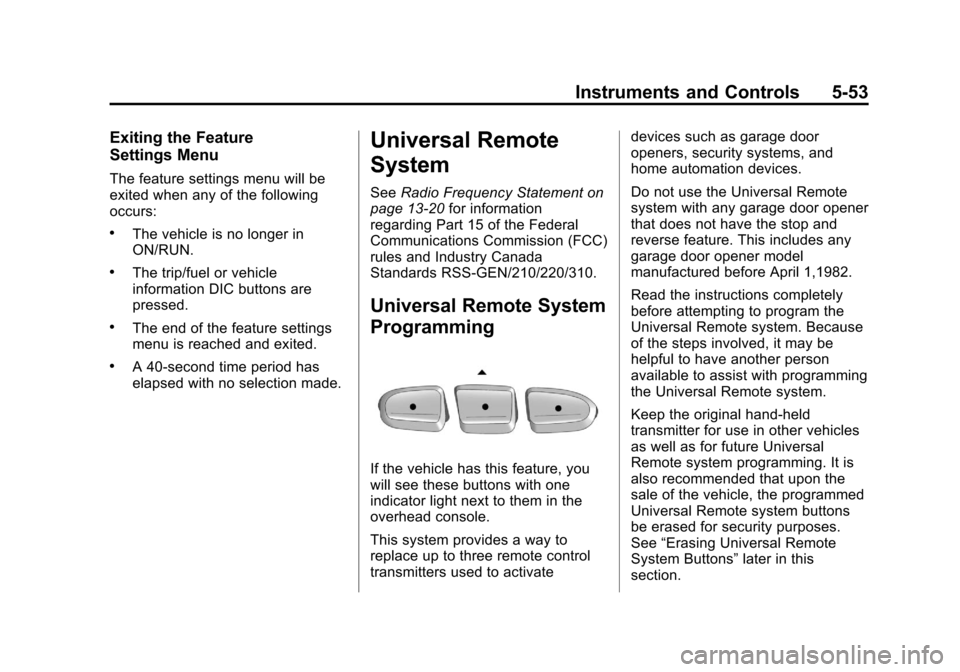
If the vehicle has this feature, you
will see these buttons with one
indicator light next to them in the
overhead console.
This system provides a way to
replace up to three remote control
transmitters used to activate devices such as garage door
openers, security systems, and
home automation devices.
Do not use the Universal Remote
system with any garage door opener
that does not have the stop and
reverse feature. This includes any
garage door opener model
manufactured before April 1,1982.
Read the instructions completely
before attempting to program the
Universal Remote system. Because
of the steps involved, it may be
helpful to have another person
available to assist with programming
the Universal Remote system.
Keep the original hand-held
transmitter for use in other vehicles
as well as for future Universal
Remote system programming. It is
also recommended that upon the
sale of the vehicle, the programmed
Universal Remote system buttons
be erased for security purposes.
See
“Erasing Universal Remote
System Buttons” later in this
section.
Page 176 of 478

Black plate (54,1)Cadillac CTS/CTS-V Owner Manual - 2013 - crc2 - 8/22/12
5-54 Instruments and Controls
When programming a garage door,
park outside of the garage. Park
directly in line with and facing the
garage door opener motor-head or
gate motor-head. Be sure that
people and objects are clear of the
garage door or gate being
programmed.
It is recommended that a new
battery be installed in the hand-held
transmitter for quicker and more
accurate transmission of the
radio-frequency signal.
Programming the Universal
Remote System
For questions or help programming
the Universal Remote system, call
1-800-355-3515 or go to
www.homelink.com.
Programming a garage door opener
involves time-sensitive actions, so
read the entire procedure before
starting. Otherwise, the device will
time out and the procedure will have
to be repeated.To program up to three devices:
1. Hold the end of the hand-held
transmitter about 3 to 8 cm (1 to
3 in) away from the Universal
Remote system buttons while
keeping the indicator light in
view. The hand-held transmitter
was supplied by the
manufacturer of the garage door
opener receiver
(motor-head unit).
2. At the same time, press and hold both the hand-held
transmitter button and one of the
three Universal Remote system
buttons to be used to operate
the garage door. Do not release
the Universal Remote system
button or the hand-held
transmitter button until the
indicator light changes from a
slowly to a rapidly flashing light.
You now may release both
buttons.
Some entry gates and garage
door openers may require
substitution of Step 2 with the procedure noted in
“Gate
Operator and Canadian
Programming” later in this
section.
3. Press and hold for five seconds the newly trained Universal
Remote system button (the
button selected in Step 2) while
observing the indicator light and
garage door activation.
.If the indicator light stays on
continuously or the garage
door starts to move when
the Universal Remote
system button is pressed
and released, then the
programming is complete.
There is no need to
continue programming
Steps 4–6.
Page 177 of 478
Black plate (55,1)Cadillac CTS/CTS-V Owner Manual - 2013 - crc2 - 8/22/12
Instruments and Controls 5-55
.If the Universal Remote
system indicator light blinks
rapidly for two seconds,
then turns to a constant
light and the garage door
does not move, continue
with programming
Steps 4–6.
It may be helpful to have
another person assist with
the remaining Steps 4–6.
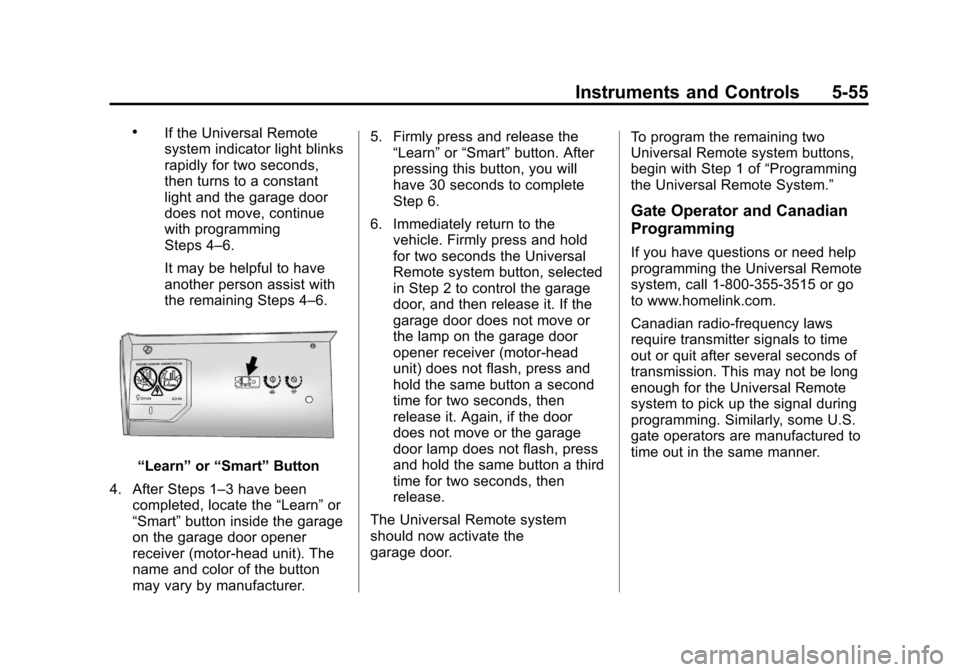
“Learn”or“Smart” Button
4. After Steps 1–3 have been completed, locate the “Learn”or
“Smart” button inside the garage
on the garage door opener
receiver (motor-head unit). The
name and color of the button
may vary by manufacturer. 5. Firmly press and release the
“Learn” or“Smart” button. After
pressing this button, you will
have 30 seconds to complete
Step 6.
6. Immediately return to the vehicle. Firmly press and hold
for two seconds the Universal
Remote system button, selected
in Step 2 to control the garage
door, and then release it. If the
garage door does not move or
the lamp on the garage door
opener receiver (motor-head
unit) does not flash, press and
hold the same button a second
time for two seconds, then
release it. Again, if the door
does not move or the garage
door lamp does not flash, press
and hold the same button a third
time for two seconds, then
release.
The Universal Remote system
should now activate the
garage door. To program the remaining two
Universal Remote system buttons,
begin with Step 1 of
“Programming
the Universal Remote System.”
Gate Operator and Canadian
Programming
If you have questions or need help
programming the Universal Remote
system, call 1-800-355-3515 or go
to www.homelink.com.
Canadian radio-frequency laws
require transmitter signals to time
out or quit after several seconds of
transmission. This may not be long
enough for the Universal Remote
system to pick up the signal during
programming. Similarly, some U.S.
gate operators are manufactured to
time out in the same manner.
Page 181 of 478

Black plate (3,1)Cadillac CTS/CTS-V Owner Manual - 2013 - crc2 - 8/22/12
Lighting 6-3
The DRL system will make either
the reduced intensity low-beam
headlamps or dedicated DRLs come
on when the following conditions
are met:
.It is still daylight and the ignition
is in ON/RUN or START.
.The exterior lamp control is inPor AUTO and the headlamps
are off.
.The automatic transmission is
not in P (Park).
When DRLs are on, only the
reduced intensity low-beam
headlamps or dedicated DRLs will
be on. The other exterior lamps and
the instrument cluster will not be on.
When the exterior lamp control is in
AUTO and it is dark enough outside,
the DRL turn off and the low-beam
headlamps will turn on. When it is
bright enough outside, the low-beam
headlamps will go off, and the DRL
will turn back on. If the vehicle is
started in a dark garage, the
automatic headlamp system comes on immediately. Once the vehicle
leaves the garage, it takes about
one minute for the automatic
headlamp system to change to DRL
if it is light outside. During that
delay, the instrument cluster may
not be as bright as usual. Make sure
the instrument panel brightness
knob is in the full bright position.
See
Instrument Panel Illumination
Control on page 6‑6.
Turning the exterior lamp control to
off or to the low-beam headlamp
position will turn off the DRL. If the
parking lamps or the fog lamps were
turned on instead, the DRL will still
turn off.
This will work regardless of gear
position and whether or not the
parking brake is set.
When the DRL are active and a turn
signal is operated, the DRL on the
side the turn signal is activated, will
turn off until the turn signal is
turned off.
Automatic Headlamp
System
When it is dark enough outside, the
automatic headlamp system turns
on the headlamps at the normal
brightness, along with the taillamps,
sidemarker, parking lamps, and the
instrument panel lights. The radio
lights will also be dim.
To turn off the automatic headlamp
system, turn the exterior lamp
control to the off position and then
release it.
The vehicle has a light sensor on
the top of the instrument panel in
the defroster grille which regulates
when the automatic headlamps turn
Page 189 of 478
Black plate (1,1)Cadillac CTS/CTS-V Owner Manual - 2013 - crc2 - 8/22/12
Infotainment System 7-1
Infotainment
System
Introduction
Infotainment . . . . . . . . . . . . . . . . . . . 7-1
Theft-Deterrent Feature . . . . . . . 7-2
Operation . . . . . . . . . . . . . . . . . . . . . 7-3
Radio
AM-FM Radio . . . . . . . . . . . . . . . . . 7-8
Satellite Radio . . . . . . . . . . . . . . . 7-11
Radio Reception . . . . . . . . . . . . . 7-15
Backglass Antenna . . . . . . . . . . 7-15
Multi-Band Antenna . . . . . . . . . . 7-16
Audio Players
CD Player . . . . . . . . . . . . . . . . . . . 7-16
CD/DVD Player . . . . . . . . . . . . . . 7-19
MP3 . . . . . . . . . . . . . . . . . . . . . . . . . 7-23
Hard Drive Device (HDD) . . . . 7-27
Auxiliary Devices . . . . . . . . . . . . 7-34
Phone
Bluetooth . . . . . . . . . . . . . . . . . . . . 7-36
Trademarks and License
Agreements
Trademarks and LicenseAgreements . . . . . . . . . . . . . . . . 7-44
Introduction
Infotainment
Read the following pages to
become familiar with the audio
system's features.
{WARNING
Taking your eyes off the road for
extended periods could cause a
crash resulting in injury or death
to you or others. Do not give
extended attention to infotainment
tasks while driving.
This system provides access to
many audio and non‐audio listings.
To minimize taking your eyes off the
road while driving, do the following
while the vehicle is parked:
.Become familiar with the
operation and controls of the
audio system.
Page 190 of 478

Black plate (2,1)Cadillac CTS/CTS-V Owner Manual - 2013 - crc2 - 8/22/12
7-2 Infotainment System
.Set up the tone, speaker
adjustments, and preset radio
stations.
For more information, see Defensive
Driving on page 9‑3.
Notice: Contact your dealer
before adding any equipment.
Adding audio or communication
equipment could interfere with
the operation of the engine, radio,
or other systems, and could
damage them. Follow federal
rules covering mobile radio and
telephone equipment.
The vehicle has Retained
Accessory Power (RAP). With RAP,
the audio system can be played
even after the ignition is turned off.
See Retained Accessory Power
(RAP) on page 9‑21 for more
information.
Navigation System
For vehicles with a navigation
system, see the separate navigation
manual.
Theft-Deterrent Feature
TheftLock®is designed to
discourage theft of the vehicle's
radio by learning a portion of the
Vehicle Identification Number (VIN).
The radio does not operate if it is
stolen or moved to a different
vehicle.
Page 191 of 478
Black plate (3,1)Cadillac CTS/CTS-V Owner Manual - 2013 - crc2 - 8/22/12
Infotainment System 7-3
Operation
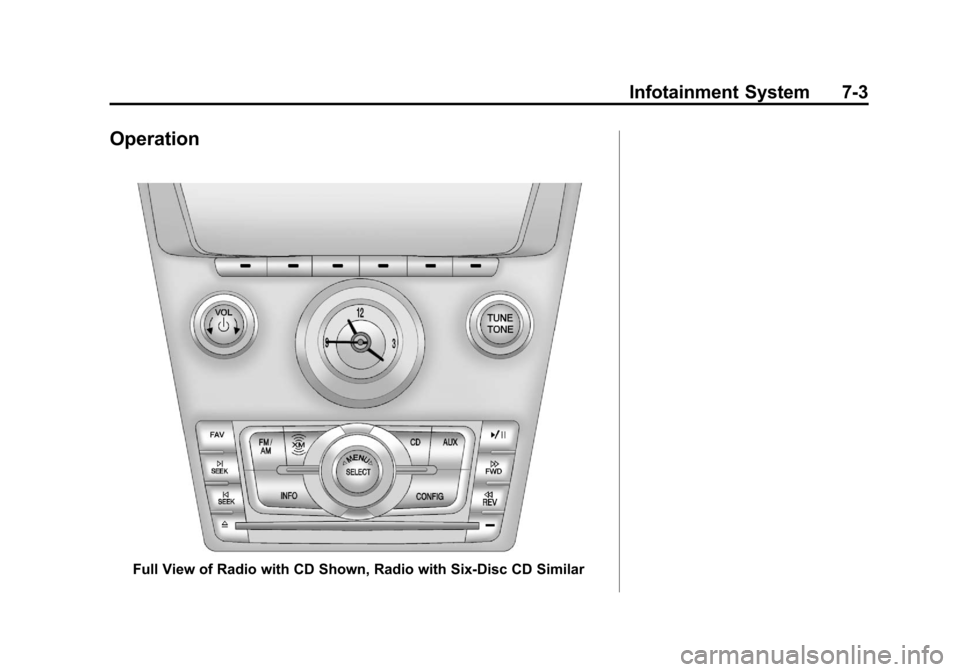
Full View of Radio with CD Shown, Radio with Six-Disc CD Similar
Page 192 of 478

Black plate (4,1)Cadillac CTS/CTS-V Owner Manual - 2013 - crc2 - 8/22/12
7-4 Infotainment System
Partial View of Radio with DVD Audio, Hard Drive Device (HDD),and USB
The vehicle may have one of these
radios as its audio system.
If the vehicle does not have one of
these radio systems, it may have a
navigation radio system. See the
navigation manual for more
information on the navigation audio
system.
Turning the System On or Off
VOL/P(Volume/Power): Press to
turn the system on and off.
Volume Control
VOL/P(Volume/Power): Turn
clockwise or counterclockwise to
increase or decrease the volume.
m: This button is disabled.
Setting the Tone (Bass/
Midrange/Treble)
BASS/MID/TREB (Bass, Midrange,
or Treble): To adjust bass,
midrange, or treble:
1. Press the TUNE/TONE knob until the tone control tabs
display.
2. Continue pressing the TUNE/ TONE knob, or press the softkey
under the desired tab to highlight
the desired tone setting.
3. To increase the highlighted setting, do one of the following:
.Turn the TUNE/TONE knob
clockwise.
.Turn the MENU/SELECT
knob clockwise.
.Press the\FWD button.
.Press the¨SEEK button.