ECU CADILLAC CTS 2013 2.G Service Manual
[x] Cancel search | Manufacturer: CADILLAC, Model Year: 2013, Model line: CTS, Model: CADILLAC CTS 2013 2.GPages: 478, PDF Size: 7.7 MB
Page 256 of 478
Black plate (14,1)Cadillac CTS/CTS-V Owner Manual - 2013 - crc2 - 8/22/12
9-14 Driving and Operating
WARNING (Continued)
cause loss of control and a
crash. Overloading can also
shorten the life of the vehicle.
{WARNING
Things inside the vehicle can
strike and injure people in a
sudden stop or turn, or in a
crash.
.Put things in the cargo
area of the vehicle. In the
cargo area, put them as
far forward as possible.
Try to spread the weight
evenly.
(Continued)
WARNING (Continued)
.Never stack heavier
things, like suitcases,
inside the vehicle so that
some of them are above
the tops of the seats.
.Do not leave an
unsecured child restraint
in the vehicle.
.Secure loose items in the
vehicle.
.Do not leave a seat folded
down unless needed.
Starting and
Operating
New Vehicle Break-In
Follow these recommended
guidelines during the first
2 414 km (1,500 miles) of driving
this vehicle. Parts have a break-in
period and performance will be
better in the long run.
For the first 2 414 km (1,500 miles):
.Avoid full throttle starts and
abrupt stops.
.Do not exceed 4,000
engine rpm.
.Avoid driving at any one
constant speed, fast or slow.
.Avoid downshifting to brake or
slow the vehicle when the
engine speed will exceed
4000 rpm.
.Do not let the engine labor.
Never lug the engine in high
gear at low speeds. With a
Page 294 of 478

Black plate (52,1)Cadillac CTS/CTS-V Owner Manual - 2013 - crc2 - 8/22/12
9-52 Driving and Operating
.Do not tow a trailer during the
first 800 km (500 mi), to prevent
damage to the engine, axle or
other parts.
.Then, during the first 800 km
(500 mi) trailer towing, do not
drive over 80 km/h (50 mph) and
do not make starts at full throttle.
.Vehicles with automatic
transmissions can tow in D
(Drive) but M (Manual Mode) is
recommended. SeeManual
Mode on page 9‑26. Use a lower
gear if the transmission shifts
too often. For vehicles with a
manual transmission, it is better
not to use the highest gear.
{WARNING
When towing a trailer, exhaust
gases may collect at the rear of
the vehicle and enter if the
liftgate, trunk/hatch, or rear-most
window is open.
(Continued)
WARNING (Continued)
When towing a trailer:
.Do not drive with the liftgate,
trunk/hatch, or rear-most
window open.
.Fully open the air outlets on
or under the instrument
panel.
.Also adjust the Climate
Control system to a setting
that brings in only outside air.
See“Climate Control
Systems” in the Index.
For more information about
Carbon Monoxide, see Engine
Exhaust on page 9‑24.
Towing a trailer requires a certain
amount of experience. The
combination you are driving is
longer and not as responsive as the
vehicle itself. Get acquainted with
the handling and braking of the rig
before setting out for the open road. Before starting, check all trailer hitch
parts and attachments, safety
chains, electrical connectors, lamps,
tires and mirrors. If the trailer has
electric brakes, start the
combination moving and then apply
the trailer brake controller by hand
to be sure the brakes work.
During the trip, check occasionally
to be sure that the load is secure
and the lamps and any trailer
brakes still work.
Towing with a Stability Control
System
When towing, the sound of the
stability control system might be
heard. The system is reacting to the
vehicle movement caused by the
trailer, which mainly occurs during
cornering. This is normal when
towing heavier trailers.
Following Distance
Stay at least twice as far behind the
vehicle ahead as you would when
driving the vehicle without a trailer.
Page 320 of 478

Black plate (20,1)Cadillac CTS/CTS-V Owner Manual - 2013 - crc2 - 8/22/12
10-20 Vehicle Care
Notice:If the pressure cap is not
tightly installed, coolant loss and
possible engine damage may
occur. Be sure the cap is properly
and tightly secured.
Recheck the coolant level in the
bottle next time you use your
vehicle to ensure the system is full
when cold.
Checking Coolant in the
Intercooler System (CTS-V)
The vehicle must be on a level
surface when checking the coolant
level.
The super charged engine
intercooler coolant fill neck is in the
engine compartment on the
passenger side of the vehicle. See
Engine Compartment Overview on
page 10‑5.
On the coolant fill neck, there is a
cold fill region between the two
horizontal lines shown.
Check to see if coolant is visible in
the coolant fill neck. If the coolant is
not visible or below the cold fill region in the fill neck, add a 50/
50 mixture of clean, drinkable water
and DEX-COOL coolant at the
coolant fill bottle, but be sure the
cooling system is cool before this
is done.
Adding Coolant to the
Intercooler System
Coolant (CTS-V)
1. Remove the intercooler system
pressure cap when the
intercooler system hoses are no
longer hot. Turn the pressure
cap slowly counterclockwise about one-quarter of a turn.
If you hear a hiss, wait for that to
stop. This allows any pressure
still left to be vented.
2. Keep turning the pressure cap slowly and remove it.
3. Add the proper DEX-COOL coolant mixture to the fill neck
until the coolant is within the
cold fill region.
With the intercooler system
pressure cap off, start the
engine and let it run for a couple
of minutes. Then turn the engine
off. By this time, the coolant
level inside the fill neck may be
lower. If the level drops where
coolant is no longer within the
cold fill region of the fill neck
with the engine off, add more of
the DEX-COOL coolant mixture
to the fill neck until the level is
again visible in the cold fill
region.
4. Replace the pressure cap tightly.
Page 321 of 478

Black plate (21,1)Cadillac CTS/CTS-V Owner Manual - 2013 - crc2 - 8/22/12
Vehicle Care 10-21
Notice:If the pressure cap is not
tightly installed, coolant loss and
possible engine damage may
occur. Be sure the cap is properly
and tightly secured.
If the coolant is not at the proper
level when the system cools down
again, see your dealer.
Engine Overheating
The vehicle has several indicators
to warn of engine overheating.
There are two engine hot messages
that may be displayed in the Driver
Information Center (DIC). See
Engine Cooling System Messages
on page 5‑34 for more information.
You may decide not to lift the hood
when one of these warnings appear,
but get service help right away. See
Roadside Service (U.S. and
Canada) on page 13‑7 orRoadside
Service (Mexico) on page 13‑9.
If you do decide to lift the hood,
make sure the vehicle is parked on
a level surface. Then check to see if the engine
cooling fans are running. If the
engine is overheating, the fan(s)
should be running. If they are not,
do not continue to run the engine
and have the vehicle serviced.
Notice:
Running the engine
without coolant may cause
damage or a fire. Vehicle damage
would not be covered by the
warranty. See Overheated Engine
Protection Operating Mode on
page 10‑22 for information on
driving to a safe place in an
emergency.
If Steam Is Coming from the
Engine Compartment
{WARNING
Steam from an overheated engine
can burn you badly, even if you
just open the hood. Stay away
from the engine if you see or hear
steam coming from it. Just turn it
(Continued)
WARNING (Continued)
off and get everyone away from
the vehicle until it cools down.
Wait until there is no sign of
steam or coolant before you open
the hood.
If you keep driving when the
engine is overheated, the liquids
in it can catch fire. You or others
could be badly burned. Stop the
engine if it overheats, and get out
of the vehicle until the engine
is cool.
If No Steam Is Coming from
the Engine Compartment
If an engine overheat warning is
displayed but no steam can be seen
or heard, the problem may not be
too serious. Sometimes the engine
can get a little too hot when the
vehicle:
.Climbs a long hill on a hot day.
.Stops after high-speed driving.
Page 330 of 478
Black plate (30,1)Cadillac CTS/CTS-V Owner Manual - 2013 - crc2 - 8/22/12
10-30 Vehicle Care
5. Pull the wiper blade assemblydown far enough to release it
from the J-hooked end of the
wiper arm. Slide the assembly
away from the arm.
Allowing the wiper blade arm to
touch the windshield when no
wiper blade is installed could
damage the windshield. Any
damage that occurs would not
be covered by your warranty. Do
not allow the wiper blade arm to
touch the windshield.
6. Replace the blade with a new one.
7. Reinstall the wiper bladeassembly by sliding it over the
wiper arm to engage the
J-hooked end. Pull up on the
assembly to lock it into place.
8. Repeat the steps for the other wiper.
Rear Wiper Blade Replacement
(Wagon)
The rear wiper blade and wiper arm
have a cover for protection. The
cover must be removed before the
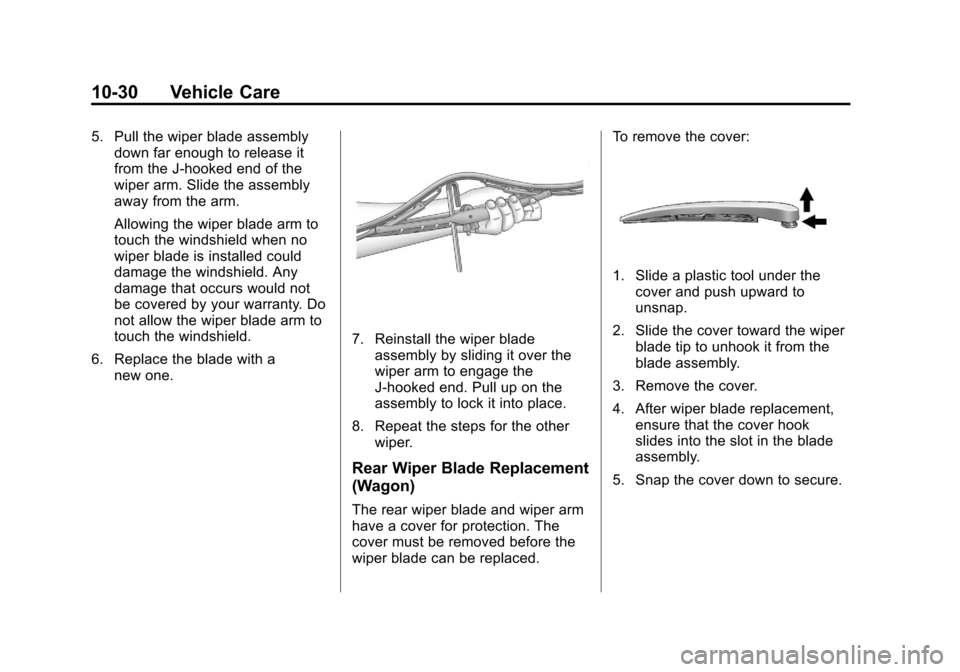
wiper blade can be replaced. To remove the cover:
1. Slide a plastic tool under the
cover and push upward to
unsnap.
2. Slide the cover toward the wiper blade tip to unhook it from the
blade assembly.
3. Remove the cover.
4. After wiper blade replacement, ensure that the cover hook
slides into the slot in the blade
assembly.
5. Snap the cover down to secure.
Page 331 of 478
Black plate (31,1)Cadillac CTS/CTS-V Owner Manual - 2013 - crc2 - 8/22/12
Vehicle Care 10-31
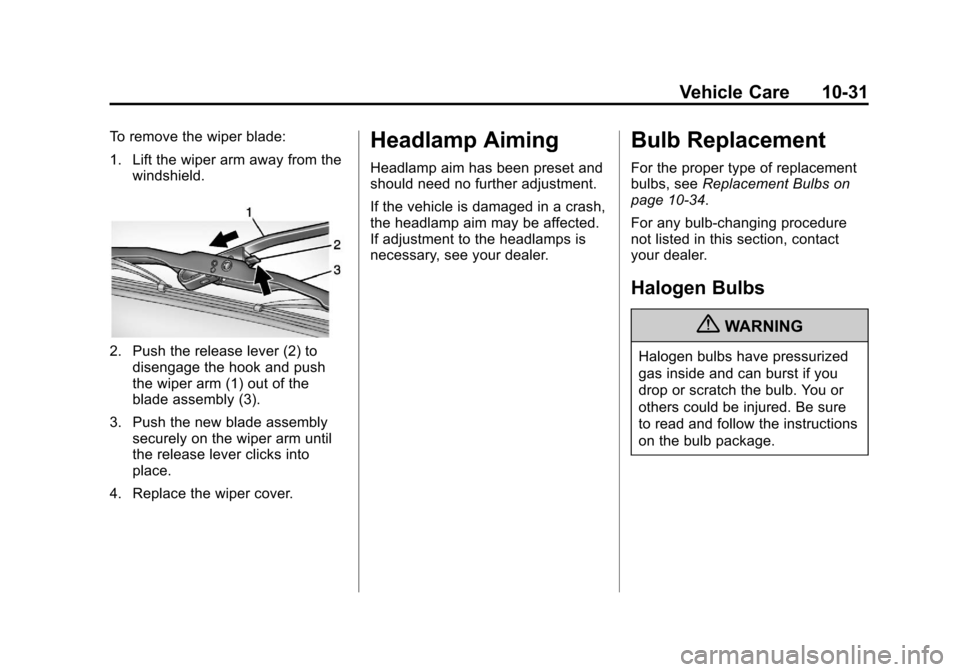
To remove the wiper blade:
1. Lift the wiper arm away from thewindshield.
2. Push the release lever (2) todisengage the hook and push
the wiper arm (1) out of the
blade assembly (3).
3. Push the new blade assembly securely on the wiper arm until
the release lever clicks into
place.
4. Replace the wiper cover.
Headlamp Aiming
Headlamp aim has been preset and
should need no further adjustment.
If the vehicle is damaged in a crash,
the headlamp aim may be affected.
If adjustment to the headlamps is
necessary, see your dealer.
Bulb Replacement
For the proper type of replacement
bulbs, see Replacement Bulbs on
page 10‑34.
For any bulb‐changing procedure
not listed in this section, contact
your dealer.
Halogen Bulbs
{WARNING
Halogen bulbs have pressurized
gas inside and can burst if you
drop or scratch the bulb. You or
others could be injured. Be sure
to read and follow the instructions
on the bulb package.
Page 404 of 478
Black plate (104,1)Cadillac CTS/CTS-V Owner Manual - 2013 - crc2 - 8/22/12
10-104 Vehicle Care
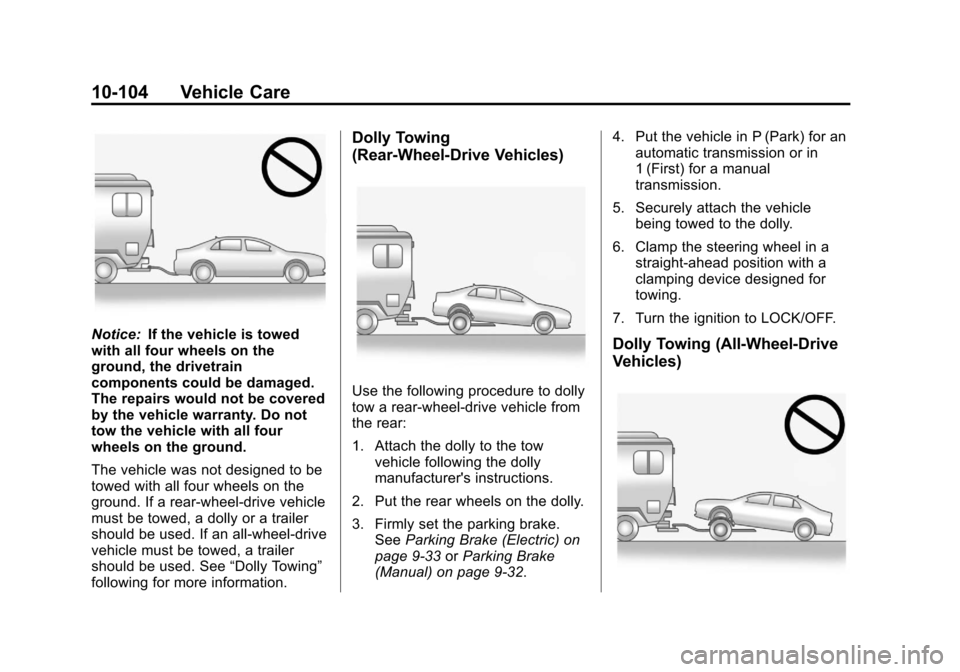
Notice:If the vehicle is towed
with all four wheels on the
ground, the drivetrain
components could be damaged.
The repairs would not be covered
by the vehicle warranty. Do not
tow the vehicle with all four
wheels on the ground.
The vehicle was not designed to be
towed with all four wheels on the
ground. If a rear-wheel-drive vehicle
must be towed, a dolly or a trailer
should be used. If an all-wheel-drive
vehicle must be towed, a trailer
should be used. See “Dolly Towing”
following for more information.
Dolly Towing
(Rear-Wheel-Drive Vehicles)
Use the following procedure to dolly
tow a rear-wheel-drive vehicle from
the rear:
1. Attach the dolly to the tow vehicle following the dolly
manufacturer's instructions.
2. Put the rear wheels on the dolly.
3. Firmly set the parking brake. See Parking Brake (Electric) on
page 9‑33 orParking Brake
(Manual) on page 9‑32. 4. Put the vehicle in P (Park) for an
automatic transmission or in
1 (First) for a manual
transmission.
5. Securely attach the vehicle being towed to the dolly.
6. Clamp the steering wheel in a straight-ahead position with a
clamping device designed for
towing.
7. Turn the ignition to LOCK/OFF.
Dolly Towing (All-Wheel-Drive
Vehicles)
Page 412 of 478
Black plate (112,1)Cadillac CTS/CTS-V Owner Manual - 2013 - crc2 - 8/22/12
10-112 Vehicle Care
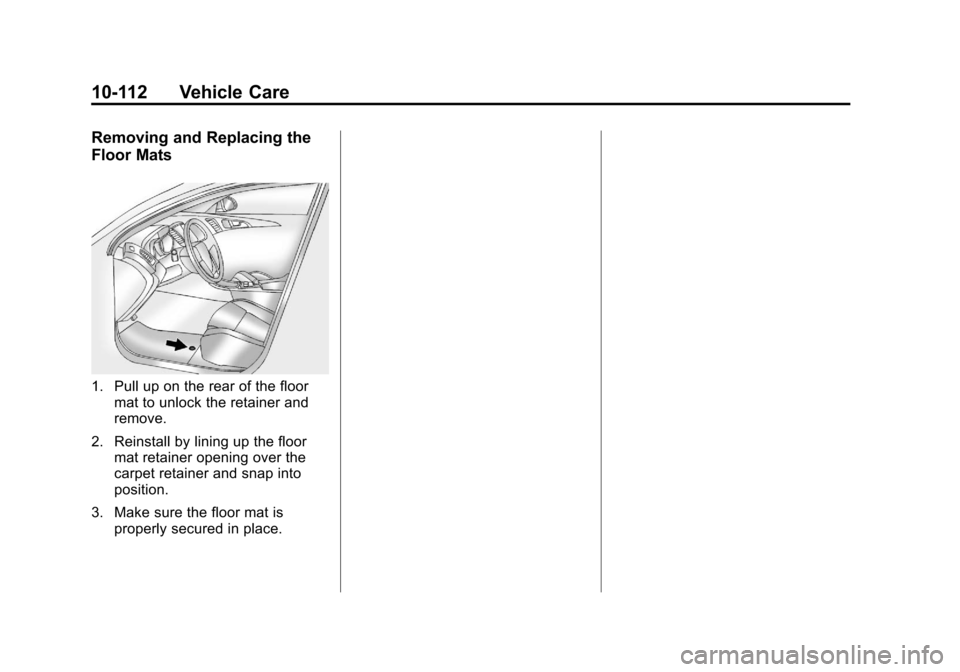
Removing and Replacing the
Floor Mats
1. Pull up on the rear of the floormat to unlock the retainer and
remove.
2. Reinstall by lining up the floor mat retainer opening over the
carpet retainer and snap into
position.
3. Make sure the floor mat is properly secured in place.
Page 444 of 478

Black plate (8,1)Cadillac CTS/CTS-V Owner Manual - 2013 - crc2 - 8/22/12
13-8 Customer Information
claims are made too often, or the
same type of claim is made many
times.
Cadillac Owner Privileges™
.Emergency Fuel Delivery:
Delivery of enough fuel for the
vehicle to get to the nearest
service station.
.Lock-Out Service:Service to
unlock the vehicle if you are
locked out. A remote unlock may
be available if you have OnStar.
For security reasons, the driver
must present identification
before this service is given.
.Emergency Tow from a Public
Road or Highway: Tow to the
nearest Cadillac dealer for
warranty service, or if the vehicle
was in a crash and cannot be
driven. Assistance is also given
when the vehicle is stuck in the
sand, mud, or snow.
.Flat Tire Change: Service to
change a flat tire with a spare
tire. The spare tire, if equipped, must be in good condition and
properly inflated. It is your
responsibility for the repair or
replacement of the tire if it is not
covered by the warranty.
.Battery Jump Start:
Service to
jump start a dead battery.
.Trip Interruption Benefits and
Service: If your trip is
interrupted due to a warranty
failure, incidental expenses may
be reimbursed during the
6 years/110 000 km (70,000 mi)
Powertrain warranty period.
Items considered are hotel,
meals, and rental car.
Cadillac Technician Roadside
Service (U.S. Only)
Cadillac's exceptional Roadside
Service is more than an auto club or
towing service. It provides every
Cadillac owner in the United States
with the advantage of contacting a
Cadillac advisor and, where
available, a Cadillac trained dealer
technician who can provide on-site
service. A dealer technician will travel to
your location within a 30-mile radius
of a participating Cadillac
dealership. If beyond this radius, we
will arrange to have your car towed
to the nearest Cadillac dealership.
Each technician travels with a
specially equipped service vehicle
complete with the necessary
Cadillac parts and tools required to
handle most roadside repairs.
Services Not Included in
Roadside Service
.Impound towing caused by
violation of any laws.
.Legal fines.
.Mounting, dismounting,
or changing of snow tires,
chains, or other traction devices.
.Towing or services for vehicles
driven on a non-public road or
highway.
Page 456 of 478

Black plate (20,1)Cadillac CTS/CTS-V Owner Manual - 2013 - crc2 - 8/22/12
13-20 Customer Information
if the vehicle is leased, with the
consent of the lessee; in response
to an official request by police or
similar government office; as part of
GM's defense of litigation through
the discovery process; or, as
required by law. Data that GM
collects or receives may also be
used for GM research needs or may
be made available to others for
research purposes, where a need is
shown and the data is not tied to a
specific vehicle or vehicle owner.
OnStar®
If the vehicle is equipped with
OnStar®and has an active
subscription, additional data may be
collected through the OnStar
system. This includes information
about the vehicle’s operation; about
collisions involving the vehicle; the
use of the vehicle and its features;
and, in certain situations, the
location and approximate GPS
speed of the vehicle. Refer to the OnStar Terms and Conditions and
Privacy Statement on the OnStar
website.
Navigation System
If the vehicle is equipped with a
navigation system, use of the
system may result in the storage of
destinations, addresses, telephone
numbers, and other trip information.
See the navigation manual for
information on stored data and for
deletion instructions.
Radio Frequency
Identification (RFID)
RFID technology is used in some
vehicles for functions such as tire
pressure monitoring and ignition
system security, as well as in
connection with conveniences such
as Remote Keyless Entry (RKE)
transmitters for remote door locking/
unlocking and starting, and
in-vehicle transmitters for garage
door openers. RFID technology in
GM vehicles does not use or recordpersonal information or link with any
other GM system containing
personal information.
Radio Frequency
Statement
This vehicle has systems that
operate on a radio frequency that
comply with Part 15 of the Federal
Communications Commission (FCC)
rules and with Industry Canada
Standards RSS‐GEN/210/220/310.
Operation is subject to the following
two conditions:
1. The device may not cause
harmful interference.
2. The device must accept any interference received, including
interference that may cause
undesired operation of the
device.
Changes or modifications to any of
these systems by other than an
authorized service facility could void
authorization to use this equipment.