instrument panel CADILLAC CTS 2013 2.G Service Manual
[x] Cancel search | Manufacturer: CADILLAC, Model Year: 2013, Model line: CTS, Model: CADILLAC CTS 2013 2.GPages: 478, PDF Size: 7.7 MB
Page 278 of 478
Black plate (36,1)Cadillac CTS/CTS-V Owner Manual - 2013 - crc2 - 8/22/12
9-36 Driving and Operating
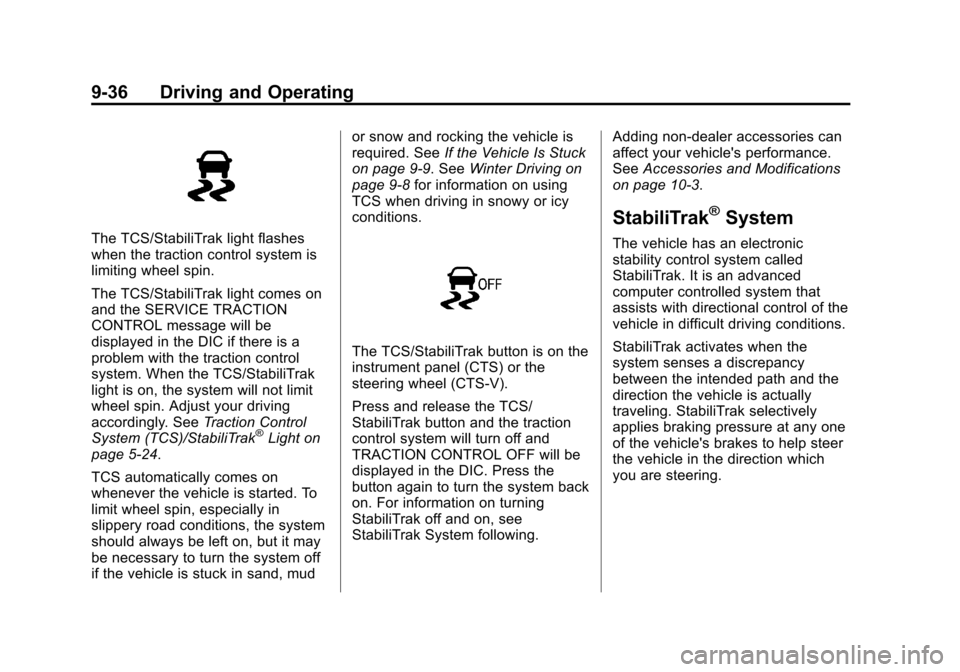
The TCS/StabiliTrak light flashes
when the traction control system is
limiting wheel spin.
The TCS/StabiliTrak light comes on
and the SERVICE TRACTION
CONTROL message will be
displayed in the DIC if there is a
problem with the traction control
system. When the TCS/StabiliTrak
light is on, the system will not limit
wheel spin. Adjust your driving
accordingly. SeeTraction Control
System (TCS)/StabiliTrak
®Light on
page 5‑24.
TCS automatically comes on
whenever the vehicle is started. To
limit wheel spin, especially in
slippery road conditions, the system
should always be left on, but it may
be necessary to turn the system off
if the vehicle is stuck in sand, mud or snow and rocking the vehicle is
required. See
If the Vehicle Is Stuck
on page 9‑9. See Winter Driving on
page 9‑8 for information on using
TCS when driving in snowy or icy
conditions.
The TCS/StabiliTrak button is on the
instrument panel (CTS) or the
steering wheel (CTS-V).
Press and release the TCS/
StabiliTrak button and the traction
control system will turn off and
TRACTION CONTROL OFF will be
displayed in the DIC. Press the
button again to turn the system back
on. For information on turning
StabiliTrak off and on, see
StabiliTrak System following. Adding non-dealer accessories can
affect your vehicle's performance.
See
Accessories and Modifications
on page 10‑3.
StabiliTrak®System
The vehicle has an electronic
stability control system called
StabiliTrak. It is an advanced
computer controlled system that
assists with directional control of the
vehicle in difficult driving conditions.
StabiliTrak activates when the
system senses a discrepancy
between the intended path and the
direction the vehicle is actually
traveling. StabiliTrak selectively
applies braking pressure at any one
of the vehicle's brakes to help steer
the vehicle in the direction which
you are steering.
Page 279 of 478
Black plate (37,1)Cadillac CTS/CTS-V Owner Manual - 2013 - crc2 - 8/22/12
Driving and Operating 9-37
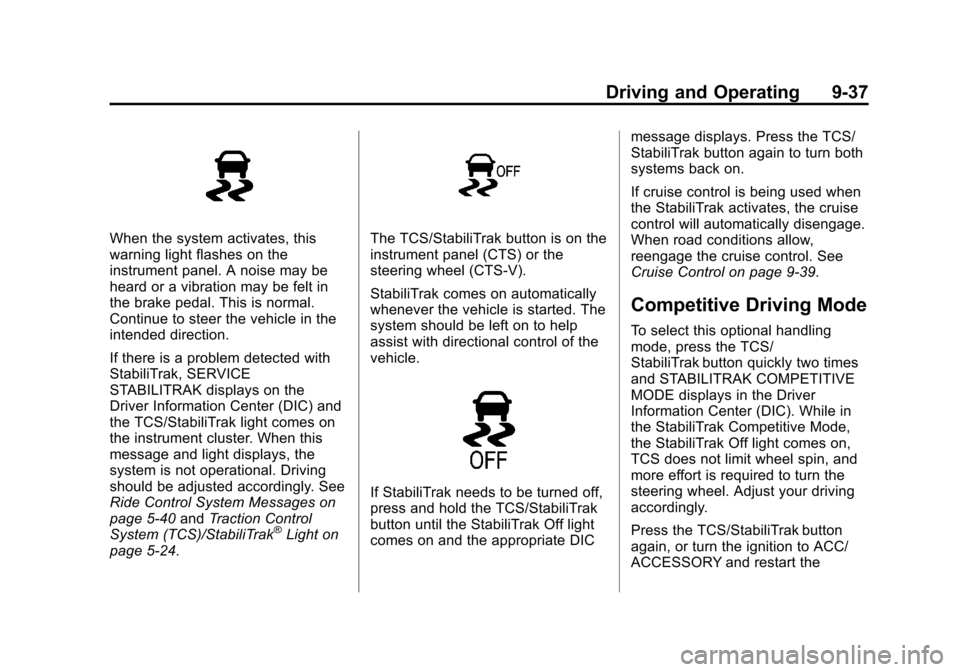
When the system activates, this
warning light flashes on the
instrument panel. A noise may be
heard or a vibration may be felt in
the brake pedal. This is normal.
Continue to steer the vehicle in the
intended direction.
If there is a problem detected with
StabiliTrak, SERVICE
STABILITRAK displays on the
Driver Information Center (DIC) and
the TCS/StabiliTrak light comes on
the instrument cluster. When this
message and light displays, the
system is not operational. Driving
should be adjusted accordingly. See
Ride Control System Messages on
page 5‑40andTraction Control
System (TCS)/StabiliTrak
®Light on
page 5‑24.
The TCS/StabiliTrak button is on the
instrument panel (CTS) or the
steering wheel (CTS-V).
StabiliTrak comes on automatically
whenever the vehicle is started. The
system should be left on to help
assist with directional control of the
vehicle.
If StabiliTrak needs to be turned off,
press and hold the TCS/StabiliTrak
button until the StabiliTrak Off light
comes on and the appropriate DIC message displays. Press the TCS/
StabiliTrak button again to turn both
systems back on.
If cruise control is being used when
the StabiliTrak activates, the cruise
control will automatically disengage.
When road conditions allow,
reengage the cruise control. See
Cruise Control on page 9‑39.
Competitive Driving Mode
To select this optional handling
mode, press the TCS/
StabiliTrak button quickly two times
and STABILITRAK COMPETITIVE
MODE displays in the Driver
Information Center (DIC). While in
the StabiliTrak Competitive Mode,
the StabiliTrak Off light comes on,
TCS does not limit wheel spin, and
more effort is required to turn the
steering wheel. Adjust your driving
accordingly.
Press the TCS/StabiliTrak button
again, or turn the ignition to ACC/
ACCESSORY and restart the
Page 280 of 478
Black plate (38,1)Cadillac CTS/CTS-V Owner Manual - 2013 - crc2 - 8/22/12
9-38 Driving and Operating
vehicle, to turn TCS back on and
turn the TCS/StabiliTrak warning
light off.
Notice:When traction control is
turned off, or Competitive Driving
Mode is active, it is possible to
lose traction. If you attempt to
shift with the drive wheels
spinning with a loss of traction, it
is possible to cause damage to
the transmission. Do not attempt
to shift when the drive wheels do
not have traction. Damage caused
by misuse of the vehicle is not
covered. See the warranty book
for additional information.
Magnetic Ride Control
With this feature on the CTS-V, the
Magnetic Ride Control system
adjusts the ride of the vehicle to
Tour or Sport modes. Magnetic Ride
Control monitors the suspension
system to determine the proper
system response. TOUR:
Use for normal city and
highway driving. This setting
provides a smooth, soft ride.
SPORT: Use where road conditions
or personal preference demand
more control. This setting provides
more “feel,” or response to road
conditions.
The setting can be changed at any
time. Based on road conditions,
steering wheel angle, and the
vehicle speed, the system
automatically adjusts to provide the
best handling while providing a
smooth ride. The Tour and Sport
modes will feel similar on a smooth
road. Select a new setting whenever
driving conditions change.
The Driver Information Center (DIC)
briefly displays SUSPENSION
MODE TOUR or SUSPENSION
MODE SPORT on vehicle startup or
when a new mode is selected.
Press and release this button in the
center of the instrument panel, to
change modes.
Limited-Slip Rear Axle
Vehicles with a limited-slip rear axle
can give more traction on snow,
mud, ice, sand, or gravel. When
traction is low, this feature allows
the drive wheel with the most
traction to move the vehicle. The
limited-slip rear axle also gives the
driver enhanced control when
cornering hard or completing a
maneuver, such as a lane change.
Page 289 of 478
Black plate (47,1)Cadillac CTS/CTS-V Owner Manual - 2013 - crc2 - 8/22/12
Driving and Operating 9-47
Fuel
Use of the recommended fuel is an
important part of the proper
maintenance of this vehicle. To help
keep the engine clean and maintain
optimum vehicle performance, we
recommend the use of gasoline
advertised as TOP TIER Detergent
Gasoline.
Look for the TOP TIER label on the
fuel pump to ensure gasoline meets
enhanced detergency standards
developed by auto companies. A list
of marketers providing TOP TIER
Detergent Gasoline can be found at
www.toptiergas.com. TOP TIER
gasoline is only available in the U.S.
and Canada.
The eighth digit of the Vehicle
Identification Number (VIN) shows
the code letter or number that
identifies the vehicle's engine. The
VIN is at the top left of the
instrument panel. SeeVehicle
Identification Number (VIN) on
page 12‑1.
Recommended Fuel
If the vehicle has a V6 engine, use
regular unleaded gasoline with a
posted octane rating of 87 or higher.
If the octane rating is less than 87,
an audible knocking noise, commonly referred to as spark
knock, might be heard when driving.
If this occurs, use a gasoline rated
at 87 octane or higher as soon as
possible. If heavy knocking is heard
when using gasoline rated at
87 octane or higher, the engine
needs service.
If the vehicle has the 6.2L V8 engine
(VIN Code P), use premium
unleaded gasoline with a posted
octane rating of 91 or higher. For
best performance, use premium
unleaded gasoline with a posted
octane rating of 93. In an
emergency, you can use regular
unleaded gasoline with an octane
rating of 87 or higher. If 87 octane
fuel is used, do not perform any
aggressive driving maneuvers such
as wide open throttle applications.
You might also hear audible spark
knock during acceleration. Refill the
tank with premium fuel as soon as
possible to avoid damaging the
engine. If heavy knocking is heard
Page 294 of 478

Black plate (52,1)Cadillac CTS/CTS-V Owner Manual - 2013 - crc2 - 8/22/12
9-52 Driving and Operating
.Do not tow a trailer during the
first 800 km (500 mi), to prevent
damage to the engine, axle or
other parts.
.Then, during the first 800 km
(500 mi) trailer towing, do not
drive over 80 km/h (50 mph) and
do not make starts at full throttle.
.Vehicles with automatic
transmissions can tow in D
(Drive) but M (Manual Mode) is
recommended. SeeManual
Mode on page 9‑26. Use a lower
gear if the transmission shifts
too often. For vehicles with a
manual transmission, it is better
not to use the highest gear.
{WARNING
When towing a trailer, exhaust
gases may collect at the rear of
the vehicle and enter if the
liftgate, trunk/hatch, or rear-most
window is open.
(Continued)
WARNING (Continued)
When towing a trailer:
.Do not drive with the liftgate,
trunk/hatch, or rear-most
window open.
.Fully open the air outlets on
or under the instrument
panel.
.Also adjust the Climate
Control system to a setting
that brings in only outside air.
See“Climate Control
Systems” in the Index.
For more information about
Carbon Monoxide, see Engine
Exhaust on page 9‑24.
Towing a trailer requires a certain
amount of experience. The
combination you are driving is
longer and not as responsive as the
vehicle itself. Get acquainted with
the handling and braking of the rig
before setting out for the open road. Before starting, check all trailer hitch
parts and attachments, safety
chains, electrical connectors, lamps,
tires and mirrors. If the trailer has
electric brakes, start the
combination moving and then apply
the trailer brake controller by hand
to be sure the brakes work.
During the trip, check occasionally
to be sure that the load is secure
and the lamps and any trailer
brakes still work.
Towing with a Stability Control
System
When towing, the sound of the
stability control system might be
heard. The system is reacting to the
vehicle movement caused by the
trailer, which mainly occurs during
cornering. This is normal when
towing heavier trailers.
Following Distance
Stay at least twice as far behind the
vehicle ahead as you would when
driving the vehicle without a trailer.
Page 304 of 478
Black plate (4,1)Cadillac CTS/CTS-V Owner Manual - 2013 - crc2 - 8/22/12
10-4 Vehicle Care
Vehicle Checks
Doing Your Own
Service Work
{WARNING
It can be dangerous to work on
your vehicle if you do not have
the proper knowledge, service
manual, tools, or parts. Always
follow owner manual procedures
and consult the service manual
for your vehicle before doing any
service work.
If doing some of your own service
work, use the proper service
manual. It tells you much more
about how to service the vehicle
than this manual can. To order the
proper service manual, see Service
Publications Ordering Information
on page 13‑16. This vehicle has an airbag system.
Before attempting to do your own
service work, see
Servicing the
Airbag-Equipped Vehicle on
page 3‑31.
Keep a record with all parts receipts
and list the mileage and the date of
any service work performed. See
Maintenance Records on
page 11‑17.
Notice: Even small amounts of
contamination can cause damage
to vehicle systems. Do not allow
contaminants to contact the
fluids, reservoir caps,
or dipsticks.
Hood
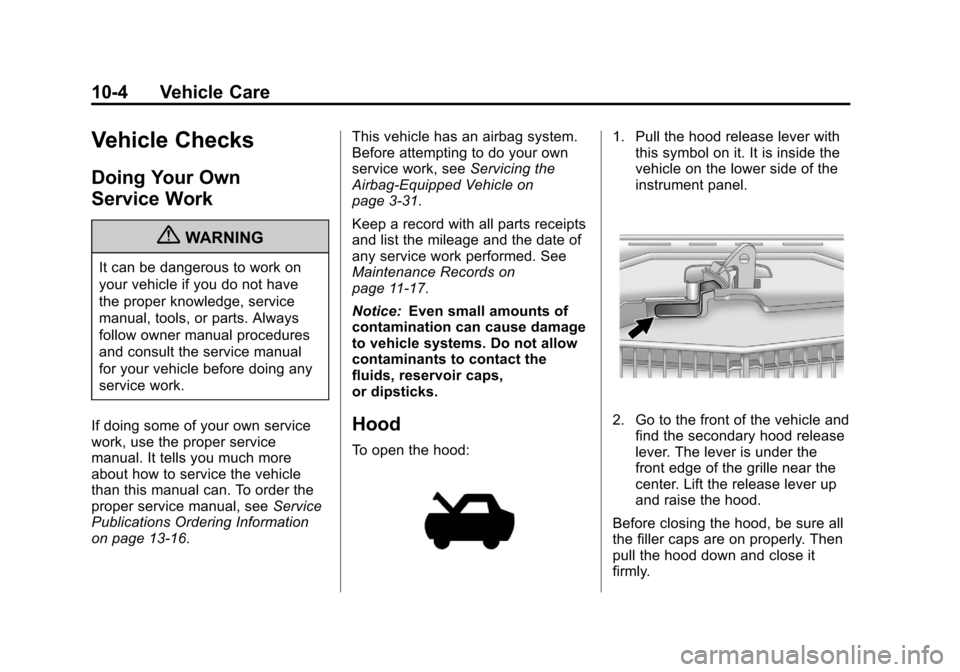
To open the hood:
1. Pull the hood release lever with this symbol on it. It is inside the
vehicle on the lower side of the
instrument panel.
2. Go to the front of the vehicle and
find the secondary hood release
lever. The lever is under the
front edge of the grille near the
center. Lift the release lever up
and raise the hood.
Before closing the hood, be sure all
the filler caps are on properly. Then
pull the hood down and close it
firmly.
Page 337 of 478
Black plate (37,1)Cadillac CTS/CTS-V Owner Manual - 2013 - crc2 - 8/22/12
Vehicle Care 10-37
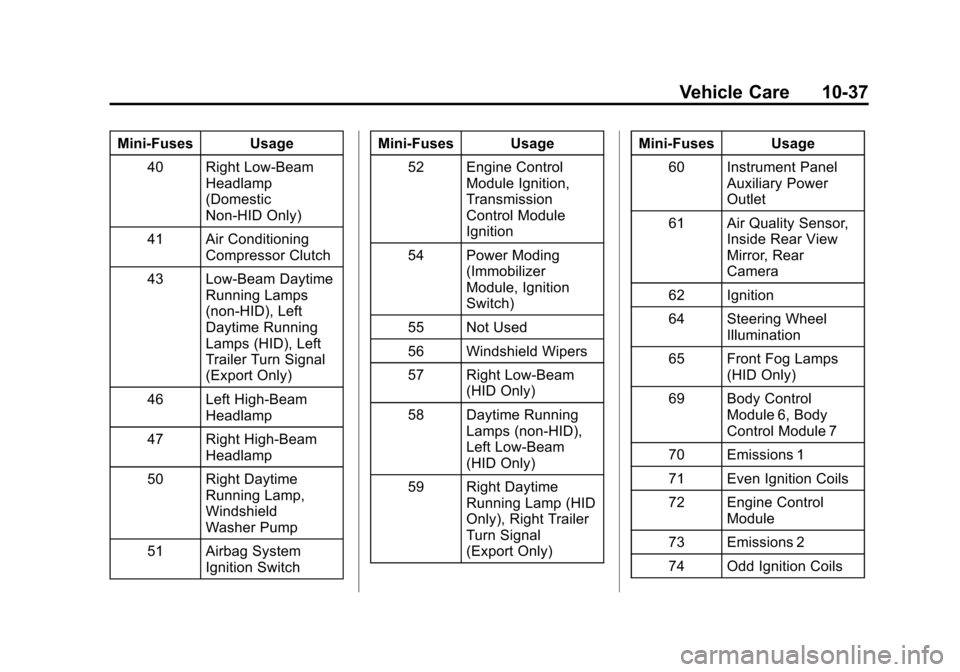
Mini-Fuses Usage40 Right Low-Beam Headlamp
(Domestic
Non-HID Only)
41 Air Conditioning Compressor Clutch
43 Low-Beam Daytime Running Lamps
(non-HID), Left
Daytime Running
Lamps (HID), Left
Trailer Turn Signal
(Export Only)
46 Left High-Beam Headlamp
47 Right High-Beam Headlamp
50 Right Daytime Running Lamp,
Windshield
Washer Pump
51 Airbag System Ignition Switch Mini-Fuses Usage
52 Engine Control Module Ignition,
Transmission
Control Module
Ignition
54 Power Moding (Immobilizer
Module, Ignition
Switch)
55 Not Used
56 Windshield Wipers
57 Right Low-Beam (HID Only)
58 Daytime Running Lamps (non-HID),
Left Low-Beam
(HID Only)
59 Right Daytime Running Lamp (HID
Only), Right Trailer
Turn Signal
(Export Only) Mini-Fuses Usage
60 Instrument Panel Auxiliary Power
Outlet
61 Air Quality Sensor, Inside Rear View
Mirror, Rear
Camera
62 Ignition
64 Steering Wheel Illumination
65 Front Fog Lamps (HID Only)
69 Body Control Module 6, Body
Control Module 7
70 Emissions 1
71 Even Ignition Coils
72 Engine Control Module
73 Emissions 2
74 Odd Ignition Coils
Page 338 of 478

Black plate (38,1)Cadillac CTS/CTS-V Owner Manual - 2013 - crc2 - 8/22/12
10-38 Vehicle Care
Mini-Fuses Usage75 Transmission Output Speed
Sensor, Brake
Vacuum Relay
76 Spare
77 Spare
78 Spare
79 Spare
80 Spare
81 Spare
J-Case Fuses Usage
6 Cooling Fan 2
7 Cooling Fan 1
8 Starter
9 Brake Vacuum Pump
10 Antilock Brake System Motor J-Case
Fuses Usage
13 Not Used
14 Electric Parking Brake
15 Not Used
16 Not Used
17 Blower Motor
18 Rear Window Defogger
37 Not Used
Relays Usage 1 Cooling Fan 2
2 Cooling Fan 1
3 Starter
4 Rear Window Defogger
5 Instrument Panel Auxiliary Power
Outlet Relays Usage
12 Horn
20 Headlamp Washer (HID Only)
21 Cooling Fan (Series/ Parallel)
32 Air Conditioning Compressor Clutch
39 Windshield Washer Pump
42 Right Daytime Running Lamp,
Trailer Turn Signal
44 Low-Beam (non-HID), Left
Daytime Running
Lamps (HID), Left
Trailer Turn Signal
(Export Only)
45 Front Fog Lamps (HID Only)
48 High-Beam Headlamps
Page 341 of 478
Black plate (41,1)Cadillac CTS/CTS-V Owner Manual - 2013 - crc2 - 8/22/12
Vehicle Care 10-41
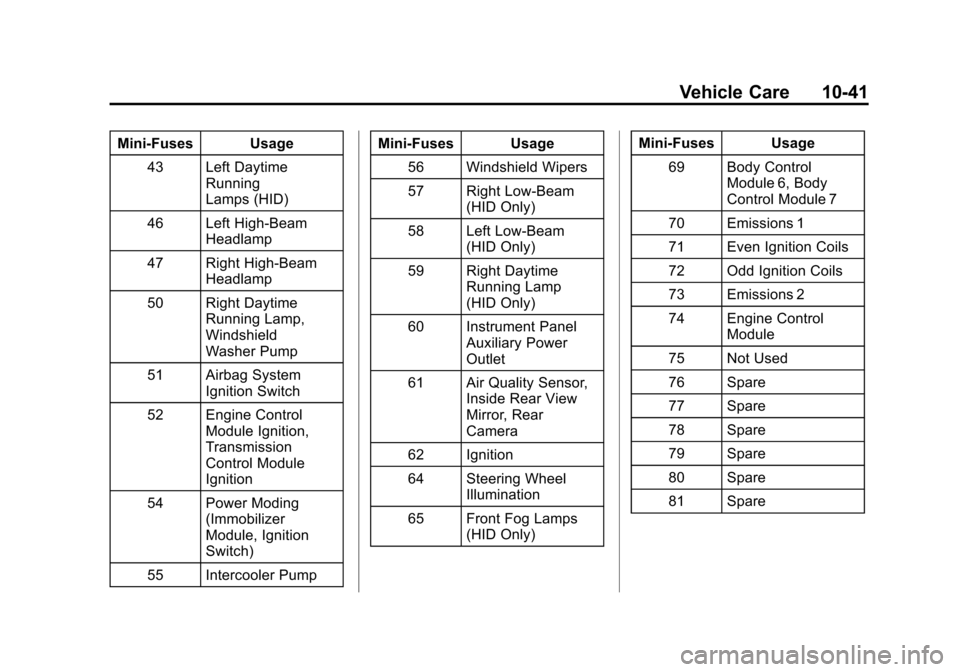
Mini‐Fuses Usage43 Left Daytime Running
Lamps (HID)
46 Left High‐Beam Headlamp
47 Right High‐Beam Headlamp
50 Right Daytime Running Lamp,
Windshield
Washer Pump
51 Airbag System Ignition Switch
52 Engine Control Module Ignition,
Transmission
Control Module
Ignition
54 Power Moding (Immobilizer
Module, Ignition
Switch)
55 Intercooler Pump Mini‐Fuses Usage
56 Windshield Wipers
57 Right Low‐Beam (HID Only)
58 Left Low‐Beam (HID Only)
59 Right Daytime Running Lamp
(HID Only)
60 Instrument Panel Auxiliary Power
Outlet
61 Air Quality Sensor, Inside Rear View
Mirror, Rear
Camera
62 Ignition
64 Steering Wheel Illumination
65 Front Fog Lamps (HID Only) Mini‐Fuses Usage
69 Body Control Module 6, Body
Control Module 7
70 Emissions 1
71 Even Ignition Coils
72 Odd Ignition Coils
73 Emissions 2
74 Engine Control Module
75 Not Used
76 Spare
77 Spare
78 Spare
79 Spare
80 Spare
81 Spare
Page 342 of 478

Black plate (42,1)Cadillac CTS/CTS-V Owner Manual - 2013 - crc2 - 8/22/12
10-42 Vehicle Care
J-CaseFuses Usage
6 Cooling Fan 2
7 Cooling Fan 1
8 Starter
9 Not Used
10 Antilock Brake System Motor
13 Not Used
14 Electric Parking Brake
15 Not Used
16 Not Used
17 Blower Motor
18 Rear Window Defogger
37 Magnetic Ride/ Suspension Control Relays Usage
1 Cooling Fan 2
2 Cooling Fan 1
3 Starter
4 Rear Window Defogger
5 Instrument Panel Auxiliary Power
Outlet
12 Horn
20 Headlamp Washer (HID Only)
21 Cooling Fan (Series/ Parallel)
32 Air Conditioning Compressor Clutch
39 Windshield Washer Pump
42 Right Daytime Running Lamp
44 Left Daytime Running Lamp (HID) Relays Usage
45 Front Fog Lamps (HID Only)
48 High‐Beam Headlamps
49 Low‐Beam Headlamps (HID)
53 Not Used
63 Main Ignition
66 Windshield Wipers
67 Powertrain
68 Windshield Wipers High Speed
Engine Compartment
Fuse Block (CTS Wagon)
This fuse block is on the left side of
the engine compartment.