ECO mode CADILLAC CTS 2016 3.G Owner's Manual
[x] Cancel search | Manufacturer: CADILLAC, Model Year: 2016, Model line: CTS, Model: CADILLAC CTS 2016 3.GPages: 354, PDF Size: 3.56 MB
Page 195 of 354

Cadillac CTS/CTS-V Owner Manual (GMNA-Localizing-MidEast-9369309) -
2016 - crc - 7/30/15
194 Driving and Operating
The vehicle has an electronic
keyless ignition with pushbutton
start.
Pressing the button cycles it through
three modes: ACC/ACCESSORY,
ON/RUN/START, and Stopping the
Engine/OFF.
The Remote Keyless Entry (RKE)
transmitter must be in the vehicle for
the system to operate. If the
pushbutton start is not working, the
vehicle may be near a strong radio
antenna signal causing interference
to the Keyless Access system. See
Remote Keyless Entry (RKE)
System Operation029.
To shift out of P (Park), the vehicle
must be in ACC/ACCESSORY or
ON/RUN, and the brake pedal must
be applied.
Stopping the Engine/OFF (No
Indicator Lights) : When the
vehicle is stopped, press the
ENGINE START/STOP button once
to turn the engine off. If the vehicle is in P (Park), the
ignition will turn off, and Retained
Accessory Power (RAP) will remain
active. See
Retained Accessory
Power (RAP) 0197.
If the vehicle is not in P (Park), the
ignition will return to ACC/
ACCESSORY and display a
message in the Driver Information
Center (DIC). See Transmission
Messages 0146. When the vehicle
is shifted into P (Park), the ignition
system will switch to OFF.
Do not turn the engine off when the
vehicle is moving. This will cause a
loss of power assist in the brake
and steering systems and disable
the airbags.
If the vehicle must be shut off in an
emergency:
1. Brake using a firm and steady pressure. Do not pump the
brakes repeatedly. This may
deplete power assist, requiring
increased brake pedal force.
2. Shift the vehicle to N (Neutral). This can be done while the
vehicle is moving. After shifting to N (Neutral), firmly apply the
brakes and steer the vehicle to
a safe location.
3. Come to a complete stop, shift to P (Park), and turn the
ignition to OFF. On vehicles
with an automatic transmission,
the shift lever must be in
P (Park) to turn the ignition
switch to the OFF position.
4. Set the parking brake. See Electric Parking Brake 0204.
{Warning
Turning off the vehicle while
moving may cause loss of power
assist in the brake and steering
systems and disable the airbags.
While driving, only shut the
vehicle off in an emergency.
If the vehicle cannot be pulled over,
and must be shut off while driving,
press and hold the ENGINE START/
STOP button for longer than
two seconds, or press twice in
five seconds.
Page 196 of 354

Cadillac CTS/CTS-V Owner Manual (GMNA-Localizing-MidEast-9369309) -
2016 - crc - 7/30/15
Driving and Operating 195
ACC/ACCESSORY (Amber
Indicator Light) :This mode allows
you to use some electrical
accessories when the engine is off.
With the ignition off, pressing the
button one time without the brake
pedal applied will place the ignition
system in ACC/ACCESSORY.
The ignition will switch from ACC/
ACCESSORY to OFF after
five minutes to prevent battery
rundown.
ON/RUN/START (Green Indicator
Light) : This mode is for driving and
starting. With the ignition off, and
the brake pedal applied, pressing
the button once will place the
ignition system in ON/RUN/START.
Once engine cranking begins,
release the button. Engine cranking
will continue until the engine starts.
See Starting the Engine 0195. The
ignition will then remain in ON/RUN.
Service Only Mode
This power mode is available for
service and diagnostics, and to
verify the proper operation of the
malfunction indicator lamp as may be required for emission inspection
purposes. With the vehicle off, and
the brake pedal not applied,
pressing and holding the button for
more than five seconds will place
the vehicle in Service Only Mode.
The instruments and audio systems
will operate as they do in ON/RUN,
but the vehicle will not be able to be
driven. The engine will not start in
Service Only Mode. Press the
button again to turn the vehicle off.
Starting the Engine
Move the shift lever to P (Park) or
N (Neutral). To restart the engine
when the vehicle is already moving,
use N (Neutral) only.
Caution
Do not try to shift to P (Park) if the
vehicle is moving. If you do, you
could damage the transmission.
Shift to P (Park) only when the
vehicle is stopped.
Caution
If you add electrical parts or
accessories, you could change
the way the engine operates. Any
resulting damage would not be
covered by the vehicle warranty.
See
Add-On Electrical Equipment
0 248.
Starting Procedure 1. With the Keyless Access system, the Remote Keyless
Entry (RKE) transmitter must
be in the vehicle. Press the
ENGINE START/STOP button,
if equipped, with the brake
pedal applied. When the
engine begins cranking, let go
of the button.
The idle speed will go down as
the engine gets warm. Do not
race the engine immediately
after starting it.
If the RKE transmitter is not in
the vehicle, if there is
interference, or the RKE
battery is low, a Driver
Page 202 of 354
Cadillac CTS/CTS-V Owner Manual (GMNA-Localizing-MidEast-9369309) -
2016 - crc - 7/30/15
Driving and Operating 201
ON/RUN. If you cannot shift out of
P (Park), ease pressure on the shift
lever and push the shift lever all the
way into P (Park) as you maintain
brake application. Then press the
shift lever button and move the shift
lever into another gear. SeeShifting
out of Park 0198.
Caution
Shifting to R (Reverse) while the
vehicle is moving forward could
damage the transmission. The
repairs would not be covered by
the vehicle warranty. Shift to
R (Reverse) only after the vehicle
is stopped.
R : Use this gear to back up.
At low vehicle speeds, R (Reverse)
can be used to rock the vehicle
back and forth to get out of snow,
ice, or sand without damaging your
transmission. See If the Vehicle Is
Stuck 0189.
N : In this position, the engine does
not connect with the wheels. To
restart when the vehicle is already moving, use N (Neutral) only. You
can also use N (Neutral) when the
vehicle is being towed.
{Warning
Shifting into a drive gear while the
engine is running at high speed is
dangerous. Unless your foot is
firmly on the brake pedal, the
vehicle could move very rapidly.
You could lose control and hit
people or objects. Do not shift
into a drive gear while the engine
is running at high speed.
Caution
Shifting out of P (Park) or
N (Neutral) with the engine
running at high speed may
damage the transmission. The
repairs would not be covered by
the vehicle warranty. Be sure the
engine is not running at high
speed when shifting the vehicle.
D :
This position is for normal
driving. It provides the best fuel
economy. If you need more power
for passing, and you are:
. Going less than 55 km/h
(35 mph), push the accelerator
pedal about halfway down.
. Going about 55 km/h (35 mph) or
more, push the accelerator all
the way down.
The transmission will shift down
to a lower gear and have more
power.
Downshifting the transmission in
slippery road conditions could result
in skidding. See “Skidding”under
Loss of Control 0182.
M : This mode can be entered with
the shift lever in the D (Drive)
position by pressing the M (Manual
Mode) button on the top of the shift
lever. M (Manual Mode) allows the
driver to select gears appropriate for
current driving conditions.
M (Manual Mode) can be exited with
a second press of the M (Manual
Mode) button. See Manual Mode
0 202.
Page 203 of 354

Cadillac CTS/CTS-V Owner Manual (GMNA-Localizing-MidEast-9369309) -
2016 - crc - 7/30/15
202 Driving and Operating
Caution
Spinning the tires or holding the
vehicle in one place on a hill
using only the accelerator pedal
may damage the transmission.
The repair will not be covered by
the vehicle warranty. If you are
stuck, do not spin the tires. When
stopping on a hill, use the brakes
to hold the vehicle in place.
While in Sport or Track Mode, the
vehicle monitors driving behavior,
and automatically enables
Performance Shift Features when
spirited driving is detected. These
features maintain lower
transmission gears to increase
available engine braking and
improve acceleration response. The
vehicle will exit these features and
return to normal operation after a
short period when no spirited driving
is detected. See Driver Mode
Control 0208.
Manual Mode
Tap Shift
Caution
Driving with the engine at a high
rpm without upshifting while using
Tap Shift, could damage the
vehicle. Always upshift when
necessary while using Tap Shift.
Vehicles with Tap Shift have
controls on the back of the steering
wheel to manually shift the
automatic transmission.
To enter Permanent Tap Shift Mode: 1. With the shift lever in D (Drive), press the M (Manual Mode)
button on the top of the shift
lever. While in Tap Shift Mode,
the M of the PRNDM section of
the instrument cluster will
become highlighted, and the
current gear is indicated.
2. Tap the left control to downshift, and the right control
to upshift.
3. To exit, press the M (Manual Mode) button a second time.
With the shift lever in D (Drive) and
not in Permanent Tap Shift Mode,
the tap shift controls will activate a
temporary tap manual shift mode,
allowing the transmission to be
manually shifted. Automatic shifts
return after no manual shifts have
been done for seven to 10 seconds.
The Temporary Tap Shift Mode can
also be deactivated by holding the
right upshift control briefly.
While using Tap Shift, the vehicle
will have firmer, quicker shifting. You
can use this for sport driving or
Page 210 of 354

Cadillac CTS/CTS-V Owner Manual (GMNA-Localizing-MidEast-9369309) -
2016 - crc - 7/30/15
Driving and Operating 209
Tour Mode
Use for normal city and highway
driving to provide a smooth,
soft ride.
Sport Mode
Use where road conditions or
personal preference demand a more
controlled response.
When selected, the Sport Mode
indicator will display in the Driver
Information Center (DIC).
Competitive Driving Mode can be
accessed through this mode.
Snow/Ice Mode
Use when more traction is needed
during slippery conditions.
When selected, the Snow/Ice Mode
indicator will display in the DIC.
This feature is not intended for use
when the vehicle is stuck in sand,
mud, ice, snow, or gravel. If the
vehicle becomes stuck, seeIf the
Vehicle Is Stuck 0189.
Track Mode (V-Series Only)
Use when maximum vehicle
handling is desired.
When selected, the Track Mode
indicator will display in the DIC.
When in Track Mode, the automatic
transmission and steering will
function similar to Sport Mode. The
accelerator pedal is adjusted to give
maximum control during the highest
level of spirited driving. The
Magnetic Ride Control will be set to
the optimum level for vehicle
responsiveness. Competitive Driving
Mode or PTM can be accessed
through this mode.
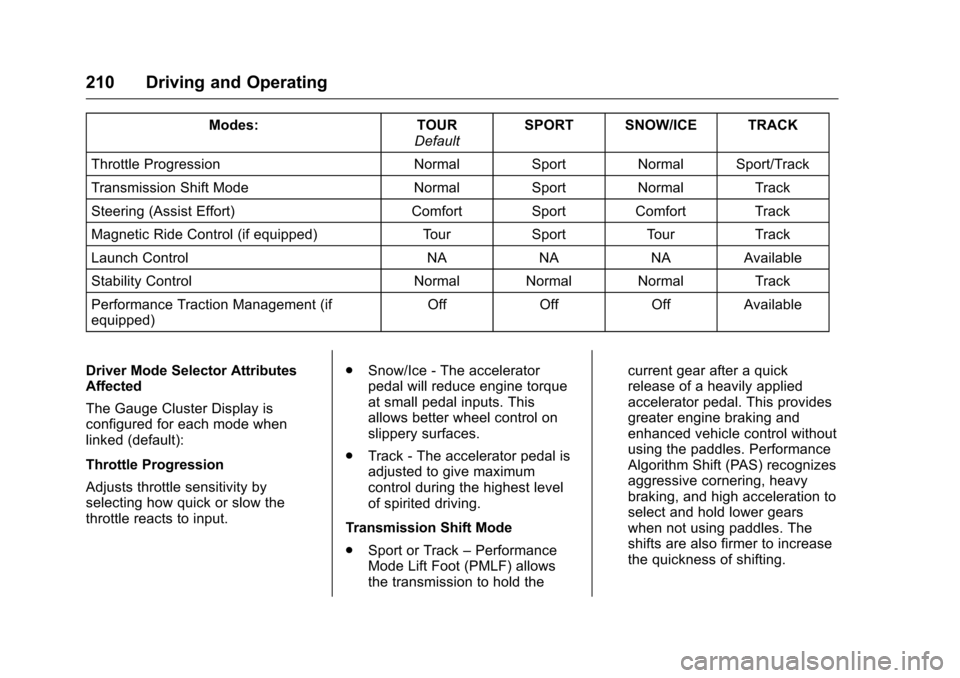
There are seven attributes that vary
by mode shown below. Not all
vehicles have all features,
depending on the vehicle options.
Page 211 of 354
Cadillac CTS/CTS-V Owner Manual (GMNA-Localizing-MidEast-9369309) -
2016 - crc - 7/30/15
210 Driving and Operating
Modes:TOUR
Default SPORT SNOW/ICE TRACK
Throttle Progression NormalSportNormal Sport/Track
Transmission Shift Mode NormalSportNormal Track
Steering (Assist Effort) Comfort Sport Comfort Track
Magnetic Ride Control (if equipped) TourSport TourTrack
Launch Control NANANAAvailable
Stability Control Normal Normal Normal Track
Performance Traction Management (if
equipped) Off
OffOffAvailable
Driver Mode Selector Attributes
Affected
The Gauge Cluster Display is
configured for each mode when
linked (default):
Throttle Progression
Adjusts throttle sensitivity by
selecting how quick or slow the
throttle reacts to input. .
Snow/Ice - The accelerator
pedal will reduce engine torque
at small pedal inputs. This
allows better wheel control on
slippery surfaces.
. Track - The accelerator pedal is
adjusted to give maximum
control during the highest level
of spirited driving.
Transmission Shift Mode
. Sport or Track –Performance
Mode Lift Foot (PMLF) allows
the transmission to hold the current gear after a quick
release of a heavily applied
accelerator pedal. This provides
greater engine braking and
enhanced vehicle control without
using the paddles. Performance
Algorithm Shift (PAS) recognizes
aggressive cornering, heavy
braking, and high acceleration to
select and hold lower gears
when not using paddles. The
shifts are also firmer to increase
the quickness of shifting.
Page 212 of 354

Cadillac CTS/CTS-V Owner Manual (GMNA-Localizing-MidEast-9369309) -
2016 - crc - 7/30/15
Driving and Operating 211
.Snow/Ice –The transmission will
use 2 (Second) gear instead of
1 (First) gear when accelerating
from a stop. The vehicle will
upshift normally when the
vehicle is moving. The
transmission will also shift
differently to assist in
maintaining traction.
Steering (Assist Effort)
Adjusts from a lighter steering feel
in Tour mode to reduced assist in
Sport and Track mode for more
steering feel.
Magnetic Ride Control (if
equipped)
Adjusts the shock dampening
firmness from a comfort tune in Tour
mode to an optimized
responsiveness tune in Sport and
Track.
Launch Control
Available only in Track mode for
maximum “off-the-line” acceleration
when in Competitive Driving Mode
or PTM. Stability Control
.
Competitive mode allows less
computer control to permit some
slide and drift and is selected
with the button –only available
in Track mode.
. StabiliTrak can be turned off by
pressing and holding the button
for five seconds.
PTM (Performance Traction
Management) (if equipped)
. Available in Track Mode.
. There are five selectable
settings.
Competitive Driving Mode
(V-Series Only)
To select this optional handling
mode, press the
Ybutton quickly
two times and the DIC will display
the appropriate message. While in
the Competitive Driving Mode, the
traction off light
iand StabiliTrak
OFF light
gwill come on in the
instrument cluster. TCS does not
limit wheel spin, the Electronic Limited-Slip Differential (ELSD)
allows increased vehicle agility, and
more effort is required to turn the
steering wheel. See
“Limited-Slip
Differential (V-Series Only)” later in
this section. Adjust your driving
accordingly.
Press the
Ybutton again, or turn
the ignition to ACC/ACCESSORY
and restart the vehicle, to turn TCS
back on. The traction off light
iand
StabiliTrak OFF light
gwill go out in
the instrument cluster.
Caution
When traction control is turned
off, or Competitive Driving Mode
is active, it is possible to lose
traction.
Performance Traction
Management (V-Series Only)
Performance Traction Management
(PTM) integrates the Traction
Control, StabiliTrak, and Selective
Ride Control systems to provide
improved and consistent
Page 213 of 354
Cadillac CTS/CTS-V Owner Manual (GMNA-Localizing-MidEast-9369309) -
2016 - crc - 7/30/15
212 Driving and Operating
performance when cornering. The
amount of available engine power is
based on the mode selected, track
conditions, driver skill, and the
radius of each corner.
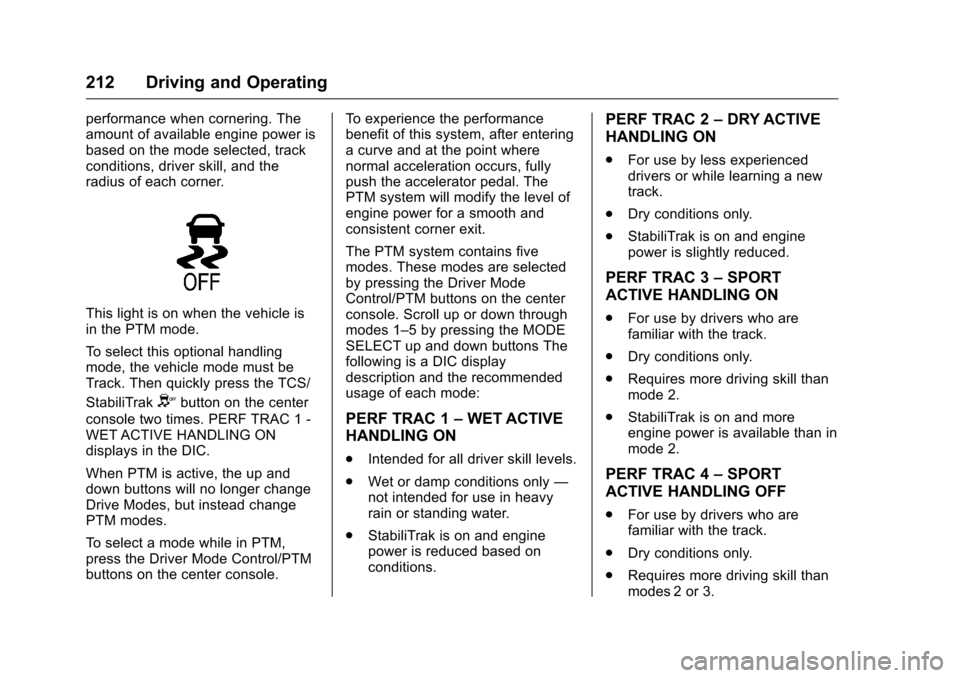
This light is on when the vehicle is
in the PTM mode.
To select this optional handling
mode, the vehicle mode must be
Track. Then quickly press the TCS/
StabiliTrak
Ybutton on the center
console two times. PERF TRAC 1 -
WET ACTIVE HANDLING ON
displays in the DIC.
When PTM is active, the up and
down buttons will no longer change
Drive Modes, but instead change
PTM modes.
To select a mode while in PTM,
press the Driver Mode Control/PTM
buttons on the center console. To experience the performance
benefit of this system, after entering
a curve and at the point where
normal acceleration occurs, fully
push the accelerator pedal. The
PTM system will modify the level of
engine power for a smooth and
consistent corner exit.
The PTM system contains five
modes. These modes are selected
by pressing the Driver Mode
Control/PTM buttons on the center
console. Scroll up or down through
modes 1–5 by pressing the MODE
SELECT up and down buttons The
following is a DIC display
description and the recommended
usage of each mode:
PERF TRAC 1
–WET ACTIVE
HANDLING ON
. Intended for all driver skill levels.
. Wet or damp conditions only —
not intended for use in heavy
rain or standing water.
. StabiliTrak is on and engine
power is reduced based on
conditions.
PERF TRAC 2 –DRY ACTIVE
HANDLING ON
. For use by less experienced
drivers or while learning a new
track.
. Dry conditions only.
. StabiliTrak is on and engine
power is slightly reduced.
PERF TRAC 3 –SPORT
ACTIVE HANDLING ON
. For use by drivers who are
familiar with the track.
. Dry conditions only.
. Requires more driving skill than
mode 2.
. StabiliTrak is on and more
engine power is available than in
mode 2.
PERF TRAC 4 –SPORT
ACTIVE HANDLING OFF
. For use by drivers who are
familiar with the track.
. Dry conditions only.
. Requires more driving skill than
modes 2 or 3.
Page 215 of 354

Cadillac CTS/CTS-V Owner Manual (GMNA-Localizing-MidEast-9369309) -
2016 - crc - 7/30/15
214 Driving and Operating
Limited-Slip Differential
(Except V-Series)
If equipped, the mechanical
limited-slip differential can give more
traction on snow, mud, ice, sand,
or gravel. It works like a standard
axle most of the time, but when
traction is low, this feature allows
the drive wheel with the most
traction to move the vehicle. For
vehicles with limited slip differential,
driven under severe conditions, the
rear axle fluid should be changed.
SeeCompetitive Driving Mode
(V-Series Only) 0211 and
Maintenance Schedule 0329.
Limited-Slip Differential
(V-Series Only)
If equipped, the Electronic
Limited-Slip Differential (ELSD) is
automatically activated. ELSD
actively monitors vehicle sensors
and driver inputs to determine the
amount of change for the
conditions. With ELSD, the
vehicle has:
.
Enhanced high-speed control. .
Improved traction through
corners, allowing more
acceleration.
. More precise steering.
. Increased vehicle agility.
. Integration with StabiliTrak.
For vehicles with ELSD, driven
under severe conditions, the rear
axle fluid should be changed. See
Competitive Driving Mode (V-Series
Only) 0211 and Maintenance
Schedule 0329.
Cruise Control
{Warning
Cruise control can be dangerous
where you cannot drive safely at
a steady speed. Do not use
cruise control on winding roads or
in heavy traffic.
Cruise control can be dangerous
on slippery roads. On such roads,
fast changes in tire traction can
cause excessive wheel slip, and
you could lose control. Do not use
cruise control on slippery roads.
With cruise control, a speed of
about 40 km/h (25 mph) or more can
be maintained without keeping your
foot on the accelerator. Cruise
control does not work at speeds
below about 40 km/h (25 mph).
If the StabiliTrak
®system begins to
limit wheel spin while using cruise
control, the cruise control
automatically disengages. See
Traction Control/Electronic Stability
Control 0206. If a collision alert
Page 217 of 354
Cadillac CTS/CTS-V Owner Manual (GMNA-Localizing-MidEast-9369309) -
2016 - crc - 7/30/15
216 Driving and Operating
Once the vehicle speed reaches
about 40 km/h (25 mph) or more,
press the +RES up to the first
detent briefly. The vehicle returns to
the previous set speed.
Increasing Speed While Cruise
Control is at a Set Speed
If the cruise control system is
already activated:
.Press and hold +RES up until
the desired speed is reached,
then release it.
. To increase vehicle speed in
small increments, briefly press
+RES up to the first detent. For
each press, the vehicle goes
about 1 km/h (1 mph) faster.
. To increase vehicle speed in
larger increments, briefly press
+RES up to the second detent.
For each press, the vehicle
speed increases to the next
5 km/h (5 mph) mark on the
speedometer. The speedometer reading can be
displayed in either English or metric
units. See
Instrument Cluster 0112.
The increment value used depends
on the units displayed.
Reducing Speed While Cruise
Control is at a Set Speed
If the cruise control system is
already activated:
. Press and hold SET− down until
the desired lower speed is
reached, then release it.
. To decrease the vehicle speed in
small increments, briefly press
SET− down to the first detent.
For each press, the vehicle goes
about 1 km/h (1 mph) slower.
. To decrease the vehicle speed in
larger increments, briefly press
SET− down to the second
detent. For each press, the
vehicle speed decreases to the
next 5 km/h (5 mph) mark on the
speedometer.
The cruise control system may
automatically brake to slow the
vehicle down (CTS model only). The speedometer reading can be
displayed in either English or metric
units. See
Instrument Cluster 0112.
The increment value used depends
on the units displayed.
Passing Another Vehicle While
Using Cruise Control
Use the accelerator pedal to
increase the vehicle speed. When
you take your foot off the pedal, the
vehicle will slow down to the
previously set cruise speed. While
pressing the accelerator pedal or
shortly following the release to
override cruise control, briefly
applying the SET– switch will result
in cruise control set to the current
vehicle speed.
Using Cruise Control on Hills
How well the cruise control will work
on hills depends upon the vehicle
speed, load, and the steepness of
the hills. When going up steep hills,
you might have to step on the
accelerator pedal to maintain the
vehicle speed. When going
downhill, the cruise control system
may automatically brake to slow the
vehicle down (CTS model only).