mirror CADILLAC CTS 2016 3.G Owner's Manual
[x] Cancel search | Manufacturer: CADILLAC, Model Year: 2016, Model line: CTS, Model: CADILLAC CTS 2016 3.GPages: 354, PDF Size: 3.56 MB
Page 227 of 354
Cadillac CTS/CTS-V Owner Manual (GMNA-Localizing-MidEast-9369309) -
2016 - crc - 7/30/15
226 Driving and Operating
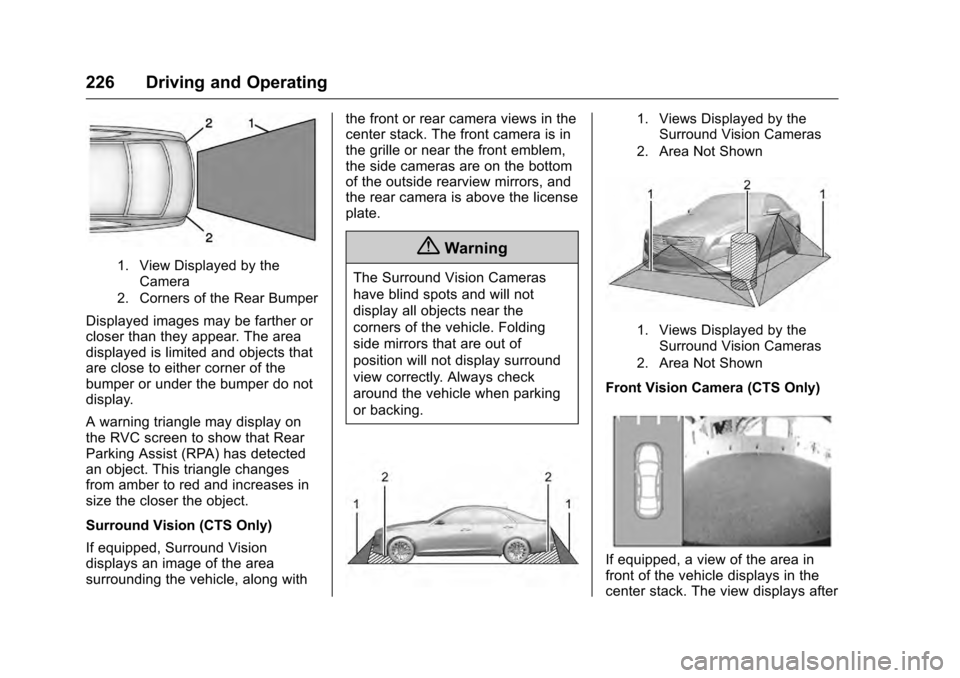
1. View Displayed by theCamera
2. Corners of the Rear Bumper
Displayed images may be farther or
closer than they appear. The area
displayed is limited and objects that
are close to either corner of the
bumper or under the bumper do not
display.
A warning triangle may display on
the RVC screen to show that Rear
Parking Assist (RPA) has detected
an object. This triangle changes
from amber to red and increases in
size the closer the object.
Surround Vision (CTS Only)
If equipped, Surround Vision
displays an image of the area
surrounding the vehicle, along with the front or rear camera views in the
center stack. The front camera is in
the grille or near the front emblem,
the side cameras are on the bottom
of the outside rearview mirrors, and
the rear camera is above the license
plate.
{Warning
The Surround Vision Cameras
have blind spots and will not
display all objects near the
corners of the vehicle. Folding
side mirrors that are out of
position will not display surround
view correctly. Always check
around the vehicle when parking
or backing.
1. Views Displayed by the
Surround Vision Cameras
2. Area Not Shown
1. Views Displayed by the Surround Vision Cameras
2. Area Not Shown
Front Vision Camera (CTS Only)
If equipped, a view of the area in
front of the vehicle displays in the
center stack. The view displays after
Page 229 of 354
Cadillac CTS/CTS-V Owner Manual (GMNA-Localizing-MidEast-9369309) -
2016 - crc - 7/30/15
228 Driving and Operating
Warning (Continued)
or vehicle damage, even with
parking assist, always check the
area around the vehicle and
check all mirrors before moving
forward or backing.
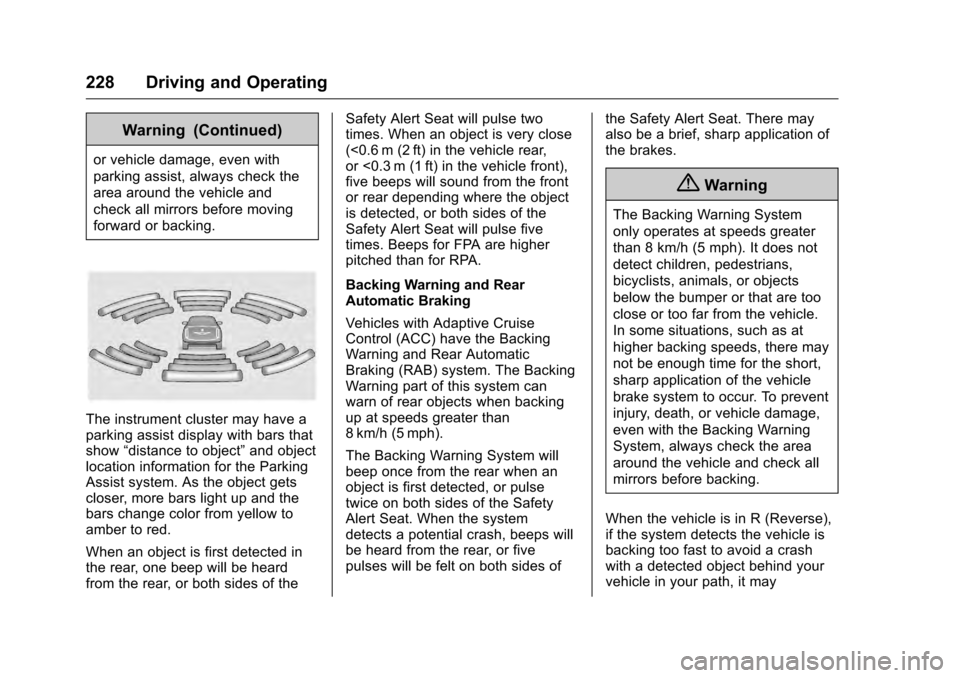
The instrument cluster may have a
parking assist display with bars that
show“distance to object” and object
location information for the Parking
Assist system. As the object gets
closer, more bars light up and the
bars change color from yellow to
amber to red.
When an object is first detected in
the rear, one beep will be heard
from the rear, or both sides of the Safety Alert Seat will pulse two
times. When an object is very close
(<0.6 m (2 ft) in the vehicle rear,
or <0.3 m (1 ft) in the vehicle front),
five beeps will sound from the front
or rear depending where the object
is detected, or both sides of the
Safety Alert Seat will pulse five
times. Beeps for FPA are higher
pitched than for RPA.
Backing Warning and Rear
Automatic Braking
Vehicles with Adaptive Cruise
Control (ACC) have the Backing
Warning and Rear Automatic
Braking (RAB) system. The Backing
Warning part of this system can
warn of rear objects when backing
up at speeds greater than
8 km/h (5 mph).
The Backing Warning System will
beep once from the rear when an
object is first detected, or pulse
twice on both sides of the Safety
Alert Seat. When the system
detects a potential crash, beeps will
be heard from the rear, or five
pulses will be felt on both sides of
the Safety Alert Seat. There may
also be a brief, sharp application of
the brakes.
{Warning
The Backing Warning System
only operates at speeds greater
than 8 km/h (5 mph). It does not
detect children, pedestrians,
bicyclists, animals, or objects
below the bumper or that are too
close or too far from the vehicle.
In some situations, such as at
higher backing speeds, there may
not be enough time for the short,
sharp application of the vehicle
brake system to occur. To prevent
injury, death, or vehicle damage,
even with the Backing Warning
System, always check the area
around the vehicle and check all
mirrors before backing.
When the vehicle is in R (Reverse),
if the system detects the vehicle is
backing too fast to avoid a crash
with a detected object behind your
vehicle in your path, it may
Page 235 of 354

Cadillac CTS/CTS-V Owner Manual (GMNA-Localizing-MidEast-9369309) -
2016 - crc - 7/30/15
234 Driving and Operating
or on some vehicles, Off. The first
button press shows the current
setting on the DIC. Additional button
presses will change this setting. The
chosen setting will remain until it is
changed and will affect the timing of
both the Collision Alert and the
Tailgating Alert features. The timing
of both alerts will vary based on
vehicle speed. The faster the
vehicle speed, the farther away the
alert will occur. Consider traffic and
weather conditions when selecting
the alert timing. The range of
selectable alert timing may not be
appropriate for all drivers and
driving conditions.
If your vehicle is equipped with
Adaptive Cruise Control (ACC),
changing the FCA timing setting
automatically changes the ACC
following gap setting (Far, Medium,
or Near).
Unnecessary Alerts
FCA may provide unnecessary
alerts for turning vehicles, vehicles
in other lanes, objects that are notvehicles, or shadows. These alerts
are normal operation and the
vehicle does not need service.
Cleaning the System
If the FCA system does not seem to
operate properly, cleaning the
outside of the windshield in front of
the rearview mirror, and cleaning the
front of the vehicle where radar
sensors are located, may correct
the issue.
Front Automatic Braking
(FAB) System
If the vehicle has Adaptive Cruise
Control (ACC), it also has FAB,
which includes Intelligent Brake
Assist (IBA). When the system
detects a vehicle ahead in your path
that is traveling in the same
direction that you may be about to
crash into, it can provide a boost to
braking or automatically brake the
vehicle. This can help avoid or
lessen the severity of crashes when
driving in a forward gear. Depending
on the situation, the vehicle may
automatically brake moderately orhard. This front automatic braking
can only occur if a vehicle is
detected. This is shown by the FCA
vehicle ahead indicator being lit.
See
Forward Collision Alert (FCA)
System 0232.
The system works when driving in a
forward gear above 4 km/h (2 mph).
It can detect vehicles up to
approximately 60 m (197 ft).
{Warning
FAB is an emergency crash
preparation feature and is not
designed to avoid crashes. Do
not rely on FAB to brake the
vehicle. FAB will not brake
outside of its operating speed
range and only responds to
detected vehicles.
FAB may not: . Detect a vehicle ahead on
winding or hilly roads.
(Continued)
Page 237 of 354

Cadillac CTS/CTS-V Owner Manual (GMNA-Localizing-MidEast-9369309) -
2016 - crc - 7/30/15
236 Driving and Operating
Side Blind Zone
Alert (SBZA)
If equipped, the SBZA system is a
lane-changing aid that assists
drivers with avoiding crashes that
occur with moving vehicles in the
side blind zone (or spot) areas.
When the vehicle is in a forward
gear, the left or right side mirror
display will light up if a moving
vehicle is detected in that blind
zone. If the turn signal is activated
and a vehicle is also detected on
the same side, the display will flash
as an extra warning not to change
lanes. Since this system is part of
the Lane Change Alert system, read
the entire Lane Change Alert
section before using this feature.
Lane Change Alert (LCA)
If equipped, the LCA system is a
lane-changing aid that assists
drivers with avoiding lane change
crashes that occur with moving
vehicles in the side blind zone (or
spot) areas or with vehicles rapidly
approaching these areas from
behind. The LCA warning displaywill light up in the corresponding
outside side mirror and will flash if
the turn signal is on.
{Warning
LCA does not alert the driver to
vehicles outside of the system
detection zones, pedestrians,
bicyclists, or animals. It may not
provide alerts when changing
lanes under all driving conditions.
Failure to use proper care when
changing lanes may result in
injury, death, or vehicle damage.
Before making a lane change,
always check mirrors, glance over
your shoulder, and use the turn
signals.
LCA Detection Zones
1. SBZA Detection Zone
2. LCA Detection Zone
The LCA sensor covers a zone of
approximately one lane over from
both sides of the vehicle, or 3.5 m
(11 ft). The height of the zone is
approximately between 0.5 m (1.5 ft)
and 2 m (6 ft) off the ground. The
Side Blind Zone Alert (SBZA)
warning area starts at approximately
the middle of the vehicle and goes
back 5 m (16 ft). Drivers are also
warned of vehicles rapidly
approaching from up to 25 m (82 ft)
behind the vehicle.
Page 238 of 354

Cadillac CTS/CTS-V Owner Manual (GMNA-Localizing-MidEast-9369309) -
2016 - crc - 7/30/15
Driving and Operating 237
How the System Works
The LCA symbol lights up in the
side mirrors when the system
detects a moving vehicle in the next
lane over that is in the side blind
zone or rapidly approaching from
behind. A lit LCA symbol indicates it
may be unsafe to change lanes.
Before making a lane change,
check the LCA display, check
mirrors, glance over your shoulder,
and use the turn signals.
Left Side MirrorDisplayRight Side Mirror Display
When the vehicle is started, both
outside mirror LCA displays will
briefly come on to indicate the
system is operating. When the
vehicle is in a forward gear, the left
or right side mirror display will light
up if a moving vehicle is detected in
the next lane over in that blind zone
or rapidly approaching that zone. If the turn signal is activated in the
same direction as a detected
vehicle, this display will flash as an
extra warning not to change lanes.
LCA can be disabled through
vehicle personalization. See
“Collision/Detection Systems”
under
Vehicle Personalization 0147.
If LCA is disabled by the driver, the
LCA mirror displays will not light up.
When the System Does Not
Seem to Work Properly
The LCA system requires some
driving for the system to calibrate to
maximum performance. This
calibration may occur more quickly if
the vehicle is driven on a straight
highway road with traffic and
roadside objects (e.g., guardrails,
barriers). During a trip, the LCA
system is not operational until the
vehicle first reaches a speed of
24 km/h (15 mph).
LCA displays may not come on
when passing a vehicle quickly, for
a stopped vehicle, or when towing a
trailer. The LCA detection zones
that extend back from the side of
the vehicle do not move further back when a trailer is towed. Use caution
while changing lanes when towing a
trailer. LCA may alert to objects
attached to the vehicle, such as a
trailer, bicycle, or object extending
out to either side of the vehicle.
Attached objects may also interfere
with the detection of vehicles. This
is normal system operation; the
vehicle does not need service.
LCA may not always alert the driver
to vehicles in the next lane over,
especially in wet conditions or when
driving on sharp curves. The system
does not need to be serviced. The
system may light up due to
guardrails, signs, trees, shrubs, and
other non-moving objects. This is
normal system operation; the
vehicle does not need service.
LCA may not operate when the LCA
sensors in the left or right corners of
the rear bumper are covered with
mud, dirt, snow, ice, or slush, or in
heavy rainstorms. For cleaning
instructions, see "Washing the
Vehicle" under
Exterior Care0318.
If the DIC still displays the system
unavailable message after cleaning
Page 240 of 354

Cadillac CTS/CTS-V Owner Manual (GMNA-Localizing-MidEast-9369309) -
2016 - crc - 7/30/15
Driving and Operating 239
Warning (Continued)
vehicle. Always keep your
attention on the road and
maintain proper vehicle position
within the lane, or vehicle
damage, injury, or death could
occur. Always keep the
windshield, headlamps, and
camera sensors clean and in
good repair. Do not use LKA in
bad weather conditions.
{Warning
Using LKA while towing a trailer
or on slippery roads could cause
loss of control of the vehicle and
a crash. Turn the system off.
How the System Works
The LKA camera sensor is on the
windshield ahead of the rearview
mirror.
To turn LKA on and off, press
A
on the center stack.
When on,Ais green if LKA is
available to assist and provide LDW
alerts. It may assist by gently
turning the steering wheel and
display
Aas amber if the vehicle
approaches a detected lane marking
without using a turn signal in that
direction. It may also provide an
LDW alert by flashing
Aamber
as the lane marking is crossed.
Additionally, there will be three
beeps, or the driver seat will pulse
three times, on the right or left,
depending on the lane departure
direction.
The LKA system does not
continuously steer the vehicle.
If LKA does not detect active driver
steering, an alert and chime may be
provided. Move the steering wheel
to dismiss.
When the System Does Not
Seem to Work Properly
The system performance may be
affected by:
. Close vehicles ahead.
. Sudden lighting changes, such
as when driving through tunnels.
. Banked roads.
. Roads with poor lane markings,
such as two-lane roads.
If the LKA system is not functioning
properly when lane markings are
clearly visible, cleaning the
windshield may help.
LKA assistance and/or LDW alerts
may occur due to tar marks,
shadows, cracks in the road,
temporary or construction lane
markings, or other road
imperfections. This is normal system
operation; the vehicle does not need
service. Turn LKA off if these
conditions continue.
Page 245 of 354

Cadillac CTS/CTS-V Owner Manual (GMNA-Localizing-MidEast-9369309) -
2016 - crc - 7/30/15
244 Driving and Operating
{Warning
When towing a trailer, exhaust
gases may collect at the rear of
the vehicle and enter if the
liftgate, trunk/hatch, or rear-most
window is open.
When towing a trailer:. Do not drive with the
liftgate, trunk/hatch,
or rear-most window open.
. Fully open the air outlets on
or under the instrument
panel.
. Also adjust the climate
control system to a setting
that brings in only outside
air. See “Climate Control
Systems” in the Index.
For more information about
Carbon Monoxide, see Engine
Exhaust 0199.
Towing a trailer requires a certain
amount of experience. The
combination you are driving is
longer and not as responsive as the vehicle itself. Get acquainted with
the handling and braking of the rig
before setting out for the open road.
Before starting, check all trailer hitch
parts and attachments, safety
chains, electrical connectors, lamps,
tires, and mirrors. If the trailer has
electric brakes, start the
combination moving and then apply
the trailer brake controller by hand
to be sure the brakes work.
During the trip, check occasionally
to be sure that the load is secure
and the lamps and any trailer
brakes still work.
Following Distance
Stay at least twice as far behind the
vehicle ahead as you would when
driving the vehicle without a trailer.
This can help to avoid heavy
braking and sudden turns.
Passing
More passing distance is needed
when towing a trailer. The
combination will not accelerate as
quickly and is longer so it is
necessary to go much farther
beyond the passed vehicle before
returning to the lane.
Backing Up
Hold the bottom of the steering
wheel with one hand. To move the
trailer to the left, move that hand to
the left. To move the trailer to the
right, move your hand to the right.
Always back up slowly and,
if possible, have someone
guide you.
Making Turns
Caution
Making very sharp turns while
trailering could cause the trailer to
come in contact with the vehicle.
The vehicle could be damaged.
Avoid making very sharp turns
while trailering.
When turning with a trailer, make
wider turns than normal. Do this so
the trailer will not strike soft
shoulders, curbs, road signs, trees,
Page 289 of 354

Cadillac CTS/CTS-V Owner Manual (GMNA-Localizing-MidEast-9369309) -
2016 - crc - 7/30/15
288 Vehicle Care
Number Usage*1 Electronic limited slip differential/DC
DC transformer
2 Left window
3 Body control module 8
*4 A/C inverter 5 Passive entry passive start
battery 1
6 Body control module 4
7 Heated mirrors
8 Amplifier
9 Rear window defogger
10 Glass break
*11 Trailer connector 12 OnStar (if equipped)
13 Right window
14 Electric parking brake
15 Not used Number Usage
16 Trunk release
*17 Run relay
*18 Logistics relay
*19 Logistics fuse 20 Rear window defogger relay
21 Mirror window module
22 Pedestrian protection
23 Canister vent
24 Body control module 2
*25 Rear vision camera
*26 Front ventilated seats
*27 SBZA/LDW/EOCM
*28 Trailer/Sunshade
*29 Rear heated seats
*30 Semi-active damping system Number Usage
*31 Transfer case control module/
Electronic limited
slip differential
32 Theft module/ Universal garage
door opener/Rain
sensor
*33 UPA
*34 Radio, DVD
35 Spare
*36 Trailer 37 Fuel pump, fuel system control
module
38 Not used
39 Not used
40 Not used
41 Not used
*42 Memory seat module
43 Body control module 3
Page 346 of 354

Cadillac CTS/CTS-V Owner Manual (GMNA-Localizing-MidEast-9369309) -
2016 - crc - 7/30/15
Index 345
AutomaticDoor Locks . . . . . . . . . . . . . . . . . . . . . 38
Headlamp System . . . . . . . . . . . . 158
Transmission . . . . . . . . . . . . . . . . . 200
Transmission Fluid . . . . . . . . . . . 262
Automatic Transmission Manual Mode . . . . . . . . . . . . . . . . . 202
Shift Lock Control Function
Check . . . . . . . . . . . . . . . . . . . . . . . 276
B
Battery . . . . . . . . . . . . . . . . . . . . . . . . . 273Exterior Lighting BatterySaver . . . . . . . . . . . . . . . . . . . . . . . 162
Jump Starting . . . . . . . . . . . . . . . . . 313
Load Management . . . . . . . . . . . . 161
Power Protection . . . . . . . . . . . . . 162
Voltage and Charging Messages . . . . . . . . . . . . . . . . . . . 135
Blade Replacement, Wiper . . . . . 277
Brake Parking, Electric . . . . . . . . . . . . . . 204
System Warning Light . . . . . . . . 122
Brakes . . . . . . . . . . . . . . . . . . . . . . . . . . 271 Antilock . . . . . . . . . . . . . . . . . . . . . . . 203
Assist . . . . . . . . . . . . . . . . . . . . . . . . . 206
Fluid . . . . . . . . . . . . . . . . . . . . . . . . . . 272
System Messages . . . . . . . . . . . . 136
Braking . . . . . . . . . . . . . . . . . . . . . . . . . 180 Break-In, New Vehicle . . . . . . . . . . 193
Bulb Replacement . . . . . . . . . . . . . . 279
Halogen Bulbs . . . . . . . . . . . . . . . . 278
Headlamp Aiming . . . . . . . . . . . . . 278
Headlamps . . . . . . . . . . . . . . . . . . . 278
High Intensity Discharge(HID) Lighting . . . . . . . . . . . . . . . 278
License Plate Lamps . . . . . . . . . 279
Buying New Tires . . . . . . . . . . . . . . . 301
C
Capacities and Specifications . . . . . . . . . . . . . . . . . 338
Carbon Fiber . . . . . . . . . . . . . . . . . . . 193
Carbon Monoxide Engine Exhaust . . . . . . . . . . . . . . . 199
Trunk . . . . . . . . . . . . . . . . . . . . . . . . . . . 39
Winter Driving . . . . . . . . . . . . . . . . 187
Cargo Tie-Downs . . . . . . . . . . . . . . . . . . . . 102
Caution, Danger, and Warning . . . . 2
Center Console Storage . . . . . . . . 101
Chains, Tire . . . . . . . . . . . . . . . . . . . . 304
Charging
Wireless . . . . . . . . . . . . . . . . . . . . . . 109
Charging System Light . . . . . . . . . 120
Check
Malfunction IndicatorEngine Light . . . . . . . . . . . . . . . . 121 Child Restraints
Infants and Young Children . . . . . 85
Lower Anchors and Tethers
for Children . . . . . . . . . . . . . . . . . . . 89
Older Children . . . . . . . . . . . . . . . . . . 83
Securing . . . . . . . . . . . . . . . . . . . . 95, 96
Systems . . . . . . . . . . . . . . . . . . . . . . . . 87
Circuit Breakers . . . . . . . . . . . . . . . . 280
Cleaning Exterior Care . . . . . . . . . . . . . . . . . 318
Interior Care . . . . . . . . . . . . . . . . . . 323
Climate Control Systems Dual Automatic . . . . . . . . . . . . . . . 169
Rear . . . . . . . . . . . . . . . . . . . . . . . . . . 174
Clock . . . . . . . . . . . . . . . . . . . . . . . . . . . 107
Cluster, Instrument . . . . . . . . . . . . . 112
Compartments Storage . . . . . . . . . . . . . . . . . . . . . . . 100
Competitive Driving Mode . . . . . . 211
Compressor Kit, Tire Sealant . . . 306
Control Traction and ElectronicStability . . . . . . . . . . . . . . . . . . . . . 206
Control of a Vehicle . . . . . . . . . . . . . 180
Convenience Net . . . . . . . . . . . . . . . 102
Convex Mirrors . . . . . . . . . . . . . . . . . . 43
Coolant Engine . . . . . . . . . . . . . . . . . . . . . . . . 266
Page 349 of 354

Cadillac CTS/CTS-V Owner Manual (GMNA-Localizing-MidEast-9369309) -
2016 - crc - 7/30/15
348 Index
Headlamps (cont'd)High-Beam On Light . . . . . . . . . . 128
High/Low Beam Changer . . . . . 157
Lamps On Reminder . . . . . . . . . 128
Heated Rear Seats . . . . . . . . . . . . . . . . . . . . . 63
Steering Wheel . . . . . . . . . . . . . . . 105
Heated and Ventilated Front Seats . . . . . . . . . . . . . . . . . . . . . . . . . . 60
Heated Mirrors . . . . . . . . . . . . . . . . . . . 44
High-Beam On Light . . . . . . . . . . . . 128
High-Speed Operation . . . . . . . . . . 294
Hill and Mountain Roads . . . . . . . . 187
Hood . . . . . . . . . . . . . . . . . . . . . . . . . . . 251
Horn . . . . . . . . . . . . . . . . . . . . . . . . . . . . 105
How to Wear Safety Belts Properly . . . . . . . . . . . . . . . . . . . . . . . . 65
I
Ignition Positions . . . . . . . . . . . . . . . 193
IndicatorVehicle Ahead . . . . . . . . . . . . . . . . 124
Infants and Young Children, Restraints . . . . . . . . . . . . . . . . . . . . . . 85
Infotainment . . . . . . . . . . . . . . . . . . . . 163
Infotainment System . . . . . . . . . . . . 343
Instrument Cluster . . . . . . . . . . . . . . 112
Instrument Panel Storage Area . . . . . . . . . . . . . . . . . 100 Interior Rearview Mirrors . . . . . . . . . 45
Introduction . . . . . . . . . . . . . . . . . . . . . . . 2
J
Jump Starting . . . . . . . . . . . . . . . . . . . 313
K
Key and Lock Messages . . . . . . . . 139
Keyless Entry
Remote (RKE) System . . . . . . . . . 29
Keys . . . . . . . . . . . . . . . . . . . . . . . . . . . . . 28
L
Lamps Daytime Running (DRL) . . . . . . 157
Dome . . . . . . . . . . . . . . . . . . . . . . . . . 160
Exterior Controls . . . . . . . . . . . . . . 155
Exterior Lamps OffReminder . . . . . . . . . . . . . . . . . . . 157
Exterior Lighting Battery Saver . . . . . . . . . . . . . . . . . . . . . . . 162
License Plate . . . . . . . . . . . . . . . . . 279
Malfunction Indicator . . . . . . . . . 121
Messages . . . . . . . . . . . . . . . . . . . . 139
On Reminder . . . . . . . . . . . . . . . . . 128
Reading . . . . . . . . . . . . . . . . . . . . . . 160
Lane Change Alert (LCA) . . . . . . . 236
Lane Departure Warning (LDW) . . . . . . . . . . . . . . . . 238
Lane Keep Assist (LKA) . . . . . . . . 238 Lane Keep Assist Light . . . . . . . . . 124
Lap-Shoulder Belt . . . . . . . . . . . . . . . 66
LATCH System
Replacing Parts after aCrash . . . . . . . . . . . . . . . . . . . . . . . . . 95
LATCH, Lower Anchors and Tethers for Children . . . . . . . . . . . . 89
LED Lighting . . . . . . . . . . . . . . . . . . . . 278
Light Adaptive Forward Lighting(AFL) Light . . . . . . . . . . . . . . . . . . 128
Parking Brake . . . . . . . . . . . . . . . . 123
Lighting Adaptive Forward . . . . . . . . . . . . . 159
Entry . . . . . . . . . . . . . . . . . . . . . . . . . 161
Exit . . . . . . . . . . . . . . . . . . . . . . . . . . . 161
Illumination Control . . . . . . . . . . . 160
LED . . . . . . . . . . . . . . . . . . . . . . . . . . 278
Lights . . . . . . . . . . . . . . . . . . . . . . . . . . . 124 Airbag Readiness . . . . . . . . . . . . . .119
Antilock Brake System(ABS) Warning . . . . . . . . . . . . . . 124
Brake System Warning . . . . . . . 122
Charging System . . . . . . . . . . . . . 120
Cruise Control . . . . . . . . . . . . . . . . 128
Door Ajar . . . . . . . . . . . . . . . . . . . . . 129
Engine Coolant Temperature Warning . . . . . . . 126