manual transmission CADILLAC CTS 2016 3.G Owners Manual
[x] Cancel search | Manufacturer: CADILLAC, Model Year: 2016, Model line: CTS, Model: CADILLAC CTS 2016 3.GPages: 354, PDF Size: 3.56 MB
Page 6 of 354
Cadillac CTS/CTS-V Owner Manual (GMNA-Localizing-MidEast-9369309) -
2016 - crc - 7/30/15
In Brief 5
In Brief
Instrument Panel
Instrument Panel . . . . . . . . . . . . . . . . 6
Initial Drive Information
Initial Drive Information . . . . . . . . . . 8
Stop/Start System . . . . . . . . . . . . . . . 8
Remote Keyless Entry (RKE)System . . . . . . . . . . . . . . . . . . . . . . . . 8
Remote Vehicle Start . . . . . . . . . . . 9
Door Locks . . . . . . . . . . . . . . . . . . . . . 9
Trunk . . . . . . . . . . . . . . . . . . . . . . . . . . 10
Windows . . . . . . . . . . . . . . . . . . . . . . . 10
Seat Adjustment . . . . . . . . . . . . . . . 10
Memory Features . . . . . . . . . . . . . . 13
Heated and Ventilated Seats . . . 14
Head Restraint Adjustment . . . . 14
Safety Belts . . . . . . . . . . . . . . . . . . . . 15
Passenger Sensing System . . . 15
Mirror Adjustment . . . . . . . . . . . . . . 15
Steering Wheel Adjustment . . . . 16
Interior Lighting . . . . . . . . . . . . . . . . 17
Exterior Lighting . . . . . . . . . . . . . . . 17
Windshield Wiper/Washer . . . . . . 18
Climate Controls . . . . . . . . . . . . . . . 18
Transmission . . . . . . . . . . . . . . . . . . 19
Starting the Engine . . . . . . . . . . . . 20
Vehicle Features
Infotainment System . . . . . . . . . . . 20
Steering Wheel Controls . . . . . . . 20
Cruise Control . . . . . . . . . . . . . . . . . 20
Driver Information Center (DIC) . . . . . . . . . . . . . . . . . 21
Forward Collision Alert (FCA) System . . . . . . . . . . . . . . . . . . . . . . . 21
Front Automatic Braking (FAB) System . . . . . . . . . . . . . . . . . . . . . . . 21
Lane Keep Assist (LKA) . . . . . . . 22
Lane Change Alert (LCA) . . . . . . 22
Surround Vision (CTS Only) . . . 22
Curb View Camera (CTS-V Only) . . . . . . . . . . . . . . . . . 22
Rear Vision Camera (RVC) . . . . 23
Rear Cross Traffic Alert (RCTA) System . . . . . . . . . . . . . . . . . . . . . . . 23
Parking Assist . . . . . . . . . . . . . . . . . 23
Automatic Parking Assist (APA) . . . . . . . . . . . . . . . . . . 23
Rear Automatic Braking (RAB) System . . . . . . . . . . . . . . . . . . . . . . . 23
Power Outlets . . . . . . . . . . . . . . . . . 23
Sunroof . . . . . . . . . . . . . . . . . . . . . . . . 24
Performance and Maintenance
Traction Control/Electronic Stability Control . . . . . . . . . . . . . . 25
Tire Pressure Monitor . . . . . . . . . . 25
Engine Oil Life System . . . . . . . . 26 Car Wash Guidelines . . . . . . . . . . 26
Driving for Better Fuel
Economy . . . . . . . . . . . . . . . . . . . . . 26
Page 8 of 354

Cadillac CTS/CTS-V Owner Manual (GMNA-Localizing-MidEast-9369309) -
2016 - crc - 7/30/15
In Brief 7
1.Air Vents 0176.
2. Turn Signal Lever. See Turn
and Lane-Change Signals
0 159.
3. Manual Mode 0202 (If
Equipped).
4. Instrument Cluster 0112.
5. Windshield Wiper/Washer
0105.
6. Hazard Warning Flashers
0159.
Lane Keep Assist (LKA) 0238
(If Equipped).
Start/Stop Disable Switch (If
Equipped). See Starting the
Engine 0195.
7. Light Sensor (If Equipped). See Automatic Headlamp System
0158.
Solar Sensor. See Dual
Automatic Climate Control
System 0169.
8. Infotainment 0163.
9. Glove Box Button. See Glove
Box 0100. Automatic Parking Assist
Button (If Equipped). See
Assistance Systems for
Parking or Backing
0225.
Parking Assist Button. See
Assistance Systems for
Parking or Backing 0225.
10. Heated and Ventilated Front
Seats 060 (If Equipped).
11. Dual Automatic Climate Control
System 0169.
12. Instrument Panel Storage
0100.
Wireless Charging Pad (If
Equipped) (Out of View). See
Wireless Charging 0109
13. Traction Control/Electronic
Stability Control 0206.
14. MODE Switch. See Driver
Mode Control 0208.
15. Shift Lever. See Automatic
Transmission 0200.
Manual Mode Button. See
Automatic Transmission 0200.
16. ENGINE START/STOP Button. SeeIgnition Positions 0193. 17.
Steering Wheel Controls 0105.
Driver Information Center (DIC)
Controls. See Driver
Information Center (DIC) 0129.
18. Horn 0105.
19. Steering Wheel Adjustment
0104.
20. Cruise Control 0214 (If
Equipped).
Adaptive Cruise Control 0217
(If Equipped).
Forward Collision Alert (FCA)
System 0232 (If Equipped).
Heated Steering Wheel 0105
(If Equipped).
21. Instrument Panel Illumination
Control 0160.
22. Head-Up Display (HUD) 0132
(If Equipped).
23. Data Link Connector (DLC) (Out of View). See Malfunction
Indicator Lamp (Check Engine
Light) 0121.
24. Hood Release. See Hood
0 251.
Page 20 of 354
Cadillac CTS/CTS-V Owner Manual (GMNA-Localizing-MidEast-9369309) -
2016 - crc - 7/30/15
In Brief 19
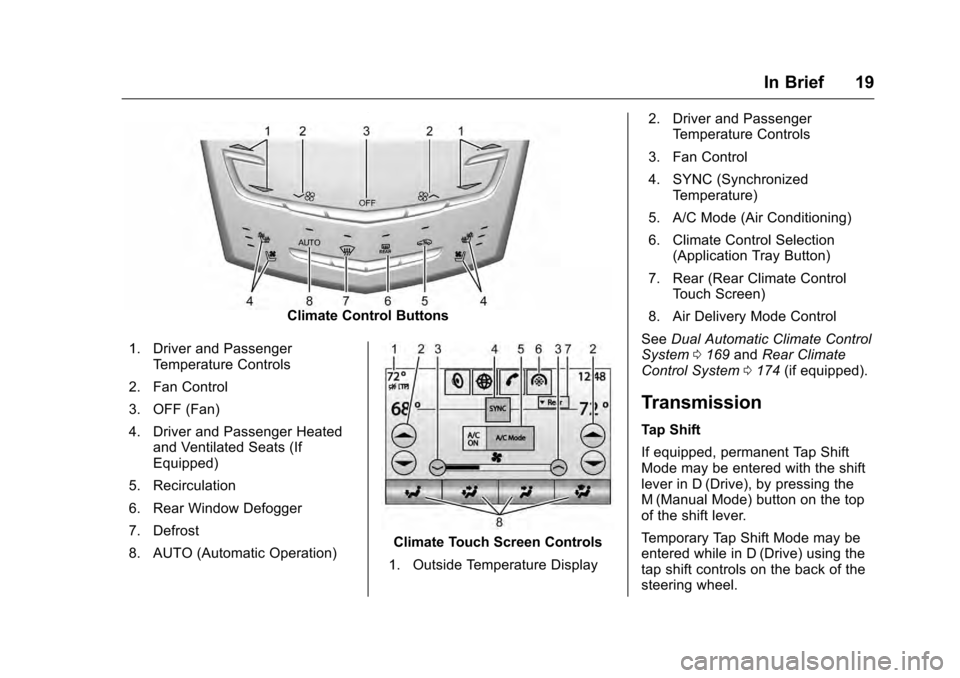
Climate Control Buttons
1. Driver and Passenger Temperature Controls
2. Fan Control
3. OFF (Fan)
4. Driver and Passenger Heated and Ventilated Seats (If
Equipped)
5. Recirculation
6. Rear Window Defogger
7. Defrost
8. AUTO (Automatic Operation)
Climate Touch Screen Controls
1. Outside Temperature Display 2. Driver and Passenger
Temperature Controls
3. Fan Control
4. SYNC (Synchronized Temperature)
5. A/C Mode (Air Conditioning)
6. Climate Control Selection (Application Tray Button)
7. Rear (Rear Climate Control Touch Screen)
8. Air Delivery Mode Control
See Dual Automatic Climate Control
System 0169 andRear Climate
Control System 0174 (if equipped).
Transmission
Tap Shift
If equipped, permanent Tap Shift
Mode may be entered with the shift
lever in D (Drive), by pressing the
M (Manual Mode) button on the top
of the shift lever.
Temporary Tap Shift Mode may be
entered while in D (Drive) using the
tap shift controls on the back of the
steering wheel.
Page 39 of 354

Cadillac CTS/CTS-V Owner Manual (GMNA-Localizing-MidEast-9369309) -
2016 - crc - 7/30/15
38 Keys, Doors, and Windows
Automatic Door Locks
The doors will lock automatically
when all doors are closed, the
ignition is on, and the shift lever is
moved out of P (Park).
To unlock the doors:
.Press
Kon a door.
. Shift the transmission into
P (Park).
Automatic door unlocking can be
programmed through the Driver
Information Center (DIC). See
Vehicle Personalization 0147.
Lockout Protection
If the vehicle is in ACC/
ACCESSORY or ON/RUN/START
and the power door lock switch is
pressed with the driver door open,
all the doors will lock and only the
driver door will unlock.
If the vehicle is off and locking is
requested while a door is open,
when all doors are closed the
vehicle will check for RKE
transmitters inside. If an RKE
transmitter is detected and the number of RKE transmitters inside
has not reduced, the driver door will
unlock and the horn will chirp three
times.
Lockout Protection can be manually
overridden with the driver door open
by pressing and holding
Qon the
power door lock switch.
Unlocked Door Anti-Lockout
If Unlocked Door Anti-Lockout is
turned on and the vehicle is off, the
driver door is open, and locking is
requested, all the doors will lock and
only the driver door will unlock. The
Unlocked Door Anti-Lockout feature
can be turned on or off using the
vehicle personalization menus. See
Vehicle Personalization 0147.
Safety Locks
The rear door safety locks prevent
passengers from opening the rear
doors from inside the vehicle.
Press
Z {to activate the safety
locks on the rear doors. The
indicator light in the switch will
illuminate when activated.
The rear door power windows are
also disabled. See Power Windows
0 46.
Press
Z {again to deactivate the
lockout switch.
Page 60 of 354
Cadillac CTS/CTS-V Owner Manual (GMNA-Localizing-MidEast-9369309) -
2016 - crc - 7/30/15
Seats and Restraints 59
Manually Recalling Memory
Positions
Press and hold 1, 2, or
Bto
manually recall the previously
stored memory positions. Releasing
1, 2, or
Bbefore the stored
positions are reached stops the
recall.
Automatically Recalling Memory
Positions
If programmed in the vehicle
personalization Menu, the Auto
(Automatic) Memory Recall feature
automatically recalls the current
driver ’s previously stored 1 or 2
position when the ignition is
changed from off to ON/RUN/
START or ACC/ACCESSORY.
The transmission must be in
P (Park).
See Vehicle Personalization 0147.
To stop recall movement, press one
of the memory, driver seat, outside
mirror, or power tilt and telescoping
steering column controls. RKE transmitters are not labeled
with a number. If your memory seat
position is stored to 1 or 2 but this
position is not automatically
recalling, then store your positions
to the other button or switch RKE
transmitters with the other driver.
If the vehicle’s driver has changed,
in some vehicles the Driver ID may
be displayed for the first few ignition
cycles.
Easy Exit Recall
If programmed on in the vehicle
personalization menu, the Easy Exit
feature recalls the previously stored
B(Exit) positions when leaving the
vehicle. See “Storing Memory
Positions” listed previously. See
also Vehicle Personalization 0147.
Easy Exit Recall automatically
activates when one of the following
occurs:
. The vehicle is turned off and the
driver door is opened within a
short time.
. The vehicle is turned off with the
driver door open. Obstructions
If something has blocked the driver
seat and/or the power tilt and
telescoping steering column while
recalling a memory position, the
recall may stop. Remove the
obstruction. Then do one of the
following:
.
If automatically or manually
recalling the stored memory
position, press and hold the
appropriate manual control for
two seconds. Try recalling again
by pressing the appropriate
memory button, then try recalling
again by opening the driver door
and pressingKon the RKE
transmitter..
. If recalling the exit position,
press and hold the appropriate
manual control for the exit
feature not recalling for
two seconds. Then try recalling
the exit position again.
If the memory position is still not
recalling, see your dealer for
service.
Page 104 of 354

Cadillac CTS/CTS-V Owner Manual (GMNA-Localizing-MidEast-9369309) -
2016 - crc - 7/30/15
Instruments and Controls 103
Instruments and
Controls
Controls
Steering Wheel Adjustment . . . 104
Steering Wheel Controls . . . . . . 105
Heated Steering Wheel . . . . . . . 105
Horn . . . . . . . . . . . . . . . . . . . . . . . . . . 105
Windshield Wiper/Washer . . . . 105
Clock . . . . . . . . . . . . . . . . . . . . . . . . . 107
Power Outlets . . . . . . . . . . . . . . . . 107
Wireless Charging . . . . . . . . . . . . 109
Warning Lights, Gauges, and
Indicators
Warning Lights, Gauges, andIndicators . . . . . . . . . . . . . . . . . . . . 111
Instrument Cluster . . . . . . . . . . . . 112
Speedometer . . . . . . . . . . . . . . . . . 116
Odometer . . . . . . . . . . . . . . . . . . . . . 116
Trip Odometer . . . . . . . . . . . . . . . . 116
Tachometer . . . . . . . . . . . . . . . . . . . 116
Fuel Gauge . . . . . . . . . . . . . . . . . . . 117
Engine Coolant Temperature Gauge . . . . . . . . . . . . . . . . . . . . . . 117
Safety Belt Reminders . . . . . . . . 118
Airbag Readiness Light . . . . . . . 119
Passenger Airbag Status Indicator . . . . . . . . . . . . . . . . . . . . . 119 Charging System Light . . . . . . . 120
Malfunction Indicator Lamp
(Check Engine Light) . . . . . . . . 121
Brake System Warning Light . . . . . . . . . . . . . . . . . . . . . . . . 122
Parking Brake Light . . . . . . . . . . 123
Service Electric Parking Brake Light . . . . . . . . . . . . . . . . . . . . . . . . 123
Antilock Brake System (ABS) Warning Light . . . . . . . . . . . . . . . 124
Lane Keep Assist (LKA) Light . . . . . . . . . . . . . . . . . . . . . . . . 124
Vehicle Ahead Indicator . . . . . . 124
Traction Off Light . . . . . . . . . . . . . 125
StabiliTrak
®OFF Light . . . . . . . . 125
Traction Control System (TCS)/ StabiliTrak
®Light . . . . . . . . . . . 125
Engine Coolant Temperature Warning Light . . . . . . . . . . . . . . . 126
Tire Pressure Light . . . . . . . . . . . 126
Engine Oil Pressure Light . . . . 127
Low Fuel Warning Light . . . . . . 127
Security Light . . . . . . . . . . . . . . . . . 127
High-Beam On Light . . . . . . . . . . 128
Adaptive Forward Lighting (AFL) Light . . . . . . . . . . . . . . . . . . 128
Lamps On Reminder . . . . . . . . . 128
Cruise Control Light . . . . . . . . . . 128
Door Ajar Light . . . . . . . . . . . . . . . 129
Information Displays
Driver Information Center (DIC) . . . . . . . . . . . . . . . . 129
Head-Up Display (HUD) . . . . . . 132
Vehicle Messages
Vehicle Messages . . . . . . . . . . . . 135
Battery Voltage and Charging Messages . . . . . . . . . . . . . . . . . . . 135
Brake System Messages . . . . . 136
Cruise Control Messages . . . . . 136
Door Ajar Messages . . . . . . . . . . 137
Engine Cooling System Messages . . . . . . . . . . . . . . . . . . . 137
Engine Oil Messages . . . . . . . . . 138
Engine Power Messages . . . . . 138
Fuel System Messages . . . . . . . 138
Key and Lock Messages . . . . . 139
Lamp Messages . . . . . . . . . . . . . . 139
Object Detection System Messages . . . . . . . . . . . . . . . . . . . 140
Ride Control System Messages . . . . . . . . . . . . . . . . . . . 142
Airbag System Messages . . . . 144
Safety Belt Messages . . . . . . . . 145
Security Messages . . . . . . . . . . . 145
Service Vehicle Messages . . . . 145
Starting the Vehicle Messages . . . . . . . . . . . . . . . . . . . 145
Tire Messages . . . . . . . . . . . . . . . . 146
Transmission Messages . . . . . . 146
Page 107 of 354
Cadillac CTS/CTS-V Owner Manual (GMNA-Localizing-MidEast-9369309) -
2016 - crc - 7/30/15
106 Instruments and Controls
Heavy snow or ice can overload the
wiper motor. SeeElectrical System
Overload 0280.
Wiper Parking
If the ignition is put in OFF while the
wipers are on LO, HI, or INT, they
will immediately stop.
If the windshield wiper lever is then
moved to OFF before the driver
door is opened or within 10 minutes,
the wipers will restart and move to
the base of the windshield.
If the ignition is put in OFF while the
wipers are performing wipes due to
windshield washing or Rainsense
wipes, the wipers continue to run
until they reach the base of the
windshield.
Rainsense
If equipped, there is a sensor near
the top center of the windshield
detects the amount of water on the
windshield and controls the
frequency of the windshield wiper.
To turn this feature on or off, see
“Rain Sense Wipers” underVehicle
Personalization 0147. Keep this area of the windshield
clear of debris to allow for best
system performance.
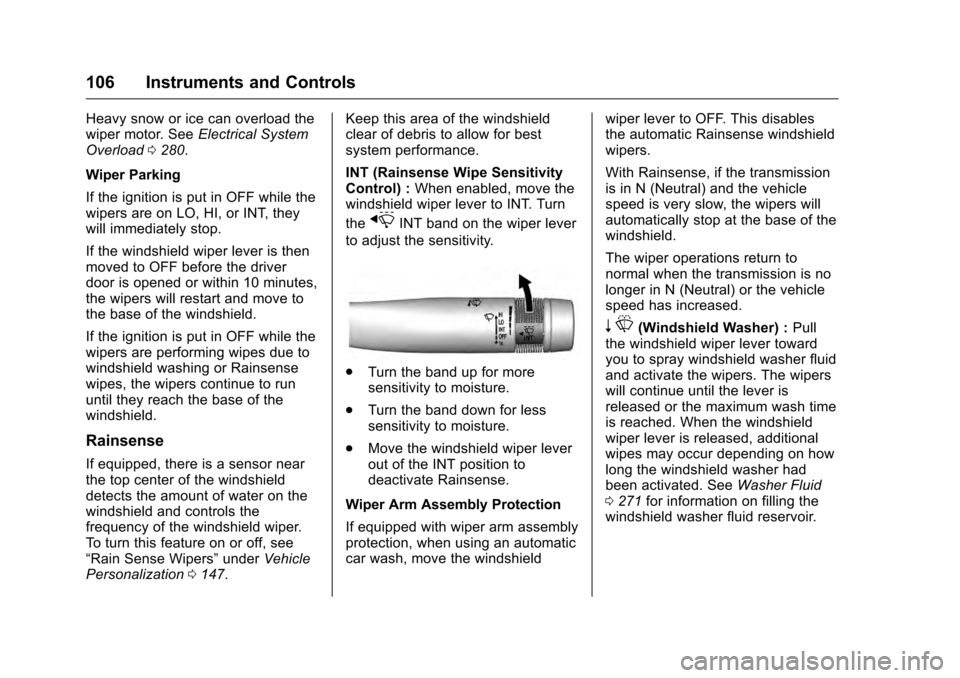
INT (Rainsense Wipe Sensitivity
Control) :
When enabled, move the
windshield wiper lever to INT. Turn
the
xINT band on the wiper lever
to adjust the sensitivity.
. Turn the band up for more
sensitivity to moisture.
. Turn the band down for less
sensitivity to moisture.
. Move the windshield wiper lever
out of the INT position to
deactivate Rainsense.
Wiper Arm Assembly Protection
If equipped with wiper arm assembly
protection, when using an automatic
car wash, move the windshield wiper lever to OFF. This disables
the automatic Rainsense windshield
wipers.
With Rainsense, if the transmission
is in N (Neutral) and the vehicle
speed is very slow, the wipers will
automatically stop at the base of the
windshield.
The wiper operations return to
normal when the transmission is no
longer in N (Neutral) or the vehicle
speed has increased.
n
L(Windshield Washer) : Pull
the windshield wiper lever toward
you to spray windshield washer fluid
and activate the wipers. The wipers
will continue until the lever is
released or the maximum wash time
is reached. When the windshield
wiper lever is released, additional
wipes may occur depending on how
long the windshield washer had
been activated. See Washer Fluid
0 271 for information on filling the
windshield washer fluid reservoir.
Page 117 of 354

Cadillac CTS/CTS-V Owner Manual (GMNA-Localizing-MidEast-9369309) -
2016 - crc - 7/30/15
116 Instruments and Controls
three people), or Max (for full
loading) by pressing SEL while the
desired item is highlighted.
Open Source Software :Press
SEL while Open Source Software is
highlighted to display open source
software information.
Speedometer
The speedometer shows the
vehicle's speed in kilometers per
hour (km/h) or miles per hour (mph).
This vehicle is equipped with an
overspeed warning device. When
the vehicle's speed reaches
120 km/h (75 mph), a chime will
sound. A message also displays in
the Driver Information Center (DIC).
See Vehicle Speed Messages
0 147.
Odometer
The odometer shows how far the
vehicle has been driven, in either
kilometers or miles.
Trip Odometer
The trip odometer shows how far
the vehicle has been driven since
the trip odometer was last reset.
The trip odometer is accessed and
reset through the Driver Information
Center (DIC). See Driver
Information Center (DIC) 0129.
Tachometer
The tachometer displays the engine
speed in revolutions per
minute (rpm).
On the Base cluster, if the vehicle
has the Stop/Start system, when the
ignition is in ON/RUN, the
tachometer indicates the vehicle
status. When pointing to AUTO
STOP, the engine is off but the
vehicle is on and can move. The
engine could auto start at any time.
When the indicator points to OFF,
the vehicle is off.
When the engine is on, the
tachometer will indicate the engine’s
revolutions per minute (rpm). The
tachometer may vary by several hundred rpm’s, during auto stop
mode, when the engine is shutting
off and restarting.
A slight bump may be felt when the
transmission is determining the
most fuel efficient operating range.
Caution
If the engine is operated with the
rpm’s in the warning area at the
high end of the tachometer, the
vehicle could be damaged, and
the damage would not be covered
by the vehicle warranty. Do not
operate the engine with the rpm’s
in the warning area.
Page 122 of 354
Cadillac CTS/CTS-V Owner Manual (GMNA-Localizing-MidEast-9369309) -
2016 - crc - 7/30/15
Instruments and Controls 121
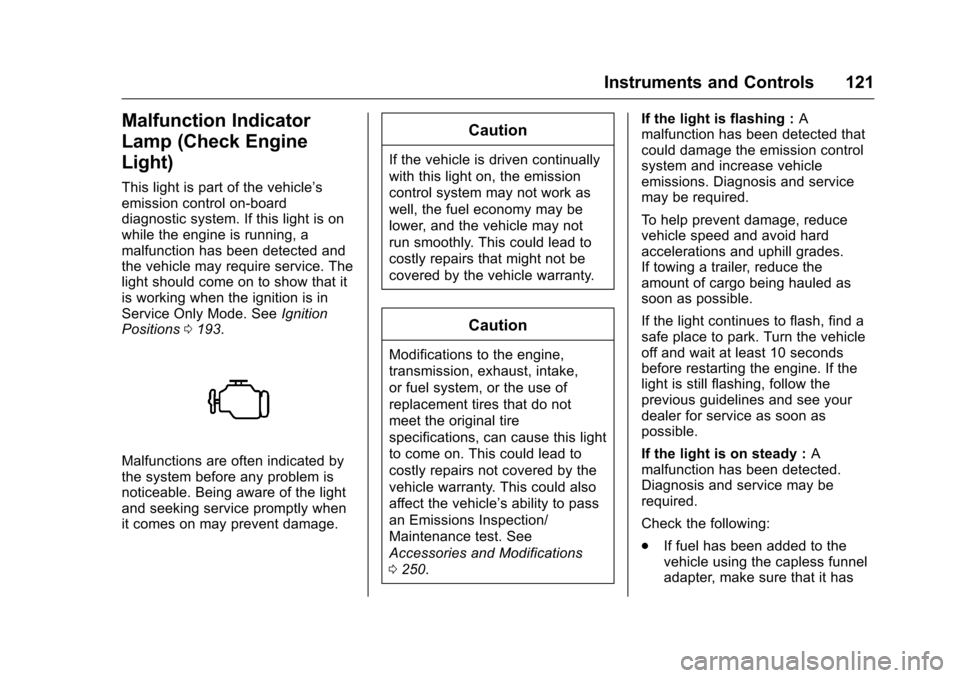
Malfunction Indicator
Lamp (Check Engine
Light)
This light is part of the vehicle’s
emission control on-board
diagnostic system. If this light is on
while the engine is running, a
malfunction has been detected and
the vehicle may require service. The
light should come on to show that it
is working when the ignition is in
Service Only Mode. SeeIgnition
Positions 0193.
Malfunctions are often indicated by
the system before any problem is
noticeable. Being aware of the light
and seeking service promptly when
it comes on may prevent damage.
Caution
If the vehicle is driven continually
with this light on, the emission
control system may not work as
well, the fuel economy may be
lower, and the vehicle may not
run smoothly. This could lead to
costly repairs that might not be
covered by the vehicle warranty.
Caution
Modifications to the engine,
transmission, exhaust, intake,
or fuel system, or the use of
replacement tires that do not
meet the original tire
specifications, can cause this light
to come on. This could lead to
costly repairs not covered by the
vehicle warranty. This could also
affect the vehicle’s ability to pass
an Emissions Inspection/
Maintenance test. See
Accessories and Modifications
0250. If the light is flashing :
A
malfunction has been detected that
could damage the emission control
system and increase vehicle
emissions. Diagnosis and service
may be required.
To help prevent damage, reduce
vehicle speed and avoid hard
accelerations and uphill grades.
If towing a trailer, reduce the
amount of cargo being hauled as
soon as possible.
If the light continues to flash, find a
safe place to park. Turn the vehicle
off and wait at least 10 seconds
before restarting the engine. If the
light is still flashing, follow the
previous guidelines and see your
dealer for service as soon as
possible.
If the light is on steady : A
malfunction has been detected.
Diagnosis and service may be
required.
Check the following:
. If fuel has been added to the
vehicle using the capless funnel
adapter, make sure that it has
Page 135 of 354

Cadillac CTS/CTS-V Owner Manual (GMNA-Localizing-MidEast-9369309) -
2016 - crc - 7/30/15
134 Instruments and Controls
Polarized sunglasses could make
the HUD image harder to see.
HUD Views
There are four views in the HUD.
Some vehicle information and
vehicle messages or alerts may be
displayed in any view.
Speed View :This display gives the
speedometer reading (in English or
metric units), speed limit, Adaptive
Cruise Control speed, Lane
Departure Warning, and Vehicle
Ahead indicator. Some information
only appears on vehicles that have
these features, and when they are
active.
Audio/Phone View : This displays
the speed view along with audio/
phone information. The current radio
station, media type, and incoming
calls will be displayed when active
on vehicles equipped with these
features.
All HUD views may briefly display
audio information when the driver
uses the steering wheel controls to
adjust the audio settings appearing
in the instrument cluster.
Incoming phone calls appearing in
the instrument cluster, may also
display in any HUD view.
Navigation View : This display
includes the information in the
speed view along with Turn-by-Turn
Navigation information in some
vehicles. The compass heading is
displayed when navigation routing is
not active.
Navigation Turn-by-Turn Alerts
shown in the instrument cluster may
also be displayed in any HUD view.
Performance View : This displays
the speedometer reading, rpm
reading, transmission positions, and
gear shift indicator.
Care of the HUD
Clean the inside of the windshield to
remove any dirt or film that could
reduce the sharpness or clarity of
the HUD image.