change wheel CADILLAC CTS 2017 3.G User Guide
[x] Cancel search | Manufacturer: CADILLAC, Model Year: 2017, Model line: CTS, Model: CADILLAC CTS 2017 3.GPages: 352, PDF Size: 3.99 MB
Page 133 of 352
Cadillac CTS/CTS-V Owner Manual (GMNA-Localizing-MidEast-10293089) -
2017 - crc - 6/22/16
132 INSTRUMENTS AND CONTROLS
Information Displays
Driver Information
Center (DIC)
The DIC displays are shown in the left
and right interactive display zones on
the instrument cluster. The displays
show the status of many vehicle
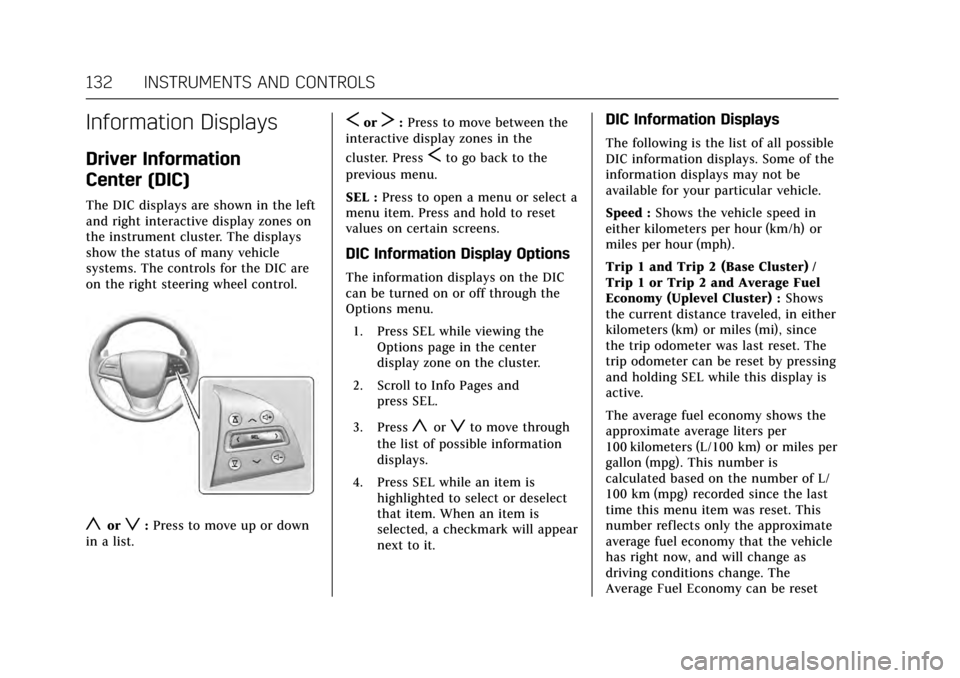
systems. The controls for the DIC are
on the right steering wheel control.
yorz:Press to move up or down
in a list.
SorT: Press to move between the
interactive display zones in the
cluster. Press
Sto go back to the
previous menu.
SEL : Press to open a menu or select a
menu item. Press and hold to reset
values on certain screens.
DIC Information Display Options
The information displays on the DIC
can be turned on or off through the
Options menu.
1. Press SEL while viewing the Options page in the center
display zone on the cluster.
2. Scroll to Info Pages and press SEL.
3. Press
yorzto move through
the list of possible information
displays.
4. Press SEL while an item is highlighted to select or deselect
that item. When an item is
selected, a checkmark will appear
next to it.
DIC Information Displays
The following is the list of all possible
DIC information displays. Some of the
information displays may not be
available for your particular vehicle.
Speed : Shows the vehicle speed in
either kilometers per hour (km/h) or
miles per hour (mph).
Trip 1 and Trip 2 (Base Cluster) /
Trip 1 or Trip 2 and Average Fuel
Economy (Uplevel Cluster) : Shows
the current distance traveled, in either
kilometers (km) or miles (mi), since
the trip odometer was last reset. The
trip odometer can be reset by pressing
and holding SEL while this display is
active.
The average fuel economy shows the
approximate average liters per
100 kilometers (L/100 km) or miles per
gallon (mpg). This number is
calculated based on the number of L/
100 km (mpg) recorded since the last
time this menu item was reset. This
number reflects only the approximate
average fuel economy that the vehicle
has right now, and will change as
driving conditions change. The
Average Fuel Economy can be reset
Page 137 of 352
Cadillac CTS/CTS-V Owner Manual (GMNA-Localizing-MidEast-10293089) -
2017 - crc - 6/22/16
136 INSTRUMENTS AND CONTROLS
Some vehicle messages or alerts
displayed in the HUD may be cleared
by using the steering wheel controls.
SeeVehicle Messages 0138.
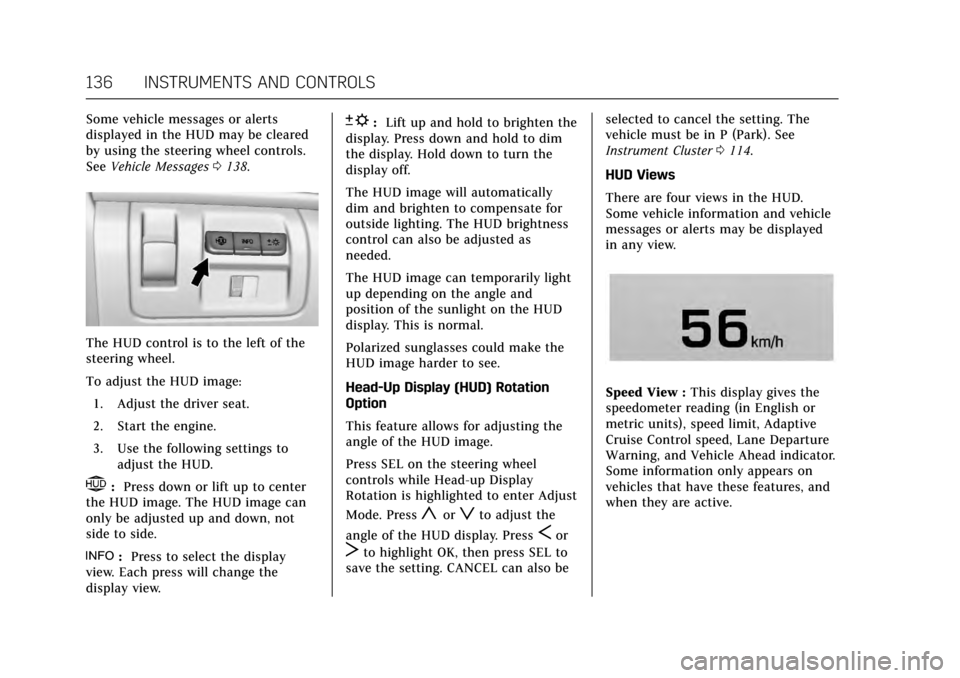
The HUD control is to the left of the
steering wheel.
To adjust the HUD image:
1. Adjust the driver seat.
2. Start the engine.
3. Use the following settings to adjust the HUD.
$:Press down or lift up to center
the HUD image. The HUD image can
only be adjusted up and down, not
side to side.
!: Press to select the display
view. Each press will change the
display view.
D: Lift up and hold to brighten the
display. Press down and hold to dim
the display. Hold down to turn the
display off.
The HUD image will automatically
dim and brighten to compensate for
outside lighting. The HUD brightness
control can also be adjusted as
needed.
The HUD image can temporarily light
up depending on the angle and
position of the sunlight on the HUD
display. This is normal.
Polarized sunglasses could make the
HUD image harder to see.
Head-Up Display (HUD) Rotation
Option
This feature allows for adjusting the
angle of the HUD image.
Press SEL on the steering wheel
controls while Head-up Display
Rotation is highlighted to enter Adjust
Mode. Press
yorzto adjust the
angle of the HUD display. Press
Sor
Tto highlight OK, then press SEL to
save the setting. CANCEL can also be selected to cancel the setting. The
vehicle must be in P (Park). See
Instrument Cluster
0114.
HUD Views
There are four views in the HUD.
Some vehicle information and vehicle
messages or alerts may be displayed
in any view.
Speed View : This display gives the
speedometer reading (in English or
metric units), speed limit, Adaptive
Cruise Control speed, Lane Departure
Warning, and Vehicle Ahead indicator.
Some information only appears on
vehicles that have these features, and
when they are active.
Page 145 of 352

Cadillac CTS/CTS-V Owner Manual (GMNA-Localizing-MidEast-10293089) -
2017 - crc - 6/22/16
144 INSTRUMENTS AND CONTROLS
System. Do not use this system to
help park or back the vehicle. See your
dealer for service.
SERVICE SIDE DETECTION
SYSTEM
If this message remains on after
continued driving, the vehicle needs
service. Side Blind Zone Alert (SBZA),
Lane Change Alert (LCA), and Rear
Cross Traffic Alert (RCTA) features
will not work. Take the vehicle to your
dealer.
SIDE DETECTION SYSTEM
UNAVAILABLE
This message indicates that Side Blind
Zone Alert (SBZA), Lane Change Alert
(LCA), and Rear Cross Traffic Alert
(RCTA) are disabled either because the
sensor is blocked and cannot detect
vehicles in the blind zone, or the
vehicle is passing through an open
area, such as the desert, where there
is insufficient data for operation. This
message may also activate during
heavy rain or due to road spray. The
vehicle does not need service. For
cleaning, see "Washing the Vehicle"
underExterior Care 0315.
TAKE STEERING
If LKA does not detect active driver
steering, an alert and chime may be
provided. Move the steering wheel to
dismiss. See Lane Keep Assist
(LKA) 0241.
Ride Control System
Messages
ALL WHEEL DRIVE OFF
If the vehicle has the All-Wheel-Drive
(AWD) system, this message displays
when there is a temporary condition
making the AWD system unavailable.
The vehicle will run in 2WD. This
could be caused by:
.
Loss of wheel or vehicle speed
. AWD system overheat
. Certain vehicle electrical
conditions
This message turns off when the
above conditions are no longer
present and the warning message is
reset.
See All-Wheel Drive 0206.
PERFORMANCE TRACTION 1 -
WET (V-Series Only)
This message displays when this
Performance Traction Management
(PTM) mode is selected. The TCS and
StabiliTrak OFF cluster lights will also
be on when this mode is selected.
Launch Control is available when this
mode is selected. In this mode, the
Traction Control and Active Handling
System are available but intended for
use on wet race track conditions.
Adjust your driving accordingly. See
“Performance Traction Management
(V-Series Only)” underCompetitive
Driving Mode 0214.
PERFORMANCE TRACTION 2 -
DRY (V-Series Only)
This message displays when this
Performance Traction Management
(PTM) mode is selected. The TCS and
StabiliTrak OFF cluster lights will also
be on when this mode is selected.
Launch Control is available when this
mode is selected. In this mode, the
Traction Control and Active Handling
System are available but intended for
use on dry race track conditions.
Adjust your driving accordingly. See
Page 163 of 352

Cadillac CTS/CTS-V Owner Manual (GMNA-Localizing-MidEast-10293089) -
2017 - crc - 6/22/16
162 LIGHTING
Interior Lighting
Instrument Panel
Illumination Control
The brightness of the instrument
panel lighting and steering wheel
controls can be adjusted.
D:Move the thumbwheel up or
down to brighten or dim the lights.
The brightness of the displays
automatically adjusts based on
outdoor lighting. The instrument
panel illumination control will set the
lowest level to which the displays will
automatically be adjusted.
Courtesy Lamps
The courtesy lamps come on when
any door is opened and the dome
lamp is in the DOOR position.
Dome Lamps
To change the dome lamp settings,
press the following:
OFF : Turns the lamp off, even when a
door is open.
DOOR : The lamp comes on when a
door is opened.
ON : Turns the lamp on.
Reading Lamps
There are front and rear reading
lamps on the overhead console and
over the rear passenger doors. These
lamps come on when any door is
opened.
To manually turn the reading lamps
on or off:
Pressmornnext to each overhead
console reading lamp.
Page 180 of 352

Cadillac CTS/CTS-V Owner Manual (GMNA-Localizing-MidEast-10293089) -
2017 - crc - 6/22/16
CLIMATE CONTROLS 179
Air Vents
Adjustable air vents are in the center
and on the side of the instrument
panel.
1. Thumbwheel
2. Slider Knob
Use the thumbwheels (1) near the air
vents to open or close off the airflow.
Move the slider knobs (2) to change
the direction of the airf low.
Additional air vents are beneath the
windshield and the driver and
passenger side door windows. These
are fixed and cannot be adjusted.
Operation Tips
.Clear away any ice, snow, or leaves
from air inlets at the base of the
windshield that could block the
flow of air into the vehicle.
. Keep the path under the front
seats clear of objects to help
circulate the air inside of the
vehicle more effectively. .
Use of non-GM approved hood
deflectors can adversely affect the
performance of the system. Check
with your dealer before adding
equipment to the outside of the
vehicle.
. Do not attach any devices to the
air vent slats. This restricts airflow
and may cause damage to the air
vents.
Page 182 of 352

Cadillac CTS/CTS-V Owner Manual (GMNA-Localizing-MidEast-10293089) -
2017 - crc - 6/22/16
DRIVING AND OPERATING 181
Driving and
Operating
Driving Information
Distracted Driving . . . . . . . . . . . . . . . . 182
Defensive Driving . . . . . . . . . . . . . . . . 182
Control of a Vehicle . . . . . . . . . . . . . . 182
Braking . . . . . . . . . . . . . . . . . . . . . . . . . . . . 183
Steering . . . . . . . . . . . . . . . . . . . . . . . . . . . 183
Off-Road Recovery . . . . . . . . . . . . . . . . 184
Loss of Control . . . . . . . . . . . . . . . . . . . 184
Track Events and CompetitiveDriving . . . . . . . . . . . . . . . . . . . . . . . . . . 185
Driving on Wet Roads . . . . . . . . . . . 189
Hill and Mountain Roads . . . . . . . . 189
Winter Driving . . . . . . . . . . . . . . . . . . . . 190
If the Vehicle Is Stuck . . . . . . . . . . . 191
Vehicle Load Limits . . . . . . . . . . . . . . 192
Starting and Operating
New Vehicle Break-In . . . . . . . . . . . . 195
Composite Materials . . . . . . . . . . . . . 196
Ignition Positions . . . . . . . . . . . . . . . . 196
Starting the Engine . . . . . . . . . . . . . . 198
Retained Accessory Power (RAP) . . . . . . . . . . . . . . . . . . . . 200
Shifting Into Park . . . . . . . . . . . . . . . . 200
Shifting out of Park . . . . . . . . . . . . . . 201 Parking over Things
That Burn . . . . . . . . . . . . . . . . . . . . . . . 201
Extended Parking . . . . . . . . . . . . . . . . . 201
Engine Exhaust
Engine Exhaust . . . . . . . . . . . . . . . . . . . 202
Running the Vehicle While Parked . . . . . . . . . . . . . . . . . . . . . . . . . . . 203
Automatic Transmission
Automatic Transmission . . . . . . . . . 203
Manual Mode . . . . . . . . . . . . . . . . . . . . . 205
Drive Systems
All-Wheel Drive . . . . . . . . . . . . . . . . . . 206
Brakes
Antilock Brake System (ABS) . . . . 206
Electric Parking Brake . . . . . . . . . . . . 207
Brake Assist . . . . . . . . . . . . . . . . . . . . . . . 208
Ride Control Systems
Traction Control/ElectronicStability Control . . . . . . . . . . . . . . . . 209
Driver Mode Control . . . . . . . . . . . . . 211
Competitive Driving Mode . . . . . . . 214
Limited-Slip Differential (Except V-Series) . . . . . . . . . . . . . . . . . . . . . . . . . 217
Limited-Slip Differential (V-Series Only) . . . . . . . . . . . . . . . . . . 217
Cruise Control
Cruise Control . . . . . . . . . . . . . . . . . . . . 218 Adaptive Cruise Control . . . . . . . . . 220
Driver Assistance Systems
Driver Assistance Systems . . . . . . . 227
Assistance Systems for Parking
or Backing . . . . . . . . . . . . . . . . . . . . . . . 228
Assistance Systems for Driving . . . . . . . . . . . . . . . . . . . . . . . . . . 235
Forward Collision Alert (FCA) System . . . . . . . . . . . . . . . . . . . . . . . . . . 235
Forward Automatic Braking (FAB) . . . . . . . . . . . . . . . . . . . 237
Side Blind Zone Alert (SBZA) . . . . 239
Lane Change Alert (LCA) . . . . . . . . 239
Lane Departure Warning (LDW) . . . . . . . . . . . . . . . . . 241
Lane Keep Assist (LKA) . . . . . . . . . . 241
Fuel
Fuel . . . . . . . . . . . . . . . . . . . . . . . . . . . . . . . 242
Fuel Additives . . . . . . . . . . . . . . . . . . . . 243
Filling the Tank . . . . . . . . . . . . . . . . . . 243
Filling a Portable Fuel
Container . . . . . . . . . . . . . . . . . . . . . . . . 245
Trailer Towing
General Towing Information . . . . 245
Conversions and Add-Ons
Add-On Electrical Equipment . . . 246
Page 193 of 352

Cadillac CTS/CTS-V Owner Manual (GMNA-Localizing-MidEast-10293089) -
2017 - crc - 6/22/16
192 DRIVING AND OPERATING
pedal when the transmission is in
gear. Slowly spinning the wheels in
the forward and reverse directions
causes a rocking motion that could
free the vehicle. If that does not get
the vehicle out after a few tries, it
might need to be towed out. If the
vehicle does need to be towed out, see
Towing the Vehicle0312.
Vehicle Load Limits
It is very important to know how
much weight the vehicle can carry.
This weight is called the vehicle
capacity weight and includes the
weight of all occupants, cargo, and
all nonfactory-installed options.
Two labels on the vehicle may
show how much weight it may
properly carry: the Tire and
Loading Information label and the
Certification label.
{Warning
Do not load the vehicle any
heavier than the Gross Vehicle
Weight Rating (GVWR),
or either the maximum front or
rear Gross Axle Weight Rating
(GAWR). This can cause
systems to break and change
the way the vehicle handles.
This could cause loss of control
and a crash. Overloading can
also reduce stopping distance,
damage the tires, and shorten
the life of the vehicle. Tire and Loading Information
Label
Label Example
A vehicle-specific Tire and
Loading Information label is
attached to the vehicle's center
pillar (B-pillar). The Tire and
Loading Information label shows
the number of occupant seating
positions (1), and the maximum
vehicle capacity weight (2) in
kilograms and pounds.
Page 208 of 352

Cadillac CTS/CTS-V Owner Manual (GMNA-Localizing-MidEast-10293089) -
2017 - crc - 6/22/16
DRIVING AND OPERATING 207
a sudden obstacle, a computer senses
the wheels are slowing down. If one of
the wheels is about to stop rolling, the
computer will separately work the
brakes at each wheel.
ABS can change the brake pressure to
each wheel, as required, faster than
any driver could. This can help you
steer around the obstacle while
braking hard.
As the brakes are applied, the
computer keeps receiving updates on
wheel speed and controls braking
pressure accordingly.
Remember: ABS does not change the
time needed to get a foot up to the
brake pedal or always decrease
stopping distance. If you get too close
to the vehicle in front of you, there
will not be enough time to apply the
brakes if that vehicle suddenly slows
or stops. Always leave enough room
up ahead to stop, even with ABS.Using ABS
Do not pump the brakes. Just hold the
brake pedal down firmly and let ABS
work. You may hear the ABS pump or
motor operating and feel the brake
pedal pulsate. This is normal.
Braking in Emergencies
ABS allows you to steer and brake at
the same time. In many emergencies,
steering can help more than even the
very best braking.
Electric Parking Brake
The vehicle has an Electric Parking
Brake (EPB). The switch for the EPB is
on the instrument panel, to the left of
the steering wheel. The EPB can
always be activated, even if the
ignition is off. To prevent draining the
battery, avoid repeated cycles of the
EPB system when the engine is not
running.
The system has a red parking brake
status light and an amber parking
brake warning light. SeeParking Brake
Light 0125 and Service Electric Parking
Brake Light 0126. There are also
parking brake-related Driver
Information Center (DIC) messages.
See Brake System Messages 0138. In
case of insufficient electrical power,
the EPB cannot be applied or released.
Before leaving the vehicle, check the
red parking brake status light to
ensure that the parking brake is
applied.
EPB Apply
To apply the EPB:
1. Be sure the vehicle is at a complete stop.
Page 216 of 352
Cadillac CTS/CTS-V Owner Manual (GMNA-Localizing-MidEast-10293089) -
2017 - crc - 6/22/16
DRIVING AND OPERATING 215
not limit wheel spin, the Electronic
Limited-Slip Differential (eLSD) allows
increased vehicle agility, and more
effort is required to turn the steering
wheel. See“Limited-Slip Differential
(V-Series Only)” later in this section.
Adjust your driving accordingly.
Press
Yagain, or turn the ignition to
ACC/ACCESSORY and restart the
vehicle, to turn TCS back on. The
traction off light
iand StabiliTrak
OFF light
gwill go out in the
instrument cluster.
Caution
When traction control is turned off,
or Competitive Driving Mode is
active, it is possible to lose traction.
Performance Traction
Management (V-Series Only)
Performance Traction Management
(PTM) integrates the Traction Control,
StabiliTrak, and Selective Ride Control
systems to provide improved and
consistent performance when
cornering. The amount of available engine power is based on the mode
selected, track conditions, driver skill,
and the radius of each corner.
This light is on when the vehicle is in
the PTM mode.
To select this optional handling mode,
the vehicle mode must be Track. Then
quickly press
Yon the center
console two times. PERF TRAC 1 -
WET ACTIVE HANDLING ON displays
in the DIC.
When PTM is active, the up and down
buttons will no longer change Drive
Modes, but instead change PTM
modes.
To select a mode while in PTM, press
the Driver Mode Control/PTM buttons
on the center console.
To experience the performance benefit
of this system, after entering a curve
and at the point where normal acceleration occurs, fully push the
accelerator pedal. The PTM system
will modify the level of engine power
for a smooth and consistent
corner exit.
The PTM system contains five modes.
These modes are selected by pressing
the Driver Mode Control/PTM buttons
on the center console. Scroll up or
down through modes 1–5 by pressing
the MODE SELECT up and down
buttons The following is a DIC display
description and the recommended
usage of each mode:PERF TRAC 1
–WET ACTIVE
HANDLING ON
. Intended for all driver skill levels.
. Wet or damp conditions only —
not intended for use in heavy rain
or standing water.
. StabiliTrak is on and engine power
is reduced based on conditions.
Page 218 of 352

Cadillac CTS/CTS-V Owner Manual (GMNA-Localizing-MidEast-10293089) -
2017 - crc - 6/22/16
DRIVING AND OPERATING 217
The Launch Control feature will
initially limit engine speed as the
driver rapidly applies the accelerator
pedal to wide open throttle. Allow the
engine rpm to stabilize. A smooth,
quick release of the brake pedal, while
maintaining the fully pressed
accelerator pedal, will manage
wheel slip.
After the vehicle is launched, the
system continues in Competitive
Driving Mode or Performance Traction
Management (V-Series).
Competitive Driving Mode, PTM, and
Launch Control are systems designed
for a closed course race track and not
intended for use on public roads. The
systems are not intended to
compensate for lack of driver
experience or familiarity with the race
track.Limited-Slip Differential
(Except V-Series)
If equipped, the mechanical
limited-slip differential can give more
traction on snow, mud, ice, sand,
or gravel. It works like a standard axle
most of the time, but when traction is
low, this feature allows the drive
wheel with the most traction to move
the vehicle. For vehicles with
limited-slip differential, driven under
severe conditions, the rear axle fluid
should be changed. SeeCompetitive
Driving Mode 0214 and Maintenance
Schedule 0324.
Limited-Slip Differential
(V-Series Only)
If equipped, the Electronic
Limited-Slip Differential (eLSD) is
automatically activated. eLSD actively
monitors vehicle sensors and driver
inputs to determine the amount of
change for the conditions. With eLSD,
the vehicle has:
.
Enhanced high-speed control. .
Improved traction through
corners, allowing more
acceleration.
. More precise steering.
. Increased vehicle agility.
. Integration with StabiliTrak.
For vehicles with eLSD, driven under
severe conditions, the rear axle fluid
should be changed. See Competitive
Driving Mode 0214 and Maintenance
Schedule 0324.