manual transmission CADILLAC CTS 2017 3.G User Guide
[x] Cancel search | Manufacturer: CADILLAC, Model Year: 2017, Model line: CTS, Model: CADILLAC CTS 2017 3.GPages: 352, PDF Size: 3.99 MB
Page 138 of 352
Cadillac CTS/CTS-V Owner Manual (GMNA-Localizing-MidEast-10293089) -
2017 - crc - 6/22/16
INSTRUMENTS AND CONTROLS 137
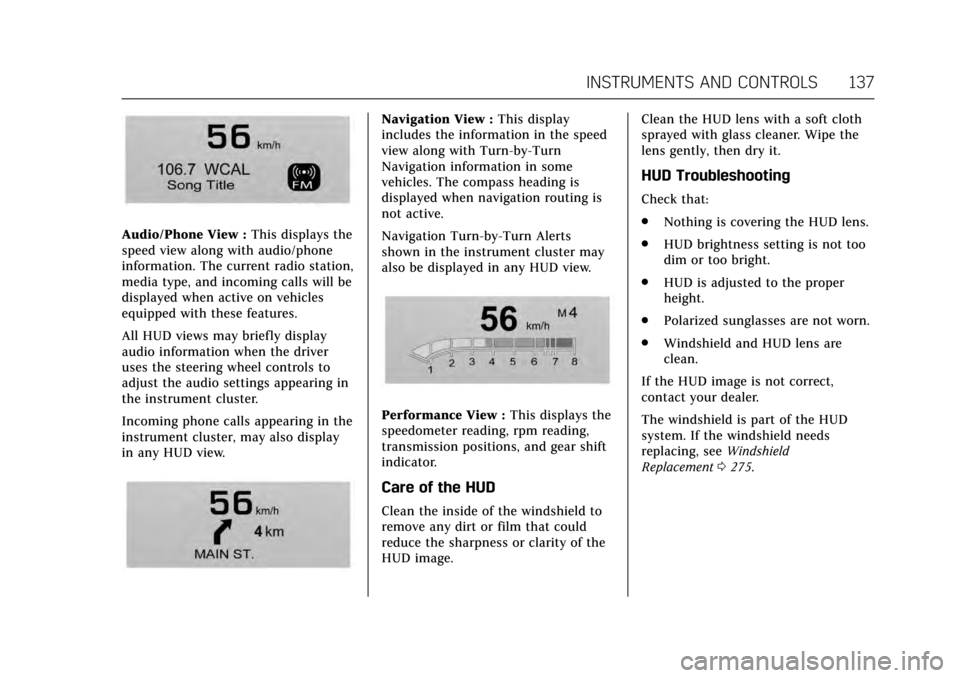
Audio/Phone View :This displays the
speed view along with audio/phone
information. The current radio station,
media type, and incoming calls will be
displayed when active on vehicles
equipped with these features.
All HUD views may briefly display
audio information when the driver
uses the steering wheel controls to
adjust the audio settings appearing in
the instrument cluster.
Incoming phone calls appearing in the
instrument cluster, may also display
in any HUD view.
Navigation View : This display
includes the information in the speed
view along with Turn-by-Turn
Navigation information in some
vehicles. The compass heading is
displayed when navigation routing is
not active.
Navigation Turn-by-Turn Alerts
shown in the instrument cluster may
also be displayed in any HUD view.
Performance View : This displays the
speedometer reading, rpm reading,
transmission positions, and gear shift
indicator.
Care of the HUD
Clean the inside of the windshield to
remove any dirt or film that could
reduce the sharpness or clarity of the
HUD image. Clean the HUD lens with a soft cloth
sprayed with glass cleaner. Wipe the
lens gently, then dry it.
HUD Troubleshooting
Check that:
.
Nothing is covering the HUD lens.
. HUD brightness setting is not too
dim or too bright.
. HUD is adjusted to the proper
height.
. Polarized sunglasses are not worn.
. Windshield and HUD lens are
clean.
If the HUD image is not correct,
contact your dealer.
The windshield is part of the HUD
system. If the windshield needs
replacing, see Windshield
Replacement 0275.
Page 148 of 352

Cadillac CTS/CTS-V Owner Manual (GMNA-Localizing-MidEast-10293089) -
2017 - crc - 6/22/16
INSTRUMENTS AND CONTROLS 147
SERVICE STEERING
COLUMN LOCK
This message displays if there is a
problem with the steering column
lock. Take the vehicle to your dealer
for service.
SERVICE VEHICLE SOON
This message displays if there is a
problem with the vehicle. Take the
vehicle to your dealer for service.
Starting the Vehicle
Messages
PRESS BRAKE TO START
This message is displayed when
attempting to start the vehicle
without first pressing the brake pedal.
SERVICE KEYLESS START
SYSTEM
This message is displayed if there is a
problem with the pushbutton start
system. Take the vehicle to your
dealer for service.
TURN STEERING WHEEL START
VEHICLE AGAIN
This message may display when you
try to start the vehicle, but the
column remains locked. Try turning
the steering wheel while starting the
vehicle to unlock the steering column.
If the vehicle still does not start, turn
the steering wheel the other way, and
try starting the vehicle again.
Tire Messages
SERVICE TIRE MONITOR SYSTEM
This message displays if there is a
problem with the Tire Pressure
Monitor System (TPMS). SeeTire
Pressure Monitor Operation 0293.
TIRE LEARNING ACTIVE
This message displays when the
system is learning new tires. See Tire
Pressure Monitor Operation 0293.
TIRE PRESSURE LOW ADD AIR
TO TIRE
This message displays when the
pressure in one or more of the tires
is low. This message also displays LEFT
FRONT, RIGHT FRONT, LEFT REAR,
or RIGHT REAR to indicate the
location of the low tire.
The low tire pressure warning light
will also come on. See
Tire Pressure
Light 0128.
If a tire pressure message appears on
the DIC, stop as soon as possible.
Inflate the tires by adding air until the
tire pressure is equal to the values
shown on the Tire and Loading
Information label. See Tires0287,
Vehicle Load Limits 0192, and Tire
Pressure 0290.
More than one tire pressure message
can appear at a time. The DIC also
shows the tire pressure values. See
Driver Information Center (DIC) 0132.
Transmission Messages
SERVICE TRANSMISSION
This message displays if there is a
problem with the transmission. See
your dealer.
Page 149 of 352
Cadillac CTS/CTS-V Owner Manual (GMNA-Localizing-MidEast-10293089) -
2017 - crc - 6/22/16
148 INSTRUMENTS AND CONTROLS
SHIFT DENIED
This message displays when using the
Driver Shift Control (DSC) and
attempting to shift to a gear not
appropriate for the vehicle speed and
engine revolutions per minute (rpm).
SeeManual Mode 0205.
SHIFT TO PARK
This message displays when the
transmission needs to be shifted to
P (Park). This may appear when
turning the ignition off if the vehicle
is not in P (Park).
TRANSMISSION HOT —IDLE
ENGINE
This message displays and a chime
sounds if the transmission fluid in the
vehicle gets hot. Driving with the
transmission fluid temperature high
can cause damage to the vehicle. Stop
the vehicle and let it idle to allow the
transmission to cool. This message
clears when the fluid temperature
reaches a safe level.
Vehicle Reminder
Messages
ICE POSSIBLE DRIVE WITH CARE
This message displays when ice
conditions are possible.
Vehicle Speed Messages
SPEED LIMIT EXCEEDED
This message is displayed when the
vehicle speed is greater than the set
speed. See “Speed Warning” under
Driver Information Center (DIC) 0132.
VEHICLE OVERSPEED
This message displays when the
vehicle speed exceeds 120 km/h
(75 mph).
Washer Fluid Messages
WASHER FLUID LOW ADD FLUID
This message may display when the
washer fluid level is low. Fill the
windshield washer reservoir as soon
as possible. See Engine Compartment
Overview 0250 for the location of the
windshield washer reservoir. Also, see
Washer Fluid 0269.
Page 161 of 352

Cadillac CTS/CTS-V Owner Manual (GMNA-Localizing-MidEast-10293089) -
2017 - crc - 6/22/16
160 LIGHTING
The DRL turn off when the headlamps
are turned to
;or the ignition is off.
Automatic Headlamp
System
When the exterior lamp control is set
to AUTO and it is dark enough
outside, the headlamps come on
automatically.
If equipped, the light sensor is on top
of the instrument panel or on the
windshield near the rearview mirror.
Do not cover the sensor, otherwise the
headlamps will come on when they
are not needed.The system may also turn on the
headlamps when driving through a
parking garage or tunnel.
If the vehicle is started in a dark
garage, the automatic headlamp
system comes on immediately. If it is
light outside when the vehicle leaves
the garage, there is a slight delay
before the automatic headlamp
system turns off the headlamps.
During that delay, the instrument
cluster may not be as bright as usual.
Make sure the instrument panel
brightness control is in the full bright
position. See
Instrument Panel
Illumination Control 0162.
When it is bright enough outside, the
headlamps will turn off.
The automatic headlamp system turns
off when the exterior lamp control is
turned to
Oor the ignition is off.
Lights On with Wipers
If the windshield wipers are activated
in daylight with the engine on, and
the exterior lamp control is in AUTO,
the headlamps, parking lamps, and
other exterior lamps come on. The
transition time for the lamps coming on varies based on wiper speed. When
the wipers are not operating, these
lamps turn off. Move the exterior
lamp control to
Oor;to disable
this feature.
Adaptive Forward
Lighting (AFL)
On vehicles with the AFL system, the
headlamps pivot horizontally to
provide greater road illumination
while turning. To enable AFL, set the
exterior lamp control on the turn
signal lever to the AUTO position.
Moving the control out of the AUTO
position will deactivate the system.
AFL will operate when the vehicle
speed is greater than 3 km/h (2 mph).
AFL will not operate when the
transmission is in R (Reverse). AFL is
not immediately operable after
starting the vehicle; driving a short
distance is required to calibrate the
AFL. See Exterior Lamp Controls 0157.
Page 170 of 352

Cadillac CTS/CTS-V Owner Manual (GMNA-Localizing-MidEast-10293089) -
2017 - crc - 6/22/16
INFOTAINMENT SYSTEM 169
Sport:
Displays these vehicle metrics:
.Vehicle Speed: Up to three digits
are displayed in km/h or MPH
depending on vehicle settings.
. Engine Rotations Per Minute
(RPMs): The curved line shows
current RPMs. As the RPMs
increase, the backfill follows.
. Transmission State (Current Gear):
Automatic and manual
transmissions display 1, 2, etc.
. Lateral G-Force Graphic: Left and
Right G-Forces are displayed. The
graphic fills to the left or the right
depending on the measure value.
The measured G-Force displays as
a number at the top of the
graphic. .
Event Odometer: This displays the
distance driven since the recording
began.
Track:
Displays these vehicle metrics:
. Vehicle Speed: Same as Sport.
. GPS Tracking Map: Shows the
vehicle’s current position relative
to a known route.
. Engine Rotations Per Minute
(RPMs): Same as Sport.
. Transmission State (Current Gear):
Same as Sport.
. Friction Bubble Graphic: Lateral
and longitudinal G-Forces are
displayed as a dot within a bubble.
A red dot displays when the
vehicle starts braking and turns green when the vehicle
accelerates. The dot is white when
the vehicle is not moving. A white
dot is the default.
. Brake and Throttle Graphic:
Displays the percentage value of
brake and throttle pedal position
from 0–100%.
. Steering Angle: The graphic fills
from the center to the left or right
depending on the direction of
steering. The numerical steering
angle displays below the graphic.
. StabiliTrak Active Indicator: The
graphic only displays if the active
handling systems are activated.
. Performance Traction
Management (PTM) Mode:
Displays the current PTM mode.
The options are Wet, Dry, Sport 1,
Sport 2, or Race.
. Current Lap Time: Displays the
elapsed lap time if the finish line
is defined and the vehicle has
crossed the defined finish line at
least once.
Page 171 of 352

Cadillac CTS/CTS-V Owner Manual (GMNA-Localizing-MidEast-10293089) -
2017 - crc - 6/22/16
170 INFOTAINMENT SYSTEM
.Event Odometer: Displays the
distance driven since the recording
began.
. Drive Mode: Displays the vehicle’s
current drive mode.
Performance Timing:
Displays these vehicle metrics:
. Vehicle Speed: Same as Sport.
. Engine Rotations Per Minute
(RPMs): Same as Sport.
. Transmission State (Current Gear):
Same as Sport.
. 0–100 km/h (0–60 mph), 0–
200 km/h (0–100 mph), 400 m (1/
4 mi), and 0–200–0 km/h (0–100–
0 mph): The timer starts recording
as soon as the vehicle accelerates. As the vehicle passes each speed
and distance milestone, it is
displayed on the overlay.
. Throttle Position: Displays
the percentage of throttle applied
from 0–100%.
. StabiliTrak Active Indicator: The
graphic only displays if the active
handling systems are activated.
Naming Convention
The recorded video file name is stored
as the recorded date and the length of
the recording.
If the recorded session was recorded
while the system was in Valet Mode,
the file name will display the mode,
date, and length of time.
Settings
Touch the Settings button from the
PDR menu to display settings.
Valet Mode Recording : Allows
recording preferences to be selected.
It is recommended that a blank SD
card be used. Available choices are:
. Automatically record when in
Valet Mode: Enables the PDR to
begin recording as soon as the
vehicle is in Valet Mode.
. Overwrite existing data when
memory full: Allows manual
overwriting of previous recordings,
one at a time starting with the
oldest, when the current recording
requires additional storage to
continue.
Page 182 of 352

Cadillac CTS/CTS-V Owner Manual (GMNA-Localizing-MidEast-10293089) -
2017 - crc - 6/22/16
DRIVING AND OPERATING 181
Driving and
Operating
Driving Information
Distracted Driving . . . . . . . . . . . . . . . . 182
Defensive Driving . . . . . . . . . . . . . . . . 182
Control of a Vehicle . . . . . . . . . . . . . . 182
Braking . . . . . . . . . . . . . . . . . . . . . . . . . . . . 183
Steering . . . . . . . . . . . . . . . . . . . . . . . . . . . 183
Off-Road Recovery . . . . . . . . . . . . . . . . 184
Loss of Control . . . . . . . . . . . . . . . . . . . 184
Track Events and CompetitiveDriving . . . . . . . . . . . . . . . . . . . . . . . . . . 185
Driving on Wet Roads . . . . . . . . . . . 189
Hill and Mountain Roads . . . . . . . . 189
Winter Driving . . . . . . . . . . . . . . . . . . . . 190
If the Vehicle Is Stuck . . . . . . . . . . . 191
Vehicle Load Limits . . . . . . . . . . . . . . 192
Starting and Operating
New Vehicle Break-In . . . . . . . . . . . . 195
Composite Materials . . . . . . . . . . . . . 196
Ignition Positions . . . . . . . . . . . . . . . . 196
Starting the Engine . . . . . . . . . . . . . . 198
Retained Accessory Power (RAP) . . . . . . . . . . . . . . . . . . . . 200
Shifting Into Park . . . . . . . . . . . . . . . . 200
Shifting out of Park . . . . . . . . . . . . . . 201 Parking over Things
That Burn . . . . . . . . . . . . . . . . . . . . . . . 201
Extended Parking . . . . . . . . . . . . . . . . . 201
Engine Exhaust
Engine Exhaust . . . . . . . . . . . . . . . . . . . 202
Running the Vehicle While Parked . . . . . . . . . . . . . . . . . . . . . . . . . . . 203
Automatic Transmission
Automatic Transmission . . . . . . . . . 203
Manual Mode . . . . . . . . . . . . . . . . . . . . . 205
Drive Systems
All-Wheel Drive . . . . . . . . . . . . . . . . . . 206
Brakes
Antilock Brake System (ABS) . . . . 206
Electric Parking Brake . . . . . . . . . . . . 207
Brake Assist . . . . . . . . . . . . . . . . . . . . . . . 208
Ride Control Systems
Traction Control/ElectronicStability Control . . . . . . . . . . . . . . . . 209
Driver Mode Control . . . . . . . . . . . . . 211
Competitive Driving Mode . . . . . . . 214
Limited-Slip Differential (Except V-Series) . . . . . . . . . . . . . . . . . . . . . . . . . 217
Limited-Slip Differential (V-Series Only) . . . . . . . . . . . . . . . . . . 217
Cruise Control
Cruise Control . . . . . . . . . . . . . . . . . . . . 218 Adaptive Cruise Control . . . . . . . . . 220
Driver Assistance Systems
Driver Assistance Systems . . . . . . . 227
Assistance Systems for Parking
or Backing . . . . . . . . . . . . . . . . . . . . . . . 228
Assistance Systems for Driving . . . . . . . . . . . . . . . . . . . . . . . . . . 235
Forward Collision Alert (FCA) System . . . . . . . . . . . . . . . . . . . . . . . . . . 235
Forward Automatic Braking (FAB) . . . . . . . . . . . . . . . . . . . 237
Side Blind Zone Alert (SBZA) . . . . 239
Lane Change Alert (LCA) . . . . . . . . 239
Lane Departure Warning (LDW) . . . . . . . . . . . . . . . . . 241
Lane Keep Assist (LKA) . . . . . . . . . . 241
Fuel
Fuel . . . . . . . . . . . . . . . . . . . . . . . . . . . . . . . 242
Fuel Additives . . . . . . . . . . . . . . . . . . . . 243
Filling the Tank . . . . . . . . . . . . . . . . . . 243
Filling a Portable Fuel
Container . . . . . . . . . . . . . . . . . . . . . . . . 245
Trailer Towing
General Towing Information . . . . 245
Conversions and Add-Ons
Add-On Electrical Equipment . . . 246
Page 186 of 352
Cadillac CTS/CTS-V Owner Manual (GMNA-Localizing-MidEast-10293089) -
2017 - crc - 6/22/16
DRIVING AND OPERATING 185
to a lower gear. Any sudden
changes could cause the tires to
slide.
Remember: Antilock brakes help avoid
only the braking skid.
Track Events and
Competitive Driving
Track events and competitive driving
may affect the vehicle warranty. See
the warranty manual before using the
vehicle for competitive driving.
Caution
If the vehicle is used for track
events and competitive driving, the
engine may use more oil than it
would with normal use. Low oil
levels can damage the engine.
Check the oil level often and
maintain the proper level. See
Engine Oil 0257.
Engine Oil
2.0L (LTG) Engine
This is not available with a track
package option and is not
recommended for track use.
3.6L Twin Turbo (LF3) Engine
This requires premium fuel, and
comes standard with a 6.63 L (7 qt)
sump, integrated oil cooler, and other
powertrain and powertrain cooling
components in preparation for
track use.
3.6L (LGX) Engine
.
With Oil Cooler: Confirm the oil
level is at the upper mark that
shows the proper operating range
on the engine oil dipstick.
. Without Oil Cooler: Do not use for
track events and competitive
driving.
6.2L Supercharged (LT4) Engine
Change the engine oil to 0W-40 or
5W-40 that meets the dexos2™
specification. If this oil is not
available, the following oils can be
used as an alternative: Valvoline
®
SYNPOWER MST 5W-40, Mobil®1
ESP Formula M 5W-40. See Capacities
and Specifications 0336.
This requires premium fuel, and
comes standard with a 10 qt sump,
air/oil separator, integrated oil cooler,
and other powertrain and powertrain
cooling components in preparation for
track use.
Check the oil level often during track
events and competitive driving and
keep the oil level at or near the
upper mark.
Automatic Transmission Fluid
Have the transmission fluid set to the
track specific oil level prior to track
usage. Transmission fluid should be
changed after 30 hours of track usage.
Any transmission level set or change
should be performed at your dealer.
Axle Fluid
Axles must have 805 km (500 mi)
before being used in track driving.
The front, if equipped with AWD, and
rear axle fluid temperatures may be
higher than when driving in severe
conditions. Drain and refill with new
Page 191 of 352

Cadillac CTS/CTS-V Owner Manual (GMNA-Localizing-MidEast-10293089) -
2017 - crc - 6/22/16
190 DRIVING AND OPERATING
.Check all fluid levels and brakes,
tires, cooling system, and
transmission.
. Shift to a lower gear when going
down steep or long hills.
{Warning
Using the brakes to slow the vehicle
on a long downhill slope can cause
brake overheating, can reduce brake
performance, and could result in a
loss of braking. Shift the
transmission to a lower gear to let
the engine assist the brakes on a
steep downhill slope.
{Warning
Coasting downhill in N (Neutral) or
with the ignition off is dangerous.
This can cause overheating of the
brakes and loss of steering. Always
have the engine running and the
vehicle in gear. .
Drive at speeds that keep the
vehicle in its own lane. Do not
swing wide or cross the
center line.
. Be alert on top of hills; something
could be in your lane (e.g., stalled
car, accident).
. Pay attention to special road signs
(e.g., falling rocks area, winding
roads, long grades, passing or
no-passing zones) and take
appropriate action.
Winter Driving
Driving on Snow or Ice
Snow or ice between the tires and the
road creates less traction or grip, so
drive carefully. Wet ice can occur at
about 0 °C (32 °F) when freezing rain
begins to fall. Avoid driving on wet ice
or in freezing rain until roads can be
treated.
For slippery road driving:
.Accelerate gently. Accelerating too
quickly causes the wheels to spin
and makes the surface under the
tires slick. .
Turn on Traction Control. See
Traction Control/Electronic Stability
Control 0209.
. Antilock Brake System (ABS)
improves vehicle stability during
hard stops, but the brakes should
be applied sooner than when on
dry pavement. See Antilock Brake
System (ABS) 0206.
See Driver Mode Control 0211
. Allow greater following distance
and watch for slippery spots. Icy
patches can occur on otherwise
clear roads in shaded areas. The
surface of a curve or an overpass
can remain icy when the
surrounding roads are clear. Avoid
sudden steering maneuvers and
braking while on ice.
. Turn off cruise control.
Blizzard Conditions
Stop the vehicle in a safe place and
signal for help. Stay with the vehicle
unless there is help nearby. Get help
and keep everyone in the vehicle safe:
.Turn on the hazard warning
flashers.
Page 192 of 352

Cadillac CTS/CTS-V Owner Manual (GMNA-Localizing-MidEast-10293089) -
2017 - crc - 6/22/16
DRIVING AND OPERATING 191
.Tie a red cloth to an outside
mirror.
{Warning
Snow can trap engine exhaust
under the vehicle. This may cause
exhaust gases to get inside. Engine
exhaust contains carbon monoxide
(CO), which cannot be seen or
smelled. It can cause
unconsciousness and even death.
If the vehicle is stuck in snow:
. Clear snow from the base of
the vehicle, especially any
blocking the exhaust pipe.
. Open a window about 5 cm
(2 in) on the vehicle side that
is away from the wind, to
bring in fresh air.
. Fully open the air outlets on
or under the instrument
panel.
. Adjust the climate control
system to circulate the air
inside the vehicle and set the
(Continued)
Warning (Continued)
fan speed to the highest
setting. See“Climate Control
Systems.”
For more information about CO, see
Engine Exhaust 0202.
To save fuel, run the engine for short
periods to warm the vehicle and then
shut the engine off and partially close
the window. Moving about to keep
warm also helps.
If it takes time for help to arrive,
when running the engine, push the
accelerator pedal slightly so the
engine runs faster than the idle speed.
This keeps the battery charged to
restart the vehicle and to signal for
help with the headlamps. Do this as
little as possible, to save fuel.
If the Vehicle Is Stuck
Slowly and cautiously spin the wheels
to free the vehicle when stuck in sand,
mud, ice, or snow. If stuck too severely for the traction
system to free the vehicle, turn the
traction system off and use the
rocking method. See
Traction Control/
Electronic Stability Control 0209.
{Warning
If the vehicle's tires spin at high
speed, they can explode, and you or
others could be injured. The vehicle
can overheat, causing an engine
compartment fire or other damage.
Spin the wheels as little as possible
and avoid going above 56 km/h
(35 mph).
Rocking the Vehicle to Get it Out
Turn the steering wheel left and right
to clear the area around the front
wheels. Turn off any traction system.
Shift back and forth between
R (Reverse) and a low forward gear,
spinning the wheels as little as
possible. To prevent transmission
wear, wait until the wheels stop
spinning before shifting gears. Release
the accelerator pedal while shifting,
and press lightly on the accelerator