brake light CADILLAC CTS 2017 3.G Owner's Manual
[x] Cancel search | Manufacturer: CADILLAC, Model Year: 2017, Model line: CTS, Model: CADILLAC CTS 2017 3.GPages: 352, PDF Size: 3.99 MB
Page 221 of 352

Cadillac CTS/CTS-V Owner Manual (GMNA-Localizing-MidEast-10293089) -
2017 - crc - 6/22/16
220 DRIVING AND OPERATING
Passing Another Vehicle While
Using Cruise Control
Use the accelerator pedal to increase
the vehicle speed. When you take your
foot off the pedal, the vehicle will slow
down to the previously set cruise
speed. While pressing the accelerator
pedal or shortly following the release
to override cruise control, briefly
applying the SET–switch will result in
cruise control set to the current
vehicle speed.
Using Cruise Control on Hills
How well the cruise control will work
on hills depends upon the vehicle
speed, load, and the steepness of the
hills. When going up steep hills, you
might have to step on the accelerator
pedal to maintain the vehicle speed.
When going downhill, the cruise
control system may automatically
brake to slow the vehicle down (CTS
model only). Also, you may have to
brake or shift to a lower gear to keep
the vehicle speed down. If the brake
pedal is applied, cruise control
disengages. Ending Cruise Control
There are four ways to end cruise
control:
.
Step lightly on the brake pedal.
. Press
*.
. Shift the transmission to
N (Neutral).
. Press
J.
Erasing Speed Memory
The cruise control set speed is erased
from memory if
Jis pressed or if
the ignition is turned off.
Adaptive Cruise Control
If equipped with Adaptive Cruise
Control (ACC), it allows the driver to
select the cruise control set speed and
following gap. Read this entire section
before using this system. The
following gap is the following time
between your vehicle and a vehicle
detected directly ahead in your path
moving in the same direction. If no
vehicle is detected in your path, ACC
works like regular cruise control. ACC
uses camera and radar sensors. If a vehicle is detected in your path,
ACC can apply acceleration or limited,
moderate braking to maintain the
selected following gap. To disengage
ACC, apply the brake. If ACC is
controlling your vehicle speed when
the Traction Control System (TCS) or
electronic stability control system
activates, the ACC may automatically
disengage. See
Traction Control/
Electronic Stability Control 0209. When
road conditions allow ACC to be safely
used, the ACC can be turned back on.
ACC will not engage if the TCS or
electronic stability control system is
disabled.{Warning
ACC has limited braking ability and
may not have time to slow the
vehicle down enough to avoid a
collision with another vehicle you
are following. This can occur when
vehicles suddenly slow or stop
ahead, or enter your lane. Also see
“Alerting the Driver” in this section.
Complete attention is always
(Continued)
Page 224 of 352
Cadillac CTS/CTS-V Owner Manual (GMNA-Localizing-MidEast-10293089) -
2017 - crc - 6/22/16
DRIVING AND OPERATING 223
Reducing Speed While ACC is at a
Set Speed
If ACC is already activated, do one of
the following:
.Use the brake to get to the desired
lower speed. Press SET– down and
release the accelerator pedal. The
vehicle will now cruise at the
lower speed.
. Press and hold SET– down until
the desired lower speed is reached,
then release it.
. To decrease the vehicle speed in
smaller increments, press SET−
down to the first detent. For each
press, the vehicle goes about
1 km/h (1 mph) slower.
. To decrease the vehicle speed in
larger increments, press SET−
down to the second detent. For
each press, the vehicle speed
decreases to the next 5 km/h
(5 mph) mark on the speedometer.
The speedometer reading can be
displayed in either English or metric
units. See Instrument Cluster 0114.
The increment value used depends on
the units displayed. Selecting the Follow Distance
When a slower moving vehicle is
detected ahead within the selected
following gap, ACC will adjust the
vehicle's speed and attempt to
maintain the follow distance gap
selected.
Press
[on the steering wheel to
adjust the following gap. Each press
cycles the gap button through three
settings: Far, Medium, or Near.
When pressed, the current gap setting
displays briefly on the instrument
cluster and HUD, if equipped.
Subsequent presses cycle the gap
button through three settings: Far,
Medium, or Near. The gap setting will
be maintained until it is changed.
Since each gap setting corresponds to
a following time (Far, Medium,
or Near), the following distance will
vary based on vehicle speed. The
faster the vehicle speed, the further
back your vehicle will follow a vehicle
detected ahead. Consider traffic and
weather conditions when selecting the
following gap. The range of selectable
gaps may not be appropriate for all
drivers and driving conditions. Changing the gap setting
automatically changes the alert timing
sensitivity (Far, Medium, or Near) for
the Forward Collision Alert (FCA)
feature. See
Forward Collision Alert
(FCA) System 0235.
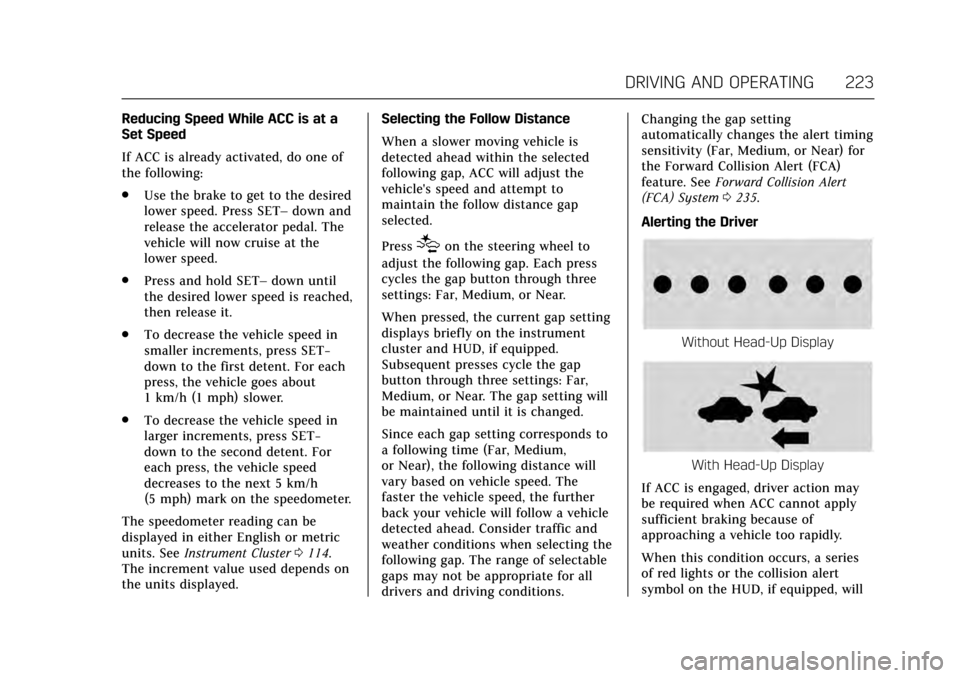
Alerting the Driver
Without Head-Up Display
With Head-Up Display
If ACC is engaged, driver action may
be required when ACC cannot apply
sufficient braking because of
approaching a vehicle too rapidly.
When this condition occurs, a series
of red lights or the collision alert
symbol on the HUD, if equipped, will
Page 226 of 352

Cadillac CTS/CTS-V Owner Manual (GMNA-Localizing-MidEast-10293089) -
2017 - crc - 6/22/16
DRIVING AND OPERATING 225
Notification to Resume ACC
ACC will maintain a follow gap behind
a detected vehicle and slow your
vehicle to a stop behind that vehicle.
If the stopped vehicle ahead has
driven away and ACC has not
resumed, the vehicle ahead symbol
will flash as a reminder to check
traffic before proceeding. In addition,
the left and right sides of the Safety
Alert Seat will pulse three times,
or three beeps will sound. See”Alert
Type ”and “Go Notifier” in“Collision/
Detection Systems” underVehicle
Personalization 0149.
When the vehicle ahead drives away,
press +RES or the accelerator pedal to
resume ACC. If stopped for more than
two minutes or if the driver door is
opened and the driver safety belt is
unbuckled, the ACC automatically
applies the electric parking brake to
hold the vehicle. The electric parking
brake status light will turn on. See
Electric Parking Brake 0207. To release
the electric parking brake, press the
accelerator pedal. A DIC warning message may display
indicating to shift to P (Park) before
exiting the vehicle. See
Vehicle
Messages 0138.
{Warning
If ACC has stopped the vehicle, and
if ACC is disengaged, turned off,
or canceled, the vehicle will no
longer be held at a stop. The vehicle
can move. When ACC is holding the
vehicle at a stop, always be
prepared to manually apply the
brakes.
{Warning
Leaving the vehicle without placing
it in P (Park) can be dangerous. Do
not leave the vehicle while it is
being held at a stop by ACC. Always
place the vehicle in P (Park) and
turn off the ignition before leaving
the vehicle. ACC Override
If using the accelerator pedal while
ACC is active, a warning message on
the DIC and in the HUD (if equipped)
will indicate that automatic braking
will not occur. See
Vehicle Messages
0 138. ACC will resume operation
when the accelerator pedal is not
being pressed.
{Warning
The ACC will not automatically
apply the brakes if your foot is
resting on the accelerator pedal.
You could crash into a vehicle
ahead of you.
Curves in the Road
{Warning
On curves, ACC may not detect a
vehicle ahead in your lane. You
could be startled if the vehicle
accelerates up to the set speed,
especially when following a vehicle (Continued)
Page 228 of 352

Cadillac CTS/CTS-V Owner Manual (GMNA-Localizing-MidEast-10293089) -
2017 - crc - 6/22/16
DRIVING AND OPERATING 227
Do Not Use ACC on Hills and When
Towing a Trailer
Do not use ACC when driving on steep
hills or when towing a trailer. ACC will
not detect a vehicle in the lane while
driving on steep hills. The driver will
often need to take over acceleration
and braking on steep hills, especially
when towing a trailer. If the brakes are
applied, the ACC disengages.
Ending ACC
There are three ways to
disengage ACC:
.Step lightly on the brake pedal.
. Press
*.
. Press
J. Erasing Speed Memory
The cruise control set speed is erased
from memory if
Jis pressed or if
the ignition is turned off.
Cleaning the Sensing System
The camera sensor on the windshield
behind the rearview mirror and the
radar sensors on the front of the
vehicle can become blocked by snow,
ice, dirt, or mud. These areas need to
be cleaned for ACC to operate
properly.
For cleaning instructions, see
“Washing the Vehicle ”under Exterior
Care 0315.
System operation may also be limited
under snow, heavy rain, or road spray
conditions.
Driver Assistance
Systems
This vehicle may have features that
work together to help avoid crashes or
reduce crash damage while driving,
backing, and parking. Read this entire
section before using these systems.
{Warning
Do not rely on the Driver
Assistance Systems. These systems
do not replace the need for paying
attention and driving safely. You
may not hear or feel alerts or
warnings provided by these
systems. Failure to use proper care
when driving may result in injury,
death, or vehicle damage. See
Defensive Driving 0182.
Under many conditions, these
systems will not: . Detect children, pedestrians,
bicyclists, or animals.
(Continued)
Page 232 of 352

Cadillac CTS/CTS-V Owner Manual (GMNA-Localizing-MidEast-10293089) -
2017 - crc - 6/22/16
DRIVING AND OPERATING 231
sensors will not detect objects and
can also cause false detections. Keep
the sensors clean of mud, dirt, snow,
ice, and slush; and clean sensors after
a car wash in freezing temperatures.
{Warning
The Parking Assist system does not
detect children, pedestrians,
bicyclists, animals, or objects
located below the bumper or that
are too close or too far from the
vehicle. It is not available at speeds
greater than 8 km/h (5 mph). To
prevent injury, death, or vehicle
damage, even with Parking Assist,
always check the area around the
vehicle and check all mirrors before
moving forward or backing.
The instrument cluster may have a
parking assist display with bars that
show“distance to object ”and object
location information for the Parking
Assist system. As the object gets
closer, more bars light up and the bars
change color from yellow to amber
to red.
When an object is first detected in the
rear, one beep will be heard from the
rear, or both sides of the Safety Alert
Seat will pulse two times. When an
object is very close (<0.6 m (2 ft) in the
vehicle rear, or <0.3 m (1 ft) in the
vehicle front), five beeps will sound
from the front or rear depending
where the object is detected, or both
sides of the Safety Alert Seat will
pulse five times. Beeps for FPA are
higher pitched than for RPA. Backing Warning and Reverse
Automatic Braking
Vehicles with Adaptive Cruise Control
(ACC) have the Backing Warning and
Reverse Automatic Braking (RAB)
system. The Backing Warning part of
this system can warn of rear objects
when backing up at speeds greater
than 8 km/h (5 mph).
The Backing Warning System will
beep once from the rear when an
object is first detected, or pulse twice
on both sides of the Safety Alert Seat.
When the system detects a potential
crash, beeps will be heard from the
rear, or five pulses will be felt on both
sides of the Safety Alert Seat. There
may also be a brief, sharp application
of the brakes.
{Warning
The Backing Warning System only
operates at speeds greater than
8 km/h (5 mph). It does not detect
children, pedestrians, bicyclists,
animals, or objects below the
bumper or that are too close or too
(Continued)
Page 234 of 352

Cadillac CTS/CTS-V Owner Manual (GMNA-Localizing-MidEast-10293089) -
2017 - crc - 6/22/16
DRIVING AND OPERATING 233
pulses occur on the left or right side,
depending on the direction of the
detected vehicle.
Use caution while backing up when
towing a trailer, as the RCTA
detection zones that extend out from
the back of the vehicle do not move
further back when a trailer is towed.
Turning the Features On or Off
TheXbutton on the center stack is
used to turn on or off the Front and
Rear Parking Assist, Rear Cross Traffic
Alert, Backing Warning, and Reverse
Automatic Braking system at the same
time. The indicator light next to the
button comes on when the features
are on and turns off when the features
have been disabled.
Turn off parking assist and Reverse
Automatic Braking when towing a
trailer. To turn the rear parking assist
symbols on or off, see
“Rear Camera”
under Vehicle Personalization 0149.
RCTA can also be turned on or off
through vehicle personalization. See
“Collision/Detection Systems” under
Vehicle Personalization 0149.
Automatic Parking Assist (APA)
If equipped, APA searches for and
steers the vehicle into parallel and
perpendicular parking spots. When
using APA, you must still shift gears,
and control the brakes and
accelerator. A display and audible
beeps help to guide parking
maneuvers.
{Warning
APA does not apply the brakes. APA
may not detect objects in the
parking space, objects that are soft
or narrow, objects high off the
ground such as flatbed trucks,
or objects below ground level such
as large potholes. Always verify that
the parking space is appropriate for
(Continued)
Warning (Continued)
parking a vehicle. APA does not
respond to changes in the parking
space, such as movement of an
adjacent vehicle, or a person or
object entering the parking space.
APA does not detect or avoid traffic
that is behind or alongside of the
vehicle. Always be prepared to stop
the vehicle during the parking
maneuver.
Press
Oon the center stack to
enable the system to search for a
parking space that is large enough and
within 1.5 m (5 ft) of the vehicle. The
vehicle speed must be below
30 km/h (18 mph). The system cannot:
. Detect whether it is a legal parking
space.
. Park exactly lined up with the
vehicle next to it if the spot is
approached at an angle or if the
parking space is angled.
. Park exactly centered in a spot
that is marked too large.
Page 236 of 352

Cadillac CTS/CTS-V Owner Manual (GMNA-Localizing-MidEast-10293089) -
2017 - crc - 6/22/16
DRIVING AND OPERATING 235
When the System Does Not Seem to
Work Properly
The APA system may require a short
period of driving along curves to
calibrate.
Assistance Systems for
Driving
If equipped, when driving the vehicle
in a forward gear, Forward Collision
Alert (FCA), Lane Departure Warning
(LDW), Lane Keep Assist (LKA), Side
Blind Zone Alert (SBZA), Lane Change
Alert (LCA), and/or Forward
Automatic Braking (FAB) can help to
avoid a crash or reduce crash damage.
Forward Collision Alert
(FCA) System
If equipped, the FCA system may help
to avoid or reduce the harm caused by
front-end crashes. When approaching
a vehicle ahead too quickly, FCA
provides a flashing red alert on the
windshield and rapidly beeps or pulses
the Safety Alert Seat. FCA also lights
an amber visual alert if following
another vehicle much too closely.FCA detects vehicles within a distance
of approximately 60 m (197 ft) and
operates at speeds above 40 km/h
(25 mph). If the vehicle has Adaptive
Cruise Control (ACC), it can detect
vehicles to distances of approximately
110 m (360 ft) and operates at all
speeds. See
Adaptive Cruise
Control 0220.
{Warning
FCA is a warning system and does
not apply the brakes. When
approaching a slower-moving or
stopped vehicle ahead too rapidly,
or when following a vehicle too
closely, FCA may not provide a
warning with enough time to help
avoid a crash. It also may not
provide any warning at all. FCA
does not warn of pedestrians,
animals, signs, guardrails, bridges,
construction barrels, or other
objects. Be ready to take action and
apply the brakes. See Defensive
Driving 0182. FCA can be disabled with the FCA
steering wheel control, or if your
vehicle is equipped with Adaptive
Cruise Control (ACC), through vehicle
personalization. See
“Collision/
Detection Systems” underVehicle
Personalization 0149.
Detecting the Vehicle Ahead
FCA warnings will not occur unless
the FCA system detects a vehicle
ahead. When a vehicle is detected, the
vehicle ahead indicator will display
green. Vehicles may not be detected
on curves, highway exit ramps,
or hills, due to poor visibility; or if a
vehicle ahead is partially blocked by
pedestrians or other objects. FCA will
not detect another vehicle ahead until
it is completely in the driving lane.
Page 248 of 352
Cadillac CTS/CTS-V Owner Manual (GMNA-Localizing-MidEast-10293089) -
2017 - crc - 6/22/16
VEHICLE CARE 247
Vehicle Care
General Information
General Information . . . . . . . . . . . . . 248
Accessories andModifications . . . . . . . . . . . . . . . . . . . 248
Vehicle Checks
Doing Your OwnService Work . . . . . . . . . . . . . . . . . . . . 249
Hood . . . . . . . . . . . . . . . . . . . . . . . . . . . . . . 249
Engine Compartment Overview . . . . . . . . . . . . . . . . . . . . . . . . . 250
Engine Oil . . . . . . . . . . . . . . . . . . . . . . . . . 257
Engine Oil Life System . . . . . . . . . . . 259
Automatic Transmission Fluid . . . . . . . . . . . . . . . . . . . . . . . . . . . . . 260
Engine Air Cleaner/Filter . . . . . . . . . 261
Cooling System . . . . . . . . . . . . . . . . . . . 263
Engine Coolant . . . . . . . . . . . . . . . . . . . 264
Engine Overheating . . . . . . . . . . . . . . 267
Washer Fluid . . . . . . . . . . . . . . . . . . . . . 269
Brakes . . . . . . . . . . . . . . . . . . . . . . . . . . . . . 269
Brake Fluid . . . . . . . . . . . . . . . . . . . . . . . 270
Battery . . . . . . . . . . . . . . . . . . . . . . . . . . . . 271
All-Wheel Drive . . . . . . . . . . . . . . . . . . 272
Starter Switch Check . . . . . . . . . . . . . 273
Automatic Transmission Shift Lock Control Function
Check . . . . . . . . . . . . . . . . . . . . . . . . . . . . 273 Park Brake and P (Park)
Mechanism Check . . . . . . . . . . . . . . 274
Wiper Blade Replacement . . . . . . . 274
Windshield Replacement . . . . . . . . 275
Headlamp Aiming
Headlamp Aiming . . . . . . . . . . . . . . . . 275
Bulb Replacement
Bulb Replacement . . . . . . . . . . . . . . . . 275
Halogen Bulbs . . . . . . . . . . . . . . . . . . . . 275
High Intensity Discharge (HID) Lighting . . . . . . . . . . . . . . . . . . . . . . . . . 276
LED Lighting . . . . . . . . . . . . . . . . . . . . . 276
Back-Up Lamps . . . . . . . . . . . . . . . . . . . 276
License Plate Lamp . . . . . . . . . . . . . . 277
Replacement Bulbs . . . . . . . . . . . . . . . 277
Electrical System
Electrical System Overload . . . . . . 278
Fuses and Circuit Breakers . . . . . . 278
Engine Compartment Fuse Block . . . . . . . . . . . . . . . . . . . . . . . . . . . . 279
Instrument Panel Fuse Block . . . . 282
Rear Compartment Fuse Block . . . . . . . . . . . . . . . . . . . . . . . . . . . . 284
Wheels and Tires
Tires . . . . . . . . . . . . . . . . . . . . . . . . . . . . . . . 287
All-Season Tires . . . . . . . . . . . . . . . . . . 288
Winter Tires . . . . . . . . . . . . . . . . . . . . . . 288
Run-Flat Tires . . . . . . . . . . . . . . . . . . . . 288 Low-Profile Tires . . . . . . . . . . . . . . . . . 289
Summer Tires . . . . . . . . . . . . . . . . . . . . 289
Tire Pressure . . . . . . . . . . . . . . . . . . . . . . 290
Tire Pressure for High-Speed
Operation . . . . . . . . . . . . . . . . . . . . . . . . 291
Tire Pressure Monitor System . . . 292
Tire Pressure Monitor Operation . . . . . . . . . . . . . . . . . . . . . . . . 293
Tire Inspection . . . . . . . . . . . . . . . . . . . 296
Tire Rotation . . . . . . . . . . . . . . . . . . . . . 296
When It Is Time for New Tires . . . . . . . . . . . . . . . . . . . . . . . . . . . . . 297
Buying New Tires . . . . . . . . . . . . . . . . 298
Different Size Tires and Wheels . . . . . . . . . . . . . . . . . . . . . . . . . . 300
Wheel Alignment and Tire Balance . . . . . . . . . . . . . . . . . . . . . . . . . . 300
Wheel Replacement . . . . . . . . . . . . . . 300
Tire Chains . . . . . . . . . . . . . . . . . . . . . . . 301
If a Tire Goes Flat . . . . . . . . . . . . . . . . 302
Tire Sealant and Compressor Kit . . . . . . . . . . . . . . . . . 303
Storing the Tire Sealant and Compressor Kit . . . . . . . . . . . . . . . . . 309
Jump Starting
Jump Starting . . . . . . . . . . . . . . . . . . . . . 310
Towing the Vehicle
Towing the Vehicle . . . . . . . . . . . . . . . 312
Recreational Vehicle Towing . . . . 313
Page 271 of 352
Cadillac CTS/CTS-V Owner Manual (GMNA-Localizing-MidEast-10293089) -
2017 - crc - 6/22/16
270 VEHICLE CARE
Caution
Continuing to drive with worn-out
brake pads could result in costly
brake repair.
Some driving conditions or climates
can cause a brake squeal when the
brakes are first applied or lightly
applied. This does not mean
something is wrong with the brakes.
If equipped with high performance
brake linings, there could be an
increased build-up of brake dust as
well as minor noises as compared to
standard brake linings.
Properly torqued wheel nuts are
necessary to help prevent brake
pulsation. When tires are rotated,
inspect brake pads for wear and
evenly tighten wheel nuts in the
proper sequence to torque
specifications. See Capacities and
Specifications 0336.
Brake pads should be replaced as
complete sets.
Brake Pedal Travel
See your dealer if the brake pedal does
not return to normal height, or if
there is a rapid increase in pedal
travel. This could be a sign that brake
service may be required.
Replacing Brake System Parts
Always replace brake system parts
with new, approved replacement parts.
If this is not done, the brakes may not
work properly. The braking
performance expected can change in
many other ways if the wrong
replacement brake parts are installed
or parts are improperly installed.
Cold Weather Brake Operation
(CTS-V Model)
High performance brake components
may bind and clunk when moving the
vehicle. This may be noticeable after
parking when the brakes have been
wet, such as when driving in the rain
or after a car wash. This is normal for
brakes with high friction pads and
does not affect the operation of the
brakes. Apply the brakes several times
until the binding or clunking stops. Drive the vehicle and apply the brakes
several times if it is washed before
long-term storage.
Brake Fluid
The brake master cylinder reservoir is
filled with GM approved DOT 3 brake
fluid as indicated on the reservoir cap.
See
Engine Compartment Overview
0 250 for the location of the reservoir.
Checking Brake Fluid
With the vehicle in P (Park) on a level
surface, the brake fluid level should be
between the minimum and maximum
marks on the brake fluid reservoir.
There are only two reasons why the
brake fluid level in the reservoir may
go down:
. Normal brake lining wear. When
new linings are installed, the fluid
level goes back up.
Page 272 of 352
Cadillac CTS/CTS-V Owner Manual (GMNA-Localizing-MidEast-10293089) -
2017 - crc - 6/22/16
VEHICLE CARE 271
.A fluid leak in the brake hydraulic
system. Have the brake hydraulic
system fixed. With a leak, the
brakes will not work well.
Always clean the brake fluid reservoir
cap and the area around the cap
before removing it.
Do not top off the brake fluid. Adding
fluid does not correct a leak. If fluid is
added when the linings are worn,
there will be too much fluid when
new brake linings are installed. Add or
remove fluid, as necessary, only when
work is done on the brake hydraulic
system.
{Warning
If too much brake fluid is added, it
can spill on the engine and burn,
if the engine is hot enough. You or
others could be burned, and the
vehicle could be damaged. Add
brake fluid only when work is done
on the brake hydraulic system. When the brake fluid falls to a low
level, the brake warning light comes
on. See
Brake System Warning
Light 0125.
Brake fluid absorbs water over time
which degrades the effectiveness of
the brake fluid. Replace brake fluid at
the specified intervals to prevent
increased stopping distance. See
Maintenance Schedule 0324.
What to Add
Use only GM approved DOT 3 brake
fluid from a clean, sealed container.
See Recommended Fluids and
Lubricants 0331.
{Warning
The wrong or contaminated brake
fluid could result in damage to the
brake system. This could result in
the loss of braking leading to a
possible injury. Always use the
proper GM approved brake fluid.
Caution
If brake fluid is spilled on the
vehicle's painted surfaces, the paint
finish can be damaged. Immediately
wash off any painted surface.
Battery
The original equipment battery is
maintenance free. Do not remove the
cap and do not add fluid.
The battery is in the trunk, behind the
trim panel, on the driver side of the
vehicle. Refer to the replacement
number shown on the original battery
label when a new battery is needed.