transmission CADILLAC CTS 2018 User Guide
[x] Cancel search | Manufacturer: CADILLAC, Model Year: 2018, Model line: CTS, Model: CADILLAC CTS 2018Pages: 394, PDF Size: 6.48 MB
Page 141 of 394
Cadillac CTS/CTS-V Owner Manual (GMNA-Localizing-U.S./Canada/Mexico-
11349156) - 2018 - CRC - 9/29/17
140 INSTRUMENTS AND CONTROLS
Head-Up Display (HUD)
{Warning
If the HUD image is too bright or
too high in your field of view, it
may take you more time to see
things you need to see when it is
dark outside. Be sure to keep the
HUD image dim and placed low in
your field of view.
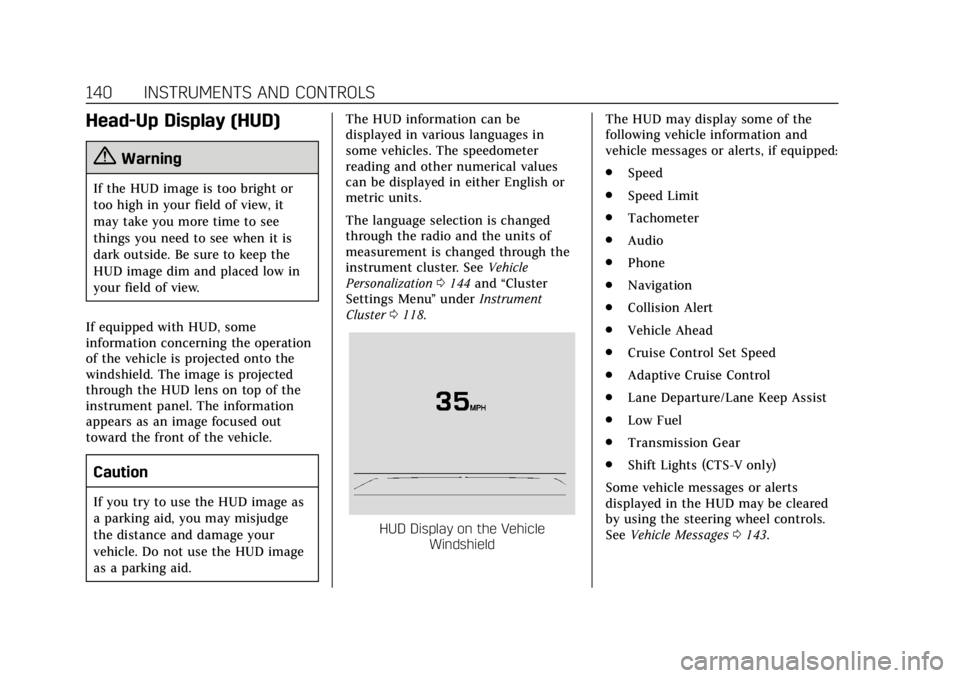
If equipped with HUD, some
information concerning the operation
of the vehicle is projected onto the
windshield. The image is projected
through the HUD lens on top of the
instrument panel. The information
appears as an image focused out
toward the front of the vehicle.
Caution
If you try to use the HUD image as
a parking aid, you may misjudge
the distance and damage your
vehicle. Do not use the HUD image
as a parking aid. The HUD information can be
displayed in various languages in
some vehicles. The speedometer
reading and other numerical values
can be displayed in either English or
metric units.
The language selection is changed
through the radio and the units of
measurement is changed through the
instrument cluster. See
Vehicle
Personalization 0144 and “Cluster
Settings Menu ”under Instrument
Cluster 0118.
HUD Display on the Vehicle
Windshield The HUD may display some of the
following vehicle information and
vehicle messages or alerts, if equipped:
.
Speed
. Speed Limit
. Tachometer
. Audio
. Phone
. Navigation
. Collision Alert
. Vehicle Ahead
. Cruise Control Set Speed
. Adaptive Cruise Control
. Lane Departure/Lane Keep Assist
. Low Fuel
. Transmission Gear
. Shift Lights (CTS-V only)
Some vehicle messages or alerts
displayed in the HUD may be cleared
by using the steering wheel controls.
See Vehicle Messages 0143.
Page 143 of 394

Cadillac CTS/CTS-V Owner Manual (GMNA-Localizing-U.S./Canada/Mexico-
11349156) - 2018 - CRC - 9/29/17
142 INSTRUMENTS AND CONTROLS
Metric
English
Audio/Phone View : This displays the
speed view along with audio/phone
information. The current radio station,
media type, and incoming calls will be
displayed.
All HUD views may briefly display
audio information when the driver
uses the steering wheel controls to
adjust the audio settings appearing in
the instrument cluster.
Incoming phone calls appearing in the
instrument cluster, may also display
in any HUD view.
Metric
English
Navigation View : This display
includes the information in the speed
view along with Turn-by-Turn
Navigation information in some
vehicles. When navigation routing is
not active compass information is
displayed.
Navigation Turn-by-Turn Alerts
shown in the instrument cluster may
also be displayed in any HUD view.
Metric
English
Performance View : This display
gives the speedometer reading, rpm
reading, transmission positions, Shift
Timing Light Position (CTS-V only),
and gear shift indicator (if equipped).
If equipped, the shift timing lights at
the top of the display will appear with
increases in engine rpm. The rows of
lights get closer together as the shift
point gets closer. Shift the
transmission before the lights come
together in the display. Shift
immediately if the lights are flashing.
See Manual Mode 0202.
Page 144 of 394
Cadillac CTS/CTS-V Owner Manual (GMNA-Localizing-U.S./Canada/Mexico-
11349156) - 2018 - CRC - 9/29/17
INSTRUMENTS AND CONTROLS 143
Care of the HUD
Clean the inside of the windshield to
remove any dirt or film that could
reduce the sharpness or clarity of the
HUD image.
Clean the HUD lens with a soft cloth
sprayed with glass cleaner. Wipe the
lens gently, then dry it.
HUD Troubleshooting
Check that:
.Nothing is covering the HUD lens.
. HUD brightness setting is not too
dim or too bright.
. HUD is adjusted to the proper
height.
. Polarized sunglasses are not worn.
. Windshield and HUD lens are
clean.
If the HUD image is not correct,
contact your dealer.
The windshield is part of the HUD
system. If the windshield needs
replacing, see Windshield Replacement
0 281.
Vehicle Messages
Messages displayed on the DIC
indicate the status of the vehicle or
some action that may be needed to
correct a condition. Multiple messages
may appear one after another.
The messages that do not require
immediate action can be
acknowledged and cleared by pressing
V. The messages that require
immediate action cannot be cleared
until that action is performed.
All messages should be taken
seriously; clearing the message does
not correct the problem.
If a SERVICE message appears, see
your dealer.
Follow the instructions given in the
messages. The system displays
messages regarding the following
topics:
. Service Messages
. Fluid Levels
. Vehicle Security
. Brakes .
Ride Control Systems
. Driver Assistance Systems
. Cruise Control
. Lighting and Bulb Replacement
. Wiper/Washer Systems
. Doors and Windows
. Seat Belts
. Airbag Systems
. Engine and Transmission
. Tire Pressure
. Battery
Engine Power Messages
ENGINE POWER IS REDUCED
This message displays when the
vehicle's propulsion power is reduced.
Reduced propulsion power can affect
the vehicle's ability to accelerate.
If this message is on, but there is no
observed reduction in performance,
proceed to your destination. The
performance may be reduced the next
time the vehicle is driven. The vehicle
may be driven while this message is
Page 151 of 394
Cadillac CTS/CTS-V Owner Manual (GMNA-Localizing-U.S./Canada/Mexico-
11349156) - 2018 - CRC - 9/29/17
150 INSTRUMENTS AND CONTROLS
instructions refer to a garage door
opener, but can be used for other
devices.
Do not use the Universal Remote
system with any garage door opener
that does not have the stop and
reverse feature. This includes any
garage door opener model
manufactured before April 1, 1982.
Read these instructions completely
before programming the Universal
Remote system. It may help to have
another person assist with the
programming process.
Keep the original hand-held
transmitter for use in other vehicles
as well as for future programming.
Erase the programming when vehicle
ownership is terminated. See“Erasing
Universal Remote System Buttons”
later in this section.
To program a garage door opener,
park outside directly in line with and
facing the garage door opener receiver.
Clear all people and objects near the
garage door. Make sure the hand-held transmitter
has a new battery for quick and
accurate transmission of the
radio-frequency signal.
Programming the Universal
Remote System
For questions or programming help,
see www.homelink.com/gm or call
1-800-355-3515.
Programming involves time-sensitive
actions, and may time out causing the
procedure to be repeated.
To program up to three devices:
1. Hold the end of the hand-held transmitter about 3 to 8 cm (1 to
3 in) away from the Universal
Remote system buttons with the
indicator light in view. The
hand-held transmitter was
supplied by the manufacturer of
the garage door opener receiver.
2. At the same time, press and hold both the hand-held transmitter
button and one of the three
Universal Remote system
buttons to be used to operate the
garage door. Do not release either button until the indicator light
changes from a slow to a rapid
flash. Then release both buttons.
Some garage door openers may
require substitution of Step 2
with the procedure under
“Radio
Signals for Canada and Some
Gate Operators” later in this
section.
3. Press and hold the newly programmed Universal Remote
system button for five seconds
while watching the indicator
light and garage door activation.
.If the indicator light stays on
continuously or the garage
door moves when the button
is pressed, then programming
is complete. There is no need
to complete Steps 4–6.
. If the indicator light does not
come on or the garage door
does not move, a second
button press may be
required. For a second time,
press and hold the newly
programmed button for
Page 152 of 394
Cadillac CTS/CTS-V Owner Manual (GMNA-Localizing-U.S./Canada/Mexico-
11349156) - 2018 - CRC - 9/29/17
INSTRUMENTS AND CONTROLS 151
five seconds. If the light stays
on or the garage door moves,
programming is complete.
. If the indicator light blinks
rapidly for two seconds, then
changes to a solid light and
the garage door does not
move, continue with
programming Steps 4–6.
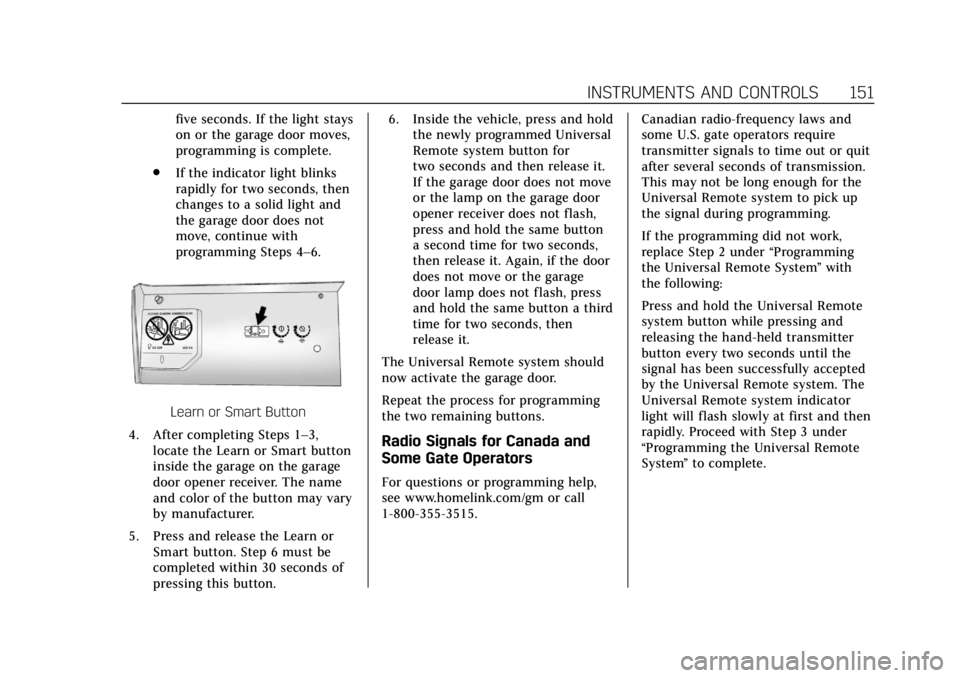
Learn or Smart Button
4. After completing Steps 1–3, locate the Learn or Smart button
inside the garage on the garage
door opener receiver. The name
and color of the button may vary
by manufacturer.
5. Press and release the Learn or Smart button. Step 6 must be
completed within 30 seconds of
pressing this button. 6. Inside the vehicle, press and hold
the newly programmed Universal
Remote system button for
two seconds and then release it.
If the garage door does not move
or the lamp on the garage door
opener receiver does not flash,
press and hold the same button
a second time for two seconds,
then release it. Again, if the door
does not move or the garage
door lamp does not flash, press
and hold the same button a third
time for two seconds, then
release it.
The Universal Remote system should
now activate the garage door.
Repeat the process for programming
the two remaining buttons.
Radio Signals for Canada and
Some Gate Operators
For questions or programming help,
see www.homelink.com/gm or call
1-800-355-3515. Canadian radio-frequency laws and
some U.S. gate operators require
transmitter signals to time out or quit
after several seconds of transmission.
This may not be long enough for the
Universal Remote system to pick up
the signal during programming.
If the programming did not work,
replace Step 2 under
“Programming
the Universal Remote System ”with
the following:
Press and hold the Universal Remote
system button while pressing and
releasing the hand-held transmitter
button every two seconds until the
signal has been successfully accepted
by the Universal Remote system. The
Universal Remote system indicator
light will flash slowly at first and then
rapidly. Proceed with Step 3 under
“Programming the Universal Remote
System ”to complete.
Page 157 of 394

Cadillac CTS/CTS-V Owner Manual (GMNA-Localizing-U.S./Canada/Mexico-
11349156) - 2018 - CRC - 9/29/17
156 LIGHTING
The DRL turn off when the headlamps
are turned to
Oor the ignition is off.
For vehicles sold in Canada, this
control only works when the vehicle is
parked.
Automatic Headlamp
System
When the exterior lamp control is set
to AUTO and it is dark enough
outside, the headlamps come on
automatically.
If equipped, the light sensor is on top
of the instrument panel or on the
windshield near the rearview mirror. Do not cover the sensor, otherwise the
headlamps will come on when they
are not needed.
The system may also turn on the
headlamps when driving through a
parking garage or tunnel.
If the vehicle is started in a dark
garage, the automatic headlamp
system comes on immediately. If it is
light outside when the vehicle leaves
the garage, there is a slight delay
before the automatic headlamp
system turns off the headlamps.
During that delay, the instrument
cluster may not be as bright as usual.
Make sure the instrument panel
brightness control is in the full bright
position. See
Instrument Panel
Illumination Control 0158.
When it is bright enough outside, the
headlamps will turn off.
The automatic headlamp system turns
off when the exterior lamp control is
turned to
Oor the ignition is off. For
vehicles sold in Canada, this control
only works when the transmission is
in P (Park).
Lights On with Wipers
If the windshield wipers are activated
in daylight with the engine on, and
the exterior lamp control is in AUTO,
the headlamps, parking lamps, and
other exterior lamps come on. The
transition time for the lamps coming
on varies based on wiper speed. When
the wipers are not operating, these
lamps turn off. Move the exterior
lamp control to
Oor;to disable
this feature.
Adaptive Forward
Lighting (AFL)
On vehicles with the AFL system, the
headlamps pivot horizontally to
provide greater road illumination
while turning. To enable AFL, set the
exterior lamp control on the turn
signal lever to the AUTO position.
Moving the control out of the AUTO
position will deactivate the system.
AFL will operate when the vehicle
speed is greater than 3 km/h (2 mph).
AFL will not operate when the
transmission is in R (Reverse). AFL is
not immediately operable after
Page 165 of 394
Cadillac CTS/CTS-V Owner Manual (GMNA-Localizing-U.S./Canada/Mexico-
11349156) - 2018 - CRC - 9/29/17
164 INFOTAINMENT SYSTEM
Delete Recording :Touch to delete
the video. A confirmation screen
displays. Touch Yes to delete or No to
cancel.
Pause/Play : Touch to play or pause
the video. The button will change
when pressed.
/: Touch to display the previous
screen.
Exit : Touch to exit the current
display.
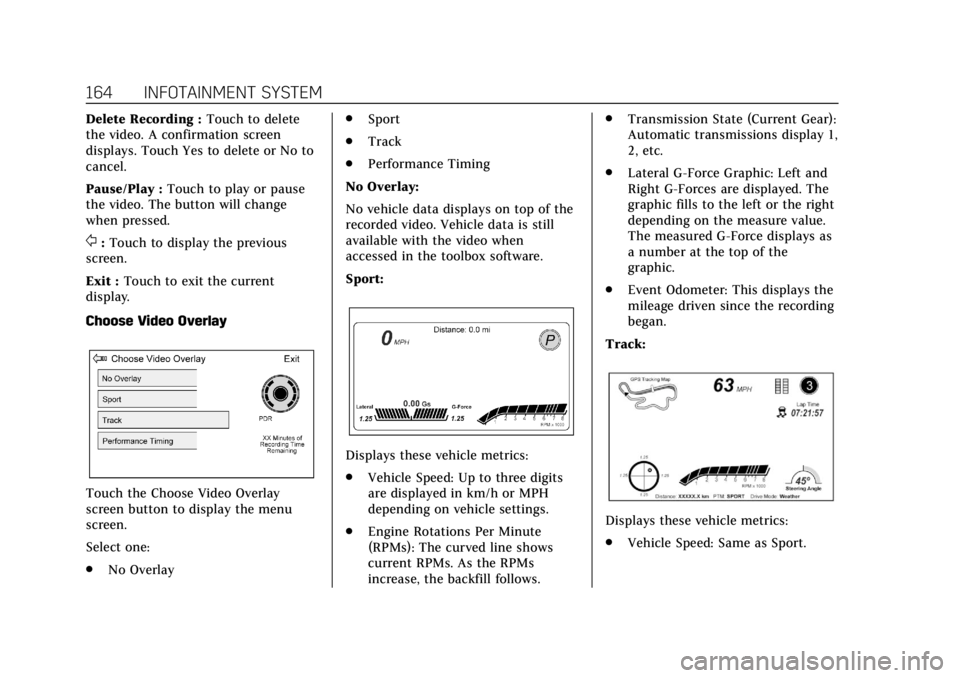
Choose Video Overlay
Touch the Choose Video Overlay
screen button to display the menu
screen.
Select one:
. No Overlay .
Sport
. Track
. Performance Timing
No Overlay:
No vehicle data displays on top of the
recorded video. Vehicle data is still
available with the video when
accessed in the toolbox software.
Sport:
Displays these vehicle metrics:
. Vehicle Speed: Up to three digits
are displayed in km/h or MPH
depending on vehicle settings.
. Engine Rotations Per Minute
(RPMs): The curved line shows
current RPMs. As the RPMs
increase, the backfill follows. .
Transmission State (Current Gear):
Automatic transmissions display 1,
2, etc.
. Lateral G-Force Graphic: Left and
Right G-Forces are displayed. The
graphic fills to the left or the right
depending on the measure value.
The measured G-Force displays as
a number at the top of the
graphic.
. Event Odometer: This displays the
mileage driven since the recording
began.
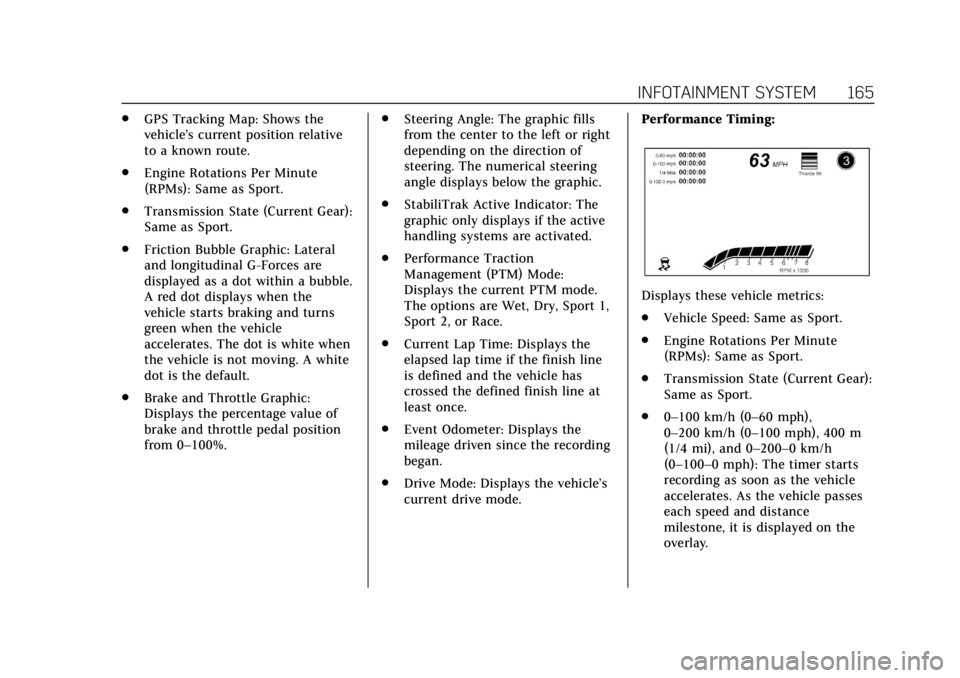
Track:
Displays these vehicle metrics:
. Vehicle Speed: Same as Sport.
Page 166 of 394
Cadillac CTS/CTS-V Owner Manual (GMNA-Localizing-U.S./Canada/Mexico-
11349156) - 2018 - CRC - 9/29/17
INFOTAINMENT SYSTEM 165
.GPS Tracking Map: Shows the
vehicle’s current position relative
to a known route.
. Engine Rotations Per Minute
(RPMs): Same as Sport.
. Transmission State (Current Gear):
Same as Sport.
. Friction Bubble Graphic: Lateral
and longitudinal G-Forces are
displayed as a dot within a bubble.
A red dot displays when the
vehicle starts braking and turns
green when the vehicle
accelerates. The dot is white when
the vehicle is not moving. A white
dot is the default.
. Brake and Throttle Graphic:
Displays the percentage value of
brake and throttle pedal position
from 0–100%. .
Steering Angle: The graphic fills
from the center to the left or right
depending on the direction of
steering. The numerical steering
angle displays below the graphic.
. StabiliTrak Active Indicator: The
graphic only displays if the active
handling systems are activated.
. Performance Traction
Management (PTM) Mode:
Displays the current PTM mode.
The options are Wet, Dry, Sport 1,
Sport 2, or Race.
. Current Lap Time: Displays the
elapsed lap time if the finish line
is defined and the vehicle has
crossed the defined finish line at
least once.
. Event Odometer: Displays the
mileage driven since the recording
began.
. Drive Mode: Displays the vehicle’s
current drive mode. Performance Timing:
Displays these vehicle metrics:
.
Vehicle Speed: Same as Sport.
. Engine Rotations Per Minute
(RPMs): Same as Sport.
. Transmission State (Current Gear):
Same as Sport.
. 0–100 km/h (0–60 mph),
0–200 km/h (0–100 mph), 400 m
(1/4 mi), and 0–200–0 km/h
(0–100–0 mph): The timer starts
recording as soon as the vehicle
accelerates. As the vehicle passes
each speed and distance
milestone, it is displayed on the
overlay.
Page 177 of 394
Cadillac CTS/CTS-V Owner Manual (GMNA-Localizing-U.S./Canada/Mexico-
11349156) - 2018 - CRC - 9/29/17
176 DRIVING AND OPERATING
Driving and
Operating
Driving Information
Distracted Driving . . . . . . . . . . . . . . . . 177
Defensive Driving . . . . . . . . . . . . . . . . 178
Drunk Driving . . . . . . . . . . . . . . . . . . . . 178
Control of a Vehicle . . . . . . . . . . . . . . 178
Braking . . . . . . . . . . . . . . . . . . . . . . . . . . . . 178
Steering . . . . . . . . . . . . . . . . . . . . . . . . . . . 179
Off-Road Recovery . . . . . . . . . . . . . . . . 179
Loss of Control . . . . . . . . . . . . . . . . . . . 180
Track Events and CompetitiveDriving . . . . . . . . . . . . . . . . . . . . . . . . . . 180
Driving on Wet Roads . . . . . . . . . . . 185
Hill and Mountain Roads . . . . . . . . 185
Winter Driving . . . . . . . . . . . . . . . . . . . . 186
If the Vehicle Is Stuck . . . . . . . . . . . 187
Vehicle Load Limits . . . . . . . . . . . . . . 188
Starting and Operating
New Vehicle Break-In . . . . . . . . . . . . 191
Composite Materials . . . . . . . . . . . . . 192
Ignition Positions . . . . . . . . . . . . . . . . 192
Starting the Engine . . . . . . . . . . . . . . 194
Engine Heater . . . . . . . . . . . . . . . . . . . . 196
Retained Accessory Power (RAP) . . . . . . . . . . . . . . . . . . . . 197 Shifting Into Park . . . . . . . . . . . . . . . . 197
Shifting out of Park . . . . . . . . . . . . . . 198
Parking over Things
That Burn . . . . . . . . . . . . . . . . . . . . . . . 199
Extended Parking . . . . . . . . . . . . . . . . . 199
Engine Exhaust
Engine Exhaust . . . . . . . . . . . . . . . . . . . 199
Running the Vehicle While
Parked . . . . . . . . . . . . . . . . . . . . . . . . . . . 200
Automatic Transmission
Automatic Transmission . . . . . . . . . 200
Manual Mode . . . . . . . . . . . . . . . . . . . . . 202
Drive Systems
All-Wheel Drive . . . . . . . . . . . . . . . . . . 203
Brakes
Antilock Brake System (ABS) . . . . 204
Electric Parking Brake . . . . . . . . . . . . 204
Brake Assist . . . . . . . . . . . . . . . . . . . . . . . 206
Hill Start Assist (HSA) . . . . . . . . . . . 206
Ride Control Systems
Traction Control/ElectronicStability Control . . . . . . . . . . . . . . . . 206
Driver Mode Control . . . . . . . . . . . . . 208
Competitive Driving Mode (V-Sport Only) . . . . . . . . . . . . . . . . . . 211
Limited-Slip Differential . . . . . . . . . 214
Cruise Control
Cruise Control . . . . . . . . . . . . . . . . . . . . 214
Adaptive Cruise Control . . . . . . . . . 217
Driver Assistance Systems
Driver Assistance Systems . . . . . . . 225
Assistance Systems for Parking or Backing . . . . . . . . . . . . . . . . . . . . . . . 226
Assistance Systems for Driving . . . . . . . . . . . . . . . . . . . . . . . . . . 232
Forward Collision Alert (FCA) System . . . . . . . . . . . . . . . . . . . . . . . . . . 232
Forward Automatic Braking (FAB) . . . . . . . . . . . . . . . . . . . 235
Side Blind Zone Alert (SBZA) . . . . 236
Lane Change Alert (LCA) . . . . . . . . 236
Lane Departure Warning (LDW) . . . . . . . . . . . . . . . . . 238
Lane Keep Assist (LKA) . . . . . . . . . . 239
Vehicle-to-Vehicle . . . . . . . . . . . . . . . . 240
Fuel
Fuel . . . . . . . . . . . . . . . . . . . . . . . . . . . . . . . 242
California Fuel Requirements . . . . 243
Fuels in Foreign Countries . . . . . . . 244
Fuel Additives . . . . . . . . . . . . . . . . . . . . 244
Filling the Tank . . . . . . . . . . . . . . . . . . 244
Filling a Portable Fuel Container . . . . . . . . . . . . . . . . . . . . . . . . 246
Page 183 of 394
Cadillac CTS/CTS-V Owner Manual (GMNA-Localizing-U.S./Canada/Mexico-
11349156) - 2018 - CRC - 9/29/17
182 DRIVING AND OPERATING
Automatic Transmission Fluid
Have the transmission fluid set to the
track specific oil level prior to track
usage. Transmission fluid should be
changed after every 15 hours of track
usage. Any transmission level set or
change should be performed at your
dealer.
Brake Fluid
For track events and competitive
driving, it is recommended that the
brake fluid be replaced with a high
performance brake fluid that has a dry
boiling point greater than 279 °C
(534 °F). After conversion to the high
performance brake fluid, follow the
brake fluid service recommendations
outlined by the fluid manufacturer. Do
not use silicone or DOT-5 brake fluids.
Caution
Removing the splash shield can
degrade wet braking performance,
as well as introduce brake pedal
pulsation, due to brake disc(Continued)
Caution (Continued)
exposure to road debris. Only
remove the front brake disc splash
shield and front tire deflector when
driving in track events.
Brake cooling can be improved if the
front brake disc splash shield and
front tire deflector are removed.
Removing the shield will require that
the suspension bushings visible to the
brake disc be protected with insulated
thermal wrapping.
Brake Burnishing
To prepare the V-Sport and V-Series
brake systems for track events and
racing, complete the appropriate high
performance brake burnishing
procedure described below.
V-Sport and V-Series Brake
Burnishing
New brake pads must be burnished
before racing or other competitive
driving.
Caution
These procedures are specific to the
V-Sport and V-Series brake package.
This procedure should not be run
on other models as damage may
result.
Caution
The new vehicle break-in period
should be completed before
performing the brake burnishing
procedure or damage may occur to
the powertrain/engine. See New
Vehicle Break-In 0191.
When performed as instructed, this
procedure will not damage the brakes.
During the burnishing procedure, the
brake pads will smoke and produce an
odor. The braking force and pedal
travel may increase. After the
procedure is complete, the brake pads
may appear white at the rotor contact.