Climate CADILLAC CTS 2018 Owner's Guide
[x] Cancel search | Manufacturer: CADILLAC, Model Year: 2018, Model line: CTS, Model: CADILLAC CTS 2018Pages: 394, PDF Size: 6.48 MB
Page 171 of 394
Cadillac CTS/CTS-V Owner Manual (GMNA-Localizing-U.S./Canada/Mexico-
11349156) - 2018 - CRC - 9/29/17
170 CLIMATE CONTROLS
mode is lit. Touching any of the air
delivery modes cancels automatic air
delivery control and the direction of
the airf low can be controlled
manually.
To change the current mode, select
one of the following:
Y:Air is directed to the instrument
panel outlets.
[: Air is directed to the floor
outlets, with some air to the
windshield and side windows.
\: Air is divided between the
instrument panel outlets and the floor
outlets.
-: Clears the windows of fog or
moisture. Air is directed to the
windshield and floor outlets.
0: Clears the windshield of fog or
frost more quickly. Air is directed to
the windshield. Press
0on the
center stack to turn on or off.
Changing the air delivery mode also
turns off the defrost mode.
A/C : Touch A/C on the display to
turn the automatic air conditioning on
or off. If the fan is turned off, the air conditioner will not run. Outside
temperatures below freezing may also
prevent the air conditioner from
running.
Touch or press AUTO on the display
or center stack to return to automatic
operation, the air conditioner runs as
needed.
Automatic Air Recirculation :
When
the AUTO indicator light is on, the air
is automatically recirculated as
needed to help quickly cool the inside
of the vehicle.
The climate control system may have
a sensor to detect air pollution. When
using automatic air recirculation, the
air quality control system may
operate. To adjust the sensitivity of
the air quality sensor, see “Climate
and Air Quality” underVehicle
Personalization 0144.@:Touch or press@on the
display or center stack to alternate
between recirculating air inside the
vehicle or pulling in outside air. The
indicator light is lit when recirculation
mode is active. This helps to quickly cool the air inside the vehicle or
reduce outside air and odors that
might enter.
Touching or pressing
@cancels
automatic recirculation. Touch or
press AUTO on the display or center
stack to return to automatic
operation; recirculation runs
automatically as needed.
Manual recirculation mode is not
available when in Defrost or Defog
modes.
Auto Defog : The climate control
system may have a sensor to
automatically detect high humidity
inside the vehicle. When high
humidity is detected, the climate
control system may adjust to outside
air supply and turn on the air
conditioner. If the climate control
system does not detect possible
window fogging, it returns to normal
operation. To turn Auto Defog off or
on, see “Climate and Air Quality”
under Vehicle Personalization 0144.
Page 172 of 394
Cadillac CTS/CTS-V Owner Manual (GMNA-Localizing-U.S./Canada/Mexico-
11349156) - 2018 - CRC - 9/29/17
CLIMATE CONTROLS 171
Rear Window Defogger
K:Press to turn the rear window
defogger on or off. An indicator light
on the button comes on to show that
the rear window defogger is on. The
rear window defogger only works
when the engine is running.
The rear window defogger turns off
automatically after about 15 minutes.
At higher vehicle speeds, the rear
window defogger may stay on
continuously.
The rear window defogger can be set
to automatic operation. See “Climate
and Air Quality” underVehicle
Personalization 0144. When Auto Rear
Defog is selected, the rear window
defogger turns on automatically when
the interior temperature is about 4 °C
(40 °F) and below.
The upper gridlines on the rear
window are antenna lines and are not
intended to heat when the defogger is
activated.
The heated outside mirrors turn on
when the rear window defogger
button is on and help to clear fog or
frost from the surface of the mirrors.Caution
Do not try to clear frost or other
material from the inside of the
front windshield and rear window
with a razor blade or anything else
that is sharp. This may damage the
rear window defogger grid and
affect the radio's ability to pick up
stations clearly. The repairs would
not be covered by the vehicle
warranty.
Driver and Passenger Heated and
Ventilated Seats : If equipped, press
Jorzto heat the driver or
passenger seat cushion and seatback.
Press
Cor{to ventilate the driver
or passenger seat.
The vehicle also has auto heated and
ventilated seats that turn on when the
vehicle is on. The seats will activate at
the level required by the vehicle’s
interior temperature. Use the manual
heated or ventilated seat buttons on
the center stack to turn auto heated
or ventilated seats off. The auto heated and ventilated seat feature
can be turned on or off.
See
Vehicle Personalization 0144 and
Heated and Ventilated Seats 014.
Remote Start Climate Control
Operation : If equipped with the
remote start feature, the climate
control system may run when the
vehicle is started remotely. The system
uses the driver’s previous settings to
heat or cool the inside of the vehicle.
The rear window defogger may come
on during remote start based on cold
ambient conditions. The rear window
defogger indicator light does not come
on during a remote start.
If equipped, the heated seats will turn
on if it is cold outside or the
ventilated seats will turn on if it is hot
outside. The heated and ventilated
seat indicator lights may not come on
during a remote start. If equipped, the
heated steering wheel will come on in
a remote start if it is cold outside. The
heated steering wheel indicator light
may not come on. See Remote Vehicle
Start 037 and Heated and Ventilated
Seats 014.
Page 173 of 394
Cadillac CTS/CTS-V Owner Manual (GMNA-Localizing-U.S./Canada/Mexico-
11349156) - 2018 - CRC - 9/29/17
172 CLIMATE CONTROLS
Sensor
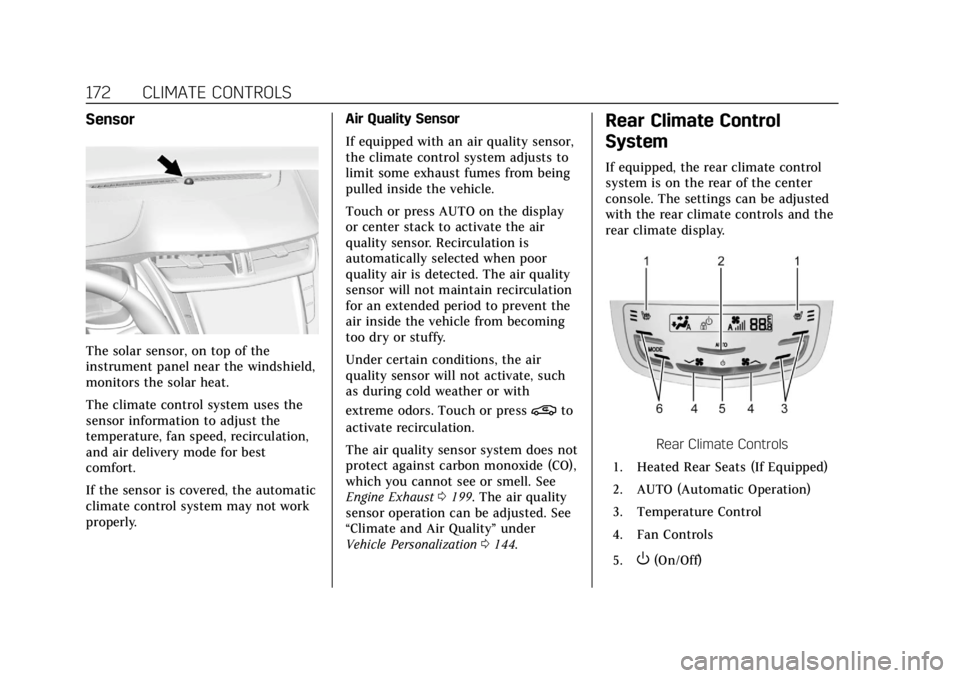
The solar sensor, on top of the
instrument panel near the windshield,
monitors the solar heat.
The climate control system uses the
sensor information to adjust the
temperature, fan speed, recirculation,
and air delivery mode for best
comfort.
If the sensor is covered, the automatic
climate control system may not work
properly.Air Quality Sensor
If equipped with an air quality sensor,
the climate control system adjusts to
limit some exhaust fumes from being
pulled inside the vehicle.
Touch or press AUTO on the display
or center stack to activate the air
quality sensor. Recirculation is
automatically selected when poor
quality air is detected. The air quality
sensor will not maintain recirculation
for an extended period to prevent the
air inside the vehicle from becoming
too dry or stuffy.
Under certain conditions, the air
quality sensor will not activate, such
as during cold weather or with
extreme odors. Touch or press
@to
activate recirculation.
The air quality sensor system does not
protect against carbon monoxide (CO),
which you cannot see or smell. See
Engine Exhaust 0199. The air quality
sensor operation can be adjusted. See
“Climate and Air Quality” under
Vehicle Personalization 0144.
Rear Climate Control
System
If equipped, the rear climate control
system is on the rear of the center
console. The settings can be adjusted
with the rear climate controls and the
rear climate display.
Rear Climate Controls
1. Heated Rear Seats (If Equipped)
2. AUTO (Automatic Operation)
3. Temperature Control
4. Fan Controls
5.
O(On/Off)
Page 174 of 394
Cadillac CTS/CTS-V Owner Manual (GMNA-Localizing-U.S./Canada/Mexico-
11349156) - 2018 - CRC - 9/29/17
CLIMATE CONTROLS 173
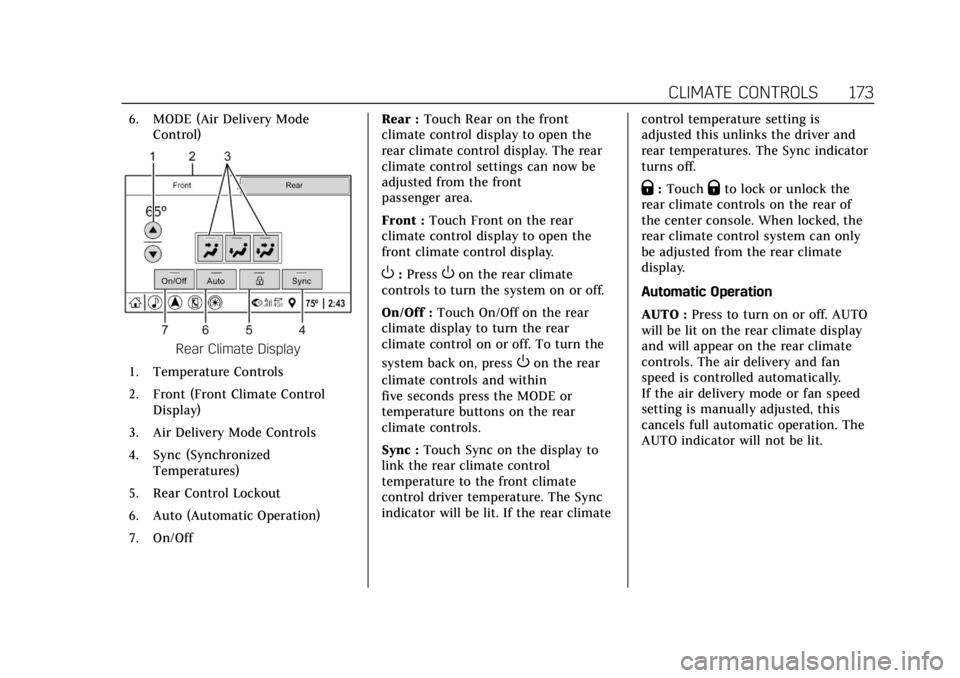
6. MODE (Air Delivery ModeControl)
Rear Climate Display
1. Temperature Controls
2. Front (Front Climate Control Display)
3. Air Delivery Mode Controls
4. Sync (Synchronized Temperatures)
5. Rear Control Lockout
6. Auto (Automatic Operation)
7. On/Off Rear :
Touch Rear on the front
climate control display to open the
rear climate control display. The rear
climate control settings can now be
adjusted from the front
passenger area.
Front : Touch Front on the rear
climate control display to open the
front climate control display.
O: PressOon the rear climate
controls to turn the system on or off.
On/Off : Touch On/Off on the rear
climate display to turn the rear
climate control on or off. To turn the
system back on, press
Oon the rear
climate controls and within
five seconds press the MODE or
temperature buttons on the rear
climate controls.
Sync : Touch Sync on the display to
link the rear climate control
temperature to the front climate
control driver temperature. The Sync
indicator will be lit. If the rear climate control temperature setting is
adjusted this unlinks the driver and
rear temperatures. The Sync indicator
turns off.
Q:
TouchQto lock or unlock the
rear climate controls on the rear of
the center console. When locked, the
rear climate control system can only
be adjusted from the rear climate
display.
Automatic Operation
AUTO : Press to turn on or off. AUTO
will be lit on the rear climate display
and will appear on the rear climate
controls. The air delivery and fan
speed is controlled automatically.
If the air delivery mode or fan speed
setting is manually adjusted, this
cancels full automatic operation. The
AUTO indicator will not be lit.
Page 175 of 394
Cadillac CTS/CTS-V Owner Manual (GMNA-Localizing-U.S./Canada/Mexico-
11349156) - 2018 - CRC - 9/29/17
174 CLIMATE CONTROLS
Manual Operation
Fan Controls :Press or press and
hold
A yorz Aon the rear
climate controls to increase or
decrease the rear climate airf low.
M/N: Touch or pressMorNon the rear climate display or the rear
climate controls to increase or
decrease the rear passenger
temperature.
Y/[/\:TouchY,[,\on
the rear climate display or press
MODE on the rear climate controls to
change the direction of the airf low in
the rear seating area.
MorL: If equipped, pressMorLto heat the left or right outboard seat
cushion. See Heated Rear Seats 068.
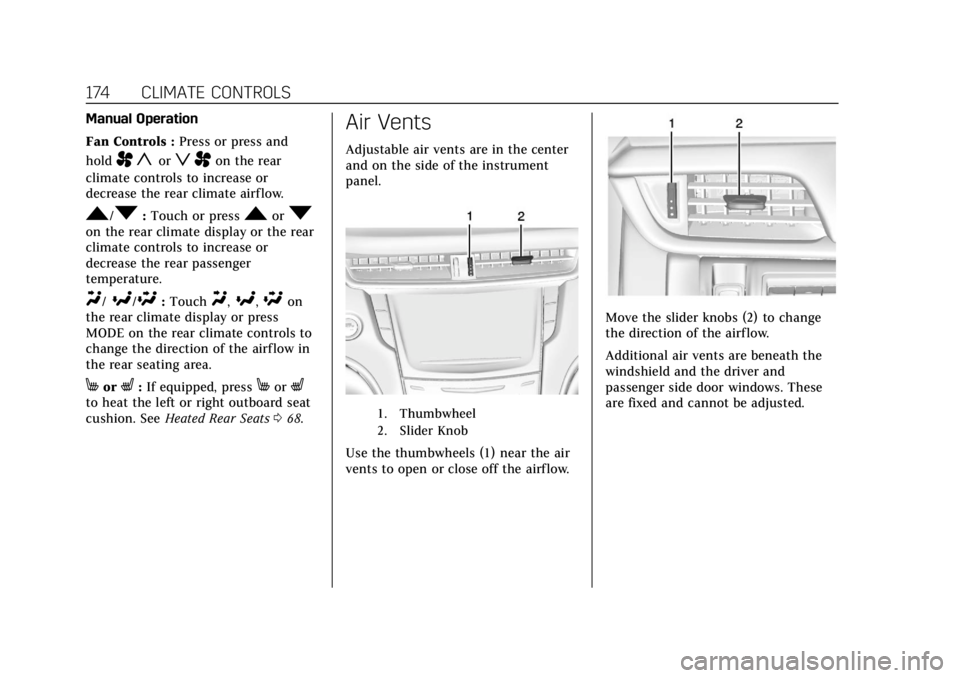
Air Vents
Adjustable air vents are in the center
and on the side of the instrument
panel.
1. Thumbwheel
2. Slider Knob
Use the thumbwheels (1) near the air
vents to open or close off the airflow.
Move the slider knobs (2) to change
the direction of the airf low.
Additional air vents are beneath the
windshield and the driver and
passenger side door windows. These
are fixed and cannot be adjusted.
Page 176 of 394
Cadillac CTS/CTS-V Owner Manual (GMNA-Localizing-U.S./Canada/Mexico-
11349156) - 2018 - CRC - 9/29/17
CLIMATE CONTROLS 175
Operation Tips
.Clear away any ice, snow, or leaves
from air inlets at the base of the
windshield that could block the
flow of air into the vehicle.
. Clear snow off the hood to
improve visibility and help
decrease moisture drawn into the
vehicle.
. Keep the path under the front
seats clear of objects to help
circulate the air inside of the
vehicle more effectively.
. Use of non-GM approved hood
deflectors can adversely affect the
performance of the system. Check
with your dealer before adding
equipment to the outside of the
vehicle.
. Do not attach any devices to the
air vent slats. This restricts airflow
and may cause damage to the air
vents.Maintenance
Passenger Compartment
Air Filter
The filter reduces dust, pollen, and
other airborne irritants from outside
air that is pulled into the vehicle. The
filter should be replaced as part of
routine scheduled maintenance. See
Maintenance Schedule 0339.
See your dealer regarding replacement
of the filter.
Service
All vehicles have a label underhood
that identifies the refrigerant used in
the vehicle. The refrigerant system
should only be serviced by trained and
certified technicians. The air
conditioning evaporator should never
be repaired or replaced by one from a
salvage vehicle. It should only be
replaced by a new evaporator to
ensure proper and safe operation. During service, all refrigerants should
be reclaimed with proper equipment.
Venting refrigerants directly to the
atmosphere is harmful to the
environment and may also create
unsafe conditions based on inhalation,
combustion, frostbite, or other
health-based concerns.
Page 178 of 394
Cadillac CTS/CTS-V Owner Manual (GMNA-Localizing-U.S./Canada/Mexico-
11349156) - 2018 - CRC - 9/29/17
DRIVING AND OPERATING 177
Trailer Towing
General Towing Information . . . . 246
Driving Characteristics andTowing Tips . . . . . . . . . . . . . . . . . . . . . 246
Trailer Towing (V6 Engine, Non Twin Turbo) . . . . . . . . . . . . . . . . . . . . . 249
Trailer Towing (V6 Twin Turbo) . . . . . . . . . . . . . . . . . . . . . . . . . . . 250
Towing Equipment (V6 Engine, Non Twin Turbo) . . . . . . . . . . . . . . . 250
Towing Equipment (V6 Twin Turbo) . . . . . . . . . . . . . . . . . . . . . . . . . . . 251
Conversions and Add-Ons
Add-On Electrical Equipment . . . 251
Driving Information
Distracted Driving
Distraction comes in many forms and
can take your focus from the task of
driving. Exercise good judgment and
do not let other activities divert your
attention away from the road. Many
local governments have enacted laws
regarding driver distraction. Become
familiar with the local laws in
your area.
To avoid distracted driving, keep your
eyes on the road, keep your hands on
the steering wheel, and focus your
attention on driving.
. Do not use a phone in demanding
driving situations. Use a
hands-free method to place or
receive necessary phone calls.
. Watch the road. Do not read, take
notes, or look up information on
phones or other electronic devices.
. Designate a front seat passenger
to handle potential distractions. .
Become familiar with vehicle
features before driving, such as
programming favorite radio
stations and adjusting climate
control and seat settings. Program
all trip information into any
navigation device prior to driving.
. Wait until the vehicle is parked to
retrieve items that have fallen to
the floor.
. Stop or park the vehicle to tend to
children.
. Keep pets in an appropriate carrier
or restraint.
. Avoid stressful conversations
while driving, whether with a
passenger or on a cell phone.
{Warning
Taking your eyes off the road too
long or too often could cause a
crash resulting in injury or death.
Focus your attention on driving.
Page 188 of 394
Cadillac CTS/CTS-V Owner Manual (GMNA-Localizing-U.S./Canada/Mexico-
11349156) - 2018 - CRC - 9/29/17
DRIVING AND OPERATING 187
.Tie a red cloth to an outside
mirror.
{Warning
Snow can trap engine exhaust
under the vehicle. This may cause
exhaust gases to get inside. Engine
exhaust contains carbon monoxide
(CO), which cannot be seen or
smelled. It can cause
unconsciousness and even death.
If the vehicle is stuck in snow:
. Clear snow from the base of
the vehicle, especially any
blocking the exhaust pipe.
. Open a window about 5 cm
(2 in) on the vehicle side that
is away from the wind, to
bring in fresh air.
. Fully open the air outlets on
or under the instrument
panel.
. Adjust the climate control
system to circulate the air
inside the vehicle and set the
(Continued)
Warning (Continued)
fan speed to the highest
setting. See“Climate Control
Systems.”
For more information about CO, see
Engine Exhaust 0199.
To save fuel, run the engine for short
periods to warm the vehicle and then
shut the engine off and partially close
the window. Moving about to keep
warm also helps.
If it takes time for help to arrive,
when running the engine, push the
accelerator pedal slightly so the
engine runs faster than the idle speed.
This keeps the battery charged to
restart the vehicle and to signal for
help with the headlamps. Do this as
little as possible, to save fuel.
If the Vehicle Is Stuck
Slowly and cautiously spin the wheels
to free the vehicle when stuck in sand,
mud, ice, or snow. If stuck too severely for the traction
system to free the vehicle, turn the
traction system off and use the
rocking method. See
Traction Control/
Electronic Stability Control 0206.
{Warning
If the vehicle's tires spin at high
speed, they can explode, and you or
others could be injured. The vehicle
can overheat, causing an engine
compartment fire or other damage.
Spin the wheels as little as possible
and avoid going above 56 km/h
(35 mph).
Rocking the Vehicle to Get it Out
Turn the steering wheel left and right
to clear the area around the front
wheels. Turn off any traction system.
Shift back and forth between
R (Reverse) and a low forward gear,
spinning the wheels as little as
possible. To prevent transmission
wear, wait until the wheels stop
spinning before shifting gears. Release
the accelerator pedal while shifting,
and press lightly on the accelerator
Page 197 of 394
Cadillac CTS/CTS-V Owner Manual (GMNA-Localizing-U.S./Canada/Mexico-
11349156) - 2018 - CRC - 9/29/17
196 DRIVING AND OPERATING
.The shift lever is in any gear other
than D (Drive).
. The battery has been recently
disconnected.
. The battery charge is low.
. The interior comfort level has not
reached the required level for the
climate control system or defog
settings. See Dual Automatic
Climate Control System 0167.
. The Auto Stop time is greater than
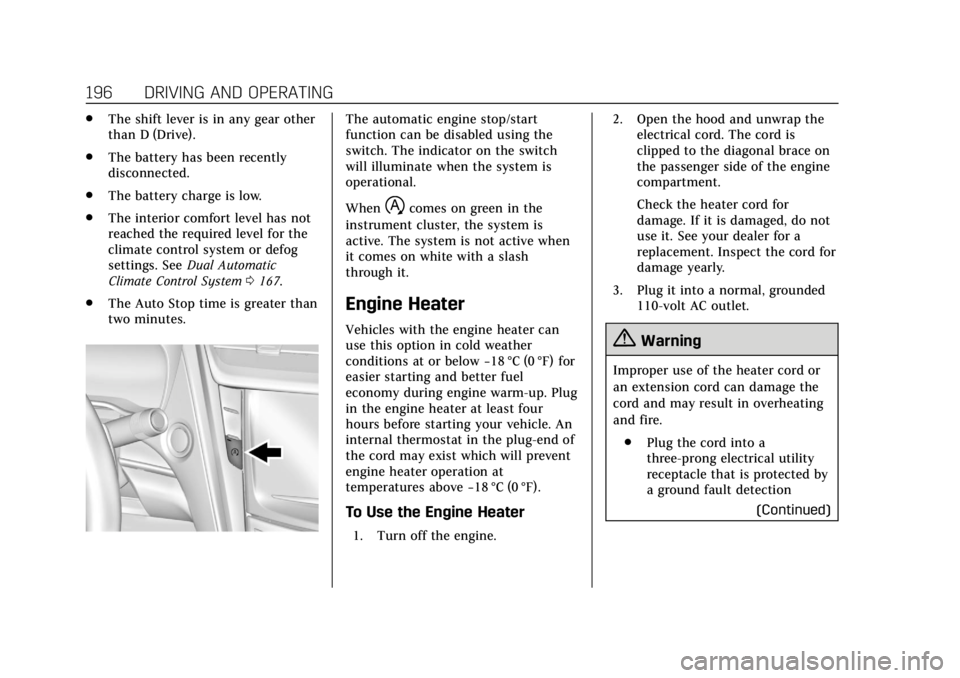
two minutes.The automatic engine stop/start
function can be disabled using the
switch. The indicator on the switch
will illuminate when the system is
operational.
When
hcomes on green in the
instrument cluster, the system is
active. The system is not active when
it comes on white with a slash
through it.
Engine Heater
Vehicles with the engine heater can
use this option in cold weather
conditions at or below −18 °C (0 °F) for
easier starting and better fuel
economy during engine warm-up. Plug
in the engine heater at least four
hours before starting your vehicle. An
internal thermostat in the plug-end of
the cord may exist which will prevent
engine heater operation at
temperatures above −18 °C (0 °F).
To Use the Engine Heater
1. Turn off the engine. 2. Open the hood and unwrap the
electrical cord. The cord is
clipped to the diagonal brace on
the passenger side of the engine
compartment.
Check the heater cord for
damage. If it is damaged, do not
use it. See your dealer for a
replacement. Inspect the cord for
damage yearly.
3. Plug it into a normal, grounded 110-volt AC outlet.
{Warning
Improper use of the heater cord or
an extension cord can damage the
cord and may result in overheating
and fire.
. Plug the cord into a
three-prong electrical utility
receptacle that is protected by
a ground fault detection
(Continued)
Page 248 of 394

Cadillac CTS/CTS-V Owner Manual (GMNA-Localizing-U.S./Canada/Mexico-
11349156) - 2018 - CRC - 9/29/17
DRIVING AND OPERATING 247
.Do not tow a trailer during the
first 2 414 km (1,500 mi) to
prevent damage to the engine,
axle, or other parts.
. Then during the first 800 km
(500 mi) of trailer towing, do not
drive over 80 km/h (50 mph) and
do not make starts at full throttle.
. Vehicles can tow in D (Drive). Shift
the transmission to a lower gear if
the transmission shifts too often
under heavy loads and/or hilly
conditions.
. Do not use Adaptive Cruise
Control when towing.
. The Forward Automatic Braking
System should be set to Off when
towing. See Forward Automatic
Braking (FAB) 0235.
. Turn off Parking Assist when
towing.{Warning
When towing a trailer, exhaust
gases may collect at the rear of the
vehicle and enter if the liftgate,
trunk/hatch, or rear-most window
is open.
When towing a trailer:
. Do not drive with the liftgate,
trunk/hatch, or rear-most
window open.
. Fully open the air outlets on
or under the instrument
panel.
. Also adjust the climate
control system to a setting
that brings in only outside air.
See “Climate Control Systems ”
in the Index.
For more information about carbon
monoxide, see Engine Exhaust
0 199.
Towing a trailer requires a certain
amount of experience. The
combination you are driving is longer and not as responsive as the vehicle
itself. Get acquainted with the
handling and braking of the rig before
setting out for the open road.
Before starting, check all trailer hitch
parts and attachments, safety chains,
electrical connectors, lamps, tires, and
mirrors. If the trailer has electric
brakes, start the combination moving
and then apply the trailer brake
controller by hand to be sure the
brakes work.
During the trip, check occasionally to
be sure that the load is secure and the
lamps and any trailer brakes
still work.
Following Distance
Stay at least twice as far behind the
vehicle ahead as you would when
driving the vehicle without a trailer.
This can help to avoid heavy braking
and sudden turns.
Passing
More passing distance is needed when
towing a trailer. The combination will
not accelerate as quickly and is longer