coolant level CADILLAC CTS 2018 Owner's Manual
[x] Cancel search | Manufacturer: CADILLAC, Model Year: 2018, Model line: CTS, Model: CADILLAC CTS 2018Pages: 394, PDF Size: 6.48 MB
Page 110 of 394
Cadillac CTS/CTS-V Owner Manual (GMNA-Localizing-U.S./Canada/Mexico-
11349156) - 2018 - CRC - 9/29/17
INSTRUMENTS AND CONTROLS 109
Instruments and
Controls
Controls
Steering Wheel Adjustment . . . . . 110
Steering Wheel Controls . . . . . . . . . 110
Heated Steering Wheel . . . . . . . . . . 110
Horn . . . . . . . . . . . . . . . . . . . . . . . . . . . . . . . 111
Windshield Wiper/Washer . . . . . . . 111
Compass . . . . . . . . . . . . . . . . . . . . . . . . . . 113
Clock . . . . . . . . . . . . . . . . . . . . . . . . . . . . . . 113
Power Outlets . . . . . . . . . . . . . . . . . . . . . 113
Wireless Charging . . . . . . . . . . . . . . . . 115
Warning Lights, Gauges, and
Indicators
Warning Lights, Gauges, andIndicators . . . . . . . . . . . . . . . . . . . . . . . 117
Instrument Cluster . . . . . . . . . . . . . . . 118
Speedometer . . . . . . . . . . . . . . . . . . . . . . 121
Odometer . . . . . . . . . . . . . . . . . . . . . . . . . 122
Trip Odometer . . . . . . . . . . . . . . . . . . . . 122
Tachometer . . . . . . . . . . . . . . . . . . . . . . . 122
Fuel Gauge . . . . . . . . . . . . . . . . . . . . . . . . 122
Boost Gauge (Performance Configuration Only) . . . . . . . . . . . . 123 Engine Oil Temperature Gauge
(Performance
Configuration Only) . . . . . . . . . . . . 124
Engine Coolant Temperature Gauge . . . . . . . . . . . . . . . . . . . . . . . . . . . . 124
Seat Belt Reminders . . . . . . . . . . . . . . 125
Airbag Readiness Light . . . . . . . . . . 126
Passenger Airbag Status Indicator . . . . . . . . . . . . . . . . . . . . . . . . . 126
Charging System Light . . . . . . . . . . . 127
Malfunction Indicator Lamp (Check Engine Light) . . . . . . . . . . . 128
Brake System Warning Light . . . . 129
Electric Parking Brake Light . . . . . 130
Service Electric Parking Brake Light . . . . . . . . . . . . . . . . . . . . . . . . . . . . . 130
Antilock Brake System (ABS) Warning Light . . . . . . . . . . . . . . . . . . 131
Lane Keep Assist (LKA) Light . . . 131
Vehicle Ahead Indicator . . . . . . . . . 131
Traction Off Light . . . . . . . . . . . . . . . . 132
StabiliTrak OFF Light . . . . . . . . . . . . 132
Traction Control System (TCS)/ StabiliTrak Light . . . . . . . . . . . . . . . . 132
Engine Coolant Temperature Warning Light . . . . . . . . . . . . . . . . . . 133
Driver Mode Control Light (Uplevel) . . . . . . . . . . . . . . . . . . . . . . . . . 133
Tire Pressure Light . . . . . . . . . . . . . . . 133
Engine Oil Pressure Light . . . . . . . . 134 Low Fuel Warning Light . . . . . . . . . 134
Auto Stop Mode (Uplevel
Cluster Only) . . . . . . . . . . . . . . . . . . . . 135
Security Light . . . . . . . . . . . . . . . . . . . . . 135
High-Beam On Light . . . . . . . . . . . . . 135
Adaptive Forward Lighting (AFL) Light . . . . . . . . . . . . . . . . . . . . . . . . . . . . . 135
Lamps On Reminder . . . . . . . . . . . . . 136
Cruise Control Light . . . . . . . . . . . . . . 136
Door Ajar Light . . . . . . . . . . . . . . . . . . . 136
Information Displays
Driver Information Center (DIC) . . . . . . . . . . . . . . . . . . . . . 137
Head-Up Display (HUD) . . . . . . . . . 140
Vehicle Messages
Vehicle Messages . . . . . . . . . . . . . . . . . 143
Engine Power Messages . . . . . . . . . . 143
Vehicle Speed Messages . . . . . . . . . 144
Vehicle Personalization
Vehicle Personalization . . . . . . . . . . 144
Universal Remote System
Universal Remote System . . . . . . . . 149
Universal Remote System Programming . . . . . . . . . . . . . . . . . . . 149
Universal Remote System Operation . . . . . . . . . . . . . . . . . . . . . . . . 152
Page 125 of 394
Cadillac CTS/CTS-V Owner Manual (GMNA-Localizing-U.S./Canada/Mexico-
11349156) - 2018 - CRC - 9/29/17
124 INSTRUMENTS AND CONTROLS
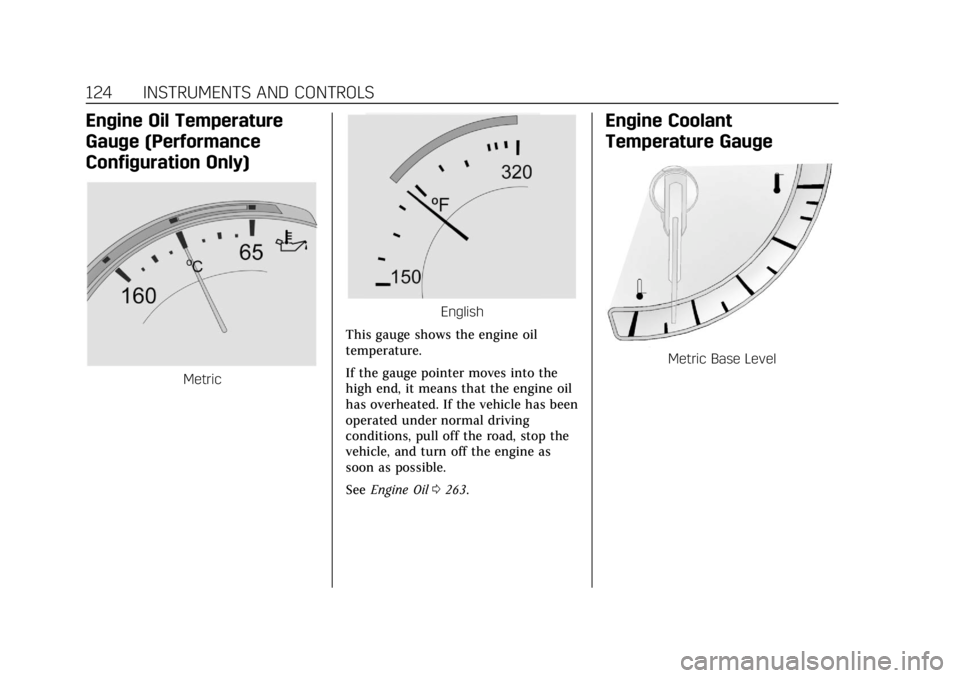
Engine Oil Temperature
Gauge (Performance
Configuration Only)
Metric
English
This gauge shows the engine oil
temperature.
If the gauge pointer moves into the
high end, it means that the engine oil
has overheated. If the vehicle has been
operated under normal driving
conditions, pull off the road, stop the
vehicle, and turn off the engine as
soon as possible.
See Engine Oil 0263.
Engine Coolant
Temperature Gauge
Metric Base Level
Page 134 of 394

Cadillac CTS/CTS-V Owner Manual (GMNA-Localizing-U.S./Canada/Mexico-
11349156) - 2018 - CRC - 9/29/17
INSTRUMENTS AND CONTROLS 133
SeeTraction Control/Electronic Stability
Control 0206.
Engine Coolant
Temperature Warning Light
On some vehicles this light comes on
briefly while starting the vehicle. If it
does not, have the vehicle serviced by
the dealer. If the system is working
normally the indicator light goes off.
For vehicles with the reconfigurable
cluster, this light may not come on
when starting the vehicle.
Caution
The engine coolant temperature
warning light indicates that the
vehicle has overheated. Driving with
this light on can damage the engine
(Continued)
Caution (Continued)
and it may not be covered by the
vehicle warranty. SeeEngine
Overheating 0274.
The engine coolant temperature
warning light comes on when the
engine has overheated.
If this happens pull over and turn off
the engine as soon as possible. See
Engine Overheating 0274.
Driver Mode Control Light
(Uplevel)
This light comes on when Sport Mode
is selected.
This light comes on when Snow/Ice
Mode is selected.
This light comes on when Track Mode
is selected. See Driver Mode Control
0 208.
Tire Pressure Light
Page 249 of 394
Cadillac CTS/CTS-V Owner Manual (GMNA-Localizing-U.S./Canada/Mexico-
11349156) - 2018 - CRC - 9/29/17
248 DRIVING AND OPERATING
so it is necessary to go much farther
beyond the passed vehicle before
returning to the lane.
Backing Up
Hold the bottom of the steering wheel
with one hand. To move the trailer to
the left, move that hand to the left. To
move the trailer to the right, move
your hand to the right. Always back
up slowly and, if possible, have
someone guide you.
Making TurnsCaution
Making very sharp turns while
trailering could cause the trailer to
come in contact with the vehicle.
The vehicle could be damaged.
Avoid making very sharp turns
while trailering.
When turning with a trailer, make
wider turns than normal. Do this so
the trailer will not strike soft shoulders, curbs, road signs, trees,
or other objects. Avoid jerky or sudden
maneuvers. Signal well in advance.
If the trailer turn signal bulbs burn
out, the arrows on the instrument
cluster will still flash for turns. It is
important to check occasionally to be
sure the trailer bulbs are still working.
Driving on Grades
Reduce speed and shift to a lower gear
before
starting down a long or steep
downgrade. If the transmission is not
shifted down, the brakes might get hot
and no longer work well.
Vehicles can tow in D (Drive). Shift
the transmission to a lower gear if the
transmission shifts too often under
heavy loads and/or hilly conditions.
When towing at high altitude on steep
uphill grades, consider the following:
Engine coolant will boil at a lower
temperature than at normal altitudes.
If the engine is turned off immediately
after towing at high altitude on steep
uphill grades, the vehicle may show
signs similar to engine overheating. To
avoid this, let the engine run while
parked, preferably on level ground, with the automatic transmission in
P (Park) for a few minutes before
turning the engine off. If the overheat
warning comes on, see
Engine
Overheating 0274.
Parking on Hills
{Warning
Parking the vehicle on a hill with
the trailer attached can be
dangerous. If something goes
wrong, the rig could start to move.
People can be injured, and both the
vehicle and the trailer can be
damaged. When possible, always
park the rig on a flat surface.
If parking the rig on a hill: 1. Press the brake pedal, but do not shift into P (Park) yet. Turn the
wheels into the curb if facing
downhill or into traffic if facing
uphill.
2. Have someone place chocks under the trailer wheels.
Page 264 of 394
Cadillac CTS/CTS-V Owner Manual (GMNA-Localizing-U.S./Canada/Mexico-
11349156) - 2018 - CRC - 9/29/17
VEHICLE CARE 263
1. Windshield Washer FluidReservoir. See Washer Fluid
0 275.
2. Remote Positive (+) Battery Terminal. See Jump Starting -
North America 0323.
3. Engine Compartment Fuse Block
0286.
4. Engine Coolant Surge Tank and Pressure Cap. See Cooling System
0 269.
5. Remote Negative (-) Battery Terminal. See Jump Starting -
North America 0323.
6. Engine Oil Dipstick. See Engine
Oil 0263.
7. Engine Cooling Fan (Out of View). See Cooling System 0269.
8. Engine Oil Fill Cap (Out of View). See Engine Oil 0263.
9. Engine Air Cleaner/Filter 0267.
10. Brake Fluid Reservoir. See Brake
Fluid 0276.Engine Oil
To ensure proper engine performance
and long life, careful attention must
be paid to engine oil. Following these
simple, but important steps will help
protect your investment:
.
Use engine oil approved to the
proper specification and of the
proper viscosity grade. See
“Selecting the Right Engine Oil” in
this section.
. Check the engine oil level regularly
and maintain the proper oil level.
See “Checking Engine Oil” and
“When to Add Engine Oil” in this
section.
. Change the engine oil at the
appropriate time. See Engine Oil
Life System 0265.
. Always dispose of engine oil
properly. See “What to Do with
Used Oil” in this section.
Checking Engine Oil
Check the engine oil level regularly,
every 650 km (400 mi), especially prior
to a long trip. The engine oil dipstick handle is a loop. See
Engine
Compartment Overview 0256 for the
location.
{Warning
The engine oil dipstick handle may
be hot; it could burn you. Use a
towel or glove to touch the dipstick
handle.
If a low oil Driver Information Center
(DIC) message displays, check the oil
level.
Follow these guidelines:
. To get an accurate reading, park
the vehicle on level ground. Check
the engine oil level after the
engine has been off for at least
two hours. Checking the engine oil
level on steep grades or too soon
after engine shutoff can result in
incorrect readings. Accuracy
improves when checking a cold
engine prior to starting. Remove
the dipstick and check the level.
Page 272 of 394
Cadillac CTS/CTS-V Owner Manual (GMNA-Localizing-U.S./Canada/Mexico-
11349156) - 2018 - CRC - 9/29/17
VEHICLE CARE 271
What to Use
{Warning
Do not touch heater or radiator
hoses, or other engine parts. They
can be very hot and can burn you.
Do not run the engine if there is a
leak; all coolant could leak out.
That could cause an engine fire and
can burn you. Fix any leak before
driving the vehicle.
Use a 50/50 mixture of clean
drinkable water and DEX-COOL
coolant. This mixture:
. Gives freezing protection down to
−37 °C (−34 °F), outside
temperature.
. Gives boiling protection up to
129 °C (265 °F), engine
temperature.
. Protects against rust and
corrosion.
. Will not damage aluminum parts.
. Helps keep the proper engine
temperature.
Caution
Do not use anything other than a
mix of DEX-COOL coolant that
meets GM Standard GMW3420 and
clean, drinkable water. Anything
else can cause damage to the
engine cooling system and the
vehicle, which would not be covered
by the vehicle warranty.
Never dispose of engine coolant by
putting it in the trash, pouring it on
the ground, or into sewers, streams,
or bodies of water. Have the coolant
changed by an authorized service
center, familiar with legal
requirements regarding used coolant
disposal. This will help protect the
environment and your health.
Checking Coolant
The vehicle must be on a level surface
when checking the coolant level. It is normal to see coolant moving in
the upper coolant hose return line
when the engine is running. It is also
normal to see bubbles entering the
surge tank through the small hose.
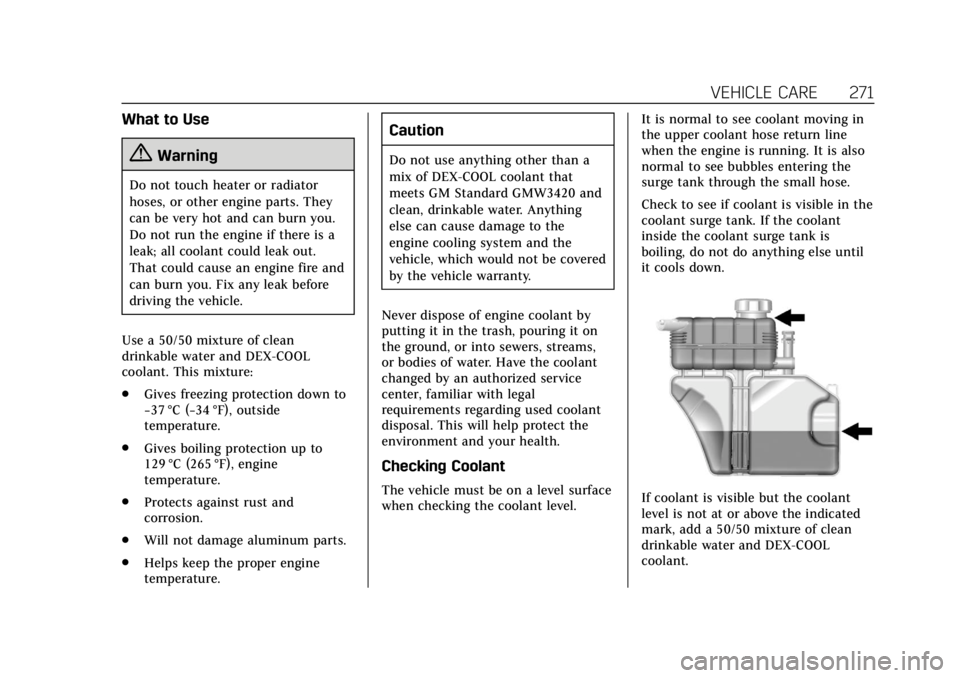
Check to see if coolant is visible in the
coolant surge tank. If the coolant
inside the coolant surge tank is
boiling, do not do anything else until
it cools down.If coolant is visible but the coolant
level is not at or above the indicated
mark, add a 50/50 mixture of clean
drinkable water and DEX-COOL
coolant.
Page 273 of 394
Cadillac CTS/CTS-V Owner Manual (GMNA-Localizing-U.S./Canada/Mexico-
11349156) - 2018 - CRC - 9/29/17
272 VEHICLE CARE
Be sure the cooling system is cool
before this is done.
It is normal for the coolant level in
the bottom chamber to rise and fall
with operating temperature and
ambient conditions. Coolant will
evaporate from the bottom chamber
in normal operation. This will happen
faster when the vehicle is driven for
long periods in hot, dry conditions.
If no coolant is visible in the coolant
surge tank, add coolant as follows:
How to Add Coolant to the
Coolant Surge Tank
{Warning
Spilling coolant on hot engine parts
can burn you. Coolant contains
ethylene glycol and it will burn if
the engine parts are hot enough.
{Warning
Plain water, or other liquids such as
alcohol, can boil before the proper
coolant mixture will. With plain
water or the wrong mixture, the
engine could get too hot but there
would not be an overheat warning.
The engine could catch fire and you
or others could be burned.
{Warning
Steam and scalding liquids from a
hot cooling system are under
pressure. Turning the pressure cap,
even a little, can cause them to
come out at high speed and you
could be burned. Never turn the cap
when the cooling system, including
the pressure cap, is hot. Wait for
the cooling system and pressure
cap to cool.
Caution
Failure to follow the specific
coolant fill procedure could cause
the engine to overheat and could
cause system damage. If coolant is
not visible in the surge tank,
contact your dealer.
If no problem is found, check to see if
coolant is visible in the coolant surge
tank. If coolant is visible but the
coolant level is not at the bottom of
the fill neck, add a 50/50 mixture of
clean, drinkable water and DEX-COOL
coolant at the coolant surge tank, but
be sure the cooling system, including
the coolant surge tank pressure cap, is
cool before you do it.
Page 274 of 394

Cadillac CTS/CTS-V Owner Manual (GMNA-Localizing-U.S./Canada/Mexico-
11349156) - 2018 - CRC - 9/29/17
VEHICLE CARE 273
1. Remove the coolant surge tankpressure cap from the top
chamber when the cooling
system, including the coolant
surge tank pressure cap and
upper radiator hose, is no
longer hot.
Turn the pressure cap slowly
counterclockwise. If you hear a
hiss, wait for that to stop. This
will allow any pressure still left
to be vented out the
discharge hose.
2. Keep turning the pressure cap slowly and remove it. Open the
surge tank service port cap to
the lower chamber. The service
port is behind the top chamber.
3. Fill the surge tank top chamberwith the proper mixture to the
bottom of the fill neck. The top
chamber needs to be completely
full. Fill the surge tank bottom
chamber through the service port
to approximately half.
4. With the coolant surge tank pressure cap off and the surge
tank service port cap open, start
the engine and let it run until
you can feel the upper radiator
hose getting hot. Watch out for
the engine cooling fan(s).
By this time, the coolant level
inside the coolant surge tank top
chamber may be lower. If the level is lower, add more of the
proper mixture to the surge tank
top chamber until the level
reaches the bottom of the
fill neck.
5. Replace the surge tank pressure cap tightly and close the surge
tank service port cap.
6. Check the level in the surge tank top and bottom chambers when
the cooling system has cooled
down. If the coolant is not at the
proper levels, repeat Steps 1–
6 and reinstall the pressure cap
and close the service port. If the
coolant still is not at the proper
levels when the system cools
down again, see your dealer.
Caution
If the pressure cap is not tightly
installed, coolant loss and engine
damage may occur. Be sure the cap
is properly and tightly secured.
Page 275 of 394
Cadillac CTS/CTS-V Owner Manual (GMNA-Localizing-U.S./Canada/Mexico-
11349156) - 2018 - CRC - 9/29/17
274 VEHICLE CARE
Engine Overheating
The vehicle has an indicator to warn
of the engine overheating.
If the decision is made not to lift the
hood when this warning appears, get
service help right away. SeeRoadside
Service 0361.
If the decision is made to lift the
hood, make sure the vehicle is parked
on a level surface.
Then check to see if the engine
cooling fan is running. If the engine is
overheating, the fan should be
running. If it is not, do not continue
to run the engine. Have the vehicle
serviced.
Caution
Do not run the engine if there is a
leak in the engine cooling system.
This can cause a loss of all coolant
and can damage the system and
vehicle. Have any leaks fixed
right away.
If Steam Is Coming from the
Engine Compartment
{Warning
Steam and scalding liquids from a
hot cooling system are under
pressure. Turning the pressure cap,
even a little, can cause them to
come out at high speed and you
could be burned. Never turn the cap
when the cooling system, including
the pressure cap, is hot. Wait for
the cooling system and pressure
cap to cool.
If Steam Is Coming from the
Engine Compartment with No
Overheat Warning
(V-Series Only)
The V-Series hood vent is functional,
and will allow water from rain and car
washes to enter the engine
compartment and contact hot
surfaces. If steam is seen coming from
the hood vent with no accompanying
overheat warning, no action is
required.
If No Steam Is Coming from the
Engine Compartment
If an engine overheat warning is
displayed but no steam can be seen or
heard, the problem may not be too
serious. Sometimes the engine can get
a little too hot when the vehicle:
. Climbs a long hill on a hot day.
. Stops after high-speed driving.
. Idles for long periods in traffic.
If the overheat warning is displayed
with no sign of steam: 1. Turn the air conditioning off.
2. Turn the heater on to the highest temperature and to the highest
fan speed. Open the windows as
necessary.
3. When it is safe to do so, pull off the road, shift to P (Park) or
N (Neutral) and let the
engine idle.
If the overheat warning no longer
displays, the vehicle can be driven.
Continue to drive the vehicle slowly
for about 10 minutes. Keep a safe
vehicle distance from the vehicle in
Page 289 of 394
Cadillac CTS/CTS-V Owner Manual (GMNA-Localizing-U.S./Canada/Mexico-
11349156) - 2018 - CRC - 9/29/17
288 VEHICLE CARE
FusesUsage
22 Driver motorized seat belt
26 –
27 –/Heated seat 2
28 –/Reverse lock out
29 Adaptive forward lighting, Automatic
headlamp leveling/
Pedestrian protection
30 –
31 Passenger window switch
32 –
33 Sunroof
34 Front wiper
35 Steering column lock
36 Rear bussed electrical center/Ignition
37 –/Malfunction
Indicator Lamp/
Ignition
38 Aeroshutter Fuses
Usage
39 O2 sensor/Emissions
40 Ignition coil even/O2 sensor
41 Ignition coil odd
42 Engine control module
43 –
44 –
45 Washer
48 Instrument panel/ Body/Ignition
49 Fuel system control module/Ignition
50 Heated steering wheel
51 Engine control module/Ignition
52 Transmission control module/Ignition
53 Coolant pump
55 – Fuses
Usage
56 Transmission control module
64 Adaptive headlamp leveling
65 Left HID headlamp
66 Right HID headlamp
67 Left/Right high-beam headlamp
68 Headlamp leveling motor
69 Horn
71 Cooling fan
72 Starter 2
73 Brake vacuum pump
74 Starter 1
75 Air conditioning clutch
76 –
Relays Usage
8 Headlamp washer
23 Wiper control