suspension CADILLAC CTS 2018 Owner's Manual
[x] Cancel search | Manufacturer: CADILLAC, Model Year: 2018, Model line: CTS, Model: CADILLAC CTS 2018Pages: 394, PDF Size: 6.48 MB
Page 145 of 394

Cadillac CTS/CTS-V Owner Manual (GMNA-Localizing-U.S./Canada/Mexico-
11349156) - 2018 - CRC - 9/29/17
144 INSTRUMENTS AND CONTROLS
on, but maximum acceleration and
speed may be reduced. Anytime this
message stays on, or displays
repeatedly, the vehicle should be
taken to your dealer for service as
soon as possible.
Vehicle Speed Messages
SPEED LIMITED TO
XXX KM/H (MPH)
This message shows that the vehicle
speed has been limited to the speed
displayed. The limited speed is a
protection for various propulsion and
vehicle systems, such as lubrication,
thermal, suspension, Teen Driver if
equipped, or tires.
Vehicle Personalization
The following are all possible vehicle
personalization features. Depending
on the vehicle, some may not be
available.
For System, Apps, and Personal
features and functions, see“Settings”
in the infotainment manual.
To access the vehicle
personalization menu:
1. Touch the Settings icon on the Home Page of the infotainment
display.
2. Touch Vehicle to display a list of available options.
3. Touch to select the desired feature setting.
4. Touch
9orRto turn a feature
off or on.
5. Touch
zto go to the top level of
the Settings menu. The menu may contain the following:
Rear Seat Reminder
This allows for a chime and a message
when the rear door has been opened
before or during operation of the
vehicle.
Select Off or On.
Driving Mode
These settings will overwrite the main
Vehicle Mode selections made with
the MODE switch on the console.
Touch and the following may display:
.
Engine Sound Management
. Steering
. Suspension
Engine Sound Management
This setting adjusts the sound of the
engine exhaust from a quiet to a loud
exhaust volume.
Touch Auto (Follows the MODE
switch), Tour, Sport, or Track.
Page 146 of 394
Cadillac CTS/CTS-V Owner Manual (GMNA-Localizing-U.S./Canada/Mexico-
11349156) - 2018 - CRC - 9/29/17
INSTRUMENTS AND CONTROLS 145
Steering
This setting adjusts how the steering
feels from a lighter to a reduced assist
for more steering feel.
Touch Auto (Follows the MODE
switch), Tour, Sport, or Track.
Suspension
This setting adjusts the suspension
from a comfortable to a more
responsive tune.
Touch Auto (Follows the MODE
switch), Tour, Sport, or Track.
Climate and Air Quality
Touch and the following may display:
.Auto Fan Speed
. Air Quality Sensor
. Auto Cooled Seats
. Auto Heated Seats
. Auto Defog
. Auto Rear Defog Auto Fan Speed
This setting specifies the amount of
airf low when the climate control fan
setting is Auto Fan.
Touch Low, Medium, or High.
Air Quality Sensor
This setting switches the system into
Recirculation Mode based on the
quality of the outside air.
Touch Off, Low Sensitivity, or High
Sensitivity.
Auto Cooled Seats
This setting automatically turns on
and regulates the ventilated seats
when the cabin temperature is warm.
See
Heated and Ventilated Front Seats
0 64.
Touch Off or On.
Auto Heated Seats
This setting automatically turns on
and regulates the heated seats when
the cabin temperature is cool. The
auto heated seats can be turned off by using the heated seat buttons on the
center stack. See
Heated and Ventilated
Front Seats 064.
If equipped with Auto Heated Steering
Wheel, this feature will turn on when
the Auto Heated Seats turn on.
Touch Off or On.
Auto Defog
This setting automatically turns the
front defogger on when the engine is
started.
Touch Off or On.
Auto Rear Defog
This setting automatically turns the
rear defogger on when the engine is
started.
Touch Off or On.
Collision / Detection Systems
Touch and the following may display:
. Alert Type
. Forward Collision System
. Connected Vehicle Braking Alert
. Traffic and Roadside Information
Page 183 of 394
Cadillac CTS/CTS-V Owner Manual (GMNA-Localizing-U.S./Canada/Mexico-
11349156) - 2018 - CRC - 9/29/17
182 DRIVING AND OPERATING
Automatic Transmission Fluid
Have the transmission fluid set to the
track specific oil level prior to track
usage. Transmission fluid should be
changed after every 15 hours of track
usage. Any transmission level set or
change should be performed at your
dealer.
Brake Fluid
For track events and competitive
driving, it is recommended that the
brake fluid be replaced with a high
performance brake fluid that has a dry
boiling point greater than 279 °C
(534 °F). After conversion to the high
performance brake fluid, follow the
brake fluid service recommendations
outlined by the fluid manufacturer. Do
not use silicone or DOT-5 brake fluids.
Caution
Removing the splash shield can
degrade wet braking performance,
as well as introduce brake pedal
pulsation, due to brake disc(Continued)
Caution (Continued)
exposure to road debris. Only
remove the front brake disc splash
shield and front tire deflector when
driving in track events.
Brake cooling can be improved if the
front brake disc splash shield and
front tire deflector are removed.
Removing the shield will require that
the suspension bushings visible to the
brake disc be protected with insulated
thermal wrapping.
Brake Burnishing
To prepare the V-Sport and V-Series
brake systems for track events and
racing, complete the appropriate high
performance brake burnishing
procedure described below.
V-Sport and V-Series Brake
Burnishing
New brake pads must be burnished
before racing or other competitive
driving.
Caution
These procedures are specific to the
V-Sport and V-Series brake package.
This procedure should not be run
on other models as damage may
result.
Caution
The new vehicle break-in period
should be completed before
performing the brake burnishing
procedure or damage may occur to
the powertrain/engine. See New
Vehicle Break-In 0191.
When performed as instructed, this
procedure will not damage the brakes.
During the burnishing procedure, the
brake pads will smoke and produce an
odor. The braking force and pedal
travel may increase. After the
procedure is complete, the brake pads
may appear white at the rotor contact.
Page 209 of 394
Cadillac CTS/CTS-V Owner Manual (GMNA-Localizing-U.S./Canada/Mexico-
11349156) - 2018 - CRC - 9/29/17
208 DRIVING AND OPERATING
To turn off only TCS, press and
release
Y. The traction off lighti
displays in the instrument cluster.
A DIC message may display.
To turn TCS on again, press and
release
Y. The traction off lighti
displayed in the instrument cluster
will turn off.
If TCS is limiting wheel spin when
Y
is pressed, the system will not turn off
until the wheels stop spinning.
To turn off both TCS and StabiliTrak,
press and hold
Yuntil the traction
off light
iand StabiliTrak OFF light
gcome on and stay on in the
instrument cluster. A DIC message
may display.
To turn TCS and StabiliTrak on again,
press and release
Y. The traction off
light
iand StabiliTrak OFF lightg
in the instrument cluster turn off.
Adding accessories can affect the
vehicle's performance. See Accessories
and Modifications 0254.
Driver Mode Control
Driver Mode Control attempts to add
a sportier feel, provide a more
comfortable ride, or assist in different
weather conditions or terrain. This
system simultaneously changes the
software settings of various
sub-systems. Depending on the option
package, available features, and mode
selected, the suspension, steering, and
powertrain will change settings to
achieve the desired mode
characteristics. If the vehicle is
equipped with Magnetic Ride Control,
selecting the various Driver Modes
adjusts the ride of the vehicle to
enhance the ride performance for the
road conditions and the
selected mode.
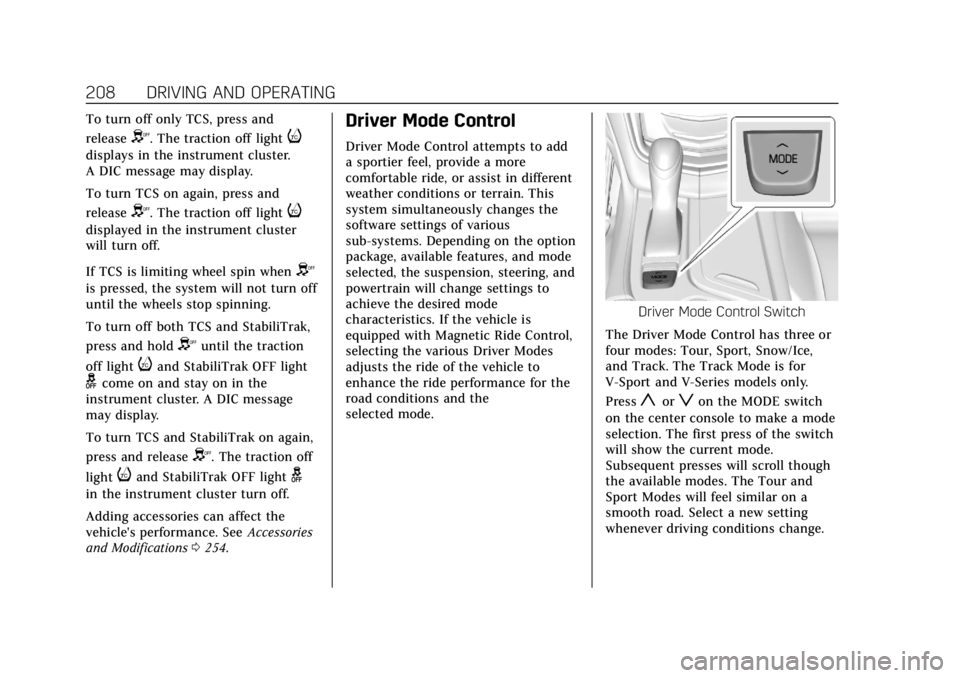
Driver Mode Control Switch
The Driver Mode Control has three or
four modes: Tour, Sport, Snow/Ice,
and Track. The Track Mode is for
V-Sport and V-Series models only.
Press
yorzon the MODE switch
on the center console to make a mode
selection. The first press of the switch
will show the current mode.
Subsequent presses will scroll though
the available modes. The Tour and
Sport Modes will feel similar on a
smooth road. Select a new setting
whenever driving conditions change.
Page 210 of 394

Cadillac CTS/CTS-V Owner Manual (GMNA-Localizing-U.S./Canada/Mexico-
11349156) - 2018 - CRC - 9/29/17
DRIVING AND OPERATING 209
Tour Mode
Use for normal city and highway
driving to provide a smooth, soft ride.
Sport Mode
Use where road conditions or personal
preference demand a more controlled
response.
When selected, the Sport Mode
indicator will display.
When in Sport or Track Mode, the
vehicle will shift automatically but
may hold a lower gear longer than it
would in the normal driving mode
based on braking, throttle input, and
vehicle lateral acceleration. See
Automatic Transmission0200. The
steering will change to provide more
precise control. If the vehicle has
Magnetic Ride Control, the suspension
will change to provide better
cornering performance.
Competitive Driving Mode (V-Sport
only) can be accessed through this
mode. See Competitive Driving Mode
(V-Sport Only) 0211.
Snow/Ice Mode
Use when more traction is needed
during slippery conditions.
Snow/Ice Mode will use a different
accelerator pedal map to optimize
traction on a slippery surface. The
accelerator pedal will reduce engine
torque at small pedal inputs.
When selected, the Snow/Ice Mode
indicator will display.
This feature is not intended for use
when the vehicle is stuck in sand,
mud, ice, snow, or gravel. If the
vehicle becomes stuck, see If the
Vehicle Is Stuck 0187.
Track Mode (V-Sport and
V-Series Only)
Use when maximum vehicle handling
is desired. For use when driving on a
closed race course or drag strip.
When selected, the Track Mode
indicator will display. When in Track Mode, the automatic
transmission and steering will
function similar to Sport Mode. The
accelerator pedal is adjusted to give
maximum control during the highest
level of spirited driving. The Magnetic
Ride Control will be set to the
optimum level for vehicle
responsiveness. Competitive Driving
Mode (V-Sport only) or Performance
Traction Management (PTM) (V-Series
only) can be accessed through this
mode. See
Competitive Driving Mode
(V-Sport Only) 0211.
There are six attributes that vary by
mode shown below. Not all vehicles
have all features, depending on the
vehicle options.
Page 212 of 394
Cadillac CTS/CTS-V Owner Manual (GMNA-Localizing-U.S./Canada/Mexico-
11349156) - 2018 - CRC - 9/29/17
DRIVING AND OPERATING 211
hold lower gears when not using
paddles. The shifts are also firmer to
increase the quickness of shifting.
Steering (Assist Effort)
Adjusts from a lighter steering feel in
Tour Mode to reduced assist in Sport
and Track Mode for more
steering feel.
Magnetic Ride Control (if equipped)
Adjusts the shock dampening
firmness from a comfort tune in Tour
Mode to an optimized responsiveness
tune in Sport and Track.
Launch Control (V-Series Only)
Available only in Track Mode for
maximum“off–the–line ”acceleration
when in Competitive or PTM Modes.
Stability Control
. Competitive Mode allows less
computer control to permit some
slide and drift and is selected with
the button –only available in
Track Mode.
. StabiliTrak can be turned off by
pressing and holding the button
for five seconds.Driver Mode Customization
The Engine Sound Management,
steering, and suspension drive modes
can be set to the driver’s preference.
See “Driving Mode ”under Vehicle
Personalization 0144.
When in the Track main vehicle mode,
you cannot overwrite the Steering or
Suspension settings. These settings
are designed to interact with the
advanced functions in the Track Mode
and cannot be overwritten.
The selections made in the Driving
Mode menu overwrite the main
vehicle mode selection via the buttons
or switch on the center console. In
order to customize and overwrite,
select one of the three settings by
touching the infotainment display.
When in the customization screen for
each system, select one of the
available options:
. Auto (Follows the MODE switch)
. Tour
. Sport
. Track The default will be to follow the
vehicle MODE switch settings, but the
main vehicle mode selection for the
currently selected system can be
overwritten using this menu. The
settings selected in this menu will set
the vehicle behavior in all selected
vehicle modes, and will be retained
over each ignition cycle. They do not
have to be reset each time the vehicle
is started.
Competitive Driving Mode
(V-Sport Only)
To select this optional handling mode,
press
Yquickly two times and the
DIC will display COMPETITIVE MODE
ON. While in the Competitive Driving
Mode, the traction off light
iand
StabiliTrak OFF light
gwill come on
in the instrument cluster. TCS does
not limit wheel spin, the Electronic
Limited-Slip Differential (eLSD) allows
increased vehicle agility, and more
effort is required to turn the steering
wheel. See “Limited-Slip Differential
Page 255 of 394

Cadillac CTS/CTS-V Owner Manual (GMNA-Localizing-U.S./Canada/Mexico-
11349156) - 2018 - CRC - 9/29/17
254 VEHICLE CARE
California Perchlorate
Materials Requirements
Certain types of automotive
applications, such as airbag initiators,
seat belt pretensioners, and lithium
batteries contained in Remote Keyless
Entry transmitters, may contain
perchlorate materials. Special
handling may be necessary. For
additional information, see
www.dtsc.ca.gov/hazardouswaste/
perchlorate.
Accessories and
Modifications
Adding non-dealer accessories or
making modifications to the vehicle
can affect vehicle performance and
safety, including such things as
airbags, braking, stability, ride and
handling, emissions systems,
aerodynamics, durability, and
electronic systems like antilock
brakes, traction control, and stability
control. These accessories or
modifications could even cause
malfunction or damage not covered by
the vehicle warranty.Damage to suspension components
caused by modifying vehicle height
outside of factory settings will not be
covered by the vehicle warranty.
Damage to vehicle components
resulting from modifications or the
installation or use of non-GM certified
parts, including control module or
software modifications, is not covered
under the terms of the vehicle
warranty and may affect remaining
warranty coverage for affected parts.
GM Accessories are designed to
complement and function with other
systems on the vehicle. See your
dealer to accessorize the vehicle using
genuine GM Accessories installed by a
dealer technician.
Also, see
Adding Equipment to the
Airbag-Equipped Vehicle 087.
Vehicle Checks
Doing Your Own
Service Work
{Warning
It can be dangerous to work on
your vehicle if you do not have the
proper knowledge, service manual,
tools, or parts. Always follow
owner’s manual procedures and
consult the service manual for your
vehicle before doing any
service work.
If doing some of your own service
work, use the proper service manual.
It tells you much more about how to
service the vehicle than this manual
can. To order the proper service
manual, see Service Publications
Ordering Information 0366.
This vehicle has an airbag system.
Before attempting to do your own
service work, see Servicing the
Airbag-Equipped Vehicle 086.
Page 314 of 394
Cadillac CTS/CTS-V Owner Manual (GMNA-Localizing-U.S./Canada/Mexico-
11349156) - 2018 - CRC - 9/29/17
VEHICLE CARE 313
Wheel Replacement
Replace any wheel that is bent,
cracked, or badly rusted or corroded.
If wheel nuts keep coming loose, the
wheel, wheel bolts, and wheel nuts
should be replaced. If the wheel leaks
air, replace it. Some aluminum wheels
can be repaired. See your dealer if any
of these conditions exist.
Your dealer will know the kind of
wheel that is needed.
Each new wheel should have the same
load-carrying capacity, diameter,
width, offset, and be mounted the
same way as the one it replaces.
Replace wheels, wheel bolts, wheel
nuts, or Tire Pressure Monitor System
(TPMS) sensors with new GM original
equipment parts.
{Warning
Using the wrong replacement
wheels, wheel bolts, or wheel nuts
can be dangerous. It could affect
the braking and handling of the(Continued)
Warning (Continued)
vehicle. Tires can lose air, and
cause loss of control, causing a
crash. Always use the correct wheel,
wheel bolts, and wheel nuts for
replacement.
Caution
The wrong wheel can also cause
problems with bearing life, brake
cooling, speedometer or odometer
calibration, headlamp aim, bumper
height, vehicle ground clearance,
and tire or tire chain clearance to
the body and chassis.
Used Replacement Wheels
{Warning
Replacing a wheel with a used one
is dangerous. How it has been used
or how far it has been driven may(Continued)
Warning (Continued)
be unknown. It could fail suddenly
and cause a crash. When replacing
wheels, use a new GM original
equipment wheel.
Tire Chains
{Warning
If the vehicle has P245/40R18,
245/40R18, 275/35R18, 255/35R19,
265/35ZR19, or 295/30ZR19 size
tires, do not use tire chains. There
is not enough clearance. Tire chains
used on a vehicle without the
proper amount of clearance can
cause damage to the brakes,
suspension, or other vehicle parts.
The area damaged by the tire
chains could cause loss of control
and a crash. Use another type of
traction device only if its
manufacturer recommends it for
the vehicle's tire size combination(Continued)
Page 326 of 394
Cadillac CTS/CTS-V Owner Manual (GMNA-Localizing-U.S./Canada/Mexico-
11349156) - 2018 - CRC - 9/29/17
VEHICLE CARE 325
{Warning
Fans or other moving engine parts
can injure you badly. Keep your
hands away from moving parts
once the engine is running.
5. Connect one end of the red positive (+) cable to the remote
positive (+) terminal on the
discharged battery.
6. Connect the other end of the red positive (+) cable to the
positive (+) terminal of the good
battery.
7. Connect one end of the black negative (–) cable to the
negative (–) terminal of the good
battery.
8. Connect the other end of the black negative (–) cable to the
remote negative (–) grounding
terminal for the discharged
battery. 9. Start the engine in the vehicle
with the good battery and run
the engine at idle speed for at
least four minutes.
10. Try to start the vehicle that had the dead battery. If it will not
start after a few tries, it probably
needs service.
Caution
If the jumper cables are connected
or removed in the wrong order,
electrical shorting may occur and
damage the vehicle. The repairs
would not be covered by the vehicle
warranty. Always connect and
remove the jumper cables in the
correct order, making sure that the
cables do not touch each other or
other metal.
Jumper Cable Removal
Reverse the sequence exactly when
removing the jumper cables.
After starting the disabled vehicle and
removing the jumper cables, allow it
to idle for several minutes.
Towing the Vehicle
Caution
Incorrectly towing a disabled
vehicle may cause damage. The
damage would not be covered by
the vehicle warranty.
Do not lash or hook to suspension
components. Use the proper straps
around the tires to secure the
vehicle.
Use only a flatbed tow truck for
towing a disabled vehicle. Never use a
sling type lift or damage will occur.
Use ramps to help reduce approach
angles if necessary. A towed vehicle
should have its drive wheels off the
ground. Consult a professional towing
service if the disabled vehicle must be
towed.
Page 327 of 394

Cadillac CTS/CTS-V Owner Manual (GMNA-Localizing-U.S./Canada/Mexico-
11349156) - 2018 - CRC - 9/29/17
326 VEHICLE CARE
Due to low ramp angles on the
V-Series only, use care when loading
the vehicle onto a flatbed carrier.
Front spring spacers were provided for
lifting the front suspension if more
clearance is necessary when towing.
Consult your dealer or a professional
towing service if the disabled vehicle
must be towed.
Front Tow EyeCaution
Improper use of the tow eye can
cause vehicle damage. Use caution
and low speeds to prevent damage
to the vehicle.
If the vehicle is equipped with tow
eye, only use the tow eye to pull the
vehicle onto a flatbed car carrier from
a flat road surface. Do not use the tow
eye to pull the vehicle from snow,
mud or sand. The tow eye is located
underneath the load floor, near the
spare tire or the compressor kit,
if equipped.
Carefully open the cover in the fascia
by using the small notch that conceals
the tow eye socket.
Install the tow eye into the socket and
turn it until it is fully tightened. When
the tow eye is removed, reinstall the
cover with the notch in the original
position.
Recreational Vehicle
Towing
Recreational vehicle towing means
towing the vehicle behind another
vehicle such as a motor home. The
two most common types of
recreational vehicle towing are known
as dinghy towing and dolly towing.
Dinghy towing is towing the vehicle
with all four wheels on the ground.
Dolly towing is towing the vehicle
with two wheels on the ground and
two wheels up on a device known as a
dolly.