transmission fluid CADILLAC CTS 2018 Owner's Manual
[x] Cancel search | Manufacturer: CADILLAC, Model Year: 2018, Model line: CTS, Model: CADILLAC CTS 2018Pages: 394, PDF Size: 6.48 MB
Page 113 of 394
Cadillac CTS/CTS-V Owner Manual (GMNA-Localizing-U.S./Canada/Mexico-
11349156) - 2018 - CRC - 9/29/17
112 INSTRUMENTS AND CONTROLS
had been activated. SeeWasher Fluid
0 275 for information on filling the
windshield washer fluid reservoir.
{Warning
In freezing weather, do not use the
washer until the windshield is
warmed. Otherwise the washer fluid
can form ice on the windshield,
blocking your vision.
Clear snow and ice from the wiper
blades and windshield before using
them. If frozen to the windshield,
carefully loosen or thaw them.
Damaged blades should be replaced.
See Wiper Blade Replacement 0280.
Heavy snow or ice can overload the
wiper motor. See Electrical System
Overload 0285.
Wiper Parking
If the ignition is turned off while the
wipers are on LO, HI, or INT, they will
immediately stop. If the windshield wiper lever is then
moved to OFF before the driver door is
opened or within 10 minutes, the
wipers will restart and move to the
base of the windshield.
If the ignition is turned off while the
wipers are performing wipes due to
windshield washing or Rainsense
wipes, the wipers continue to run
until they reach the base of the
windshield.
Rainsense
If equipped, there is a sensor near the
top center of the windshield detects
the amount of water on the
windshield and controls the frequency
of the windshield wiper. To turn this
feature on or off, see
“Rain Sense
Wipers ”under Vehicle Personalization
0 144.
Keep this area of the windshield clear
of debris to allow for best system
performance.
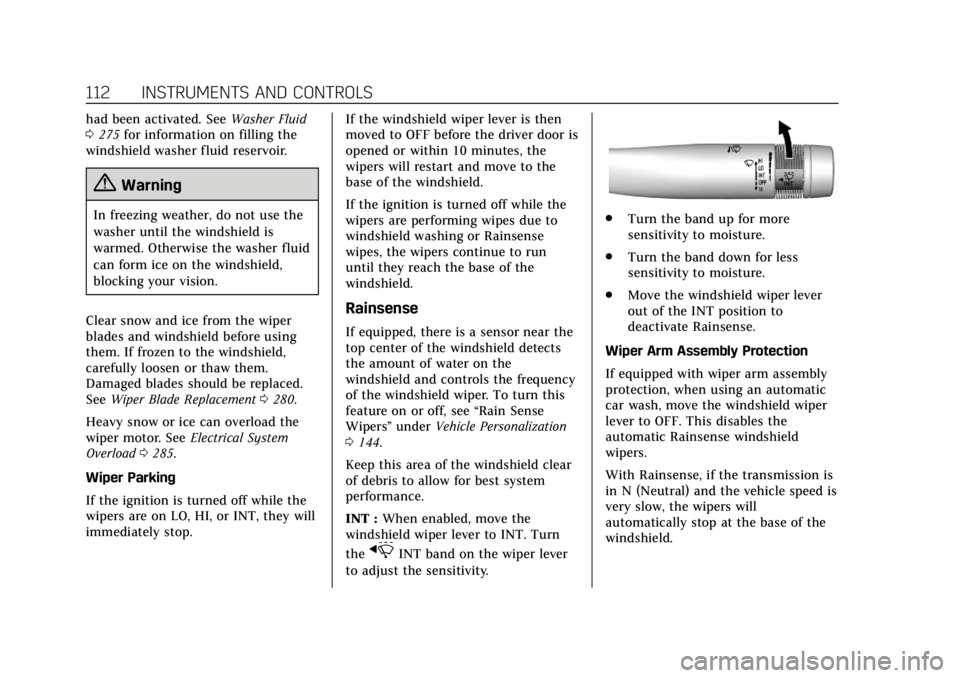
INT : When enabled, move the
windshield wiper lever to INT. Turn
the
xINT band on the wiper lever
to adjust the sensitivity.
. Turn the band up for more
sensitivity to moisture.
. Turn the band down for less
sensitivity to moisture.
. Move the windshield wiper lever
out of the INT position to
deactivate Rainsense.
Wiper Arm Assembly Protection
If equipped with wiper arm assembly
protection, when using an automatic
car wash, move the windshield wiper
lever to OFF. This disables the
automatic Rainsense windshield
wipers.
With Rainsense, if the transmission is
in N (Neutral) and the vehicle speed is
very slow, the wipers will
automatically stop at the base of the
windshield.
Page 114 of 394

Cadillac CTS/CTS-V Owner Manual (GMNA-Localizing-U.S./Canada/Mexico-
11349156) - 2018 - CRC - 9/29/17
INSTRUMENTS AND CONTROLS 113
The wiper operations return to normal
when the transmission is no longer in
N (Neutral) or the vehicle speed has
increased.
Wiper-Activated Headlamps
This feature activates the headlamps
and parking lamps after the
windshield wipers have been in use
for a while. The transition time for the
lamps coming on varies based on the
wiper speed. For this feature to work,
the exterior lamp control must be
in AUTO.
The wiper-activated headlamps
immediately turn off when the
ignition is turned to off, or the
windshield wiper control is turned off.
Rear Camera Mirror Washer
If equipped, push the windshield
wiper lever forward to spray washer
fluid on the Rear Camera Mirror. The
lever returns to its starting position
when released. SeeRear Camera Mirror
0 48.
Compass
The vehicle may have a compass
display on the Driver Information
Center (DIC). The compass receives its
heading and other information from
the Global Positioning System (GPS)
antenna, StabiliTrak, and vehicle
speed information.
The compass system is designed to
operate for a certain number of miles
or degrees of turn before needing a
signal from the GPS satellites. When
the compass display shows CAL, drive
the vehicle for a short distance in an
open area where it can receive a GPS
signal. The compass system will
automatically determine when a GPS
signal is restored and provide a
heading again.
Clock
The time and date for the clock can be
set using the infotainment system. See
“Time/Date ”in “System“under
“Settings ”in the infotainment manual.
Power Outlets
Power Outlets 12-Volt Direct Current
Accessory power outlets can be used
to plug in electrical equipment, such
as a cell phone or MP3 player.
The vehicle has three 12-volt
accessory power outlets:
.
Inside the center console storage
in front of the armrest cover.
. Inside the storage area under the
armrest cover.
. Inside the storage area on the rear
of the center console, if equipped.
These outlets are powered while the
vehicle is on or in ACC/ACCESSORY
mode, or until the driver door is
opened within 10 minutes of turning
off the vehicle.
Page 140 of 394
Cadillac CTS/CTS-V Owner Manual (GMNA-Localizing-U.S./Canada/Mexico-
11349156) - 2018 - CRC - 9/29/17
INSTRUMENTS AND CONTROLS 139
Best Fuel Economy :Displays average
fuel economy, the best fuel economy
over the selected distance, and a bar
graph showing instantaneous fuel
economy.
Cruise Set Speed : Shows the speed
the cruise control or Adaptive Cruise
Control (ACC, if equipped) is set to.
Follow Distance : When Adaptive
Cruise Control (ACC) is not engaged,
the current follow time to the vehicle
ahead is displayed as a time value on
this page. When ACC has been
engaged, the display switches to the
gap setting page. This page shows the
current gap setting along with the
vehicle ahead indicator.
Gap Setting : When ACC has been
engaged, this page shows the current
gap setting along with the vehicle
ahead indicator.
Battery Voltage : Shows the current
battery voltage.
Engine Boost : Shows the current
amount of boost being added. G-Force (V-Series) :
Gives the driver
an indication of the vehicle
performance in cornering. The G-force
is displayed in the center of the DIC
as a numerical value.
Transmission Temperature
(V-Series) : Shows the temperature of
the transmission fluid in either
degrees Celsius (°C) or degrees
Fahrenheit (°F).
Oil Life : Shows an estimate of the
oil's remaining useful life.
If REMAINING OIL LIFE 99% is
displayed, that means 99% of the
current oil life remains.
When the remaining oil life is low, the
CHANGE ENGINE OIL SOON message
will appear on the display. The oil
should be changed as soon as
possible. See Engine Oil0263. In
addition to the engine oil life system
monitoring the oil life, additional
maintenance is recommended. See
Maintenance Schedule 0339.
The Oil Life display must be reset
after each oil change. It will not reset
itself. Do not to reset the Oil Life
display accidentally at any time other than when the oil has just been
changed. It cannot be reset accurately
until the next oil change. To reset the
engine oil life system, press and hold
SEL for several seconds while the Oil
Life display is active. See
Engine Oil
Life System 0265.
Tire Pressure : Shows the
approximate pressures of all four tires.
Tire pressure is displayed in either
kilopascal (kPa) or in pounds per
square inch (psi). If the pressure is
low, the value for that tire is shown in
amber. See Tire Pressure Monitor
System 0303 and Tire Pressure
Monitor Operation 0304.
Tire Temperature (V-Series) :
Displays a description of the tire air
temperature based on the readings
from the TPMS sensors. The
temperature range displayed will
change based on ambient conditions
and driving style.
Vehicle Odometer (Base Cluster) :
Shows the odometer.
Blank Page : The Blank Page display
allows for no information to be
displayed in the DIC display zone(s).
Page 144 of 394
Cadillac CTS/CTS-V Owner Manual (GMNA-Localizing-U.S./Canada/Mexico-
11349156) - 2018 - CRC - 9/29/17
INSTRUMENTS AND CONTROLS 143
Care of the HUD
Clean the inside of the windshield to
remove any dirt or film that could
reduce the sharpness or clarity of the
HUD image.
Clean the HUD lens with a soft cloth
sprayed with glass cleaner. Wipe the
lens gently, then dry it.
HUD Troubleshooting
Check that:
.Nothing is covering the HUD lens.
. HUD brightness setting is not too
dim or too bright.
. HUD is adjusted to the proper
height.
. Polarized sunglasses are not worn.
. Windshield and HUD lens are
clean.
If the HUD image is not correct,
contact your dealer.
The windshield is part of the HUD
system. If the windshield needs
replacing, see Windshield Replacement
0 281.
Vehicle Messages
Messages displayed on the DIC
indicate the status of the vehicle or
some action that may be needed to
correct a condition. Multiple messages
may appear one after another.
The messages that do not require
immediate action can be
acknowledged and cleared by pressing
V. The messages that require
immediate action cannot be cleared
until that action is performed.
All messages should be taken
seriously; clearing the message does
not correct the problem.
If a SERVICE message appears, see
your dealer.
Follow the instructions given in the
messages. The system displays
messages regarding the following
topics:
. Service Messages
. Fluid Levels
. Vehicle Security
. Brakes .
Ride Control Systems
. Driver Assistance Systems
. Cruise Control
. Lighting and Bulb Replacement
. Wiper/Washer Systems
. Doors and Windows
. Seat Belts
. Airbag Systems
. Engine and Transmission
. Tire Pressure
. Battery
Engine Power Messages
ENGINE POWER IS REDUCED
This message displays when the
vehicle's propulsion power is reduced.
Reduced propulsion power can affect
the vehicle's ability to accelerate.
If this message is on, but there is no
observed reduction in performance,
proceed to your destination. The
performance may be reduced the next
time the vehicle is driven. The vehicle
may be driven while this message is
Page 183 of 394
Cadillac CTS/CTS-V Owner Manual (GMNA-Localizing-U.S./Canada/Mexico-
11349156) - 2018 - CRC - 9/29/17
182 DRIVING AND OPERATING
Automatic Transmission Fluid
Have the transmission fluid set to the
track specific oil level prior to track
usage. Transmission fluid should be
changed after every 15 hours of track
usage. Any transmission level set or
change should be performed at your
dealer.
Brake Fluid
For track events and competitive
driving, it is recommended that the
brake fluid be replaced with a high
performance brake fluid that has a dry
boiling point greater than 279 °C
(534 °F). After conversion to the high
performance brake fluid, follow the
brake fluid service recommendations
outlined by the fluid manufacturer. Do
not use silicone or DOT-5 brake fluids.
Caution
Removing the splash shield can
degrade wet braking performance,
as well as introduce brake pedal
pulsation, due to brake disc(Continued)
Caution (Continued)
exposure to road debris. Only
remove the front brake disc splash
shield and front tire deflector when
driving in track events.
Brake cooling can be improved if the
front brake disc splash shield and
front tire deflector are removed.
Removing the shield will require that
the suspension bushings visible to the
brake disc be protected with insulated
thermal wrapping.
Brake Burnishing
To prepare the V-Sport and V-Series
brake systems for track events and
racing, complete the appropriate high
performance brake burnishing
procedure described below.
V-Sport and V-Series Brake
Burnishing
New brake pads must be burnished
before racing or other competitive
driving.
Caution
These procedures are specific to the
V-Sport and V-Series brake package.
This procedure should not be run
on other models as damage may
result.
Caution
The new vehicle break-in period
should be completed before
performing the brake burnishing
procedure or damage may occur to
the powertrain/engine. See New
Vehicle Break-In 0191.
When performed as instructed, this
procedure will not damage the brakes.
During the burnishing procedure, the
brake pads will smoke and produce an
odor. The braking force and pedal
travel may increase. After the
procedure is complete, the brake pads
may appear white at the rotor contact.
Page 186 of 394
Cadillac CTS/CTS-V Owner Manual (GMNA-Localizing-U.S./Canada/Mexico-
11349156) - 2018 - CRC - 9/29/17
DRIVING AND OPERATING 185
For continuous road/street course use,
hot tire inflation pressure may be
adjusted to a minimum of 270 kPa
(39 psi).
Return the tires to the recommended
cold tire inflation pressure when
high-speed driving has ended.
SeeVehicle Load Limits 0188 and Tire
Pressure 0301.
Driving on Wet Roads
Rain and wet roads can reduce vehicle
traction and affect your ability to stop
and accelerate. Always drive slower in
these types of driving conditions and
avoid driving through large puddles
and deep-standing or flowing water.
{Warning
Wet brakes can cause crashes. They
might not work as well in a quick
stop and could cause pulling to one
side. You could lose control of the
vehicle.
(Continued)
Warning (Continued)
After driving through a large puddle
of water or a car/vehicle wash,
lightly apply the brake pedal until
the brakes work normally.
Flowing or rushing water creates
strong forces. Driving through
flowing water could cause the
vehicle to be carried away. If this
happens, you and other vehicle
occupants could drown. Do not
ignore police warnings and be very
cautious about trying to drive
through flowing water.
Hydroplaning
Hydroplaning is dangerous. Water can
build up under the vehicle's tires so
they actually ride on the water. This
can happen if the road is wet enough
and you are going fast enough. When
the vehicle is hydroplaning, it has
little or no contact with the road.
There is no hard and fast rule about
hydroplaning. The best advice is to
slow down when the road is wet.
Other Rainy Weather Tips
Besides slowing down, other wet
weather driving tips include:
.Allow extra following distance.
. Pass with caution.
. Keep windshield wiping equipment
in good shape.
. Keep the windshield washer fluid
reservoir filled.
. Have good tires with proper tread
depth. See Tires0294.
. Turn off cruise control.
Hill and Mountain Roads
Driving on steep hills or through
mountains is different than driving on
flat or rolling terrain. Tips include:
.Keep the vehicle serviced and in
good shape.
. Check all fluid levels and brakes,
tires, cooling system, and
transmission.
. Shift to a lower gear when going
down steep or long hills.
Page 203 of 394
Cadillac CTS/CTS-V Owner Manual (GMNA-Localizing-U.S./Canada/Mexico-
11349156) - 2018 - CRC - 9/29/17
202 DRIVING AND OPERATING
Caution
A transmission hot message may
display if the automatic
transmission fluid is too hot.
Driving under this condition can
damage the vehicle. Stop and idle
the engine to cool the automatic
transmission fluid. This message
clears when the transmission fluid
has cooled sufficiently.
D : This position is for normal driving.
If more power is needed for passing,
press the accelerator pedal down.
Downshifting the transmission in
slippery road conditions could result
in skidding. See “Skidding”underLoss
of Control 0180.
M : This mode can be entered with
the shift lever in the D (Drive) position
by pressing the M (Manual Mode)
button on the top of the shift lever.
M (Manual Mode) allows the driver to
select gears appropriate for current
driving conditions. M (Manual Mode) can be exited with a second press of
the M (Manual Mode) button. See
Manual Mode
0202.
Caution
Spinning the tires or holding the
vehicle in one place on a hill using
only the accelerator pedal may
damage the transmission. The
repair will not be covered by the
vehicle warranty. If the vehicle is
stuck, do not spin the tires. When
stopping on a hill, use the brakes to
hold the vehicle in place.
While in Sport or Track Mode, the
vehicle monitors driving behavior, and
automatically enables Performance
Shift Features when spirited driving is
detected. These features maintain
lower transmission gears to increase
available engine braking and improve
acceleration response. The vehicle will
exit these features and return to Sport
or Track Mode normal operation after
a short period when no spirited
driving is detected. See Driver Mode
Control 0208.
Manual Mode
Tap Shift
Caution
Driving with the engine at a high
rpm without upshifting while using
Tap Shift, could damage the vehicle.
Always upshift when necessary
while using Tap Shift.
Vehicles with Tap Shift have controls
on the back of the steering wheel to
manually shift the automatic
transmission.
Page 250 of 394

Cadillac CTS/CTS-V Owner Manual (GMNA-Localizing-U.S./Canada/Mexico-
11349156) - 2018 - CRC - 9/29/17
DRIVING AND OPERATING 249
3. When the wheel chocks are inplace, release the regular brakes
until the chocks absorb the load.
4. Reapply the brake pedal. Then apply the parking brake and shift
into P (Park).
5. Release the brake pedal.
Leaving After Parking on a Hill
1. Apply and hold the brake pedal.
2. Start the engine.
3. Shift into a gear.
4. Release the parking brake.
5. Let up on the brake pedal.
6. Drive slowly until the trailer is clear of the chocks.
7. Stop and have someone pick up and store the chocks.
Maintenance when Trailer
Towing
The vehicle needs service more often
when pulling a trailer. See
Maintenance Schedule 0339. Things
that are especially important in trailer
operation are automatic transmission fluid, engine oil, axle lubricant, belts,
cooling system, and brake system. It is
a good idea to inspect these before
and during the trip.
Check periodically to see that all hitch
nuts and bolts are tight.
Trailer Towing (V6 Engine,
Non Twin Turbo)
Before pulling a trailer, there are three
important considerations that have to
do with weight:
.
The weight of the trailer.
. The weight of the trailer tongue.
. The total weight on your vehicle's
tires.
Weight of the Trailer
How heavy can a trailer safely be?
It should never weigh more than
454 kg (1,000 lb). But even that can be
too heavy.
It depends on how the rig is used. For
example, speed, altitude, road grades,
outside temperature, and how much
the vehicle is used to pull a trailer are all important. It can depend on any
special equipment on the vehicle, and
the amount of tongue weight the
vehicle can carry. See
“Weight of the
Trailer Tongue ”later in this section.
Maximum trailer weight is calculated
assuming only the driver is in the tow
vehicle and it has all the required
trailering equipment. The weight of
additional optional equipment,
passengers, and cargo in the tow
vehicle must be subtracted from the
maximum trailer weight.
Ask your dealer for trailering
information or advice.
Weight of the Trailer Tongue
The tongue load (1) of any trailer is an
important weight to measure because
it affects the total gross weight of the
vehicle. The Gross Vehicle Weight
(GVW) includes the curb weight of the
vehicle, any cargo carried in it, and
the people who will be riding in the
vehicle. If there are a lot of options,
equipment, passengers, or cargo in the
vehicle, it will reduce the tongue
weight the vehicle can carry, which
will also reduce the trailer weight the
Page 253 of 394
Cadillac CTS/CTS-V Owner Manual (GMNA-Localizing-U.S./Canada/Mexico-
11349156) - 2018 - CRC - 9/29/17
252 VEHICLE CARE
Vehicle Care
General Information
General Information . . . . . . . . . . . . . 253
California Proposition65 Warning . . . . . . . . . . . . . . . . . . . . . 253
California Perchlorate Materials Requirements . . . . . . . . . . . . . . . . . . . 254
Accessories and Modifications . . . . . . . . . . . . . . . . . . . 254
Vehicle Checks
Doing Your OwnService Work . . . . . . . . . . . . . . . . . . . . 254
Hood . . . . . . . . . . . . . . . . . . . . . . . . . . . . . . 255
Engine Compartment Overview . . . . . . . . . . . . . . . . . . . . . . . . . 256
Engine Oil . . . . . . . . . . . . . . . . . . . . . . . . . 263
Engine Oil Life System . . . . . . . . . . . 265
Automatic Transmission Fluid . . . . . . . . . . . . . . . . . . . . . . . . . . . . . 266
Engine Air Cleaner/Filter . . . . . . . . . 267
Cooling System . . . . . . . . . . . . . . . . . . . 269
Engine Overheating . . . . . . . . . . . . . . 274
Washer Fluid . . . . . . . . . . . . . . . . . . . . . 275
Brakes . . . . . . . . . . . . . . . . . . . . . . . . . . . . . 275
Brake Fluid . . . . . . . . . . . . . . . . . . . . . . . 276
Battery - North America . . . . . . . . . 277
All-Wheel Drive . . . . . . . . . . . . . . . . . . 279 Starter Switch Check . . . . . . . . . . . . . 279
Automatic Transmission Shift
Lock Control Function
Check . . . . . . . . . . . . . . . . . . . . . . . . . . . . 280
Park Brake and P (Park)
Mechanism Check . . . . . . . . . . . . . . 280
Wiper Blade Replacement . . . . . . . 280
Windshield Replacement . . . . . . . . 281
Gas Strut(s) . . . . . . . . . . . . . . . . . . . . . . . 281
Headlamp Aiming
Headlamp Aiming . . . . . . . . . . . . . . . . 282
Bulb Replacement
Bulb Replacement . . . . . . . . . . . . . . . . 283
Halogen Bulbs . . . . . . . . . . . . . . . . . . . . 283
High Intensity Discharge (HID) Lighting . . . . . . . . . . . . . . . . . . . . . . . . . 283
LED Lighting . . . . . . . . . . . . . . . . . . . . . 283
Back-Up Lamps . . . . . . . . . . . . . . . . . . . 283
License Plate Lamp . . . . . . . . . . . . . . 284
Electrical System
Electrical System Overload . . . . . . 285
Fuses and Circuit Breakers . . . . . . 285
Engine Compartment Fuse Block . . . . . . . . . . . . . . . . . . . . . . . . . . . . 286
Instrument Panel Fuse Block . . . . 289
Rear Compartment Fuse Block . . . . . . . . . . . . . . . . . . . . . . . . . . . . 291
Wheels and Tires
Tires . . . . . . . . . . . . . . . . . . . . . . . . . . . . . . . 294
All-Season Tires . . . . . . . . . . . . . . . . . . 295
Winter Tires . . . . . . . . . . . . . . . . . . . . . . 295
Run-Flat Tires . . . . . . . . . . . . . . . . . . . . 295
Low-Profile Tires . . . . . . . . . . . . . . . . . 296
Summer Tires . . . . . . . . . . . . . . . . . . . . 296
Tire Sidewall Labeling . . . . . . . . . . . 297
Tire Designations . . . . . . . . . . . . . . . . . 298
Tire Terminology andDefinitions . . . . . . . . . . . . . . . . . . . . . . 299
Tire Pressure . . . . . . . . . . . . . . . . . . . . . . 301
Tire Pressure for High-Speed Operation . . . . . . . . . . . . . . . . . . . . . . . . 302
Tire Pressure Monitor System . . . 303
Tire Pressure Monitor Operation . . . . . . . . . . . . . . . . . . . . . . . . 304
Tire Inspection . . . . . . . . . . . . . . . . . . . 307
Tire Rotation . . . . . . . . . . . . . . . . . . . . . 307
When It Is Time for New Tires . . . . . . . . . . . . . . . . . . . . . . . . . . . . . 308
Buying New Tires . . . . . . . . . . . . . . . . 309
Different Size Tires and Wheels . . . . . . . . . . . . . . . . . . . . . . . . . . 311
Uniform Tire Quality Grading . . . 311
Wheel Alignment and Tire Balance . . . . . . . . . . . . . . . . . . . . . . . . . . 312
Wheel Replacement . . . . . . . . . . . . . . 313
Tire Chains . . . . . . . . . . . . . . . . . . . . . . . 313
If a Tire Goes Flat . . . . . . . . . . . . . . . . 314
Page 267 of 394
Cadillac CTS/CTS-V Owner Manual (GMNA-Localizing-U.S./Canada/Mexico-
11349156) - 2018 - CRC - 9/29/17
266 VEHICLE CARE
vary considerably. For the oil life
system to work properly, the system
must be reset every time the oil is
changed.
When the system has calculated that
oil life has been diminished, it
indicates that an oil change is
necessary. A CHANGE ENGINE OIL
SOON message comes on. Change the
oil as soon as possible within the next
1 000 km (600 mi). It is possible that,
if driving under the best conditions,
the oil life system might indicate that
an oil change is not necessary for up
to a year. The engine oil and filter
must be changed at least once a year
and at this time the system must be
reset. Your dealer has trained service
people who will perform this work and
reset the system. It is also important
to check the oil regularly over the
course of an oil drain interval and
keep it at the proper level.
If the system is ever reset accidentally,
the oil must be changed at 5 000 km
(3,000 mi) since the last oil change.
Remember to reset the oil life system
whenever the oil is changed.How to Reset the Engine Oil Life
System
Reset the system whenever the engine
oil is changed so that the system can
calculate the next engine oil change.
To reset the system:1. Using the DIC buttons, display REMAINING OIL LIFE on the
DIC. See Driver Information Center
(DIC) 0137.
2. Press and hold SEL to clear the CHANGE ENGINE OIL SOON
message and reset the oil life
at 100%.
Be careful not to reset the oil life
display accidentally at any time
other than after the oil is
changed. It cannot be reset
accurately until the next oil
change.
The oil life system can also be reset as
follows:
1. Display REMAINING OIL LIFE on the DIC. See Driver Information
Center (DIC) 0137. 2. Fully press and release the
accelerator pedal three times
within five seconds.
If the CHANGE ENGINE OIL
SOON message is not on, the
system is reset.
The system is reset when the
CHANGE ENGINE OIL SOON message
is off.
If the CHANGE ENGINE OIL SOON
message comes back on when the
vehicle is started, the engine oil life
system has not been reset. Repeat the
procedure.
Automatic Transmission
Fluid
How to Check Automatic
Transmission Fluid
It is not necessary to check the
transmission fluid level.
A transmission fluid leak is the only
reason for fluid loss. If a leak occurs,
take the vehicle to your dealer and
have it repaired as soon as possible.