service CADILLAC CTS 2019 Service Manual
[x] Cancel search | Manufacturer: CADILLAC, Model Year: 2019, Model line: CTS, Model: CADILLAC CTS 2019Pages: 401, PDF Size: 6.85 MB
Page 207 of 401

Cadillac CTS/CTS-V Owner Manual (GMNA-Localizing-U.S./Canada/Mexico-
12460273) - 2019 - CRC - 5/16/18
206 DRIVING AND OPERATING
The vehicle has an Electric Parking
Brake (EPB). The EPB can always be
activated, even if the ignition is off. To
prevent draining the battery, avoid
repeated cycles of the EPB system
when the engine is not running.
The system has a
Yor PARK
Electric Parking Brake light, and a
8
Service Parking Brake light.
See Electric Parking Brake Light 0131
and Service Electric Parking Brake Light
0 131.
Before leaving the vehicle, check for
the
Yor PARK light to ensure that
the parking brake is applied.
EPB Apply
To apply the EPB:
1. Be sure the vehicle is at a complete stop.
2. Lift up the EPB switch momentarily.
The
Yor PARK light will flash and
then stay on once the EPB is fully
applied. If the
Yor PARK light
flashes continuously, then the EPB is only partially applied or there is a
problem with the EPB. A DIC message
will display. Release the EPB and try
to apply it again. If the light does not
come on, or keeps flashing, have the
vehicle serviced. Do not drive the
vehicle if the
Yor PARK light is
flashing. See your dealer. See Electric
Parking Brake Light 0131.
If the
8light is on, pull the EPB
switch and hold it. Continue to hold
the switch until the
Yor PARK light
remains on. If the
8light remains on,
see your dealer.
If the EPB is applied while the vehicle
is moving, the vehicle will decelerate
as long as the switch is pressed. If the
switch is pressed until the vehicle
comes to a stop, the EPB will remain
applied.
The vehicle may automatically apply
the EPB in some situations when the
vehicle is not moving. This is normal,
and is done to periodically check the
correct operation of the EPB system.
If the EPB fails to apply, block the rear
wheels to prevent vehicle movement.
EPB Release
To release the EPB:
1. Turn the ignition on or to ACC/ ACCESSORY.
2. Apply and hold the brake pedal.
3. Press the EPB switch momentarily.
The EPB is released when the
Yor
PARK light is off.
If the
8light is on, release the EPB by
pressing and holding the EPB switch.
Continue to hold the switch until
the
Yor PARK light is off. If either
light stays on after release is
attempted, see your dealer.
Caution
Driving with the parking brake on
can overheat the brake system and
cause premature wear or damage to
brake system parts. Make sure that
the parking brake is fully released
and the brake warning light is off
before driving.
Page 226 of 401
Cadillac CTS/CTS-V Owner Manual (GMNA-Localizing-U.S./Canada/Mexico-
12460273) - 2019 - CRC - 5/16/18
DRIVING AND OPERATING 225
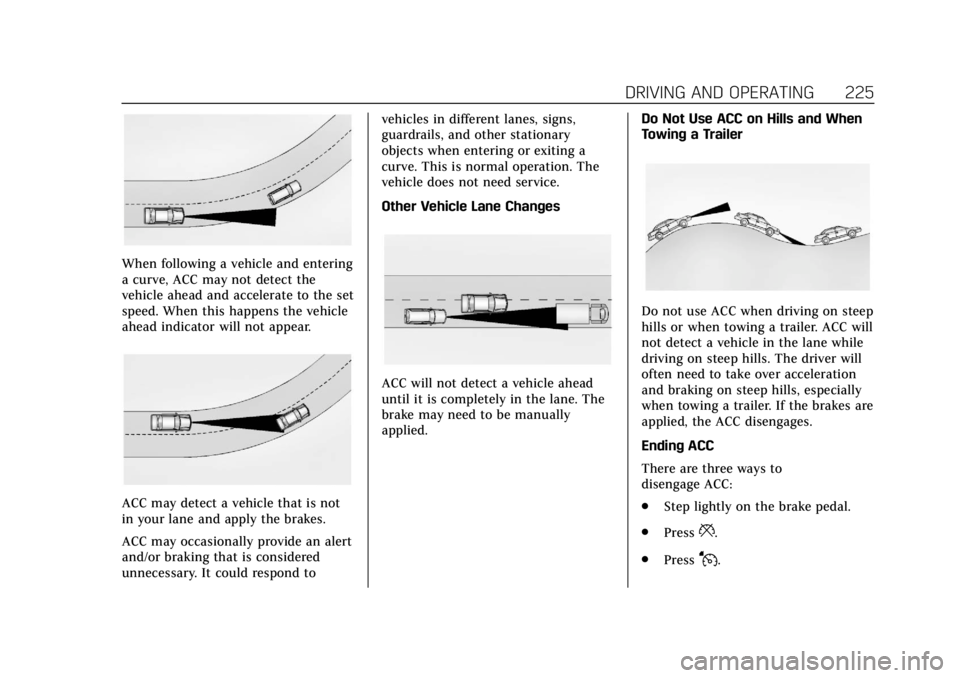
When following a vehicle and entering
a curve, ACC may not detect the
vehicle ahead and accelerate to the set
speed. When this happens the vehicle
ahead indicator will not appear.
ACC may detect a vehicle that is not
in your lane and apply the brakes.
ACC may occasionally provide an alert
and/or braking that is considered
unnecessary. It could respond tovehicles in different lanes, signs,
guardrails, and other stationary
objects when entering or exiting a
curve. This is normal operation. The
vehicle does not need service.
Other Vehicle Lane Changes
ACC will not detect a vehicle ahead
until it is completely in the lane. The
brake may need to be manually
applied.
Do Not Use ACC on Hills and When
Towing a Trailer
Do not use ACC when driving on steep
hills or when towing a trailer. ACC will
not detect a vehicle in the lane while
driving on steep hills. The driver will
often need to take over acceleration
and braking on steep hills, especially
when towing a trailer. If the brakes are
applied, the ACC disengages.
Ending ACC
There are three ways to
disengage ACC:
.
Step lightly on the brake pedal.
. Press
*.
. Press
J.
Page 234 of 401

Cadillac CTS/CTS-V Owner Manual (GMNA-Localizing-U.S./Canada/Mexico-
12460273) - 2019 - CRC - 5/16/18
DRIVING AND OPERATING 233
Warning (Continued)
adjacent vehicle, or a person or
object entering the parking space.
APA does not detect or avoid traffic
that is behind or alongside of the
vehicle. Always be prepared to stop
the vehicle during the parking
maneuver.
Press
Oon the center stack to
enable the system to search for a
parking space that is large enough and
within 1.5 m (5 ft) of the vehicle. The
vehicle speed must be below
30 km/h (18 mph). The system cannot:
. Detect whether it is a legal parking
space.
. Park exactly lined up with the
vehicle next to it if the spot is
approached at an angle or if the
parking space is angled.
. Park exactly centered in a spot
that is marked too large.
. Always detect short curbs. When enabled, APA searches for
parallel parking spaces to the right of
the vehicle. To search for a parking
space to the left, turn on the left turn
signal or, if available, change the side
selection in the infotainment display.
To switch the parking mode between
parallel and perpendicular, press and
hold
Oduring the search process or,
if available, change the parking mode
in the infotainment display.
After completely passing a large
enough space, an audible beep occurs
and a red stop symbol is displayed.
If the vehicle is in R (Reverse), but
does not steer into the expected
space, this may be because the system is maneuvering the vehicle into a
previously detected space. The APA
system does not need service.
APA will instruct the vehicle to stop
once a large enough space is found.
Follow the displayed instructions.
When instructed to drive in reverse,
shift to R (Reverse) to engage
automatic steering. The steering wheel
will briefly vibrate as a reminder to
remove hands from the steering
wheel. Check surroundings and
continue braking or accelerating as
needed, and be prepared to stop to
avoid vehicles, pedestrians, or objects.
If the vehicle exceeds 10 km/h
(6 mph), APA is automatically
disengaged and automatic steering
will turn off. A progress arrow displays
Page 237 of 401

Cadillac CTS/CTS-V Owner Manual (GMNA-Localizing-U.S./Canada/Mexico-
12460273) - 2019 - CRC - 5/16/18
236 DRIVING AND OPERATING
Tailgating Alert
The vehicle ahead indicator will
display amber when you are following
a detected vehicle ahead much too
closely.
Selecting the Alert Timing
The Collision Alert control is on the
steering wheel. Press
[to set the
FCA timing to Far, Medium, Near,
or on some vehicles, Off. The first
button press shows the current setting
on the DIC. Additional button presses
will change this setting. The chosen
setting will remain until it is changed
and will affect the timing of both the
Collision Alert and the Tailgating
Alert features. The timing of both
alerts will vary based on vehicle speed.
The faster the vehicle speed, the
farther away the alert will occur.
Consider traffic and weather
conditions when selecting the alert
timing. The range of selectable alert
timing may not be appropriate for all
drivers and driving conditions.
If your vehicle is equipped with
Adaptive Cruise Control (ACC),
changing the FCA timing setting
automatically changes the ACC
following gap setting (Far, Medium,
or Near).
Following Distance Indicator
The following distance to a moving
vehicle ahead in your path is indicated
in following time in seconds on the
Driver Information Center (DIC). See
Driver Information Center (DIC) 0138.
The minimum following time is
0.5 seconds away. If there is no vehicle
detected ahead, or the vehicle ahead is
out of sensor range, dashes will be
displayed.
Unnecessary Alerts
FCA may provide unnecessary alerts
for turning vehicles, vehicles in other
lanes, objects that are not vehicles,
or shadows. These alerts are normal
operation and the vehicle does not
need service.
Cleaning the System
If the FCA system does not seem to
operate properly, this may correct the
issue:
. Clean the outside of the
windshield in front of the rearview
mirror.
Page 241 of 401

Cadillac CTS/CTS-V Owner Manual (GMNA-Localizing-U.S./Canada/Mexico-
12460273) - 2019 - CRC - 5/16/18
240 DRIVING AND OPERATING
when a trailer is towed. Use caution
while changing lanes when towing a
trailer. LCA may alert to objects
attached to the vehicle, such as a
trailer, bicycle, or object extending out
to either side of the vehicle. Attached
objects may also interfere with the
detection of vehicles. This is normal
system operation; the vehicle does not
need service.
LCA may not always alert the driver to
vehicles in the next lane over,
especially in wet conditions or when
driving on sharp curves. The system
does not need to be serviced. The
system may light up due to guardrails,
signs, trees, shrubs, and other
non-moving objects. This is normal
system operation; the vehicle does not
need service.
LCA may not operate when the LCA
sensors in the left or right corners of
the rear bumper are covered with
mud, dirt, snow, ice, or slush, or in
heavy rainstorms. For cleaning
instructions, see "Washing the
Vehicle" underExterior Care0335.
If the DIC still displays the system
unavailable message after cleaning both sides of the vehicle toward the
rear corners of the vehicle, see your
dealer.
If the LCA displays do not light up
when moving vehicles are in the side
blind zone or rapidly approaching this
zone and the system is clean, the
system may need service. Take the
vehicle to your dealer.
Radio Frequency Information
See
Radio Frequency Statement 0373.
Lane Departure
Warning (LDW)
If equipped, LDW may help avoid
crashes due to unintentional lane
departures. It may provide a warning
if the vehicle is crossing a detected
lane marking without using a turn
signal in the lane departure direction.
Since this system is part of the Lane
Keep Assist (LKA) system, read the
entire LKA section before using this
feature.
Lane Keep Assist (LKA)
If equipped, LKA may help avoid
crashes due to unintentional lane
departures. It may assist by gently
turning the steering wheel if the
vehicle approaches a detected lane
marking without using a turn signal in
that direction. It may also provide a
Lane Departure Warning (LDW)
system alert as the lane marking is
crossed. The LKA system will not
assist or provide an LDW alert if it
detects that you are actively steering.
Override LKA by turning the steering
wheel. LKA uses a camera to detect
lane markings between 60 km/h (37
mph) and 180 km/h (112 mph).
{Warning
The LKA system does not
continuously steer the vehicle.
It may not keep the vehicle in the
lane or give a Lane Departure
Warning (LDW) alert, even if a lane
marking is detected.
(Continued)
Page 243 of 401

Cadillac CTS/CTS-V Owner Manual (GMNA-Localizing-U.S./Canada/Mexico-
12460273) - 2019 - CRC - 5/16/18
242 DRIVING AND OPERATING
.Sudden lighting changes, such as
when driving through tunnels.
. Banked roads.
. Roads with poor lane markings,
such as two-lane roads.
If the LKA system is not functioning
properly when lane markings are
clearly visible, cleaning the windshield
may help.
A camera blocked message may
display if the camera is blocked.
Cleaning the outside of the windshield
behind the rearview mirror may
correct the issue. Some driver
assistance systems may have reduced
performance or not work at all. An
LKA or LDW unavailable message may
display if the systems are temporarily
unavailable. This message could be
due to a blocked camera. The LKA
system does not need service. Clean
the outside of the windshield behind
the rearview mirror.
LKA assistance and/or LDW alerts
may occur due to tar marks, shadows,
cracks in the road, temporary or
construction lane markings, or other
road imperfections. This is normal system operation; the vehicle does not
need service. Turn LKA off if these
conditions continue.
Vehicle-to-Vehicle
If equipped and traveling in the U.S.
or Canada, Vehicle-to-Vehicle (V2V)
can communicate with other
V2V-equipped vehicles to send and
receive vehicle location, speed,
direction, and notices regarding
certain traffic situations from up to
approximately 300 m (980 ft) away.
Under certain conditions, V2V may
provide notice of certain traffic
situations, such as when other
V2V-equipped vehicles ahead may be
braking hard, disabled, on slippery
roads, or in a crash.
V2V does not automatically brake or
steer the vehicle.
{Warning
V2V features work only when other
nearby vehicles equipped with V2V
are detected and communications
(Continued)
Warning (Continued)
are received. V2V may not detect
other V2V-equipped vehicles or
receive communications under
certain conditions, including
around tall buildings; in parking
garages; around airports; in tunnels
and underpasses; in an area with
very dense trees; or where the roof
antenna is blocked by objects such
as roof carriers, snow or ice.
Communication failures or delays
can occur and may not provide
notice sufficiently in advance to
help avoid a crash, or may not
provide any notices at all. Pay
attention to the road and operation
of the vehicle at all times and be
ready to take action and apply the
brakes. SeeDefensive Driving 0179.
Page 244 of 401

Cadillac CTS/CTS-V Owner Manual (GMNA-Localizing-U.S./Canada/Mexico-
12460273) - 2019 - CRC - 5/16/18
DRIVING AND OPERATING 243
{Warning
V2V does not detect or warn of
pedestrians, animals, signs,
guardrails, bridges, construction
barrels, or other objects.
Under certain conditions, V2V can
notify of situations that are beyond
line-of-sight. It is important to
understand the feature operation to be
prepared when events that may not be
seen immediately are detected.
Even if the V2V features are turned off
through vehicle personalization,
information from the vehicle is sent to
other vehicles equipped with V2V.
Other vehicles equipped with V2V may
be alerted to certain events involving
your vehicle, such as hard braking;
activation of hazard warning flashers;
an airbag deployment; or a
StabiliTrak/Electronic Stability Control
(ESC), Traction Control, or Antilock
Brake System (ABS) event. V2V
communications are not stored by the vehicle and cannot be used to identify
owners or occupants or to later track
the vehicle’s location.
Unnecessary Alerts
V2V features may provide alerts to
driving situations that are too early or
unnecessary. These alerts are normal
operation and the vehicle does not
need service.
SERVICE VEHICLE SOON
If this message displays, V2V features
may need service. Do not use them.
Take the vehicle to your dealer.
V2V Hard Braking Ahead
When the vehicle is traveling above
40 km/h (25 mph), V2V may detect
when a V2V-equipped vehicle ahead is
braking hard. Under these conditions,
V2V may display a Driver Information
Center (DIC) message and icon.
If equipped, a red flashing alert on the
windshield may also occur.
With Head-Up Display
Without Head-Up Display
When a detected vehicle is braking
extremely hard, rapid beeps or seat
pulses may also occur.
To enable or disable this feature, see
“Connected Vehicle Braking Alert ”
under Vehicle Personalization 0145.
V2V Disabled Vehicle Ahead
When the vehicle is traveling above
20 km/h (13 mph), V2V may detect
when a V2V-equipped vehicle ahead
has a deployed airbag. When the
vehicle is traveling above 60 km/h
(38 mph), V2V may detect when a
Page 246 of 401
Cadillac CTS/CTS-V Owner Manual (GMNA-Localizing-U.S./Canada/Mexico-
12460273) - 2019 - CRC - 5/16/18
DRIVING AND OPERATING 245
Recommended Fuel (LGX
3.6L V6 Engine)
Do not use any fuel labeled E85 or
FlexFuel. Do not use gasoline with
ethanol levels greater than 15% by
volume.
Use regular unleaded gasoline meeting
ASTM specification D4814 with a
posted octane rating of 87 or higher.
Do not use gasoline with a posted
octane rating of less than 87, as this
may cause engine knock and will
lower fuel economy.
Recommended Fuel (LTG
2.0L L4 Engine)
Do not use any fuel labeled E85 or
FlexFuel. Do not use gasoline with
ethanol levels greater than 15% by
volume.
Premium unleaded gasoline meeting
ASTM specification D4814 with a
posted octane rating of 93 is highly
recommended for best performance
and fuel economy. Unleaded gasoline
with an octane rated as low as 87 can
be used. Using unleaded gasolinerated below 93 octane, however, will
lead to reduced acceleration and fuel
economy. If knocking occurs, use a
gasoline rated at 93 octane as soon as
possible, otherwise, the engine could
be damaged. If heavy knocking is
heard when using gasoline with a
93 octane rating, the engine needs
service.
Recommended Fuel
(LF3 3.6L V6 Twin Turbo
and LT4 6.2L V8 Engines)
Do not use any fuel labeled E85 or
FlexFuel. Do not use gasoline with
ethanol levels greater than 15% by
volume.
Use premium unleaded gasoline
meeting ASTM specification D4814
with a posted octane rating of 93.
If unavailable, unleaded gasoline with
a posted octane rating of 91 may be
used, but with reduced performance
and fuel economy. If the octane is less
than 91, the engine could be damaged
and the repairs would not be covered
by the vehicle warranty. If heavy
knocking is heard when using gasoline
rated at 93 octane, the engine needs
service.
Prohibited Fuels
Caution
Do not use fuels with any of the
following conditions; doing so may
damage the vehicle and void its
warranty:
. For vehicles that are not
FlexFuel, fuel labeled greater
than 15% ethanol by volume,
such as mid-level ethanol
blends (16–50% ethanol), E85,
or FlexFuel.
. Fuel with any amount of
methanol, methylal, ferrocene,
and aniline. These fuels can
corrode metal fuel system
parts or damage plastic and
rubber parts.
. Fuel containing metals such
as methylcyclopentadienyl
manganese tricarbonyl
(Continued)
Page 253 of 401
Cadillac CTS/CTS-V Owner Manual (GMNA-Localizing-U.S./Canada/Mexico-
12460273) - 2019 - CRC - 5/16/18
252 DRIVING AND OPERATING
3. When the wheel chocks are inplace, gradually release the brake
pedal to allow the chocks to
absorb the load of the trailer.
4. Reapply the brake pedal. Then apply the parking brake and shift
into P (Park).
5. Release the brake pedal.
Leaving After Parking on a Hill
1. Apply and hold the brake pedal. .Start the engine.
. Shift into a gear.
. Release the parking brake.
2. Let up on the brake pedal.
3. Drive slowly until the trailer is clear of the chocks.
4. Stop and have someone pick up and store the chocks.
Maintenance When Trailer
Towing
The vehicle needs service more often
when used to tow trailers. See
Maintenance Schedule 0345. It is
especially important to check the automatic transmission fluid, engine
oil, axle lubricant, belts, cooling
system, and brake system before and
during each trip.
Check periodically that all nuts and
bolts on the trailer hitch are tight.
Engine Cooling When Trailer
Towing
The cooling system may temporarily
overheat during severe operating
conditions. See
Engine Overheating
0 279.
Trailer Towing (V6 Engine,
Non Twin Turbo)
Caution
Towing a trailer improperly can
damage the vehicle and result in
costly repairs not covered by the
vehicle warranty. To tow a trailer
correctly, follow the directions in
this section and see your dealer for
important information about
towing a trailer with the vehicle. Trailering is different than just driving
the vehicle by itself. Trailering means
changes in handling, acceleration,
braking, durability, and fuel economy.
Successful, safe trailering takes correct
equipment, and it has to be used
properly.
The following information has many
time-tested, important trailering tips
and safety rules. Many of these are
important for your safety and that of
your passengers. Read this section
carefully before pulling a trailer.
Trailer Weight
{Warning
Never exceed the towing capacity
for your vehicle.
Safe trailering requires monitoring the
weight, speed, altitude, road grades,
outside temperature, dimensions of
the front of the trailer, and how
frequently the vehicle is used to tow a
trailer.
Page 256 of 401

Cadillac CTS/CTS-V Owner Manual (GMNA-Localizing-U.S./Canada/Mexico-
12460273) - 2019 - CRC - 5/16/18
DRIVING AND OPERATING 255
Safety Chains
Always attach chains between the
vehicle and the trailer, and attach the
chains to the holes on the trailer hitch
platform. Instructions about safety
chains may be provided by the hitch
manufacturer or by the trailer
manufacturer.
Cross the safety chains under the
tongue of the trailer to help prevent
the tongue from contacting the road if
it becomes separated from the hitch.
Always leave just enough slack so the
combination can turn. Never allow
safety chains to drag on the ground.
Trailer Brakes
State or local regulations may require
trailers to have their own braking
system if the loaded weight of the
trailer exceeds certain minimums that
can vary from state to state. Read and
follow the instructions for the trailer
brakes so they are installed, adjusted,
and maintained properly. Never
attempt to tap into your vehicle's
hydraulic brake system. If you do,both the vehicle anti-lock brakes and
the trailer brakes may not function,
which could result in a crash.
Trailer Lamps
Always check all trailer lamps are
working at the beginning of each trip,
and periodically on longer trips.
Turn Signals When Towing a
Trailer
When properly connected, the trailer
turn signals will illuminate to indicate
the vehicle is turning, changing lanes,
or stopping. When towing a trailer,
the arrows on the instrument cluster
will illuminate even if the trailer is not
properly connected or the bulbs are
burned out.
Towing Equipment
(V6 Twin Turbo)
{Warning
Never tow a trailer with your
vehicle. It was not designed or
intended to tow a trailer.
Conversions and
Add-Ons
Add-On Electrical
Equipment
{Warning
The Data Link Connector (DLC) is
used for vehicle service and
Emission Inspection/Maintenance
testing. See
Malfunction Indicator
Lamp (Check Engine Light) 0129.
A device connected to the DLC —
such as an aftermarket fleet or
driver-behavior tracking device —
may interfere with vehicle systems.
This could affect vehicle operation
and cause a crash. Such devices
may also access information stored
in the vehicle’s systems.