brake CADILLAC CTS 2019 Owner's Manual
[x] Cancel search | Manufacturer: CADILLAC, Model Year: 2019, Model line: CTS, Model: CADILLAC CTS 2019Pages: 401, PDF Size: 6.85 MB
Page 4 of 401
Cadillac CTS/CTS-V Owner Manual (GMNA-Localizing-U.S./Canada/Mexico-
12460273) - 2019 - CRC - 5/8/18
INTRODUCTION 3
Danger, Warning, and
Caution
Warning messages found on vehicle
labels and in this manual describe
hazards and what to do to avoid or
reduce them.
{Danger
Danger indicates a hazard with a
high level of risk which will result
in serious injury or death.
{Warning
Warning indicates a hazard that
could result in injury or death.
Caution
Caution indicates a hazard that
could result in property or vehicle
damage.
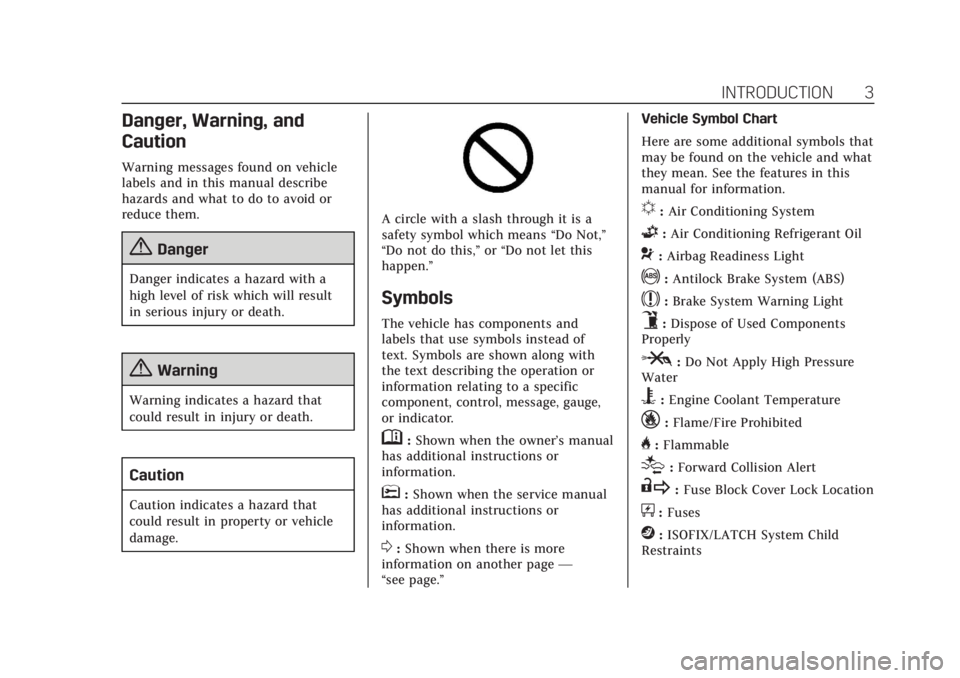
A circle with a slash through it is a
safety symbol which means“Do Not,”
“Do not do this,” or“Do not let this
happen.”
Symbols
The vehicle has components and
labels that use symbols instead of
text. Symbols are shown along with
the text describing the operation or
information relating to a specific
component, control, message, gauge,
or indicator.
M: Shown when the owner’s manual
has additional instructions or
information.
*: Shown when the service manual
has additional instructions or
information.
0: Shown when there is more
information on another page —
“see page.” Vehicle Symbol Chart
Here are some additional symbols that
may be found on the vehicle and what
they mean. See the features in this
manual for information.
u:
Air Conditioning System
G:Air Conditioning Refrigerant Oil
9:Airbag Readiness Light
!:Antilock Brake System (ABS)
$:Brake System Warning Light
9:Dispose of Used Components
Properly
P: Do Not Apply High Pressure
Water
B: Engine Coolant Temperature
_:Flame/Fire Prohibited
H: Flammable
[:Forward Collision Alert
R: Fuse Block Cover Lock Location
+:Fuses
j:ISOFIX/LATCH System Child
Restraints
Page 8 of 401

Cadillac CTS/CTS-V Owner Manual (GMNA-Localizing-U.S./Canada/Mexico-
12460273) - 2019 - CRC - 5/8/18
IN BRIEF 7
1.Air Vents 0175.
2. Turn Signal Lever. See Turn and
Lane-Change Signals 0158.
3. Manual Mode 0203 (If
Equipped).
4. Instrument Cluster 0119.
5. Windshield Wiper/Washer 0111.
6. Hazard Warning Flashers 0158.
Lane Keep Assist (LKA) 0240 (If
Equipped).
Stop/Start Disable Switch (If
Equipped). See Starting the
Engine 0195.
7. Light Sensor (If Equipped). See Automatic Headlamp System
0157.
Solar Sensor. See Dual Automatic
Climate Control System 0168.
8. Infotainment 0162.
9. Glove Box Button. See Glove Box
0 106.
Automatic Park Assist Button (If
Equipped). See Assistance
Systems for Parking or Backing
0 227. Parking Assist Button. See
Assistance Systems for Parking or
Backing
0227.
10. Heated and Ventilated Front Seats
063 (If Equipped).
11. Dual Automatic Climate Control
System 0168.
12. Instrument Panel Storage 0106.
Wireless Charging Pad (If
Equipped) (Out of View). See
Wireless Charging 0115.
13. Traction Control/Electronic
Stability Control 0207.
14. MODE Switch. See Driver Mode
Control 0209.
15. Shift Lever. See Automatic
Transmission 0201.
Manual Mode Button. See
Automatic Transmission 0201.
16. ENGINE START/STOP Button. SeeIgnition Positions 0193.
17. Steering Wheel Controls 0110.
Driver Information Center (DIC)
Controls. See Driver Information
Center (DIC) 0138. 18.
Horn 0111.
19. Steering Wheel Adjustment 0110.
20. Cruise Control 0215 (If
Equipped).
Adaptive Cruise Control 0218 (If
Equipped).
Forward Collision Alert (FCA)
System 0234 (If Equipped).
Heated Steering Wheel 0110 (If
Equipped).
21. Instrument Panel Illumination
Control 0159.
22. Head-Up Display (HUD) 0141 (If
Equipped).
23. Data Link Connector (DLC) (Out of View). See Malfunction
Indicator Lamp (Check Engine
Light) 0129.
24. Hood Release. See Hood0260.
25. Electric Parking Brake (EPB) Switch. See Electric Parking Brake
0 205.
Page 9 of 401
Cadillac CTS/CTS-V Owner Manual (GMNA-Localizing-U.S./Canada/Mexico-
12460273) - 2019 - CRC - 5/8/18
8 IN BRIEF
Initial Drive Information
This section provides a brief overview
about some of the important features
that may or may not be on your
specific vehicle.
For more detailed information, refer to
each of the features which can be
found later in this owner’s manual.
Stop/Start System
If equipped, the Stop/Start system will
shut off the engine to help conserve
fuel. It has components designed for
the increased number of starts.
When the brakes are applied and the
vehicle is at a complete stop, the
engine may turn off. When stopped,
the tachometer displays AUTO STOP.
SeeTachometer 0123. When the brake
pedal is released or the accelerator
pedal is pressed, the engine will
restart. See Stop/Start System 0196 in
Driving and Operating.
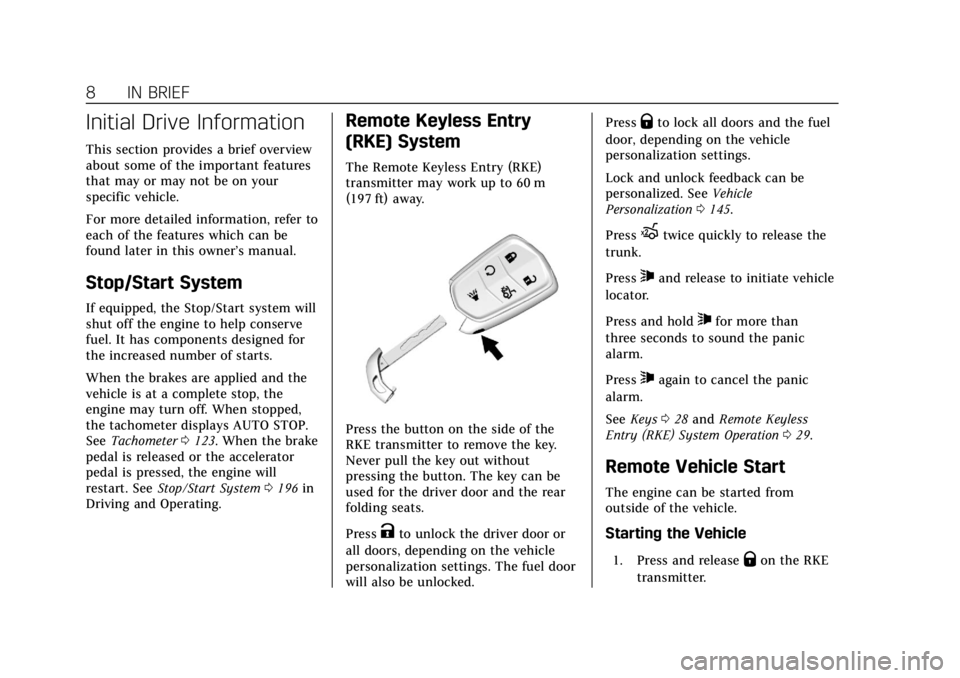
Remote Keyless Entry
(RKE) System
The Remote Keyless Entry (RKE)
transmitter may work up to 60 m
(197 ft) away.
Press the button on the side of the
RKE transmitter to remove the key.
Never pull the key out without
pressing the button. The key can be
used for the driver door and the rear
folding seats.
Press
Kto unlock the driver door or
all doors, depending on the vehicle
personalization settings. The fuel door
will also be unlocked. Press
Qto lock all doors and the fuel
door, depending on the vehicle
personalization settings.
Lock and unlock feedback can be
personalized. See Vehicle
Personalization 0145.
Press
Xtwice quickly to release the
trunk.
Press
7and release to initiate vehicle
locator.
Press and hold
7for more than
three seconds to sound the panic
alarm.
Press
7again to cancel the panic
alarm.
See Keys 028 and Remote Keyless
Entry (RKE) System Operation 029.
Remote Vehicle Start
The engine can be started from
outside of the vehicle.
Starting the Vehicle
1. Press and releaseQon the RKE
transmitter.
Page 21 of 401

Cadillac CTS/CTS-V Owner Manual (GMNA-Localizing-U.S./Canada/Mexico-
12460273) - 2019 - CRC - 5/8/18
20 IN BRIEF
next 5 km/h (5 mph) mark on the
speedometer, press +RES up to the
second detent.
SET−:Press the control down briefly
to set the speed and activate cruise
control. If cruise control is already
active, use to decrease vehicle speed.
To decrease speed by 1 km/h (1 mph),
press SET− down to the first detent.
To decrease speed to the next 5 km/h
(5 mph) mark on the speedometer,
press SET− down to the second detent.
*:Press to disengage cruise control
without erasing the set speed from
memory.
See Cruise Control 0215 orAdaptive
Cruise Control 0218 (if equipped).
Driver Information
Center (DIC)
The DIC display is in the instrument
cluster. It shows the status of many
vehicle systems.
yorz:Press to move up or down
in a list.
SorT: Press to move between the
interactive display zones in the
cluster. Press
Sto go back to the
previous menu.
SEL : Press to open a menu or select a
menu item. Press and hold to reset
values on certain screens.
See Driver Information Center (DIC)
0 138.
Forward Collision Alert
(FCA) System
If equipped, FCA may help avoid or
reduce the harm caused by front-end
crashes. FCA provides a green
indicator,
V, when a vehicle is
detected ahead. This indicator
displays amber when following a
vehicle much too closely. When
approaching a vehicle ahead too
quickly, FCA provides a flashing red
alert on the windshield and rapidly
beeps or pulses the driver seat.
See Forward Collision Alert (FCA)
System 0234.
Forward Automatic
Braking (FAB)
If the vehicle has Adaptive Cruise
Control (ACC), it also has FAB, which
includes Intelligent Brake Assist (IBA).
When the system detects a vehicle
ahead in your path that is traveling in
the same direction that you may be
about to crash into, it can provide a
boost to braking or automatically
Page 22 of 401
Cadillac CTS/CTS-V Owner Manual (GMNA-Localizing-U.S./Canada/Mexico-
12460273) - 2019 - CRC - 5/8/18
IN BRIEF 21
brake the vehicle. This can help avoid
or lessen the severity of crashes when
driving in a forward gear.
SeeForward Automatic Braking (FAB)
0 237.
Lane Keep Assist (LKA)
If equipped, LKA may help avoid
crashes due to unintentional lane
departures. It may assist by gently
turning the steering wheel if the
vehicle approaches a detected lane
marking without using a turn signal in
that direction. It may also provide a
Lane Departure Warning (LDW) alert
as the lane marking is crossed. The
system will not assist or alert if it
detects that you are actively steering.
Override LKA by turning the steering
wheel. LKA uses a camera to detect
lane markings between 60 km/h (37
mph) and 180 km/h (112 mph).
See Lane Departure Warning (LDW)
0 240 and Lane Keep Assist (LKA)
0 240.
Lane Change Alert (LCA)
If equipped, the LCA system is a
lane-changing aid that assists drivers
with avoiding lane change crashes
that occur with moving vehicles in the
side blind zone (or spot) areas or with
vehicles rapidly approaching these
areas from behind. The LCA warning
display will light up in the
corresponding outside mirror and will
flash if the turn signal is on. The Side
Blind Zone Alert (SBZA) system is
included as part of the LCA system.
See Side Blind Zone Alert (SBZA) 0238
and Lane Change Alert (LCA) 0238.
Surround Vision (CTS Only)
If equipped, views around the vehicle
appear on the infotainment display to
aid with parking and low-speed
maneuvers.
See “Surround Vision (CTS Only)”
under Assistance Systems for Parking
or Backing 0227.
Front Vision Camera
If equipped, a view of the area in front
of the vehicle appears on the
infotainment display to aid with
parking and low-speed maneuvers.
See “Front Vision Camera ”under
Assistance Systems for Parking or
Backing 0227.
Curb View Camera
(CTS-V Only)
If equipped, a view of the area in front
of the vehicle displays on the
infotainment display to aid with
parking and low-speed maneuvers.
The display shows a front, top down
view at the top of the screen and left
and right front camera images on the
bottom.
See “Curb View Camera (CTS-V Series
Only)” underAssistance Systems for
Parking or Backing 0227.
Page 23 of 401

Cadillac CTS/CTS-V Owner Manual (GMNA-Localizing-U.S./Canada/Mexico-
12460273) - 2019 - CRC - 5/8/18
22 IN BRIEF
Rear Vision Camera (RVC)
If equipped, RVC shows a view of the
area behind the vehicle on the
infotainment display when the vehicle
is shifted into R (Reverse) to aid with
parking and low-speed backing
maneuvers.
SeeAssistance Systems for Parking or
Backing 0227.
Rear Cross Traffic Alert
(RCTA) System
If equipped, the RCTA system shows a
triangle with an arrow on the
infotainment display to warn of traffic
behind your vehicle that may cross
your vehicle's path while in
R (Reverse). In addition, beeps will
sound, or the driver seat will pulse.
See Assistance Systems for Parking or
Backing 0227.
Park Assist
If equipped, Rear Park Assist (RPA)
uses sensors on the rear bumper to
assist with parking and avoiding
objects while in R (Reverse). It operates at speeds less than 8 km/h
(5 mph). RPA may show a warning
triangle on the infotainment display
and a graphic on the instrument
cluster to provide the object distance.
In addition, multiple beeps or seat
pulses may occur if very close to an
object.
The vehicle may also have the Front
Park Assist system.
See
Assistance Systems for Parking or
Backing 0227.
Automatic Parking
Assist (APA)
If equipped, the APA system helps to
search for and maneuver the vehicle
into parallel or perpendicular parking
spots using automatic steering, DIC
displays, and beeps. When the vehicle
speed is below 30 km/h (18 mph),
press
Oto enable the system.
See “Automatic Parking Assist (APA)”
under Assistance Systems for Parking
or Backing 0227.
Reverse Automatic
Braking (RAB)
If the vehicle has Adaptive Cruise
Control (ACC) it also has the RAB
system, which is designed to help
avoid or reduce the harm caused by
backing crashes when the vehicle is
shifted into R (Reverse). If the system
detects the vehicle is backing too fast
to avoid a crash with a detected object
behind your vehicle in your path, it
may automatically brake hard to
a stop.
See Assistance Systems for Parking or
Backing 0227.
Vehicle-to-Vehicle
If equipped, this technology
communicates with other
Vehicle-to-Vehicle (V2V)-equipped
vehicles. It can help drivers avoid
crashes and traffic congestion. V2V
technology alerts when other
V2V-equipped vehicles ahead are
braking hard, are disabled, or may be
on slippery roads. See
Vehicle-to-Vehicle 0242.
Page 28 of 401
Cadillac CTS/CTS-V Owner Manual (GMNA-Localizing-U.S./Canada/Mexico-
12460273) - 2019 - CRC - 5/8/18
IN BRIEF 27
Car Wash Guidelines
Caution
Some automatic car washes can
cause damage to the vehicle, wheels
and ground effects. Automatic car
washes are not recommended, due
to lack of clearance for the
undercarriage and/or wide rear tires
and wheels. See "Washing the
Vehicle" underExterior Care0335.
Driving for Better Fuel
Economy
Driving habits can affect fuel mileage.
Here are some driving tips to get the
best fuel economy possible:
.
Set the climate controls to the
desired temperature after the
engine is started, or turn them off
when not required.
. Avoid fast starts and accelerate
smoothly.
. Brake gradually and avoid abrupt
stops. .
Avoid idling the engine for long
periods of time.
. When road and weather
conditions are appropriate, use
cruise control.
. Always follow posted speed limits
or drive more slowly when
conditions require.
. Keep vehicle tires properly
inflated.
. Combine several trips into a
single trip.
. Replace the vehicle's tires with the
same TPC Spec number molded
into the tire's sidewall near
the size.
. Follow recommended scheduled
maintenance.
Roadside Service
U.S.: 1-800-224-1400
Canada: 1-800-882-1112
TTY Users (U.S. Only): 1-888-889-2438
New Cadillac owners are automatically
enrolled in the Roadside Service
Program.
See Roadside Service 0367.
Page 35 of 401
Cadillac CTS/CTS-V Owner Manual (GMNA-Localizing-U.S./Canada/Mexico-
12460273) - 2019 - CRC - 5/8/18
34 KEYS, DOORS, AND WINDOWS
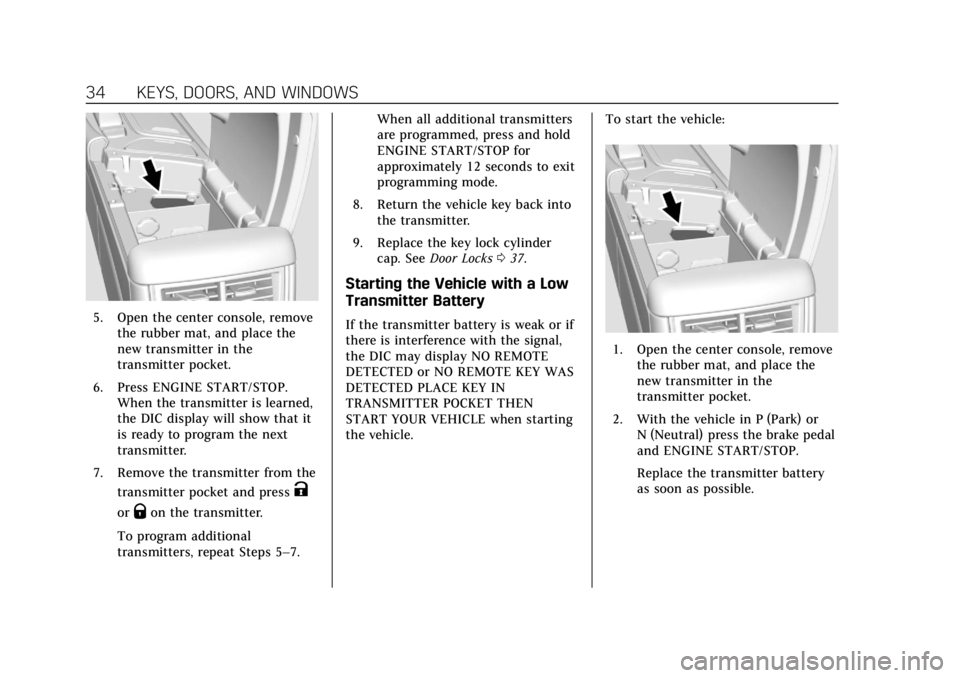
5. Open the center console, removethe rubber mat, and place the
new transmitter in the
transmitter pocket.
6. Press ENGINE START/STOP. When the transmitter is learned,
the DIC display will show that it
is ready to program the next
transmitter.
7. Remove the transmitter from the transmitter pocket and press
K
orQon the transmitter.
To program additional
transmitters, repeat Steps 5–7. When all additional transmitters
are programmed, press and hold
ENGINE START/STOP for
approximately 12 seconds to exit
programming mode.
8. Return the vehicle key back into the transmitter.
9. Replace the key lock cylinder cap. See Door Locks 037.
Starting the Vehicle with a Low
Transmitter Battery
If the transmitter battery is weak or if
there is interference with the signal,
the DIC may display NO REMOTE
DETECTED or NO REMOTE KEY WAS
DETECTED PLACE KEY IN
TRANSMITTER POCKET THEN
START YOUR VEHICLE when starting
the vehicle. To start the vehicle:
1. Open the center console, remove
the rubber mat, and place the
new transmitter in the
transmitter pocket.
2. With the vehicle in P (Park) or N (Neutral) press the brake pedal
and ENGINE START/STOP.
Replace the transmitter battery
as soon as possible.
Page 37 of 401
Cadillac CTS/CTS-V Owner Manual (GMNA-Localizing-U.S./Canada/Mexico-
12460273) - 2019 - CRC - 5/8/18
36 KEYS, DOORS, AND WINDOWS
The climate control system will use
the previous settings during a remote
start. The rear window defogger may
come on during remote start based on
cold ambient conditions. The rear
defog indicator light does not come on
during remote start.
If equipped, the heated and ventilated
front seats may also come on when
the vehicle personalization setting is
enabled. SeeHeated and Ventilated
Front Seats 063.
If equipped with a remote start heated
steering wheel, it may come on during
a remote start. See Heated Steering
Wheel 0110.
Laws in some local communities may
restrict the use of remote starters. For
example, some laws may require a
person using remote start to have the
vehicle in view. Check local
regulations for any requirements.
If your vehicle is low on fuel, do not
use the remote start feature. The
vehicle may run out of fuel.
The RKE transmitter range may be
shorter while the vehicle is running. Other conditions can affect the
performance of the transmitter. See
Remote Keyless Entry (RKE) System
0
29.
Starting the Engine Using Remote
Start
1. Press and release
Qon the RKE
transmitter.
2. Immediately press and hold
/
for at least four seconds or until
the turn signal lamps flash. The
flashing confirms the request to
remote start the vehicle has been
received.
During the remote start, the
parking lamps will remain on as
long as the engine is running.
The engine will shut off after
15 minutes unless a time
extension is done or the ignition
is turned on.
3. Press the brake pedal and turn the ignition on to drive the
vehicle. Extending Engine Run Time
The engine run time can also be
extended by another 15 minutes,
if during the first 15 minutes
Steps 1 and 2 are repeated while the
engine is still running. An extension
can be requested, 30 seconds after
starting. This provides a total of
30 minutes.
The remote start can only be
extended once.
When the remote start is extended,
the second 15-minute period is added
on to the first 15 minutes for a total
of 30 minutes.
A maximum of two remote starts, or a
remote start with an extension, are
allowed between ignition cycles.
Then the ignition must be turned on
and then off before the remote start
procedure can be used again.
Canceling a Remote Start
To cancel a remote start, do any of
the following:
.
Press and hold
/until the
parking lamps turn off.
Page 41 of 401
Cadillac CTS/CTS-V Owner Manual (GMNA-Localizing-U.S./Canada/Mexico-
12460273) - 2019 - CRC - 5/8/18
40 KEYS, DOORS, AND WINDOWS
WhenQis pressed on the power door
lock switch with the door open, a
chime will sound three times
indicating that delayed locking is
active.
The doors will then lock automatically
five seconds after all doors are closed.
If a door is reopened before
five seconds have elapsed, the
five-second timer will reset once all
the doors are closed again.
Press
Qon the door lock switch again,
or press
Qon the RKE transmitter, to
override this feature and lock the
doors immediately.
Delayed locking can be programmed
through the Driver Information Center
(DIC). See Vehicle Personalization
0 145.
Automatic Door Locks
The doors will lock automatically
when all doors are closed, the ignition
is on, and the vehicle is shifted out of
P (Park). If a vehicle door is unlocked, and then
opened and closed, the doors will lock
either when your foot is removed from
the brake or the vehicle speed
becomes faster than 13 km/h (8 mph).
To unlock the doors:
.
Press
Kon the power door lock
switch.
. Shift the transmission into
P (Park).
Automatic door locking or unlocking
can be enabled or disabled in settings.
See Vehicle Personalization 0145.
Lockout Protection
If the vehicle is on or in ACC/
ACCESSORY and the power door lock
switch is pressed with the driver door
open, all the doors will lock and only
the driver door will unlock.
If the vehicle is off and locking is
requested while a door is open, when
all doors are closed the vehicle will
check for RKE transmitters inside.
If an RKE transmitter is detected and
the number of RKE transmitters inside has not reduced, the driver door will
unlock and the horn will chirp three
times.
Lockout Protection can be manually
overridden with the driver door open
by pressing and holding
Qon the
power door lock switch.
Open Door Anti-Lockout
If Open Door Anti-Lockout has been
turned on and the vehicle is off, the
driver door is open, and locking is
requested, all the doors will lock and
the driver door will remain unlocked.
Push the lock button on the door or
the RKE transmitter a second time to
lock the driver door. The Open Door
Anti-Lockout feature can be turned on
or off. See Vehicle Personalization
0 145.