brake CADILLAC CTS 2019 User Guide
[x] Cancel search | Manufacturer: CADILLAC, Model Year: 2019, Model line: CTS, Model: CADILLAC CTS 2019Pages: 401, PDF Size: 6.85 MB
Page 83 of 401
Cadillac CTS/CTS-V Owner Manual (GMNA-Localizing-U.S./Canada/Mexico-
12460273) - 2019 - CRC - 5/8/18
82 SEATS AND RESTRAINTS
airbag inflation, after an event that
exceeds a predetermined threshold.
After turning the ignition off and then
on again, the fuel system will return
to normal operation; the doors can be
locked, the interior lamps can be
turned off, and the hazard warning
flashers can be turned off using the
controls for those features. If any of
these systems are damaged in the
crash they may not operate as normal.
{Warning
A crash severe enough to inflate the
airbags may have also damaged
important functions in the vehicle,
such as the fuel system, brake and
steering systems, etc. Even if the
vehicle appears to be drivable after
a moderate crash, there may be
concealed damage that could make
it difficult to safely operate the
vehicle.
Use caution if you should attempt
to restart the engine after a crash
has occurred.In many crashes severe enough to
inflate the airbag, windshields are
broken by vehicle deformation.
Additional windshield breakage may
also occur from the front outboard
passenger airbag.
.
Airbags are designed to inflate
only once. After an airbag inflates,
you will need some new parts for
the airbag system. If you do not
get them, the airbag system will
not be there to help protect you in
another crash. A new system will
include airbag modules and
possibly other parts. The service
manual for the vehicle covers the
need to replace other parts.
. The vehicle has a crash sensing
and diagnostic module which
records information after a crash.
See Vehicle Data Recording and
Privacy 0374 and Event Data
Recorders 0375.
. Let only qualified technicians
work on the airbag systems.
Improper service can mean that
an airbag system will not work
properly. See your dealer for
service.
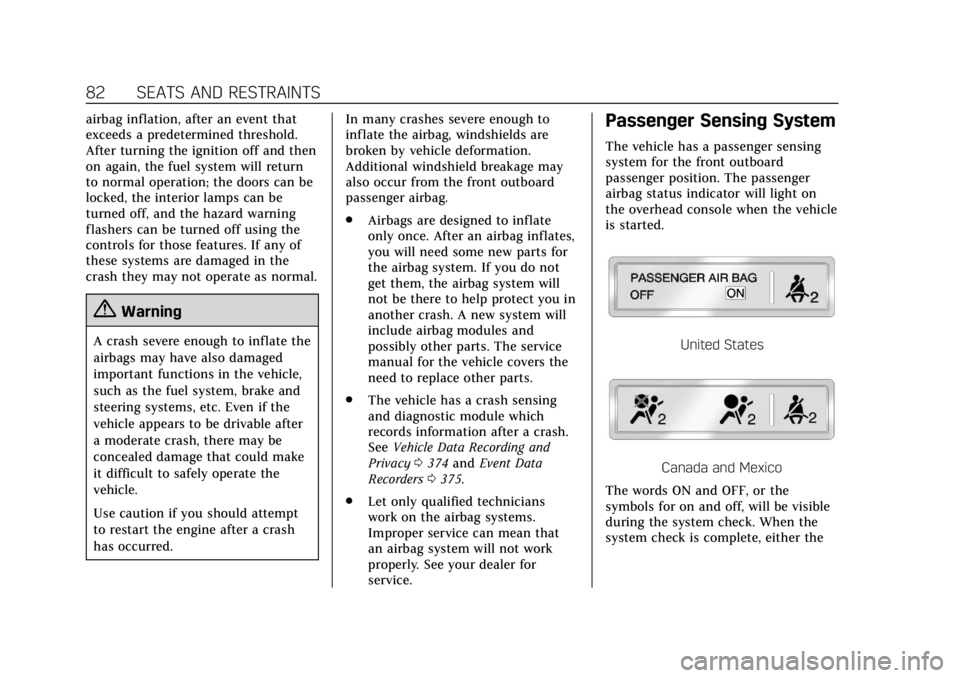
Passenger Sensing System
The vehicle has a passenger sensing
system for the front outboard
passenger position. The passenger
airbag status indicator will light on
the overhead console when the vehicle
is started.
United States
Canada and Mexico
The words ON and OFF, or the
symbols for on and off, will be visible
during the system check. When the
system check is complete, either the
Page 110 of 401
Cadillac CTS/CTS-V Owner Manual (GMNA-Localizing-U.S./Canada/Mexico-
12460273) - 2019 - CRC - 5/8/18
INSTRUMENTS AND CONTROLS 109
Instruments and
Controls
Controls
Steering Wheel Adjustment . . . . . 110
Steering Wheel Controls . . . . . . . . . 110
Heated Steering Wheel . . . . . . . . . . 110
Horn . . . . . . . . . . . . . . . . . . . . . . . . . . . . . . . 111
Windshield Wiper/Washer . . . . . . . 111
Compass . . . . . . . . . . . . . . . . . . . . . . . . . . 113
Clock . . . . . . . . . . . . . . . . . . . . . . . . . . . . . . 113
Power Outlets . . . . . . . . . . . . . . . . . . . . . 113
Wireless Charging . . . . . . . . . . . . . . . . 115
Warning Lights, Gauges, and
Indicators
Warning Lights, Gauges, andIndicators . . . . . . . . . . . . . . . . . . . . . . . 118
Instrument Cluster . . . . . . . . . . . . . . . 119
Speedometer . . . . . . . . . . . . . . . . . . . . . . 123
Odometer . . . . . . . . . . . . . . . . . . . . . . . . . 123
Trip Odometer . . . . . . . . . . . . . . . . . . . . 123
Tachometer . . . . . . . . . . . . . . . . . . . . . . . 123
Fuel Gauge . . . . . . . . . . . . . . . . . . . . . . . . 123
Boost Gauge (Performance Configuration Only) . . . . . . . . . . . . 124 Engine Oil Temperature Gauge
(Performance
Configuration Only) . . . . . . . . . . . . 125
Engine Coolant Temperature Gauge . . . . . . . . . . . . . . . . . . . . . . . . . . . . 125
Seat Belt Reminders . . . . . . . . . . . . . . 126
Airbag Readiness Light . . . . . . . . . . 127
Passenger Airbag Status Indicator . . . . . . . . . . . . . . . . . . . . . . . . . 127
Charging System Light . . . . . . . . . . . 128
Malfunction Indicator Lamp (Check Engine Light) . . . . . . . . . . . 129
Brake System Warning Light . . . . 131
Electric Parking Brake Light . . . . . 131
Service Electric Parking Brake Light . . . . . . . . . . . . . . . . . . . . . . . . . . . . . 131
Antilock Brake System (ABS) Warning Light . . . . . . . . . . . . . . . . . . 132
Lane Keep Assist (LKA) Light . . . 132
Vehicle Ahead Indicator . . . . . . . . . 132
Traction Off Light . . . . . . . . . . . . . . . . 133
StabiliTrak OFF Light . . . . . . . . . . . . 133
Traction Control System (TCS)/ StabiliTrak Light . . . . . . . . . . . . . . . . 133
Engine Coolant Temperature Warning Light . . . . . . . . . . . . . . . . . . 134
Driver Mode Control Light (Uplevel) . . . . . . . . . . . . . . . . . . . . . . . . . 134
Tire Pressure Light . . . . . . . . . . . . . . . 135
Engine Oil Pressure Light . . . . . . . . 135 Low Fuel Warning Light . . . . . . . . . 135
Auto Stop Mode (Uplevel
Cluster Only) . . . . . . . . . . . . . . . . . . . . 136
Security Light . . . . . . . . . . . . . . . . . . . . . 136
High-Beam On Light . . . . . . . . . . . . . 136
Adaptive Forward Lighting (AFL) Light . . . . . . . . . . . . . . . . . . . . . . . . . . . . . 136
Lamps On Reminder . . . . . . . . . . . . . 137
Cruise Control Light . . . . . . . . . . . . . . 137
Door Ajar Light . . . . . . . . . . . . . . . . . . . 137
Information Displays
Driver Information Center (DIC) . . . . . . . . . . . . . . . . . . . . . 138
Head-Up Display (HUD) . . . . . . . . . 141
Vehicle Messages
Vehicle Messages . . . . . . . . . . . . . . . . . 144
Engine Power Messages . . . . . . . . . . 144
Vehicle Speed Messages . . . . . . . . . 145
Vehicle Personalization
Vehicle Personalization . . . . . . . . . . 145
Universal Remote System
Universal Remote System . . . . . . . . 150
Universal Remote System Programming . . . . . . . . . . . . . . . . . . . 150
Universal Remote System Operation . . . . . . . . . . . . . . . . . . . . . . . . 152
Page 132 of 401

Cadillac CTS/CTS-V Owner Manual (GMNA-Localizing-U.S./Canada/Mexico-
12460273) - 2019 - CRC - 5/8/18
INSTRUMENTS AND CONTROLS 131
Brake System Warning
Light
The vehicle brake system consists of
two hydraulic circuits. If one circuit is
not working, the remaining circuit can
still work to stop the vehicle. For
normal braking performance, both
circuits need to be working.
If the warning light comes on, there is
a brake problem. Have the brake
system inspected right away.
MetricEnglish
This light should come on briefly
when the engine is started. If it does
not come on then, have it fixed so it
will be ready to warn you if there is a
problem.
If the light comes on and stays on,
there is a brake problem.
{Warning
The brake system might not be
working properly if the brake
system warning light is on. Driving
with the brake system warning light
on can lead to a crash. If the light is
still on after the vehicle has been
pulled off the road and carefully
stopped, have the vehicle towed for
service.
Electric Parking Brake
Light
MetricEnglish
This light comes on when the parking
brake is applied. If the light continues
flashing after the parking brake is
released, or while driving, there is a
problem with the Electric Parking Brake system. A message may also
display in the Driver Information
Center (DIC).
If the light does not come on,
or remains flashing, see your dealer.
Service Electric Parking
Brake Light
On some vehicles the service electric
parking brake light should come on
briefly when the vehicle is started.
If it does not come on, have it fixed so
it will be ready to warn if there is a
problem. For vehicles with the
reconfigurable cluster, this light may
not come on when the vehicle is
started.
Page 133 of 401

Cadillac CTS/CTS-V Owner Manual (GMNA-Localizing-U.S./Canada/Mexico-
12460273) - 2019 - CRC - 5/8/18
132 INSTRUMENTS AND CONTROLS
If this light stays on, the vehicle
should be taken to a dealer as soon as
possible. SeeElectric Parking Brake
0 205. A message may also display in
the Driver Information Center (DIC).
Antilock Brake System
(ABS) Warning Light
This light comes on briefly when the
engine is started.
If the light does not come on, have it
fixed so it will be ready to warn if
there is a problem.
If the light comes on while driving,
stop as soon as it is safely possible
and turn off the vehicle. Then start
the engine again to reset the system.
If the ABS light stays on, or comes on
again while driving, the vehicle needs
service. A chime may also sound when
the light comes on steady. If the ABS light is the only light on,
the vehicle has regular brakes, but the
antilock brakes are not functioning.
If both the ABS and the brake system
warning light are on, the vehicle's
antilock brakes are not functioning
and there is a problem with the
regular brakes. See your dealer for
service.
See
Brake System Warning Light 0131.
Lane Keep Assist (LKA)
Light
For some vehicles, this light comes on
briefly while starting the vehicle. If it
does not come on, have the vehicle
serviced.
For vehicles with the uplevel cluster,
this light may not come on when
starting the vehicle. This light is green if LKA is available
to assist.
LKA may assist by gently turning the
steering wheel if the vehicle
approaches a detected lane marking
without using the turn signal in that
direction. The LKA light will turn
amber.
This light is amber and flashes as a
Lane Departure Warning (LDW) alert,
to indicate that the lane marking has
been crossed.
See
Lane Keep Assist (LKA) 0240.
Vehicle Ahead Indicator
If equipped, this indicator will display
green when a vehicle is detected
ahead and amber when you are
following a vehicle ahead much too
closely.
Page 145 of 401
Cadillac CTS/CTS-V Owner Manual (GMNA-Localizing-U.S./Canada/Mexico-
12460273) - 2019 - CRC - 5/8/18
144 INSTRUMENTS AND CONTROLS
Care of the HUD
Clean the inside of the windshield to
remove any dirt or film that could
reduce the sharpness or clarity of the
HUD image.
Clean the HUD lens with a soft cloth
sprayed with glass cleaner. Wipe the
lens gently, then dry it.
HUD Troubleshooting
If you cannot see the HUD image
when the ignition is on, check that:
.Nothing is covering the HUD lens.
. The HUD brightness setting is not
too dim or too bright.
. The HUD is adjusted to the proper
height.
. Polarized sunglasses are not worn.
. The windshield and HUD lens are
clean.
If the HUD image is not correct,
contact your dealer.
The windshield is part of the HUD
system. If the windshield needs
replacing, see Windshield Replacement
0 287.
Vehicle Messages
Messages displayed on the DIC
indicate the status of the vehicle or
some action that may be needed to
correct a condition. Multiple messages
may appear one after another.
The messages that do not require
immediate action can be
acknowledged and cleared by pressing
V. The messages that require
immediate action cannot be cleared
until that action is performed.
All messages should be taken
seriously; clearing the message does
not correct the problem.
If a SERVICE message appears, see
your dealer.
Follow the instructions given in the
messages. The system displays
messages regarding the following
topics:
. Service Messages
. Fluid Levels
. Vehicle Security
. Brakes .
Steering
. Ride Control Systems
. Driver Assistance Systems
. Cruise Control
. Lighting and Bulb Replacement
. Wiper/Washer Systems
. Doors and Windows
. Seat Belts
. Airbag Systems
. Engine and Transmission
. Tire Pressure
. Battery
Engine Power Messages
ENGINE POWER IS REDUCED
This message displays when the
vehicle's propulsion power is reduced.
Reduced propulsion power can affect
the vehicle's ability to accelerate.
If this message is on, but there is no
observed reduction in performance,
proceed to your destination. The
performance may be reduced the next
time the vehicle is driven. The vehicle
Page 148 of 401

Cadillac CTS/CTS-V Owner Manual (GMNA-Localizing-U.S./Canada/Mexico-
12460273) - 2019 - CRC - 5/8/18
INSTRUMENTS AND CONTROLS 147
Alert Type
This setting specifies the type of
vehicle feedback provided, either a
beep or seat vibration, when you are
in danger of colliding with an object.
Touch Beeps or Safety Alert Seat.
Forward Collision System
This setting controls the vehicle
response when detecting a vehicle
ahead of you. The Off setting disables
all FCA and FAB functions. With the
Alert and Brake setting, both FCA and
FAB are available. The Alert setting
disables FAB. SeeForward Automatic
Braking (FAB) 0237.
Touch Off, Alert, or Alert and Brake.
Connected Vehicle Braking Alert
This setting specifies if you see an
alert when a vehicle ahead of you is
suddenly braking, giving you more
time to react. See Vehicle-to-Vehicle
0 242.
Touch Off or On. Traffic and Roadside Information
This setting specifies whether to
inform you that there are traffic
conditions, or events, ahead of you
that could affect your travel. See
Vehicle-to-Vehicle
0242.
Touch Off or On.
Adaptive Cruise Go Notifier
This setting determines if an alert will
appear when Adaptive Cruise Control
brings the vehicle to a complete stop
and the vehicle ahead of you starts
moving again. See Adaptive Cruise
Control 0218.
Touch Off or On.
Lane Change Alert
This setting specifies if an alert will
display on the outside mirror to help
you avoid crashing into a vehicle in
your blind spot, or rapidly
approaching your blind spot, during a
lane change maneuver. See Lane
Change Alert (LCA) 0238.
Touch Off or On. Rear Camera Park Assist Symbols
This setting enables the Rear Camera
Park Assist Symbols. See
Assistance
Systems for Parking or Backing 0227.
Touch Off or On.
Rear Cross Traffic Alert
This setting specifies if an alert will
display when the vehicle detects
approaching rear cross traffic when in
R (Reverse). See Assistance Systems for
Parking or Backing 0227.
Touch Off or On.
Comfort and Convenience
Touch and the following may display:
. Auto Memory Recall
. Easy Exit Options
. Chime Volume
. Reverse Tilt Mirror
. Rain Sense Wipers
Page 167 of 401
Cadillac CTS/CTS-V Owner Manual (GMNA-Localizing-U.S./Canada/Mexico-
12460273) - 2019 - CRC - 5/8/18
166 INFOTAINMENT SYSTEM
.GPS Tracking Map: Shows the
vehicle’s current position relative
to a known route.
. Engine Rotations Per Minute
(RPMs): Same as Sport.
. Transmission State (Current Gear):
Same as Sport.
. Friction Bubble Graphic: Lateral
and longitudinal G-Forces are
displayed as a dot within a bubble.
A red dot displays when the
vehicle starts braking and turns
green when the vehicle
accelerates. The dot is white when
the vehicle is not moving. A white
dot is the default.
. Brake and Throttle Graphic:
Displays the percentage value of
brake and throttle pedal position
from 0–100%.
. Steering Angle: The graphic fills
from the center to the left or right
depending on the direction of
steering. The numerical steering
angle displays below the graphic. .
StabiliTrak/Electronic Stability
Control (ESC) Active Indicator:
The graphic only displays if the
active handling systems are
activated.
. Performance Traction
Management (PTM) Mode:
Displays the current PTM mode.
The options are Wet, Dry, Sport 1,
Sport 2, or Race.
. Current Lap Time: Displays the
elapsed lap time if the finish line
is defined and the vehicle has
crossed the defined finish line at
least once.
. Event Odometer: Displays the
mileage driven since the recording
began.
. Drive Mode: Displays the vehicle’s
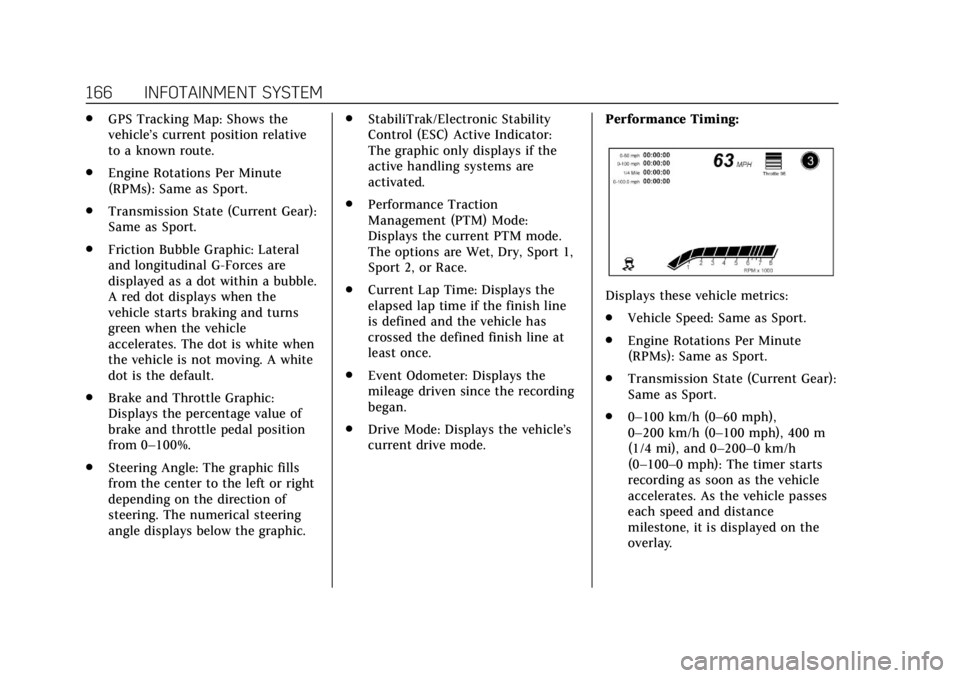
current drive mode. Performance Timing:
Displays these vehicle metrics:
.
Vehicle Speed: Same as Sport.
. Engine Rotations Per Minute
(RPMs): Same as Sport.
. Transmission State (Current Gear):
Same as Sport.
. 0–100 km/h (0–60 mph),
0–200 km/h (0–100 mph), 400 m
(1/4 mi), and 0–200–0 km/h
(0–100–0 mph): The timer starts
recording as soon as the vehicle
accelerates. As the vehicle passes
each speed and distance
milestone, it is displayed on the
overlay.
Page 178 of 401
Cadillac CTS/CTS-V Owner Manual (GMNA-Localizing-U.S./Canada/Mexico-
12460273) - 2019 - CRC - 5/16/18
DRIVING AND OPERATING 177
Driving and
Operating
Driving Information
Distracted Driving . . . . . . . . . . . . . . . . 178
Defensive Driving . . . . . . . . . . . . . . . . 179
Drunk Driving . . . . . . . . . . . . . . . . . . . . 179
Control of a Vehicle . . . . . . . . . . . . . . 179
Braking . . . . . . . . . . . . . . . . . . . . . . . . . . . . 179
Steering . . . . . . . . . . . . . . . . . . . . . . . . . . . 180
Off-Road Recovery . . . . . . . . . . . . . . . . 180
Loss of Control . . . . . . . . . . . . . . . . . . . 181
Track Events and CompetitiveDriving . . . . . . . . . . . . . . . . . . . . . . . . . . 181
Driving on Wet Roads . . . . . . . . . . . 186
Hill and Mountain Roads . . . . . . . . 186
Winter Driving . . . . . . . . . . . . . . . . . . . . 187
If the Vehicle Is Stuck . . . . . . . . . . . 188
Vehicle Load Limits . . . . . . . . . . . . . . 189
Starting and Operating
New Vehicle Break-In . . . . . . . . . . . . 192
Composite Materials . . . . . . . . . . . . . 193
Ignition Positions . . . . . . . . . . . . . . . . 193
Starting the Engine . . . . . . . . . . . . . . 195
Stop/Start System . . . . . . . . . . . . . . . . 196
Engine Heater . . . . . . . . . . . . . . . . . . . . 197 Retained Accessory
Power (RAP) . . . . . . . . . . . . . . . . . . . . 198
Shifting Into Park . . . . . . . . . . . . . . . . 198
Shifting out of Park . . . . . . . . . . . . . . 199
Parking over Things That Burn . . . . . . . . . . . . . . . . . . . . . . . 200
Extended Parking . . . . . . . . . . . . . . . . . 200
Engine Exhaust
Engine Exhaust . . . . . . . . . . . . . . . . . . . 200
Running the Vehicle While Parked . . . . . . . . . . . . . . . . . . . . . . . . . . . 201
Automatic Transmission
Automatic Transmission . . . . . . . . . 201
Manual Mode . . . . . . . . . . . . . . . . . . . . . 203
Drive Systems
All-Wheel Drive . . . . . . . . . . . . . . . . . . 204
Brakes
Antilock Brake System (ABS) . . . . 205
Electric Parking Brake . . . . . . . . . . . . 205
Brake Assist . . . . . . . . . . . . . . . . . . . . . . . 207
Hill Start Assist (HSA) . . . . . . . . . . . 207
Ride Control Systems
Traction Control/ElectronicStability Control . . . . . . . . . . . . . . . . 207
Driver Mode Control . . . . . . . . . . . . . 209
Competitive Driving Mode (V-Sport Only) . . . . . . . . . . . . . . . . . . 212 Limited-Slip Differential . . . . . . . . . 215
Cruise Control
Cruise Control . . . . . . . . . . . . . . . . . . . . 215
Adaptive Cruise Control . . . . . . . . . 218
Driver Assistance Systems
Driver Assistance Systems . . . . . . . 226
Assistance Systems for Parking
or Backing . . . . . . . . . . . . . . . . . . . . . . . 227
Assistance Systems for Driving . . . . . . . . . . . . . . . . . . . . . . . . . . 234
Forward Collision Alert (FCA) System . . . . . . . . . . . . . . . . . . . . . . . . . . 234
Forward Automatic Braking (FAB) . . . . . . . . . . . . . . . . . . . 237
Side Blind Zone Alert (SBZA) . . . . 238
Lane Change Alert (LCA) . . . . . . . . 238
Lane Departure Warning (LDW) . . . . . . . . . . . . . . . . . 240
Lane Keep Assist (LKA) . . . . . . . . . . 240
Vehicle-to-Vehicle . . . . . . . . . . . . . . . . 242
Fuel
Top Tier Fuel . . . . . . . . . . . . . . . . . . . . . 244
Recommended Fuel (LGX 3.6L V6 Engine) . . . . . . . . . . . . . . . . . . . . . . 245
Recommended Fuel (LTG 2.0L L4 Engine) . . . . . . . . . . . . . . . . . . . . . . . . . . 245
Page 180 of 401
Cadillac CTS/CTS-V Owner Manual (GMNA-Localizing-U.S./Canada/Mexico-
12460273) - 2019 - CRC - 5/16/18
DRIVING AND OPERATING 179
Refer to the infotainment section for
more information on using that
system and the navigation system,
if equipped, including pairing and
using a cell phone.
Defensive Driving
Defensive driving means“always
expect the unexpected.” The first step
in driving defensively is to wear the
seat belt. See Seat Belts068.
. Assume that other road users
(pedestrians, bicyclists, and other
drivers) are going to be careless
and make mistakes. Anticipate
what they might do and be ready.
. Allow enough following distance
between you and the driver in
front of you.
. Focus on the task of driving.
Drunk Driving
Death and injury associated with
drinking and driving is a global
tragedy.
{Warning
Drinking and then driving is very
dangerous. Your reflexes,
perceptions, attentiveness, and
judgment can be affected by even a
small amount of alcohol. You can
have a serious —or even fatal —
collision if you drive after drinking.
Do not drink and drive or ride with
a driver who has been drinking.
Ride home in a cab; or if you are
with a group, designate a driver
who will not drink.
Control of a Vehicle
Braking, steering, and accelerating are
important factors in helping to control
a vehicle while driving.
Braking
Braking action involves perception
time and reaction time. Deciding to
push the brake pedal is perception
time. Actually doing it is
reaction time. Average driver reaction time is about
three-quarters of a second. In that
time, a vehicle moving at 100 km/h
(60 mph) travels 20 m (66 ft), which
could be a lot of distance in an
emergency.
Helpful braking tips to keep in mind
include:
.
Keep enough distance between
you and the vehicle in front
of you.
. Avoid needless heavy braking.
. Keep pace with traffic.
If the engine ever stops while the
vehicle is being driven, brake normally
but do not pump the brakes. Doing so
could make the pedal harder to push
down. If the engine stops, there will
be some power brake assist but it will
be used when the brake is applied.
Once the power assist is used up, it
can take longer to stop and the brake
pedal will be harder to push.
Page 181 of 401

Cadillac CTS/CTS-V Owner Manual (GMNA-Localizing-U.S./Canada/Mexico-
12460273) - 2019 - CRC - 5/16/18
180 DRIVING AND OPERATING
Steering
Variable Effort Steering
The vehicle has a steering system that
varies the amount of effort required to
steer the vehicle in relation to the
speed of the vehicle.
The amount of steering effort required
is less at slower speeds to make the
vehicle more maneuverable and easier
to park. At faster speeds, the steering
effort increases to provide a sport-like
feel to the steering. This provides
maximum control and stability.
Electric Power Steering
The vehicle has electric power
steering. It does not have power
steering fluid. Regular maintenance is
not required.
If power steering assist is lost due to a
system malfunction, the vehicle can
be steered, but may require increased
effort. See your dealer if there is a
problem.If the steering wheel is turned until it
reaches the end of its travel and is
held against that position for an
extended period of time, power
steering assist may be reduced.
If the steering assist is used for an
extended period of time while the
vehicle is not moving, power assist
may be reduced.
Normal use of the power steering
assist should return when the system
cools down.
See your dealer if there is a problem.
Curve Tips
.
Take curves at a reasonable speed.
. Reduce speed before entering a
curve.
. Maintain a reasonable steady
speed through the curve.
. Wait until the vehicle is out of the
curve before accelerating gently
into the straightaway.
Steering in Emergencies
.There are some situations when
steering around a problem may be
more effective than braking.
. Holding both sides of the steering
wheel allows you to turn
180 degrees without removing
a hand.
. Antilock Brake System (ABS)
allows steering while braking.
Off-Road Recovery
The vehicle's right wheels can drop off
the edge of a road onto the shoulder
while driving. Follow these tips: