center console CADILLAC CTS 2019 Owner's Manual
[x] Cancel search | Manufacturer: CADILLAC, Model Year: 2019, Model line: CTS, Model: CADILLAC CTS 2019Pages: 401, PDF Size: 6.85 MB
Page 15 of 401
Cadillac CTS/CTS-V Owner Manual (GMNA-Localizing-U.S./Canada/Mexico-
12460273) - 2019 - CRC - 5/8/18
14 IN BRIEF
.Lap-Shoulder Belt 071
. Lower Anchors and Tethers for
Children (LATCH System) 095
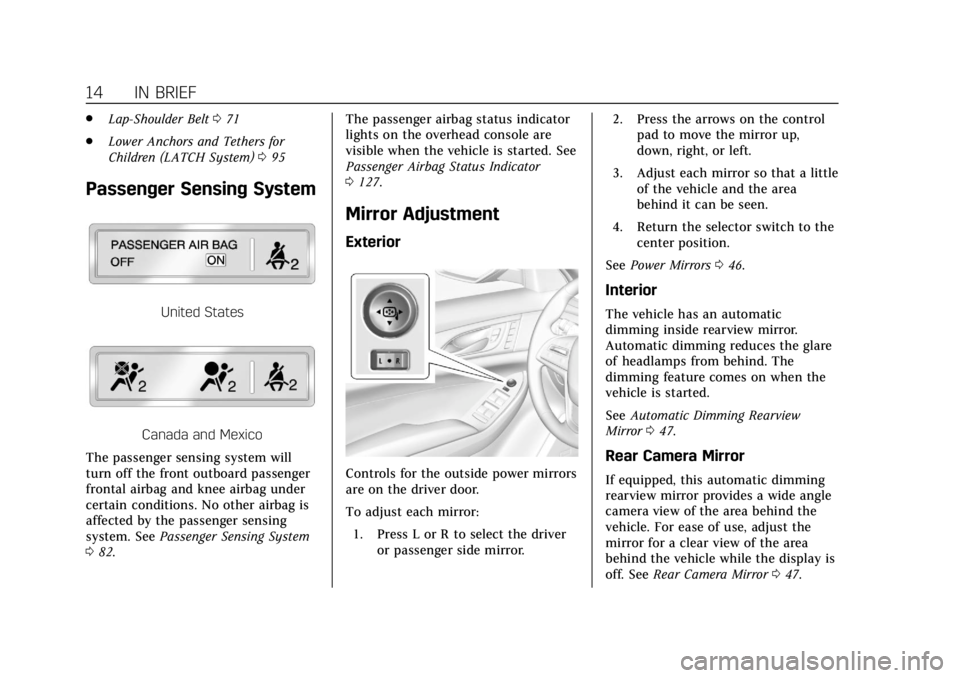
Passenger Sensing System
United States
Canada and Mexico
The passenger sensing system will
turn off the front outboard passenger
frontal airbag and knee airbag under
certain conditions. No other airbag is
affected by the passenger sensing
system. See Passenger Sensing System
0 82. The passenger airbag status indicator
lights on the overhead console are
visible when the vehicle is started. See
Passenger Airbag Status Indicator
0
127.
Mirror Adjustment
Exterior
Controls for the outside power mirrors
are on the driver door.
To adjust each mirror:
1. Press L or R to select the driver or passenger side mirror. 2. Press the arrows on the control
pad to move the mirror up,
down, right, or left.
3. Adjust each mirror so that a little of the vehicle and the area
behind it can be seen.
4. Return the selector switch to the center position.
See Power Mirrors 046.
Interior
The vehicle has an automatic
dimming inside rearview mirror.
Automatic dimming reduces the glare
of headlamps from behind. The
dimming feature comes on when the
vehicle is started.
See Automatic Dimming Rearview
Mirror 047.
Rear Camera Mirror
If equipped, this automatic dimming
rearview mirror provides a wide angle
camera view of the area behind the
vehicle. For ease of use, adjust the
mirror for a clear view of the area
behind the vehicle while the display is
off. See Rear Camera Mirror 047.
Page 24 of 401

Cadillac CTS/CTS-V Owner Manual (GMNA-Localizing-U.S./Canada/Mexico-
12460273) - 2019 - CRC - 5/8/18
IN BRIEF 23
Power Outlets
Power Outlets 12-Volt Direct Current
Accessory power outlets can be used
to plug in electrical equipment, such
as a cell phone or MP3 player.
The vehicle has three 12-volt
accessory power outlets:
.Inside the center console storage
in front of the armrest cover.
. Inside the storage area under the
armrest cover.
. Inside the storage area on the rear
of the center console, if equipped.
These outlets are powered while the
vehicle is on or in ACC/ACCESSORY
mode, or until the driver door is
opened within 10 minutes of turning
off the vehicle.
Lift the cover to access the accessory
power outlet.
See Power Outlets 0113.
Universal Remote System
If equipped, this system provides a
way to replace up to three remote
control transmitters used to activate
devices such as garage door openers,
security systems, and home
automation devices.
Read the instructions completely
before attempting to program the
Universal Remote system. Because of
the steps involved, it may be helpful
to have another person available to
assist you with programming the
Universal Remote system.
See Universal Remote System 0150.
Sunroof
If equipped, the sunroof will only
operate when the ignition is on or in
ACC/ACCESSORY, or when Retained
Accessory Power (RAP) is active. See
Retained Accessory Power (RAP) 0198.
The driver side switch (1) operates the
sunroof.
Vent : Press and release
~(1) to
vent the sunroof. The sunshade will
automatically open approximately
38 cm (15 in). Press and hold
g(1)
to close the sunroof vent.
Page 25 of 401
Cadillac CTS/CTS-V Owner Manual (GMNA-Localizing-U.S./Canada/Mexico-
12460273) - 2019 - CRC - 5/8/18
24 IN BRIEF
Express-Open/Express-Close :With
the sunroof in the vent position, press
~(1) a second time to express-open
the sunroof. Press
g(1) to
express-close the sunroof. To stop the
sunroof partway, press the switch
again.
The passenger side switch
Q(2)
operates the sunshade. Press and
release
Q(2) to express-open or
express-close the sunshade. To stop
the sunshade partway, press the
switch again.
See Sunroof 052.
Performance and
Maintenance
Traction Control/Electronic
Stability Control
The Traction Control System (TCS)
limits wheel spin. The system turns
on automatically every time the
vehicle is started.
StabiliTrak/Electronic Stability Control
(ESC) assists with directional control
of the vehicle in difficult driving
conditions. The system turns on
automatically every time the vehicle is
started.
.
To turn off TCS, press and
release
Yon the center console.
iilluminates in the instrument
cluster. A DIC message may
display.
. Press
Yagain to turn TCS
back on.
. To turn off both TCS and
StabiliTrak/ESC, press and
hold
Yon the center console until
gandiilluminate in the
instrument cluster. A DIC message
may display.
. Press
Yagain to turn on both
systems.
See Traction Control/Electronic Stability
Control 0207.
The vehicle has Driver Mode Control
and may have Competitive Driving
Mode. See Driver Mode Control 0209
and Competitive Driving Mode (V-Sport
Only) 0212.
Tire Pressure Monitor
This vehicle may have a Tire Pressure
Monitor System (TPMS).
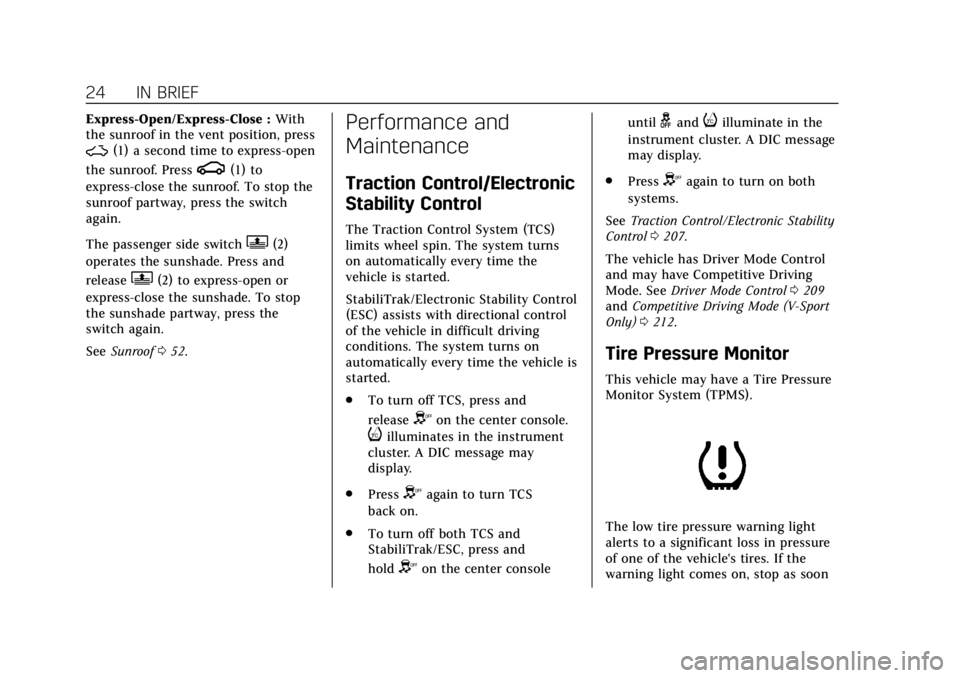
The low tire pressure warning light
alerts to a significant loss in pressure
of one of the vehicle's tires. If the
warning light comes on, stop as soon
Page 34 of 401

Cadillac CTS/CTS-V Owner Manual (GMNA-Localizing-U.S./Canada/Mexico-
12460273) - 2019 - CRC - 5/8/18
KEYS, DOORS, AND WINDOWS 33
4. Open the center console, removethe rubber mat, and place the
new transmitter in the
transmitter pocket.
5. Press ENGINE START/STOP. When the transmitter is learned,
the DIC display will show that it
is ready to program the next
transmitter.
6. Remove the transmitter from the transmitter pocket and press
K
orQon the transmitter.
To program additional
transmitters, repeat Steps 4–6.
When all additional transmitters
are programmed, press and hold
ENGINE START/STOP for
approximately 12 seconds to exit
programming mode.
7. Return the vehicle key back into the transmitter.
8. Replace the key lock cylinder cap. See Door Locks 037. Programming without Recognized
Transmitters
If two currently recognized
transmitters are not available, follow
this procedure to program up to eight
transmitters. This feature is not
available in Canada. This procedure
will take approximately 30 minutes to
complete. The vehicle must be off and
all transmitters to be programmed
must be with you.
1. Remove the vehicle key from the transmitter.
2. Remove the key lock cylinder cap on the driver door handle. See
Door Locks 037. Insert the
vehicle key into the key lock
cylinder on the driver door
handle, then turn the key
counterclockwise to the unlock
position five times within
10 seconds.
The DIC displays REMOTE
LEARN PENDING,
PLEASE WAIT. 3. Wait for 10 minutes until the
DIC displays PRESS ENGINE
START BUTTON TO LEARN and
then press ENGINE
START/STOP.
The DIC display will again show
REMOTE LEARN PENDING,
PLEASE WAIT.
4. Repeat Step 3 two additional times. After the third time all
previously known transmitters
will no longer work with the
vehicle. Remaining transmitters
can be relearned during the next
steps.
The DIC should now display
READY FOR REMOTE # 1.
Page 35 of 401
Cadillac CTS/CTS-V Owner Manual (GMNA-Localizing-U.S./Canada/Mexico-
12460273) - 2019 - CRC - 5/8/18
34 KEYS, DOORS, AND WINDOWS
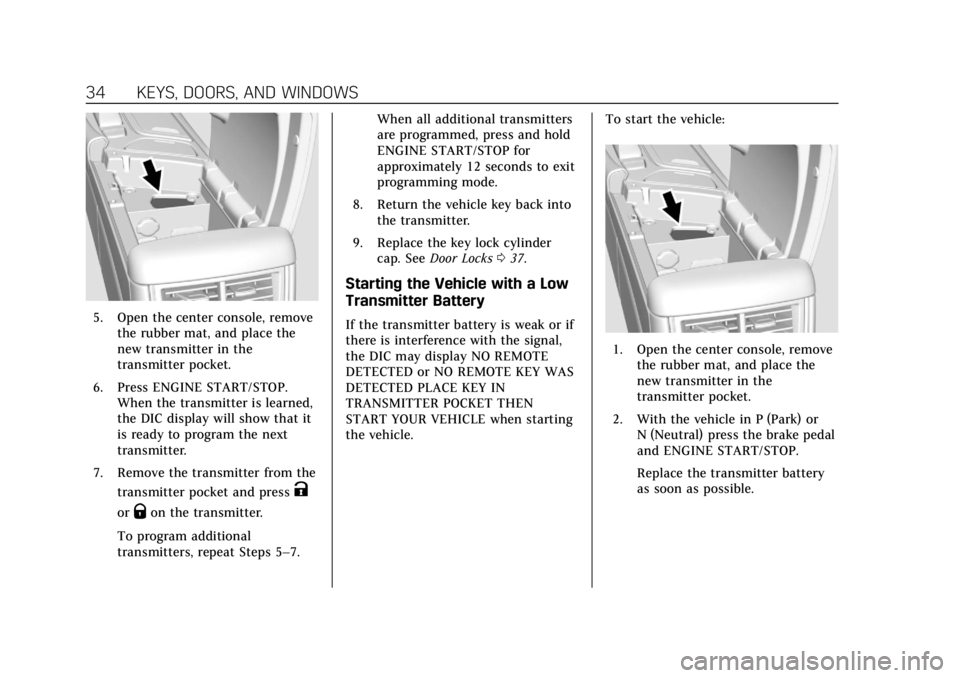
5. Open the center console, removethe rubber mat, and place the
new transmitter in the
transmitter pocket.
6. Press ENGINE START/STOP. When the transmitter is learned,
the DIC display will show that it
is ready to program the next
transmitter.
7. Remove the transmitter from the transmitter pocket and press
K
orQon the transmitter.
To program additional
transmitters, repeat Steps 5–7. When all additional transmitters
are programmed, press and hold
ENGINE START/STOP for
approximately 12 seconds to exit
programming mode.
8. Return the vehicle key back into the transmitter.
9. Replace the key lock cylinder cap. See Door Locks 037.
Starting the Vehicle with a Low
Transmitter Battery
If the transmitter battery is weak or if
there is interference with the signal,
the DIC may display NO REMOTE
DETECTED or NO REMOTE KEY WAS
DETECTED PLACE KEY IN
TRANSMITTER POCKET THEN
START YOUR VEHICLE when starting
the vehicle. To start the vehicle:
1. Open the center console, remove
the rubber mat, and place the
new transmitter in the
transmitter pocket.
2. With the vehicle in P (Park) or N (Neutral) press the brake pedal
and ENGINE START/STOP.
Replace the transmitter battery
as soon as possible.
Page 46 of 401

Cadillac CTS/CTS-V Owner Manual (GMNA-Localizing-U.S./Canada/Mexico-
12460273) - 2019 - CRC - 5/8/18
KEYS, DOORS, AND WINDOWS 45
The power sounder provides an
audible alarm which is distinct from
the vehicle’s horn. It has its own
power source, and can sound an alarm
if the vehicle’s battery is
compromised.
The inclination sensor can set off the
alarm if it senses movement of the
vehicle, such as a change in vehicle
orientation.
Immobilizer
SeeRadio Frequency Statement 0373.
Immobilizer Operation
This vehicle has a passive
theft-deterrent system.
The system does not have to be
manually armed or disarmed.
The vehicle is automatically
immobilized when the vehicle is
turned off.
The immobilization system is
disarmed when the ignition is turned
on or to ACC/ACCESSORY and a valid
transmitter is present in the vehicle.
The security light, in the instrument
cluster, comes on if there is a problem
with arming or disarming the
theft-deterrent system.
The system has one or more RKE
transmitters matched to an
immobilizer control unit in the
vehicle. Only a correctly matched RKE
transmitter will start the vehicle.
If the transmitter is ever damaged,
you may not be able to start your
vehicle.
When trying to start the vehicle, the
security light may come on briefly
when the ignition is turned on.
If the engine does not start and the
security light stays on, there is a
problem with the system. Turn the
ignition off and try again.
If the vehicle will not change ignition
modes (ACC/ACCESSORY, on, off), and
the RKE transmitter appears to be undamaged, try another transmitter.
Or, you may try placing the
transmitter in the transmitter pocket
located in the center console.
If the ignition modes will not change
with the other transmitter or in the
transmitter pocket, the vehicle needs
service. If the ignition does change
modes, the first transmitter may be
faulty. See your dealer.
It is possible for the immobilizer
system to learn new or replacement
RKE transmitters. Up to eight
transmitters can be programmed for
the vehicle. To program additional
transmitters, see
“Programming
Transmitters to the Vehicle ”under
Remote Keyless Entry (RKE) System
Operation 029.
Do not leave the key or device that
disarms or deactivates the
theft-deterrent system in the vehicle.
Page 52 of 401

Cadillac CTS/CTS-V Owner Manual (GMNA-Localizing-U.S./Canada/Mexico-
12460273) - 2019 - CRC - 5/8/18
KEYS, DOORS, AND WINDOWS 51
Warning (Continued)
override, make sure that all people
and obstructions are clear of the
window path.
When the engine is on, override the
automatic reversal system by pulling
and holding the window switch if
conditions prevent it from closing.
Programming the Power
Windows
Programming may be necessary if the
vehicle battery has been disconnected
or discharged. If the window is unable
to express-up, program each
express-close window: 1. Close all doors.
2. Turn the ignition on or to ACC/ ACCESSORY.
3. Partially open the window to be programmed. Then close it and
continue to pull the switch
briefly after the window has fully
closed. 4. Open the window and continue
to press the switch briefly after
the window has fully opened.
Remote Window Operation
If equipped, this feature allows all the
windows to be opened remotely.
If enabled in vehicle personalization,
press and hold
Kon the RKE
transmitter. See Vehicle Personalization
0 145.
Sun Visors
Pull the sun visor down to block glare.
Detach the sun visor from the center
mount to pivot to the side window
and, if equipped, extend along the rod.
Rear Window Sunshade
If equipped with a rear window
sunshade, the switch is on the
overhead console. The sunshade only
operates with the ignition is on.
To open the sunshade, press and
release the switch. The sunshade will
fully extend. To close the sunshade,
press and release the switch again.
The sunshade will fully close.
When shifting the vehicle into
R (Reverse), the sunshade will
automatically retract if it is extended.
It will re-extend after a short delay
when shifting into D (Drive).
Page 68 of 401
Cadillac CTS/CTS-V Owner Manual (GMNA-Localizing-U.S./Canada/Mexico-
12460273) - 2019 - CRC - 5/8/18
SEATS AND RESTRAINTS 67
Raising the Seatback
{Warning
If either seatback is not locked, it
could move forward in a sudden
stop or crash. That could cause
injury to the person sitting there.
Always push and pull on the
seatbacks to be sure they are
locked.
{Warning
A seat belt that is improperly
routed, not properly attached,
or twisted will not provide the
protection needed in a crash. The
person wearing the belt could be
seriously injured. After raising the
rear seatback, always check to be
sure that the seat belts are properly
routed and attached, and are not
twisted.To raise a seatback:
1. Lift the seatback up. Make sure the center seat belt and latch do
not get trapped behind the seat.
Push the seatback rearward to
secure it in place.
A red tab near the seatback lever
retracts when the seatback is in
place.
2. Push and pull the top of the seatback to be sure it is in
position.
3. Lock the seatback using the vehicle key in the cylinder.
4. Reconnect the center seat belt mini-latch to the mini-buckle. Do
not let the belt twist.
5. Pull on the center seat belt to make sure the mini-latch is
secure.
6. Repeat the steps to raise the other seatback, if necessary.
When the seat is not in use, it should
be kept in the upright, locked position.
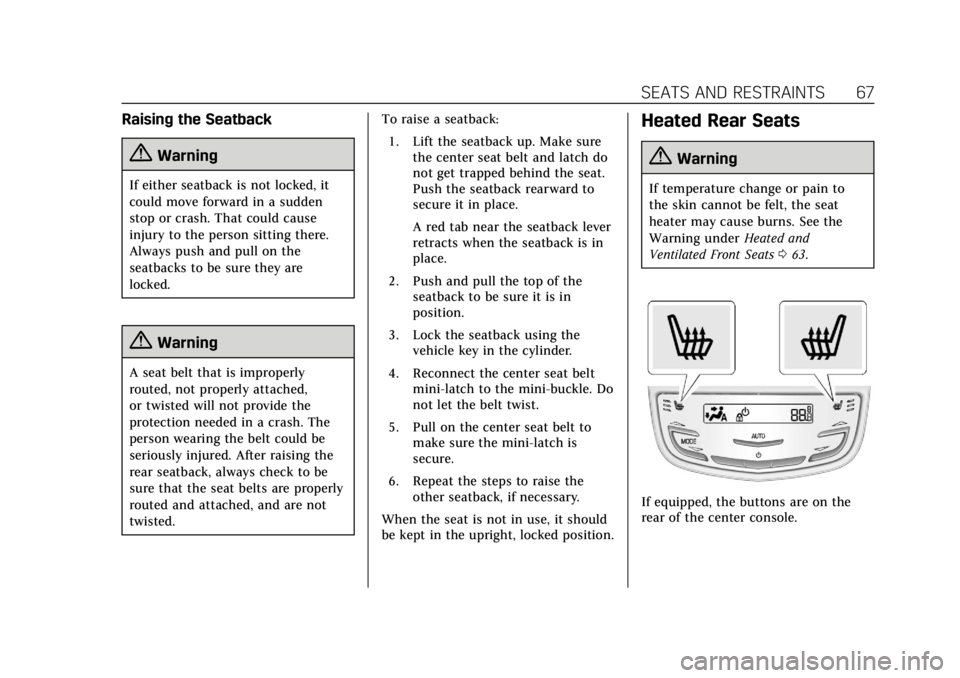
Heated Rear Seats
{Warning
If temperature change or pain to
the skin cannot be felt, the seat
heater may cause burns. See the
Warning under Heated and
Ventilated Front Seats 063.
If equipped, the buttons are on the
rear of the center console.
Page 107 of 401

Cadillac CTS/CTS-V Owner Manual (GMNA-Localizing-U.S./Canada/Mexico-
12460273) - 2019 - CRC - 5/8/18
106 STORAGE
Storage
Storage Compartments
Storage Compartments . . . . . . . . . . 106
Instrument Panel Storage . . . . . . . . 106
Glove Box . . . . . . . . . . . . . . . . . . . . . . . . . 106
Cupholders . . . . . . . . . . . . . . . . . . . . . . . . 107
Armrest Storage . . . . . . . . . . . . . . . . . . 107
Center Console Storage . . . . . . . . . . 107
Additional Storage Features
Cargo Tie-Downs . . . . . . . . . . . . . . . . . 108
Convenience Net . . . . . . . . . . . . . . . . . 108
Storage Compartments
{Warning
Do not store heavy or sharp objects
in storage compartments. In a
crash, these objects may cause the
cover to open and could result in
injury.
Instrument Panel Storage
Touch the bottom of the climate
control system panel until the door
automatically starts to open. The
storage area may contain a USB port.
See the infotainment manual.
Keep the storage area door closed
while driving.
Touch the bottom of the climate
control system again until the door
automatically starts to close.
Glove Box
To open, press the button. Close the
glove box manually.
Page 108 of 401

Cadillac CTS/CTS-V Owner Manual (GMNA-Localizing-U.S./Canada/Mexico-
12460273) - 2019 - CRC - 5/8/18
STORAGE 107
Cupholders
Cupholders in the front center console
have a power retractable cover. Push
the handle forward to express open.
Pull the handle rearward to express
close.
The power cover will operate when
the vehicle door is opened and the
ignition is on or in ACC/ACCESSORY,
or when Retained Accessory Power
(RAP) is active. The cover can be
opened or closed manually by pushing
or pulling the handle. SeeRetained
Accessory Power (RAP) 0198.
Power Retractable Cover
Anti-Pinch Feature
If any object is in the path of the
power cover when it is active, the
cover will stop at the obstruction and
auto-reverse to a preset position. The
cover will return to normal operation
after the obstruction is removed.
Armrest Storage
Pull the armrest down to access the
rear seat storage area and cupholders.
Press the latch to open the
storage area.
Center Console Storage
Press the button to access the storage
area in front of the armrest cover.
Press the button on the driver side of
the cover to access the storage area
under the armrest. There are two USB
ports, an SD card (if equipped), a
power outlet, and an input jack inside.