power steering CADILLAC CTS 2019 Owner's Manual
[x] Cancel search | Manufacturer: CADILLAC, Model Year: 2019, Model line: CTS, Model: CADILLAC CTS 2019Pages: 401, PDF Size: 6.85 MB
Page 6 of 401
Cadillac CTS/CTS-V Owner Manual (GMNA-Localizing-U.S./Canada/Mexico-
12460273) - 2019 - CRC - 5/8/18
IN BRIEF 5
In Brief
Instrument Panel
Instrument Panel . . . . . . . . . . . . . . . . . . . 6
Initial Drive Information
Initial Drive Information . . . . . . . . . . . 8
Stop/Start System . . . . . . . . . . . . . . . . . . . 8
Remote Keyless Entry (RKE)System . . . . . . . . . . . . . . . . . . . . . . . . . . . . . 8
Remote Vehicle Start . . . . . . . . . . . . . . . 8
Door Locks . . . . . . . . . . . . . . . . . . . . . . . . . . 9
Trunk . . . . . . . . . . . . . . . . . . . . . . . . . . . . . . . 10
Windows . . . . . . . . . . . . . . . . . . . . . . . . . . . 10
Seat Adjustment . . . . . . . . . . . . . . . . . . . 10
Memory Features . . . . . . . . . . . . . . . . . . 12
Heated and Ventilated Seats . . . . . . 12
Head Restraint Adjustment . . . . . . . 13
Seat Belts . . . . . . . . . . . . . . . . . . . . . . . . . . . 13
Passenger Sensing System . . . . . . . . 14
Mirror Adjustment . . . . . . . . . . . . . . . . 14
Steering Wheel Adjustment . . . . . . . 15
Interior Lighting . . . . . . . . . . . . . . . . . . . 15
Exterior Lighting . . . . . . . . . . . . . . . . . . . 16
Windshield Wiper/Washer . . . . . . . . 17
Climate Controls . . . . . . . . . . . . . . . . . . . 18
Transmission . . . . . . . . . . . . . . . . . . . . . . . 19
Vehicle Features
Infotainment System . . . . . . . . . . . . . . 19
Steering Wheel Controls . . . . . . . . . . 19
Cruise Control . . . . . . . . . . . . . . . . . . . . . 19
Driver Information Center (DIC) . . . . . . . . . . . . . . . . . . . . . . 20
Forward Collision Alert (FCA) System . . . . . . . . . . . . . . . . . . . . . . . . . . . . 20
Forward Automatic Braking (FAB) . . . . . . . . . . . . . . . . . . . . 20
Lane Keep Assist (LKA) . . . . . . . . . . . 21
Lane Change Alert (LCA) . . . . . . . . . . 21
Surround Vision (CTS Only) . . . . . . 21
Curb View Camera (CTS-V Only) . . . . . . . . . . . . . . . . . . . . . 21
Rear Vision Camera (RVC) . . . . . . . . 22
Rear Cross Traffic Alert (RCTA) System . . . . . . . . . . . . . . . . . . . . . . . . . . . . 22
Park Assist . . . . . . . . . . . . . . . . . . . . . . . . . 22
Automatic Parking Assist (APA) . . . . . . . . . . . . . . . . . . . . . . 22
Reverse Automatic Braking (RAB) . . . . . . . . . . . . . . . . . . . . 22
Vehicle-to-Vehicle . . . . . . . . . . . . . . . . . 22
Power Outlets . . . . . . . . . . . . . . . . . . . . . . 23
Universal Remote System . . . . . . . . . 23
Sunroof . . . . . . . . . . . . . . . . . . . . . . . . . . . . . 23
Performance and Maintenance
Traction Control/Electronic Stability Control . . . . . . . . . . . . . . . . . . 24
Tire Pressure Monitor . . . . . . . . . . . . . 24
Fuel (LGX 3.6L V6 Engine) . . . . . . . . 25
Fuel (LTG 2.0L L4 Engine) . . . . . . . . 25
Fuel (LF3 3.6L V6 Twin Turbo and LT4 6.2L V8 Engines) . . . . . . . . . . . . 26
E85 or FlexFuel . . . . . . . . . . . . . . . . . . . . 26
Engine Oil Life System . . . . . . . . . . . . 26
Car Wash Guidelines . . . . . . . . . . . . . . 27
Driving for Better Fuel Economy . . . . . . . . . . . . . . . . . . . . . . . . . . 27
Roadside Service . . . . . . . . . . . . . . . . . . . 27
Page 13 of 401
Cadillac CTS/CTS-V Owner Manual (GMNA-Localizing-U.S./Canada/Mexico-
12460273) - 2019 - CRC - 5/8/18
12 IN BRIEF
Memory Features
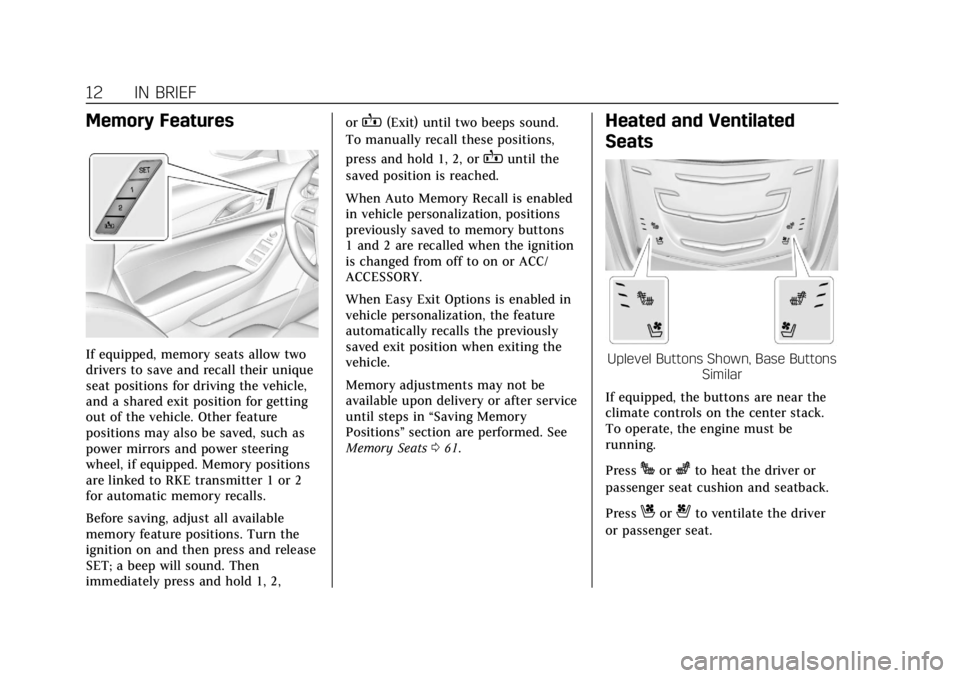
If equipped, memory seats allow two
drivers to save and recall their unique
seat positions for driving the vehicle,
and a shared exit position for getting
out of the vehicle. Other feature
positions may also be saved, such as
power mirrors and power steering
wheel, if equipped. Memory positions
are linked to RKE transmitter 1 or 2
for automatic memory recalls.
Before saving, adjust all available
memory feature positions. Turn the
ignition on and then press and release
SET; a beep will sound. Then
immediately press and hold 1, 2,or
B(Exit) until two beeps sound.
To manually recall these positions,
press and hold 1, 2, or
Buntil the
saved position is reached.
When Auto Memory Recall is enabled
in vehicle personalization, positions
previously saved to memory buttons
1 and 2 are recalled when the ignition
is changed from off to on or ACC/
ACCESSORY.
When Easy Exit Options is enabled in
vehicle personalization, the feature
automatically recalls the previously
saved exit position when exiting the
vehicle.
Memory adjustments may not be
available upon delivery or after service
until steps in “Saving Memory
Positions” section are performed. See
Memory Seats 061.
Heated and Ventilated
Seats
Uplevel Buttons Shown, Base Buttons
Similar
If equipped, the buttons are near the
climate controls on the center stack.
To operate, the engine must be
running.
Press
Jorzto heat the driver or
passenger seat cushion and seatback.
Press
Cor{to ventilate the driver
or passenger seat.
Page 16 of 401
Cadillac CTS/CTS-V Owner Manual (GMNA-Localizing-U.S./Canada/Mexico-
12460273) - 2019 - CRC - 5/8/18
IN BRIEF 15
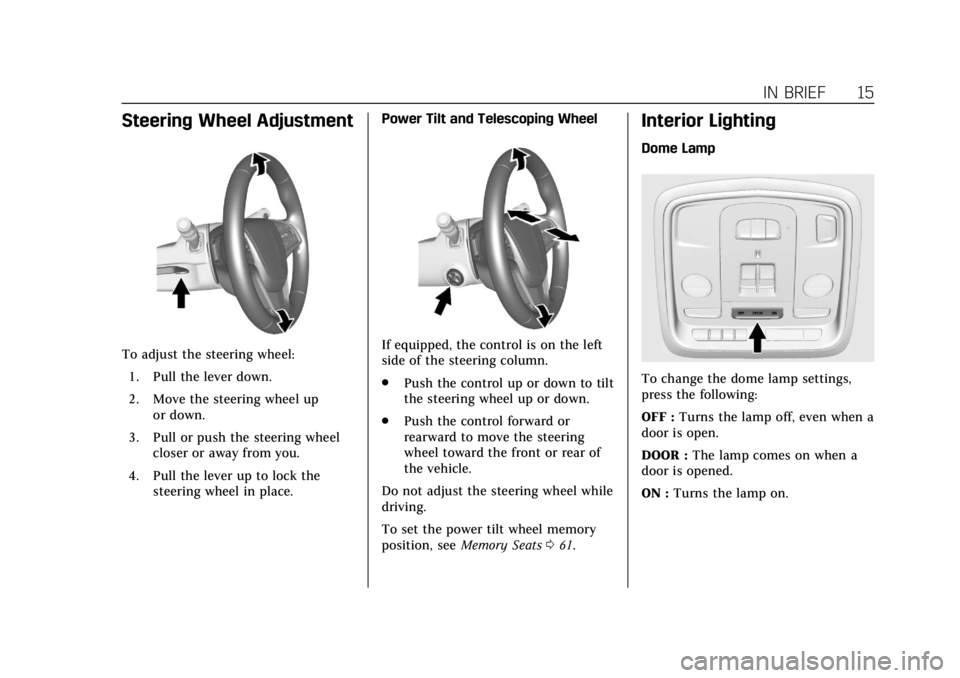
Steering Wheel Adjustment
To adjust the steering wheel:1. Pull the lever down.
2. Move the steering wheel up or down.
3. Pull or push the steering wheel closer or away from you.
4. Pull the lever up to lock the steering wheel in place. Power Tilt and Telescoping WheelIf equipped, the control is on the left
side of the steering column.
.
Push the control up or down to tilt
the steering wheel up or down.
. Push the control forward or
rearward to move the steering
wheel toward the front or rear of
the vehicle.
Do not adjust the steering wheel while
driving.
To set the power tilt wheel memory
position, see Memory Seats 061.
Interior Lighting
Dome Lamp
To change the dome lamp settings,
press the following:
OFF : Turns the lamp off, even when a
door is open.
DOOR : The lamp comes on when a
door is opened.
ON : Turns the lamp on.
Page 62 of 401
Cadillac CTS/CTS-V Owner Manual (GMNA-Localizing-U.S./Canada/Mexico-
12460273) - 2019 - CRC - 5/8/18
SEATS AND RESTRAINTS 61
Memory Seats
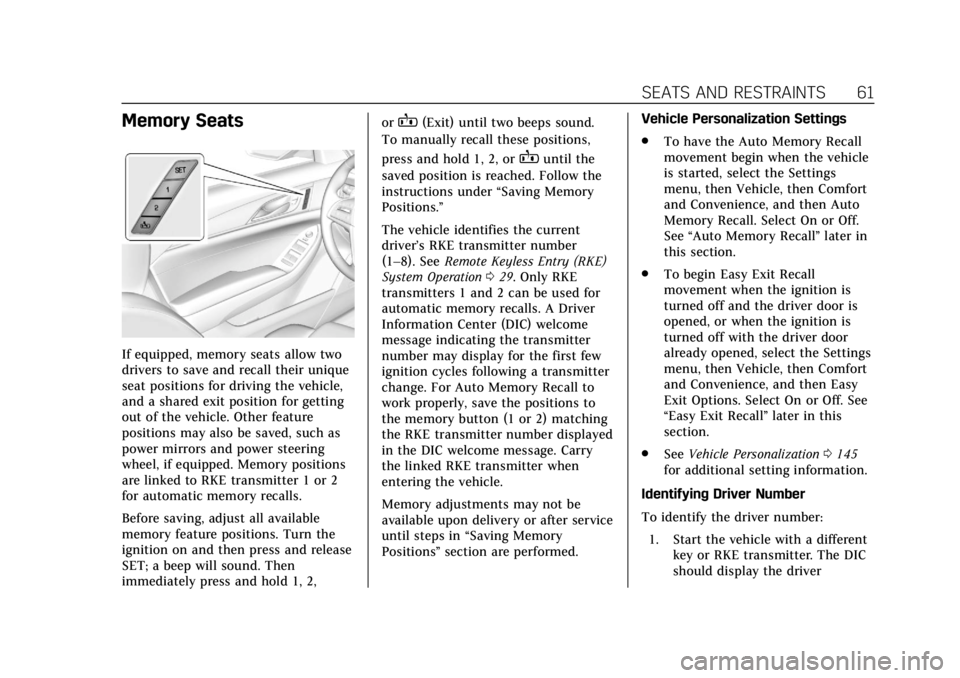
If equipped, memory seats allow two
drivers to save and recall their unique
seat positions for driving the vehicle,
and a shared exit position for getting
out of the vehicle. Other feature
positions may also be saved, such as
power mirrors and power steering
wheel, if equipped. Memory positions
are linked to RKE transmitter 1 or 2
for automatic memory recalls.
Before saving, adjust all available
memory feature positions. Turn the
ignition on and then press and release
SET; a beep will sound. Then
immediately press and hold 1, 2,or
B(Exit) until two beeps sound.
To manually recall these positions,
press and hold 1, 2, or
Buntil the
saved position is reached. Follow the
instructions under “Saving Memory
Positions.”
The vehicle identifies the current
driver’s RKE transmitter number
(1–8). See Remote Keyless Entry (RKE)
System Operation 029. Only RKE
transmitters 1 and 2 can be used for
automatic memory recalls. A Driver
Information Center (DIC) welcome
message indicating the transmitter
number may display for the first few
ignition cycles following a transmitter
change. For Auto Memory Recall to
work properly, save the positions to
the memory button (1 or 2) matching
the RKE transmitter number displayed
in the DIC welcome message. Carry
the linked RKE transmitter when
entering the vehicle.
Memory adjustments may not be
available upon delivery or after service
until steps in “Saving Memory
Positions” section are performed. Vehicle Personalization Settings
.
To have the Auto Memory Recall
movement begin when the vehicle
is started, select the Settings
menu, then Vehicle, then Comfort
and Convenience, and then Auto
Memory Recall. Select On or Off.
See “Auto Memory Recall” later in
this section.
. To begin Easy Exit Recall
movement when the ignition is
turned off and the driver door is
opened, or when the ignition is
turned off with the driver door
already opened, select the Settings
menu, then Vehicle, then Comfort
and Convenience, and then Easy
Exit Options. Select On or Off. See
“Easy Exit Recall” later in this
section.
. See Vehicle Personalization 0145
for additional setting information.
Identifying Driver Number
To identify the driver number: 1. Start the vehicle with a different key or RKE transmitter. The DIC
should display the driver
Page 63 of 401
Cadillac CTS/CTS-V Owner Manual (GMNA-Localizing-U.S./Canada/Mexico-
12460273) - 2019 - CRC - 5/8/18
62 SEATS AND RESTRAINTS
number; 1 or 2. Turn the ignition
off and remove the key or RKE
transmitter from the vehicle.
2. Start the vehicle with the initial key or RKE transmitter. The DIC
should display the other driver
number not shown in Step 1.
Saving Memory Positions
Read these instructions completely
before saving memory positions.
To save preferred driving positions
1 and 2: 1. Turn the ignition on or to ACC/ ACCESSORY.
A DIC welcome message may
indicate driver number 1 or 2.
2. Adjust all available memory features to the desired driving
position.
3. Press and release SET; a beep will sound.
4. Immediately press and hold the 1 or 2 memory button matching
the above DIC welcome message
until two beeps sound. If too much time passes between
releasing SET and pressing 1, the
memory position will not be
saved and two beeps will not
sound. Repeat Steps 3 and 4.
1 or 2 corresponds to the driver
number. See
“Identifying Driver
Number” previously in this
section.
5. Repeat Steps 1–4 for a second driver using 1 or 2.
To save the position for
Band easy
exit features, repeat Steps 1–4 using
B. This saves the position for getting
out of the vehicle.
Save preferred memory feature
positions to both 1 and 2 if you are
the only driver.
Manually Recalling Memory
Positions
Press and hold 1, 2, or
Bto recall
the previously saved memory
positions. To stop Manual Memory Recall
movement, release 1, 2, or
Bor press
any of the following controls:
. Power seat
. Memory SET
. Power mirror, with the driver or
passenger side mirror selected
. Power steering wheel, if equipped
Auto Memory Recall
The vehicle identifies the number of
the current driver’s RKE transmitter
(1–8). See Remote Keyless Entry (RKE)
System Operation 029. If the RKE
transmitter is 1 or 2, and Auto
Memory Recall is programmed on in
vehicle personalization, the positions
saved to the same memory button
number 1 or 2 are automatically
recalled when the ignition is turned
on, or turned from off to ACC/
ACCESSORY. RKE transmitters 3–8
will not provide automatic memory
recalls.
To turn Auto Memory Recall on or off,
see "Vehicle Personalization Settings"
previously in this section and Vehicle
Personalization 0145.
Page 64 of 401
Cadillac CTS/CTS-V Owner Manual (GMNA-Localizing-U.S./Canada/Mexico-
12460273) - 2019 - CRC - 5/8/18
SEATS AND RESTRAINTS 63
The shift lever must be in P (Park) to
start Auto Memory Recall. Auto
Memory Recall will complete if the
vehicle is shifted out of P (Park) prior
to reaching the saved memory
position.
To stop Auto Memory Recall
movement, turn the ignition off or
press any of the following controls:
.Power seat
. Memory SET, 1, 2, or
B
.Power mirror, with the driver or
passenger side mirror selected
. Power steering wheel, if equipped
If the saved memory seat position
does not automatically recall or recalls
to the wrong positions, the driver’s
RKE transmitter number (1 or 2) may
not match the memory button
number that positions were saved to.
Try saving the position to the other
memory button or try the other RKE
transmitter. Easy Exit Recall
Easy Exit Recall is not linked to an
RKE transmitter. The position saved to
Bis used for all drivers. To turn
Easy Exit Recall on or off, see "Vehicle
Personalization Settings" previously in
this section and Vehicle Personalization
0 145.
If turned on, the position saved to
B
is automatically recalled when one of
the following occurs:
. The vehicle is turned off and the
driver door is opened within a
short time.
. The vehicle is turned off with the
driver door open.
To stop Easy Exit Recall movement,
press any of the following memory
controls:
. Power seat
. Memory SET, 1, 2, or
B
.Power mirror, with the driver or
passenger side mirror selected
. Power steering wheel, if equipped Obstructions
If something has blocked the driver
seat and/or power steering wheel
while recalling a memory position, the
recall may stop. Remove the
obstruction and try the recall again.
If the memory position still does not
recall, see your dealer for service.
Heated and Ventilated
Front Seats
{Warning
If temperature change or pain to
the skin cannot be felt, the seat
heater may cause burns. To reduce
the risk of burns, use care when
using the seat heater, especially for
long periods of time. Do not place
anything on the seat that insulates
against heat, such as a blanket,
cushion, cover, or similar item. This
may cause the seat heater to
overheat. An overheated seat heater
may cause a burn or may damage
the seat.
Page 110 of 401
Cadillac CTS/CTS-V Owner Manual (GMNA-Localizing-U.S./Canada/Mexico-
12460273) - 2019 - CRC - 5/8/18
INSTRUMENTS AND CONTROLS 109
Instruments and
Controls
Controls
Steering Wheel Adjustment . . . . . 110
Steering Wheel Controls . . . . . . . . . 110
Heated Steering Wheel . . . . . . . . . . 110
Horn . . . . . . . . . . . . . . . . . . . . . . . . . . . . . . . 111
Windshield Wiper/Washer . . . . . . . 111
Compass . . . . . . . . . . . . . . . . . . . . . . . . . . 113
Clock . . . . . . . . . . . . . . . . . . . . . . . . . . . . . . 113
Power Outlets . . . . . . . . . . . . . . . . . . . . . 113
Wireless Charging . . . . . . . . . . . . . . . . 115
Warning Lights, Gauges, and
Indicators
Warning Lights, Gauges, andIndicators . . . . . . . . . . . . . . . . . . . . . . . 118
Instrument Cluster . . . . . . . . . . . . . . . 119
Speedometer . . . . . . . . . . . . . . . . . . . . . . 123
Odometer . . . . . . . . . . . . . . . . . . . . . . . . . 123
Trip Odometer . . . . . . . . . . . . . . . . . . . . 123
Tachometer . . . . . . . . . . . . . . . . . . . . . . . 123
Fuel Gauge . . . . . . . . . . . . . . . . . . . . . . . . 123
Boost Gauge (Performance Configuration Only) . . . . . . . . . . . . 124 Engine Oil Temperature Gauge
(Performance
Configuration Only) . . . . . . . . . . . . 125
Engine Coolant Temperature Gauge . . . . . . . . . . . . . . . . . . . . . . . . . . . . 125
Seat Belt Reminders . . . . . . . . . . . . . . 126
Airbag Readiness Light . . . . . . . . . . 127
Passenger Airbag Status Indicator . . . . . . . . . . . . . . . . . . . . . . . . . 127
Charging System Light . . . . . . . . . . . 128
Malfunction Indicator Lamp (Check Engine Light) . . . . . . . . . . . 129
Brake System Warning Light . . . . 131
Electric Parking Brake Light . . . . . 131
Service Electric Parking Brake Light . . . . . . . . . . . . . . . . . . . . . . . . . . . . . 131
Antilock Brake System (ABS) Warning Light . . . . . . . . . . . . . . . . . . 132
Lane Keep Assist (LKA) Light . . . 132
Vehicle Ahead Indicator . . . . . . . . . 132
Traction Off Light . . . . . . . . . . . . . . . . 133
StabiliTrak OFF Light . . . . . . . . . . . . 133
Traction Control System (TCS)/ StabiliTrak Light . . . . . . . . . . . . . . . . 133
Engine Coolant Temperature Warning Light . . . . . . . . . . . . . . . . . . 134
Driver Mode Control Light (Uplevel) . . . . . . . . . . . . . . . . . . . . . . . . . 134
Tire Pressure Light . . . . . . . . . . . . . . . 135
Engine Oil Pressure Light . . . . . . . . 135 Low Fuel Warning Light . . . . . . . . . 135
Auto Stop Mode (Uplevel
Cluster Only) . . . . . . . . . . . . . . . . . . . . 136
Security Light . . . . . . . . . . . . . . . . . . . . . 136
High-Beam On Light . . . . . . . . . . . . . 136
Adaptive Forward Lighting (AFL) Light . . . . . . . . . . . . . . . . . . . . . . . . . . . . . 136
Lamps On Reminder . . . . . . . . . . . . . 137
Cruise Control Light . . . . . . . . . . . . . . 137
Door Ajar Light . . . . . . . . . . . . . . . . . . . 137
Information Displays
Driver Information Center (DIC) . . . . . . . . . . . . . . . . . . . . . 138
Head-Up Display (HUD) . . . . . . . . . 141
Vehicle Messages
Vehicle Messages . . . . . . . . . . . . . . . . . 144
Engine Power Messages . . . . . . . . . . 144
Vehicle Speed Messages . . . . . . . . . 145
Vehicle Personalization
Vehicle Personalization . . . . . . . . . . 145
Universal Remote System
Universal Remote System . . . . . . . . 150
Universal Remote System Programming . . . . . . . . . . . . . . . . . . . 150
Universal Remote System Operation . . . . . . . . . . . . . . . . . . . . . . . . 152
Page 111 of 401
Cadillac CTS/CTS-V Owner Manual (GMNA-Localizing-U.S./Canada/Mexico-
12460273) - 2019 - CRC - 5/8/18
110 INSTRUMENTS AND CONTROLS
Controls
Steering Wheel Adjustment
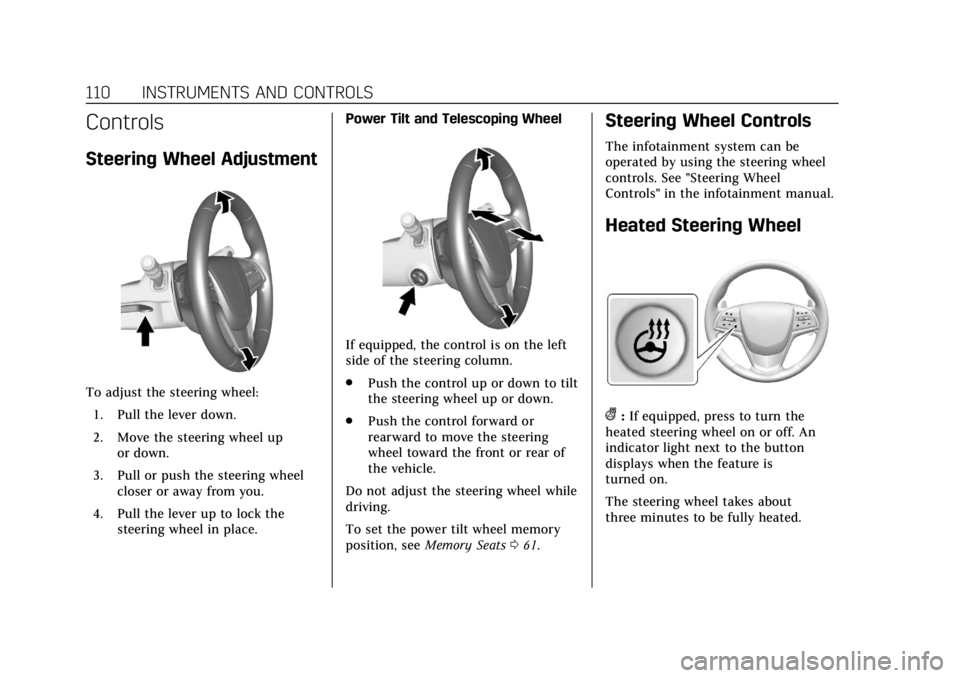
To adjust the steering wheel:1. Pull the lever down.
2. Move the steering wheel up or down.
3. Pull or push the steering wheel closer or away from you.
4. Pull the lever up to lock the steering wheel in place. Power Tilt and Telescoping Wheel
If equipped, the control is on the left
side of the steering column.
.
Push the control up or down to tilt
the steering wheel up or down.
. Push the control forward or
rearward to move the steering
wheel toward the front or rear of
the vehicle.
Do not adjust the steering wheel while
driving.
To set the power tilt wheel memory
position, see Memory Seats 061.
Steering Wheel Controls
The infotainment system can be
operated by using the steering wheel
controls. See "Steering Wheel
Controls" in the infotainment manual.
Heated Steering Wheel
(:If equipped, press to turn the
heated steering wheel on or off. An
indicator light next to the button
displays when the feature is
turned on.
The steering wheel takes about
three minutes to be fully heated.
Page 145 of 401
Cadillac CTS/CTS-V Owner Manual (GMNA-Localizing-U.S./Canada/Mexico-
12460273) - 2019 - CRC - 5/8/18
144 INSTRUMENTS AND CONTROLS
Care of the HUD
Clean the inside of the windshield to
remove any dirt or film that could
reduce the sharpness or clarity of the
HUD image.
Clean the HUD lens with a soft cloth
sprayed with glass cleaner. Wipe the
lens gently, then dry it.
HUD Troubleshooting
If you cannot see the HUD image
when the ignition is on, check that:
.Nothing is covering the HUD lens.
. The HUD brightness setting is not
too dim or too bright.
. The HUD is adjusted to the proper
height.
. Polarized sunglasses are not worn.
. The windshield and HUD lens are
clean.
If the HUD image is not correct,
contact your dealer.
The windshield is part of the HUD
system. If the windshield needs
replacing, see Windshield Replacement
0 287.
Vehicle Messages
Messages displayed on the DIC
indicate the status of the vehicle or
some action that may be needed to
correct a condition. Multiple messages
may appear one after another.
The messages that do not require
immediate action can be
acknowledged and cleared by pressing
V. The messages that require
immediate action cannot be cleared
until that action is performed.
All messages should be taken
seriously; clearing the message does
not correct the problem.
If a SERVICE message appears, see
your dealer.
Follow the instructions given in the
messages. The system displays
messages regarding the following
topics:
. Service Messages
. Fluid Levels
. Vehicle Security
. Brakes .
Steering
. Ride Control Systems
. Driver Assistance Systems
. Cruise Control
. Lighting and Bulb Replacement
. Wiper/Washer Systems
. Doors and Windows
. Seat Belts
. Airbag Systems
. Engine and Transmission
. Tire Pressure
. Battery
Engine Power Messages
ENGINE POWER IS REDUCED
This message displays when the
vehicle's propulsion power is reduced.
Reduced propulsion power can affect
the vehicle's ability to accelerate.
If this message is on, but there is no
observed reduction in performance,
proceed to your destination. The
performance may be reduced the next
time the vehicle is driven. The vehicle
Page 178 of 401
Cadillac CTS/CTS-V Owner Manual (GMNA-Localizing-U.S./Canada/Mexico-
12460273) - 2019 - CRC - 5/16/18
DRIVING AND OPERATING 177
Driving and
Operating
Driving Information
Distracted Driving . . . . . . . . . . . . . . . . 178
Defensive Driving . . . . . . . . . . . . . . . . 179
Drunk Driving . . . . . . . . . . . . . . . . . . . . 179
Control of a Vehicle . . . . . . . . . . . . . . 179
Braking . . . . . . . . . . . . . . . . . . . . . . . . . . . . 179
Steering . . . . . . . . . . . . . . . . . . . . . . . . . . . 180
Off-Road Recovery . . . . . . . . . . . . . . . . 180
Loss of Control . . . . . . . . . . . . . . . . . . . 181
Track Events and CompetitiveDriving . . . . . . . . . . . . . . . . . . . . . . . . . . 181
Driving on Wet Roads . . . . . . . . . . . 186
Hill and Mountain Roads . . . . . . . . 186
Winter Driving . . . . . . . . . . . . . . . . . . . . 187
If the Vehicle Is Stuck . . . . . . . . . . . 188
Vehicle Load Limits . . . . . . . . . . . . . . 189
Starting and Operating
New Vehicle Break-In . . . . . . . . . . . . 192
Composite Materials . . . . . . . . . . . . . 193
Ignition Positions . . . . . . . . . . . . . . . . 193
Starting the Engine . . . . . . . . . . . . . . 195
Stop/Start System . . . . . . . . . . . . . . . . 196
Engine Heater . . . . . . . . . . . . . . . . . . . . 197 Retained Accessory
Power (RAP) . . . . . . . . . . . . . . . . . . . . 198
Shifting Into Park . . . . . . . . . . . . . . . . 198
Shifting out of Park . . . . . . . . . . . . . . 199
Parking over Things That Burn . . . . . . . . . . . . . . . . . . . . . . . 200
Extended Parking . . . . . . . . . . . . . . . . . 200
Engine Exhaust
Engine Exhaust . . . . . . . . . . . . . . . . . . . 200
Running the Vehicle While Parked . . . . . . . . . . . . . . . . . . . . . . . . . . . 201
Automatic Transmission
Automatic Transmission . . . . . . . . . 201
Manual Mode . . . . . . . . . . . . . . . . . . . . . 203
Drive Systems
All-Wheel Drive . . . . . . . . . . . . . . . . . . 204
Brakes
Antilock Brake System (ABS) . . . . 205
Electric Parking Brake . . . . . . . . . . . . 205
Brake Assist . . . . . . . . . . . . . . . . . . . . . . . 207
Hill Start Assist (HSA) . . . . . . . . . . . 207
Ride Control Systems
Traction Control/ElectronicStability Control . . . . . . . . . . . . . . . . 207
Driver Mode Control . . . . . . . . . . . . . 209
Competitive Driving Mode (V-Sport Only) . . . . . . . . . . . . . . . . . . 212 Limited-Slip Differential . . . . . . . . . 215
Cruise Control
Cruise Control . . . . . . . . . . . . . . . . . . . . 215
Adaptive Cruise Control . . . . . . . . . 218
Driver Assistance Systems
Driver Assistance Systems . . . . . . . 226
Assistance Systems for Parking
or Backing . . . . . . . . . . . . . . . . . . . . . . . 227
Assistance Systems for Driving . . . . . . . . . . . . . . . . . . . . . . . . . . 234
Forward Collision Alert (FCA) System . . . . . . . . . . . . . . . . . . . . . . . . . . 234
Forward Automatic Braking (FAB) . . . . . . . . . . . . . . . . . . . 237
Side Blind Zone Alert (SBZA) . . . . 238
Lane Change Alert (LCA) . . . . . . . . 238
Lane Departure Warning (LDW) . . . . . . . . . . . . . . . . . 240
Lane Keep Assist (LKA) . . . . . . . . . . 240
Vehicle-to-Vehicle . . . . . . . . . . . . . . . . 242
Fuel
Top Tier Fuel . . . . . . . . . . . . . . . . . . . . . 244
Recommended Fuel (LGX 3.6L V6 Engine) . . . . . . . . . . . . . . . . . . . . . . 245
Recommended Fuel (LTG 2.0L L4 Engine) . . . . . . . . . . . . . . . . . . . . . . . . . . 245