radio CADILLAC CTS V 2004 1.G User Guide
[x] Cancel search | Manufacturer: CADILLAC, Model Year: 2004, Model line: CTS V, Model: CADILLAC CTS V 2004 1.GPages: 454, PDF Size: 2.87 MB
Page 189 of 454

SEEK LOCAL/DISTANT:This feature instructs the
audio system to seek only local radio stations with the
strongest signal or to seek all radio stations with a strong
signal in a large area. Use LOCAL when you are in
urban areas where there are several strong radio station
signals and you want to limit the number of stations to
those with the strongest signals only. Use DISTANT
when you are in rural areas where there are fewer radio
station signals available.
To switch between LOCAL and DISTANT, press the
TUNE/SEL knob. Your choice will be set when you press
BACK and return to the main menu.
9(English/Metric Units):Use this menu item to
adjust the measurement units.
You can choose between ENGLISH UNITS and
METRIC UNITS. To switch between the two, press the
TUNE/SEL knob. Once your choice is displayed,
turn the knob to set your choice and continue scrolling
through the main menu.
The measurement units that you choose will be reected
on all the vehicle system displays, not just the DIC
information. For example, the climate control panel will
display degrees Celsius if you choose METRIC UNITS.TCS (Traction Control System):You can enable or
disable the traction control system using this menu item.
Press the TUNE/SEL knob to switch between on
and off.
You can also turn the traction control system off using the
traction control button located in the glove box, or by
programming one of the steering wheel controls
(1, 2, 3 or 4) or audio system softkeys to enable/disable
the TCS. SeeRecongurable Steering Wheel Controls
(SWC) (CTS) on page 3-8and “Congurable Radio
Display Keys” underAudio System(s) on page 3-107for
more information.
When you disable the traction control system, the
Traction Suspended message will appear on the DIC and
the traction control system warning light on the instrument
panel cluster will come on. SeeDIC Warnings and
Messages on page 3-70andTraction Control System
(TCS) Warning Light on page 3-45for more information.
8(Clock):Use this menu item to set the time on
the clock.
SeeSetting the Time on page 3-108for
more information.
3-69
Page 190 of 454

8/4(Clock/Information Display):Use this menu
item to toggle between the clock display and the XM™
Information (Song, Artist, Album), if available.
SeeAudio System(s) on page 3-107for
more information.
SETUP:When you select this menu item, the following
submenu is available:
PERSONALIZATION
LANGUAGE
CONFIGURE DISPLAY KEYS
CONFIGURE SWC (Steering Wheel Control) KEYS
To change the language displayed on the radio, select
LANGUAGE by pressing the TUNE/SEL knob. Turn the
TUNE/SEL knob to scroll through the available languages
and press the knob to make your selection. If you
accidentally select a language that you did not want,
ENGLISH is always at the top of the language list.
For more information on the other items in the SETUP
menu seeDIC Vehicle Personalization on page 3-88
andRecongurable Steering Wheel Controls (SWC)
(CTS) on page 3-8.
DIC Warnings and Messages
These messages will appear if there is a problem
sensed in one of your vehicle’s systems. The text
messages are the same for both the Base audio and
Navigation systems unless otherwise indicated.
The symbols, however, appear only on the Navigation
system display.
You must acknowledge a message to clear it from the
screen for further use. To clear a message, do one
of the following:
Using the Base audio system, press CLR.
Using the Navigation system, press the multifunction
button next to the OK prompt.
Be sure to take any message that appears on the
screen seriously and remember that clearing the
message will only make the message disappear,
not the problem.
3-70
Page 192 of 454

To reduce the charging overload, use the vehicle’s
accessories. Turn on the exterior lamps and radio, set
the climate control on AUTO and the fan speed on the
highest setting, and turn the rear window defogger on.
The normal battery voltage range is 11.5 to 15.5 volts
when the engine is running. You can monitor battery
voltage on the DIC by pressing the INFO button until you
nd BATTERY VOLTS (Base audio system) or by
selecting Battery Voltage from the Vehicle Information
menu (Navigation system).
Battery Voltage Low
This symbol appears
with the Battery Voltage
Low message.
This message will appear when the electrical system
is charging less than 10 volts or if the battery has
been drained.If this message appears immediately after starting the
engine, it is possible that the generator can still recharge
the battery. The battery should recharge while driving
but may take a few hours to do so. Consider using
an auxiliary charger (be sure to follow the
manufacturer’s instructions) to boost the battery after
returning home or to a nal destination.
If this message appears while driving or after starting
your vehicle and stays on, have it checked by your
GM dealer immediately to determine the cause of
this problem.
To help the generator recharge the battery quickly, you
can reduce the load on the electrical system by
turning off the accessories.
The normal battery voltage range is 11.5 to 15.5 volts.
You can monitor battery voltage on the DIC by pressing
the INFO button until you nd BATTERY VOLTS
(Base audio system) or by selecting Battery Voltage
from the Vehicle Information menu (Navigation system).
3-72
Page 208 of 454
Turn Signal On
This symbol appears
with the Turn Signal
On message.
If you drive your vehicle for more than about
1 mile (1.6 km) with a turn signal on, this message
will appear as a reminder to turn off the turn signal.
A multiple chime will sound when this message
is displayed.
DIC Vehicle Personalization
Your vehicle is equipped with personalization that allows
you to program certain features to a preferred setting
for up to two people. The number of programmable
features varies depending upon which model of
the vehicle is purchased.
On all vehicles, features such as climate control
settings, radio preset settings, exterior lighting at unlock,
remote lock and unlock conrmation, and automatic
door locks have already been programmed for
your convenience.
Some vehicles are equipped with additional features
that can be programmed including the seat and outside
rearview mirror position. The navigation system
screen preferences will remain at the last set position.
If your vehicle is equipped with the ability to program
additional personalization features, the driver’s
preferences are recalled by pressing the unlock button
on the remote keyless entry transmitter, 1 or 2, or
by pressing the appropriate memory button, 1 or 2,
located on the driver’s door. Certain features can
be programmed not to recall until the key is placed in
the ignition. To change feature preferences you
must use one of the following procedures.
3-88
Page 211 of 454
3. There is an alpha-numeric bar at the bottom of the
screen. Turn the TUNE/SEL knob to scroll through
the available letters, numbers and symbols.
Press the knob to select the highlighted character.
As each character is selected, it will appear on the
screen and the system will advance one character to
the right. If you make a mistake, press the
Backspace multifunction button to erase the last
character entered. You can then re-enter another
character. If you want to completely erase the entire
name, press the Delete multifunction button.
If you prefer lower case letters, press the Lower
multifunction button. The multifunction button
will then change to Upper. Press the Upper
multifunction button to change the letters back to
upper case.
4. Repeat Step 3 until the name you want is complete.
You can program up to 26 characters.
5. Press the Ok multifunction button when the name is
complete to save it.
The name you selected is now set. You can either exit
the programming mode by following the instructions
later in this section or program the next feature available
on your vehicle.Congure Display Keys
(Base Audio System)
This feature allows you to customize the functions
of the four soft keys located to the left and right of
the audio display. See “Congurable Radio Display
Keys” underRadio with CD on page 3-108for
programming information.
Remote Recall Memory/Recall
Driving Positions
If your vehicle has the optional memory package, you
will have this feature. When this feature is turned on, you
can recall any previously programmed seat and mirror
controls when the unlock button on the remote
keyless entry transmitter is pressed.
Programmable Modes
Mode 1:ON
Mode 2:OFF
3-91
Page 227 of 454

To change the mode using the Navigation system,
do the following:
1. Enter the Personalization menu following the
instructions listed previously.
2. Scroll to Enhanced Chime Volume using the
TUNE/SEL knob to highlight it.
3. Press the TUNE/SEL knob to switch back and forth
between the normal and loud settings.
You will hear a chime as an example of the volume
level chosen.
The mode you selected is now set. You can either exit
the programming mode by following the instructions
later in this section or program the next feature available
on your vehicle.
Exiting the Personalization Menu
To exit the personalization portion of the SETUP menu
using the Base audio system, press the BACK key
once you’ve nished making your selections. You will
return to the main audio screen.
To exit Feature Programming using the Navigation
system, press the multifunction button next to the Back
prompt once you’ve nished making your selections.
You will return to the Main Menu.
Audio System(s)
Notice:Before adding any sound equipment to
your vehicle, like a tape player, CB radio, mobile
telephone, or two-way radio, make sure that it can
be added by checking with your dealer. Also,
check federal rules covering mobile radio and
telephone units. If sound equipment can be added,
it is very important to do it properly. Added
sound equipment may interfere with the operation
of your vehicle’s engine, radio, or other systems,
and even damage them. Your vehicle’s systems may
interfere with the operation of sound equipment
that has been added improperly.
Figure out which audio system is in your vehicle, nd
out what your audio system can do, and how to operate
all of its controls.
Your vehicle has a feature called Retained Accessory
Power (RAP). With RAP, the audio system can be
played even after the ignition is turned off. See
“Retained Accessory Power (RAP)” underIgnition
Positions on page 2-22.
3-107
Page 228 of 454
Setting the Time
1. Press the TUNE/SEL knob to enter the main menu.
2. Turn the TUNE/SEL knob until SET CLOCK
appears on the display.
3. Press the TUNE/SEL knob to select SET CLOCK.
4. Turn the TUNE/SEL knob to adjust the time.
5. Press the TUNE/SEL knob to update the time.
VEHICLE TIME UPDATED will appear on
the display.
If the CLOCK/RADIO DISP is congured into one of the
congurable keys, pressing the key will switch the
display between the radio station frequency and the
time. See “Congurable Radio Display Keys” under
Radio with CD on page 3-108for more information on
conguring the keys.
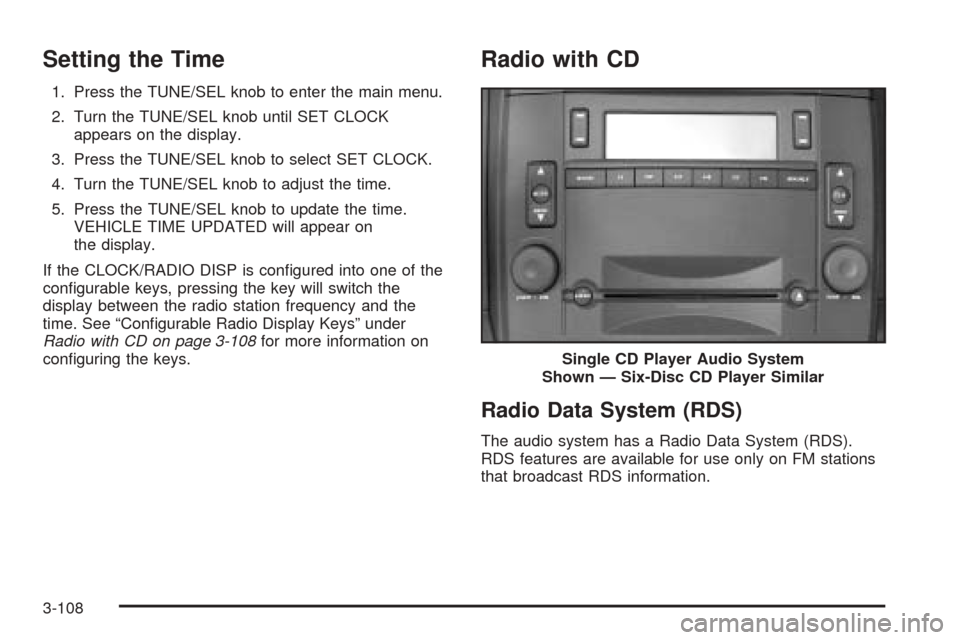
Radio with CD
Radio Data System (RDS)
The audio system has a Radio Data System (RDS).
RDS features are available for use only on FM stations
that broadcast RDS information.Single CD Player Audio System
Shown — Six-Disc CD Player Similar
3-108
Page 229 of 454
With RDS, the radio can do the following:
Seek to stations broadcasting the selected type
of programming
Receive announcements concerning local and
national emergencies
Display messages from radio stations
Seek to stations with traffic announcements
This system relies upon receiving specic information
from these stations and will only work when the
information is available. In rare cases, a radio station
may broadcast incorrect information that will cause
the radio features to work improperly. If this happens,
contact the radio station.
While the radio is tuned to an RDS station, the station
name or call letters will appear on the display instead of
the frequency. RDS stations may also provide the time of
day, a program type (PTY) for current programming, and
the name of the program being broadcast.
XM™ Satellite Radio Service
XM™ is a satellite radio service that is based in the
48 contiguous United States. XM™ offers 100 coast to
coast channels including music, news, sports, talk,
and children’s programming. XM™ provides digital
quality audio and text information, including song title
and artist name. A service fee is required in order
to receive the XM™ service. For more information,
contact XM™ at www.xmradio.com or call
1-800-852-XMXM (9696).
Playing the Radio
PWR (Power):Press this knob to turn the system on
and off.
VOL (Volume):Turn this knob to increase or to
decrease the volume.
AVC (Automatic Volume Compensation):Available
only with the premium Bose
®audio system, AVC
monitors the noise in the vehicle and will adjust the
volume level so that it always sounds the same to you.
AVC works best when listening at low volume levels.
At loud listening levels there will be little or no effect.
To turn AVC on and off, perform the following steps:
1. Press the TUNE/SEL knob to enter the main menu.
2. Turn the TUNE/SEL knob until AUTO VOLUME
COMP. appears on the display.
3-109
Page 230 of 454
3. Press the TUNE/SEL knob to turn AVC on or off.
An X will appear in the box when AVC is selected on.
4. Press the CLR button to exit the display. To return
to the original display, repeatedly press the CLR
button or wait for the display to time out.
SOURCE:Press this button to select a source, either
radio or CD. The CD must be loaded to select the
source and to play. CD will appear on the display if a
CD is loaded. If a CD is not loaded the display will
not change from the radio source.
Finding a Station
BAND:Press this button to select FM1, FM2, AM, or
XM1 or XM2 (if equipped).
QSEEKR:Press the up or the down arrow to go to
the next or to the previous station and stay there.
SEEK will appear on the display. The sound will mute
while seeking.
The radio will only seek stations with a strong signal
that are in the selected band.
QSCANR:Press the SCAN button to enter scan
mode. SCAN will appear on the display. Press the
up arrow to scan to the next station. The radio will go to
a station, play for 5 seconds, then go on to the next
station. Press this button again to stop scanning.To scan preset stations, press and hold SCAN for more
than two seconds until you hear a beep and PSCAN
appears on the display. The radio will go to the
rst preset station stored on your pushbuttons, play for
5 seconds, then go on to the next preset station.
Press SCAN again to stop scanning presets.
The radio will only scan stations with a strong signal
that are in the selected band.
LOCAL/DISTANT Selection:With this feature you can
set the radio to search for local stations or stations that
are further away for a larger selection. To set this feature
to LOCAL or DISTANT, perform the following steps:
1. Press the TUNE/SEL knob to enter the main menu.
2. Turn the TUNE/SEL knob until SEEK LOCAL or
SEEK DISTANT appears on the display.
3. Press the TUNE/SEL knob to select either LOCAL
or DISTANT.
4. Press the CLR button to exit the display. To return
to the original display, repeatedly press the CLR
button or wait for the display to time out.
To search for stations, press the SEEK up or down
arrows. If the system is set to LOCAL, SEEK will appear
in the display and seek to stations with strong signals
only. If the system is set to DISTANT, D-SEEK will
appear in the display and seek to stations with weak and
strong signals.
3-110
Page 231 of 454
Setting Preset Stations
Up to 30 stations (six FM1, six FM2, and six AM,
six XM1 and six XM2 (if equipped)), can be programmed
on the six numbered pushbuttons, by performing the
following steps:
1. Turn the radio on.
2. Press BAND to select FM1, FM2, or AM, or
XM1 or XM2.
3. Tune in the desired station.
4. Press and hold one of the six numbered pushbuttons
for two seconds until you hear a beep. The set preset
station number will appear on the display above the
pushbutton that it is set to. Whenever that numbered
pushbutton is pressed for less than two seconds, the
station that was set will return.
5. Repeat the steps for each pushbutton.
To set the preset stations with an equalization
setting, DSP setting, or a PTY setting, see each
of these features later in this section. When a preset
station is selected, once one of these additional
settings is selected, the preset station will remember
each setting and it will remain active, until the
setting is selected off for that preset station.AUTOSTORE PRESETS:To set the preset stations
automatically, perform the following steps:
1. Turn the radio on.
2. Press BAND to select FM1, FM2, or AM.
3. Press the TUNE/SEL knob to enter the main menu.
4. Turn the TUNE/SEL knob until AUTOSTORE
PRESETS appears on the display.
5. Press the TUNE/SEL knob to select. AUTOSTORE
will appear on the display. The radio will
automatically search the band and select and store
the six radio stations with the strongest signal.
The stations will be stored by signal strength, not
sequential order. The set preset station number will
appear on the display above the pushbutton that
it is set to. Whenever that numbered pushbutton is
pressed for less than two seconds, the station
that was set will return.
6. Press the CLR button to exit the display. To return
to the original display, repeatedly press the CLR
button or wait for the display to time out.
When battery power is removed and later applied,
you will not have to reset your radio presets.
3-111