power steering CADILLAC CTS V 2017 3.G User Guide
[x] Cancel search | Manufacturer: CADILLAC, Model Year: 2017, Model line: CTS V, Model: CADILLAC CTS V 2017 3.GPages: 352, PDF Size: 3.99 MB
Page 151 of 352
Cadillac CTS/CTS-V Owner Manual (GMNA-Localizing-MidEast-10293089) -
2017 - crc - 6/22/16
150 INSTRUMENTS AND CONTROLS
The selected language will display on
the system, and voice recognition,
if equipped will reflect the selected
language.
Valet Mode(If Equipped)
This will lock the infotainment system
and steering wheel controls. It may
also limit access to vehicle storage
locations (if equipped).
To enable valet mode:
1. Enter a four-digit code on the keypad.
2. Select Enter to go to the confirmation screen.
3. Re-enter the four-digit code.
Press LOCK or UNLOCK to lock or
unlock the system. Press Back to go
back to the previous menu.
Radio
Press to display the Radio menu and
the following may display:
. Manage Favorites
. Number of Favorites Shown
. Auto Volume
. Audible Touch Feedback .
Bose AudioPilot
. Maximum Start Up Volume
Manage Favorites
This allows favorites to be edited. See
“Manage Favorites ”in “Settings” under
“Radio ”in the infotainment manual.
Number of Favorites Shown
Press to set the number of favorites to
display.
Select the desired number or select
Auto and the infotainment system will
automatically adjust the number of
favorites shown.
Auto Volume
This feature adjusts the volume based
on the vehicle speed.
Select Off, Low, Medium-Low,
Medium, Medium-High, or High.
Audible Touch Feedback
This allows Audible Touch Feedback
to be turned on or off.
Select Off or On. Bose Audio Pilot
If equipped, this feature adjusts the
volume based on the noise in the
vehicle and speed. See
“Bose
AudioPilot noise compensation
technology” under“Infotainment
System Settings” in the infotainment
manual.
Select Off or On.
Maximum Startup Volume
This feature sets the maximum
startup volume. If the vehicle is
started and the volume is greater than
this level, the volume is adjusted to
this level. To set the maximum
startup volume, press + or −to
increase or decrease.
Vehicle
Select and the following may display:
. Climate and Air Quality
. Collision/Detection Systems
. Comfort and Convenience
. Lighting
. Power Door Locks
. Remote Lock, Unlock, Start
Page 182 of 352
Cadillac CTS/CTS-V Owner Manual (GMNA-Localizing-MidEast-10293089) -
2017 - crc - 6/22/16
DRIVING AND OPERATING 181
Driving and
Operating
Driving Information
Distracted Driving . . . . . . . . . . . . . . . . 182
Defensive Driving . . . . . . . . . . . . . . . . 182
Control of a Vehicle . . . . . . . . . . . . . . 182
Braking . . . . . . . . . . . . . . . . . . . . . . . . . . . . 183
Steering . . . . . . . . . . . . . . . . . . . . . . . . . . . 183
Off-Road Recovery . . . . . . . . . . . . . . . . 184
Loss of Control . . . . . . . . . . . . . . . . . . . 184
Track Events and CompetitiveDriving . . . . . . . . . . . . . . . . . . . . . . . . . . 185
Driving on Wet Roads . . . . . . . . . . . 189
Hill and Mountain Roads . . . . . . . . 189
Winter Driving . . . . . . . . . . . . . . . . . . . . 190
If the Vehicle Is Stuck . . . . . . . . . . . 191
Vehicle Load Limits . . . . . . . . . . . . . . 192
Starting and Operating
New Vehicle Break-In . . . . . . . . . . . . 195
Composite Materials . . . . . . . . . . . . . 196
Ignition Positions . . . . . . . . . . . . . . . . 196
Starting the Engine . . . . . . . . . . . . . . 198
Retained Accessory Power (RAP) . . . . . . . . . . . . . . . . . . . . 200
Shifting Into Park . . . . . . . . . . . . . . . . 200
Shifting out of Park . . . . . . . . . . . . . . 201 Parking over Things
That Burn . . . . . . . . . . . . . . . . . . . . . . . 201
Extended Parking . . . . . . . . . . . . . . . . . 201
Engine Exhaust
Engine Exhaust . . . . . . . . . . . . . . . . . . . 202
Running the Vehicle While Parked . . . . . . . . . . . . . . . . . . . . . . . . . . . 203
Automatic Transmission
Automatic Transmission . . . . . . . . . 203
Manual Mode . . . . . . . . . . . . . . . . . . . . . 205
Drive Systems
All-Wheel Drive . . . . . . . . . . . . . . . . . . 206
Brakes
Antilock Brake System (ABS) . . . . 206
Electric Parking Brake . . . . . . . . . . . . 207
Brake Assist . . . . . . . . . . . . . . . . . . . . . . . 208
Ride Control Systems
Traction Control/ElectronicStability Control . . . . . . . . . . . . . . . . 209
Driver Mode Control . . . . . . . . . . . . . 211
Competitive Driving Mode . . . . . . . 214
Limited-Slip Differential (Except V-Series) . . . . . . . . . . . . . . . . . . . . . . . . . 217
Limited-Slip Differential (V-Series Only) . . . . . . . . . . . . . . . . . . 217
Cruise Control
Cruise Control . . . . . . . . . . . . . . . . . . . . 218 Adaptive Cruise Control . . . . . . . . . 220
Driver Assistance Systems
Driver Assistance Systems . . . . . . . 227
Assistance Systems for Parking
or Backing . . . . . . . . . . . . . . . . . . . . . . . 228
Assistance Systems for Driving . . . . . . . . . . . . . . . . . . . . . . . . . . 235
Forward Collision Alert (FCA) System . . . . . . . . . . . . . . . . . . . . . . . . . . 235
Forward Automatic Braking (FAB) . . . . . . . . . . . . . . . . . . . 237
Side Blind Zone Alert (SBZA) . . . . 239
Lane Change Alert (LCA) . . . . . . . . 239
Lane Departure Warning (LDW) . . . . . . . . . . . . . . . . . 241
Lane Keep Assist (LKA) . . . . . . . . . . 241
Fuel
Fuel . . . . . . . . . . . . . . . . . . . . . . . . . . . . . . . 242
Fuel Additives . . . . . . . . . . . . . . . . . . . . 243
Filling the Tank . . . . . . . . . . . . . . . . . . 243
Filling a Portable Fuel
Container . . . . . . . . . . . . . . . . . . . . . . . . 245
Trailer Towing
General Towing Information . . . . 245
Conversions and Add-Ons
Add-On Electrical Equipment . . . 246
Page 184 of 352

Cadillac CTS/CTS-V Owner Manual (GMNA-Localizing-MidEast-10293089) -
2017 - crc - 6/22/16
DRIVING AND OPERATING 183
Braking
Braking action involves perception
time and reaction time. Deciding to
push the brake pedal is perception
time. Actually doing it is
reaction time.
Average driver reaction time is about
three-quarters of a second. In that
time, a vehicle moving at 100 km/h
(60 mph) travels 20 m (66 ft), which
could be a lot of distance in an
emergency.
Helpful braking tips to keep in mind
include:
.Keep enough distance between
you and the vehicle in front
of you.
. Avoid needless heavy braking.
. Keep pace with traffic.
If the engine ever stops while the
vehicle is being driven, brake normally
but do not pump the brakes. Doing so
could make the pedal harder to push
down. If the engine stops, there will
be some power brake assist but it will
be used when the brake is applied. Once the power assist is used up, it
can take longer to stop and the brake
pedal will be harder to push.
Steering
Variable Effort Steering
Some vehicles have a steering system
that varies the amount of effort
required to steer the vehicle in
relation to the speed of the vehicle.
The amount of steering effort required
is less at slower speeds to make the
vehicle more maneuverable and easier
to park. At faster speeds, the steering
effort increases to provide a sport-like
feel to the steering. This provides
maximum control and stability.
Electric Power Steering
The vehicle has electric power
steering. It does not have power
steering fluid. Regular maintenance is
not required.
If power steering assist is lost due to a
system malfunction, the vehicle can
be steered, but may require increased
effort. See your dealer if there is a
problem.If the steering wheel is turned until it
reaches the end of its travel and is
held against that position for an
extended period of time, power
steering assist may be reduced.
If steering assist is used for an
extended period of time, power assist
may be reduced.
Normal use of the power steering
assist should return when the system
cools down.
See specific vehicle steering messages
under
Vehicle Messages 0138.
See your dealer if there is a problem.
Curve Tips
. Take curves at a reasonable speed.
. Reduce speed before entering a
curve.
. Maintain a reasonable steady
speed through the curve.
. Wait until the vehicle is out of the
curve before accelerating gently
into the straightaway.
Page 198 of 352
Cadillac CTS/CTS-V Owner Manual (GMNA-Localizing-MidEast-10293089) -
2017 - crc - 6/22/16
DRIVING AND OPERATING 197
To shift out of P (Park), the vehicle
must be in ACC/ACCESSORY or ON/
RUN, and the brake pedal must be
applied.
Stopping the Engine/OFF (No
Indicator Lights) :When the vehicle
is stopped, press the ENGINE START/
STOP button once to turn the
engine off.
If the vehicle is in P (Park), the
ignition will turn off, and Retained
Accessory Power (RAP) will remain
active. See Retained Accessory Power
(RAP) 0200.
If the vehicle is not in P (Park), the
ignition will return to ACC/
ACCESSORY and display a message in
the Driver Information Center (DIC).
See Transmission Messages 0147.
When the vehicle is shifted into
P (Park), the ignition system will
switch to OFF.
Do not turn the engine off when the
vehicle is moving. This will cause a
loss of power assist in the brake and
steering systems and disable the
airbags. If the vehicle must be shut off in an
emergency:
1. Brake using a firm and steady pressure. Do not pump the
brakes repeatedly. This may
deplete power assist, requiring
increased brake pedal force.
2. Shift the vehicle to N (Neutral). This can be done while the
vehicle is moving. After shifting
to N (Neutral), firmly apply the
brakes and steer the vehicle to a
safe location.
3. Come to a complete stop, shift to P (Park), and turn the ignition to
OFF. On vehicles with an
automatic transmission, the shift
lever must be in P (Park) to turn
the ignition switch to the OFF
position.
4. Set the parking brake. See Electric Parking Brake 0207.{Warning
Turning off the vehicle while
moving may cause loss of power
assist in the brake and steering
systems and disable the airbags.
While driving, only shut the vehicle
off in an emergency.
If the vehicle cannot be pulled over,
and must be shut off while driving,
press and hold the ENGINE START/
STOP button for longer than
two seconds, or press twice in
five seconds.
ACC/ACCESSORY (Amber Indicator
Light) : This mode allows you to use
some electrical accessories when the
engine is off.
With the ignition off, pressing the
button one time without the brake
pedal applied will place the ignition
system in ACC/ACCESSORY.
The ignition will switch from ACC/
ACCESSORY to OFF after five minutes
to prevent battery rundown.
Page 208 of 352
Cadillac CTS/CTS-V Owner Manual (GMNA-Localizing-MidEast-10293089) -
2017 - crc - 6/22/16
DRIVING AND OPERATING 207
a sudden obstacle, a computer senses
the wheels are slowing down. If one of
the wheels is about to stop rolling, the
computer will separately work the
brakes at each wheel.
ABS can change the brake pressure to
each wheel, as required, faster than
any driver could. This can help you
steer around the obstacle while
braking hard.
As the brakes are applied, the
computer keeps receiving updates on
wheel speed and controls braking
pressure accordingly.
Remember: ABS does not change the
time needed to get a foot up to the
brake pedal or always decrease
stopping distance. If you get too close
to the vehicle in front of you, there
will not be enough time to apply the
brakes if that vehicle suddenly slows
or stops. Always leave enough room
up ahead to stop, even with ABS.Using ABS
Do not pump the brakes. Just hold the
brake pedal down firmly and let ABS
work. You may hear the ABS pump or
motor operating and feel the brake
pedal pulsate. This is normal.
Braking in Emergencies
ABS allows you to steer and brake at
the same time. In many emergencies,
steering can help more than even the
very best braking.
Electric Parking Brake
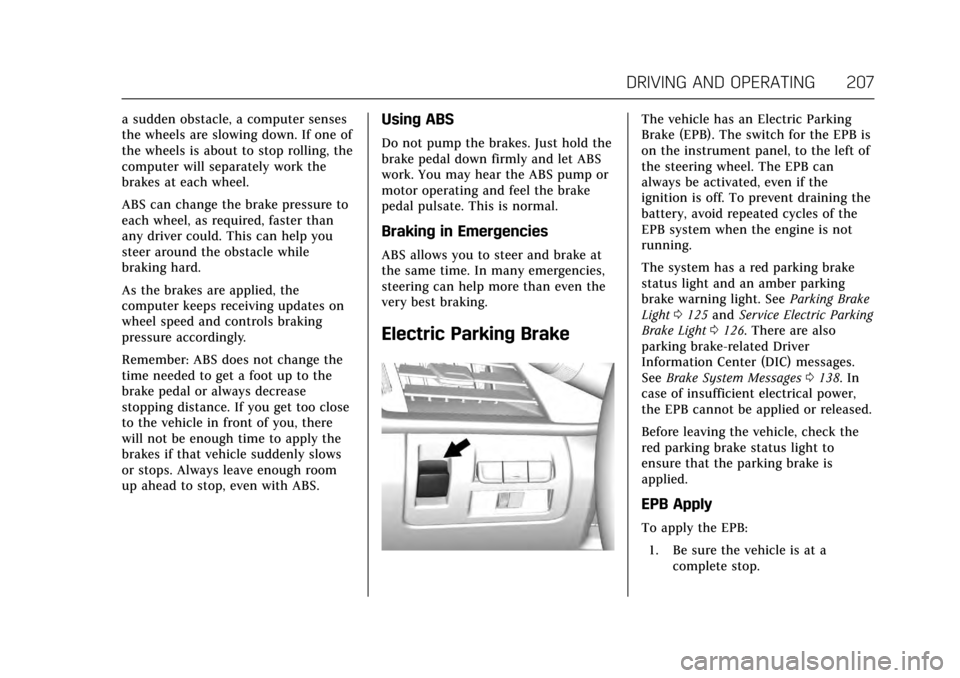
The vehicle has an Electric Parking
Brake (EPB). The switch for the EPB is
on the instrument panel, to the left of
the steering wheel. The EPB can
always be activated, even if the
ignition is off. To prevent draining the
battery, avoid repeated cycles of the
EPB system when the engine is not
running.
The system has a red parking brake
status light and an amber parking
brake warning light. SeeParking Brake
Light 0125 and Service Electric Parking
Brake Light 0126. There are also
parking brake-related Driver
Information Center (DIC) messages.
See Brake System Messages 0138. In
case of insufficient electrical power,
the EPB cannot be applied or released.
Before leaving the vehicle, check the
red parking brake status light to
ensure that the parking brake is
applied.
EPB Apply
To apply the EPB:
1. Be sure the vehicle is at a complete stop.
Page 212 of 352

Cadillac CTS/CTS-V Owner Manual (GMNA-Localizing-MidEast-10293089) -
2017 - crc - 6/22/16
DRIVING AND OPERATING 211
Adding accessories can affect the
vehicle's performance. SeeAccessories
and Modifications 0248.
Driver Mode Control
Driver Mode Control attempts to add
a sportier feel, provide a more
comfortable ride, or assist in different
weather conditions or terrain. This
system simultaneously changes the
software settings of various
sub-systems. Depending on the option
package, available features, and mode
selected, the suspension, steering, and
powertrain will change settings to
achieve the desired mode
characteristics. If the vehicle is
equipped with Magnetic Ride Control,
selecting the various Driver Modes
adjusts the ride of the vehicle to
enhance the ride performance for the
road conditions and the
selected mode. While in the Sport and/or Track
Modes, the vehicle monitors driving
behavior and automatically enables
Performance Shift Features when
spirited driving is detected. These
features maintain lower transmission
gears to increase available engine
braking and improve acceleration
response. The vehicle will exit these
features and return to normal Sport or
Track Mode operation after a short
period when no spirited driving is
detected.
Driver Mode Control Switch
The Driver Mode Control has three or
four modes: Tour, Sport, Snow/Ice,
and Track. The Track Mode is for
V-Sport and V-Series models only. Press
«orzon the MODE switch
on the center console to make a mode
selection. The first press of the switch
will show the current mode.
Subsequent presses will scroll though
the available modes. The Tour and
Sport Modes will feel similar on a
smooth road. Select a new setting
whenever driving conditions change.
Tour Mode
Use for normal city and highway
driving to provide a smooth, soft ride.
Sport Mode
Use where road conditions or personal
preference demand a more controlled
response.
When selected, the Sport Mode
indicator will display in the Driver
Information Center (DIC).
Snow/Ice Mode
Use when more traction is needed
during slippery conditions.
When selected, the Snow/Ice Mode
indicator will display in the DIC.
Page 216 of 352

Cadillac CTS/CTS-V Owner Manual (GMNA-Localizing-MidEast-10293089) -
2017 - crc - 6/22/16
DRIVING AND OPERATING 215
not limit wheel spin, the Electronic
Limited-Slip Differential (eLSD) allows
increased vehicle agility, and more
effort is required to turn the steering
wheel. See“Limited-Slip Differential
(V-Series Only)” later in this section.
Adjust your driving accordingly.
Press
Yagain, or turn the ignition to
ACC/ACCESSORY and restart the
vehicle, to turn TCS back on. The
traction off light
iand StabiliTrak
OFF light
gwill go out in the
instrument cluster.
Caution
When traction control is turned off,
or Competitive Driving Mode is
active, it is possible to lose traction.
Performance Traction
Management (V-Series Only)
Performance Traction Management
(PTM) integrates the Traction Control,
StabiliTrak, and Selective Ride Control
systems to provide improved and
consistent performance when
cornering. The amount of available engine power is based on the mode
selected, track conditions, driver skill,
and the radius of each corner.
This light is on when the vehicle is in
the PTM mode.
To select this optional handling mode,
the vehicle mode must be Track. Then
quickly press
Yon the center
console two times. PERF TRAC 1 -
WET ACTIVE HANDLING ON displays
in the DIC.
When PTM is active, the up and down
buttons will no longer change Drive
Modes, but instead change PTM
modes.
To select a mode while in PTM, press
the Driver Mode Control/PTM buttons
on the center console.
To experience the performance benefit
of this system, after entering a curve
and at the point where normal acceleration occurs, fully push the
accelerator pedal. The PTM system
will modify the level of engine power
for a smooth and consistent
corner exit.
The PTM system contains five modes.
These modes are selected by pressing
the Driver Mode Control/PTM buttons
on the center console. Scroll up or
down through modes 1–5 by pressing
the MODE SELECT up and down
buttons The following is a DIC display
description and the recommended
usage of each mode:PERF TRAC 1
–WET ACTIVE
HANDLING ON
. Intended for all driver skill levels.
. Wet or damp conditions only —
not intended for use in heavy rain
or standing water.
. StabiliTrak is on and engine power
is reduced based on conditions.
Page 217 of 352

Cadillac CTS/CTS-V Owner Manual (GMNA-Localizing-MidEast-10293089) -
2017 - crc - 6/22/16
216 DRIVING AND OPERATING
PERF TRAC 2–DRY ACTIVE
HANDLING ON
. For use by less experienced drivers
or while learning a new track.
. Dry conditions only.
. StabiliTrak is on and engine power
is slightly reduced.
PERF TRAC 3 –SPORT ACTIVE
HANDLING ON
. For use by drivers who are familiar
with the track.
. Dry conditions only.
. Requires more driving skill than
mode 2.
. StabiliTrak is on and more engine
power is available than in mode 2.
PERF TRAC 4 –SPORT ACTIVE
HANDLING OFF
. For use by drivers who are familiar
with the track.
. Dry conditions only.
. Requires more driving skill than
modes 2 or 3. .
StabiliTrak is off and available
engine power is the same as
mode 3.
PERF TRAC 5 –RACE ACTIVE
HANDLING OFF
. For use by experienced drivers
who are familiar with the track.
. Dry conditions only.
. Requires more driving skill than in
other modes.
. StabiliTrak is off and engine power
is available for maximum
cornering speed.
Press and release
Yto turn off PTM
and return to the traction control and
StabiliTrak systems. The traction off
light
iand StabiliTrak OFF lightg
will go out.
Launch Control (V-Series Only)
A Launch Control feature is available,
within Competitive Driving Mode or
Performance Traction Management
(V-Series), to allow the driver to
achieve high levels of vehicle
acceleration in a straight line. Launch
Control is a form of traction control that manages tire spin while
launching the vehicle. This feature is
intended for use during closed course
race events where consistent zero to
60 and quarter mile times are
desirable.
Launch Control is only available when
the following criteria are met:
.
Competitive Driving Mode is
selected or any of the Performance
Traction Management modes are
selected (V-Series). The TCS light
comes on the instrument panel
and the appropriate DIC message
displays.
. The vehicle is not moving.
. The steering wheel is pointing
straight.
. The brake pedal must be firmly
pressed to the floor, equivalent to
a panic brake event.
. The accelerator pedal is rapidly
applied to wide open throttle. (If
the vehicle rolls due to wide open
throttle, release the throttle, press
the brake pedal more firmly, and
re-apply the accelerator to wide
open throttle.)
Page 285 of 352
Cadillac CTS/CTS-V Owner Manual (GMNA-Localizing-MidEast-10293089) -
2017 - crc - 6/22/16
284 VEHICLE CARE
FusesUsage
18 –
19 Auxiliary power outlet
20 Lighter
21 Wireless charger
22 Sensing diagnostic module/ Automatic
occupant sensing
23 Radio/DVD/HVAC control
24 Display
25 Heated steering wheel
26 Wireless charger
27 Steering wheel switches
28 –
29 Visor
30 –
31 –
32 Retained accessory power Fuses
Usage
33 Front HVAC blower
CB1 Accessory power outlet
CB7 –
K10 Retained accessory power
K605 Logistics
K644 Retained accessory power/Glove box
releaseRear Compartment Fuse
Block
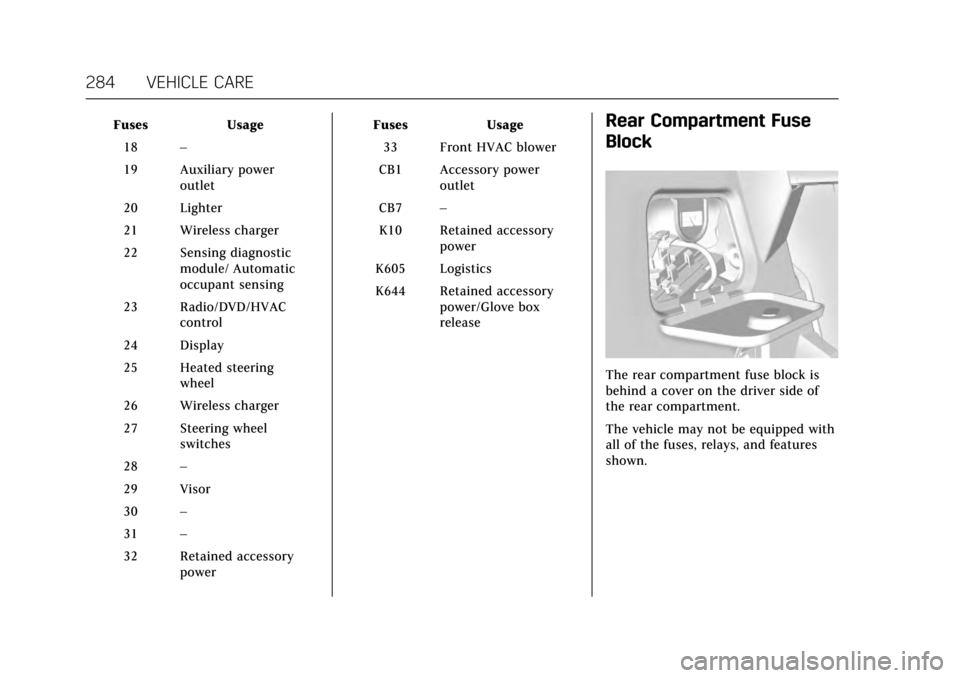
The rear compartment fuse block is
behind a cover on the driver side of
the rear compartment.
The vehicle may not be equipped with
all of the fuses, relays, and features
shown.
Page 296 of 352
Cadillac CTS/CTS-V Owner Manual (GMNA-Localizing-MidEast-10293089) -
2017 - crc - 6/22/16
VEHICLE CARE 295
sensor matching process should also
be performed after replacing a spare
tire with a road tire containing the
TPMS sensor. The malfunction light
and the DIC message should go off at
the next ignition cycle. The sensors
are matched to the tire/wheel
positions, using a TPMS relearn tool,
in the following order: driver side
front tire, passenger side front tire,
passenger side rear tire, and driver
side rear. See your dealer for service or
to purchase a relearn tool.
There are two minutes to match the
first tire/wheel position, and
five minutes overall to match all four
tire/wheel positions. If it takes longer,
the matching process stops and must
be restarted.
The TPMS sensor matching process is:1. Set the parking brake.
2. Place the vehicle power mode in ON/RUN/START. See Ignition
Positions 0196.
3. Make sure the Tire Pressure info display option is turned on. The
info displays on the DIC can be turned on and off through the
Settings menu. See
Driver
Information Center (DIC) 0132.
4. Use the five-way DIC control on the right side of the steering
wheel to scroll to the Tire
Pressure screen under the DIC
info page. See Driver Information
Center (DIC) 0132.
5. Press and hold the SEL button in the center of the five-way DIC
control.
The horn sounds twice to signal
the receiver is in relearn mode
and the TIRE LEARNING ACTIVE
message displays on the DIC
screen.
6. Start with the driver side front tire.
7. Place the relearn tool against the tire sidewall, near the valve stem.
Then press the button to activate
the TPMS sensor. A horn chirp
confirms that the sensor
identification code has been
matched to this tire and wheel
position. 8. Proceed to the passenger side
front tire, and repeat Step 7.
9. Proceed to the passenger side rear tire, and repeat Step 7.
10. Proceed to the driver side rear tire, and repeat Step 7. The horn
sounds two times to indicate the
sensor identification code has
been matched to the driver side
rear tire, and the TPMS sensor
matching process is no longer
active. The TIRE LEARNING
ACTIVE message on the DIC
display screen goes off.
11. Shut the ignition off.
12. Set all four tires to the recommended air pressure level
as indicated on the Tire and
Loading Information label.