mirror CADILLAC CTS V 2017 3.G Owner's Manual
[x] Cancel search | Manufacturer: CADILLAC, Model Year: 2017, Model line: CTS V, Model: CADILLAC CTS V 2017 3.GPages: 352, PDF Size: 3.99 MB
Page 228 of 352
Cadillac CTS/CTS-V Owner Manual (GMNA-Localizing-MidEast-10293089) -
2017 - crc - 6/22/16
DRIVING AND OPERATING 227
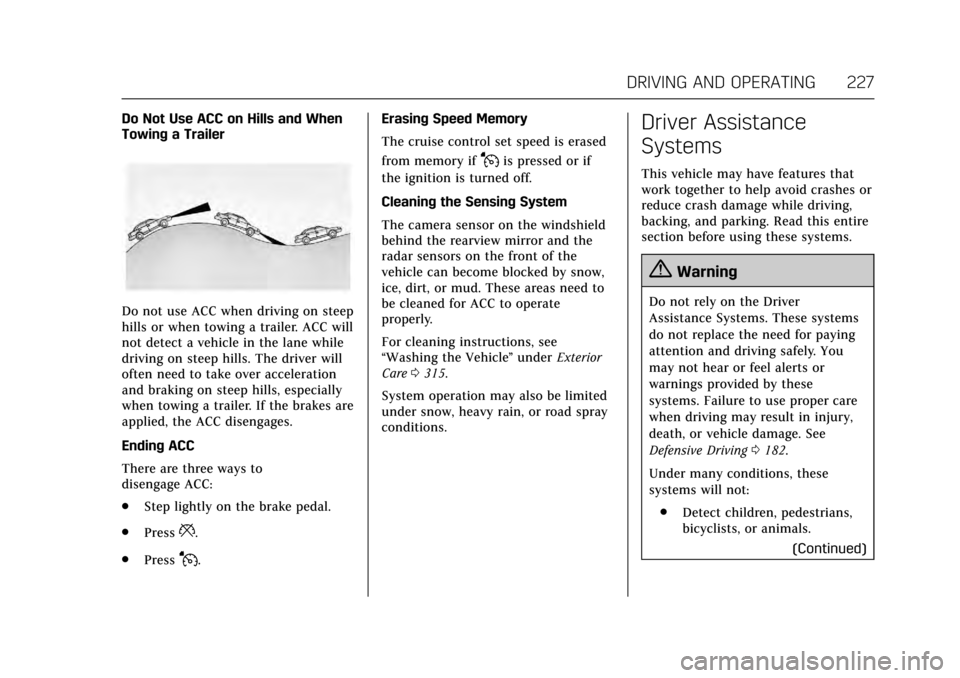
Do Not Use ACC on Hills and When
Towing a Trailer
Do not use ACC when driving on steep
hills or when towing a trailer. ACC will
not detect a vehicle in the lane while
driving on steep hills. The driver will
often need to take over acceleration
and braking on steep hills, especially
when towing a trailer. If the brakes are
applied, the ACC disengages.
Ending ACC
There are three ways to
disengage ACC:
.Step lightly on the brake pedal.
. Press
*.
. Press
J. Erasing Speed Memory
The cruise control set speed is erased
from memory if
Jis pressed or if
the ignition is turned off.
Cleaning the Sensing System
The camera sensor on the windshield
behind the rearview mirror and the
radar sensors on the front of the
vehicle can become blocked by snow,
ice, dirt, or mud. These areas need to
be cleaned for ACC to operate
properly.
For cleaning instructions, see
“Washing the Vehicle ”under Exterior
Care 0315.
System operation may also be limited
under snow, heavy rain, or road spray
conditions.
Driver Assistance
Systems
This vehicle may have features that
work together to help avoid crashes or
reduce crash damage while driving,
backing, and parking. Read this entire
section before using these systems.
{Warning
Do not rely on the Driver
Assistance Systems. These systems
do not replace the need for paying
attention and driving safely. You
may not hear or feel alerts or
warnings provided by these
systems. Failure to use proper care
when driving may result in injury,
death, or vehicle damage. See
Defensive Driving 0182.
Under many conditions, these
systems will not: . Detect children, pedestrians,
bicyclists, or animals.
(Continued)
Page 230 of 352

Cadillac CTS/CTS-V Owner Manual (GMNA-Localizing-MidEast-10293089) -
2017 - crc - 6/22/16
DRIVING AND OPERATING 229
1. View Displayed by theCamera
1. View Displayed by theCamera
2. Corners of the Rear Bumper
Displayed images may be farther or
closer than they appear. The area
displayed is limited and objects that
are close to either corner of the
bumper or under the bumper do not
display.
A warning triangle may display to
show that Rear Parking Assist (RPA)
has detected an object. This triangle
changes from amber to red and
increases in size the closer the object. Surround Vision (CTS Only)
If equipped, Surround Vision displays
an image of the area surrounding the
vehicle, along with the front or rear
camera views in the infotainment
display. The front camera is in the
grille or near the front emblem, the
side cameras are on the bottom of the
outside rearview mirrors, and the rear
camera is above the license plate.
{Warning
The Surround Vision cameras have
blind spots and will not display all
objects near the corners of the
vehicle. Folding side mirrors that
are out of position will not display
surround view correctly. Always
check around the vehicle when
parking or backing.
1. Views Displayed by the
Surround Vision Cameras
2. Area Not Shown
1. Views Displayed by the Surround Vision Cameras
2. Area Not Shown
Page 232 of 352

Cadillac CTS/CTS-V Owner Manual (GMNA-Localizing-MidEast-10293089) -
2017 - crc - 6/22/16
DRIVING AND OPERATING 231
sensors will not detect objects and
can also cause false detections. Keep
the sensors clean of mud, dirt, snow,
ice, and slush; and clean sensors after
a car wash in freezing temperatures.
{Warning
The Parking Assist system does not
detect children, pedestrians,
bicyclists, animals, or objects
located below the bumper or that
are too close or too far from the
vehicle. It is not available at speeds
greater than 8 km/h (5 mph). To
prevent injury, death, or vehicle
damage, even with Parking Assist,
always check the area around the
vehicle and check all mirrors before
moving forward or backing.
The instrument cluster may have a
parking assist display with bars that
show“distance to object ”and object
location information for the Parking
Assist system. As the object gets
closer, more bars light up and the bars
change color from yellow to amber
to red.
When an object is first detected in the
rear, one beep will be heard from the
rear, or both sides of the Safety Alert
Seat will pulse two times. When an
object is very close (<0.6 m (2 ft) in the
vehicle rear, or <0.3 m (1 ft) in the
vehicle front), five beeps will sound
from the front or rear depending
where the object is detected, or both
sides of the Safety Alert Seat will
pulse five times. Beeps for FPA are
higher pitched than for RPA. Backing Warning and Reverse
Automatic Braking
Vehicles with Adaptive Cruise Control
(ACC) have the Backing Warning and
Reverse Automatic Braking (RAB)
system. The Backing Warning part of
this system can warn of rear objects
when backing up at speeds greater
than 8 km/h (5 mph).
The Backing Warning System will
beep once from the rear when an
object is first detected, or pulse twice
on both sides of the Safety Alert Seat.
When the system detects a potential
crash, beeps will be heard from the
rear, or five pulses will be felt on both
sides of the Safety Alert Seat. There
may also be a brief, sharp application
of the brakes.
{Warning
The Backing Warning System only
operates at speeds greater than
8 km/h (5 mph). It does not detect
children, pedestrians, bicyclists,
animals, or objects below the
bumper or that are too close or too
(Continued)
Page 233 of 352

Cadillac CTS/CTS-V Owner Manual (GMNA-Localizing-MidEast-10293089) -
2017 - crc - 6/22/16
232 DRIVING AND OPERATING
Warning (Continued)
far from the vehicle. In some
situations, such as at higher
backing speeds, there may not be
enough time for the short, sharp
application of the vehicle brake
system to occur. To prevent injury,
death, or vehicle damage, even with
the Backing Warning System,
always check the area around the
vehicle and check all mirrors before
backing.
When the vehicle is in R (Reverse),
if the system detects the vehicle is
backing too fast to avoid a crash with
a detected object behind your vehicle
in your path, it may automatically
brake hard to a stop to help avoid or
reduce the harm caused by a backing
crash.
{Warning
RAB may not avoid many types of
backing crashes. Do not wait for the
automatic braking to apply. This
system is not designed to replace
driver braking and only works in
R (Reverse) when an object is
detected directly behind the vehicle.
It may not brake or stop in time to
avoid a crash. It will not brake for
objects when the vehicle is moving
at very low speeds. It does not
detect children, pedestrians,
bicyclists, animals, or objects below
the bumper or that are too close or
too far from the vehicle. To prevent
injury, death, or vehicle damage,
even with RAB, always check the
area around the vehicle before and
while backing.
Pressing the brake pedal after the
vehicle comes to a stop will release
the Reverse Automatic Braking. If the
brake pedal is not pressed soon after
the stop, the electric parking brake
may be set. When it is safe, press the accelerator pedal firmly at any time to
override the Reverse Automatic
Braking.
{Warning
There may be instances where
unexpected or undesired automatic
braking occurs. If this happens,
either press the brake pedal or
firmly press the accelerator pedal to
release the brakes from the RAB
system. Before releasing the brakes,
check the RVC screen and check the
area around the vehicle to make
sure it is safe to proceed.
Rear Cross Traffic Alert (RCTA)
If equipped, RCTA displays a red
warning triangle with a left or right
pointing arrow on the infotainment
display to warn of traffic coming from
the left or right. This system detects
objects coming from up to 20 m (65 ft)
from the left or right side of the
vehicle. When an object is detected,
either three beeps sound from the left
or right or three Safety Alert Seat
Page 238 of 352

Cadillac CTS/CTS-V Owner Manual (GMNA-Localizing-MidEast-10293089) -
2017 - crc - 6/22/16
DRIVING AND OPERATING 237
alerts will vary based on vehicle speed.
The faster the vehicle speed, the
farther away the alert will occur.
Consider traffic and weather
conditions when selecting the alert
timing. The range of selectable alert
timing may not be appropriate for all
drivers and driving conditions.
If your vehicle is equipped with
Adaptive Cruise Control (ACC),
changing the FCA timing setting
automatically changes the ACC
following gap setting (Far, Medium,
or Near).
Following Distance Indicator
The following distance to a moving
vehicle ahead in your path is indicated
in following time in seconds on the
Driver Information Center (DIC). See
Driver Information Center (DIC)0132.
The minimum following time is
0.5 seconds away. If there is no vehicle
detected ahead, or the vehicle ahead is
out of sensor range, dashes will be
displayed.
Unnecessary Alerts
FCA may provide unnecessary alerts
for turning vehicles, vehicles in other
lanes, objects that are not vehicles,
or shadows. These alerts are normal
operation and the vehicle does not
need service.
Cleaning the System
If the FCA system does not seem to
operate properly, cleaning the outside
of the windshield in front of the
rearview mirror, and cleaning the
front of the vehicle where radar
sensors are located, may correct the
issue.
Forward Automatic
Braking (FAB)
If the vehicle has Adaptive Cruise
Control (ACC), it also has FAB, which
includes Intelligent Brake Assist (IBA).
When the system detects a vehicle
ahead in your path that is traveling in
the same direction that you may be
about to crash into, it can provide a
boost to braking or automatically
brake the vehicle. This can help avoid
or lessen the severity of crashes when driving in a forward gear. Depending
on the situation, the vehicle may
automatically brake moderately or
hard. This forward automatic braking
can only occur if a vehicle is detected.
This is shown by the FCA vehicle
ahead indicator being lit. See
Forward
Collision Alert (FCA) System 0235.
The system works when driving in a
forward gear above 4 km/h (2 mph).
It can detect vehicles up to
approximately 60 m (197 ft).
{Warning
FAB is an emergency crash
preparation feature and is not
designed to avoid crashes. Do not
rely on FAB to brake the vehicle.
FAB will not brake outside of its
operating speed range and only
responds to detected vehicles.
FAB may not: . Detect a vehicle ahead on
winding or hilly roads.
(Continued)
Page 240 of 352

Cadillac CTS/CTS-V Owner Manual (GMNA-Localizing-MidEast-10293089) -
2017 - crc - 6/22/16
DRIVING AND OPERATING 239
Side Blind Zone
Alert (SBZA)
If equipped, the SBZA system is a
lane-changing aid that assists drivers
with avoiding crashes that occur with
moving vehicles in the side blind zone
(or spot) areas. When the vehicle is in
a forward gear, the left or right side
mirror display will light up if a moving
vehicle is detected in that blind zone.
If the turn signal is activated and a
vehicle is also detected on the same
side, the display will flash as an extra
warning not to change lanes. Since
this system is part of the Lane Change
Alert (LCA) system, read the entire
LCA section before using this feature.
Lane Change Alert (LCA)
If equipped, the LCA system is a
lane-changing aid that assists drivers
with avoiding lane change crashes
that occur with moving vehicles in the
side blind zone (or spot) areas or with
vehicles rapidly approaching these
areas from behind. The LCA warning
display will light up in the
corresponding outside side mirror and
will flash if the turn signal is on.
{Warning
LCA does not alert the driver to
vehicles outside of the system
detection zones, pedestrians,
bicyclists, or animals. It may not
provide alerts when changing lanes
under all driving conditions. Failure
to use proper care when changing
lanes may result in injury, death,
or vehicle damage. Before making a
lane change, always check mirrors,
glance over your shoulder, and use
the turn signals.
LCA Detection Zones
1. SBZA Detection Zone
2. LCA Detection Zone
The LCA sensor covers a zone of
approximately one lane over from
both sides of the vehicle, or 3.5 m
(11 ft). The height of the zone is
approximately between 0.5 m (1.5 ft)
and 2 m (6 ft) off the ground. The Side
Blind Zone Alert (SBZA) warning area
starts at approximately the middle of
the vehicle and goes back 5 m (16 ft).
Drivers are also warned of vehicles
rapidly approaching from up to 25 m
(82 ft) behind the vehicle.
How the System Works
The LCA symbol lights up in the side
mirrors when the system detects a
moving vehicle in the next lane over
that is in the side blind zone or
rapidly approaching that zone from
behind. A lit LCA symbol indicates it
may be unsafe to change lanes. Before
making a lane change, check the LCA
display, check mirrors, glance over
your shoulder, and use the turn
signals.
Page 241 of 352

Cadillac CTS/CTS-V Owner Manual (GMNA-Localizing-MidEast-10293089) -
2017 - crc - 6/22/16
240 DRIVING AND OPERATING
Left Side MirrorDisplayRight Side Mirror Display
When the vehicle is started, both
outside mirror LCA displays will
briefly come on to indicate the system
is operating. When the vehicle is in a
forward gear, the left or right side
mirror display will light up if a moving
vehicle is detected in the next lane
over in that blind zone or rapidly
approaching that zone. If the turn
signal is activated in the same
direction as a detected vehicle, this
display will flash as an extra warning
not to change lanes.
LCA can be disabled through vehicle
personalization. See “Collision/
Detection Systems” underVehicle
Personalization 0149. If LCA is
disabled by the driver, the LCA mirror
displays will not light up.
When the System Does Not
Seem to Work Properly
The LCA system requires some driving
for the system to calibrate to
maximum performance. This
calibration may occur more quickly if
the vehicle is driven on a straight
highway road with traffic and roadside
objects (e.g., guardrails, barriers).
During a trip, the LCA system is not
operational until the vehicle first
reaches a speed of 24 km/h (15 mph).
LCA displays may not come on when
passing a vehicle quickly, for a
stopped vehicle, or when towing a
trailer. The LCA detection zones that
extend back from the side of the
vehicle do not move further back
when a trailer is towed. Use caution
while changing lanes when towing a
trailer. LCA may alert to objects
attached to the vehicle, such as a
trailer, bicycle, or object extending out
to either side of the vehicle. Attached
objects may also interfere with the
detection of vehicles. This is normal
system operation; the vehicle does not
need service. LCA may not always alert the driver to
vehicles in the next lane over,
especially in wet conditions or when
driving on sharp curves. The system
does not need to be serviced. The
system may light up due to guardrails,
signs, trees, shrubs, and other
non-moving objects. This is normal
system operation; the vehicle does not
need service.
LCA may not operate when the LCA
sensors in the left or right corners of
the rear bumper are covered with
mud, dirt, snow, ice, or slush, or in
heavy rainstorms. For cleaning
instructions, see "Washing the
Vehicle" under
Exterior Care0315.
If the DIC still displays the system
unavailable message after cleaning
both sides of the vehicle toward the
rear corners of the vehicle, see your
dealer.
If the LCA displays do not light up
when moving vehicles are in the side
blind zone or rapidly approaching this
zone and the system is clean, the
system may need service. Take the
vehicle to your dealer.
Page 243 of 352

Cadillac CTS/CTS-V Owner Manual (GMNA-Localizing-MidEast-10293089) -
2017 - crc - 6/22/16
242 DRIVING AND OPERATING
How the System Works
The LKA camera sensor is on the
windshield ahead of the rearview
mirror.
To turn LKA on and off, press
A
on the center stack.
When on,
Ais green if LKA is
available to assist and provide LDW
alerts. It may assist by gently turning
the steering wheel and display
A
as amber if the vehicle approaches a
detected lane marking without using a
turn signal in that direction. It may
also provide an LDW alert by
flashing
Aamber as the lane
marking is crossed. Additionally, there
will be three beeps, or the driver seat
will pulse three times, on the right or
left, depending on the lane departure
direction.
The LKA system does not
continuously steer the vehicle. If LKA
does not detect active driver steering,
an alert and chime may be provided.
Move the steering wheel to dismiss.
When the System Does Not
Seem to Work Properly
The system performance may be
affected by:
. Close vehicles ahead.
. Sudden lighting changes, such as
when driving through tunnels.
. Banked roads.
. Roads with poor lane markings,
such as two-lane roads.
If the LKA system is not functioning
properly when lane markings are
clearly visible, cleaning the windshield
may help.
LKA assistance and/or LDW alerts
may occur due to tar marks, shadows,
cracks in the road, temporary or
construction lane markings, or other
road imperfections. This is normal
system operation; the vehicle does not
need service. Turn LKA off if these
conditions continue.
Fuel
Use the recommended fuel for proper
vehicle maintenance.
For the LTG 2.0L L4 turbo engine, use
unleaded petrol with a posted octane
rating of 95 RON or higher. Unleaded
petrol rated at 91 RON can be used,
but acceleration and fuel economy
will be reduced, and an audible
knocking noise may be heard. If this
occurs, use petrol rated at 95 RON as
soon as possible, otherwise the engine
could be damaged. If heavy knocking
is heard when using unleaded petrol
rated at 95 RON, the engine needs
service.
For the LGX 3.6L V6 engine, use
unleaded petrol with a posted octane
rating of 91 RON or higher, otherwise
an audible knocking noise may be
heard. If heavy knocking is heard
when using gasoline rated at 91 RON
or higher, the engine needs service.
For the LF3 3.6L V6 Twin Turbo and
LT4 6.2L V8 engines, use unleaded
petrol with a posted octane rating of
95 RON or higher. If the octane is less
than 95 RON, the engine could be
Page 286 of 352
Cadillac CTS/CTS-V Owner Manual (GMNA-Localizing-MidEast-10293089) -
2017 - crc - 6/22/16
VEHICLE CARE 285
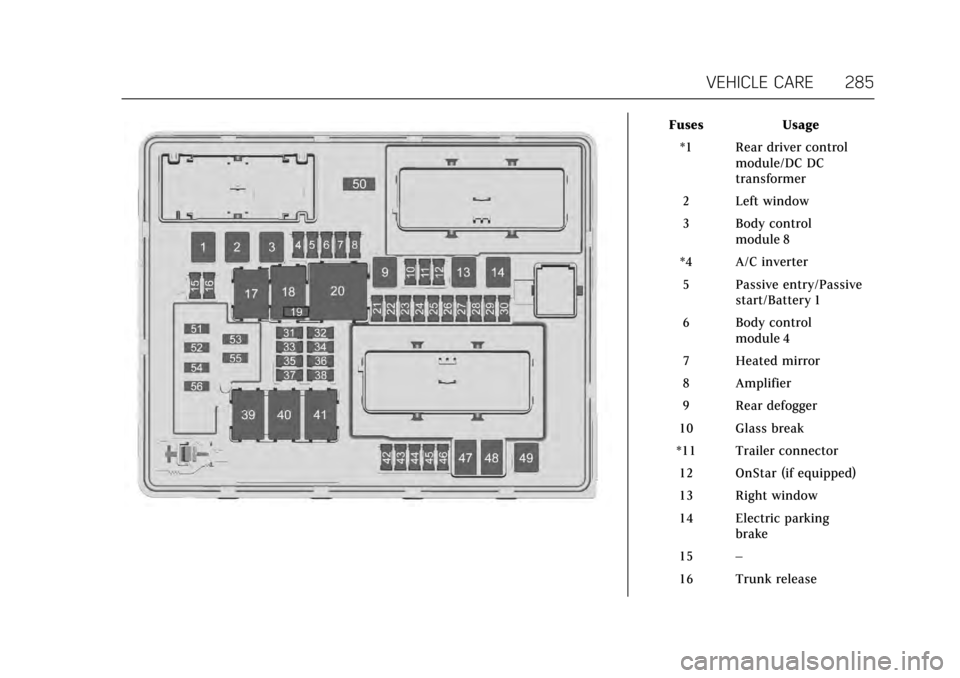
FusesUsage
*1 Rear driver control module/DC DC
transformer
2 Left window
3 Body control module 8
*4 A/C inverter 5 Passive entry/Passive start/Battery 1
6 Body control module 4
7 Heated mirror
8 Amplifier
9 Rear defogger
10 Glass break
*11 Trailer connector
12 OnStar (if equipped)
13 Right window
14 Electric parking brake
15 –
16 Trunk release
Page 287 of 352
Cadillac CTS/CTS-V Owner Manual (GMNA-Localizing-MidEast-10293089) -
2017 - crc - 6/22/16
286 VEHICLE CARE
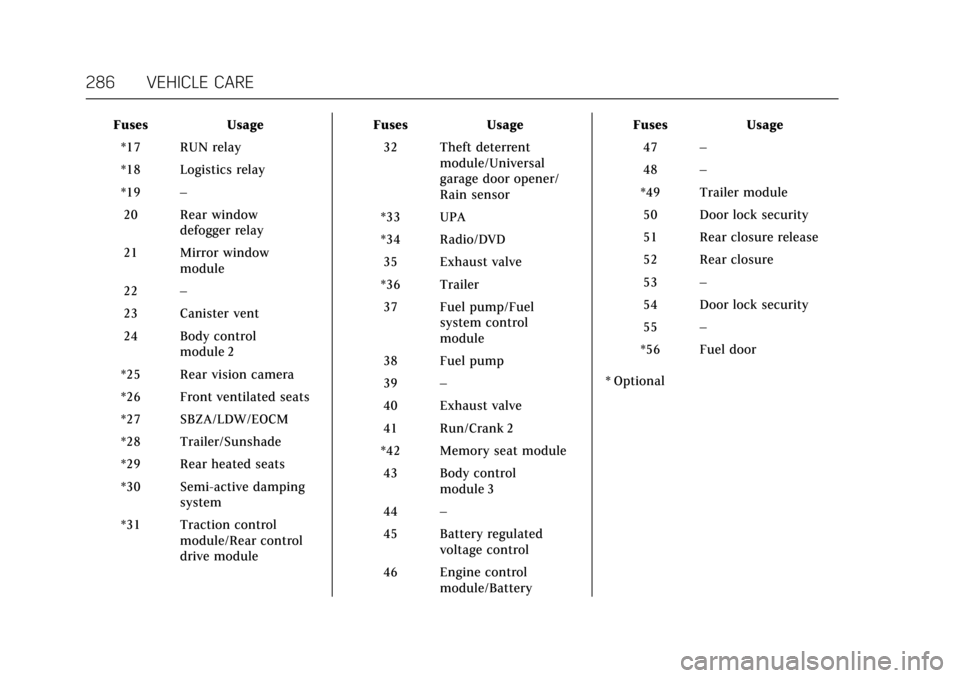
FusesUsage
*17 RUN relay
*18 Logistics relay
*19 –
20 Rear window defogger relay
21 Mirror window module
22 –
23 Canister vent
24 Body control module 2
*25 Rear vision camera
*26 Front ventilated seats
*27 SBZA/LDW/EOCM
*28 Trailer/Sunshade
*29 Rear heated seats
*30 Semi-active damping system
*31 Traction control module/Rear control
drive module Fuses
Usage
32 Theft deterrent module/Universal
garage door opener/
Rain sensor
*33 UPA
*34 Radio/DVD
35 Exhaust valve
*36 Trailer 37 Fuel pump/Fuel system control
module
38 Fuel pump
39 –
40 Exhaust valve
41 Run/Crank 2
*42 Memory seat module
43 Body control module 3
44 –
45 Battery regulated voltage control
46 Engine control module/Battery Fuses
Usage
47 –
48 –
*49 Trailer module 50 Door lock security
51 Rear closure release
52 Rear closure
53 –
54 Door lock security
55 –
*56 Fuel door
* Optional