parking brake CADILLAC DEVILLE 1997 7.G User Guide
[x] Cancel search | Manufacturer: CADILLAC, Model Year: 1997, Model line: DEVILLE, Model: CADILLAC DEVILLE 1997 7.GPages: 386, PDF Size: 21.61 MB
Page 141 of 386

Downloaded from www.Manualslib.com manuals search engine Brake System Warning Light
Your Cadillac’s hydraulic brake system is divided into
two parts. If one part isn’t working, the other
part can
still work and stop you. For good braking though, you
ueed both parts working well.
If the warning light comes
on, there could be a brake
problem. Have your brake system inspected right away.
BRAKE
This light should come on
briefly when you turn the
’ ignition key to RUN. If it
doesn’t come
on then, have
1 it fixed so it will be ready to
warn
you if there’s a
problem.
If the light comes on while you
are driving, pull off the
road and stop carefully. You may notice that the pedal is
harder to push. Or, the pedal may go closer to the floor.
It may take longer to stop. If the light is still on, have the
vehicle towed
for service. (See “Towing Your Vehicle”
in the Index.)
I- 4
Your brake system may not be working properly
if the brake system warning light
is on. Driving
with the brake system warning light on can lead
to an accident. If the light is still on after you’ve
pulled off the road and stopped carefully, have
the vehicle towed for service.
I I
When the ignition is on, the brake system warning light
will also come on when you set your parking brake. The
light will stay on
if your parking brake doesn’t release
fully. If it stays on after your parking brake is fully
released, it means you have a brake problem.
Page 142 of 386
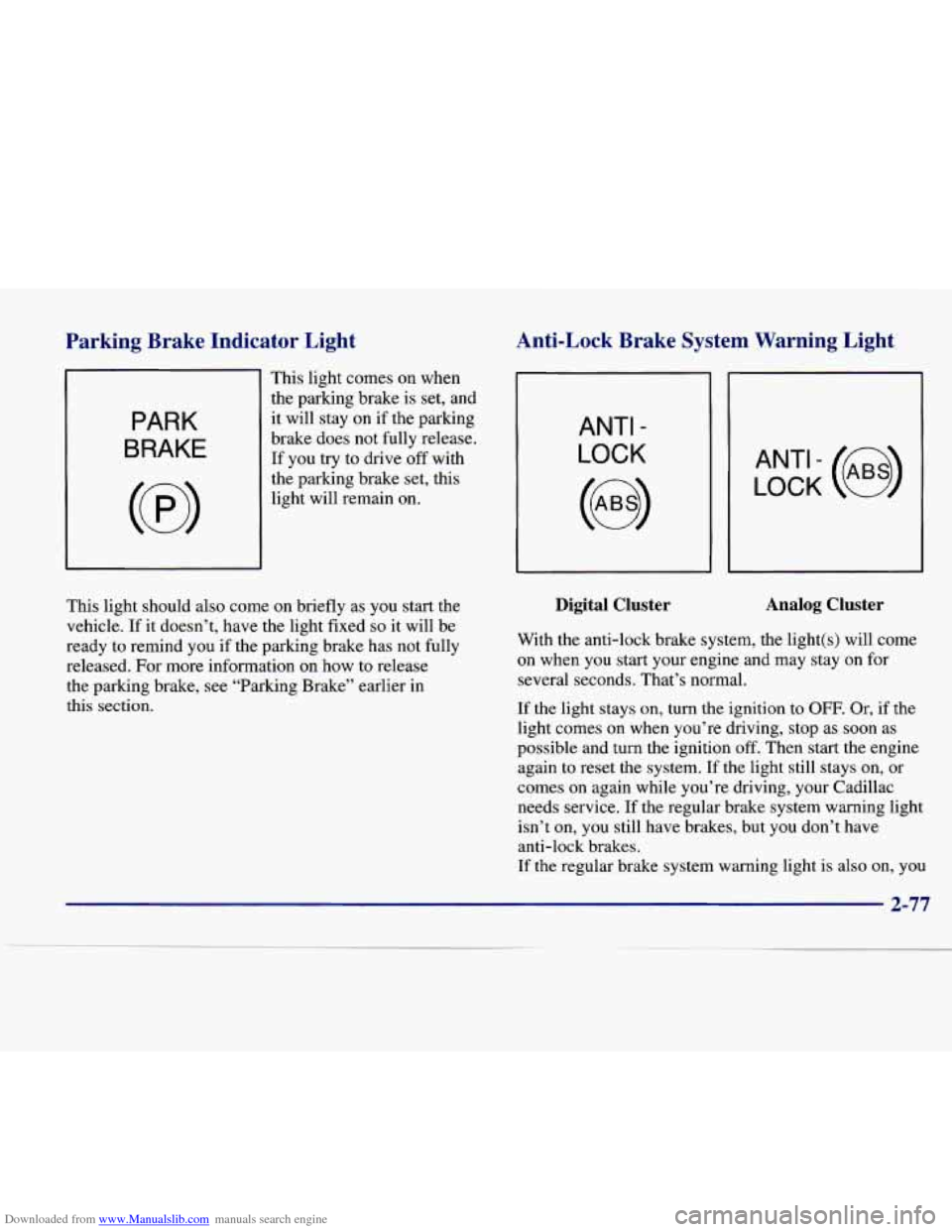
Downloaded from www.Manualslib.com manuals search engine Parkine Brake Indicator Light Anti-Lock Brake System Warning Light
PARK
BRAKE
This light comes on when
the parking brake is set, and
it will stay on if the parking
brake does not fully release.
If you try to drive off with
the parking brake set, this
light will remain on.
ANTI -
LOCK
LOCK (e)
This light should also come on briefly as you start the
vehicle.
If it doesn’t, have the light fixed so it will be
ready to remind you if the parking brake has not fully
released. For more information on how to release
the parking brake, see “Parking Brake” earlier in
this section.
Digital Cluster Analog Cluster
With the anti-lock brake system, the light(s) will come
on when you start your engine and may stay on for
several seconds. That’s normal.
If the light stays on, turn the ignition to OFF. Or, if the
light comes on when you’re driving, stop as soon as
possible and turn the ignition
off. Then start the engine
again to reset the system.
If the light still stays on, or
comes on again while you’re driving, your Cadillac
needs service. If the regular brake system warning light
isn’t on, you still have brakes, but you don’t have
anti-lock brakes.
If the regular brake system warning light is also on, you
2-77
Page 211 of 386
Downloaded from www.Manualslib.com manuals search engine in sand, mud, ice or snow. See “Rocking Your Vehicle”
in the Index.)
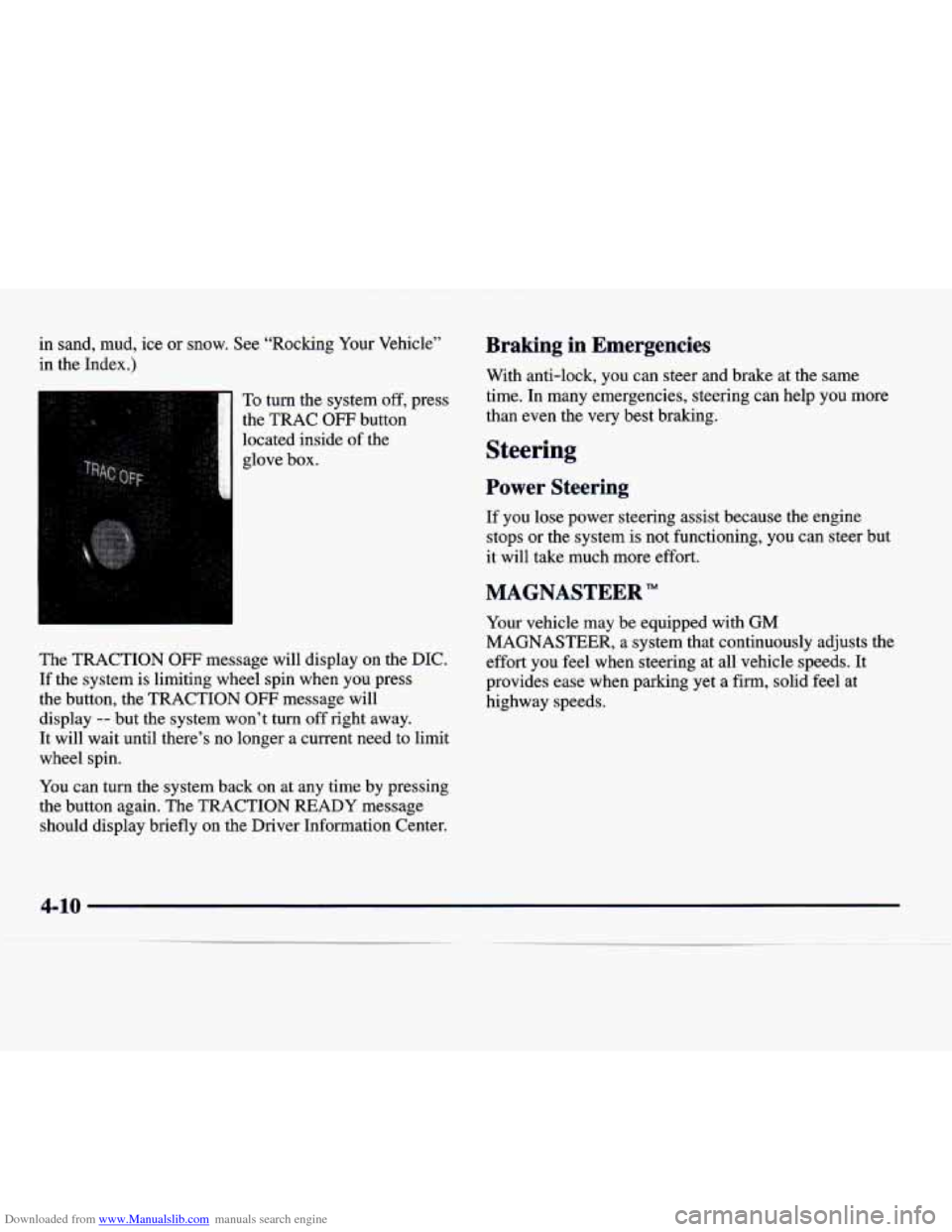
To turn the system off, press
the TRAC
OFF button
located inside
of the
glove box.
The TRACTION
OFF message will display on the DIC.
If the system is limiting wheel spin when you press
the button, the TRACTION
OFF message will
display
-- but the system won’t turn off right away.
It will wait until there’s no longer a current need to limit
wheel spin.
You can turn the system back on at any time by pressing
the button again. The TRACTION READY message
should display briefly on the Driver Information Center.
Braking in Emergencies
With anti-lock, you can steer and brake at the same
time. In many emergencies, steering can help you more
than even the very best braking.
Steering
Power Steering
If you lose power steering assist because the engine
stops
or the system is not functioning, you can steer but
it will take much more effort.
MAGNASTEER”
Your vehicle may be equipped with GM
MAGNASTEER, a system that continuously adjusts the
effort you feel when steering at all vehicle speeds. It
provides ease when parking yet a firm, solid feel at
highway speeds.
4-10
Page 238 of 386
Downloaded from www.Manualslib.com manuals search engine Trailer- Wiring Harness
If your vehicle is equipped with the 3,666-&. (1 360 kg)
trailer towing package option, you will have a wiring
harness located under the trunk trim. The harness is a
five wire harness, with connector.
These trailer-wiring harness color codes should be
followed when connecting it to your trailer:
0 WHITE: Direct trailer ground for trailer lamps.
0 BROWN: Parking lamps.
0 YELLOW Left turn and stoplamps.
0 GREEN: Right turn and stoplamps.
BLUE: Auxiliary circuit.
Driving with a Trailer
Towing a trailer requires a certain amount of experience.
Before setting out for the open road, you’ll want to get
to know your rig. Acquaint yourself with the feel
of
handling and braking with the added weight of the
trailer. And always keep in mind that the vehicle you are driving is now a good deal longer and not nearly as
responsive as your vehicle
is by itself.
Before you
start, check the trailer hitch and platform
(and attachments), safety chains, electrical connector,
lamps, tires and mirror adjustment.
If the trailer has
electric brakes, start your vehicle and trailer moving and
then apply the trailer brake controller by hand to be sure
the brakes are working. This lets you check your
electrical connection at the same time.
During your trip, check occasionally to be sure that the
load is secure, and that the lamps and any trailer brakes are still working.
Following Distance
Stay at least twice as far behind the vehicle ahead as you
would when driving your vehicle without a trailer. This can help you avoid situations that require heavy braking and sudden turns.
4-37
Page 240 of 386
Downloaded from www.Manualslib.com manuals search engine Parking on Hills
You really should not park your vehicle, with a trailer
attached, on a hill.
If something goes wrong, your rig
could start to move. People can be injured, and both
your vehicle and the trailer can be damaged.
But if you ever have to park your rig on a hill, here’s
how to do it:
1. Apply your regular brakes, but do not shift into
PARK (P).
2. Have someone place chocks under the trailer wheels.
3. When the wheel chocks are in place, release the
regular brakes until the chocks absorb the load.
4. Reapply the regular brakes. Then shift into
PARK (P) firmly and apply your parking brakes.
5. Release the regular brakes.
When You Are Ready to Leave After
Parking on a Hill
1. Apply your regular brakes and hold the pedal down
while you:
0 Start your engine;
Shift into a gear; and
0 Be sure the parking brake has released.
2. Let up on the brake pedal.
3. Drive slowly until the trailer is clear of the chocks.
4. Stop and have someone pick up and store the chocks.
Maintenance When Trailer Towing
Your vehicle will need service more often when you’re
pulling a trailer. See the Maintenance Schedule for more
on
this. Things that are especially important in trailer
operation are automatic transaxle fluid (don’t overfill),
engine oil, belt, cooling system and brake adjustment.
Each of these is covered in
this manual, and the Index
will help you find them quickly.
If you’re trailering, it’s
a good idea to review these sections before you start
your trip.
Check periodically to see that
all hitch nuts and bolts
are tight.
4-39
Page 254 of 386

Downloaded from www.Manualslib.com manuals search engine When your vehicle is being towed, have the ignition key
turned to the
OFF position. The steering wheel should
be clamped in a straight-ahead position, with a clamping
device designed for towing service. Do not use the
vehicle’s steering column lock
for this. The transaxle
should be
in NEUTRAL (N) and the parking
brake released.
Don’t have your vehicle towed on the drive wheels
unless you must.
If the vehicle must be towed on the
drive wheels, be sure to follow the speed and distance
restrictions later in
this section or your transaxle will be
damaged.
If these limitations must be exceeded, then the
drive wheels have to be supported on a dolly.
Front Towing
Tow Limits -- 35 mph (56 kph), 25 miles (40 km)
5-11
Page 268 of 386

Downloaded from www.Manualslib.com manuals search engine If a Tire Goes Flat
It’s unusual for a tire to “blow out” while you’re driving,
especially if you maintain your tires properly.
If air goes
out
of a tire, it’s much more likely to leak out slowly.
But if you should ever have a “blowout,” here are a few
tips about what to expect and what to do:
If a front tire fails, the flat tire will create a drag that
pulls the vehicle toward that side. Take your foot off the
accelerator pedal and grip the steering wheel firmly.
Steer to maintain lane position, and then gently brake to
a stop well out of the traffic lane.
A rear blowout, particularly on a curve, acts much like a
skid and may require the same correction you’d use in a
skid. In any rear blowout, remove your foot from the
accelerator pedal. Get the vehicle under control by
steering the way you want the vehicle to go. It may be
very bumpy and noisy, but you can still steer. Gently
brake to a stop
-- well off the road if possible.
If a tire goes flat, the next part shows how to use your
jacking equipment to change a flat tire safely.
Changing a Flat Tire
If a tire goes flat, avoid further tire and wheel damage
by driving slowly
to a level place. Turn on your hazard
Wi *
; flashers.
I-
Changing a tire can cause an injury. The vehicle
can slip
off the jack and roll over you or other
people. You and they could be badly injured.
Find
a level place to change your tire. To help
prevent the vehicle from moving:
1. Put the shift lever in PARK (P).
2. Set the parking brake firmly.
3. Turn off the engine.
To be even more certain the vehicle won’t move,
you can put blocks at the front and rear of the
tire farthest away from the one being changed.
That would be the tire on the other side of the
vehicle, at the opposite end.
Page 302 of 386
Downloaded from www.Manualslib.com manuals search engine To get the right reading, the fluid should be at normal
operating temperature, which is 1
80 OF to 200 OF
(82°C to 93°C).
Get the vehicle warmed up by driving about
15 miles
(24
km) when outside temperatures are above 50°F
(10°C). If it's colder than 50°F (lO"C), you may
have to drive longer.
Checking the Fluid Level
Park your vehicle on a level place. Keep the
engine running.
With the parking brake applied, place the shift lever
in PARK
(P).
With your foot on the brake pedal, move the shift
lever through each gear range, pausing for about
three seconds in each range. Then, position the shift
lever in PARK (P).
0 Let the engine run at idle for three to five minutes. Then,
without shutting off the engine, follow
these steps:
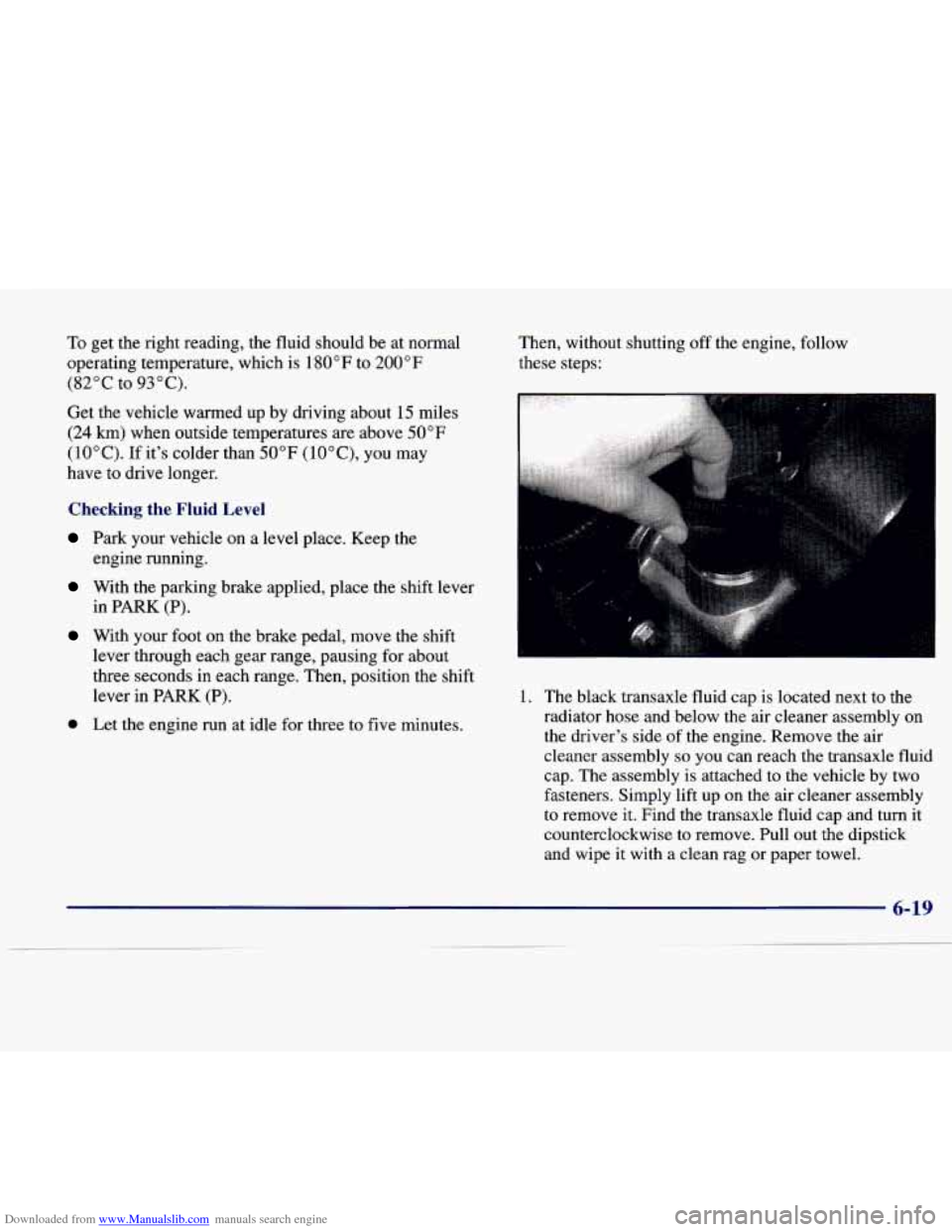
1. The black transaxle fluid cap is located next to the
radiator hose and below the air cleaner assembly on the driver's side of the engine. Remove the air
cleaner assembly
so you can reach the transaxle fluid
cap. The assembly is attached to the vehicle by two
fasteners. Simply lift up on the air cleaner assembly
to remove
it. Find the transaxle fluid cap and turn it
counterclockwise to remove. Pull out the dipstick
and wipe it with a clean rag or paper towel.
Page 373 of 386

Downloaded from www.Manualslib.com manuals search engine Battery ...................................... 6-30
Jump Starting
................................. 5-4
No Charge Message
........................... 2-89
Replacement. Remote Keyless Entry
.............. 2- 11
Volts High Message ........................... 2-89
Volts Low Message
........................... 2-89
Warnings
................................ 5.4. 5.6
Battery Guard Storage ........................... 2-52
Battery Saver
.................................. 2-50
Exterior Lighting
............................. 2-50
Inadvertent Power
............................ 2-52
BBB Auto Line ................................ 7-11
Better Business Bureau Mediation
.................. 7- 11
Brake Adjustment
.................................. 6-29
Fluid
....................................... 6-27
Master Cylinder
.............................. 6-27
Parking
..................................... 2-28
PedalTravel
................................. 6-29
Replacing System Parts
........................ 6-30
System Warning Light
......................... 2-76
Trailer
...................................... 4-36
Transaxle Shift Interlock
....................... 2-33
Wear
....................................... 6-29
Brake Vacuum Problem Message
.................. 2-90
Brakes. Anti-Lock
............................... 4-7
Braking
........................................ 4-6
Braking
in Emergencies .......................... 4- 10
Break-Iny New Vehicle
.......................... 2-20
Brightness Control .............................. 2-50
Bulb Replacement .............................. 6-3 1
BTSI ......................................... 2-33 Capacities
and Specifications
.................... 6-69
Carbon Monoxide
.................... 2.34.4.29. 4.36
Cassette Tape Player
.................. 3.17.3.20. 3.24
Cassette Tape Player Care
........................ 3-31
CeUularTelephone
.............................. 2-63
Center Console Storage Area
...................... 2-60
Center High-Mounted Stoplamp. Bulb Replacement
... 6-37
Central Door Unlocking System
.................... 2-4
Certification Label
.............................. 4-31
Chains. Tire
................................... 6-48
Change Engine Oil Message
...................... 2-90
Change Trans Fluid Message
...................... 2-90
Changing a Flat Tire
............................. 5-25
Charging System Indicator Light
................... 2-75
Check Brake Fluid
Level Message ................. 2-90
Check Coolant Level Message
..................... 2-90
Check Fuel Gage Message
........................ 2-90
Check Oil Level Message
........................ 2-90
Check Washer Fluid Message
..................... 2-91
Checking Your Restraint Systems
.................. 1-48
Chemical Paint Spotting
.......................... 6-56
Child Restraints
................................ 1-37
Securing in a Rear Outside Seat Position
........... 1-39
Securing in the Center Rear Seat Position
.......... 1-41
Securing in
the Right Front Seat Position .......... 1-43
TopStrap
................................... 1-38
Where to Put
................................ 1-37
Chrome Wheels. Cleaning
........................ 6-54
Cassette Tape Player Errors
............. 3.17. 3.20.
3-24
Center Passenger Position
........................ 1-30
Chains. Safety
................................. 4-36
CHMSL
...................................... 6-37
Page 377 of 386
Downloaded from www.Manualslib.com manuals search engine Hood Checking Things Under
......................... 6-7
Release
...................................... 6-8
Horn
......................................... 2-36
How to Reset the Oil Life Indicator ................. 6- 14
HVAC Steering Wheel Controls ................... 3- 14
Hydraulic Brake Warning Lights
................... 2-76
Hydroplaning
.................................. 4-20
Ice Possible Message
........................... 2-91
Ignition Positions
............................... 2-20
Illuminated Entry
............................... 2-51
Illuminated Rear Seat Visor Vanity Mirror
........... 2-63
Illuminated Visor Vanity Mirror
............... 2.62. 2.63
Inflation. Tire
.................................. 6-41
Inside Day/Night Manual Rearview Mirror ........... 2-53
InstrumentPanel
............................... 2-68
Brightness Control
............................ 2-50
Cleaning the
Top ............................. 6-5 1
Clusters ............................... 2.70. 2.71
Interior Lamps
................................. 2-50
Jack. Tire
.................................... 5-28
Jump Starting
................................... 5-4
Keyless Entry System. Remote
.................... 2-7
Keys
.......................................... 2-2 Labels
Certification
................................. 4-31
Service Parts Identification
..................... 6-58
Tire-Loading Information
...................... 4-30
Vehicle Identification Number
................... 6-58
Lamps
........................................ 2-45
Courtesy
.................................... 2-51
Interior
..................................... 2-50
OnReminder
................................ 2-46
Panel
....................................... 2-50
Underhood
.................................. 6-10
Leaving Your Vehicle
............................. 2-7
Leaving Your Vehicle with the Engine Running
....... 2-32
Light Sensor. Twilight Sentinel
.................... 2-50
Lighter
....................................... 2-61
Lights Air Bag Readiness
....................... 1-23. 2-75
Anti-Lock Brake System Warning
............ 2-77. 4-7
Brake System Warning
......................... 2-76
Charging System Indicator
...................... 2-75
Engine Coolant Temperature Warning
............. 2-79
Interior
..................................... 2-50
Oil Pressure
................................. 2-82
Parking Brake Indicator
........................ 2-77
Safety Belt Reminder
...................... 1-8. 2-74
Service Engine Soon
.......................... 2-80
Traction Control System Warning
............ 2-78. 4-9
Loading Your Vehicle
........................... 4-30
8-6