air condition CADILLAC DEVILLE 2003 8.G User Guide
[x] Cancel search | Manufacturer: CADILLAC, Model Year: 2003, Model line: DEVILLE, Model: CADILLAC DEVILLE 2003 8.GPages: 423, PDF Size: 2.91 MB
Page 187 of 423

PASSENGER DOOR AJAR ± 141:The right front
passenger's door is open or ajar when this message
appears. The ignition must be in ON and the transaxle
not in PARK (P) for this message to display. A chime
will sound if the vehicle's speed is greater than
3 mph (5 km/h).
RIGHT REAR DOOR AJAR ± 143:The right rear door
is open or ajar when this message appears. The
ignition must be in ON and the transaxle not in PARK (P)
for this message to display. A chime will sound if the
vehicle's speed is greater than 3 mph (5 km/h).
SERVICE AC SYSTEM ± 14:This message appears
when the electronic sensors that control the air
conditioning and heating systems are no longer working.
Have the climate control system serviced if you notice
a drop in heating and air conditioning efficiency.
SERVICE AIR BAG ± 83:There is a problem with the
air bag system when this message appears. Let
only a quali®ed technician work on your vehicle. Have
your vehicle serviced by your dealership immediately.
SERVICE CHARGING SYS ± 102:This message
will display when a problem with the charging system
has been detected. Have your vehicle serviced at
your dealership.SERVICE ELECTRICAL SYS ± 106:This message will
display if an electrical problem has occurred within
the Powertrain Control Module (PCM) or the ignition
switch. Have your vehicle serviced by your dealership.
SERVICE FUEL SYSTEM ± 101:The Powertrain
Control Module (PCM) has detected a problem within
the fuel system when this message appears. Have your
vehicle serviced by your dealership.
SERVICE IDLE CONTROL ± 107:A problem with the
idle control has occurred when this message displays.
Have your vehicle serviced by your dealership.
SERVICE STABILITY SYS ± 54:If you ever see the
SERVICE STABILITY SYS message, it means
there may be a problem with your stability enhancement
system. If you see this message, try to reset the
system (stop, turn off the engine, then start the engine
again). If the SERVICE STABILITY SYS message
still comes on, it means there is a problem. You should
see your dealer for service. Reduce your speed and
drive accordingly. A single chime will also sound when
this message is displayed.
SERVICE STEERING ± 127:This message is displayed
when a problem has been detected in the magnetic
speed variable assist steering system. If message
comes on, service is required.
3-64
Page 188 of 423

SERVICE SUSPENSION SYS ± 84:This message is
displayed to indicate that the suspension system is
not operating properly. To correct this problem, have
your vehicle serviced at your dealership.
SERVICE THEFT SYSTEM ± 34:This message means
there is a problem with the PASS-Key
žIII system. A
fault has been detected in the system which means that
the system is disabled and is not protecting the
vehicle. The vehicle usually restarts, however, you may
want to take your vehicle to your dealer before turning
off the engine.
SERVICE TPM SYSTEM ± 51:When this message is
displayed, the Tire Pressure Monitor (TPM) system
is not working properly. See your dealer for service.
SERVICE TRANSMISSION ± 100:See your dealer for
repair.
SERVICE VEHICLE SOON ± 3:This message is
displayed when a non-emissions related powertrain
malfunction occurs. Have your vehicle serviced by
a technician as soon as possible.
SPEED LIMIT TO 90 ± 113:A failure in the suspension
control system has occurred when this message
appears. The Powertrain Control Module (PCM)
determines the speed to which your vehicle is limited.
Have your vehicle serviced if this message appears.STABILITY SYS ENGAGED ± 55:You may see the
STABILITY SYS ENGAGED message on the Driver
Information Center. It means that an advanced,
computer-controlled system has come on to help your
vehicle continue to go in the direction in which you're
steering. This stability enhancement system activates
when the computer senses that your vehicle is just
starting to spin, as it might if you hit a patch of ice or
other slippery spot on the road. When the system is on,
you may hear a noise or feel a vibration in the brake
pedal. This is normal.
When the STABILITY SYS ENGAGED message is on,
you should continue to steer in the direction you want to
go. The system is designed to help you in bad weather or
other difficult driving situations by making the most of
whatever road conditions will permit. If the STABILITY
SYS ENGAGED message comes on, you'll know that
something has caused your vehicle to start to spin, so
you should consider slowing down. A single chime will
also sound when this message is displayed.
STARTING DISABLED REMOVE KEY ± 33:This
message will appear when the PASS-Key
žIII system
detects that an improper ignition key is being used to try
to start the vehicle. Check the ignition key for damage.
If it is damaged, it may need to be replaced. If it is
not damaged, remove the key and try to start the vehicle
again. If it still does not start, try another ignition key
or see your dealer for service.
3-65
Page 207 of 423
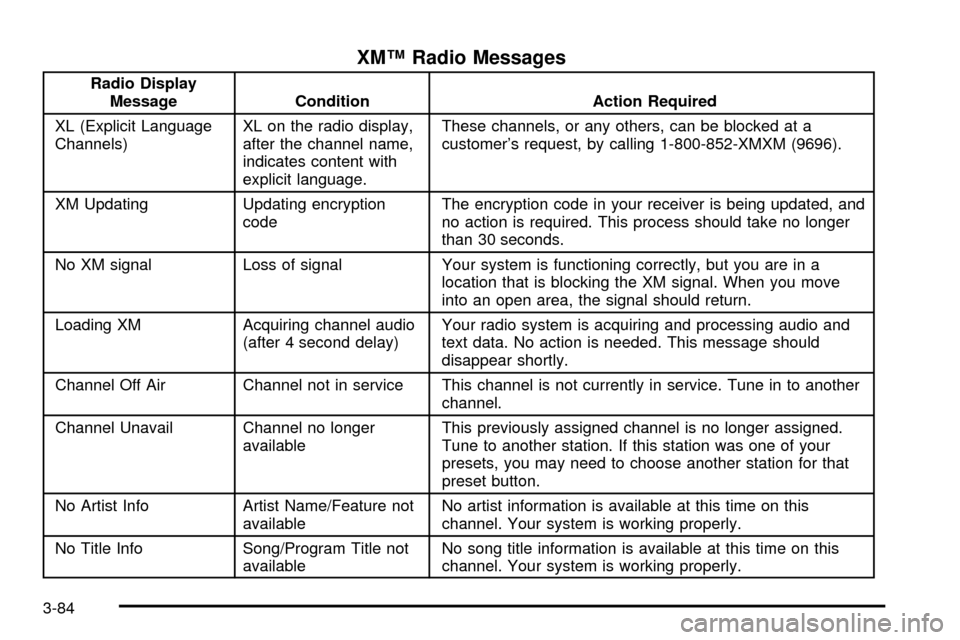
XMŸ Radio Messages
Radio Display
Message Condition Action Required
XL (Explicit Language
Channels)XL on the radio display,
after the channel name,
indicates content with
explicit language.These channels, or any others, can be blocked at a
customer's request, by calling 1-800-852-XMXM (9696).
XM Updating Updating encryption
codeThe encryption code in your receiver is being updated, and
no action is required. This process should take no longer
than 30 seconds.
No XM signal Loss of signal Your system is functioning correctly, but you are in a
location that is blocking the XM signal. When you move
into an open area, the signal should return.
Loading XM Acquiring channel audio
(after 4 second delay)Your radio system is acquiring and processing audio and
text data. No action is needed. This message should
disappear shortly.
Channel Off Air Channel not in service This channel is not currently in service. Tune in to another
channel.
Channel Unavail Channel no longer
availableThis previously assigned channel is no longer assigned.
Tune to another station. If this station was one of your
presets, you may need to choose another station for that
preset button.
No Artist Info Artist Name/Feature not
availableNo artist information is available at this time on this
channel. Your system is working properly.
No Title Info Song/Program Title not
availableNo song title information is available at this time on this
channel. Your system is working properly.
3-84
Page 218 of 423
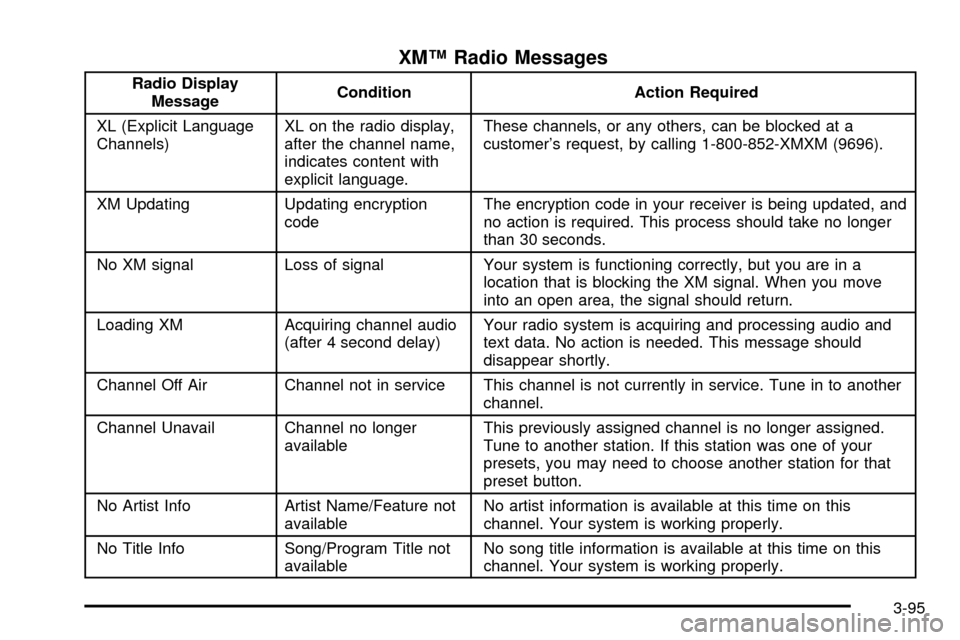
XMŸ Radio Messages
Radio Display
MessageCondition Action Required
XL (Explicit Language
Channels)XL on the radio display,
after the channel name,
indicates content with
explicit language.These channels, or any others, can be blocked at a
customer's request, by calling 1-800-852-XMXM (9696).
XM Updating Updating encryption
codeThe encryption code in your receiver is being updated, and
no action is required. This process should take no longer
than 30 seconds.
No XM signal Loss of signal Your system is functioning correctly, but you are in a
location that is blocking the XM signal. When you move
into an open area, the signal should return.
Loading XM Acquiring channel audio
(after 4 second delay)Your radio system is acquiring and processing audio and
text data. No action is needed. This message should
disappear shortly.
Channel Off Air Channel not in service This channel is not currently in service. Tune in to another
channel.
Channel Unavail Channel no longer
availableThis previously assigned channel is no longer assigned.
Tune to another station. If this station was one of your
presets, you may need to choose another station for that
preset button.
No Artist Info Artist Name/Feature not
availableNo artist information is available at this time on this
channel. Your system is working properly.
No Title Info Song/Program Title not
availableNo song title information is available at this time on this
channel. Your system is working properly.
3-95
Page 276 of 423

Gasoline Speci®cations
It is recommended that gasoline meet speci®cations
which were developed by the American Automobile
Manufacturers Association and endorsed by the
Canadian Vehicle Manufacturers Association for better
vehicle performance and engine protection. Gasoline
meeting these speci®cations could provide improved
driveability and emission control system performance
compared to other gasoline.
In Canada, look for the
ªAuto Makers' Choiceº
label on the pump.
California Fuel
If your vehicle is certi®ed to meet California Emission
Standards (see the underhood emission control label), it
is designed to operate on fuels that meet California
speci®cations. If this fuel is not available in states
adopting California emissions standards, your vehicle
will operate satisfactorily on fuels meeting federal
speci®cations, but emission control system performance
may be affected. The malfunction indicator lamp may
turn on (see
Malfunction Indicator Lamp on page 3-50)
and your vehicle may fail a smog-check test. If this
occurs, return to your authorized GM dealer for
diagnosis. If it is determined that the condition is caused
by the type of fuel used, repairs may not be covered
by your warranty.
Canada Only
5-5
Page 290 of 423
Engine Air Cleaner/Filter
SeeEngine Compartment Overview on page 5-12for
location of engine air cleaner/®lter.
When to Inspect the Engine Air
Cleaner/Filter
Inspect the air cleaner/®lter every 15, 000 miles
(25 000 km) and replace every 30, 000 miles
(50 000 km). If you are driving in dusty/dirty conditions,
inspect the ®lter at each oil change.
How to Inspect the Engine Air
Cleaner/Filter
To inspect the air cleaner/®lter, remove the ®lter from
the vehicle and lightly shake the ®lter to release
loose dust and dirt. If the ®lter remains caked with dirt, a
new ®lter is required.
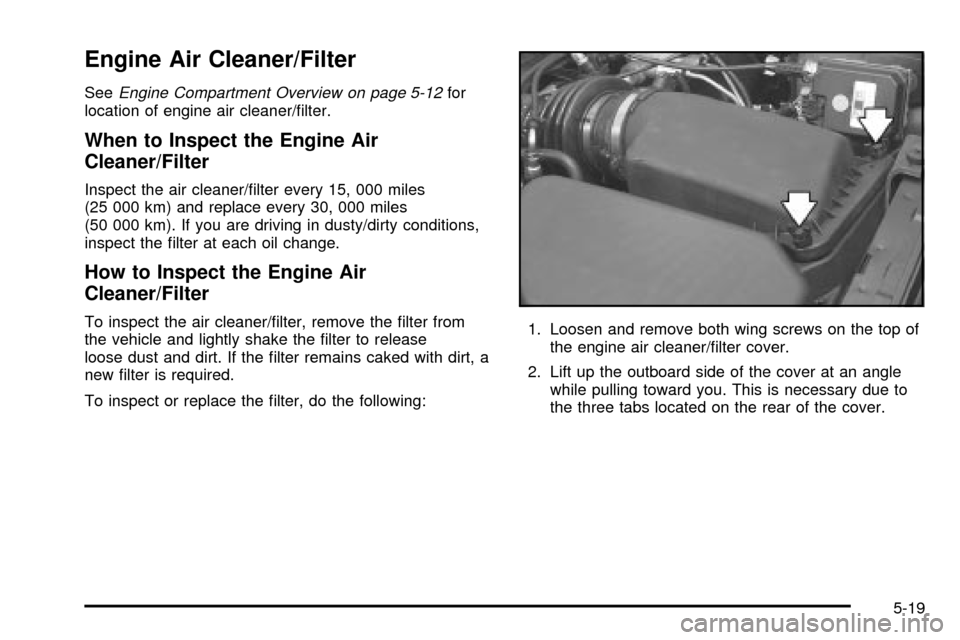
To inspect or replace the ®lter, do the following:1. Loosen and remove both wing screws on the top of
the engine air cleaner/®lter cover.
2. Lift up the outboard side of the cover at an angle
while pulling toward you. This is necessary due to
the three tabs located on the rear of the cover.
5-19
Page 298 of 423

Adding Coolant
If you need more coolant, add the proper DEX-COOLž
coolant mixtureat the surge tank,but only when the
engine is cool.
{CAUTION:
You can be burned if you spill coolant on hot
engine parts. Coolant contains ethylene glycol,
and it will burn if the engine parts are hot
enough. Don't spill coolant on a hot engine.
When replacing the pressure cap, make sure the arrow
lines up with the tube.
Coolant Surge Tank Pressure Cap
Notice:Your pressure cap is a pressure-type
cap and must be tightly installed to prevent coolant
loss and possible engine damage from overheating.
See ªCapacities and Speci®cationsº for more
information.
Engine Overheating
You will ®nd an ENGINE COOLANT HOT, IDLE
ENGINE message or an ENGINE OVERHEATED,
STOP ENGINE message displayed in the Driver
Information Center (DIC). You will also hear a chime.
There is also an engine temperature warning light and/or
gage on the instrument panel cluster. See
Engine
Coolant Temperature Warning Light on page 3-49andEngine Coolant Temperature Gage on page 3-50.
Overheated Engine Protection
Operating Mode
If an overheated engine condition exists and the
message ENGINE OVERHEATED, STOP ENGINE is
displayed, an overheat protection mode which alternates
®ring groups of cylinders helps prevent engine damage.
In this mode, you will notice a loss in power and
engine performance. This operating mode allows your
vehicle to be driven to a safe place in an emergency;
you may drive up to 50 miles (80 km). Driving extended
miles (km) and/or towing a trailer in the overheat
protection mode should be avoided.
Notice:After driving in the overheated engine
protection operating mode, to avoid engine damage,
allow the engine to cool before attempting any repair.
The engine oil will be severely degraded. Repair the
cause of coolant loss, change the oil and reset the oil
life system. See ªEngine Oilº in the Index.
5-27
Page 311 of 423
Brake Wear
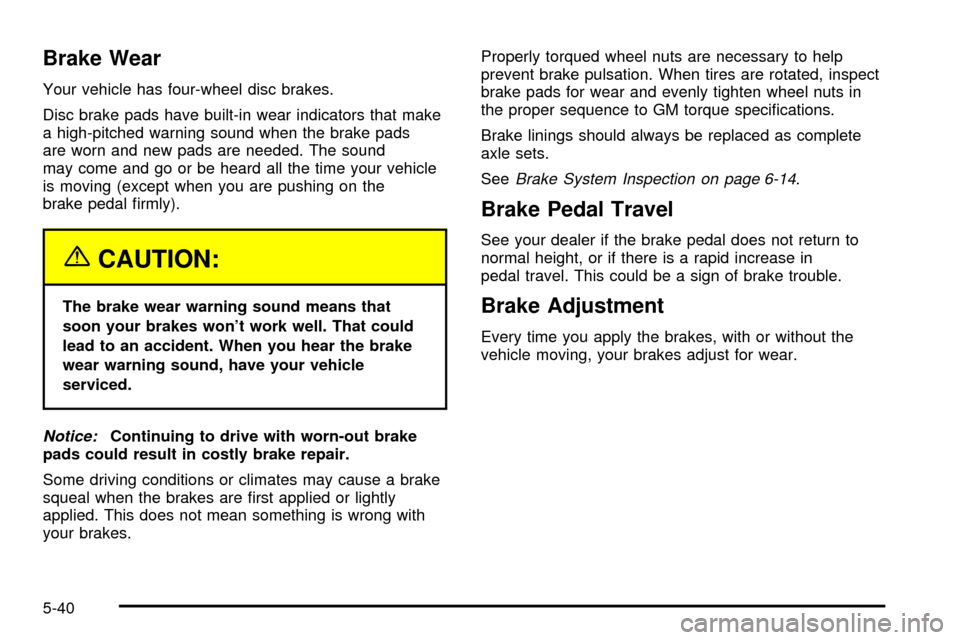
Your vehicle has four-wheel disc brakes.
Disc brake pads have built-in wear indicators that make
a high-pitched warning sound when the brake pads
are worn and new pads are needed. The sound
may come and go or be heard all the time your vehicle
is moving (except when you are pushing on the
brake pedal ®rmly).
{CAUTION:
The brake wear warning sound means that
soon your brakes won't work well. That could
lead to an accident. When you hear the brake
wear warning sound, have your vehicle
serviced.
Notice:Continuing to drive with worn-out brake
pads could result in costly brake repair.
Some driving conditions or climates may cause a brake
squeal when the brakes are ®rst applied or lightly
applied. This does not mean something is wrong with
your brakes.Properly torqued wheel nuts are necessary to help
prevent brake pulsation. When tires are rotated, inspect
brake pads for wear and evenly tighten wheel nuts in
the proper sequence to GM torque speci®cations.
Brake linings should always be replaced as complete
axle sets.
See
Brake System Inspection on page 6-14.
Brake Pedal Travel
See your dealer if the brake pedal does not return to
normal height, or if there is a rapid increase in
pedal travel. This could be a sign of brake trouble.
Brake Adjustment
Every time you apply the brakes, with or without the
vehicle moving, your brakes adjust for wear.
5-40
Page 334 of 423

Once a low or high tire pressure condition is detected,
the TPM system will display the CHECK TIRE
MESSAGE each time the engine is started, until the
tire(s) are set to the correct in¯ation pressure.
The Tire-Loading Information Label, which is located on
the rear edge of the driver's door, shows the correct
in¯ation pressure for the tires on your vehicle.
The TPM system also allows the driver to check the air
pressure status of each road tire using the Driver
Information Center (DIC). Each tire's air pressure will be
listed individually, in the following order: LF (left front
or driver's side front tire), RF (right front or passenger's
side front tire), RR (right rear or passenger's side
rear tire) and LR (left rear or driver's side rear tire). See
In¯ation -- Tire Pressure on page 5-61for information
regarding correct tire in¯ation. Also, seeDriver
Information Center (DIC) on page 3-57for information on
the DIC controls and displays.If the DIC display doesn't show tire pressures or the
SERVICE TPM SYSTEM message appears, see
your dealer for service. The TPM system may not work
properly while the compact spare tire is installed.
Anytime you replace one or more tires or rotate your
tires, the TPM system will need to be reset. A special
tool is needed to reset the sensor identi®cation
codes. See your dealer for service.
Your vehicle was delivered from the factory with
aluminum valve stem caps. If you ever have to replace
the valve stem caps on your vehicle, you should
replace them with aluminum or plastic caps.
The TPM system can alert you about a low or high tire
pressure condition, but it doesn't replace normal tire
maintenance. See
Tires on page 5-60.
5-63
Page 340 of 423
Wheel Replacement
Replace any wheel that is bent, cracked or badly rusted
or corroded. If wheel nuts keep coming loose, the
wheel, wheel bolts and wheel nuts should be replaced.
If the wheel leaks air, replace it (except some
aluminum wheels, which can sometimes be repaired).
See your dealer if any of these conditions exist.
Your dealer will know the kind of wheel you need.
Each new wheel should have the same load-carrying
capacity, diameter, width, offset and be mounted
the same way as the one it replaces.
If you need to replace any of your wheels, wheel bolts
or wheel nuts, replace them only with new GM
original equipment parts. This way, you will be sure to
have the right wheel, wheel bolts and wheel nuts
for your vehicle.{CAUTION:
Using the wrong replacement wheels, wheel
bolts or wheel nuts on your vehicle can be
dangerous. It could affect the braking and
handling of your vehicle, make your tires lose
air and make you lose control. You could have
a collision in which you or others could be
injured. Always use the correct wheel, wheel
bolts and wheel nuts for replacement.
Notice:The wrong wheel can also cause problems
with bearing life, brake cooling, speedometer or
odometer calibration, headlamp aim, bumper height,
vehicle ground clearance and tire or tire chain
clearance to the body and chassis.
See
Changing a Flat Tire on page 5-72for more
information.
5-69