brake CADILLAC DEVILLE 2003 8.G User Guide
[x] Cancel search | Manufacturer: CADILLAC, Model Year: 2003, Model line: DEVILLE, Model: CADILLAC DEVILLE 2003 8.GPages: 423, PDF Size: 2.91 MB
Page 103 of 423

Steering Column Shift Lever
If your vehicle is equipped with a steering column shift
lever, use the following procedure to shift the vehicle
into PARK (P):
1. Hold the brake pedal down with your right foot.
2. Move the shift lever into PARK (P) like this:
·Pull the lever toward you.
·Move the lever up as far as it will go.
3. With your right foot still holding the brake pedal
down, set the parking brake.
4. Turn the ignition key to OFF.
5. Remove the key and take it with you. If you can
leave your vehicle with the ignition key in your
hand, your vehicle is in PARK (P).
2-35
Page 104 of 423
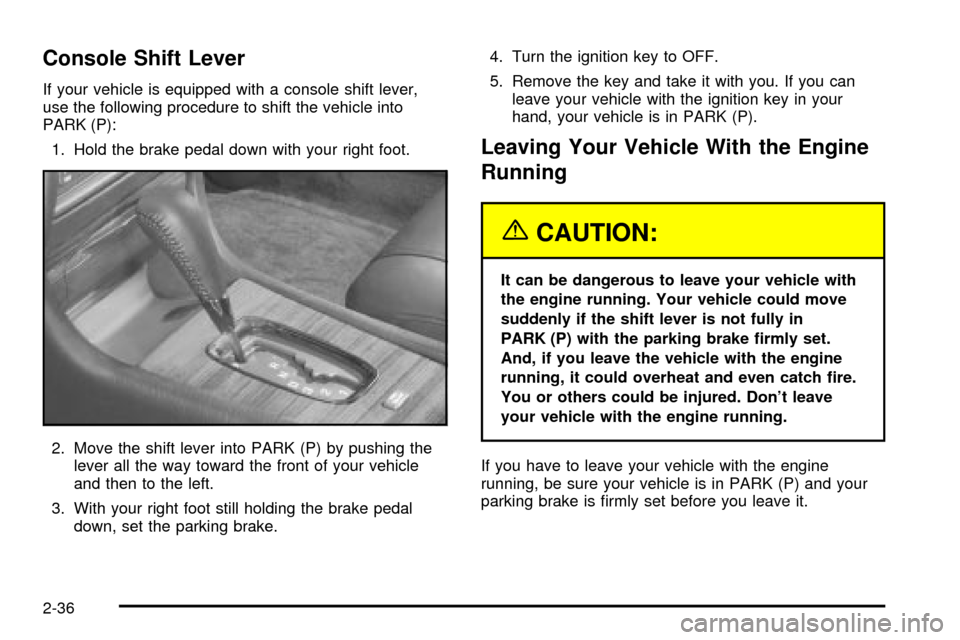
Console Shift Lever
If your vehicle is equipped with a console shift lever,
use the following procedure to shift the vehicle into
PARK (P):
1. Hold the brake pedal down with your right foot.
2. Move the shift lever into PARK (P) by pushing the
lever all the way toward the front of your vehicle
and then to the left.
3. With your right foot still holding the brake pedal
down, set the parking brake.4. Turn the ignition key to OFF.
5. Remove the key and take it with you. If you can
leave your vehicle with the ignition key in your
hand, your vehicle is in PARK (P).
Leaving Your Vehicle With the Engine
Running
{CAUTION:
It can be dangerous to leave your vehicle with
the engine running. Your vehicle could move
suddenly if the shift lever is not fully in
PARK (P) with the parking brake ®rmly set.
And, if you leave the vehicle with the engine
running, it could overheat and even catch ®re.
You or others could be injured. Don't leave
your vehicle with the engine running.
If you have to leave your vehicle with the engine
running, be sure your vehicle is in PARK (P) and your
parking brake is ®rmly set before you leave it.
2-36
Page 105 of 423

Torque Lock
If you are parking on a hill and you don't shift your
transaxle into PARK (P) properly, the weight of
the vehicle may put too much force on the parking pawl
in the transaxle. You may ®nd it difficult to pull the
shift lever out of PARK (P). This is called ªtorque lock.º
To prevent torque lock, set the parking brake and
then shift into PARK (P) properly before you leave the
driver's seat. To ®nd out how, see
Shifting Into Park (P)
on page 2-34.
If torque lock does occur, you may need to have
another vehicle push yours a little uphill to take some of
the pressure from the parking pawl in the transaxle,
so you can pull the shift lever out of PARK (P).
Shifting Out of Park (P)
Your vehicle has an automatic transaxle shift lock
control system. You have to fully apply your regular
brakes before you can shift from PARK (P) when
the ignition is ON. See
Automatic Transaxle Operation
on page 2-27.
If you cannot shift out of PARK (P), ease the pressure
on the shift lever. Push the shift lever all the way
into PARK (P) as you maintain brake application. Then
move the shift lever into the gear you want. If you
ever hold the pedal down but still can't shift out of
PARK (P), try the following:
1. Turn the ignition key to ACCESSORY. Open and
close the driver's door to turn off the RAP feature.
2. Apply and hold the brake until the end of Step 4.
3. Shift to NEUTRAL (N).
4. Start the vehicle and then shift to the drive gear you
want.
5. Have the vehicle ®xed as soon as you can.
2-37
Page 107 of 423

Running Your Engine While You
Are Parked
It's better not to park with the engine running. But if you
ever have to, here are some things to know.
{CAUTION:
Idling the engine with the climate control
system off could allow dangerous exhaust into
your vehicle. See the earlier Caution under
ªEngine Exhaust.º
Also, idling in a closed-in place can let deadly
carbon monoxide (CO) into your vehicle even if
the climate control fan is at the highest setting.
One place this can happen is a garage.
Exhaust Ð with CO Ð can come in easily.
NEVER park in a garage with the engine
running.
Another closed-in place can be a blizzard. See
ªWinter Drivingº in the Index.
{CAUTION:
It can be dangerous to get out of your vehicle
if the shift lever is not fully in PARK (P) with
the parking brake ®rmly set. Your vehicle can
roll. Don't leave your vehicle when the engine
is running unless you have to. If you've left the
engine running, the vehicle can move
suddenly. You or others could be injured. To
be sure your vehicle won't move, even when
you're on fairly level ground, always set your
parking brake after you move the shift lever to
PARK (P).
Follow the proper steps to be sure your vehicle won't
move. See
Shifting Into Park (P) on page 2-34.
If you are parking on a hill and if you're pulling a trailer,
also see
Towing a Trailer on page 4-34.
2-39
Page 125 of 423

Instrument Panel Overview...............................3-4
Hazard Warning Flashers................................3-6
Other Warning Devices...................................3-7
Horn.............................................................3-7
Tilt Wheel.....................................................3-7
Turn Signal/Multifunction Lever.........................3-8
Exterior Lamps.............................................3-15
Interior Lamps..............................................3-19
Night Vision System......................................3-22
Ultrasonic Rear Parking Assist (URPA)............3-25
Accessory Power Outlets...............................3-27
Ashtrays and Cigarette Lighter........................3-28
Climate Controls............................................3-29
Dual Climate Control System..........................3-29
Outlet Adjustment.........................................3-33
Rear Climate Control System.........................3-34
Passenger Compartment Air Filter...................3-36
Steering Wheel Climate Controls.....................3-38
Climate Controls Personalization.....................3-39
Warning Lights, Gages and Indicators.............3-40
Instrument Panel Cluster................................3-40
Speedometer and Odometer...........................3-43
Trip Odometer..............................................3-43
Tachometer (Analog Cluster Only)...................3-44Safety Belt Reminder Light.............................3-45
Air Bag Readiness Light................................3-45
Charging System Light..................................3-46
Brake System Warning and Parking Brake
Indicator Light...........................................3-47
Anti-Lock Brake System Warning Light.............3-48
Traction Control System (TCS) Warning Light . . .3-48
Engine Coolant Temperature Warning Light......3-49
Engine Coolant Temperature Gage..................3-50
Malfunction Indicator Lamp.............................3-50
Oil Pressure Light.........................................3-53
Security Light...............................................3-54
Fog Lamp Light............................................3-54
Lights On Reminder......................................3-54
Cruise Control Light......................................3-55
Fuel Gage...................................................3-55
Fuel Data Display
(Digital Cluster Only)..................................3-56
Driver Information Center (DIC).......................3-57
DIC Controls and Displays.............................3-57
DIC Warnings and Messages.........................3-60
Climate Controls and Radio System
Personalization..........................................3-67
DIC Vehicle Personalization............................3-67
Section 3 Instrument Panel
3-1
Page 135 of 423

Cruise Control
With cruise control, you can maintain a speed of
approximately 25 mph (40 km/h) or more without
keeping your foot on the accelerator. This is helpful on
long trips. Cruise control does not work at speeds
below about 25 mph (40 km/h). When cruise control is
on, you will see a CRUISE light on the instrument panel
cluster.When you apply your brakes, the cruise control shuts off.
{CAUTION:
·Cruise control can be dangerous where
you can't drive safely at a steady speed.
So, don't use your cruise control on
winding roads or in heavy traffic.
·Cruise control can be dangerous on
slippery roads. On such roads, fast
changes in tire traction can cause
needless wheel spinning, and you could
lose control. Don't use cruise control on
slippery roads.
If your vehicle is in cruise control when the traction
control system begins to limit wheel spin, the cruise
control will automatically disengage. See
Traction
Control System (TCS) on page 4-9. When road
conditions allow you to safely use it again, you may turn
the cruise control back on.
3-12
Page 136 of 423
Setting Cruise Control
{CAUTION:
If you leave your cruise control on when you're
not using cruise, you might hit a button and go
into cruise when you don't want to. You could
be startled and even lose control. Keep the
cruise control switch off until you want to use
cruise control.
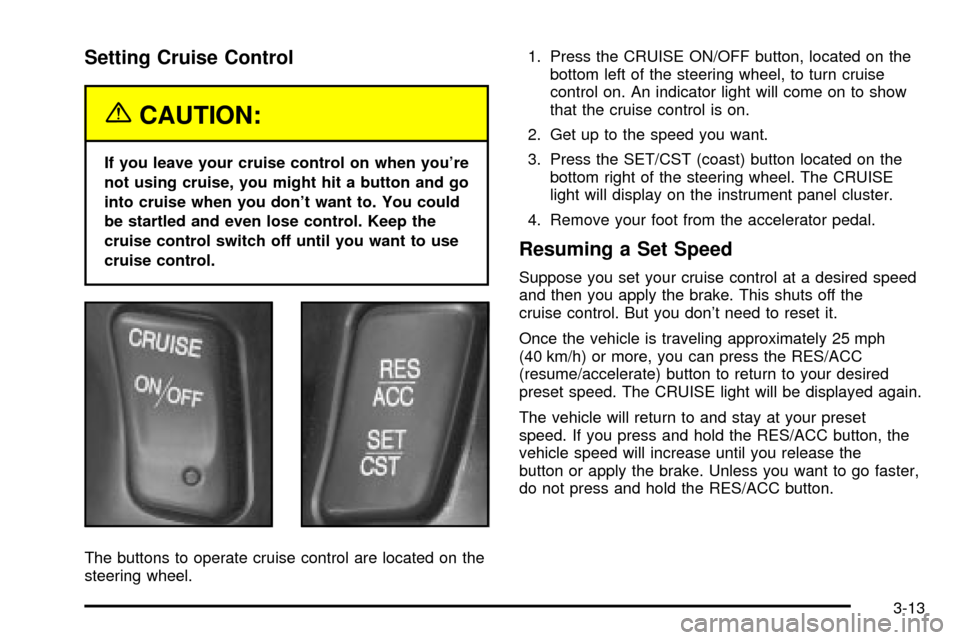
The buttons to operate cruise control are located on the
steering wheel.1. Press the CRUISE ON/OFF button, located on the
bottom left of the steering wheel, to turn cruise
control on. An indicator light will come on to show
that the cruise control is on.
2. Get up to the speed you want.
3. Press the SET/CST (coast) button located on the
bottom right of the steering wheel. The CRUISE
light will display on the instrument panel cluster.
4. Remove your foot from the accelerator pedal.
Resuming a Set Speed
Suppose you set your cruise control at a desired speed
and then you apply the brake. This shuts off the
cruise control. But you don't need to reset it.
Once the vehicle is traveling approximately 25 mph
(40 km/h) or more, you can press the RES/ACC
(resume/accelerate) button to return to your desired
preset speed. The CRUISE light will be displayed again.
The vehicle will return to and stay at your preset
speed. If you press and hold the RES/ACC button, the
vehicle speed will increase until you release the
button or apply the brake. Unless you want to go faster,
do not press and hold the RES/ACC button.
3-13
Page 137 of 423

Increasing Speed While Using Cruise
Control
There are two ways to go to a higher speed:
·Use the accelerator pedal to get to the higher
speed. Press the SET/CST button, then release the
button and the accelerator pedal. You will now
cruise at the higher speed.
·Press the RES/ACC button. Hold it there until you get
up to the speed that you want, and then release the
button. To increase your speed in very small
amounts, brie¯y press the RES/ACC button and then
release it. Each time you do this, your vehicle will
speed up approximately 1 mph (1.6 km/h).
The accelerate feature will only work after you have set
the cruise control speed by pressing the SET/CST button.
Reducing Speed While Using Cruise
Control
There are two ways to reduce your speed while using
cruise control:
·Press the SET/CST button until you reach the lower
speed you want, then release it.
·To slow down in very small amounts, push the
SET/CST button brie¯y. Each time you do this,
the vehicle will slow down approximately 1 mph
(1.6 km/h).
Passing Another Vehicle While Using
Cruise Control
Use the accelerator pedal to increase your speed.
When you take your foot off the pedal, your vehicle will
slow down to the cruise control speed you set earlier.
Using Cruise Control on Hills
How well your cruise control will work on hills depends
upon your speed, load and the steepness of the hills.
When going up steep hills, you may have to step on the
accelerator pedal to maintain your speed. When going
downhill, you may have to brake or shift to a lower gear to
keep your speed down. Applying the brake or shifting into
a lower gear will take you out of cruise control. If you
need to apply the brake or shift to a lower gear due to the
grade of the downhill slope, you may not want to attempt
to use your cruise control feature.
Ending Cruise Control
To turn off the cruise control, step lightly on the brake
pedal, or press the CRUISE ON/OFF button on the
steering wheel.
Erasing Speed Memory
When you turn off the cruise control or the ignition, your
cruise control set speed memory is erased.
3-14
Page 138 of 423
Exterior Lamps
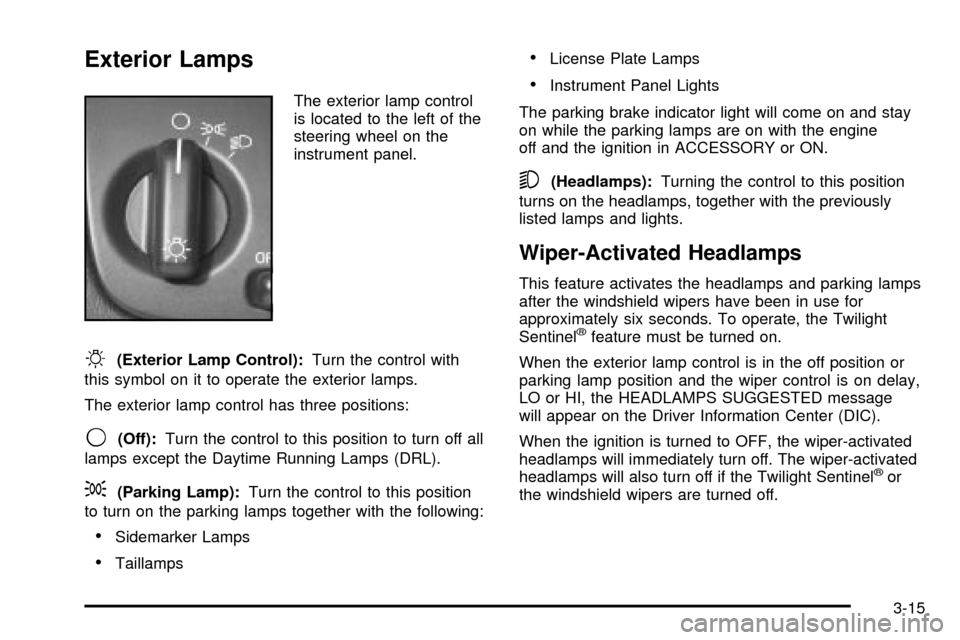
The exterior lamp control
is located to the left of the
steering wheel on the
instrument panel.
O(Exterior Lamp Control):Turn the control with
this symbol on it to operate the exterior lamps.
The exterior lamp control has three positions:
9(Off):Turn the control to this position to turn off all
lamps except the Daytime Running Lamps (DRL).
;(Parking Lamp):Turn the control to this position
to turn on the parking lamps together with the following:
·Sidemarker Lamps
·Taillamps
·License Plate Lamps
·Instrument Panel Lights
The parking brake indicator light will come on and stay
on while the parking lamps are on with the engine
off and the ignition in ACCESSORY or ON.
5(Headlamps):Turning the control to this position
turns on the headlamps, together with the previously
listed lamps and lights.
Wiper-Activated Headlamps
This feature activates the headlamps and parking lamps
after the windshield wipers have been in use for
approximately six seconds. To operate, the Twilight
Sentinel
žfeature must be turned on.
When the exterior lamp control is in the off position or
parking lamp position and the wiper control is on delay,
LO or HI, the HEADLAMPS SUGGESTED message
will appear on the Driver Information Center (DIC).
When the ignition is turned to OFF, the wiper-activated
headlamps will immediately turn off. The wiper-activated
headlamps will also turn off if the Twilight Sentinel
žor
the windshield wipers are turned off.
3-15
Page 146 of 423

The controls for this feature are located to the left of
and below the steering wheel. They are used to adjust
the brightness and location of the image. Adjust the
IMAGE control so the image is as low as possible while
remaining visible.
Slide the dimmer control until the image is no brighter
than necessary to clearly and comfortably see the image.
When the system comes on, you'll see the Night Vision
System symbol in the image. After about one minute, you
should see the view of the road ahead. If you don't see
the image after about two minutes (on cold days it may
take longer for the image to display), there may be
something wrong with the system. See your dealer for
service.
{CAUTION:
If the Night Vision System image is too bright,
or too high in your ®eld of view, it may take
you more time to see things you need to see
when it's dark outside. Be sure to keep the
image dim and placed low in your ®eld of view.
Remember that the Night Vision System, can only help
you see objects that are warmer or colder than the
surroundings. It can't sense things like brake lights, turn
signals or emergency ¯ashers, traffic lights or signs.
3-23