display CADILLAC DEVILLE 2003 8.G User Guide
[x] Cancel search | Manufacturer: CADILLAC, Model Year: 2003, Model line: DEVILLE, Model: CADILLAC DEVILLE 2003 8.GPages: 423, PDF Size: 2.91 MB
Page 141 of 423

To operate the Twilight Sentinelž, leave the exterior
lamp control in the off position and move the TWILIGHT
lever to any position but OFF.
If you move the lever all the way to the right, the lamps
will remain on for approximately three minutes after
the ignition has been turned to OFF. If you move
the lever so it is barely on, the lamps will go off quickly
when you turn the ignition switch out of OFF. You
can adjust the delay time from only a few seconds to
about three minutes.
If it's dark enough outside and the Twilight
Sentinel
žlever is off, a HEADLAMPS SUGGESTED
message will display on the Driver Information Center
(DIC). This message informs the driver that turning on the
exterior lamps is recommended (it's become dark enough
outside to require the headlamps and/or other exterior
lamps). Turning on the Twilight Sentinel or turning the
exterior lamp control to the headlamp position will remove
the HEADLAMPS SUGGESTED message.
Light Sensor
The light sensor for the DRL and the Twilight
Sentinelžis located in the center of the front defogger
grille. If you cover the sensor, it will read ªdarkº and the
exterior lamps or the HEADLAMPS SUGGESTED
message will be displayed whenever the ignition is on.
3-18
Page 143 of 423

Courtesy Lamps
The courtesy lamps are located on the headliner above
the rear seat. These lamps come on by turning the
instrument panel brightness knob fully clockwise or when
any door is opened and it is dark outside. Puddle
lamps are located on the bottom of the front and rear
door trim.
Entry Lighting
This feature turns on the courtesy lamps and the
backlighting to the door switches and to the exterior
lamp control when a door is opened or if you press the
remote keyless entry transmitter unlock button. If
activated due to the transmitter, the lighting will remain
active for about 40 seconds. Since the entry lighting
system uses the light sensor, it must be dark outside in
order for the courtesy lamps to turn on. The courtesy
lamps turn off approximately 25 seconds after the
last door is closed. They will dim to off if the ignition key
is placed in ON, or immediately deactivate if the
power locks are activated.
Parade Dimming
This feature prohibits dimming of the digital displays and
backlighting during daylight hours when the key is in
the ignition and the headlamps are on. This feature
operates with the light sensor for the Twilight
Sentinel
žand is fully automatic. When the light sensor
reads darkness outside and the parking lamps are
active, the digital displays can be adjusted by turning
the instrument panel brightness knob counterclockwise
to dim and clockwise to brighten lighting.
3-20
Page 146 of 423

The controls for this feature are located to the left of
and below the steering wheel. They are used to adjust
the brightness and location of the image. Adjust the
IMAGE control so the image is as low as possible while
remaining visible.
Slide the dimmer control until the image is no brighter
than necessary to clearly and comfortably see the image.
When the system comes on, you'll see the Night Vision
System symbol in the image. After about one minute, you
should see the view of the road ahead. If you don't see
the image after about two minutes (on cold days it may
take longer for the image to display), there may be
something wrong with the system. See your dealer for
service.
{CAUTION:
If the Night Vision System image is too bright,
or too high in your ®eld of view, it may take
you more time to see things you need to see
when it's dark outside. Be sure to keep the
image dim and placed low in your ®eld of view.
Remember that the Night Vision System, can only help
you see objects that are warmer or colder than the
surroundings. It can't sense things like brake lights, turn
signals or emergency ¯ashers, traffic lights or signs.
3-23
Page 147 of 423

In dry, clear weather, the system can see pedestrians,
animals and the direction of the road ahead. In light
rain, light snow or light fog the image may not be
as clear and you may not be able to see the direction of
the road ahead. In more severe weather conditions,
the image may be unclear and not usable.
{CAUTION:
Don't use the Night Vision System to replace
your normal view of the road ahead. It can't tell
you how far away things are. It senses only
warmer or colder objects, not all objects.
Driving by staring at the image might cause
you not to see important objects in the road
ahead. If you don't see something in time, you
could have a crash in which you and others
could be injured. Use the Night Vision System
only as a driving aid.
It is also important to keep your windshield, the HUD
(Head-Up Display for the Night Vision System) lens and
the camera lens clean. If you do not keep everything
clean, system performance may be affected.The HUD system is located on the driver's side of the
instrument panel, next to the windshield and the camera
is located behind the center of the front grille.
Use only household glass cleaner and a soft cloth to
clean the HUD or camera lens. Wipe gently and
dry thoroughly.
Notice:When cleaning, be careful not to scratch the
HUD or camera lenses. Do not spray glass cleaner
directly on the HUD lens because the cleaner could
leak inside the unit and cause damage.
The camera must also be aligned to work correctly.
If the camera needs adjustment, see your dealer.
Do not attempt to adjust the camera yourself.
3-24
Page 148 of 423

Ultrasonic Rear Parking Assist
(URPA)
Your vehicle may be equipped with Ultrasonic Rear
Parking Assist (URPA). This system can help you
to determine how close an object is to your rear bumper
within a given area, making parking easier.
{CAUTION:
Even with the Ultrasonic Rear Park Assist
system, the driver must check carefully before
backing up. The system does not operate above
typical backing speeds of 3 mph (5 km/h) while
parking. And, the system doesn't detect objects
that are more than 5 feet (1.5 meters) behind the
vehicle.
CAUTION: (Continued)
CAUTION: (Continued)
So, unless you check carefully behind you
before and when you back up, you could strike
children, pedestrians, bicyclists or pets behind
you, and they could be injured or killed.
Whether or not you are using Rear Park Assist,
always check carefully behind your vehicle
before you back up and then watch closely
as you do.
The URPA display is
located inside the vehicle,
above the rear window.
It has three color-coded
lights that can be seen
through the rearview mirror
or by turning around.
3-25
Page 149 of 423

How the System Works
URPA comes on automatically when the shift lever is
moved into REVERSE (R) and the vehicle speed is less
than 3 mph (5 km/h). When the system comes on,
the three lights on the display will illuminate to let you
know that the system is working. URPA senses
how close your vehicle is to an object. The distance is
determined by the four ultrasonic sensors located on the
rear bumper. When you shift into REVERSE (R) and
an object is detected, the following will occur in
sequence depending on the distance from the object:
·At 5 feet (1.5 m) a chime will sound and one
amber light will be lit;
·at 40 inches (1.0 m) both amber lights will be lit;
·at 20 inches (0.5 m) a continuous chime will sound
and all three lights (amber/amber/red) will be lit;
and
·at 1 foot (0.3 m) a continuous chime will sound and
all three lights (amber/amber/red) will ¯ash.
URPA can detect objects 3 inches (7.6 cm) and wider,
and at least 10 inches (25.4 cm) tall, but it cannot detect
objects that are above trunk level. In order for the
rear sensors to recognize an object, it must be within
operating range.If the URPA system is not functioning properly, the
display will ¯ash red, indicating that there is a problem.
The light will also ¯ash red while driving if a trailer is
attached to your vehicle, or a bicycle or object is on the
back of, or hanging out of your trunk. The light will
continue to ¯ash until the trailer or the object is removed
and your vehicle is driven forward at least 15 mph
(25 km/h).
It may also ¯ash red if the ultrasonic sensors are not
kept clean. So be sure to keep your rear bumper free of
mud, dirt, snow, ice and slush or materials such as
paint or the system may not work properly. If after
cleaning the rear bumper and driving forward at least
15 mph (25 km/h), the display continues to ¯ash red, see
your dealer. For cleaning instructions, see
Cleaning
the Outside of Your Vehicle on page 5-88.
It may also ¯ash red if your vehicle is moving in
REVERSE (R) at a speed greater than 3 mph (5 km/h).
Other conditions that may affect system performance
include things like the vibrations from a jackhammer or
the compression of air brakes on a very large truck.
As always, drivers should use care when backing up a
vehicle. Always look behind you, being sure to check
for other vehicles, obstructions and blind spots.
3-26
Page 152 of 423

Climate Controls
Dual Climate Control System
With this system you can control the heating, cooling
and ventilation for your vehicle.
Automatic Operation
AUTO (Automatic):When this button is pressed and
the temperature is set, the system will automatically
control the inside temperature, the air delivery mode and
the fan speed. AUTO will appear on the display.
1. Press the AUTO button.
2. Adjust the temperature to a comfortable setting
between 70ÉF (21ÉC) and 80ÉF (27ÉC).
Choosing the coldest or warmest temperature
setting will not cause the system to heat or cool any
faster. If you set the system at the warmesttemperature setting, the system will remain in
manual mode at that temperature and it will not go
into automatic mode.
In cold weather, the system will start at reduced fan
speeds to avoid blowing cold air into your vehicle
until warmer air is available. The system will
start out blowing air at the ¯oor but may change
modes automatically as the vehicle warms up
to maintain the chosen temperature setting. The
length of time needed for warm up will depend on
the outside temperature and the length of time
that has elapsed since your vehicle was last driven.
3. Wait for the system to regulate. This may take from
10 to 30 minutes. Then adjust the temperature, if
necessary.
Do not cover the solar sensor located in the center of
the instrument panel, near the windshield. For more
information on the solar sensor, seeSensorslater in this
section.
When your vehicle is ®rst started, the display will show
the driver's temperature setting, the fan speed, the
air delivery mode and the outside temperature.
When the ENG/MET (English/metric) button on the
Driver Information Center (DIC) is pressed, the display
will show readings in Fahrenheit or Celsius. Use the
ENG/MET button to toggle between them.
3-29
Page 155 of 423

Sensors
The solar sensor on your vehicle monitors the solar
radiation and the air inside your vehicle, then uses the
information to maintain the selected temperature by
initiating needed adjustments to the temperature, the fan
speed and the air delivery system. The system may
also supply cooler air to the side of the vehicle facing the
sun. The recirculation mode will also be activated, as
necessary. Do not cover the solar sensor located in the
middle of the instrument panel, near the windshield,
or the system will not work properly.There is also a sensor located behind the front grill.
This sensor reads the outside air temperature and helps
to maintain the temperature inside the vehicle. Any
cover on the front of the vehicle could cause a false
reading in the temperature.
Defogging and Defrosting
Fog on the inside of windows is a result of high humidity
(moisture) condensing on the cool window glass. This
can be minimized if the climate control system is
used properly. There are two modes to clear fog from
your windshield. Use the ¯oor/defog mode to clear
the windows of fog or moisture and warm the
passengers. Use the defrost mode (FRONT) to remove
fog or frost from the windshield more quickly.
yMODEz:Press this button until the ¯oor/defog
symbol appears on the display.
.(Floor/Defog):This mode directs the air equally
between the windshield and the ¯oor outlets. When you
select this mode, the system turns off recirculation
and runs the air-conditioning compressor unless
the outside temperature is at or below freezing. The
recirculation mode cannot be selected while in the
¯oor/defog mode.
3-32
Page 158 of 423

yPASS TEMPz:Press this switch located on the
main climate control panel in the front of the vehicle on
the instrument panel to turn on the system.
OFF:Turn the mode knob located on the rear climate
control panel to this position to turn off the air¯ow.
If the PASS OFF button located on the main climate
control panel is pressed, the rear climate control system
will be turned off and the settings selected for the
main climate control panel will also be selected for the
rear seat passengers.
For more information on how to use the climate control
system, see
Dual Climate Control System on
page 3-29. For more information on the air outlets, seeOutlet Adjustment on page 3-33.
Automatic Operation
AUTO (Automatic):Press the MODE button until
AUTO appears on the display to place the system in
automatic mode. When automatic operation is active, the
system will control the inside temperature, the air
delivery mode and the fan speed.
Manual Operation
yMODEz:Pressing this switch cancels automatic
operation and places the system in manual mode. Select
the AUTO mode to return to automatic operation.
To change the current mode, select one of the following:
F(Vent):This mode directs air to the upper outlets,
with some air directed to the ¯oor outlets.
*(Bi-Level):This mode directs half the air to the
upper outlets, and then directs the remaining air to the
¯oor outlets.
7(Floor):This mode directs the air to the ¯oor
outlets.
3-35
Page 159 of 423
y9z(Fan):Pressing this switch cancels automatic
operation and places the system in manual mode.
Press this switch to increase or decrease the fan speed.
Press the MODE switch until AUTO is displayed to
return to automatic operation.
yTEMPz(Temperature):Press this switch to
increase or decrease the temperature for the rear seat
passengers.
For cool air to be sent to the rear of the vehicle, the
air-conditioning system on the main climate-control
panel must be on. If it is not on, then the temperature in
the rear of the vehicle will remain at cabin temperature.
Be sure to keep the area under the front seats clear
of any objects so that the air inside of your vehicle can
circulate effectively.
Passenger Compartment Air Filter
The passenger compartment air ®lter traps most of the
pollen from the air entering your vehicle. Like your
vehicle's engine air cleaner/®lter, it may need to
be changed periodically. For how often to change the
passenger compartment air ®lter, see
Part A: Scheduled
Maintenance Services on page 6-4.
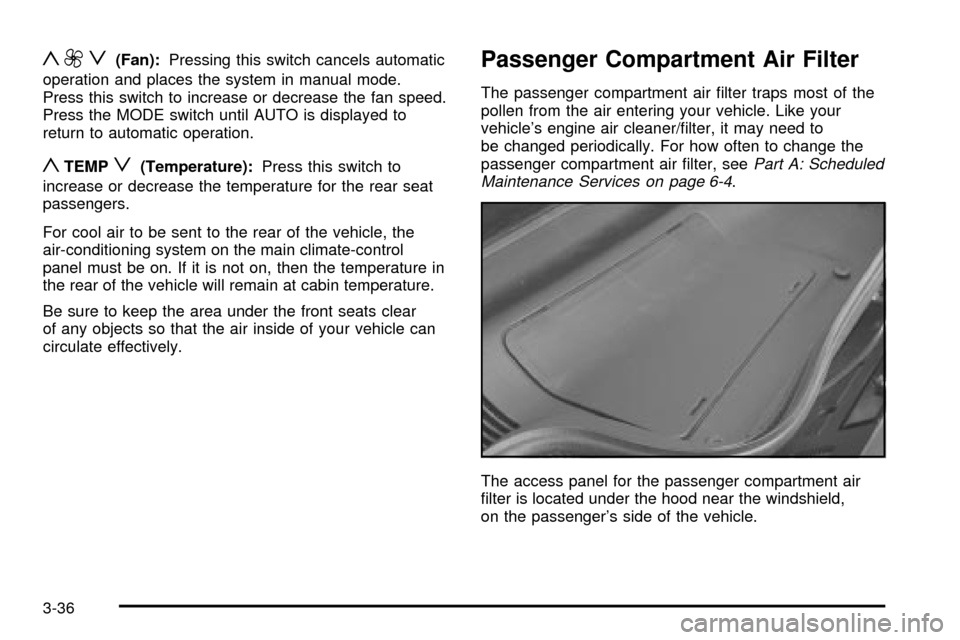
The access panel for the passenger compartment air
®lter is located under the hood near the windshield,
on the passenger's side of the vehicle.
3-36