radio CADILLAC DEVILLE 2003 8.G User Guide
[x] Cancel search | Manufacturer: CADILLAC, Model Year: 2003, Model line: DEVILLE, Model: CADILLAC DEVILLE 2003 8.GPages: 423, PDF Size: 2.91 MB
Page 151 of 423

Ashtrays and Cigarette Lighter
Notice:Don't put papers or other ¯ammable items
into your ashtrays. Hot cigarettes or other smoking
materials could ignite them, causing a damaging ®re.
Front Ashtray
With the full ¯oor console, the ashtray is located below
the climate control system. To open, push down on
the cover. To clean the ashtray, lift it out by gripping
the sides.
For vehicles without the ¯oor console, pull the tray
located below the radio to reveal the ashtray. The
ashtray can be removed for cleaning.
Rear Ashtray
The ashtrays are located on the door armrests.
To use an ashtray, lift the lid.
Cigarette Lighter
Notice:Don't hold a cigarette lighter in with your
hand while it is heating. If you do, it won't be able to
back away from the heating element when it's
ready. That can make it overheat, damaging the
lighter and the heating element.
The cigarette lighter is located near the front ashtray.
Press the lighter all the way in and release it. It will pop
back out by itself once the element has heated for use.
Cigarette lighters can be used to provide electrical
power to accessories. See
Accessory Power Outlets
on page 3-27for more information.
3-28
Page 183 of 423

DIC Warnings and Messages
These messages will appear if there is a problem
sensed in one of your vehicle's systems. Vehicles that
are ®rst sold in Canada will have a number after
each message. This number helps to identify the
problem. You must then press INFO or INFO RESET to
clear the display screen for further use. However, be
sure to take any message that appears on the display
screen seriously and remember that pressing the
INFO or INFO RESET button will only make the
message disappear, not the problem.
DIC messages can also be displayed in French,
German, Spanish and Japanese. Contact your dealer to
have the language display adjusted for your vehicle.
BATTERY NOT CHARGING ± 7:This message
will appear if the battery is not being charged. Have the
electrical system checked by your dealership at your
earliest convenience.
BATTERY SAVER ACTIVE ± 27:This message is
displayed when the vehicle has detected that the battery
voltage is dropping beyond a reasonable point. The
battery saver system will start reducing certain features
of the vehicle that you may not be able to notice. At
the point that features are disabled, this message
is displayed. It means that the vehicle is trying to save
the charge in the battery. Turn off unnecessary
accessories to allow the battery to recharge.BATTERY VOLTAGE HIGH ± 8:This message shows
that the electrical charging system is overcharging
(more than 16 volts). To avoid being stranded, have the
electrical system checked by your dealership. You
can reduce the charging overload by using the
accessories. Turn on the lamps and radio, set the
climate control on AUTO and the fan speed on HI, and
turn the rear window defogger on. You can monitor
battery voltage on the DIC by pressing the INFO button.
The normal range is 11.5 to 15.5 volts when the
engine is running.
BATTERY VOLTAGE LOW ± 6:This message will
appear when the electrical system is charging less than
10 volts or if the battery has been drained. If this
message appears immediately after starting, it is
possible that the generator can still recharge the battery.
The battery should recharge while driving but may
take a few hours to do so. Consider using an auxiliary
charger (be sure to follow the manufacturer's
instructions) to boost the battery after returning home or
to a ®nal destination. If this message appears while
driving or after starting your vehicle and stays on, have
it checked immediately to determine the cause of
this problem. To help the generator recharge the battery
quickly, you can reduce the load on the electrical
system by turning off the accessories. You can monitor
battery voltage on the DIC by pressing the INFO
button. The normal range is 11.5 to 15.5 volts.
3-60
Page 190 of 423

Climate Controls and Radio System
Personalization
These features allow both drivers to personalize their
own climate control settings as well as their radio
settings. For more information, see
Climate Controls
Personalization on page 3-39andRadio Personalization
with Home and Away Feature on page 3-103.
DIC Vehicle Personalization
Your vehicle is equipped with personalization capabilities
that allows you to program certain features to a preferred
setting for up to two people. The number of
programmable features varies depending upon which
model of the vehicle is purchased. On all vehicles,
features such as climate control settings, radio preset
settings, exterior lighting at unlock, remote lock and
unlock con®rmation, and automatic door locks have
already been programmed for your convenience. Some
vehicles are equipped with additional features that can be
programmed including the seat position, steering column
position (if equipped) and outside mirror position. The
navigation screen preferences (if equipped) will remain at
the last set position.If your vehicle is equipped with the ability to program
additional personalization features, the driver's
preferences are recalled by pressing the unlock button
on the remote keyless entry transmitter or by pressing
the appropriate memory button, 1 or 2, located on
the driver's door. Certain features can be programmed
not to recall until the key is placed in the ignition.
To change feature preferences you must use one of the
following procedures.
Entering Feature Programming
To enter feature programming mode, do the following:
1. Turn the ignition to ON, making sure the vehicle is in
PARK (P).
2. If your vehicle has memory settings, press the
appropriate memory button, 1 or 2, located on
the driver's door panel. The DIC display will show
either 1 or 2 depending on which button was
selected. Make sure the number on the DIC display
matches the number on the back of your key fob.
3. Press the INFO button until FEATURE
PROGRAMMING appears on the DIC display.
4. Press the ON/OFF button to enter FEATURE
PROGRAMMING.
3-67
Page 203 of 423

Audio System(s)
Notice:Before you add any sound equipment to
your vehicle ± like a tape player, CB radio, mobile
telephone or two-way radio ± be sure you can
add what you want. If you can, it's very important to
do it properly. Added sound equipment may
interfere with the operation of your vehicle's engine,
radio or other systems, and even damage them.
Your vehicle's systems may interfere with the
operation of sound equipment that has been added
improperly.
So, before adding sound equipment, check with
your dealer and be sure to check federal rules
covering mobile radio and telephone units.
Your audio system has been designed to operate easily
and to give years of listening pleasure. You will get
the most enjoyment out of it if you acquaint yourself with
it ®rst. Figure out which radio you have in your vehicle,
®nd out what your audio system can do and how to
operate all of its controls to be sure you're getting the
most out of the advanced engineering that went into it.
Your vehicle has a feature called Retained Accessory
Power (RAP). With RAP, you can play your audio
system even after the ignition is turned off. See
ªRetained Accessory Power (RAP)º under
Ignition
Positions on page 2-23.
Setting the Time for Radios without
Radio Data Systems (RDS)
Press and hold HR until the correct hour appears on the
display. Press and hold MN until the correct minute
appears on the display. Display the time with the ignition
off by pressing one of these buttons.
Setting the Time for Radios with
Radio Data Systems (RDS)
Press and hold HR until the correct hour appears on the
display. Press and hold MN until the correct minute
appears on the display. Display the time when the
ignition is off by pressing one of these buttons.
To synchronize the time with an FM station broadcasting
Radio Data System (RDS) information, press and hold
HR and MN at the same time until TIME UPDATED
appears on the display. If the time is not available from
the station, NO STATION TIME will appear on the
display.
3-80
Page 204 of 423
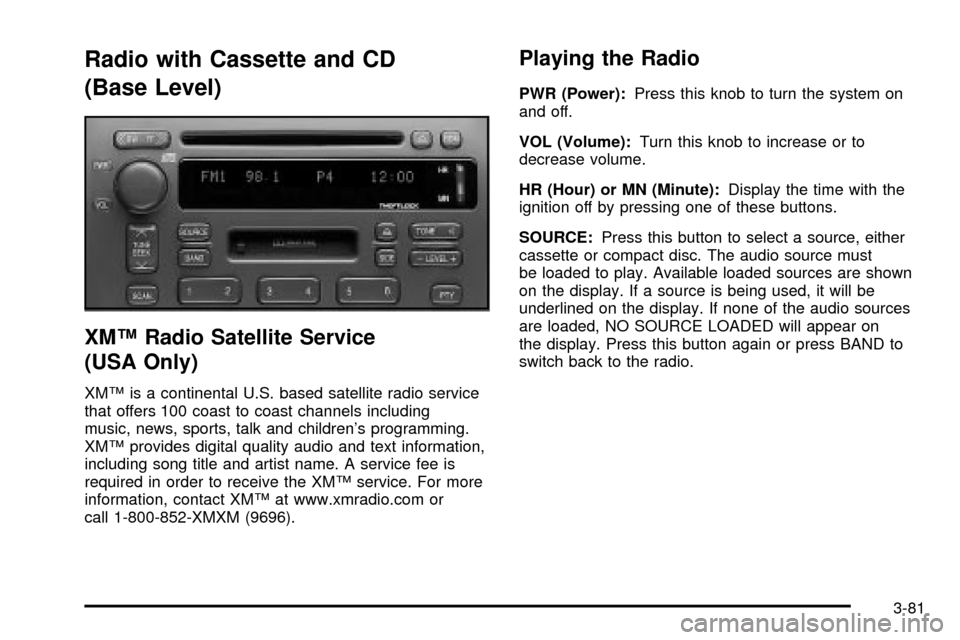
Radio with Cassette and CD
(Base Level)
XMŸ Radio Satellite Service
(USA Only)
XMŸ is a continental U.S. based satellite radio service
that offers 100 coast to coast channels including
music, news, sports, talk and children's programming.
XMŸ provides digital quality audio and text information,
including song title and artist name. A service fee is
required in order to receive the XMŸ service. For more
information, contact XMŸ at www.xmradio.com or
call 1-800-852-XMXM (9696).
Playing the Radio
PWR (Power):Press this knob to turn the system on
and off.
VOL (Volume):Turn this knob to increase or to
decrease volume.
HR (Hour) or MN (Minute):Display the time with the
ignition off by pressing one of these buttons.
SOURCE:Press this button to select a source, either
cassette or compact disc. The audio source must
be loaded to play. Available loaded sources are shown
on the display. If a source is being used, it will be
underlined on the display. If none of the audio sources
are loaded, NO SOURCE LOADED will appear on
the display. Press this button again or press BAND to
switch back to the radio.
3-81
Page 205 of 423

Finding a Station
BAND:Press this button to select weather, FM1, FM2,
AM, or XM1, XM2 (USA only, if equipped).
¦TUNE SEEK¥:This button can be pressed to two
positions. Press this button to the ®rst position to
manually tune to the next or to the previous stations. If
this button is held at the ®rst position for a few
seconds, the radio will continue tuning until this button
is released.
Press this button to the second position and release it
to seek to the next or to the previous radio station.
The radio will seek only to stations that are in the
selected band and only to those with a strong signal.
SCAN:Press this button for less than two seconds
to scan radio stations. The radio will go to a station, play
for ®ve seconds, then go on to the next station. Press
this button again to stop scanning.
To scan preset stations, press and hold SCAN for more
than two seconds until you hear a beep. The radio
will go to the ®rst preset station stored on your
pushbuttons, play for ®ve seconds, then go on to the
next preset station. Press SCAN again to stop scanning
presets.
The radio will scan only to the stations that are in the
selected band and only to those with a strong signal.
Setting Preset Stations
The six numbered pushbuttons let you return to your
favorite stations. You can set up to 36 stations
(six weather, six FM1, six FM2, six AM, six XM1
and six XM2 (USA only, if equipped), by performing
the following steps:
1. Turn the radio on.
2. Press BAND to select weather, FM1, FM2, AM, or
XM1, XM2.
3. Tune in the desired station.
4. Press and hold one of the six numbered
pushbuttons for more than two seconds until you
hear a beep.
5. Repeat the steps for each pushbutton. Whenever
you press that numbered pushbutton for less than
two seconds, the station you set will return.
When battery power is removed and later applied, you
will not have to reset your radio presets because
the radio remembers them.
3-82
Page 206 of 423

Setting the Tone (Bass/Treble)
TONE:Press and release this button until the desired
tone control (bass, treble or midrange) appears on
the display. The radio keeps separate tone settings for
each band, preset and source.
-LEVEL +:After selecting the desired tone control,
press the plus or minus symbol on this button to select
the desired level.
To save the tone settings for your presets, press and
hold the numbered pushbutton for the desired preset for
more than two seconds until you hear a beep.
Adjusting the Speakers (Balance/Fade)
M
(Speaker):Press and release this button until the
desired control (balance or fade) appears on the display.
-LEVEL +:After selecting the desired control, press
the plus or minus symbol on this button to select
the desired level.
PTY (Program Type):This button is inoperable on this
radio, except if your radio is equipped with XMŸ
Satellite Radio Service.
Finding a PTY Station (XMŸ Only)
To select and ®nd a desired PTY perform the following:
1. Press PTY. PTY will be displayed on the screen.
2. Select a category by pressing-LEVEL +.
3. Once the desired category is displayed, press
TUNE/SEEK to select the category and take
you to the category's ®rst station.
4. If you want to go to another station within that
category, press TUNE/SEEK once to display
the category, then press TUNE/SEEK again to go
to another station.
5. If PTY times out and is no longer on the display, go
back to Step 1.
SCAN:You can also scan through the channels within
a category by performing the following:
1. Press PTY. PTY will be displayed on the screen.
2. Select a category by pressing-LEVEL +.
3. Once the desired category is displayed, press
SCAN, and the radio will begin scanning within
your chosen category.
4. Press SCAN again to stop at a particular section.
3-83
Page 207 of 423
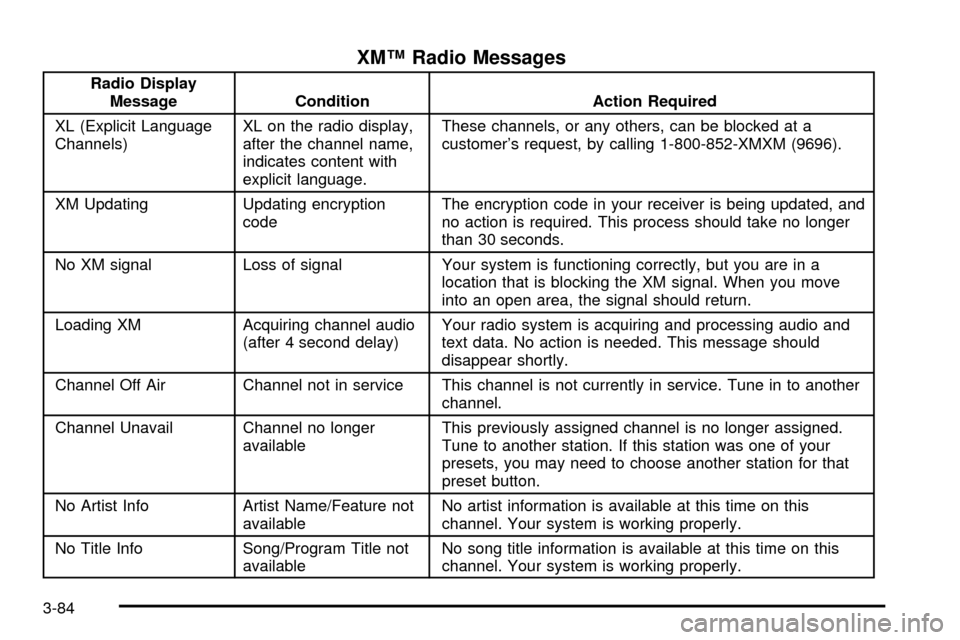
XMŸ Radio Messages
Radio Display
Message Condition Action Required
XL (Explicit Language
Channels)XL on the radio display,
after the channel name,
indicates content with
explicit language.These channels, or any others, can be blocked at a
customer's request, by calling 1-800-852-XMXM (9696).
XM Updating Updating encryption
codeThe encryption code in your receiver is being updated, and
no action is required. This process should take no longer
than 30 seconds.
No XM signal Loss of signal Your system is functioning correctly, but you are in a
location that is blocking the XM signal. When you move
into an open area, the signal should return.
Loading XM Acquiring channel audio
(after 4 second delay)Your radio system is acquiring and processing audio and
text data. No action is needed. This message should
disappear shortly.
Channel Off Air Channel not in service This channel is not currently in service. Tune in to another
channel.
Channel Unavail Channel no longer
availableThis previously assigned channel is no longer assigned.
Tune to another station. If this station was one of your
presets, you may need to choose another station for that
preset button.
No Artist Info Artist Name/Feature not
availableNo artist information is available at this time on this
channel. Your system is working properly.
No Title Info Song/Program Title not
availableNo song title information is available at this time on this
channel. Your system is working properly.
3-84
Page 208 of 423
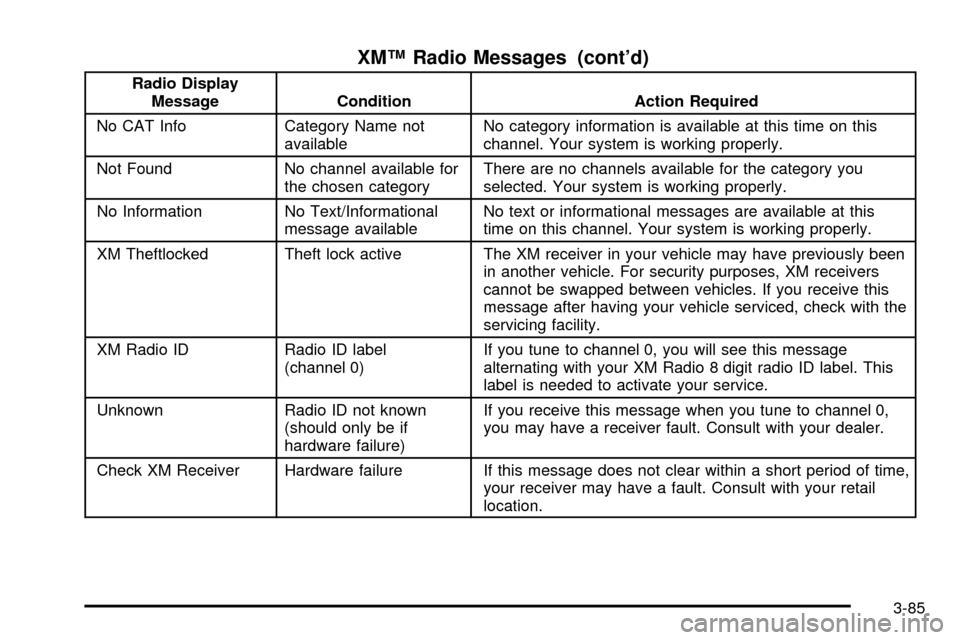
XMŸ Radio Messages (cont'd)
Radio Display
Message Condition Action Required
No CAT Info Category Name not
availableNo category information is available at this time on this
channel. Your system is working properly.
Not Found No channel available for
the chosen categoryThere are no channels available for the category you
selected. Your system is working properly.
No Information No Text/Informational
message availableNo text or informational messages are available at this
time on this channel. Your system is working properly.
XM Theftlocked Theft lock active The XM receiver in your vehicle may have previously been
in another vehicle. For security purposes, XM receivers
cannot be swapped between vehicles. If you receive this
message after having your vehicle serviced, check with the
servicing facility.
XM Radio ID Radio ID label
(channel 0)If you tune to channel 0, you will see this message
alternating with your XM Radio 8 digit radio ID label. This
label is needed to activate your service.
Unknown Radio ID not known
(should only be if
hardware failure)If you receive this message when you tune to channel 0,
you may have a receiver fault. Consult with your dealer.
Check XM Receiver Hardware failure If this message does not clear within a short period of time,
your receiver may have a fault. Consult with your retail
location.
3-85
Page 209 of 423

Playing a Cassette Tape
With the radio on, insert a cassette tape. The tape will
begin playing as soon as it is inserted. When one side of
your cassette tape is done playing, auto reverse plays
the other side of your cassette tape. A cassette tape
may be loaded with the radio off but it will not start
playing until the radio is on. If you want to insert a
cassette tape when the ignition is off, ®rst press the eject
button.
While the tape is playing, use the VOL, TONE, and
LEVEL controls just as you do for the radio. Other
controls may have different functions when a tape is
inserted. The display will show an underlined tape
symbol. TAPE PLAY will appear on the display when a
tape is playing, with an arrow to indicate which side
of the tape is playing.
Your cassette tape player automatically reduces
background noise. Dolby
žNoise Reduction is
manufactured under a license from DolbyžLaboratories
Licensing Corporation. Dolbyžand the double-D
symbol are trademarks of DolbyžLaboratories Licensing
Corporation.
Auto CrO2 allows the cassette tape player to adjust to
the type of cassette tape for clearer sound of CrO2
cassette tapes.
If an error appears on the display, see ªCassette Tape
Messagesº later in this section.
{RW (Rewind):Press the left arrow to rewind the
tape rapidly. The radio will play while the tape rewinds.
You may use your radio pushbuttons to tune to
another station while in rewind. Press the left arrow
again to return to playing speed.
FF
|(Fast Forward):Press the right arrow to fast
forward to another part of the tape. The radio will
play while the tape advances. You may use your radio
pushbuttons to tune to another station while in fast
forward. Press the right arrow again to return to playing
speed.
¦TUNE SEEK¥:Your tape must have at least
three seconds of silence between each selection
for SEEK to work. Press the up or the down arrow to
seek to the next or to the previous selection on the tape.
SCAN:Press this button to listen to selections for a
few seconds. The tape will go to a selection, play for a
few seconds, then go on to the next selection. Press
this button again to stop scanning.
SIDE:Press this button to play the other side of the
tape.
Z(Eject):Press this button, located to the right of
the cassette tape slot to remove a tape. Eject may
be activated with the radio off and/or the ignition off.
3-86