door lock CADILLAC DEVILLE 2004 8.G Owner's Manual
[x] Cancel search | Manufacturer: CADILLAC, Model Year: 2004, Model line: DEVILLE, Model: CADILLAC DEVILLE 2004 8.GPages: 460, PDF Size: 2.88 MB
Page 118 of 460
Reprogramming a Single HomeLink®
Button
To program a device to HomeLink®using a HomeLink®
button previously trained, follow these steps:
1. Press and hold the desired HomeLink
®button. Do
not release the button.
2. The indicator light will begin to ash after
20 seconds. While still holding the HomeLink
®
button, proceed with Step 2 under “Programming
HomeLink®.”
Resetting Defaults
To reset HomeLink®to default settings do the following:
1. Hold down the two outside buttons for about
20 seconds until the indicator light begins to ash.
2. Continue to hold both buttons until the HomeLink
®
indicator light turns off.
3. Release both buttons.
For questions or comments, contact HomeLink
®at
1-800-355-3515, or on the internet at
www.homelink.com.
Storage Areas
Glove Box
The glove box is located in front of the passenger’s seat
on the instrument panel. To lock the glove box door,
insert the master key into the lock cylinder and
turn it clockwise. Turn the key counterclockwise to
unlock the door.
Instrument Panel Storage Area
This storage compartment is located in the center of the
instrument panel below the radio. Pull the door out to
reveal the accessory power outlet and storage
compartment. To clean the storage compartment, lift out
while pulling on the sides.
2-50
Page 124 of 460
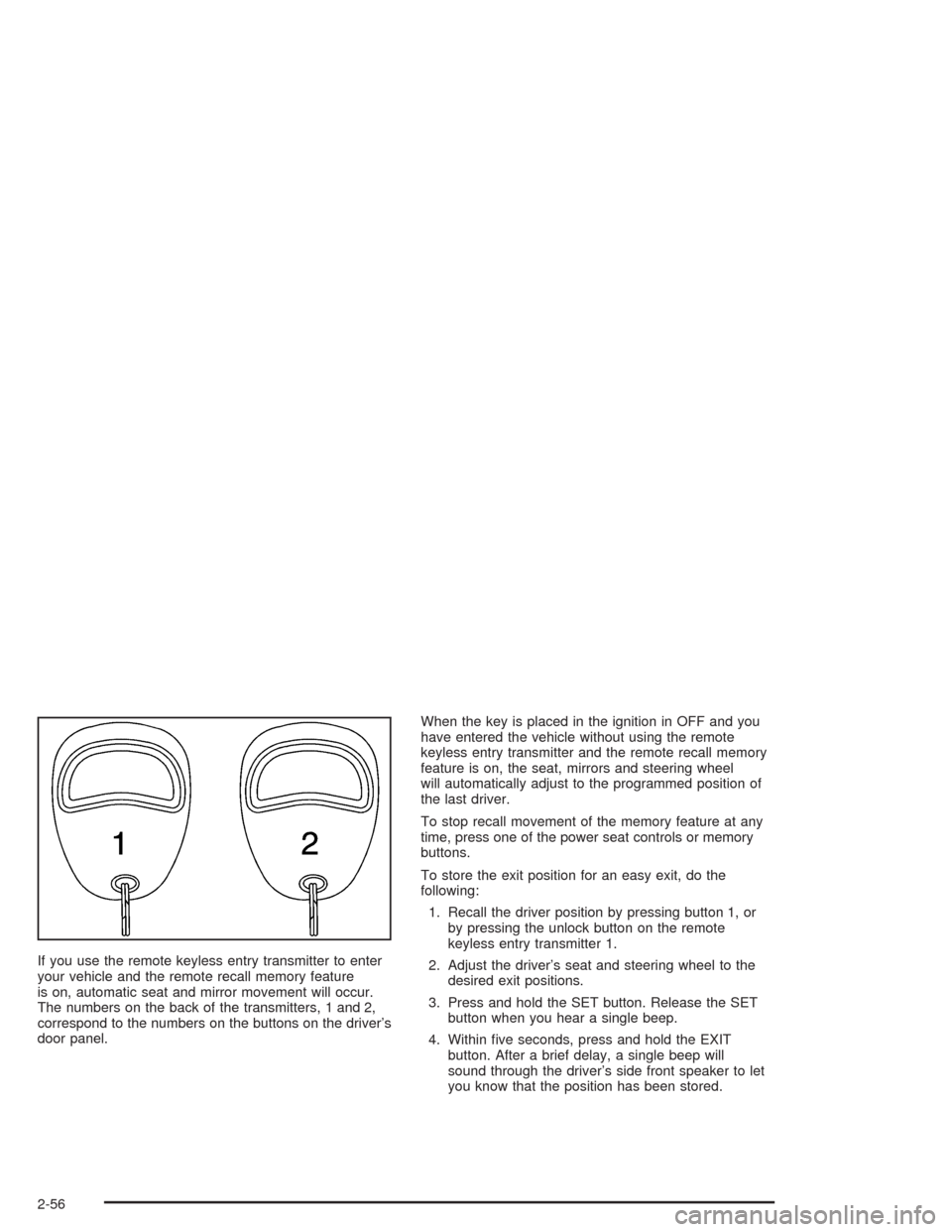
If you use the remote keyless entry transmitter to enter
your vehicle and the remote recall memory feature
is on, automatic seat and mirror movement will occur.
The numbers on the back of the transmitters, 1 and 2,
correspond to the numbers on the buttons on the driver’s
door panel.When the key is placed in the ignition in OFF and you
have entered the vehicle without using the remote
keyless entry transmitter and the remote recall memory
feature is on, the seat, mirrors and steering wheel
will automatically adjust to the programmed position of
the last driver.
To stop recall movement of the memory feature at any
time, press one of the power seat controls or memory
buttons.
To store the exit position for an easy exit, do the
following:
1. Recall the driver position by pressing button 1, or
by pressing the unlock button on the remote
keyless entry transmitter 1.
2. Adjust the driver’s seat and steering wheel to the
desired exit positions.
3. Press and hold the SET button. Release the SET
button when you hear a single beep.
4. Within ve seconds, press and hold the EXIT
button. After a brief delay, a single beep will
sound through the driver’s side front speaker to let
you know that the position has been stored.
2-56
Page 125 of 460

An exit position for driver position 2 can be programmed
by repeating the above steps, pressing button 2 (for
driver 2) and using remote keyless entry transmitter
number 2.
With the vehicle in PARK (P), the exit position for the
previously set driver can be recalled by pressing
the EXIT button. The mirrors and power lumbar positions
will not be stored or recalled.
Further programming for automatic seat and steering
wheel movement can be done using the Driver
Information Center (DIC). You can select or not select
the following:
Automatic seat and steering wheel movement when
the vehicle is unlocked with the remote keyless
entry transmitter, or
automatic seat and steering wheel movement when
a key is placed in the ignition.
For programming information, seeDIC Vehicle
Personalization on page 3-74.
Three-Button Control
The controls for these
features are located on the
driver’s door panel, and
are used to program
and recall memory settings
for the driver’s seat,
outside mirror and steering
wheel positions.
2-57
Page 151 of 460
Courtesy Lamps
The courtesy lamps are located on the headliner above
the rear seat. These lamps come on by turning the
instrument panel brightness knob fully clockwise or when
any door is opened and it is dark outside. Puddle
lamps are located on the bottom of the front and rear
door trim.
Entry Lighting
This feature turns on the courtesy lamps and the
backlighting to the door switches and to the exterior
lamp control when a door is opened or if you press the
remote keyless entry transmitter unlock button. If
activated due to the transmitter, the lighting will remain
active for about 40 seconds. Since the entry lighting
system uses the light sensor, it must be dark outside in
order for the courtesy lamps to turn on. The courtesy
lamps turn off approximately 25 seconds after the
last door is closed. They will dim to off if the ignition key
is placed in ON, or immediately deactivate if the
power locks are activated.
Parade Dimming
This feature prohibits dimming of the digital displays and
backlighting during daylight hours when the key is in
the ignition and the headlamps are on. This feature
operates with the light sensor for the Twilight
Sentinel
®and is fully automatic. When the light sensor
reads darkness outside and the parking lamps are
active, the digital displays can be adjusted by turning
the instrument panel brightness knob counterclockwise
to dim and clockwise to brighten lighting.
3-23
Page 171 of 460
Climate Controls Personalization
If your vehicle is equipped with this feature, you
can store and recall climate control settings for the
temperature, the fan speed and the direction of
the airow.
Memory buttons 1 and 2 are located on the driver’s door
panel and correspond to the numbers 1 or 2 found on
the back of each remote keyless entry transmitter.
To recall the climate control settings last stored on your
transmitter, press the unlock button on your remote
keyless entry transmitter and put the ignition in
ACCESSORY or ON. The settings will be recalled.To change the stored settings, do the following:
1. Select the desired temperature, fan speed and
airow mode. If desired, a separate temperature
setting may also be selected for the front seat
passenger. For information on how to do this, see
Dual Climate Control System on page 3-32.
2. Locate memory buttons 1 and 2 on the driver’s door
panel.
3. Press the memory button on the door panel that
corresponds to the number on the back of the
transmitter you are programming, until you hear two
beeps. The beeps conrm that your selection has
been saved and can now be recalled. For more
information on the memory feature, seeMemory
Seat, Mirrors and Steering Wheel on page 2-55.
Follow these steps each time you want to change the
stored settings.
3-43
Page 202 of 460

DIC Vehicle Personalization
Your vehicle is equipped with personalization capabilities
that allows you to program certain features to a
preferred setting for up to two people. The number of
programmable features varies depending upon
which model of the vehicle is purchased. On all vehicles,
features such as climate control settings, radio preset
settings, exterior lighting at unlock, remote lock and
unlock conrmation, and automatic door locks
have already been programmed for your convenience.
Some vehicles are equipped with additional features that
can be programmed including the seat position,
steering column position (if equipped) and outside mirror
position. The navigation screen preferences (if
equipped) will remain at the last set position.
If your vehicle is equipped with the ability to program
additional personalization features, the driver’s
preferences are recalled by pressing the unlock button
on the remote keyless entry transmitter or by pressing
the appropriate memory button, 1 or 2, located on
the driver’s door. Certain features can be programmed
not to recall until the key is placed in the ignition.
To change feature preferences you must use one of the
following procedures.
Entering Feature Programming
To enter feature programming mode, do the following:
1. Turn the ignition to ON, making sure the vehicle is in
PARK (P).
2. If your vehicle has memory settings, press the
appropriate memory button, 1 or 2, located on
the driver’s door panel. The DIC display will show
either 1 or 2 depending on which button was
selected. Make sure the number on the DIC display
matches the number on the back of your key fob.
3. Press the INFO button until FEATURE
PROGRAMMING appears on the DIC display.
4. Press the ON/OFF button to enter FEATURE
PROGRAMMING.
3-74
Page 207 of 460

Lights Flash at Unlock
This feature allows the parking lamps to ash twice
when the remote keyless entry transmitter is used
to unlock the vehicle. All doors must be closed, and the
lamps will not ash if the manual parking lamps or
headlamps are active.
Programmable Modes
Mode 1:ON
Mode 2:OFF
Before your vehicle was shipped from the factory, it was
programmed to Mode 1. The mode to which the
vehicle was programmed may have been changed since
it left the factory.To determine the mode to which the vehicle is
programmed or to program the vehicle to a different
mode, do the following:
1. Enter FEATURE PROGRAMMING following the
instructions listed previously.
2. Press the down arrow on the INFO button until
LIGHTS FLASH AT UNLOCK appears on the
DIC display.
3. To turn on the feature, press the ON/OFF button
until ON appears on the DIC display. To turn it off,
press the ON/OFF button until OFF appears on
the display.
The mode you selected is now set. You can either exit
the programming mode by following the instructions
later in this section or program the next feature available
on your vehicle.
3-79
Page 208 of 460

Lights Flash at Lock
This feature allows the parking lamps to ash once
when the remote keyless entry transmitter is used to
lock the vehicle. All doors must be closed for this feature
to work, and the lamps will not ash if the manual
parking lamps or headlamps are active.
Programmable Modes
Mode 1:ON
Mode 2:OFF
Before your vehicle was shipped from the factory, it was
programmed to Mode 1. The mode to which the
vehicle was programmed may have been changed since
it left the factory.To determine the mode to which the vehicle is
programmed or to program the vehicle to a different
mode, do the following:
1. Enter FEATURE PROGRAMMING following the
instructions listed previously.
2. Press the down arrow on the INFO button until
LIGHTS FLASH AT LOCK appears on the DIC
display.
3. To turn on the feature, press the ON/OFF button
until ON appears on the DIC display. To turn it off,
press the ON/OFF button until OFF appears on
the display.
The mode you selected is now set. You can either exit
the programming mode by following the instructions
later in this section or program the next feature available
on your vehicle.
3-80
Page 209 of 460

Horn Sounds at Lock
This feature sounds the horn once when the remote
keyless entry transmitter is used to lock the vehicle. All
doors must be closed for this feature to work.
Programmable Modes
Mode 1:ON
Mode 2:OFF
Before your vehicle was shipped from the factory, it was
programmed to Mode 2. The mode to which the
vehicle was programmed may have been changed since
it left the factory.To determine the mode to which the vehicle is
programmed or to program the vehicle to a different
mode, do the following:
1. Enter FEATURE PROGRAMMING following the
instructions listed previously.
2. Press the down arrow on the INFO button until
HORN SOUNDS AT LOCK appears on the DIC
display.
3. To turn on the feature, press the ON/OFF button
until ON appears on the DIC display. To turn it off,
press the ON/OFF button until OFF appears on
the display.
The mode you selected is now set. You can either exit
the programming mode by following the instructions
later in this section or program the next feature available
on your vehicle.
3-81
Page 210 of 460

Exterior Lights at Unlock
This feature turns on the exterior lamps when the
remote keyless entry transmitter is used to unlock the
vehicle. The lamps will remain on for about 20 seconds
unless a door is opened, the ignition is turned to
ACCESSORY, ON or START or the remote keyless
entry transmitter is used to lock the vehicle.
Programmable Modes
Mode 1:ON
Mode 2:OFF
Before your vehicle was shipped from the factory, it was
programmed to Mode 1. The mode to which the
vehicle was programmed may have been changed since
it left the factory.To determine the mode to which the vehicle is
programmed or to program the vehicle to a different
mode, do the following:
1. Enter FEATURE PROGRAMMING following the
instructions listed previously.
2. Press the down arrow on the INFO button until EXT
LIGHTS AT UNLOCK appears on the DIC display.
3. To turn on the feature, press the ON/OFF button
until ON appears on the DIC display. To turn it off,
press the ON/OFF button until OFF appears on
the display.
The mode you selected is now set. You can either exit
the programming mode by following the instructions
later in this section or program the next feature available
on your vehicle.
3-82