lock CADILLAC DEVILLE 2004 8.G Owner's Guide
[x] Cancel search | Manufacturer: CADILLAC, Model Year: 2004, Model line: DEVILLE, Model: CADILLAC DEVILLE 2004 8.GPages: 460, PDF Size: 2.88 MB
Page 118 of 460
Reprogramming a Single HomeLink®
Button
To program a device to HomeLink®using a HomeLink®
button previously trained, follow these steps:
1. Press and hold the desired HomeLink
®button. Do
not release the button.
2. The indicator light will begin to ash after
20 seconds. While still holding the HomeLink
®
button, proceed with Step 2 under “Programming
HomeLink®.”
Resetting Defaults
To reset HomeLink®to default settings do the following:
1. Hold down the two outside buttons for about
20 seconds until the indicator light begins to ash.
2. Continue to hold both buttons until the HomeLink
®
indicator light turns off.
3. Release both buttons.
For questions or comments, contact HomeLink
®at
1-800-355-3515, or on the internet at
www.homelink.com.
Storage Areas
Glove Box
The glove box is located in front of the passenger’s seat
on the instrument panel. To lock the glove box door,
insert the master key into the lock cylinder and
turn it clockwise. Turn the key counterclockwise to
unlock the door.
Instrument Panel Storage Area
This storage compartment is located in the center of the
instrument panel below the radio. Pull the door out to
reveal the accessory power outlet and storage
compartment. To clean the storage compartment, lift out
while pulling on the sides.
2-50
Page 124 of 460
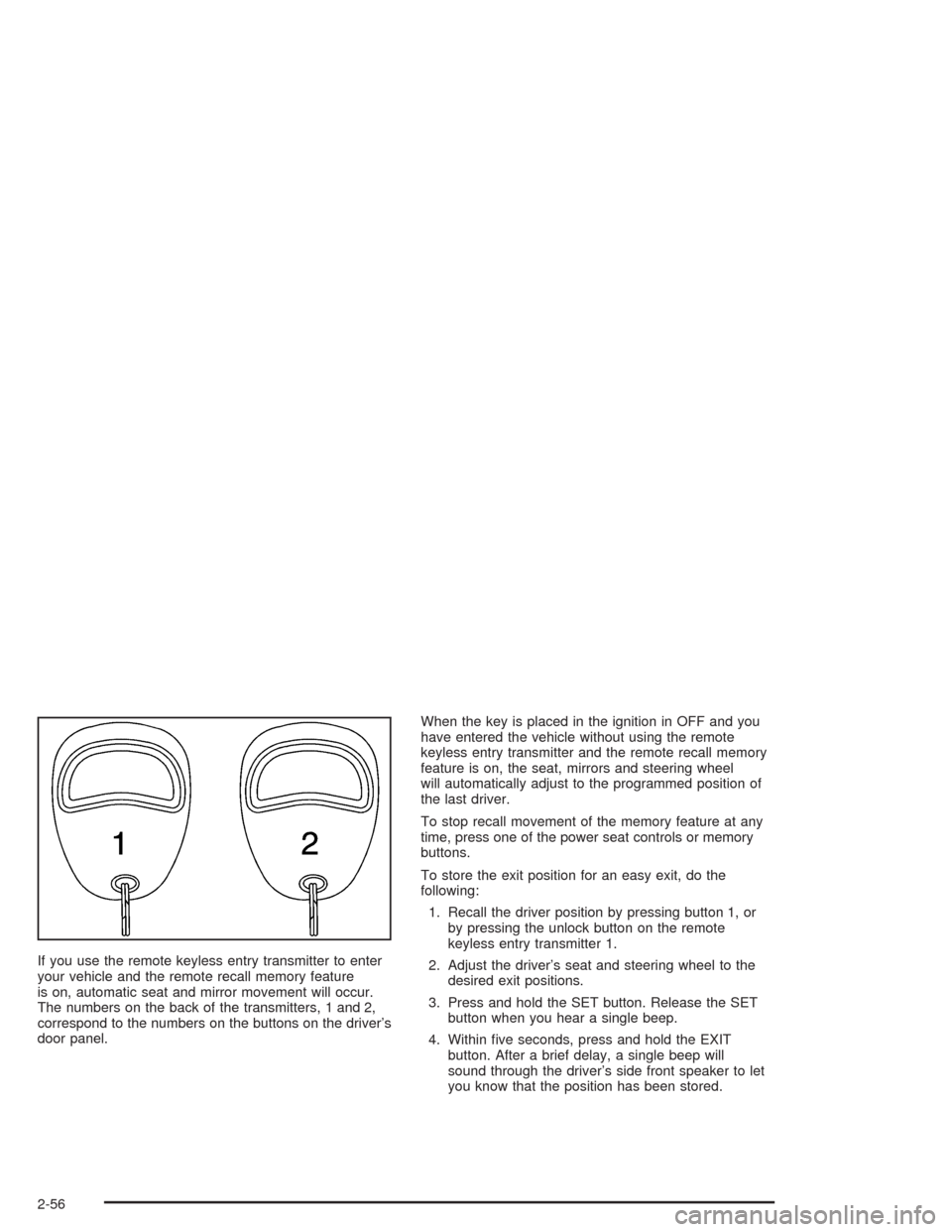
If you use the remote keyless entry transmitter to enter
your vehicle and the remote recall memory feature
is on, automatic seat and mirror movement will occur.
The numbers on the back of the transmitters, 1 and 2,
correspond to the numbers on the buttons on the driver’s
door panel.When the key is placed in the ignition in OFF and you
have entered the vehicle without using the remote
keyless entry transmitter and the remote recall memory
feature is on, the seat, mirrors and steering wheel
will automatically adjust to the programmed position of
the last driver.
To stop recall movement of the memory feature at any
time, press one of the power seat controls or memory
buttons.
To store the exit position for an easy exit, do the
following:
1. Recall the driver position by pressing button 1, or
by pressing the unlock button on the remote
keyless entry transmitter 1.
2. Adjust the driver’s seat and steering wheel to the
desired exit positions.
3. Press and hold the SET button. Release the SET
button when you hear a single beep.
4. Within ve seconds, press and hold the EXIT
button. After a brief delay, a single beep will
sound through the driver’s side front speaker to let
you know that the position has been stored.
2-56
Page 125 of 460

An exit position for driver position 2 can be programmed
by repeating the above steps, pressing button 2 (for
driver 2) and using remote keyless entry transmitter
number 2.
With the vehicle in PARK (P), the exit position for the
previously set driver can be recalled by pressing
the EXIT button. The mirrors and power lumbar positions
will not be stored or recalled.
Further programming for automatic seat and steering
wheel movement can be done using the Driver
Information Center (DIC). You can select or not select
the following:
Automatic seat and steering wheel movement when
the vehicle is unlocked with the remote keyless
entry transmitter, or
automatic seat and steering wheel movement when
a key is placed in the ignition.
For programming information, seeDIC Vehicle
Personalization on page 3-74.
Three-Button Control
The controls for these
features are located on the
driver’s door panel, and
are used to program
and recall memory settings
for the driver’s seat,
outside mirror and steering
wheel positions.
2-57
Page 127 of 460

To stop recall movement of the memory feature at any
time, press one of the power seat controls or memory
buttons.
To store the exit position for an easy exit, do the
following:
1. Recall the driver position by pressing button 1, or
by pressing the unlock button on the remote
keyless entry transmitter 1.
2. Adjust the driver’s seat and steering wheel to the
desired exit positions.
3. Press and hold the EXIT button. After a brief delay,
two beeps will sound through the driver’s side front
speaker to let you know that the position has
been stored.
An exit position for driver position 2 can be programmed
by repeating the above steps, pressing button 2 (for
driver 2) and using remote keyless entry transmitter
number 2.With the vehicle in PARK (P), the exit position for the
previously set driver can be recalled by pressing the EXIT
button. You will hear a single beep. The mirrors and
power lumbar positions will not be stored or recalled.
Further programming for automatic seat and steering
wheel movement can be done using the Driver
Information Center (DIC). You can select or not select
the following:
Automatic seat and steering wheel movement when
the vehicle is unlocked with the remote keyless
entry transmitter, or
automatic seat and steering wheel movement when
a key is placed in the ignition.
For programming information, seeDIC Vehicle
Personalization on page 3-74.
2-59
Page 129 of 460
Instrument Panel Overview...............................3-4
Hazard Warning Flashers................................3-6
Other Warning Devices...................................3-7
Horn.............................................................3-7
Tilt Wheel.....................................................3-7
Heated Steering Wheel...................................3-8
Turn Signal/Multifunction Lever.........................3-9
Exterior Lamps.............................................3-17
Interior Lamps..............................................3-22
Night Vision System......................................3-25
Ultrasonic Rear Parking Assist (URPA)............3-28
Accessory Power Outlets...............................3-30
Ashtrays and Cigarette Lighter........................3-31
Climate Controls............................................3-32
Dual Climate Control System..........................3-32
Outlet Adjustment.........................................3-37
Rear Climate Control System.........................3-38
Passenger Compartment Air Filter...................3-40
Steering Wheel Climate Controls.....................3-42
Climate Controls Personalization.....................3-43
Warning Lights, Gages, and Indicators............3-44
Instrument Panel Cluster................................3-44
Speedometer and Odometer...........................3-47
Trip Odometer..............................................3-47
Tachometer (Analog Cluster Only)...................3-49Safety Belt Reminder Light.............................3-49
Air Bag Readiness Light................................3-50
Charging System Light..................................3-51
Brake System Warning and Parking Brake
Indicator Light...........................................3-51
Anti-Lock Brake System Warning Light.............3-52
Traction Control System (TCS) Warning Light......3-53
Engine Coolant Temperature Warning Light......3-54
Engine Coolant Temperature Gage..................3-54
Malfunction Indicator Lamp.............................3-55
Oil Pressure Light.........................................3-58
Security Light...............................................3-59
Fog Lamp Light............................................3-59
Lights On Reminder......................................3-60
Cruise Control Light......................................3-60
Fuel Gage...................................................3-60
Fuel Data Display (Digital Cluster Only)...........3-61
Driver Information Center (DIC).......................3-62
DIC Controls and Displays.............................3-62
DIC Warnings and Messages.........................3-65
Climate Controls and Radio System
Personalization..........................................3-73
DIC Vehicle Personalization............................3-74
Trip Computer................................................3-89
Oil Life Indicator...........................................3-89
Section 3 Instrument Panel
3-1
Page 135 of 460

Other Warning Devices
If you carry reective triangles, you can set one up at
the side of the road about 300 feet (100 m) behind your
vehicle.
Horn
The horn can be sounded by pressing on the center of
the steering wheel pad.
Tilt Wheel
A tilt wheel allows you to adjust the steering wheel
before you drive. You can raise the steering wheel to
the highest level to give your legs more room when you
enter and exit the vehicle.The lever that allows you to tilt the steering wheel is
located on the left side of the steering column.
To tilt the wheel, hold the
wheel and pull the lever.
Then move the wheel
to a comfortable position
and release the lever
to lock the wheel in place.
3-7
Page 141 of 460
Windshield Washer
{CAUTION:
In freezing weather, do not use your washer
until the windshield is warmed. Otherwise the
washer uid can form ice on the windshield,
blocking your vision.
At the top of the turn signal/multifunction lever there is a
paddle with the word PUSH on it. To spray washer
uid on the windshield, press and release this paddle.
The wipers will clear the windshield and either stop
or return to your preset speed. For more washer cycles,
press and hold the paddle.
CHECK WASHER FLUID will be displayed on the Driver
Information Center (DIC) when the washer uid
reaches a low level.
Cruise Control
With cruise control, you can maintain a speed of
approximately 25 mph (40 km/h) or more without keeping
your foot on the accelerator. This is helpful on long trips.
Cruise control does not work at speeds below about
25 mph (40 km/h). When cruise control is on, you will see
a CRUISE light on the instrument panel cluster.When you apply your brakes, the cruise control shuts off.
{CAUTION:
Cruise control can be dangerous where you
can not drive safely at a steady speed. So, do
not use your cruise control on winding roads
or in heavy traffic.
Cruise control can be dangerous on slippery
roads. On such roads, fast changes in tire
traction can cause needless wheel spinning,
and you could lose control. Do not use cruise
control on slippery roads.
If your vehicle is in cruise control when the traction
control system begins to limit wheel spin, the cruise
control will automatically disengage. SeeTraction
Control System (TCS) on page 4-9. When road
conditions allow you to safely use it again, you may turn
the cruise control back on.
3-13
Page 150 of 460

Exterior Lighting Battery Saver
If the manual parking lamps or headlamps have been
left on, the exterior lamps will turn off approximately
10 minutes after the ignition is turned to OFF. This
protects against draining the battery in case you have
accidentally left the headlamps or parking lamps on. The
battery saver does not work if the headlamps are
turned on after the ignition switch is turned to OFF.
If you need to leave the lamps on for more than
10 minutes, use the exterior lamp control to turn the
lamps back on. To delay the lamps from turning off, see
“Twilight Sentinel
®” listed previously in this section.
Interior Lamps
Instrument Panel Brightness
This feature controls the brightness of the instrument
panel lights.
The knob for this feature is
located to the right of the
Twilight Sentinel
®lever.
Press the knob to release it to the outward position.
Turn the knob clockwise to brighten the lights or
counterclockwise to dim them. Press the knob to return
it to the original storage position.
3-22
Page 151 of 460
Courtesy Lamps
The courtesy lamps are located on the headliner above
the rear seat. These lamps come on by turning the
instrument panel brightness knob fully clockwise or when
any door is opened and it is dark outside. Puddle
lamps are located on the bottom of the front and rear
door trim.
Entry Lighting
This feature turns on the courtesy lamps and the
backlighting to the door switches and to the exterior
lamp control when a door is opened or if you press the
remote keyless entry transmitter unlock button. If
activated due to the transmitter, the lighting will remain
active for about 40 seconds. Since the entry lighting
system uses the light sensor, it must be dark outside in
order for the courtesy lamps to turn on. The courtesy
lamps turn off approximately 25 seconds after the
last door is closed. They will dim to off if the ignition key
is placed in ON, or immediately deactivate if the
power locks are activated.
Parade Dimming
This feature prohibits dimming of the digital displays and
backlighting during daylight hours when the key is in
the ignition and the headlamps are on. This feature
operates with the light sensor for the Twilight
Sentinel
®and is fully automatic. When the light sensor
reads darkness outside and the parking lamps are
active, the digital displays can be adjusted by turning
the instrument panel brightness knob counterclockwise
to dim and clockwise to brighten lighting.
3-23
Page 162 of 460
Manual Operation
yMODEz:Pressing the MODE switch and changing
the mode cancels automatic operation and places the
system in manual mode. Press AUTO to return to
automatic operation.
To change the current mode, select one of the following:
F(Vent):This mode directs air to the instrument
panel outlets.
*(Bi-Level):This mode directs approximately half of
the air to the instrument panel outlets, and then
directs most of the remaining air to the oor outlets.
Some air may be directed toward the windshield.
In automatic operation, cooler air is directed to the upper
outlets and warmer air to the oor outlets.
7(Floor):This mode directs most of the air to the
oor outlets with some air directed to the outboard
outlets (for the side windows) a little air directed to the
windshield.
The MODE switch can also be used to select the
oor/defog mode. Information on defogging and
defrosting can be found later in this section.
y9z(Fan):Press this switch to increase or
decrease the fan speed. Pressing this switch cancels
automatic operation and places the system in manual
mode. Press AUTO to return to automatic operation.
If the airow seems low when the fan speed is at
the highest setting, the passenger compartment air lter
may need to be replaced. For more information, see
Passenger Compartment Air Filter on page 3-40
andScheduled Maintenance on page 6-4.
?(Recirculation):This mode keeps outside air from
coming in the vehicle. It can be used to prevent outside
air and odors from entering your vehicle or to help heat or
cool the air inside your vehicle more quickly. Press this
button to turn the recirculation mode on or off. When the
button is pressed, an indicator light will come on. The
air-conditioning compressor also comes on.
Driver’s Temperature Knob:Press this knob to turn
the entire climate control system on or off. Turn this knob
clockwise or counterclockwise to manually increase or
decrease the temperature inside your vehicle.
3-34