fuel CADILLAC DEVILLE 2005 8.G User Guide
[x] Cancel search | Manufacturer: CADILLAC, Model Year: 2005, Model line: DEVILLE, Model: CADILLAC DEVILLE 2005 8.GPages: 420, PDF Size: 2.63 MB
Page 172 of 420
If the Light Is On Steady
You may be able to correct the emission system
malfunction by considering the following:
Did you recently put fuel into your vehicle?
If so, reinstall the fuel cap, making sure to fully
install the cap. SeeFilling the Tank on page 5-7.
The diagnostic system can determine if the fuel cap has
been left off or improperly installed. A loose or missing
fuel cap will allow fuel to evaporate into the atmosphere.
A few driving trips with the cap properly installed
should turn the light off.
Did you just drive through a deep puddle of water?
If so, your electrical system may be wet. The condition
will usually be corrected when the electrical system
dries out. A few driving trips should turn the light off.
Have you recently changed brands of fuel?
If so, be sure to fuel your vehicle with quality fuel.
SeeGasoline Octane on page 5-5. Poor fuel quality will
cause your engine not to run as efficiently as designed.
You may notice this as stalling after start-up, stalling
when you put the vehicle into gear, misring, hesitation
on acceleration, or stumbling on acceleration. (These
conditions may go away once the engine is warmed up.)
This will be detected by the system and cause the
light to turn on.If you experience one or more of these conditions,
change the fuel brand you use. It will require at least
one full tank of the proper fuel to turn the light off.
If none of the above steps have made the light turn off,
your dealer can check the vehicle. Your dealer has the
proper test equipment and diagnostic tools to x any
mechanical or electrical problems that may have
developed.
Emissions Inspection and Maintenance
Programs
Some state/provincial and local governments have or
may begin programs to inspect the emission control
equipment on your vehicle. Failure to pass this
inspection could prevent you from getting a vehicle
registration.
Here are some things you need to know in order to help
your vehicle pass an inspection:
Your vehicle will not pass this inspection if the SERVICE
ENGINE SOON or CHECK ENGINE light is on or not
working properly.
Your vehicle will not pass this inspection if the OBD
(on-board diagnostic) system determines that critical
emission control systems have not been completely
diagnosed by the system. The vehicle would be
considered not ready for inspection.
3-52
Page 175 of 420

Fuel Gage
The fuel gage shows
approximately how much
fuel is in the tank. It works
only when the ignition is
in ON.If the fuel supply gets down to about 1.8 gallons (7 L) of
fuel remaining in the tank, the FUEL LEVEL LOW
message will appear on the Driver Information
Center (DIC) and a single chime will sound.
On the digital cluster, if the fuel is less than about
1.2 gallons (4.7 L) the E segment on the gage will ash.
The fuel range on the Driver Information Center (DIC)
will display LO.
Here are a few concerns some owners have had about
the fuel gage. All of these situations are normal and
do not indicate that anything is wrong with the fuel gage:
At the gas station the gas pump shuts off before
the gage reads full.
GAL FUEL USED on the DIC does not correspond
exactly to the amount of fuel remaining as shown
on the fuel gage.
The gage may change when you turn, stop quickly
or accelerate quickly. Analog (United States)
Analog (Canada)
Digital Cluster
3-55
Page 176 of 420

Fuel Data Display
(Digital Cluster Only)
The fuel data display tells
you all you about the fuel
economy and how far
you can travel with the
fuel remaining.
The average fuel economy (AVG) display shows the
average miles per U.S. gallon.To reset the average fuel economy, press the INFO
button until the MPG AVG is displayed on the DIC.
Press and hold the INFO RESET button until both the
fuel data display and DIC display reads 0.0.
The RANGE display shows how far the computer thinks
you can travel with the fuel that is in the tank. The
computer does not know what driving conditions will be
like for the rest of your trip, so the range is estimated
based on the recent fuel economy. Therefore, the range
reading may change as your driving habits change.
Going from city to highway driving may increase
the range reading.
On the analog cluster, fuel data can be obtained by
pressing the INFO button. SeeDriver Information
Center (DIC) on page 3-57.
3-56
Page 177 of 420
Driver Information Center (DIC)
This display gives you the status of many of your
vehicle’s systems. The DIC is also used to display driver
personalization features and warning/status messages.
All messages will appear in the DIC display, located
at the bottom of the instrument panel cluster.
DIC Controls and Displays
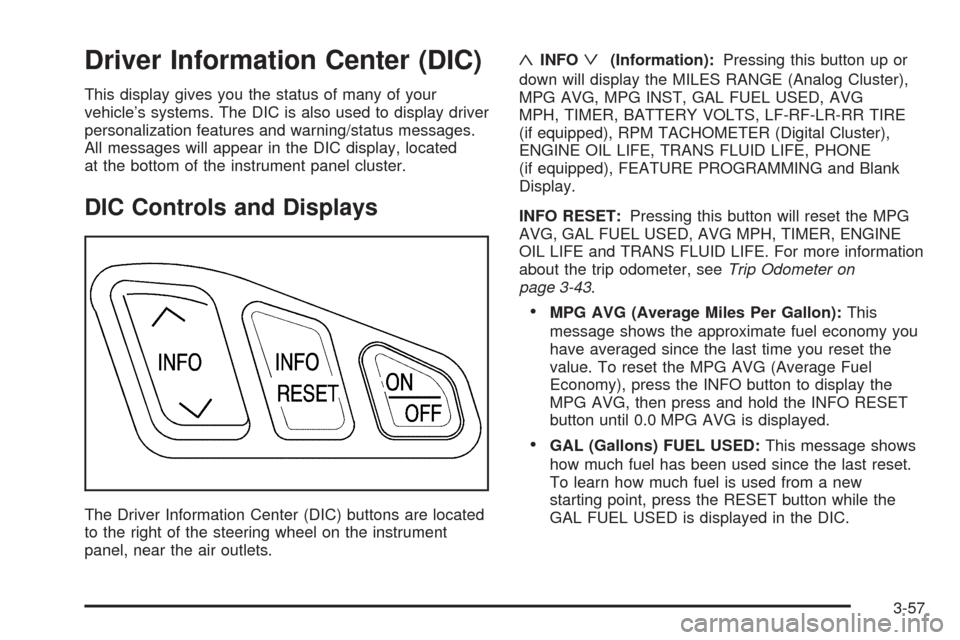
The Driver Information Center (DIC) buttons are located
to the right of the steering wheel on the instrument
panel, near the air outlets.
«INFOª(Information):Pressing this button up or
down will display the MILES RANGE (Analog Cluster),
MPG AVG, MPG INST, GAL FUEL USED, AVG
MPH, TIMER, BATTERY VOLTS, LF-RF-LR-RR TIRE
(if equipped), RPM TACHOMETER (Digital Cluster),
ENGINE OIL LIFE, TRANS FLUID LIFE, PHONE
(if equipped), FEATURE PROGRAMMING and Blank
Display.
INFO RESET:Pressing this button will reset the MPG
AVG, GAL FUEL USED, AVG MPH, TIMER, ENGINE
OIL LIFE and TRANS FLUID LIFE. For more information
about the trip odometer, seeTrip Odometer on
page 3-43.
MPG AVG (Average Miles Per Gallon):This
message shows the approximate fuel economy you
have averaged since the last time you reset the
value. To reset the MPG AVG (Average Fuel
Economy), press the INFO button to display the
MPG AVG, then press and hold the INFO RESET
button until 0.0 MPG AVG is displayed.
GAL (Gallons) FUEL USED:This message shows
how much fuel has been used since the last reset.
To learn how much fuel is used from a new
starting point, press the RESET button while the
GAL FUEL USED is displayed in the DIC.
3-57
Page 179 of 420

ON/OFF:Pressing this button turns the Programming
and Personalization Features on and off. FEATURE
PROGRAMMING must be displayed on the DIC to begin
actual programming. This button also starts and stops
the timer.
MILES RANGE:(Analog Cluster only) This message
shows about how many miles you can drive without
relling your fuel tank. Once the range drops below
40 miles (64 km) remaining, the display will show LOW.
MPG INST (Instantaneous Miles per Gallon):This
message shows the instantaneous fuel economy which
varies with your driving conditions, such as acceleration,
braking and the grade of the road being traveled.
The INFO RESET button does not function in this mode.
BATTERY VOLTS:This message shows the current
battery voltage. If the voltage is normal, the display will
show BATTERY VOLTS OK. If the voltage drops
below 10.5 volts, the display will show BATTERY
VOLTS LOW. If the voltage is above 16 volts, the
display will show BATTERY VOLTS HIGH. If the display
shows the high or low message, you will need to
have your battery checked. SeeDIC Warnings and
Messages on page 3-60for more information.LF-RF-LR-RR TIRE:On vehicles equipped with the tire
pressure monitor, this message shows the tire pressure
for each tire (left front, right front, left rear and right rear).
Pressing the INFO button will scroll through the tire
pressure for each of the four tires, such as:
34 PSI LF TIRE OK or
234 kPa LF TIRE OK
If a tire pressure is below 25 psi (172 kPa) or above
38 psi (265 kPa), the message will appear as shown
above except it will show TIRE LOW or TIRE HIGH as
appropriate. If desired, the tire pressure information
can be programmed not to appear when using the INFO
button to scroll through the DIC displays. SeeDIC
Vehicle Personalization on page 3-68.
If a low or high tire pressure is detected by the system
while driving, a CHECK TIRE PRESSURE message
will appear in the display. If this occurs, press the INFO
button to scroll to the tire(s) with a low or high
pressure condition. SeeDIC Warnings and Messages
on page 3-60for more information.
ENG/MET (English/Metric):Press this button, located
to the left of the steering wheel on the instrument
panel, to display information in the English or metric
system.
3-59
Page 181 of 420
BATTERY VOLTAGE LOW – 6:This message will
appear when the electrical system is charging less than
10 volts or if the battery has been drained. If this
message appears immediately after starting, it is
possible that the generator can still recharge the battery.
The battery should recharge while driving but may
take a few hours to do so. Consider using an auxiliary
charger (be sure to follow the manufacturer’s
instructions) to boost the battery after returning home or
to a nal destination. If this message appears while
driving or after starting your vehicle and stays on, have
it checked immediately by your GM dealer to determine
the cause of this problem. To help the generator
recharge the battery quickly, you can reduce the load
on the electrical system by turning off the accessories.
You can monitor battery voltage on the DIC by
pressing the INFO button. The normal range is
11.5 to 15.5 volts.
CHANGE ENGINE OIL – 82:This means that the life
of the engine oil has expired. SeeScheduled
Maintenance on page 6-4. After an oil change, the oil
life indicator must be reset. SeeEngine Oil Life System
on page 5-17. SeeEngine Oil on page 5-14andOil
Life Indicator on page 3-79for more information.CHANGE TRANS FLUID – 47:This message will
appear when it is time to change the transaxle uid.
SeeScheduled Maintenance on page 6-4for the proper
uid and change intervals.
After the transaxle uid has been changed, the transaxle
uid change indicator must be reset. See “How to
Reset the Transaxle Fluid Indicator” underAutomatic
Transaxle Fluid on page 5-21.
CHECK BRAKE FLUID – 37:This message will
display if the ignition is in ON to inform the driver that
the brake uid level is low. Have the brake system
serviced by your GM dealer as soon as possible. See
Brake System Warning and Parking Brake Indicator
Light on page 3-47.
CHECK COOLANT LEVEL – 2:This message will
appear when there is a low level of engine coolant.
Have the cooling system serviced by your GM dealer as
soon as possible. SeeEngine Coolant on page 5-24.
CHECK FUEL GAGE – 50:(Analog Cluster) This
message will appear when the fuel supply is less than
5 gallons (18.9 L) and the display is turned off. A single
chime will also sound when this message is displayed.
3-61
Page 184 of 420
ENGINE HOT–AC OFF – 16:This message displays
when the engine coolant becomes hotter than the
normal operating temperature. To avoid added strain
on a hot engine, the air conditioning compressor
is automatically turned off. When the coolant
temperature returns to normal, the A/C operation will
automatically resume. You can continue to drive
your vehicle. If this message continues to appear, have
the system repaired by your GM dealer as soon as
possible to avoid compressor damage.
ENGINE OVERHEATED, STOP ENGINE – 42:This
message will appear when the engine has overheated.
Stop and turn the engine off immediately to avoid
severe engine damage. SeeEngine Overheating on
page 5-27. A multiple chime will also sound when this
message is displayed.
ENGINE POWER REDUCED – 41:This message
informs you that the vehicle is reducing engine power
because the transaxle is being placed in gear under
conditions that may cause damage to the vehicle’s
engine, transaxle or ability to accelerate.
FUEL LEVEL LOW – 11:This message serves as a
warning that the fuel level in the tank is critically
low. Stop for fuel soon. A single chime will sound when
this message is displayed.HEADLAMPS SUGGESTED – 23:If it is dark enough
outside and the headlamps and Twilight Sentinel®
controls are off, this message will display on the DIC.
This message informs the driver that turning on the
exterior lamps is recommended even though the DRL
are still illuminated. It has become dark enough outside
to require the headlamps and/or other exterior lamps.
This message will also appear if the optional
Rainsense™ wiping feature is on and the Twilight
Sentinel
®is off.
ICE POSSIBLE – 13:This message appears when the
outside air temperature is cold enough to create icy
road conditions.
LEFT REAR DOOR AJAR – 142:The left rear door is
open or ajar when this message appears. The ignition
must be in ON and the transaxle not in PARK (P) for this
message to display. A chime will sound if the vehicle’s
speed is greater than 3 mph (5 km/h).
OIL PRESSURE LOW STOP ENGINE – 35:If this
message appears while the engine is running, stop the
engine and do not operate it until the cause of low
oil pressure is corrected. Severe damage to the engine
can result. A multiple chime will sound when this
message is displayed.
3-64
Page 185 of 420

PASSENGER DOOR AJAR – 141:The right front
passenger’s door is open or ajar when this message
appears. The ignition must be in ON and the transaxle
not in PARK (P) for this message to display. A chime
will sound if the vehicle’s speed is greater than
3 mph (5 km/h).
RIGHT REAR DOOR AJAR – 143:The right rear door
is open or ajar when this message appears. The
ignition must be in ON and the transaxle not in PARK (P)
for this message to display. A chime will sound if the
vehicle’s speed is greater than 3 mph (5 km/h).
SERVICE AC SYSTEM – 14:This message appears
when the electronic sensors that control the air
conditioning and heating systems are no longer working.
Have the climate control system serviced by your
GM dealer if you notice a drop in heating and air
conditioning efficiency.
SERVICE AIR BAG – 83:There is a problem with the
airbag system when this message appears. Let only
a qualied technician work on your vehicle. Have your
vehicle serviced by your GM dealer immediately.
SERVICE CHARGING SYS – 102:This message will
display when a problem with the charging system
has been detected. Have your vehicle serviced by your
GM dealer.SERVICE ELECTRICAL SYS – 106:This message will
display if an electrical problem has occurred within
the Powertrain Control Module (PCM) or the ignition
switch. Have your vehicle serviced by your GM dealer.
SERVICE FUEL SYSTEM – 101:The Powertrain
Control Module (PCM) has detected a problem within
the fuel system when this message appears. Have your
vehicle serviced by your GM dealer.
SERVICE IDLE CONTROL – 107:A problem with the
idle control has occurred when this message displays.
Have your vehicle serviced by your GM dealer.
SERVICE STABILITY SYS – 54:If you ever see the
SERVICE STABILITY SYS message, it means
there may be a problem with your stability enhancement
system. If you see this message, try to reset the
system (stop, turn off the engine, then start the engine
again). If the SERVICE STABILITY SYS message
still comes on, it means there is a problem. You should
see your GM dealer for service. Reduce your speed
and drive accordingly. A single chime will also sound
when this message is displayed.
SERVICE STEERING – 127:This message is displayed
when a problem has been detected in the magnetic
speed variable assist steering system. If this message
comes on, service is required. See your GM dealer.
3-65
Page 187 of 420

THEFT ATTEMPTED – 40:This message is displayed
if the theft system has detected a break-in attempt
while you were away from your vehicle.
TOP SPEED FUEL CUT-OFF – 111:This message will
appear when the Powertrain Control Module (PCM)
detects that the maximum speed for your vehicle has
been reached. The speed of your vehicle will surge as the
fuel supply is cut off. Your vehicle’s top speed is based on
the top speed rating of the tires. This ensures that your
vehicle stays in a safe operating range for the tires.
TRACTION ENGAGED – 91:When your traction
control system is limiting wheel spin, the TRACTION
ENGAGED message will be displayed. Slippery
road conditions may exist if this message is displayed,
so adjust your driving accordingly. This message
will stay on for a few seconds after the traction control
system stops limited wheel spin.
TRACTION OFF – 89:This message will be displayed
after the traction control system has been turned off
using the TRAC ON/OFF button on the center console.
TRACTION READY – 90:This message informs the
driver that the traction control system is available.
Pressing the TRAC ON/OFF button on the center console
once turns the traction control system off. Pressing the
button again turns the system back on. This message
will automatically disappear from the display after
ve seconds.TRACTION SUSPENDED – 56:This message displays
when the traction control system has been temporarily
shut off because your vehicle’s brakes have overheated.
This message does not indicate a problem with your
vehicle’s traction control system. After a few minutes,
the traction control system will be available again
and the TRACTION READY message will appear.
TRANS HOT IDLE ENGINE – 112:This message
indicates that the transaxle uid in your vehicle is too
hot. Stop and allow your vehicle to idle until it cools
down or until this message is removed.
TRUNK OPEN – 24:This message indicates that the
trunk is open when the ignition is on.
TURN SIGNAL ON – 20:If you drive your vehicle for
more than a mile with a turn signal on, this message
will appear as a reminder to turn off the turn signal.
A multiple chime will sound when this message
is displayed.
VEHICLE OVERSPEED – 52:This message is
displayed when the vehicle speed exceeds a certain
limit as required by some export countries. A continuous
chime will sound when this message is displayed.
3-67
Page 250 of 420
Expect to move slightly slower at night.
When you want to leave the freeway, move to the
proper lane well in advance. If you miss your exit, do
not, under any circumstances, stop and back up. Drive
on to the next exit.
The exit ramp can be curved, sometimes quite sharply.
The exit speed is usually posted. Reduce your speed
according to your speedometer, not to your sense
of motion. After driving for any distance at higher
speeds, you may tend to think you are going slower
than you actually are.
Before Leaving on a Long Trip
Make sure you are ready. Try to be well rested. If you
must start when you are not fresh — such as after
a day’s work — do not plan to make too many miles that
rst part of the journey. Wear comfortable clothing
and shoes you can easily drive in.
Is your vehicle ready for a long trip? If you keep it
serviced and maintained, it is ready to go. If it needs
service, have it done before starting out. Of course, you
will nd experienced and able service experts in GM
dealerships all across North America. They will be ready
and willing to help if you need it.Here are some things you can check before a trip:
Windshield Washer Fluid:Is the reservoir full? Are
all windows clean inside and outside?
Wiper Blades:Are they in good shape?
Fuel, Engine Oil, Other Fluids:Have you checked
all levels?
Lamps:Are they all working? Are the lenses clean?
Tires:They are vitally important to a safe,
trouble-free trip. Is the tread good enough for
long-distance driving? Are the tires all inated to the
recommended pressure?
Weather Forecasts:What is the weather outlook
along your route? Should you delay your trip a
short time to avoid a major storm system?
Maps:Do you have up-to-date maps?
4-22