instrument cluster CADILLAC DTS 2006 1.G Owners Manual
[x] Cancel search | Manufacturer: CADILLAC, Model Year: 2006, Model line: DTS, Model: CADILLAC DTS 2006 1.GPages: 450, PDF Size: 2.55 MB
Page 75 of 450
{CAUTION:
If the airbag readiness light in the instrument
panel cluster ever comes on and stays on, it
means that something may be wrong with the
airbag system. If this ever happens, have the
vehicle serviced promptly, because an
adult-size person sitting in the right front
passenger’s seat may not have the protection
of the frontal airbag. SeeAirbag Readiness
Light on page 3-58for more on this, including
important safety information.Aftermarket equipment, such as seat covers, can affect
how well the passenger sensing system operates.
You may want to consider not using seat covers or other
aftermarket equipment if your vehicle has the passenger
sensing system. SeeAdding Equipment to Your
Airbag-Equipped Vehicle on page 1-70for more
information about modications that can affect how the
system operates.
{CAUTION:
Stowing of articles under the passenger’s seat
or between the passenger’s seat cushion and
seatback may interfere with the proper
operation of the passenger sensing system.
1-69
Page 97 of 450

Theft-Deterrent Systems
Vehicle theft is big business, especially in some cities.
Although your vehicle has a number of theft-deterrent
features, we know that nothing we put on it can make it
impossible to steal.
Valet Lockout Switch
The valet lockout switch
is located inside the
glove box.
9(Off):Press this side of the button to turn the
lockout feature off. When the lockout feature is off, you
can open the trunk using either the keyless entry
transmitter or the trunk release button located near the
headlamp switch on the instrument panel.
R(On):Press this side of the button to turn the
lockout feature on. When the lockout feature is turned
on, the trunk cannot be unlocked with the keyless
entry transmitter or the trunk release button located near
the headlamp switch on the instrument panel.
If the valet lockout feature is on it will also disable the
Universal Home Remote transmitter, if equipped.
Locking the glove box with your key will also help to
secure your vehicle.
SeeRemote Keyless Entry System Operation on
page 2-5andTrunk on page 2-13for additional
information.
Content Theft-Deterrent
The security light is
located on the instrument
panel cluster.
If the ignition is off and any door is open, the security
light will ash, reminding you to arm the system.
2-19
Page 108 of 450
Parking Brake
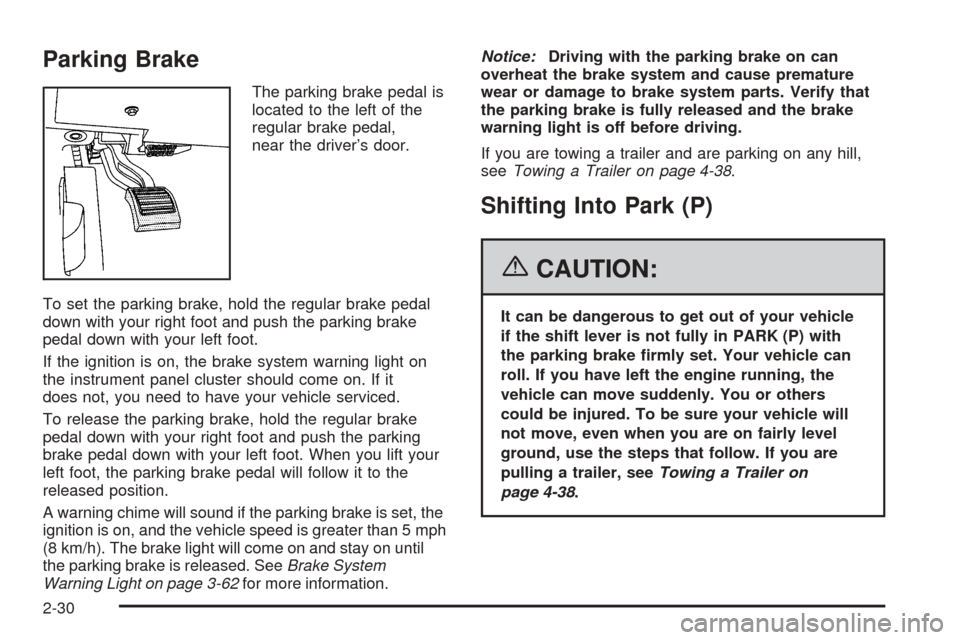
The parking brake pedal is
located to the left of the
regular brake pedal,
near the driver’s door.
To set the parking brake, hold the regular brake pedal
down with your right foot and push the parking brake
pedal down with your left foot.
If the ignition is on, the brake system warning light on
the instrument panel cluster should come on. If it
does not, you need to have your vehicle serviced.
To release the parking brake, hold the regular brake
pedal down with your right foot and push the parking
brake pedal down with your left foot. When you lift your
left foot, the parking brake pedal will follow it to the
released position.
A warning chime will sound if the parking brake is set, the
ignition is on, and the vehicle speed is greater than 5 mph
(8 km/h). The brake light will come on and stay on until
the parking brake is released. SeeBrake System
Warning Light on page 3-62for more information.Notice:Driving with the parking brake on can
overheat the brake system and cause premature
wear or damage to brake system parts. Verify that
the parking brake is fully released and the brake
warning light is off before driving.
If you are towing a trailer and are parking on any hill,
seeTowing a Trailer on page 4-38.
Shifting Into Park (P)
{CAUTION:
It can be dangerous to get out of your vehicle
if the shift lever is not fully in PARK (P) with
the parking brake rmly set. Your vehicle can
roll. If you have left the engine running, the
vehicle can move suddenly. You or others
could be injured. To be sure your vehicle will
not move, even when you are on fairly level
ground, use the steps that follow. If you are
pulling a trailer, seeTowing a Trailer on
page 4-38.
2-30
Page 134 of 450
Warning Lights, Gages, and Indicators............3-55
Instrument Panel Cluster................................3-56
Speedometer and Odometer...........................3-57
Tachometer.................................................3-57
Safety Belt Reminder Light.............................3-57
Passenger Safety Belt Reminder Light.............3-58
Airbag Readiness Light..................................3-58
Passenger Airbag Status Indicator...................3-59
Charging System Light..................................3-61
Brake System Warning Light..........................3-62
Anti-Lock Brake System Warning Light.............3-63
Low Tire Pressure Warning Light....................3-63
Traction Control System (TCS)
Warning Light...........................................3-64
StabiliTrak
®Indicator Light..............................3-64
Engine Coolant Temperature Warning Light......3-65
Engine Coolant Temperature Gage..................3-65
Malfunction Indicator Lamp.............................3-66
Oil Pressure Light.........................................3-68
Security Light...............................................3-69
Fog Lamp Light............................................3-69
Rear Fog Lamp Light....................................3-69
Lights On Reminder......................................3-70Cruise Control Light......................................3-70
Highbeam On Light.......................................3-70
Fuel Gage...................................................3-70
Driver Information Center (DIC).......................3-71
DIC Controls and Displays.............................3-72
DIC Warnings and Messages.........................3-76
DIC Vehicle Customization.............................3-88
Audio System(s).............................................3-97
Setting the Time (Radio with Single
CD Player)...............................................3-98
Setting the Time (Radio with Six-Disc
CD Player).............................................3-100
Radio with CD (MP3)..................................3-102
Navigation/Radio System..............................3-121
Theft-Deterrent Feature................................3-121
Audio Steering Wheel Controls......................3-122
Radio Reception.........................................3-123
Care of Your CDs.......................................3-124
Care of the CD Player.................................3-124
Diversity Antenna System.............................3-124
XM™ Satellite Radio Antenna System............3-125
Section 3 Instrument Panel
3-2
Page 137 of 450
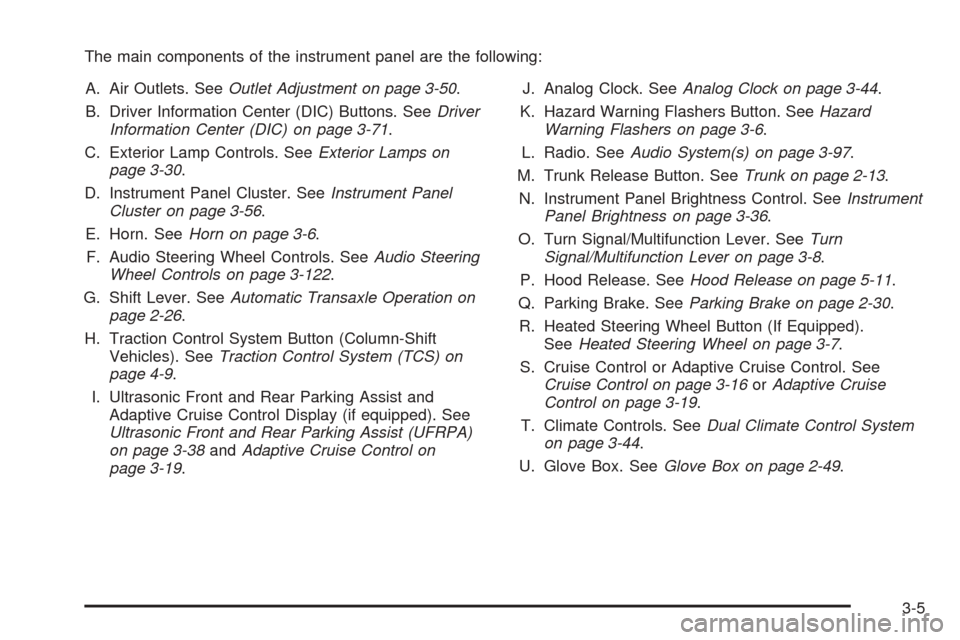
The main components of the instrument panel are the following:
A. Air Outlets. SeeOutlet Adjustment on page 3-50.
B. Driver Information Center (DIC) Buttons. SeeDriver
Information Center (DIC) on page 3-71.
C. Exterior Lamp Controls. SeeExterior Lamps on
page 3-30.
D. Instrument Panel Cluster. SeeInstrument Panel
Cluster on page 3-56.
E. Horn. SeeHorn on page 3-6.
F. Audio Steering Wheel Controls. SeeAudio Steering
Wheel Controls on page 3-122.
G. Shift Lever. SeeAutomatic Transaxle Operation on
page 2-26.
H. Traction Control System Button (Column-Shift
Vehicles). SeeTraction Control System (TCS) on
page 4-9.
I. Ultrasonic Front and Rear Parking Assist and
Adaptive Cruise Control Display (if equipped). See
Ultrasonic Front and Rear Parking Assist (UFRPA)
on page 3-38andAdaptive Cruise Control on
page 3-19.J. Analog Clock. SeeAnalog Clock on page 3-44.
K. Hazard Warning Flashers Button. SeeHazard
Warning Flashers on page 3-6.
L. Radio. SeeAudio System(s) on page 3-97.
M. Trunk Release Button. SeeTrunk on page 2-13.
N. Instrument Panel Brightness Control. SeeInstrument
Panel Brightness on page 3-36.
O. Turn Signal/Multifunction Lever. SeeTurn
Signal/Multifunction Lever on page 3-8.
P. Hood Release. SeeHood Release on page 5-11.
Q. Parking Brake. SeeParking Brake on page 2-30.
R. Heated Steering Wheel Button (If Equipped).
SeeHeated Steering Wheel on page 3-7.
S. Cruise Control or Adaptive Cruise Control. See
Cruise Control on page 3-16orAdaptive Cruise
Control on page 3-19.
T. Climate Controls. SeeDual Climate Control System
on page 3-44.
U. Glove Box. SeeGlove Box on page 2-49.
3-5
Page 140 of 450
Turn Signal/Multifunction Lever
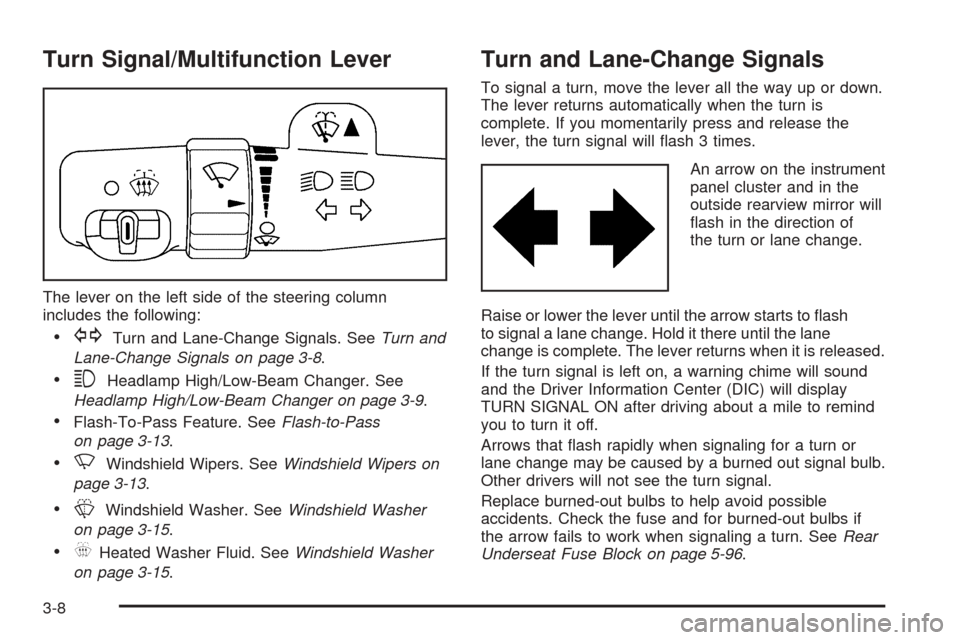
The lever on the left side of the steering column
includes the following:
GTurn and Lane-Change Signals. SeeTurn and
Lane-Change Signals on page 3-8.
3Headlamp High/Low-Beam Changer. See
Headlamp High/Low-Beam Changer on page 3-9.
Flash-To-Pass Feature. SeeFlash-to-Pass
on page 3-13.
NWindshield Wipers. SeeWindshield Wipers on
page 3-13.
LWindshield Washer. SeeWindshield Washer
on page 3-15.
_Heated Washer Fluid. SeeWindshield Washer
on page 3-15.
Turn and Lane-Change Signals
To signal a turn, move the lever all the way up or down.
The lever returns automatically when the turn is
complete. If you momentarily press and release the
lever, the turn signal will ash 3 times.
An arrow on the instrument
panel cluster and in the
outside rearview mirror will
ash in the direction of
the turn or lane change.
Raise or lower the lever until the arrow starts to ash
to signal a lane change. Hold it there until the lane
change is complete. The lever returns when it is released.
If the turn signal is left on, a warning chime will sound
and the Driver Information Center (DIC) will display
TURN SIGNAL ON after driving about a mile to remind
you to turn it off.
Arrows that ash rapidly when signaling for a turn or
lane change may be caused by a burned out signal bulb.
Other drivers will not see the turn signal.
Replace burned-out bulbs to help avoid possible
accidents. Check the fuse and for burned-out bulbs if
the arrow fails to work when signaling a turn. SeeRear
Underseat Fuse Block on page 5-96.
3-8
Page 141 of 450

Headlamp High/Low-Beam Changer
Push forward to change the headlamps from low
beam to high. Pull the lever back and then release it
to change from high beam to low.
This light on the instrument
panel cluster will be on,
indicating high-beam
usage.
Forward Collision Alert (FCA)
System
If your vehicle has this feature, be sure to read this
entire section before using it.
The system operates on a radio frequency subject to
Federal Communications Commission (FCC) Rules and
with Industry Canada.This device complies with Part 15 of the FCC Rules.
Operation is subject to the following two conditions:
1. This device may not cause interference.
2. This device must accept any interference received,
including interference that may cause undesired
operation of the device.
This device complies with RSS-210 of Industry Canada.
Operation is subject to the following two conditions:
1. This device may not cause interference.
2. This device must accept any interference received,
including interference that may cause undesired
operation of the device.
Changes or modications to this system by other than
an authorized service facility could void authorization to
use this equipment.
3-9
Page 148 of 450
Cruise Control
With cruise control, you can maintain a speed of
approximately 25 mph (40 km/h) or more without
keeping your foot on the accelerator. This is helpful on
long trips. Cruise control does not work at speeds
below about 25 mph (40 km/h). When cruise control
is on, you will see a cruise light on the instrument
panel cluster.
When you apply your brakes, the cruise control
shuts off.
{CAUTION:
Cruise control can be dangerous where you
cannot drive safely at a steady speed. So, do
not use your cruise control on winding roads
or in heavy traffic.
Cruise control can be dangerous on slippery
roads. On such roads, fast changes in tire
traction can cause excessive wheel slip, and
you could lose control. Do not use cruise
control on slippery roads.If your vehicle is in cruise control when the traction
control system begins to limit wheel spin, the cruise
control will automatically disengage. SeeTraction
Control System (TCS) on page 4-9. When road
conditions allow you to safely use it again, you may
turn the cruise control back on.
Setting Cruise Control
{CAUTION:
If you leave your cruise control on when you
are not using cruise, you might hit a button
and go into cruise when you do not want to.
You could be startled and even lose control.
Keep the cruise control switch off until you
want to use cruise control.
3-16
Page 149 of 450
The cruise control buttons
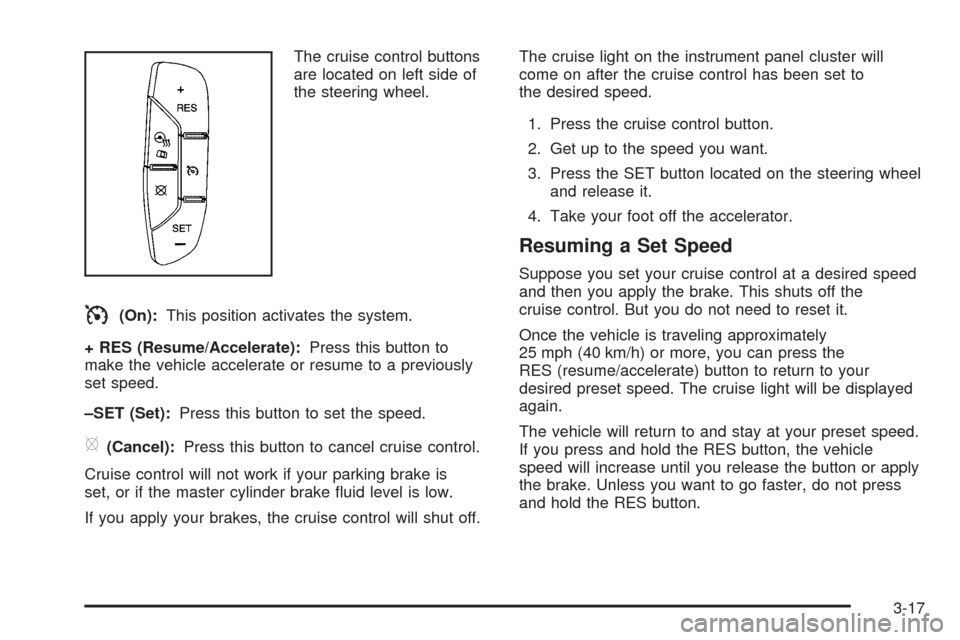
are located on left side of
the steering wheel.
I(On):This position activates the system.
+ RES (Resume/Accelerate):Press this button to
make the vehicle accelerate or resume to a previously
set speed.
–SET (Set):Press this button to set the speed.
[(Cancel):Press this button to cancel cruise control.
Cruise control will not work if your parking brake is
set, or if the master cylinder brake uid level is low.
If you apply your brakes, the cruise control will shut off.The cruise light on the instrument panel cluster will
come on after the cruise control has been set to
the desired speed.
1. Press the cruise control button.
2. Get up to the speed you want.
3. Press the SET button located on the steering wheel
and release it.
4. Take your foot off the accelerator.
Resuming a Set Speed
Suppose you set your cruise control at a desired speed
and then you apply the brake. This shuts off the
cruise control. But you do not need to reset it.
Once the vehicle is traveling approximately
25 mph (40 km/h) or more, you can press the
RES (resume/accelerate) button to return to your
desired preset speed. The cruise light will be displayed
again.
The vehicle will return to and stay at your preset speed.
If you press and hold the RES button, the vehicle
speed will increase until you release the button or apply
the brake. Unless you want to go faster, do not press
and hold the RES button.
3-17
Page 163 of 450
AUTO (Automatic):Turn the control to this position
to automatically turn on the headlamps at normal
brightness, together with the following:
Parking Lamps
Instrument Panel Lights
IntelliBeam™
;(Parking Lamps):Turn the control to this position
to turn on the parking lamps together with the
following:
Instrument Panel Lights
License Plate Lamps
Tail Lamps
Side Marker Lamps
The parking brake indicator light will come on and stay
on while the parking lamps are on with the engine
off and the ignition in ACCESSORY or RUN.
2(Headlamps):Turn the control to this position to
turn on the headlamps together with the previously listed
lamps. A warning chime will sound if you open the
driver’s door when the ignition switch is off and
the headlamps are on.
-(Fog Lamps):Press the exterior lamps control to
turn on the fog lamps. SeeFog Lamps on page 3-35.
IntelliBeam™ Intelligent High-Beam
Headlamp Control System
If your vehicle has this feature, be sure to read this
entire section before using it.
IntelliBeam™ is an enhancement to your vehicle’s
headlamp system. Using a digital light sensor on your
rearview mirror, this system will turn the vehicle’s
high-beam headlamps on and off according to
surrounding traffic conditions.
The IntelliBeam™ system will turn your high-beam
headlamps on when it is dark enough, there is no other
traffic present, and the IntelliBeam system is enabled.
Turning On and Enabling IntelliBeam™
Press and release the IntelliBeam™ button on the inside
rear view mirror. The IntelliBeam™ indicator on the
mirror will turn on to let you know the system has
been turned on. Once the system has been turned
on, it will remain on each time the vehicle is started.
Additionally, the IntelliBeam system must be enabled.
To enable the IntelliBeam™ system, turn the exterior
lamp control to AUTO, with the turn signal/multifunction
lever in its neutral position. The High-Beam On Light
will appear on the instrument panel cluster when
the high-beams are on. SeeHighbeam On Light on
page 3-70.
3-31