brake CADILLAC DTS 2007 1.G User Guide
[x] Cancel search | Manufacturer: CADILLAC, Model Year: 2007, Model line: DTS, Model: CADILLAC DTS 2007 1.GPages: 518, PDF Size: 2.77 MB
Page 131 of 518

Running the Engine While Parked
It is better not to park with the engine running. But if
you ever have to, here are some things to know.
{CAUTION:
Idling the engine with the climate control
system off could allow dangerous exhaust
into your vehicle. See the earlier caution
underEngine Exhaust on page 130.
Also, idling in a closed-in place can let
deadly carbon monoxide (CO) into your
vehicle even if the climate control fan is at
the highest setting. One place this can
happen is a garage. Exhaust — with
CO — can come in easily. NEVER park in
a garage with the engine running.
Another closed-in place can be a blizzard.
SeeWinter Driving on page 328.
{CAUTION:
It can be dangerous to get out of your
vehicle if the shift lever is not fully in
PARK (P) with the parking brake rmly
set. Your vehicle can roll. Do not leave
your vehicle when the engine is running
unless you have to. If you have left the
engine running, the vehicle can move
suddenly. You or others could be injured.
To be sure your vehicle will not move,
even when you are on fairly level ground,
always set the parking brake after you
move the shift lever to PARK (P).
Follow the proper steps to be sure your vehicle
will not move. SeeShifting Into Park (P) on
page 126.
If you are parking on a hill and if you are pulling a
trailer, also seeTowing a Trailer on page 342.
131
Page 160 of 518
Warning Lights, Gages, and Indicators..... 222
Instrument Panel Cluster........................... 223
Speedometer and Odometer...................... 224
Tachometer............................................... 224
Safety Belt Reminder Light........................ 225
Passenger Safety Belt Reminder Light....... 225
Airbag Readiness Light............................. 226
Passenger Airbag Status Indicator............. 227
Charging System Light.............................. 229
Brake System Warning Light..................... 229
Anti-Lock Brake System Warning Light...... 230
Low Tire Pressure Warning Light.............. 231
Traction Control System (TCS)
Warning Light........................................ 232
StabiliTrak
®Indicator Light......................... 232
Engine Coolant Temperature
Warning Light........................................ 233
Engine Coolant Temperature Gage............ 233
Malfunction Indicator Lamp........................ 234
Oil Pressure Light..................................... 237
Security Light............................................ 237
Fog Lamp Light......................................... 238Lights On Reminder.................................. 238
Cruise Control Light.................................. 238
Highbeam On Light................................... 238
Fuel Gage................................................. 239
Driver Information Center (DIC).................. 240
DIC Controls and Displays........................ 240
DIC Warnings and Messages.................... 246
DIC Vehicle Customization........................ 259
Audio System(s)......................................... 268
Setting the Time........................................ 269
Radio with CD (MP3)................................ 273
Using an MP3........................................... 287
XM Radio Messages................................. 294
Navigation/Radio System........................... 296
Theft-Deterrent Feature............................. 296
Audio Steering Wheel Controls.................. 296
Radio Reception........................................ 298
Care of Your CDs..................................... 299
Care of the CD Player.............................. 299
Backglass Antenna.................................... 300
XM™ Satellite Radio Antenna System....... 300
Section 3 Instrument Panel
160
Page 163 of 518
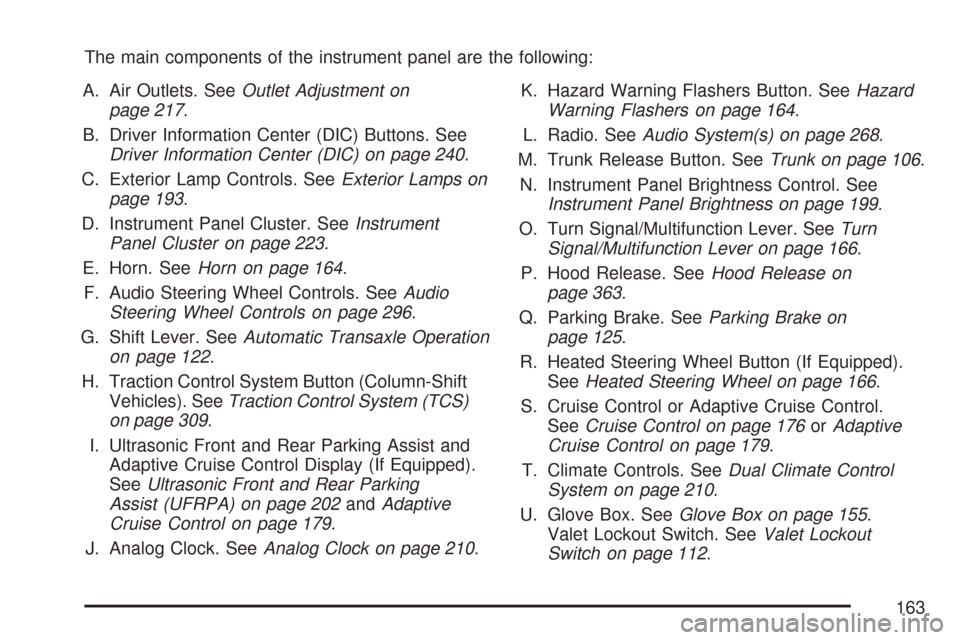
The main components of the instrument panel are the following:
A. Air Outlets. SeeOutlet Adjustment on
page 217.
B. Driver Information Center (DIC) Buttons. See
Driver Information Center (DIC) on page 240.
C. Exterior Lamp Controls. SeeExterior Lamps on
page 193.
D. Instrument Panel Cluster. SeeInstrument
Panel Cluster on page 223.
E. Horn. SeeHorn on page 164.
F. Audio Steering Wheel Controls. SeeAudio
Steering Wheel Controls on page 296.
G. Shift Lever. SeeAutomatic Transaxle Operation
on page 122.
H. Traction Control System Button (Column-Shift
Vehicles). SeeTraction Control System (TCS)
on page 309.
I. Ultrasonic Front and Rear Parking Assist and
Adaptive Cruise Control Display (If Equipped).
SeeUltrasonic Front and Rear Parking
Assist (UFRPA) on page 202andAdaptive
Cruise Control on page 179.
J. Analog Clock. SeeAnalog Clock on page 210.K. Hazard Warning Flashers Button. SeeHazard
Warning Flashers on page 164.
L. Radio. SeeAudio System(s) on page 268.
M. Trunk Release Button. SeeTrunk on page 106.
N. Instrument Panel Brightness Control. See
Instrument Panel Brightness on page 199.
O. Turn Signal/Multifunction Lever. SeeTurn
Signal/Multifunction Lever on page 166.
P. Hood Release. SeeHood Release on
page 363.
Q. Parking Brake. SeeParking Brake on
page 125.
R. Heated Steering Wheel Button (If Equipped).
SeeHeated Steering Wheel on page 166.
S. Cruise Control or Adaptive Cruise Control.
SeeCruise Control on page 176orAdaptive
Cruise Control on page 179.
T. Climate Controls. SeeDual Climate Control
System on page 210.
U. Glove Box. SeeGlove Box on page 155.
Valet Lockout Switch. SeeValet Lockout
Switch on page 112.
163
Page 169 of 518

{CAUTION:
FCA is only a warning system and does
not apply the brakes. When you are
approaching a vehicle or object too
rapidly or when you are following a
vehicle too closely that is ahead of you,
FCA may not provide you with enough
time to avoid a collision. FCA is not
designed to warn the driver of pedestrians
or animals. Your complete attention is
always required while driving and you
should be ready to take action and apply
the brakes. For more information,
seeDefensive Driving on page 302.The FCA control is
located on the steering
wheel.
To enable or disable FCA, press the Adaptive
Cruise Control button. SeeAdaptive Cruise Control
on page 179.
169
Page 176 of 518

Cruise Control
With cruise control, you can maintain a speed of
approximately 25 mph (40 km/h) or more without
keeping your foot on the accelerator. This is helpful
on long trips. Cruise control does not work at
speeds below about 25 mph (40 km/h). When
cruise control is on, you will see a cruise light
on the instrument panel cluster.
When you apply your brakes, the cruise control
shuts off.{CAUTION:
Cruise control can be dangerous where
you cannot drive safely at a steady speed.
So, do not use your cruise control on
winding roads or in heavy traffic.
Cruise control can be dangerous on
slippery roads. On such roads, fast
changes in tire traction can cause
excessive wheel slip, and you could
lose control. Do not use cruise control
on slippery roads.
If your vehicle is in cruise control when the
Traction Control System (TCS) begins to limit
wheel spin, the cruise control automatically turns
off. SeeTraction Control System (TCS) on
page 309. When road conditions let you safely use
it again, you can turn the cruise control back on.
176
Page 177 of 518

Setting Cruise Control
{CAUTION:
If you leave your cruise control on when
you are not using cruise, you might hit a
button and go into cruise when you do
not want to. You could be startled and
even lose control. Keep the cruise control
switch off until you want to use cruise
control.
The cruise control
buttons are located
on left side of the
steering wheel.
I(On):This position turns on the system.
+ RES (Resume/Accelerate):Press this button
to make the vehicle accelerate or resume to
a previously set speed.
SET– (Set):Press this button to set the speed.
[(Cancel):Press this button to cancel cruise
control.
Cruise control will not work if the parking brake is
set, or if the master cylinder brake uid level is low.
If the brakes are applied, the cruise control
shuts off.
The cruise light on the instrument panel cluster
comes on after the cruise control has been set to
the desired speed.
1. Press the cruise control button.
2. Get up to the desired speed.
3. Press the SET– button located on the steering
wheel and release it.
4. Take your foot off the accelerator.
177
Page 178 of 518

Resuming a Set Speed
Suppose you set the cruise control at a desired
speed and then you apply the brake. This shuts off
the cruise control. But you do not need to reset it.
Once the vehicle is traveling approximately
25 mph (40 km/h) or more, you can press the
+RES (resume/accelerate) button to return to
your desired preset speed. The cruise light
displays again.
The vehicle returns to and stays at your preset
speed. If you press and hold the +RES button,
the vehicle speed increases until you release the
button or apply the brake. Do not hold in the
+RES button, if you do not want the vehicle
speed to increase.
Increasing Speed While Using Cruise
Control
There are two ways to go to a higher speed:
Use the accelerator pedal to get to the higher
speed. Press the SET– button, then release
the button and the accelerator pedal. The
vehicle now cruises at the higher speed.
Press the +RES button. Hold it there until you
get up to the desired speed, and then release
the button. To increase your speed in very
small amounts, briey press the +RES button
and then release it. Each time you do this,
the vehicle accelerates approximately
1 mph (1.6 km/h).
The accelerate feature only works after you have
set the cruise control speed by pressing the
SET– button.
Reducing Speed While Using Cruise
Control
There are two ways to reduce your speed while
using cruise control:
Press the SET– button until you reach the
lower desired speed, then release it.
To slow down in very small amounts, push the
SET– button briey. Each time you do this,
the vehicle slows down approximately
1 mph (1.6 km/h).
178
Page 179 of 518

Passing Another Vehicle While Using
Cruise Control
Use the accelerator pedal to increase your speed.
When you take your foot off the pedal, the vehicle
slows down to your previous cruise control speed.
Using Cruise Control on Hills
How well your cruise control works on hills depends
upon the vehicle speed, load, and the steepness of
the hills. When going up steep hills, you might have
to step on the accelerator pedal to maintain the
vehicle’s speed. When going downhill, you might
have to brake or shift to a lower gear to keep the
vehicle’s speed down. Applying the brake or shifting
into a lower gear ends cruise control. If you need to
apply the brake or shift to a lower gear due to the
grade of the downhill slope, you might not want to
attempt to use the cruise control feature.
Ending Cruise Control
To turn off the cruise control, step lightly on
the brake pedal, or press the cancel button on
the steering wheel.
Erasing Speed Memory
When you turn off the cruise control or the
ignition, your cruise control set speed memory
is erased.
Adaptive Cruise Control
If your vehicle has this feature, be sure to read
this entire section before using it.
The system operates on a radio frequency subject
to Federal Communications Commission (FCC)
Rules and with Industry Canada.
This device complies with Part 15 of the FCC
Rules. Operation is subject to the following
two conditions:
1. This device may not cause interference.
2. This device must accept any interference
received, including interference that may
cause undesired operation of the device.
179
Page 180 of 518

This device complies with RSS-210 of Industry
Canada. Operation is subject to the following
two conditions:
1. This device may not cause interference.
2. This device must accept any interference
received, including interference that may
cause undesired operation of the device.
Changes or modications to this system by other
than an authorized service facility could void
authorization to use this equipment.
Adaptive Cruise Control is an enhancement
to traditional cruise control. It allows you to
keep cruise control engaged in moderate traffic
conditions without having to constantly reset your
cruise control. Adaptive Cruise Control uses
radar to detect a vehicle directly ahead in your
path, within a distance of 330 ft (100 m), and
operates at speeds above 25 mph (40 km/h).
When it is engaged by the driver, the system
can apply limited braking or acceleration of the
vehicle automatically to maintain a selected follow
distance to the vehicle ahead. Braking is limited
to 0.25 g’s (2.45 m/sec2)of deceleration, which iscomparable to moderate application of the
vehicle’s brakes. To disengage Adaptive Cruise
Control, apply the brake. If no vehicle is in
your path, the vehicle will react like traditional
cruise control.
{CAUTION:
Adaptive Cruise Control will not apply
hard braking or bring the vehicle to a
complete stop. It will not respond to
stopped vehicles, pedestrians or animals.
When you are approaching a vehicle or
object, Adaptive Cruise Control may not
have time to slow your vehicle enough to
avoid a collision. Your complete attention
is always required while driving and you
should be ready to take action and apply
the brakes. For more information, see
Defensive Driving on page 302.
180
Page 182 of 518
:This position turns on the system.
+ Resume (Resume/Acc](/img/23/7891/w960_7891-181.png "CADILLAC DTS 2007 1.G User Guide The Adaptive Cruise
controls are located on
the steering wheel.
The cruise control buttons are located on left side
of the steering wheel.
](On):This position turns on the system.
+ Resume (Resume/Acc")
The Adaptive Cruise
controls are located on
the steering wheel.
The cruise control buttons are located on left side
of the steering wheel.
](On):This position turns on the system.
+ Resume (Resume/Accelerate):Press this
button to make the vehicle resume to a previously
set speed or to increase the set speed when
Adaptive Cruise Control is already active.Set–:Press this button to set the speed or to
decrease the set speed when Adaptive Cruise
Control is already active.
[(Cancel):Press this button to cancel adaptive
cruise control.
+GAP (Increase Following Distance):Press
this button to increase the distance between your
vehicle and other vehicles.
−GAP (Decrease Following Distance):Press
this button to decrease the distance between your
vehicle and other vehicles.
Adaptive cruise control will not work if the master
cylinder brake uid level is low.
182