instrument panel CADILLAC DTS 2007 1.G Owner's Guide
[x] Cancel search | Manufacturer: CADILLAC, Model Year: 2007, Model line: DTS, Model: CADILLAC DTS 2007 1.GPages: 518, PDF Size: 2.77 MB
Page 200 of 518

Entry Lighting
This feature turns on the courtesy lamps and the
backlighting to the door switches and to the exterior
lamp control when a door is opened or if you press
the remote keyless entry transmitter unlock button.
If activated due to the transmitter, the lighting will
remain active for about 40 seconds. Since the entry
lighting system uses the light sensor, it must be
dark outside in order for the courtesy lamps to turn
on. The courtesy lamps turn off approximately
25 seconds after the last door is closed. They will
dim to off if the ignition key is turned to RUN, or
immediately deactivate if the power locks are
activated.
Parade Dimming
This feature prohibits dimming of the digital
displays and backlighting during daylight hours
when the key is in the ignition and the headlamps
are on. This feature is fully automatic. When
the light sensor reads darkness outside and the
parking lamps are active, the digital displays
can be adjusted by turning the instrument panel
brightness knob counterclockwise to dim and
clockwise to brighten lighting.
Reading Lamps
The reading lamps are located on the overhead
console on the headliner and in the rear door
opening. These lamps come on automatically
when any door is opened and it is dark outside.
For manual operation, press the button to
turn them on. Press it again to turn them off.
If the reading lamps are left on, they automatically
shut off 10 minutes after the ignition has been
turned off.
Battery Load Management
The battery load management feature is
designed to monitor the vehicle’s electrical
load and determine when the battery is in a
heavy discharge condition. During times of high
electrical loading, the engine may idle at a higher
revolutions per minute (rpm) setting than normal
to make sure the battery charges. High electrical
loads may occur when several of the following are
on: headlamps, high beams, fog lamps, rear
window defogger, the climate control fan at high
speeds, heated seats and engine cooling fans.
200
Page 203 of 518

{CAUTION:
The Ultrasonic Front and Rear Park Assist
(UFRPA) system does not replace driver
vision. UFRPA does not:
Operate above speeds of
5 mph (8 km/h).
Detect objects more than 4 feet
(1.2 meters) in front of the vehicle and
more than 8 feet (2.5 meters) behind
the vehicle. This distance may be less
during warmer or humid weather.
Detect objects that are below the
bumper, underneath the vehicle,
or that are very close to the vehicle.
Detect children, pedestrians, bicyclists,
or pets.
So if you do not use proper care before
moving forward or backing up, you could
hit a vehicle, child, pedestrian, bicyclist,
or pet, resulting in vehicle damage, injury,
or death. Even though the vehicle has the
CAUTION: (Continued)
CAUTION: (Continued)
UFRPA system, always check carefully
before moving forward or backing up by
checking in front of and behind your
vehicle.
The front display is located on top of the
instrument panel to the right of the driver. The rear
display is located near the rear window and can
be seen by looking over your right shoulder.
Front Parking Assist
DisplayRear Parking Assist
Display
203
Page 210 of 518

Analog Clock
The analog clock is located on the instrument
panel above the radio. The clock is not connected
with any other vehicle system and runs by
itself. To adjust the clock, do the following:
1. Locate the adjustment button directly below
the clock face.
2. Push and hold the adjustment button to
advance the clock hands. Holding the
button down will cause the clock to advance
faster. Release the buttonbeforeyou get
to the desired time.
3. Push and release the button to increase the
time by one minute increments until the
desired time is reached.
Climate Controls
Dual Climate Control System
With this system you can control the heating,
cooling, and ventilation for the vehicle.
To avoid window fogging on rainy and humid
days at temperatures above freezing, run the
air conditioning compressor. Also, it is best
to avoid the use of recirculation mode except
when maximum air conditioning performance
is needed for a short amount of time to avoid
exterior odors and fogging.
Dual Climate Control System
210
Page 211 of 518

Automatic Operation
AUTO9(Automatic Fan):When this position
is selected on the fan control, the system will
adjust the fan speed. If the OnStar
®system
is activated when this position is selected,
the climate control fan speed will lower.AUTO (Automatic Mode):
1. Turn the fan control to the AUTO position.
2. Turn the mode control to the AUTO position.
3. Adjust the temperature to a comfortable
setting between 68°F (21°C) and 78°F (26°C).
Choosing the coldest or warmest temperature
setting will not cause the system to heat or cool
any faster. In cold weather, the system will start
at reduced fan speeds to avoid blowing cold air
into your vehicle until warmer air is available.
The system will start out blowing air at the oor
but may change modes automatically as the
vehicle warms up to maintain the chosen
temperature setting. The length of time needed
to warm the interior will depend on the outside
temperature and temperature of the vehicle.
4. Wait 20 to 30 minutes for the system to
stabilize in order for the system to regulate
automatically. Then adjust the temperature
as necessary to nd your comfort setting.
Do not cover the solar sensor located in the
center of the instrument panel near the windshield.
For more information on the solar sensor, see
“Sensors” later in this section.
Dual Climate Control System for Vehicles with
Rear Climate Control
211
Page 212 of 518

After the vehicle is started, the display will
show the interior temperature settings and the
outside temperature.
If the AUTO position is selected on the fan or mode
control, the system will automatically control the air
conditioning compressor. The A/C compressor will
run automatically even at cool outside temperatures
in order to dehumidify the air. The A/C indicator
light will be lit when the system is operating
automatically, even at near freezing outside
temperatures. Press the A/C button on the fan
control to turn off the A/C. For improved window
clearing performance in defog or defrost modes,
the A/C compressor will run automatically.
h(AUTO RECIRCULATION):If the AUTO
position is selected on either the fan or mode
control, the system will automatically control the air
inlet to supply fresh outside air or recirculate the
interior air to cool the car faster. The indicator light
on the recirculation button will light whenever the
system switches to recirculation. You may force
outside air by pressing the recirculation button
when the light is lit. For vehicles without rear climate
controls, press the outside air button to force
outside air. The next time AUTO fan or mode is
selected, the air inlet will reset back to AUTO
operation.
Manual Operation
9(Fan):Turn the left control either to the left or
right to adjust the fan speed. Turning this control
completely counterclockwise will turn on the
automatic fan operation. Turning this control to the
“O” position will turn the climate control system off.
If the airow seems low when the fan speed is at
the highest setting, the passenger compartment air
lter may need to be replaced. SeePassenger
Compartment Air Filter on page 220.
9(Off):Turn the left control to this position to
turn the entire climate control system off.
To change the current mode, select one of the
following positions using the right control:
AUTO:Turn the control to this position to turn on
the automatic delivery mode operation.
F(Vent):Turn the control to this mode to direct
air to the instrument panel outlets.
*(Bi-Level):Turn the control to this mode to
direct approximately half of the air to the instrument
panel outlets and most of the remaining air to the
oor outlets. In automatic operation, cooler air is
directed to the upper outlets and warmer air to the
oor outlets.
212
Page 214 of 518

AUX:If your vehicle has a rear climate control
system, press this button to turn the rear climate
control fan on for automatic operation. After
the AUX button is pressed, the indicator light
will come on. Press the button again to turn the
auxiliary fan off. SeeRear Climate Control System
on page 218.
#(Air Conditioning):Press the center of the
left control to override the automatic system
and turn the air conditioning system on or off.
When in AUTO, the air conditioning compressor
will come on automatically, as necessary.
The air conditioning system removes moisture from
the air, so you may notice a small amount of water
dripping underneath your vehicle while idling or
after turning off the engine. This is normal.
Sensors
The solar sensor, located in the defrost grille,
middle of the instrument panel, monitors the solar
radiation. Do not cover the solar sensor or the
system will not work properly.
214
Page 223 of 518

Instrument Panel Cluster
The instrument panel cluster is designed to let you know at a glance how your vehicle is running. You will
know how fast you are going, how much fuel you are using and many of the other things you will need
to know to drive safely and economically.
United States version shown, Canada similar
223
Page 226 of 518

Airbag Readiness Light
There is an airbag readiness light on the instrument
panel, which shows the airbag symbol. The system
checks the airbag’s electrical system for
malfunctions. The light tells you if there is an
electrical problem. The system check includes the
airbag sensors, the airbag modules, the wiring and
the diagnostic module. For more information on the
airbag system, seeAirbag System on page 70.
This light will come on
when you start your
vehicle, and it will ash
for a few seconds.
Then the light should
go out. This means
the system is ready.
If the airbag readiness light stays on after you
start the vehicle or comes on when you are driving,
your airbag system may not work properly.
Have your vehicle serviced right away.{CAUTION:
If the airbag readiness light stays on after
you start your vehicle, it means the airbag
system may not be working properly. The
airbags in your vehicle may not inate in
a crash, or they could even inate without
a crash. To help avoid injury to yourself
or others, have your vehicle serviced right
away if the airbag readiness light stays on
after you start your vehicle.
The airbag readiness light should ash for a
few seconds when you turn the vehicle on. If the
light does not come on then, have it xed so it
will be ready to warn you if there is a problem.
If there is a problem with the airbag system in
your vehicle, the SERVICE AIR BAG message will
appear on the DIC display. SeeDIC Warnings
and Messages on page 246andSafety Belt
Pretensioners on page 41for more information.
226
Page 240 of 518
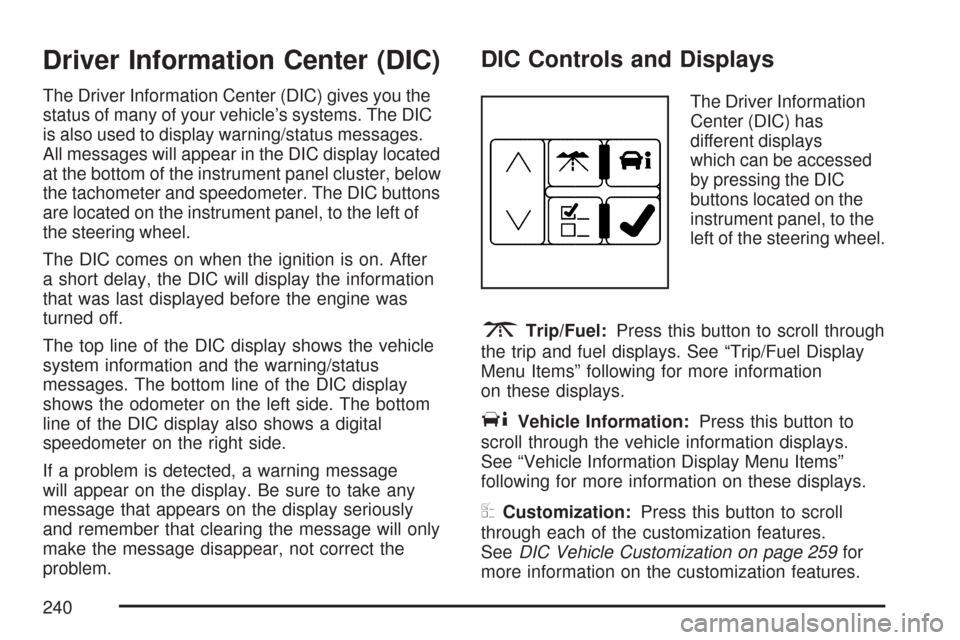
Driver Information Center (DIC)
The Driver Information Center (DIC) gives you the
status of many of your vehicle’s systems. The DIC
is also used to display warning/status messages.
All messages will appear in the DIC display located
at the bottom of the instrument panel cluster, below
the tachometer and speedometer. The DIC buttons
are located on the instrument panel, to the left of
the steering wheel.
The DIC comes on when the ignition is on. After
a short delay, the DIC will display the information
that was last displayed before the engine was
turned off.
The top line of the DIC display shows the vehicle
system information and the warning/status
messages. The bottom line of the DIC display
shows the odometer on the left side. The bottom
line of the DIC display also shows a digital
speedometer on the right side.
If a problem is detected, a warning message
will appear on the display. Be sure to take any
message that appears on the display seriously
and remember that clearing the message will only
make the message disappear, not correct the
problem.
DIC Controls and Displays
The Driver Information
Center (DIC) has
different displays
which can be accessed
by pressing the DIC
buttons located on the
instrument panel, to the
left of the steering wheel.
3Trip/Fuel:Press this button to scroll through
the trip and fuel displays. See “Trip/Fuel Display
Menu Items” following for more information
on these displays.
TVehicle Information:Press this button to
scroll through the vehicle information displays.
See “Vehicle Information Display Menu Items”
following for more information on these displays.
UCustomization:Press this button to scroll
through each of the customization features.
SeeDIC Vehicle Customization on page 259for
more information on the customization features.
240
Page 249 of 518

ENGINE OVERHEATED IDLE ENGINE
Notice:If you drive your vehicle while the
engine is overheating, severe engine damage
may occur. If an overheat warning appears
on the instrument panel cluster and/or
DIC, stop the vehicle as soon as possible.
Do not increase the engine speed above
normal idling speed. SeeEngine Overheating
on page 377for more information.
This message displays when the engine coolant
temperature is too hot. Stop and allow the vehicle
to idle until it cools down. SeeEngine Coolant
Temperature Warning Light on page 233.
SeeOverheated Engine Protection Operating
Mode on page 379for information on driving to
a safe place in an emergency.
ENGINE OVERHEATED STOP ENGINE
Notice:If you drive your vehicle while the
engine is overheating, severe engine damage
may occur. If an overheat warning appears
on the instrument panel cluster and/or
DIC, stop the vehicle as soon as possible.
SeeEngine Overheating on page 377for more
information.This message displays when the engine has
overheated. Immediately look for a safe place
to pull your vehicle over and turn the engine
off right away to avoid severe engine damage.
SeeEngine Overheating on page 377and
Overheated Engine Protection Operating Mode
on page 379. A chime also sounds when this
message is displayed.
ENGINE POWER REDUCED
This message displays when the engine power is
being reduced to protect the engine from damage.
There could be several malfunctions that might
cause this message. Reduced engine power
can affect the vehicle’s ability to accelerate.
If this message is on, but there is no reduction
in performance, proceed to your destination.
The performance may be reduced the next time
the vehicle is driven. The vehicle may be driven
at a reduced speed while this message is on, but
acceleration and speed may be reduced. Anytime
this message stays on, the vehicle should be taken
to your dealer for service as soon as possible.
249