warning CADILLAC DTS 2008 1.G User Guide
[x] Cancel search | Manufacturer: CADILLAC, Model Year: 2008, Model line: DTS, Model: CADILLAC DTS 2008 1.GPages: 454, PDF Size: 2.48 MB
Page 122 of 454

When SBZA is disabled for any reason other than the
driver turning it off, the driver will not be able to turn SBZA
back on using the DIC. The SIDE BLIND ZONE ALERT
ON option will not be selectable if the conditions for
normal system operation are not met. Until normal
operating conditions for SBZA are met, you should not
rely upon SBZA while driving.
SBZA Error Messages
The following messages may appear in the DIC:
SIDE BLIND ZONE ALERT SYSTEM OFF:This
message indicates that the driver has turned the
system off.
CLEAN SIDE BLIND ZONE ALERT SYSTEM:This
message indicates that the SBZA system is disabled
because the sensor is blocked and cannot detect
vehicles in your blind zone. The sensor may be blocked
by mud, dirt, snow, ice, slush, or even heavy rainstorms.
This message may also activate during heavy rain or
due to road spray. Your vehicle does not need service.
For cleaning, seeWashing Your Vehicle on page 5-94.
SERVICE SIDE BLIND ZONE ALERT SYSTEM:If
this message appears, both SBZA displays will remain
on indicating there is a problem with the SBZA
system. If these displays remain on after continued
driving, the system needs service. Take your vehicle to
your dealer/retailer.
Lane Departure Warning (LDW)
Your vehicle may have a Lane Departure Warning (LDW)
system. Read this entire section before using the system.
{CAUTION:
The Lane Departure Warning (LDW) system
does not steer the vehicle and is only an aid to
help you stay in your driving lane. The LDW
system may not:
Provide you with enough time to avoid a
lane change collision.
Be loud enough for you to hear the
warning beeps.
Work properly under bad weather
conditions or if the windshield is not kept
clean.
Detect lane markings and will not detect
road edges.
Warn you that your vehicle is crossing a
lane marking if the system does not detect
the lane marking.
CAUTION: (Continued)
2-46
Page 123 of 454

CAUTION: (Continued)
LDW will indicate the system is working
whenever it detects either the left or right lane
marking. So if you depart on the side of the
lane that LDW is not detecting, LDW will not
warn you.
If you do not carefully maintain your vehicle
position within the lane, vehicle damage,
injury, or death could occur. Even with LDW,
always keep your attention on the road and
maintain proper vehicle position within the
lane. Always keep the windshield clean and do
not use LDW in bad weather conditions.
When you cross a detected lane marking, the LDW
symbol will ash and you will hear three beeps. LDW will
not warn you if your turn signal is on or if you make a
sharp maneuver. Before making a lane change,
check your vehicle’s mirrors, glance over your shoulder
for vehicles and hazards, and start your turn signal
before changing lanes.
How the System Works
LDW uses a camera located between the inside
rearview mirror and the windshield to detect the lane
markings.
@(Lane Departure Warning):To turn LDW on and off,
press the LDW control, located by the exterior
headlamp control. An indicator on the control will light to
indicate that LDW is on.
When the vehicle is started, the LDW symbol, located in
the instrument panel cluster, will briey come on to
indicate that the light is operational.
2-47
Page 124 of 454
LDW only operates at speeds of 35 mph (56 km) or
greater. If LDW is turned on when traveling at these
speeds, the LDW symbol will appear green if the system
detects a left or right lane marking. This symbol will
change to amber and ash and three beeps will sound if
you cross a detected lane marking without using your
turn signal.
If the LDW symbol does not appear, LDW is not
currently operating and will not warn you.
If you would like to change the volume of the warning
chime, see Chime Volume underDIC Vehicle
Customization on page 3-87for more information.
When the System Does Not Seem To Work
Properly
The LDW symbol will not appear when the system is
having difficulty seeing the lines on the road or if
the view of the camera on the windshield is blocked
with mud, dirt, snow, ice, or slush, if the windshield is
damaged, or when weather limits visibility, such as while
driving in fog, rain, or snow conditions. This is normal
operation, your vehicle does not need service. For
cleaning instructions, seeWashing Your Vehicle
on page 5-94.LDW warnings may occasionally occur due to tar
marks, shadows, cracks in the road, or other road
imperfections. This is normal system operation, your
vehicle does not need service.
LDW Error Message
SERVICE LANE DEPARTURE SYSTEM:This
message may appear in the DIC to indicate that LDW is
not working properly. If this message remains on
after continued driving, the system needs service. Take
your vehicle to your dealer/retailer. SeeDIC Warnings
and Messages on page 3-75for more information.
LANE DEPARTURE SYSTEM UNAVAILABLE:This
message may appear in the DIC if LDW does not
activate due to a temporary condition. SeeDIC
Warnings and Messages on page 3-75for more
information.
2-48
Page 139 of 454
Instrument Panel Overview...............................3-4
Hazard Warning Flashers................................3-6
Other Warning Devices...................................3-6
Horn .............................................................3-6
Tilt Wheel.....................................................3-6
Power Tilt Wheel and Telescopic Steering
Column......................................................3-7
Heated Steering Wheel...................................3-7
Turn Signal/Multifunction Lever.........................3-8
Turn and Lane-Change Signals........................3-9
Headlamp High/Low-Beam Changer..................3-9
Forward Collision Alert (FCA) System..............3-10
Flash-to-Pass...............................................3-13
Windshield Wipers........................................3-13
Rainsense™ II Wipers...................................3-14
Windshield Washer.......................................3-15
Cruise Control..............................................3-16
Adaptive Cruise Control.................................3-19
Exterior Lamps.............................................3-32
Wiper Activated Headlamps............................3-35
Headlamps on Reminder................................3-35
Daytime Running Lamps (DRL).......................3-35
Fog Lamps ..................................................3-36
Cornering Lamps..........................................3-37
Exterior Lighting Battery Saver........................3-37
Instrument Panel Brightness...........................3-37
Courtesy Lamps...........................................3-37Entry Lighting...............................................3-37
Parade Dimming...........................................3-38
Reading Lamps............................................3-38
Footwell Lamps............................................3-38
Battery Load Management.............................3-38
Electric Power Management...........................3-39
Inadvertent Power Battery Saver.....................3-40
Battery Run-Down Protection..........................3-40
Accessory Power Outlet(s).............................3-40
Ashtray(s)....................................................3-41
Analog Clock...............................................3-42
Climate Controls............................................3-42
Dual Climate Control System..........................3-42
Outlet Adjustment.........................................3-48
Rear Climate Control System.........................3-49
Passenger Compartment Air Filter...................3-51
Warning Lights, Gages, and Indicators............3-53
Instrument Panel Cluster................................3-54
Speedometer and Odometer...........................3-55
Tachometer.................................................3-55
Safety Belt Reminders...................................3-56
Airbag Readiness Light..................................3-57
Passenger Airbag Status Indicator...................3-58
Charging System Light..................................3-60
Brake System Warning Light..........................3-60
Antilock Brake System (ABS) Warning Light.....3-61
Section 3 Instrument Panel
3-1
Page 140 of 454
Traction Control System (TCS) Warning Light . . .3-62
StabiliTrak®Indicator Light.............................3-62
Lane Departure Warning Light........................3-63
Engine Coolant Temperature Warning Light......3-63
Engine Coolant Temperature Gage..................3-64
Tire Pressure Light.......................................3-64
Malfunction Indicator Lamp.............................3-65
Oil Pressure Light.........................................3-67
Security Light...............................................3-68
Fog Lamp Light............................................3-68
Lights On Reminder......................................3-68
Cruise Control Light......................................3-68
Highbeam On Light.......................................3-69
Fuel Gage...................................................3-69Driver Information Center (DIC).......................3-70
DIC Operation and Displays...........................3-70
DIC Warnings and Messages.........................3-75
DIC Vehicle Customization.............................3-87
Audio System(s).............................................3-96
Setting the Clock..........................................3-97
Radio(s) (MP3)...........................................3-100
Using an MP3............................................3-111
XM Radio Messages...................................3-117
Navigation/Radio System..............................3-118
Theft-Deterrent Feature................................3-118
Audio Steering Wheel Controls......................3-118
Radio Reception.........................................3-119
Backglass Antenna......................................3-120
XM™ Satellite Radio Antenna System............3-120
Section 3 Instrument Panel
3-2
Page 143 of 454
The main components of the instrument panel are the following:
A. Air Outlets. SeeOutlet Adjustment on page 3-48.
B. Driver Information Center (DIC) Buttons. SeeDriver
Information Center (DIC) on page 3-70.
C. Exterior Lamp Controls. SeeExterior Lamps on
page 3-32.
D. Instrument Panel Cluster. SeeInstrument Panel
Cluster on page 3-54.
E. Horn. SeeHorn on page 3-6.
F. Audio Steering Wheel Controls. SeeAudio Steering
Wheel Controls on page 3-118.
G. Ultrasonic Front and Rear Parking Assist and
Adaptive Cruise Control Display (If Equipped). See
Ultrasonic Front and Rear Parking Assist (UFRPA)
on page 2-40andAdaptive Cruise Control on
page 3-19.
H. Analog Clock. SeeAnalog Clock on page 3-42.
I. Hazard Warning Flashers Button. SeeHazard
Warning Flashers on page 3-6.
J. Radio. SeeAudio System(s) on page 3-96.
K. Trunk Release Button. SeeTrunk on page 2-12.
L. Instrument Panel Brightness Control. SeeInstrument
Panel Brightness on page 3-37.
M. Lane Departure Warning. SeeLane Departure
Warning (LDW) on page 2-46.N. Turn Signal/Multifunction Lever. SeeTurn
Signal/Multifunction Lever on page 3-8.
O. Hood Release. SeeHood Release on page 5-12.
P. Parking Brake. SeeParking Brake on page 2-30.
Q. Heated Steering Wheel Button (If Equipped).
SeeHeated Steering Wheel on page 3-7.
R. Cruise Control or Adaptive Cruise Control. See
Cruise Control on page 3-16orAdaptive Cruise
Control on page 3-19.
S. Tilt Wheel. SeeTilt Wheel on page 3-6. Power Tilt
and Telescopic Steering Wheel (If Equipped).
SeePower Tilt Wheel and Telescopic Steering
Column on page 3-7.
T. Climate Controls. SeeDual Climate Control System
on page 3-42.
U. Traction Control System Button (Console-Shift
Vehicles). SeeTraction Control System (TCS) on
page 4-5.
V. Shift Lever. SeeAutomatic Transmission Operation
on page 2-27.
W. Accessory Power Outlet. SeeAccessory Power
Outlet(s) on page 3-40.
X. Glove Box. SeeGlove Box on page 2-59. Valet
Lockout Switch. SeeValet Lockout Switch on
page 2-18.
3-5
Page 144 of 454

Hazard Warning Flashers
The hazard warning ashers let you warn the police and
others that you have a problem. The front and rear
turn signal lamps will ash on and off.
The hazard warning
asher button is on the
instrument panel.
Press the button to make the front and rear turn signal
lamps ash on and off. Press again to turn the
ashers completely off.
The hazard warning ashers work even if the key is not
in the ignition switch.
Other Warning Devices
If you carry reective triangles, you can set them up at
the side of the road about 300 feet (100 m) behind
your vehicle.
Horn
Press near or on the horn symbols on the steering
wheel pad to sound the horn.
Tilt Wheel
A tilt wheel lets you adjust the steering wheel before
you drive. You can raise the steering wheel to the
highest level to give your legs more room when you
enter and exit the vehicle.
The lever that lets you tilt the steering wheel is located
on the left side of the steering column.
To tilt the wheel, hold the
wheel and pull the lever.
Then move the wheel
to a comfortable position
and release the lever
to lock the wheel in place.
3-6
Page 147 of 454

Turn and Lane-Change Signals
To signal a turn, move the lever all the way up or down.
The lever returns automatically when the turn is
complete. If you momentarily press and release the
lever, the turn signal will ash 3 times.
An arrow on the instrument
panel cluster and in the
outside rearview mirror will
ash in the direction of
the turn or lane change.
Raise or lower the lever until the arrow starts to ash to
signal a lane change. Hold it there until the lane
change is complete. The lever returns when it is
released.
If the turn signal is left on, a warning chime will sound
and the Driver Information Center (DIC) will display
TURN SIGNAL ON after driving about a mile to remind
you to turn it off. SeeDIC Warnings and Messages
on page 3-75.Arrows that ash rapidly when signaling for a turn or
lane change may be caused by a burned out signal bulb.
Other drivers will not see the turn signal.
Replace burned-out bulbs to help avoid possible
accidents. Check the fuse and for burned-out bulbs if
the arrow fails to work when signaling a turn. SeeRear
Underseat Fuse Block on page 5-104.
Headlamp High/Low-Beam Changer
Push forward to change the headlamps from low
beam to high. Pull the lever back and then release
it to change from high beam to low.
This light on the instrument
panel cluster will be on,
indicating high-beam
usage.
3-9
Page 148 of 454
Forward Collision Alert (FCA)
System
If your vehicle has this feature, be sure to read this
entire section before using it.
The system operates on a radio frequency subject to
Federal Communications Commission (FCC) Rules and
with Industry Canada.
This device complies with Part 15 of the FCC Rules.
Operation is subject to the following two conditions:
1. This device may not cause interference.
2. This device must accept any interference received,
including interference that may cause undesired
operation of the device.
This device complies with RSS-210 of Industry Canada.
Operation is subject to the following two conditions:
1. This device may not cause interference.
2. This device must accept any interference received,
including interference that may cause undesired
operation of the device.
Changes or modications to this system by other than
an authorized service facility could void authorization to
use this equipment.The Forward Collision Alert (FCA) system provides an
audible and visual alert if you approach a vehicle
too quickly that is directly ahead. FCA also provides a
visual alert with no audible alert if you are following
another vehicle much too closely. The FCA alert symbol
is located on top of the instrument panel to the right
of the driver. FCA uses the Adaptive Cruise Control
radar to detect a vehicle directly ahead, in your path,
within a distance of 328 ft (100 m) and operates at
speeds above 20 mph (32 km/h).
{CAUTION:
FCA is only a warning system and does not
apply the brakes. When you are approaching a
vehicle or object too rapidly or when you are
following a vehicle too closely that is ahead of
you, FCA may not provide you with enough
time to avoid a collision. FCA is not designed
to warn the driver of pedestrians or animals.
Your complete attention is always required
while driving and you should be ready to take
action and apply the brakes. For more
information, seeDefensive Driving on page 4-2.
3-10
Page 149 of 454
The FCA control is located
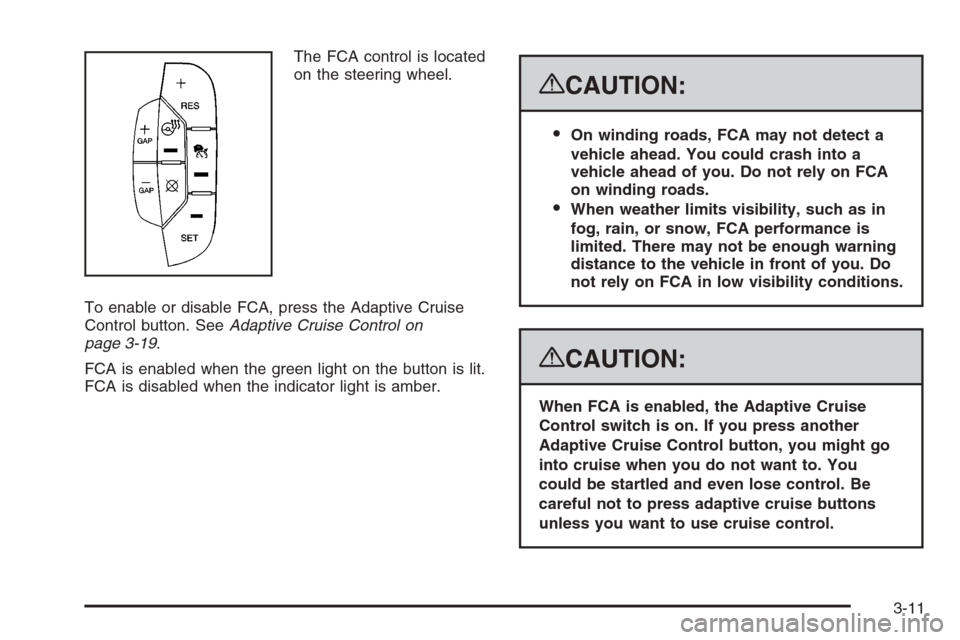
on the steering wheel.
To enable or disable FCA, press the Adaptive Cruise
Control button. SeeAdaptive Cruise Control on
page 3-19.
FCA is enabled when the green light on the button is lit.
FCA is disabled when the indicator light is amber.
{CAUTION:
On winding roads, FCA may not detect a
vehicle ahead. You could crash into a
vehicle ahead of you. Do not rely on FCA
on winding roads.
When weather limits visibility, such as in
fog, rain, or snow, FCA performance is
limited. There may not be enough warning
distance to the vehicle in front of you. Do
not rely on FCA in low visibility conditions.
{CAUTION:
When FCA is enabled, the Adaptive Cruise
Control switch is on. If you press another
Adaptive Cruise Control button, you might go
into cruise when you do not want to. You
could be startled and even lose control. Be
careful not to press adaptive cruise buttons
unless you want to use cruise control.
3-11