service CADILLAC DTS 2008 1.G Owner's Guide
[x] Cancel search | Manufacturer: CADILLAC, Model Year: 2008, Model line: DTS, Model: CADILLAC DTS 2008 1.GPages: 454, PDF Size: 2.48 MB
Page 197 of 454

{CAUTION:
Even though the passenger sensing system is
designed to turn off the right front passenger’s
frontal airbag and seat-mounted side impact
airbag (if equipped) if the system detects a
rear-facing child restraint, no system is
fail-safe, and no one can guarantee that an
airbag will not deploy under some unusual
circumstance, even though it is turned off.
We recommend that rear-facing child restraints
be secured in a rear seat, even if the airbag
is or airbags are off.
If the word OFF or the off symbol is lit on the passenger
airbag status indicator, it means that the passenger
sensing system has turned off the right front passenger’s
frontal airbag and seat-mounted side impact airbag.
SeePassenger Sensing System on page 1-63for more
on this, including important safety information.If, after several seconds, both status indicator lights
remain on, or if there are no lights at all, there may
be a problem with the lights or the passenger sensing
system. See your dealer/retailer for service.
{CAUTION:
If the airbag readiness light in the instrument
panel cluster ever comes on and stays on,
it means that something may be wrong with
the airbag system. If this ever happens, have
the vehicle serviced promptly, because an
adult-size person sitting in the right front
passenger’s seat may not have the protection
of the airbag(s). SeeAirbag Readiness Light
on page 3-57for more on this, including
important safety information.
3-59
Page 199 of 454
If the light comes on while you are driving, pull off the
road and stop carefully. You may notice that the pedal is
harder to push, or the pedal may go closer to the
oor. It may take longer to stop. If the light is still on,
have the vehicle towed for service. SeeTowing
Your Vehicle on page 4-26.
{CAUTION:
Your brake system may not be working
properly if the brake system warning light is
on. Driving with the brake system warning
light on can lead to an accident. If the light
is still on after you have pulled off the road
and stopped carefully, have the vehicle towed
for service.
Antilock Brake System (ABS)
Warning Light
For vehicles with the
Antilock Brake System
(ABS), this light comes
on briey when the
engine is started.
That is normal. If the light does not come on then, have it
xed so it will be ready to warn you if there is a problem.
If the ABS light stays on, turn the ignition off. If the light
comes on when you are driving, stop as soon as it is
safely possible and turn the ignition off. Then start the
engine again to reset the system. If the ABS light still
stays on, or comes on again while you are driving, your
vehicle needs service. If the regular brake system
warning light is not on, your vehicle still has brakes, but
not antilock brakes. If the regular brake system warning
light is also on, your vehicle does not have antilock
brakes and there is a problem with the regular brakes.
SeeBrake System Warning Light on page 3-60.
For vehicles with a Driver Information Center (DIC),
seeDIC Warnings and Messages on page 3-75for all
brake related DIC messages.
3-61
Page 200 of 454

Traction Control System (TCS)
Warning Light
The traction control system
warning light should come
on briey when the
engine is started.
If the warning light does not come on then, have it xed
so it will be ready to warn you if there is a problem. If
it stays on, or comes on when you are driving, there may
be a problem with your traction control system and
your vehicle may need service. When this warning light
is on, the system will not limit wheel spin. Adjust
your driving accordingly.
If the traction control system warning light comes on
and stays on for an extended period of time when the
system is turned on, your vehicle needs service.
SeeTraction Control System (TCS) on page 4-5for
more information.
StabiliTrak®Indicator Light
For vehicles that have the
StabiliTrak®system, this
warning light should
come on briey when the
engine is started.
If the warning light does not come on then, have it xed
so it will be ready to warn you if there is a problem. If
it stays on, or comes on when you are driving, there may
be a problem with your StabiliTrak
®system and your
vehicle may need service. When this warning light is on,
the system will not limit wheel spin. Adjust your driving
accordingly.
If the StabiliTrak
®system warning light comes on
and stays on for an extended period of time when
the system is turned on, your vehicle needs service.
SeeStabiliTrak
®System on page 4-7for more
information.
3-62
Page 203 of 454
Malfunction Indicator Lamp
Check Engine Light
A computer system called OBD II (On-Board
Diagnostics-Second Generation) monitors operation of
the fuel, ignition, and emission control systems. It makes
sure that emissions are at acceptable levels for the life of
the vehicle, helping to produce a cleaner environment.
The check engine light
comes on to indicate
that there is an OBD II
problem and service
is required.
Malfunctions often are indicated by the system before
any problem is apparent. This can prevent more serious
damage to your vehicle. This system is also designed
to assist your service technician in correctly diagnosing
any malfunction.
Notice:If you keep driving your vehicle with this
light on, after a while, the emission controls
might not work as well, your vehicle’s fuel economy
might not be as good, and the engine might not
run as smoothly. This could lead to costly repairs
that might not be covered by your warranty.Notice:Modications made to the engine,
transmission, exhaust, intake, or fuel system of
your vehicle or the replacement of the original tires
with other than those of the same Tire Performance
Criteria (TPC) can affect your vehicle’s emission
controls and can cause this light to come on.
Modications to these systems could lead to costly
repairs not covered by your warranty. This could
also result in a failure to pass a required Emission
Inspection/Maintenance test. SeeAccessories
and Modifications on page 5-3.
This light comes on, as a check to show it is working,
when the ignition is turned ON/RUN but the engine is not
running. If the light does not come on, have it repaired.
This light also comes on during a malfunction in
one of two ways:
Light Flashing— A misre condition has been
detected. A misre increases vehicle emissions and
could damage the emission control system on your
vehicle. Diagnosis and service might be required.
Light On Steady— An emission control system
malfunction has been detected on your vehicle.
Diagnosis and service might be required.
3-65
Page 204 of 454
If the Light is Flashing
The following can prevent more serious damage to your
vehicle:
Reduce vehicle speed.
Avoid hard accelerations.
Avoid steep uphill grades.
If you are towing a trailer, reduce the amount of
cargo being hauled as soon as it is possible.
If the light stops ashing and remains on steady,
see “If the Light Is On Steady” following.
If the light continues to ash, when it is safe to do so,
stop the vehicle. Find a safe place to park the vehicle.
Turn the ignition off, wait at least 10 seconds, and restart
the engine. If the light remains on steady, see “If the
Light Is On Steady” following. If the light is still ashing,
follow the previous steps and see your dealer/retailer
for service as soon as possible.
If the Light Is On Steady
You might be able to correct the emission system
malfunction by considering the following:
Did you recently put fuel into your vehicle?
If so, reinstall the fuel cap, making sure to fully
install the cap. SeeFilling the Tank on page 5-8.
The diagnostic system can determine if the fuel
cap has been left off or improperly installed.A loose or missing fuel cap allows fuel to evaporate
into the atmosphere. A few driving trips with the
cap properly installed should turn the light off.
Did you just drive through a deep puddle of water?
If so, your vehicle’s electrical system might be wet. The
condition is usually corrected when the electrical system
dries out. A few driving trips should turn the light off.
Have you recently changed brands of fuel?
If so, be sure to fuel your vehicle with quality fuel. See
Gasoline Octane on page 5-5. Poor fuel quality causes
the engine not to run as efficiently as designed. You
might notice this as stalling after start-up, stalling when
you put the vehicle into gear, misring, hesitation on
acceleration, or stumbling on acceleration — these
conditions might go away once the engine is warmed up.
This will be detected by the system and cause the light to
turn on.
If you experience one or more of these conditions,
change the fuel brand you use. It will require at least
one full tank of the proper fuel to turn the light off.
If none of the above steps have made the light turn off,
your dealer/retailer can check the vehicle. Your
dealer/retailer has the proper test equipment and
diagnostic tools to x any mechanical or electrical
problems that might have developed.
3-66
Page 205 of 454

Emissions Inspection and
Maintenance Programs
Some state/provincial and local governments have
or might begin programs to inspect the emission
control equipment on your vehicle. Failure to pass this
inspection could prevent you from getting a vehicle
registration.
Here are some things you need to know to help your
vehicle pass an inspection:
Your vehicle will not pass this inspection if the check
engine light is on or not working properly.
Your vehicle will not pass this inspection if the OBD
(on-board diagnostic) system determines that critical
emission control systems have not been completely
diagnosed by the system. The vehicle would be
considered not ready for inspection. This can happen
if you have recently replaced the battery or if the battery
has run down. The diagnostic system is designed to
evaluate critical emission control systems during normal
driving. This can take several days of routine driving.
If you have done this and your vehicle still does not pass
the inspection for lack of OBD system readiness, your
dealer/retailer can prepare the vehicle for inspection.
Oil Pressure Light
{CAUTION:
Do not keep driving if the oil pressure is low.
If you do, your engine can become so hot that
it catches re. You or others could be burned.
Check your oil as soon as possible and have
your vehicle serviced.
Notice:Lack of proper engine oil maintenance may
damage the engine. The repairs would not be covered
by your warranty. Always follow the maintenance
schedule in this manual for changing engine oil.
This light will come on
briey when you start your
engine as a check to be
sure it works. If it does
not, have your vehicle
serviced.
If the light comes on and stays on, it means that oil is not
owing through your engine properly. You could be low
on oil and you might have some other system problem.
3-67
Page 212 of 454
When the SBZA system is turned off, the DIC will display
the SIDE BLIND ZONE ALERT SYSTEM OFF message
as a reminder that the system has been turned off. See
DIC Warnings and Messages on page 3-75andSide
Blind Zone Alert (SBZA) on page 2-43for more
information.
FRONT TIRES or REAR TIRES
The pressure for each tire can be viewed in the DIC.
The tire pressure will be shown in either pounds
per square inch (psi) or kilopascals (kPa). Press the
vehicle information button until the DIC displays
FRONT TIRES PSI (kPa) LEFT ## RIGHT ##. Press
the vehicle information button again until the DIC
displays REAR TIRES PSI (kPa) LEFT ## RIGHT ##.
If a low or high tire pressure condition is detected by
the system while driving, a message advising you
to check the pressure in a specic tire will appear in the
display. SeeInflation - Tire Pressure on page 5-60
andDIC Warnings and Messages on page 3-75for more
information.
If the tire pressure display shows dashes instead of a
value, there may be a problem with your vehicle. If this
consistently occurs, see your dealer/retailer for service.
RELEARN REMOTE KEY
This display allows you to match Remote Keyless
Entry (RKE) transmitters to your vehicle. To match an
RKE transmitter to your vehicle:
1. Press the vehicle information button until
PRESS
VTO RELEARN REMOTE KEY displays.
2. Press the set/reset button until REMOTE KEY
LEARNING ACTIVE is displayed.
3. Press and hold the lock and unlock buttons on the
rst transmitter at the same time for about
15 seconds.
On vehicles with memory recall seats, the rst
transmitter learned will match driver 1 and
the second will match driver 2.
A chime will sound indicating that the transmitter
is matched.
4. To match additional transmitters at this time,
repeat Step 3.
Each vehicle can have a maximum of eight
transmitters matched to it.
5. To exit the programming mode, you must cycle
the key to LOCK/OFF.
Blank Display
This display shows no information.
3-74
Page 213 of 454
DIC Warnings and Messages
These messages appear if there is a problem detected
in one of your vehicle’s systems.
You must acknowledge a message to clear it from the
screen for further use. To clear a message, press
the set/reset button.
Be sure to take any message that appears on the
screen seriously and remember that clearing the
message will only make the message disappear,
not the problem.
AUTOMATIC LIGHT CONTROL OFF
This message displays when the automatic headlamps
are turned off. SeeExterior Lamps on page 3-32for
more information.
AUTOMATIC LIGHT CONTROL ON
This message displays when the automatic headlamps
are turned on. SeeExterior Lamps on page 3-32for
more information.
BATTERY SAVER ACTIVE
This message displays when the system detects that
the battery voltage is dropping beyond a reasonable
level. The battery saver system starts reducing certain
features of the vehicle that you may be able to notice.At the point that the features are disabled, this message
is displayed. It means that the vehicle is trying to
save the charge in the battery.
Turn off all unnecessary accessories to allow the battery
to recharge.
The normal battery voltage range is 11.5 to 15.5 volts.
You can monitor battery voltage on the Driver Information
Center (DIC) by pressing the trip/fuel button until
BATTERY VOLTAGE is displayed.
CHANGE ENGINE OIL SOON
This message displays when service is required for your
vehicle. See your dealer/retailer. SeeEngine Oil on
page 5-15andScheduled Maintenance on page 6-4for
more information.
When you reset the CHANGE ENGINE OIL SOON
message by clearing it from the display, you still must
reset the engine oil life system separately. For more
information on resetting the engine oil life system, see
Engine Oil Life System on page 5-18.
CHECK TIRE PRESSURE
This message displays when the pressure in one or
more of the vehicle’s tires needs to be checked. This
message also displays LEFT FRONT, RIGHT FRONT,
LEFT REAR, or RIGHT REAR to indicate which tire
needs to be checked. You can receive more
than one tire pressure message at a time.
3-75
Page 214 of 454
To read the other messages that may have been sent
at the same time, press the set/reset button. If a tire
pressure message appears on the DIC, stop as soon as
you can. Have the tire pressures checked and set to
those shown on the Tire Loading Information label. See
Tires on page 5-52,Loading the Vehicle on page 4-20,
andInflation - Tire Pressure on page 5-60. The DIC also
shows the tire pressure values. SeeDIC Operation and
Displays on page 3-70. If the tire pressure is low, the low
tire pressure warning light comes on. SeeTire Pressure
Light on page 3-64.
CLEAN RADAR
This message displays when the Adaptive Cruise
Control (ACC) system and the Forward Collision Alert
(FCA) system are disabled because the radar is blocked
and cannot detect vehicles in your path. It may also
activate during heavy rain or due to road spray. To clean
the system, see “Cleaning the System” underAdaptive
Cruise Control on page 3-19.
CLEAN SIDE BLIND ZONE ALERT
SYSTEM
If your vehicle has the Side Blind Zone Alert (SBZA)
system, this message displays when the SBZA system
is disabled because the sensor is blocked and cannot
detect vehicles in your blind zone. The sensor may
be blocked by mud, dirt, snow, ice, or slush.This message may also display during heavy rain or
due to road spray. It may also come on when driving in
isolated areas with no guardrails, trees, or road signs
and light traffic. Your vehicle does not need service.
For cleaning instructions, seeWashing Your Vehicle
on page 5-94. SeeSide Blind Zone Alert (SBZA)
on page 2-43for more information.
CRUISE SET TO XXX MPH (km/h)
This message displays whenever the cruise control is
set. SeeCruise Control on page 3-16andAdaptive
Cruise Control on page 3-19for more information.
If your vehicle has Adaptive Cruise Control (ACC), after
a few seconds, this message clears and the message
“SET SPD XX” displays at the bottom of the DIC.
See “SET SPD (Speed)” later in this section.
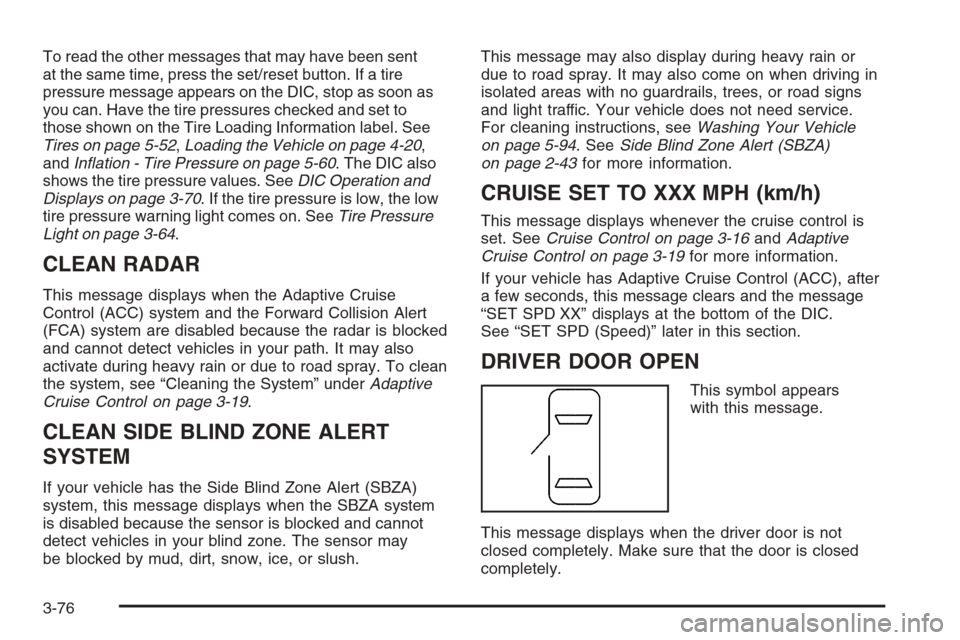
DRIVER DOOR OPEN
This symbol appears
with this message.
This message displays when the driver door is not
closed completely. Make sure that the door is closed
completely.
3-76
Page 216 of 454

The vehicle may be driven at a reduced speed while
this message is on, but acceleration and speed may be
reduced. Anytime this message stays on, the vehicle
should be taken to your dealer/retailer for service
as soon as possible.
FOLLOWING GAP
This symbol appears with this message.
If your vehicle has Adaptive Cruise Control (ACC), this
message displays to show the follow distance that
has been set. There are six follow distances to choose
from. Each follow distance is shown on the DIC by
displaying from one to six bars between two car
symbols. SeeAdaptive Cruise Control on page 3-19
for more information.
FUEL LEVEL LOW
This symbol appears
with this message.
This message displays when your vehicle is low on
fuel. Rell the fuel tank as soon as possible. A single
chime sounds when this message is displayed. See
Filling the Tank on page 5-8.
HEATED WASHER FLUID SYSTEM OFF
This message displays when you manually turn off
the heated washer uid system or when the system
automatically turns off. See “Heated Washer Fluid”
underWindshield Washer on page 3-15for more
information.
3-78