cruise control CADILLAC DTS 2009 1.G Owners Manual
[x] Cancel search | Manufacturer: CADILLAC, Model Year: 2009, Model line: DTS, Model: CADILLAC DTS 2009 1.GPages: 462, PDF Size: 2.46 MB
Page 4 of 462
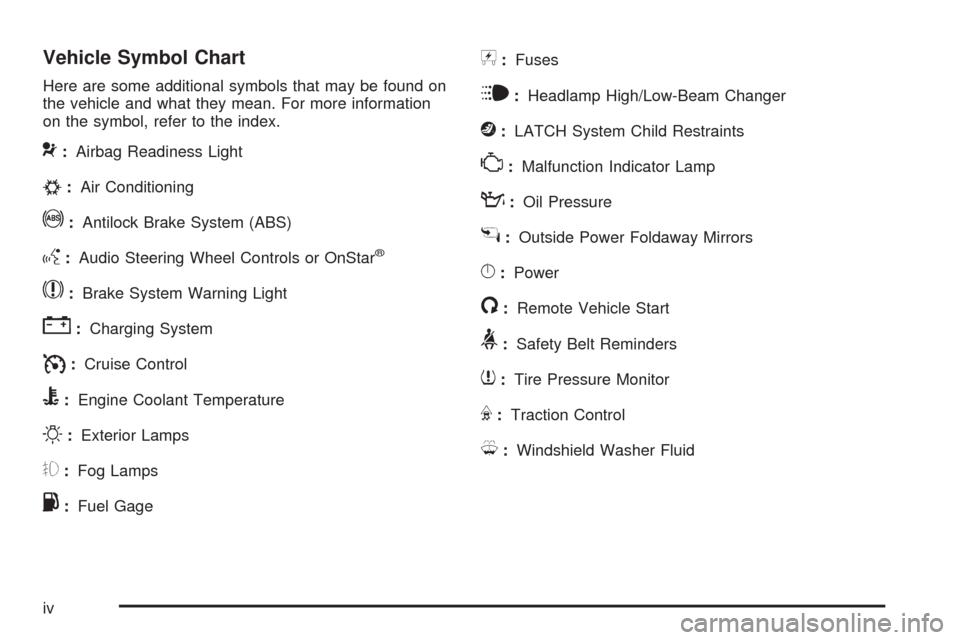
Vehicle Symbol Chart
Here are some additional symbols that may be found on
the vehicle and what they mean. For more information
on the symbol, refer to the index.
9:Airbag Readiness Light
#:Air Conditioning
!:Antilock Brake System (ABS)
g:Audio Steering Wheel Controls or OnStar®
$:Brake System Warning Light
":Charging System
I:Cruise Control
B:Engine Coolant Temperature
O:Exterior Lamps
#:Fog Lamps
.:Fuel Gage
+:Fuses
i:Headlamp High/Low-Beam Changer
j:LATCH System Child Restraints
*:Malfunction Indicator Lamp
::Oil Pressure
g:Outside Power Foldaway Mirrors
}:Power
/:Remote Vehicle Start
>:Safety Belt Reminders
7:Tire Pressure Monitor
F:Traction Control
M:Windshield Washer Fluid
iv
Page 119 of 462
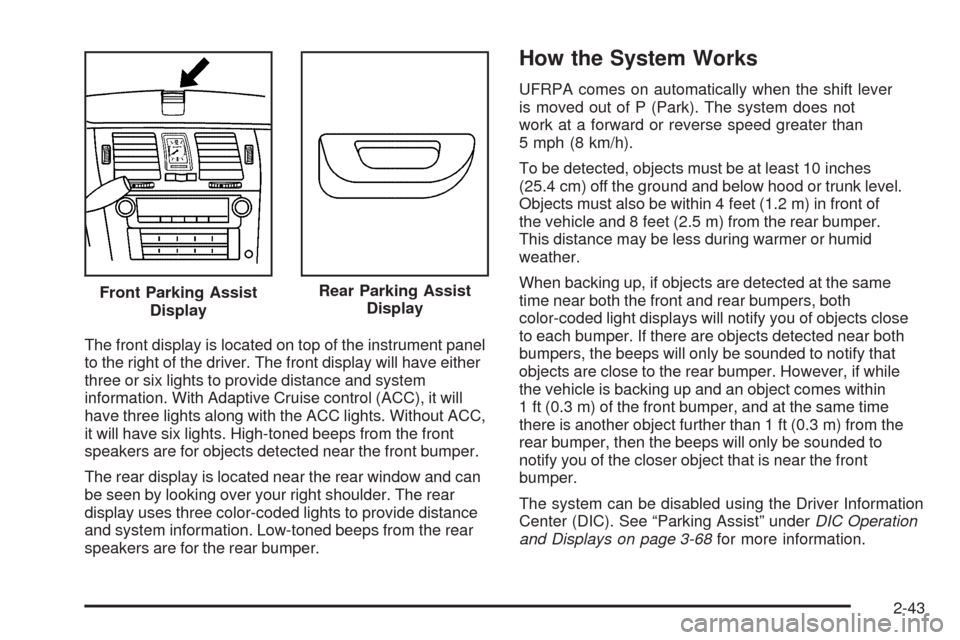
The front display is located on top of the instrument panel
to the right of the driver. The front display will have either
three or six lights to provide distance and system
information. With Adaptive Cruise control (ACC), it will
have three lights along with the ACC lights. Without ACC,
it will have six lights. High-toned beeps from the front
speakers are for objects detected near the front bumper.
The rear display is located near the rear window and can
be seen by looking over your right shoulder. The rear
display uses three color-coded lights to provide distance
and system information. Low-toned beeps from the rear
speakers are for the rear bumper.
How the System Works
UFRPA comes on automatically when the shift lever
is moved out of P (Park). The system does not
work at a forward or reverse speed greater than
5 mph (8 km/h).
To be detected, objects must be at least 10 inches
(25.4 cm) off the ground and below hood or trunk level.
Objects must also be within 4 feet (1.2 m) in front of
the vehicle and 8 feet (2.5 m) from the rear bumper.
This distance may be less during warmer or humid
weather.
When backing up, if objects are detected at the same
time near both the front and rear bumpers, both
color-coded light displays will notify you of objects close
to each bumper. If there are objects detected near both
bumpers, the beeps will only be sounded to notify that
objects are close to the rear bumper. However, if while
the vehicle is backing up and an object comes within
1 ft (0.3 m) of the front bumper, and at the same time
there is another object further than 1 ft (0.3 m) from the
rear bumper, then the beeps will only be sounded to
notify you of the closer object that is near the front
bumper.
The system can be disabled using the Driver Information
Center (DIC). See “Parking Assist” underDIC Operation
and Displays on page 3-68for more information. Front Parking Assist
Display
Rear Parking Assist
Display
2-43
Page 141 of 462

Instrument Panel Overview...............................3-4
Hazard Warning Flashers................................3-6
Horn .............................................................3-6
Tilt Wheel.....................................................3-6
Power Tilt Wheel and Telescopic
Steering Column.........................................3-7
Heated Steering Wheel...................................3-7
Turn Signal/Multifunction Lever.........................3-8
Turn and Lane-Change Signals........................3-8
Headlamp High/Low-Beam Changer..................3-9
Forward Collision Alert (FCA) System................3-9
Flash-to-Pass...............................................3-13
Windshield Wipers........................................3-13
Rainsense™ II Wipers...................................3-14
Windshield Washer.......................................3-15
Cruise Control..............................................3-16
Adaptive Cruise Control.................................3-19
Exterior Lamps.............................................3-29
Wiper Activated Headlamps............................3-32
Headlamps on Reminder................................3-33
Daytime Running Lamps (DRL).......................3-33
Fog Lamps ..................................................3-34
Cornering Lamps..........................................3-34
Exterior Lighting Battery Saver........................3-34
Instrument Panel Brightness...........................3-34Courtesy Lamps...........................................3-35
Entry Lighting...............................................3-35
Parade Dimming...........................................3-35
Reading Lamps............................................3-35
Footwell Lamps............................................3-36
Battery Load Management.............................3-36
Electric Power Management...........................3-36
Inadvertent Power Battery Saver.....................3-37
Battery Run-Down Protection..........................3-37
Accessory Power Outlet(s).............................3-38
Ashtray(s)....................................................3-39
Analog Clock...............................................3-39
Climate Controls............................................3-40
Dual Climate Control System..........................3-40
Outlet Adjustment.........................................3-46
Rear Climate Control System.........................3-46
Passenger Compartment Air Filter...................3-48
Warning Lights, Gages, and Indicators............3-50
Instrument Panel Cluster................................3-51
Speedometer and Odometer...........................3-52
Tachometer.................................................3-52
Safety Belt Reminders...................................3-53
Airbag Readiness Light..................................3-54
Passenger Airbag Status Indicator...................3-55
Charging System Light..................................3-56
Section 3 Instrument Panel
3-1
Page 142 of 462

Brake System Warning Light..........................3-56
Antilock Brake System (ABS) Warning Light.....3-57
Traction Control System (TCS) Warning Light . . .3-58
StabiliTrak
®Indicator Light.............................3-58
Lane Departure Warning (LDW) Light..............3-59
Engine Coolant Temperature Warning Light......3-59
Engine Coolant Temperature Gage..................3-60
Tire Pressure Light.......................................3-60
Malfunction Indicator Lamp.............................3-61
Oil Pressure Light.........................................3-64
Security Light...............................................3-65
Fog Lamp Light............................................3-65
Lights On Reminder......................................3-65
Cruise Control Light......................................3-66
Highbeam On Light.......................................3-66
Fuel Gage...................................................3-66Driver Information Center (DIC).......................3-67
DIC Operation and Displays...........................3-68
DIC Warnings and Messages.........................3-73
DIC Vehicle Customization.............................3-86
Audio System(s).............................................3-95
Setting the Clock..........................................3-96
Radio(s) (MP3).............................................3-99
Using an MP3............................................3-110
XM Radio Messages...................................3-115
Navigation/Radio System..............................3-116
Bluetooth
®.................................................3-116
Theft-Deterrent Feature................................3-127
Audio Steering Wheel Controls......................3-127
Radio Reception.........................................3-128
Backglass Antenna......................................3-129
XM™ Satellite Radio Antenna System............3-129
Section 3 Instrument Panel
3-2
Page 145 of 462
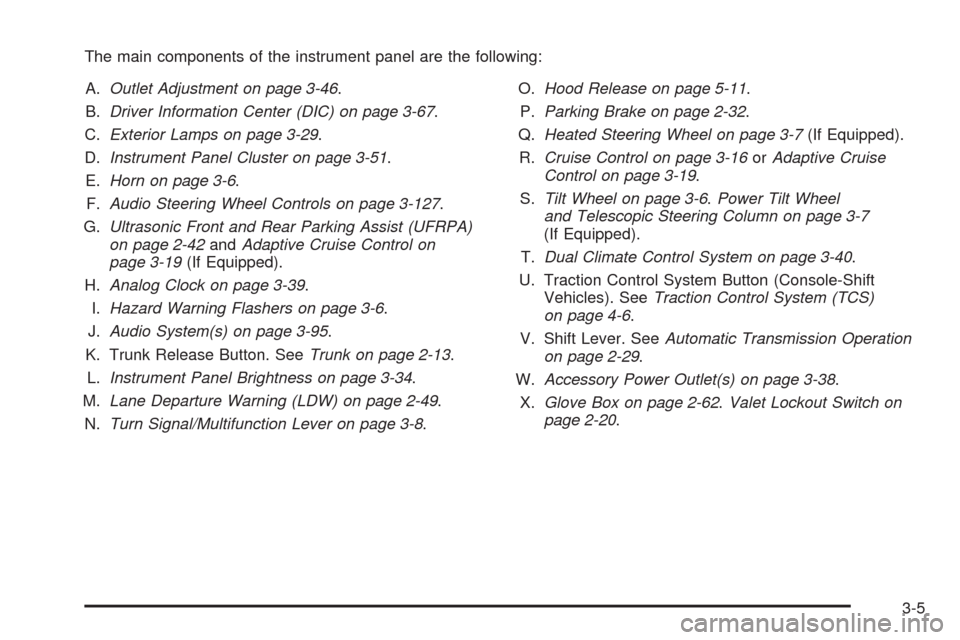
The main components of the instrument panel are the following:
A.Outlet Adjustment on page 3-46.
B.Driver Information Center (DIC) on page 3-67.
C.Exterior Lamps on page 3-29.
D.Instrument Panel Cluster on page 3-51.
E.Horn on page 3-6.
F.Audio Steering Wheel Controls on page 3-127.
G.Ultrasonic Front and Rear Parking Assist (UFRPA)
on page 2-42andAdaptive Cruise Control on
page 3-19(If Equipped).
H.Analog Clock on page 3-39.
I.Hazard Warning Flashers on page 3-6.
J.Audio System(s) on page 3-95.
K. Trunk Release Button. SeeTrunk on page 2-13.
L.Instrument Panel Brightness on page 3-34.
M.Lane Departure Warning (LDW) on page 2-49.
N.Turn Signal/Multifunction Lever on page 3-8.O.Hood Release on page 5-11.
P.Parking Brake on page 2-32.
Q.Heated Steering Wheel on page 3-7(If Equipped).
R.Cruise Control on page 3-16orAdaptive Cruise
Control on page 3-19.
S.Tilt Wheel on page 3-6.Power Tilt Wheel
and Telescopic Steering Column on page 3-7
(If Equipped).
T.Dual Climate Control System on page 3-40.
U. Traction Control System Button (Console-Shift
Vehicles). SeeTraction Control System (TCS)
on page 4-6.
V. Shift Lever. SeeAutomatic Transmission Operation
on page 2-29.
W.Accessory Power Outlet(s) on page 3-38.
X.Glove Box on page 2-62.Valet Lockout Switch on
page 2-20.
3-5
Page 150 of 462

The Forward Collision Alert (FCA) system provides
an audible and visual alert if you approach a vehicle too
quickly that is directly ahead. FCA also provides a visual
alert with no audible alert if you are following another
vehicle much too closely. The FCA alert symbol is located
on top of the instrument panel to the right of the driver.
FCA uses the Adaptive Cruise Control radar to detect a
vehicle directly ahead, in your path, within a distance of
328 ft (100 m) and operates at speeds above 20 mph
(32 km/h).
{CAUTION:
FCA is only a warning system and does not apply
the brakes. When you are approaching a vehicle
or object too rapidly or when you are following a
vehicle too closely that is ahead of you, FCA may
not provide you with enough time to avoid a
collision. FCA is not designed to warn the driver
of pedestrians or animals. Your complete attention
is always required while driving and you should
be ready to take action and apply the brakes.
For more information, seeDefensive Driving on
page 4-2.The FCA control is located
on the steering wheel.
To enable or disable FCA, press the Adaptive Cruise
Control button. SeeAdaptive Cruise Control on
page 3-19.
FCA is enabled when the green light on the button is lit.
FCA is disabled when the indicator light is amber.
3-10
Page 151 of 462

{CAUTION:
On winding roads, FCA may not detect a
vehicle ahead. You could crash into a vehicle
ahead of you. Do not rely on FCA on winding
roads.
When weather limits visibility, such as in fog,
rain, or snow, FCA performance is limited.
There may not be enough warning distance to
the vehicle in front of you. Do not rely on FCA
in low visibility conditions.
{CAUTION:
When FCA is enabled, the Adaptive Cruise
Control switch is on. If you press another Adaptive
Cruise Control button, you might go into cruise
when you do not want to. You could be startled
and even lose control. Be careful not to press
adaptive cruise buttons unless you want to use
cruise control.
Alerting the Driver
The FCA alert symbol will
ash and a warning beep
will sound when driver
action may be required.
The alert symbol will ash when:
Your vehicle is approaching another vehicle too
quickly.
Your vehicle is following a vehicle ahead of you
much too closely.
SeeDefensive Driving on page 4-2for more information.
3-11
Page 152 of 462

Detecting the Vehicle Ahead
The vehicle ahead symbol, located next to the FCA
symbol, will only appear when a vehicle ahead of you is
detected in your path. If this symbol does not appear,
or disappears briey, FCA will not respond to vehicles
you may see ahead. The symbol may disappear on
curves, highway exit ramps, or hills. Also, when another
vehicle enters the same lane as you, the FCA system
will not detect the vehicle until it is completely in your
driving lane.
{CAUTION:
When the Adaptive Cruise Control radar is blocked
by snow, ice, or dirt, it may not detect a vehicle
ahead. FCA may not help you avoid a collision
under these conditions. Do not use FCA when the
radar is blocked by snow, ice, or dirt. Keep your
radar clean. See “Cleaning the System” under
Adaptive Cruise Control on page 3-19.
{CAUTION:
FCA may not detect and warn soon enough to
stationary or slow-moving vehicles or other objects
ahead of you. You could crash into an object ahead
of you. Do not rely on FCA when approaching
stationary or slow-moving vehicles or other objects.
Unnecessary Alerts
FCA may occasionally provide alerts that you consider
unnecessary. It could respond to a turning vehicle
ahead of you, guard rails, signs, and other stationary
objects. This is normal operation, your vehicle does not
need service.
3-12
Page 153 of 462

Other Messages
There are three messages that may appear on the
Driver Information Center (DIC). They are CLEAN
RADAR, RADAR CRUISE NOT READY and SERVICE
RADAR CRUISE. SeeDIC Warnings and Messages
on page 3-73.
Cleaning the System
The radar can become blocked by snow, ice, or dirt.
If so, you may need to turn off the engine and clean
the lens. See “Cleaning the System” underAdaptive
Cruise Control on page 3-19.
Flash-to-Pass
This feature lets you use the high-beam headlamps to
signal the driver in front of you that you want to pass.
The ash-to-pass feature will only work with the
headlamps on. It does not work with Daytime
Running Lamps (DRL).
Pull and hold the turn signal lever toward you to use.
If the headlamps are on low beam, pulling the turn signal
towards you will ash the high beams.
Windshield Wipers
Turn the band with the wiper symbol on it to control the
windshield wipers.
8(Mist):For a single wiping cycle, hold it on mist
until the wipers start, then release. The wipers stop after
one wipe. For more wipe cycles, hold the band longer.
6(Delay):Use to set the delay time between wipe
cycles. The wiper speed can be set for a long or short
delay between wipes. The closer the band is set to
the top of the lever, the shorter the delay.
6(Low Speed):For steady wiping at low speed.
1(High Speed):For high-speed wiping.
9(Off):Turns the wipers off.
Clear ice and snow from the wiper blades before
using them. If the wipers are frozen to the windshield,
carefully loosen or thaw them. If they become worn
or damaged, replace with new blades or blade inserts.
Heavy snow or ice can overload the wiper motor.
A circuit breaker will stop the motor until it cools.
The vehicle has wiper-activated headlamps. After the
windshield wipers have completed eight wipe cycles
within four minutes, the headlamps automatically turn on.
SeeWiper Activated Headlamps on page 3-32for more
information.
3-13
Page 156 of 462

Cruise Control
With cruise control, a speed of approximately 25 mph
(40 km/h) or more can be maintained without keeping
your foot on the accelerator. Cruise control does not work
at speeds below about 25 mph (40 km/h). A cruise control
light appears in the instrument panel cluster when the
cruise control is on.
When the brakes are applied, the cruise control
shuts off.{CAUTION:
Cruise control can be dangerous where you
cannot drive safely at a steady speed. So, do
not use the cruise control on winding roads or
in heavy traffic.
Cruise control can be dangerous on slippery roads.
On such roads, fast changes in tire traction can
cause excessive wheel slip, and you could lose
control. Do not use cruise control on slippery roads.
If your vehicle is in cruise control when the Traction
Control System (TCS) begins to limit wheel spin, the
cruise control automatically turns off. SeeTraction
Control System (TCS) on page 4-6. When road
conditions let you safely use it again, the cruise
control can be turned back on.
3-16