mirror CADILLAC DTS 2010 1.G User Guide
[x] Cancel search | Manufacturer: CADILLAC, Model Year: 2010, Model line: DTS, Model: CADILLAC DTS 2010 1.GPages: 480, PDF Size: 17.56 MB
Page 125 of 480

Programming the Power Windows
If the battery on the vehicle has been recharged,disconnected, or is not working, you will need toreprogram each front power window for the express-upfeature to work. Before reprogramming, replace orrecharge the vehicle’s battery.
To program each front window, follow these steps:
1. With the ignition in ACC/ACCESSORY, ON/RUN, orwhen Retained Accessory Power (RAP) is active,close all doors.
2. Press and hold the power window switch until thewindow is fully open.
3. Pull the power window switch up until the window isfully closed.
4. Continue holding the switch up for approximatelytwo seconds after the window is completelyclosed.
The window is now reprogrammed. Repeat the processfor the other windows.
Window Lockout
o(Window Lockout):The rear window lockout
button is located on the driver door near the windowswitches.
Press the right side of the button to disable the rearwindow controls. The light on the button will illuminate,indicating the feature is in use. The rear windowsstill can be raised or lowered using the driver windowswitches when the lockout feature is active.
To restore power to the rear windows, press the buttonagain. The light on the button will go out.
Sun Visors
Swing down the visor to block out glare. The visors alsohave side-to-side slide capability.
Lighted Visor Vanity Mirror
Pull the visor down and lift the cover to view the mirror.The light will come on when the cover is opened. Itwill go out when you close the cover. If your vehicle hasthe adjustable lighting feature, slide the switch up ordown to brighten or dim the light.
3-17
Page 144 of 480

Mirrors
Automatic Dimming Rearview Mirror
The vehicle has an automatic dimming inside rearviewmirror with a compass display. Automatic dimmingreduces the glare of lights from behind the vehicle.The dimming feature comes on and the indicator lightilluminates each time the vehicle is started.
O(On/Off):Press and holdOfor about three
seconds to turn the dimming feature and compassdisplay on or off.
AUTO3(Vehicles with Intellibeam™):Press and
hold for approximately three seconds to turn thecompass display on or off. SeeExterior Lamps onpage 4-25for more information.
Cleaning the Mirror
Do not spray glass cleaner directly on the mirror. Use asoft towel dampened with water.
Compass
Compass Operation
PressOor AUTO3, depending on the vehicle, to
turn the compass on or off.
When the ignition and the compass feature are on, aftera few seconds, the mirror will display the compassheading. The compass automatically calibrates as thevehicle is driven.
Compass Calibration
If after a few seconds, the display does not show thecorrect direction, (for example, N for North), theremay be a strong magnetic field interfering with thecompass. Interference can be caused by a magneticantenna mount, magnetic note pad holder or asimilar magnetic item.
The compass can be placed in calibration mode
manually by pressing and holdingOor AUTO3,
depending on the vehicle, until a C is shown inthe compass display.
The compass can be calibrated by driving the vehicle incircles at 5 mph (8 km/h) or less until the displayreads a direction.
3-36
Page 145 of 480

Compass Variance
The compass is set to zone eight. If you do not live inzone eight or drive out of the area, the compassvariance needs to be changed to the appropriate zone.
To adjust for compass variance:
1. Find the current location and variance zone numberon the following zone map.
2. Press and holdOor AUTO3until a zone
number displays.
3. Once the zone number displays, pressOor
AUTO3repeatedly until the correct zone number
displays. Stop pressing the button and the mirrorwill return to normal operation. If C appears inthe compass window, the compass may needcalibration. See “Compass Calibration” listedpreviously.
Outside Power Foldaway Mirrors
Controls for the outsidepower mirrors are locatedon the driver doorarmrest.
Press the selector switch (A) or (B) to choose either theleft or right outside mirror. Then press the control padto move the mirror to the desired direction.
3-37
Page 146 of 480

Mirror Adjustment
1. Press (C) to unfold the mirrors out to the drivingposition.
2. Press (D) to fold the mirrors toward the vehicle.
Resetting the Power Foldaway Mirrors
Reset the power foldaway mirrors if:
•The mirrors are accidentally obstructed while
folding.
•They are accidentally manually folded/unfolded.
•The mirrors do not stay in the unfolded position.
•The mirrors vibrate at normal driving speeds.
Fold and unfold the mirrors one time using the mirrorcontrols to reset them to their normal position. Anoise may be heard during the resetting of the powerfoldaway mirrors. This sound is normal after a manualfolding operation.
Turn Signal Indicator (If Equipped)
The vehicle may have a turn signal indicator lamp thatis built into the mirror. The turn signal lamp flasheswith the use of the vehicle’s turn signal and hazardflashers.
Outside Automatic Dimming Mirror
If the vehicle has this feature, the driver side mirroradjusts for the glare of headlamps behind you.This feature is controlled by the on and off settings onthe automatic dimming rearview mirror.
Side Blind Zone Alert (SBZA)
If the vehicle has the Side Blind Zone Alert (SBZA)system, seeSide Blind Zone Alert (SBZA) on page 3-43for more information.
3-38
Page 147 of 480
Park Tilt Mirrors
If your vehicle is equipped with memory mirrors, it iscapable of performing the park tilt mirror feature. Thisfeature allows the driver and passenger side mirror to tiltto a factory programmed position when the vehicle is inR (Reverse). This feature may be useful in allowing youto view the curb when you are parallel parking.
When the vehicle is shifted out of R (Reverse) andeither a five-second delay has occurred, or the ignitionis turned to LOCK/OFF, the driver and passengerside mirror will return to its original position.
This feature can be enabled/disabled through the DriverInformation Center (DIC). SeeDIC VehicleCustomization on page 4-80for more information.
Outside Convex Mirror
{WARNING:
A convex mirror can make things, like other
vehicles, look farther away than they really are. If
you cut too sharply into the right lane, you could hit
a vehicle on the right. Check the inside mirror or
glance over your shoulder before changing lanes.
The passenger side mirror is convex shaped. A convexmirror’s surface is curved so more can be seen fromthe driver seat.
Outside Heated Mirrors
=(Rear Window Defogger):Press to heat the
mirrors. See “Rear Window Defogger” underDualClimate Control System on page 4-36for moreinformation.
3-39
Page 148 of 480
Object Detection Systems
Ultrasonic Front and Rear Parking
Assist (UFRPA)
For vehicles with the Ultrasonic Front and Rear ParkingAssist (UFRPA) system, it operates at speeds lessthan 8 km/h (5mph), and assists the driver with parkingand avoiding objects. It can determine how closeobjects are to the front bumper, up to 1.2 m (4 ft.) infront of the vehicle and the rear bumper, up to2.5 m (8 ft.) behind the vehicle. The distance sensorsare located on the front and rear bumper.
{WARNING:
The Ultrasonic Front and Rear Park Assist
(UFRPA) system does not replace driver vision.
It cannot detect:
•objects that are below the bumper,
underneath the vehicle, or if they are tooclose or far from the vehicle
•children, pedestrians, bicyclists, or pets.
If you do not use proper care before movingforward and while backing; vehicle damage, injury,or death could occur. Even with UFRPA, alwayscheck in front of the vehicle before moving forwardand behind the vehicle before backing up. Whilemoving forward and backing, be sure to look forobjects and check the vehicle’s mirrors.
3-40
Page 151 of 480
When the System Does Not Seem to
Work Properly
If the URPA system will not activate due to a temporarycondition, the message PARK ASSIST OFF will bedisplayed on the DIC and a red light will be shown onthe rear URPA display when the shift lever is moved intoR (Reverse). This occurs under the following conditions:
•The driver disables the system.
•The ultrasonic sensors are not clean. Keep the
vehicle’s rear bumper free of mud, dirt, snow,ice and slush. For cleaning instructions, seeWashing Your Vehicle on page 6-95.
•A trailer was attached to the vehicle, or a bicycle or
an object was hanging out of the trunk during thelast drive cycle, the red light may illuminate inthe rear display. Once the attached object isremoved, URPA will return to normal operation.
•A tow bar is attached to the vehicle.
•The vehicle’s bumper is damaged. Take the vehicle
to your dealer/retailer to repair the system.
•Other conditions may affect system performance,
such as vibrations from a jackhammer or thecompression of air brakes on a very large truck.
If the system is still disabled after driving forward atleast 25 km/h (15 mph), take the vehicle to yourdealer/retailer.
Side Blind Zone Alert (SBZA)
The vehicle may have a Side Blind Zone Alert (SBZA)system. Read this entire section before using the system.
{WARNING:
SBZA is only a lane changing aid and does not
replace driver vision. SBZA does not detect:
•Vehicles outside the side blind zones which
may be rapidly approaching.
•Pedestrians, bicyclists, or animals.
Failure to use proper care when changing lanesmay result in damage to the vehicle, injury, ordeath. Always check the outside and rearviewmirrors, glance over your shoulder, and use theturn signal before changing lanes.
When the system detects a vehicle in the side blindzone, amber SBZA displays will light up in the sidemirrors. This indicates that it may be unsafe to changelanes. Before making a lane change, always checkthe SBZA display, check the outside and rearviewmirrors, look over your shoulder for vehicles andhazards, and use the turn signal.
3-43
Page 152 of 480
SBZA Detection Zones
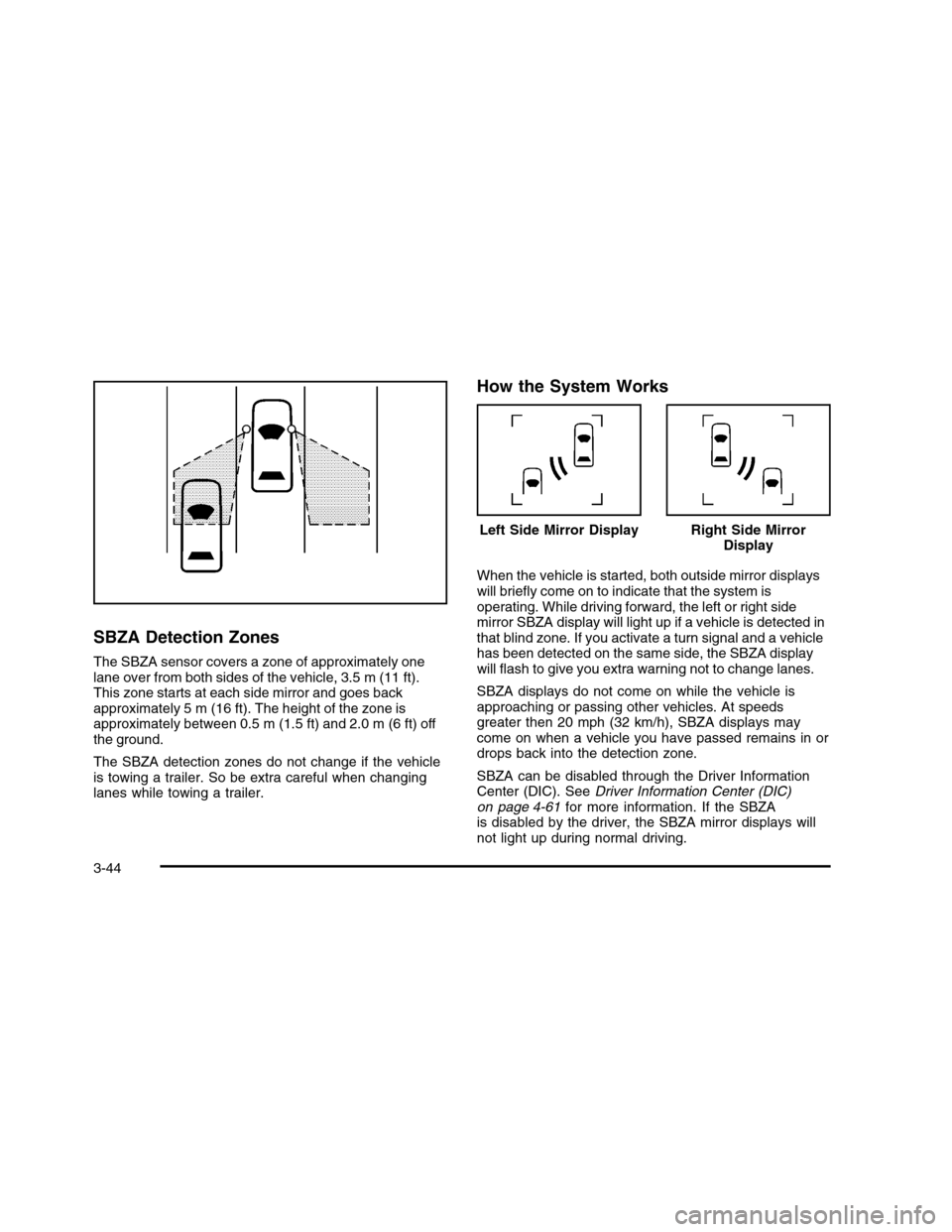
The SBZA sensor covers a zone of approximately onelane over from both sides of the vehicle, 3.5 m (11 ft).This zone starts at each side mirror and goes backapproximately 5 m (16 ft). The height of the zone isapproximately between 0.5 m (1.5 ft) and 2.0 m (6 ft) offthe ground.
The SBZA detection zones do not change if the vehicleis towing a trailer. So be extra careful when changinglanes while towing a trailer.
How the System Works
When the vehicle is started, both outside mirror displayswill briefly come on to indicate that the system isoperating. While driving forward, the left or right sidemirror SBZA display will light up if a vehicle is detected inthat blind zone. If you activate a turn signal and a vehiclehas been detected on the same side, the SBZA displaywill flash to give you extra warning not to change lanes.
SBZA displays do not come on while the vehicle isapproaching or passing other vehicles. At speedsgreater then 20 mph (32 km/h), SBZA displays maycome on when a vehicle you have passed remains in ordrops back into the detection zone.
SBZA can be disabled through the Driver InformationCenter (DIC). SeeDriver Information Center (DIC)on page 4-61for more information. If the SBZAis disabled by the driver, the SBZA mirror displays willnot light up during normal driving.
Left Side Mirror DisplayRight Side MirrorDisplay
3-44
Page 155 of 480

WARNING: (Continued)
LDW will indicate the system is working whenever
it detects either the left or right lane marking. So if
you depart on the side of the lane that LDW is not
detecting, LDW will not warn you.
If you do not carefully maintain your vehicle
position within the lane, vehicle damage, injury, or
death could occur. Even with LDW, always keep
your attention on the road and maintain proper
vehicle position within the lane. Always keep the
windshield clean and do not use LDW in bad
weather conditions.
When the vehicle crosses a detected lane marking, theLDW symbol will flash and you will hear three beeps.LDW will not warn you if the turn signal is on or ifyou make a sharp maneuver. Before making a lanechange, check the vehicle’s mirrors, glance over yourshoulder for vehicles and hazards, and start theturn signal before changing lanes.
How the System Works
LDW uses a camera located between the insiderearview mirror and the windshield to detect the lanemarkings.
@(Lane Departure Warning):To turn LDW on and
off, press the LDW control, located by the exteriorheadlamp control. An indicator on the control will light toindicate that LDW is on.
When the vehicle is started, the LDW symbol, located inthe instrument panel cluster, will briefly come on toindicate that the light is operational.
LDW only operates at speeds of 35 mph (56 km) orgreater. If LDW is turned on when traveling at thesespeeds, the LDW symbol will appear green if the systemdetects a left or right lane marking.
3-47
Page 170 of 480

Power Tilt Wheel and Telescopic
Steering Column
If the vehicle has thisfeature, the power tilt andtelescope wheel controlis located on the outboardside of the steeringcolumn.
Press the control up or down to tilt the steering wheelup or down.
Press the control forward or rearward and the steeringwheel moves toward the front or rear of the vehicle.To set the memory position, seeDIC VehicleCustomization on page 4-80andMemory Seat, Mirrorsand Steering Wheel on page 2-6.
Heated Steering Wheel
The vehicle may have a heated steering wheel.
The button for this featureis located on the steeringwheel.
Press to turn the heated steering wheel on or off. A lighton the button displays while the feature is turned on.
Heating will begin in about three minutes.
4-4