warning CADILLAC DTS 2010 1.G Repair Manual
[x] Cancel search | Manufacturer: CADILLAC, Model Year: 2010, Model line: DTS, Model: CADILLAC DTS 2010 1.GPages: 480, PDF Size: 17.56 MB
Page 147 of 480
Park Tilt Mirrors
If your vehicle is equipped with memory mirrors, it iscapable of performing the park tilt mirror feature. Thisfeature allows the driver and passenger side mirror to tiltto a factory programmed position when the vehicle is inR (Reverse). This feature may be useful in allowing youto view the curb when you are parallel parking.
When the vehicle is shifted out of R (Reverse) andeither a five-second delay has occurred, or the ignitionis turned to LOCK/OFF, the driver and passengerside mirror will return to its original position.
This feature can be enabled/disabled through the DriverInformation Center (DIC). SeeDIC VehicleCustomization on page 4-80for more information.
Outside Convex Mirror
{WARNING:
A convex mirror can make things, like other
vehicles, look farther away than they really are. If
you cut too sharply into the right lane, you could hit
a vehicle on the right. Check the inside mirror or
glance over your shoulder before changing lanes.
The passenger side mirror is convex shaped. A convexmirror’s surface is curved so more can be seen fromthe driver seat.
Outside Heated Mirrors
=(Rear Window Defogger):Press to heat the
mirrors. See “Rear Window Defogger” underDualClimate Control System on page 4-36for moreinformation.
3-39
Page 148 of 480
Object Detection Systems
Ultrasonic Front and Rear Parking
Assist (UFRPA)
For vehicles with the Ultrasonic Front and Rear ParkingAssist (UFRPA) system, it operates at speeds lessthan 8 km/h (5mph), and assists the driver with parkingand avoiding objects. It can determine how closeobjects are to the front bumper, up to 1.2 m (4 ft.) infront of the vehicle and the rear bumper, up to2.5 m (8 ft.) behind the vehicle. The distance sensorsare located on the front and rear bumper.
{WARNING:
The Ultrasonic Front and Rear Park Assist
(UFRPA) system does not replace driver vision.
It cannot detect:
•objects that are below the bumper,
underneath the vehicle, or if they are tooclose or far from the vehicle
•children, pedestrians, bicyclists, or pets.
If you do not use proper care before movingforward and while backing; vehicle damage, injury,or death could occur. Even with UFRPA, alwayscheck in front of the vehicle before moving forwardand behind the vehicle before backing up. Whilemoving forward and backing, be sure to look forobjects and check the vehicle’s mirrors.
3-40
Page 151 of 480
When the System Does Not Seem to
Work Properly
If the URPA system will not activate due to a temporarycondition, the message PARK ASSIST OFF will bedisplayed on the DIC and a red light will be shown onthe rear URPA display when the shift lever is moved intoR (Reverse). This occurs under the following conditions:
•The driver disables the system.
•The ultrasonic sensors are not clean. Keep the
vehicle’s rear bumper free of mud, dirt, snow,ice and slush. For cleaning instructions, seeWashing Your Vehicle on page 6-95.
•A trailer was attached to the vehicle, or a bicycle or
an object was hanging out of the trunk during thelast drive cycle, the red light may illuminate inthe rear display. Once the attached object isremoved, URPA will return to normal operation.
•A tow bar is attached to the vehicle.
•The vehicle’s bumper is damaged. Take the vehicle
to your dealer/retailer to repair the system.
•Other conditions may affect system performance,
such as vibrations from a jackhammer or thecompression of air brakes on a very large truck.
If the system is still disabled after driving forward atleast 25 km/h (15 mph), take the vehicle to yourdealer/retailer.
Side Blind Zone Alert (SBZA)
The vehicle may have a Side Blind Zone Alert (SBZA)system. Read this entire section before using the system.
{WARNING:
SBZA is only a lane changing aid and does not
replace driver vision. SBZA does not detect:
•Vehicles outside the side blind zones which
may be rapidly approaching.
•Pedestrians, bicyclists, or animals.
Failure to use proper care when changing lanesmay result in damage to the vehicle, injury, ordeath. Always check the outside and rearviewmirrors, glance over your shoulder, and use theturn signal before changing lanes.
When the system detects a vehicle in the side blindzone, amber SBZA displays will light up in the sidemirrors. This indicates that it may be unsafe to changelanes. Before making a lane change, always checkthe SBZA display, check the outside and rearviewmirrors, look over your shoulder for vehicles andhazards, and use the turn signal.
3-43
Page 152 of 480
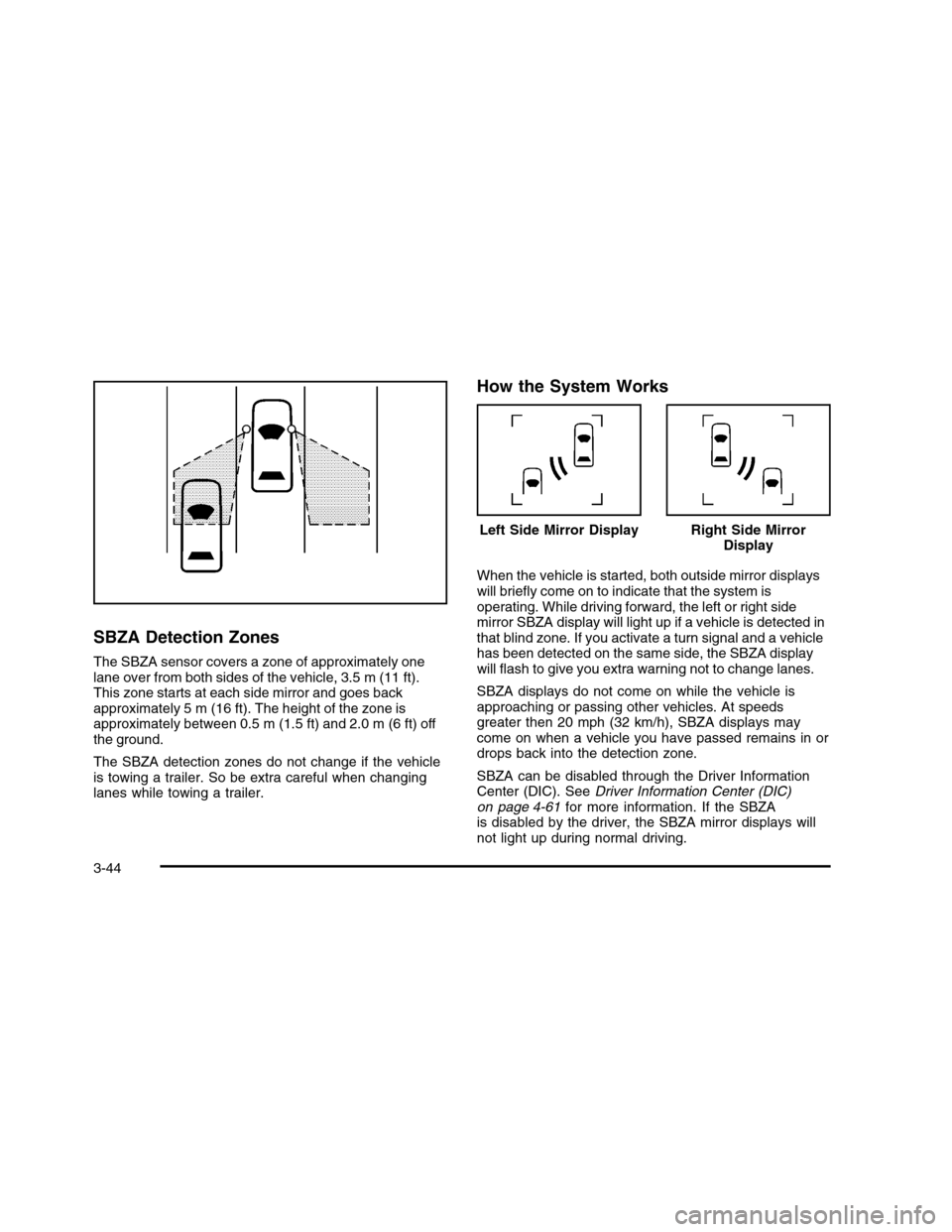
SBZA Detection Zones
The SBZA sensor covers a zone of approximately onelane over from both sides of the vehicle, 3.5 m (11 ft).This zone starts at each side mirror and goes backapproximately 5 m (16 ft). The height of the zone isapproximately between 0.5 m (1.5 ft) and 2.0 m (6 ft) offthe ground.
The SBZA detection zones do not change if the vehicleis towing a trailer. So be extra careful when changinglanes while towing a trailer.
How the System Works
When the vehicle is started, both outside mirror displayswill briefly come on to indicate that the system isoperating. While driving forward, the left or right sidemirror SBZA display will light up if a vehicle is detected inthat blind zone. If you activate a turn signal and a vehiclehas been detected on the same side, the SBZA displaywill flash to give you extra warning not to change lanes.
SBZA displays do not come on while the vehicle isapproaching or passing other vehicles. At speedsgreater then 20 mph (32 km/h), SBZA displays maycome on when a vehicle you have passed remains in ordrops back into the detection zone.
SBZA can be disabled through the Driver InformationCenter (DIC). SeeDriver Information Center (DIC)on page 4-61for more information. If the SBZAis disabled by the driver, the SBZA mirror displays willnot light up during normal driving.
Left Side Mirror DisplayRight Side MirrorDisplay
3-44
Page 154 of 480

FCC Information
SeeRadio Frequency Statement on page 8-20forFCC information.
Frequency of operation: 24.05GHz – 24.25GHz
Field Strength: Not greater than 2.5V/m peak(0.25V/m average) at a distance of 3 m.
The manufacturer is not responsible for any radio orTV interference caused by unauthorized modifications tothis equipment. Such modifications could void theuser’s authority to operate the equipment.
Lane Departure Warning (LDW)
The vehicle may have a Lane Departure Warning (LDW)system. Read this entire section before using thesystem.
{WARNING:
The Lane Departure Warning (LDW) system does
not steer the vehicle and is only an aid to help you
stay in your driving lane. The LDW system may not:
•Provide you with enough time to avoid a lane
change collision.
•Be loud enough for you to hear the warning
beeps.
•Work properly under bad weather conditions or
if the windshield is not kept clean.
•Detect lane markings and will not detect road
edges.
•Warn you that your vehicle is crossing a lane
marking if the system does not detect thelane marking.
WARNING: (Continued)
3-46
Page 155 of 480

WARNING: (Continued)
LDW will indicate the system is working whenever
it detects either the left or right lane marking. So if
you depart on the side of the lane that LDW is not
detecting, LDW will not warn you.
If you do not carefully maintain your vehicle
position within the lane, vehicle damage, injury, or
death could occur. Even with LDW, always keep
your attention on the road and maintain proper
vehicle position within the lane. Always keep the
windshield clean and do not use LDW in bad
weather conditions.
When the vehicle crosses a detected lane marking, theLDW symbol will flash and you will hear three beeps.LDW will not warn you if the turn signal is on or ifyou make a sharp maneuver. Before making a lanechange, check the vehicle’s mirrors, glance over yourshoulder for vehicles and hazards, and start theturn signal before changing lanes.
How the System Works
LDW uses a camera located between the insiderearview mirror and the windshield to detect the lanemarkings.
@(Lane Departure Warning):To turn LDW on and
off, press the LDW control, located by the exteriorheadlamp control. An indicator on the control will light toindicate that LDW is on.
When the vehicle is started, the LDW symbol, located inthe instrument panel cluster, will briefly come on toindicate that the light is operational.
LDW only operates at speeds of 35 mph (56 km) orgreater. If LDW is turned on when traveling at thesespeeds, the LDW symbol will appear green if the systemdetects a left or right lane marking.
3-47
Page 156 of 480

This symbol will change to amber and flash and threebeeps will sound if you cross a detected lane markingwithout using the turn signal.
If the LDW symbol does not appear, LDW is notcurrently operating and will not warn you.
To change the volume of the warning chime, see ChimeVolume underDIC Vehicle Customization on page 4-80for more information.
When the System Does Not Seem To Work
Properly
The LDW symbol will not appear when the system ishaving difficulty seeing the lines on the road or ifthe view of the camera on the windshield is blockedwith mud, dirt, snow, ice, or slush, if the windshield isdamaged, or when weather limits visibility, such as whiledriving in fog, rain, or snow conditions. This is normaloperation, the vehicle does not need service. Forcleaning instructions, seeWashing Your Vehicle onpage 6-95.
LDW warnings may occasionally occur due to tar marks,shadows, cracks in the road, or other roadimperfections. This is normal system operation, thevehicle does not need service.
LDW Error Message
SERVICE LANE DEPARTURE SYSTEM:Thismessage may appear in the DIC to indicate that LDW isnot working properly. If this message remains onafter continued driving, the system needs service.Take your vehicle to your dealer/retailer.
LANE DEPARTURE SYSTEM UNAVAILABLE:Thismessage may appear in the DIC if LDW does notactivate due to a temporary condition.
Universal Home Remote
System
SeeRadio Frequency Statement on page 8-20forinformation regarding Part 15 of the FederalCommunications Commission (FCC) Rules andRSS-210/211 of Industry and Science Canada.
3-48
Page 167 of 480

Instrument Panel Overview. . . . . . . . . . . . . . . . . . . . . . . . . . . . . . .4-3Hazard Warning Flashers . . . . . . . . . . . . . . . . . . . . . . . . . . . . . . . .4-3Horn . . . . . . . . . . . . . . . . . . . . . . . . . . . . . . . . . . . . . . . . . . . . . . . . . . . . . . . . . . . . .4-3Tilt Wheel . . . . . . . . . . . . . . . . . . . . . . . . . . . . . . . . . . . . . . . . . . . . . . . . . . . . .4-3Power Tilt Wheel and Telescopic SteeringColumn . . . . . . . . . . . . . . . . . . . . . . . . . . . . . . . . . . . . . . . . . . . . . . . . . . . . . .4-4Heated Steering Wheel . . . . . . . . . . . . . . . . . . . . . . . . . . . . . . . . . . .4-4Turn Signal/Multifunction Lever . . . . . . . . . . . . . . . . . . . . . . . . .4-5Turn and Lane-Change Signals . . . . . . . . . . . . . . . . . . . . . . . .4-5Headlamp High/Low-Beam Changer . . . . . . . . . . . . . . . . . .4-6Forward Collision Alert (FCA) System . . . . . . . . . . . . . . . .4-6Flash-to-Pass . . . . . . . . . . . . . . . . . . . . . . . . . . . . . . . . . . . . . . . . . . . . . . .4-10Windshield Wipers . . . . . . . . . . . . . . . . . . . . . . . . . . . . . . . . . . . . . . . .4-10Rainsense™II Wipers . . . . . . . . . . . . . . . . . . . . . . . . . . . . . . . . . . . .4-10Windshield Washer . . . . . . . . . . . . . . . . . . . . . . . . . . . . . . . . . . . . . . .4-11Cruise Control . . . . . . . . . . . . . . . . . . . . . . . . . . . . . . . . . . . . . . . . . . . . . .4-12Adaptive Cruise Control . . . . . . . . . . . . . . . . . . . . . . . . . . . . . . . . .4-15Exterior Lamps . . . . . . . . . . . . . . . . . . . . . . . . . . . . . . . . . . . . . . . . . . . . .4-25Wiper Activated Headlamps . . . . . . . . . . . . . . . . . . . . . . . . . . . .4-29Headlamps on Reminder . . . . . . . . . . . . . . . . . . . . . . . . . . . . . . . .4-29Daytime Running Lamps (DRL) . . . . . . . . . . . . . . . . . . . . . . .4-29Fog Lamps . . . . . . . . . . . . . . . . . . . . . . . . . . . . . . . . . . . . . . . . . . . . . . . . . .4-30Cornering Lamps . . . . . . . . . . . . . . . . . . . . . . . . . . . . . . . . . . . . . . . . . .4-30Exterior Lighting Battery Saver . . . . . . . . . . . . . . . . . . . . . . . .4-30Instrument Panel Brightness . . . . . . . . . . . . . . . . . . . . . . . . . . .4-31
Courtesy Lamps . . . . . . . . . . . . . . . . . . . . . . . . . . . . . . . . . . . . . . . . . . .4-31Entry Lighting . . . . . . . . . . . . . . . . . . . . . . . . . . . . . . . . . . . . . . . . . . . . . . .4-31Parade Dimming . . . . . . . . . . . . . . . . . . . . . . . . . . . . . . . . . . . . . . . . . . .4-31Reading Lamps . . . . . . . . . . . . . . . . . . . . . . . . . . . . . . . . . . . . . . . . . . . .4-32Footwell Lamps . . . . . . . . . . . . . . . . . . . . . . . . . . . . . . . . . . . . . . . . . . . .4-32Battery Load Management . . . . . . . . . . . . . . . . . . . . . . . . . . . . .4-32Electric Power Management . . . . . . . . . . . . . . . . . . . . . . . . . . .4-33Inadvertent Power Battery Saver . . . . . . . . . . . . . . . . . . . . .4-33Battery Run-Down Protection . . . . . . . . . . . . . . . . . . . . . . . . . .4-34Accessory Power Outlet(s) . . . . . . . . . . . . . . . . . . . . . . . . . . . . .4-34Ashtray(s) . . . . . . . . . . . . . . . . . . . . . . . . . . . . . . . . . . . . . . . . . . . . . . . . . . . .4-35Analog Clock . . . . . . . . . . . . . . . . . . . . . . . . . . . . . . . . . . . . . . . . . . . . . . .4-35
Climate Controls. . . . . . . . . . . . . . . . . . . . . . . . . . . . . . . . . . . . . . . . . . . .4-36Dual Climate Control System . . . . . . . . . . . . . . . . . . . . . . . . . .4-36Outlet Adjustment . . . . . . . . . . . . . . . . . . . . . . . . . . . . . . . . . . . . . . . . .4-41Rear Climate Control System . . . . . . . . . . . . . . . . . . . . . . . . .4-42Passenger Compartment Air Filter . . . . . . . . . . . . . . . . . . .4-44
Warning Lights, Gages, and Indicators. . . . . . . . . . . .4-46Instrument Panel Cluster . . . . . . . . . . . . . . . . . . . . . . . . . . . . . . . .4-47Speedometer and Odometer . . . . . . . . . . . . . . . . . . . . . . . . . . .4-48Tachometer . . . . . . . . . . . . . . . . . . . . . . . . . . . . . . . . . . . . . . . . . . . . . . . . .4-48Safety Belt Reminders . . . . . . . . . . . . . . . . . . . . . . . . . . . . . . . . . ..4-49Airbag Readiness Light . . . . . . . . . . . . . . . . . . . . . . . . . . . . . . . . . .4-50Passenger Airbag Status Indicator . . . . . . . . . . . . . . . . . . .4-51
Section 4 Instrument Panel
4-1
Page 168 of 480

Charging System Light . . . . . . . . . . . . . . . . . . . . . . . . . . . . . . . . . .4-52Brake System Warning Light . . . . . . . . . . . . . . . . . . . . . . . . . .4-52Antilock Brake System (ABS) Warning Light . . . . .4-53Traction Control System (TCS) Warning Light . . . . . .4-54StabiliTrak®Indicator Light . . . . . . . . . . . . . . . . . . . . . . . . . . . . .4-54Lane Departure Warning (LDW) Light . . . . . . . . . . . . . .4-55Engine Coolant Temperature Warning Light . . . . . .4-55Engine Coolant Temperature Gage . . . . . . . . . . . . . . . . . .4-56Tire Pressure Light . . . . . . . . . . . . . . . . . . . . . . . . . . . . . . . . . . . . . . .4-56Malfunction Indicator Lamp . . . . . . . . . . . . . . . . . . . . . . . . . . . . .4-57Oil Pressure Light . . . . . . . . . . . . . . . . . . . . . . . . . . . . . . . . . . . . . . . . .4-59Security Light . . . . . . . . . . . . . . . . . . . . . . . . . . . . . . . . . . . . . . . . . . . . . . .4-60Fog Lamp Light . . . . . . . . . . . . . . . . . . . . . . . . . . . . . . . . . . . . . . . . . . . .4-60Lights On Reminder . . . . . . . . . . . . . . . . . . . . . . . . . . . . . . . . . . . . . .4-60Cruise Control Light . . . . . . . . . . . . . . . . . . . . . . . . . . . . . . . . . . . . . .4-60Highbeam On Light . . . . . . . . . . . . . . . . . . . . . . . . . . . . . . . . . . . . . . .4-61Fuel Gage . . . . . . . . . . . . . . . . . . . . . . . . . . . . . . . . . . . . . . . . . . . . . . . . . . .4-61
Driver Information Center (DIC). . . . . . . . . . . . . . . . . . . . . . .4-61DIC Operation and Displays . . . . . . . . . . . . . . . . . . . . . . . . . . .4-62DIC Warnings and Messages . . . . . . . . . . . . . . . . . . . . . . . . .4-67DIC Vehicle Customization . . . . . . . . . . . . . . . . . . . . . . . . . . . . .4-80
Audio System(s). . . . . . . . . . . . . . . . . . . . . . . . . . . . . . . . . . . . . . . . . . . . .4-88Setting the Clock . . . . . . . . . . . . . . . . . . . . . . . . . . . . . . . . . . . . . . . . . .4-89Radio(s) (MP3) . . . . . . . . . . . . . . . . . . . . . . . . . . . . . . . . . . . . . . . . . . . . .4-92Using an MP3 . . . . . . . . . . . . . . . . . . . . . . . . . . . . . . . . . . . . . . . . . . . .4-102XM Radio Messages . . . . . . . . . . . . . . . . . . . . . . . . . . . . . . . . . . .4-107Navigation/Radio System . . . . . . . . . . . . . . . . . . . . . . . . . . . . . .4-108Bluetooth®. . . . . . . . . . . . . . . . . . . . . . . . . . . . . . . . . . . . . . . . . . . . . . . . .4-108Theft-Deterrent Feature . . . . . . . . . . . . . . . . . . . . . . . . . . . . . . . .4-119Audio Steering Wheel Controls . . . . . . . . . . . . . . . . . . . . . .4-119Radio Reception . . . . . . . . . . . . . . . . . . . . . . . . . . . . . . . . . . . . . . . . .4-120Backglass Antenna . . . . . . . . . . . . . . . . . . . . . . . . . . . . . . . . . . . . . .4-121XM™ Satellite Radio Antenna System . . . . . . . . . . . .4-121
Section 4 Instrument Panel
4-2
Page 169 of 480

Instrument Panel Overview
Hazard Warning Flashers
|(Hazard Warning Flasher):Press this button
located on the instrument panel, to make the front andrear turn signal lamps flash on and off. This warnsothers that you are having trouble.
Press|again to turn the flashers off.
Horn
Press near or on the horn symbols on the steeringwheel pad to sound the horn.
Tilt Wheel
This feature allows the position of the steering wheel tobe adjusted.
The adjustment lever islocated on the left side ofthe steering column.
1. Pull the lever to move the steering wheel up or down.
2. Release the lever to lock the wheel in place.
Do not adjust the steering wheel while driving.
4-3