cruise control CADILLAC DTS 2011 1.G Owner's Manual
[x] Cancel search | Manufacturer: CADILLAC, Model Year: 2011, Model line: DTS, Model: CADILLAC DTS 2011 1.GPages: 470, PDF Size: 4.72 MB
Page 183 of 470
Black plate (21,1)Cadillac DTS Owner Manual - 2011
{WARNING:
Adaptive Cruise Control may not detect and react
to stationary or slow-moving vehicles or other
objects ahead of you. Your vehicle may accelerate
toward objects, such as a stopped vehicle that
suddenly appears after the lead vehicle changes
lanes. Your complete attention is always required
while driving and you should be ready to take
action and apply the brakes.
Low-Speed Deactivation
If your vehicle speed falls below 32 km/h (20 mph) while
following a vehicle ahead, ACC will begin to disengage.
The Driver Alert symbol will flash and the warning beep
will sound. The driver must take action since ACC will
not slow the vehicle to a stop.
Passing a Vehicle/ACC Override
To increase speed to pass a vehicle, use the
accelerator pedal. While you are doing this, the system
will not automatically apply the brakes. A message will
appear on the DIC. SeeDIC Warnings and Messages
on page 4‑65. Once you remove your foot from the
accelerator pedal, ACC will return to normal operation
and be able to apply the brakes, if needed.
{WARNING:
If you rest your foot on the accelerator pedal, the
system will not automatically apply the brakes.
You could crash into a vehicle ahead of you. Do
not rest your foot on the accelerator pedal when
using Adaptive Cruise Control.
4-21
Page 184 of 470
Black plate (22,1)Cadillac DTS Owner Manual - 2011
Curves in the Road
{WARNING:
Due to Adaptive Cruise Control limitations in
curves, it may respond to a vehicle in another
lane, or may not have time to react to a vehicle in
your lane. You could crash into a vehicle ahead of
you, or lose control of your vehicle. Give extra
attention in curves and be ready to use the brakes
if necessary. Select an appropriate speed while
driving in curves.
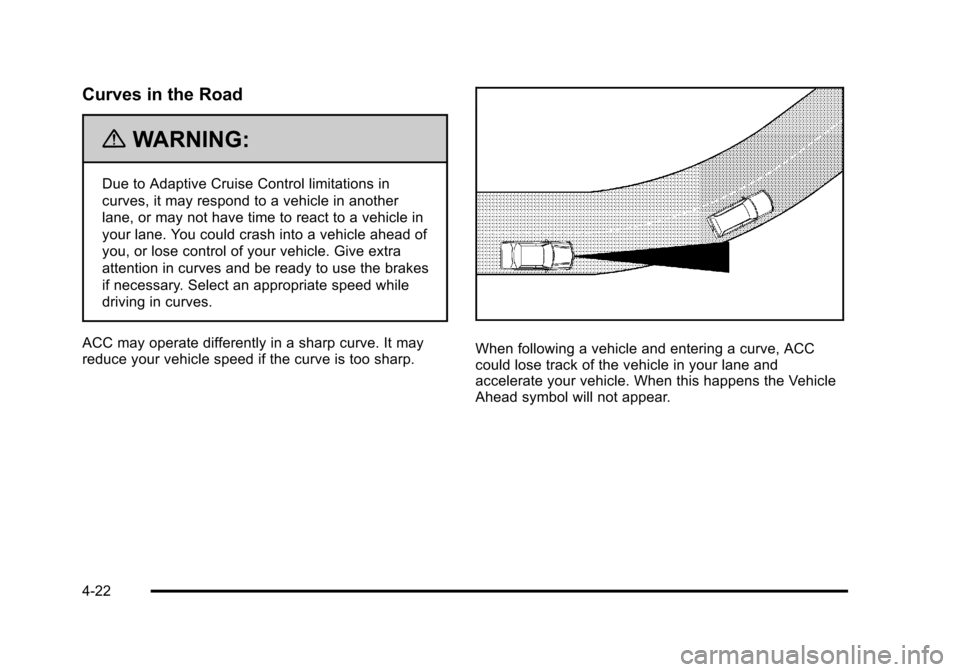
ACC may operate differently in a sharp curve. It may
reduce your vehicle speed if the curve is too sharp.
When following a vehicle and entering a curve, ACC
could lose track of the vehicle in your lane and
accelerate your vehicle. When this happens the Vehicle
Ahead symbol will not appear.
4-22
Page 185 of 470
Black plate (23,1)Cadillac DTS Owner Manual - 2011
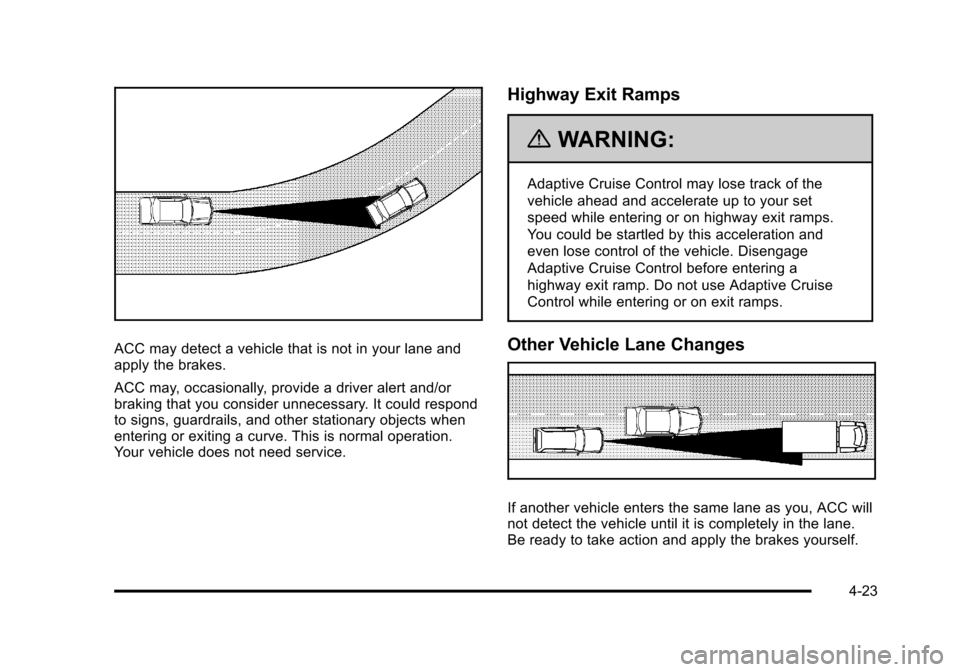
ACC may detect a vehicle that is not in your lane and
apply the brakes.
ACC may, occasionally, provide a driver alert and/or
braking that you consider unnecessary. It could respond
to signs, guardrails, and other stationary objects when
entering or exiting a curve. This is normal operation.
Your vehicle does not need service.
Highway Exit Ramps
{WARNING:
Adaptive Cruise Control may lose track of the
vehicle ahead and accelerate up to your set
speed while entering or on highway exit ramps.
You could be startled by this acceleration and
even lose control of the vehicle. Disengage
Adaptive Cruise Control before entering a
highway exit ramp. Do not use Adaptive Cruise
Control while entering or on exit ramps.
Other Vehicle Lane Changes
If another vehicle enters the same lane as you, ACC will
not detect the vehicle until it is completely in the lane.
Be ready to take action and apply the brakes yourself.
4-23
Page 220 of 470

Black plate (58,1)Cadillac DTS Owner Manual - 2011
Front Fog Lamp Light
The fog lamp light comes
on when the fog lamps
are in use.
The light goes out when the fog lamps are turned off.
See Fog Lamps
on page 4‑29for more information.
Lights On Reminder
This light comes on
whenever the parking
lamps are on.
See Exterior Lamps
on page 4‑25for more information.
Cruise Control Light
This light comes on
whenever the cruise
control is set.
The light goes out when the cruise control is turned off.
See Cruise Control
on page 4‑12andAdaptive Cruise
Controlon page 4‑14for more information.
Highbeam On Light
This light comes on when
the high-beam headlamps
are in use.
See Headlamp High/Low-Beam Changer
on page 4‑6for more information.
4-58
Page 228 of 470
Black plate (66,1)Cadillac DTS Owner Manual - 2011
CHANGE ENGINE OIL SOON
This message displays when service is required for
your vehicle. See your dealer. SeeEngine Oilon
page 6‑15and Scheduled Maintenanceon page 7‑3for more information.
When you reset the CHANGE ENGINE OIL SOON
message by clearing it from the display, you still must
reset the engine oil life system separately. For more
information on resetting the engine oil life system, see
Engine Oil Life System on page 6‑18.
CHECK TIRE PRESSURE or ADD AIR
TO TIRE
On vehicles with the Tire Pressure Monitor System
(TPMS), this message displays when the pressure in
one or more of the vehicle's tires is low. This message
also displays LEFT FRONT, RIGHT FRONT, LEFT
REAR, or RIGHT REAR to indicate which tire needs to
be checked. The low tire pressure warning light will also
come on. See Tire Pressure Light
on page 4‑54. If a
tire pressure message appears on the DIC, stop as
soon as you can. Have the tire pressures checked and
set to those shown on the Tire Loading Information
label. See Tires
on page 6‑48,Loading the Vehicleon
page 5‑18, and Inflation - Tire Pressureon page 6‑57.You can receive more than one tire pressure message
at a time. To read the other messages that may have
been sent at the same time, press the set/reset button.
The DIC also shows the tire pressure values. See
DIC
Operation and Displays
on page 4‑60.
CLEAN RADAR
This message displays when the Adaptive Cruise
Control (ACC) system and the Forward Collision Alert
(FCA) system are disabled because the radar is
blocked and cannot detect vehicles in your path. It may
also activate during heavy rain or due to road spray. To
clean the system, see “Cleaning the System” under
Adaptive Cruise Control on page 4‑14.
CRUISE SET TO XXX MPH (km/h)
This message displays whenever the cruise control is
set. See Cruise Controlon page 4‑12andAdaptive
Cruise Controlon page 4‑14for more information.
If your vehicle has Adaptive Cruise Control (ACC), after
a few seconds, this message clears and the message
“SET SPD XX” displays at the bottom of the DIC. See
“SET SPD (Speed)” later in this section.
4-66
Page 230 of 470

Black plate (68,1)Cadillac DTS Owner Manual - 2011
ENGINE OVERHEATED STOP ENGINE
Notice:If you drive your vehicle while the engine is
overheating, severe engine damage may occur. If an
overheat warning appears on the instrument panel
cluster and/or DIC, stop the vehicle as soon as
possible. See Engine Overheating
on page 6‑29for
more information.
This message displays when the engine has
overheated. Immediately look for a safe place to pull
your vehicle over and turn the engine off right away to
avoid severe engine damage. See Engine Overheating
on page 6‑29andOverheated Engine Protection
Operating Modeon page 6‑31. A chime also sounds
when this message is displayed.
ENGINE POWER REDUCED
This message displays when the engine power is being
reduced to protect the engine from damage. There
could be several malfunctions that might cause this
message. Reduced engine power can affect the
vehicle's ability to accelerate. If this message is on, but
there is no reduction in performance, proceed to your
destination. The performance may be reduced the next time the vehicle is driven. The vehicle may be driven
at a reduced speed while this message is on, but
acceleration and speed may be reduced. Anytime this
message stays on, the vehicle should be taken to your
dealer for service as soon as possible.
FOLLOWING GAP
This symbol appears with this message.
If your vehicle has Adaptive Cruise Control (ACC), this
message displays to show the follow distance that has
been set. There are six follow distances to choose from.
Each follow distance is shown on the DIC by displaying
from one to six bars between two car symbols. See
Adaptive Cruise Control
on page 4‑14for more
information.
4-68
Page 232 of 470
Black plate (70,1)Cadillac DTS Owner Manual - 2011
NO CRUISE BRAKING GAS PEDAL
APPLIED
This message displays when the Adaptive Cruise
Control (ACC) is engaged and you are pressing the
accelerator pedal enough to disable ACC automatic
braking. SeeAdaptive Cruise Control
on page 4‑14for
more information.
OIL PRESSURE LOW STOP ENGINE
Notice: If you drive your vehicle while the engine
oil pressure is low, severe engine damage may
occur. If a low oil pressure warning appears on
the instrument panel cluster and/or DIC, stop the
vehicle as soon as possible. Do not drive the
vehicle until the cause of the low oil pressure is
corrected. See Engine Oil
on page 6‑15for more
information.
This message displays when the vehicle's engine oil
pressure is low. The oil pressure light also appears on
the instrument panel cluster. See Oil Pressure Light
on
page 4‑57. A multiple chime sounds when this message is
displayed. See
Engine Oil
on page 6‑15for more
information.
Stop the vehicle immediately, as engine damage can
result from driving a vehicle with low oil pressure. Have
the vehicle serviced by your dealer as soon as possible
when this message is displayed.
PARKING ASSIST OFF
If your vehicle has the Ultrasonic Front and Rear
Parking Assist (UFRPA) system, after the vehicle is
shifted out of P (Park), this message displays to remind
the driver that the UFRPA system has been turned off.
Press the set/reset button to acknowledge this message
and clear it from the DIC display. To turn the UFRPA
system back on, see “PARKING ASSIST”underDIC
Operation and Displays
on page 4‑60. See Ultrasonic
Front and Rear Parking Assist (UFRPA)on page 3‑38for more information.
4-70
Page 233 of 470

Black plate (71,1)Cadillac DTS Owner Manual - 2011
PASSENGER DOOR OPEN
This symbol appears with
this message.
This message displays when the passenger side front
door is not closed completely. Make sure that the door
is closed completely.
RADAR CRUISE NOT READY
This message displays when the Adaptive Cruise
Control (ACC) system will not activate due to a
temporary condition. Your vehicle does not require
service. If this message appears when you attempt to
activate the system, continue driving for several minutes
and then try activating the system again. See Adaptive
Cruise Control
on page 4‑14for more information.
REMOTE KEY LEARNING ACTIVE
This message displays while you are matching a
Remote Keyless Entry (RKE) transmitter to your
vehicle. See “Matching Transmitter(s) to Your Vehicle”
under Remote Keyless Entry (RKE) System Operation
on page 3‑4andDIC Operation and Displayson
page 4‑60for more information.
REPLACE BATTERY IN REMOTE KEY
This message displays when the battery in the Remote
Keyless Entry (RKE) transmitter needs to be replaced.
To replace the battery, see “Battery Replacement”under
Remote Keyless Entry (RKE) System Operation
on
page 3‑4.
RIGHT REAR DOOR OPEN
This symbol appears with
this message.
This message displays when the passenger side rear
door is not closed completely. Make sure that the door
is closed completely.
4-71
Page 235 of 470
Black plate (73,1)Cadillac DTS Owner Manual - 2011
SERVICE PARKING ASSIST
If your vehicle has the Ultrasonic Front and Rear
Parking Assist (UFRPA) system, this message displays
if there is a problem with the UFRPA system. Do not
use this system to help you park. SeeUltrasonic Front
and Rear Parking Assist (UFRPA)
on page 3‑38for
more information. See your dealer for service.
SERVICE POWER STEERING
Your vehicle may have a speed variable assist steering
system. See Steering on page 5‑8.
This message displays if a problem is detected with
the speed variable assist steering system. When this
message is displayed, you may notice that the effort
required to steer the vehicle decreases or feels lighter,
but you will still be able to steer the vehicle.
SERVICE RADAR CRUISE
This message displays when the Adaptive Cruise
Control (ACC) system and the Forward Collision Alert
(FCA) system are disabled and need service. See your
dealer.
SERVICE SIDE BLIND ZONE ALERT
SYSTEM
If your vehicle has the Side Blind Zone Alert (SBZA)
system and this message displays, both SBZA displays
will remain on indicating there is a problem with the
SBZA system. If these displays remain on after
continued driving, the system needs service. See your
dealer. See Side Blind Zone Alert (SBZA)
on page 3‑42for more information.
SERVICE STABILITRAK
Your vehicle may have a vehicle stability enhancement
system called StabiliTrak®. SeeStabiliTrak®Systemon
page 5‑6.
This message displays if there has been a problem
detected with the StabiliTrak system.
If this message comes on while you are driving, pull off
the road as soon as possible and stop carefully. Try
resetting the system by turning the ignition off then back
on. If this message still stays on or comes back on
again while you are driving, your vehicle needs service.
Have the StabiliTrak system inspected by your dealer
as soon as possible.
4-73
Page 236 of 470

Black plate (74,1)Cadillac DTS Owner Manual - 2011
SERVICE SUSPENSION SYS (System)
This message displays when the magnetic ride control
or automatic leveling control system is not operating
properly. Have your vehicle serviced by your dealer.
SERVICE THEFT DETERRENT SYSTEM
This message displays when there is a problem with the
theft-deterrent system programmed in the key. A fault
has been detected in the system which means that the
system is disabled and it is not protecting the vehicle.
The vehicle usually restarts; however, you may want to
take the vehicle to your dealer before turning off the
engine. SeePASS-Key
®III+ Electronic Immobilizer
Operationon page 3‑20for more information.
SERVICE TIRE MONITOR SYSTEM
On vehicles with the Tire Pressure Monitor System
(TPMS), this message displays if a part on the TPMS
is not working properly. The tire pressure light also
flashes and then remains on during the same ignition
cycle. See Tire Pressure Light
on page 4‑54. Several
conditions may cause this message to appear. See Tire
Pressure Monitor Operation
on page 6‑61for more
information. If the warning comes on and stays on,
there may be a problem with the TPMS, see your
dealer.
SERVICE TRACTION CONTROL
This message displays when there is a problem with the
Traction Control System (TCS). When this message is
displayed, the system will not limit wheel spin. Adjust
your driving accordingly. See your dealer for service.
See Traction Control System (TCS)
on page 5‑6for
more information.
SERVICE TRANSMISSION
This message displays when there is a problem with the
vehicle's transmission. Have your vehicle serviced by
your dealer.
SERVICE VEHICLE SOON
This message displays when a non-emissions related
malfunction occurs. Have your vehicle serviced by your
dealer as soon as possible.
SET SPD (Speed)
If your vehicle has Adaptive Cruise Control (ACC), this
message displays whenever the cruise control is set.
First, the “CRUISE SET TO XXX MPH (km/h)” message
appears. After a few seconds, the “CRUISE SET TO
XXX MPH (km/h)” message clears and the message
“SET SPD XX” displays at the bottom of the DIC. See
“CRUISE SET TO XXX MPH (km/h)” earlier in this
section and Adaptive Cruise Control
on page 4‑14for
more information.
4-74