ECU CADILLAC DTS 2011 1.G Service Manual
[x] Cancel search | Manufacturer: CADILLAC, Model Year: 2011, Model line: DTS, Model: CADILLAC DTS 2011 1.GPages: 470, PDF Size: 4.72 MB
Page 301 of 470
Black plate (23,1)Cadillac DTS Owner Manual - 2011
{WARNING:
Do not load the vehicle any heavier than
the Gross Vehicle Weight Rating (GVWR),
or either the maximum front or rear Gross
Axle Weight Rating (GAWR). If you do,
parts on the vehicle can break, and it
can change the way the vehicle handles.
These could cause you to lose control and
crash. Also, overloading can shorten the life
of the vehicle.
Notice:Overloading the vehicle may cause
damage. Repairs would not be covered by the
vehicle warranty. Do not overload the vehicle.
If you put things inside your vehicle, like
suitcases, tools, packages, or anything else, they
will go as fast as the vehicle goes. If you have to
stop or turn quickly, or if there is a crash, they will
keep going.
{WARNING:
Things you put inside your vehicle can strike
and injure people in a sudden stop or turn,
or in a crash.
.Put things in the trunk of your vehicle. In
a trunk, put them as far forward as you
can. Try to spread the weight evenly.
.Never stack heavier things, like
suitcases, inside the vehicle so that some
of them are above the tops of the seats.
.Do not leave an unsecured child restraint
in your vehicle.
.When you carry something inside the
vehicle, secure it whenever you can.
5-23
Page 304 of 470

Black plate (26,1)Cadillac DTS Owner Manual - 2011
Dolly Towing
The vehicle can be towed using a dolly. To tow the
vehicle using a dolly, follow these steps:1. Put the front wheels on a dolly.
2. Put the gear shift lever in P (Park).
3. Set the parking brake.
4. Clamp the steering wheel in a straight-ahead position with a clamping device designed for
towing. 5. Remove the key from the ignition.
6. Secure the vehicle to the dolly.
7. Release the parking brake.
Towing a Trailer
The Cadillac Professional Vehicle cannot tow a trailer.
{WARNING:
The driver can lose control when pulling a trailer if
the correct equipment is not used or the vehicle is
not driven properly. For example, if the trailer is
too heavy, the brakes may not work well
—or
even at all. The driver and passengers could be
seriously injured. The vehicle may also be
damaged; the resulting repairs would not be
covered by the vehicle warranty. Pull a trailer only
if all the steps in this section have been followed.
Ask your dealer for advice and information about
towing a trailer with the vehicle.
5-26
Page 308 of 470

Black plate (30,1)Cadillac DTS Owner Manual - 2011
Follow the manufacturer's recommendation for attaching
safety chains and do not attach them to the bumper.
Always leave just enough slack so the rig can turn.
Never allow safety chains to drag on the ground.
Trailer Brakes
Because the vehicle has StabiliTrak®, do not tap into
the vehicle's hydraulic brake system. If you do, both
brake systems will not work well, or at all.
Be sure to read and follow the instructions for the trailer
brakes so they are installed, adjusted and maintained
properly.
Driving with a Trailer
Towing a trailer requires a certain amount of
experience. Get to know the rig before setting out for
the open road. Get acquainted with the feel of handling
and braking with the added weight of the trailer. And
always keep in mind that the vehicle you are driving is
now longer and not as responsive as the vehicle is by
itself.
Before starting, check all trailer hitch parts and
attachments, safety chains, electrical connectors,
lamps, tires and mirror adjustments. If the trailer has
electric brakes, start the vehicle and trailer moving and
then apply the trailer brake controller by hand to be
sure the brakes are working. This checks the electrical
connection at the same time. During the trip, check occasionally to be sure that the
load is secure, and that the lamps and any trailer
brakes are still working.
Following Distance
Stay at least twice as far behind the vehicle ahead as
you would when driving the vehicle without a trailer.
This can help to avoid situations that require heavy
braking and sudden turns.
Passing
More passing distance is needed when towing a trailer.
Because the rig is longer, it is necessary to go much
farther beyond the passed vehicle before returning to
the lane.
Backing Up
Hold the bottom of the steering wheel with one hand.
Then, to move the trailer to the left, move that hand to
the left. To move the trailer to the right, move your hand
to the right. Always back up slowly and, if possible,
have someone guide you.
Making Turns
Notice:
Making very sharp turns while trailering
could cause the trailer to come in contact with the
vehicle. The vehicle could be damaged. Avoid
making very sharp turns while trailering.
5-30
Page 310 of 470
Black plate (32,1)Cadillac DTS Owner Manual - 2011
3. When the wheel chocks are in place, release thebrake pedal until the chocks absorb the load.
4. Reapply the brake pedal. Then apply the parking brake and shift the transmission into P (Park).
5. Release the brake pedal.
Leaving After Parking on a Hill
1. Apply and hold the brake pedal while you:
.start the engine,
.shift into a gear, and
.release the parking brake.
2. Let up on the brake pedal.
3. Drive slowly until the trailer is clear of the chocks.
4. Stop and have someone pick up and store the chocks.
Maintenance When Trailer Towing
The vehicle needs service more often when pulling a
trailer. See Scheduled Maintenanceon page 7‑3for
more information. Things that are especially important
in trailer operation are automatic transmission fluid,
engine oil, belts, cooling system and brake system. It is
a good idea to inspect these before and during the trip.
Check periodically to see that all hitch nuts and bolts
are tight.
Engine Cooling When Trailer Towing
The cooling system may temporarily overheat during
severe operating conditions. See Engine Overheating
on page 6‑29.
Changing a Tire When Trailer Towing
If the vehicle gets a flat tire while towing a trailer, be
sure to secure the trailer and disconnect it from the
vehicle before changing the tire.
5-32
Page 339 of 470

Black plate (29,1)Cadillac DTS Owner Manual - 2011
4.6L L37 Engine shown, 4.6L LD8 Engine similar
4. With the coolant surge tank cap off, start the engine and let it run until you can feel the upper
radiator hose getting hot. Watch out for the engine
cooling fans.
By this time, the coolant level inside the coolant
surge tank may be lower. If the level is lower, add
more of the proper mixture to the coolant surge
tank until the level reaches the FULL COLD mark
on the side of the coolant surge tank.
5. Replace the cap. Be sure the cap is hand‐tight and fully seated. Notice:
If the pressure cap is not tightly installed,
coolant loss and possible engine damage may
occur. Be sure the cap is properly and tightly
secured.
If coolant is needed, add the proper DEX-COOL
®
coolant mixture at the coolant recovery tank.
Engine Overheating
The vehicle has several indicators to warn of engine
overheating.
There is an engine temperature warning light and/or
gauge on the instrument panel cluster. See Engine
Coolant Temperature Warning Light
on page 4‑53and
Engine Coolant Temperature Gauge on page 4‑53.
The vehicle may also display a ENGINE OVERHEATED
IDLE ENGINE message or an ENGINE OVERHEATED
STOP ENGINE message displayed in the Driver
Information Center (DIC). See DIC Warnings and
Messages
on page 4‑65for more information. You will
also hear a chime.
The decision may be made not to lift the hood when
this warning appears, but instead get service help right
away. See Roadside Service on page 8‑7.
If the decision is made to lift the hood , make sure the
vehicle is parked on a level surface.
6-29
Page 347 of 470

Black plate (37,1)Cadillac DTS Owner Manual - 2011
WARNING: (Continued)
provide the protection needed in a crash. If a
replacement battery is ever needed, it must be
vented in the same manner as the original battery.
Always make sure that the vent hose is properly
reattached before reinstalling the seat cushion.
To be sure the vent hose (A) is properly attached, the
vent hose connectors (B) must be securely reattached
to the vent outlets (C) on each side of the battery and
the vent assembly grommet (D) must be secured to the
floor pan (E).
Vehicle Storage
{WARNING:
Batteries have acid that can burn you and gas
that can explode. You can be badly hurt if you are
not careful. SeeJump Starting
on page 6‑38
for tips on working around a battery without
getting hurt.
Infrequent Usage: Remove the black, negative (−) cable
from the battery to keep the battery from running down.
Extended Storage: Remove the black, negative (−)
cable from the battery or use a battery trickle charger.
6-37
Page 402 of 470

Black plate (92,1)Cadillac DTS Owner Manual - 2011
A. Cover
B. Wing Nut
C. Retainer
D. Jack and Wheel Wrench E. Jack Container F. Spare Tire
G. Bolt 1. Open the trunk. See Trunk on page 3‑12.
2. Reinstall the spare tire (F), face down, making sure to line up the wheel center hole with the bolt (G)
and place it on the compartment floor.
3. Insert the jack container (E) into the spare tire (F). Then insert the jack and wheel wrench (D) into
the center of the spare tire making sure to line
up the wheel nut hole with the bolt (G) on the
compartment floor.
4. Secure the spare tire and the jack container with the retainer (C) and then the wing nut (B).
5. Reinstall the spare tire cover (A).
6-92
Page 418 of 470
Black plate (108,1)Cadillac DTS Owner Manual - 2011
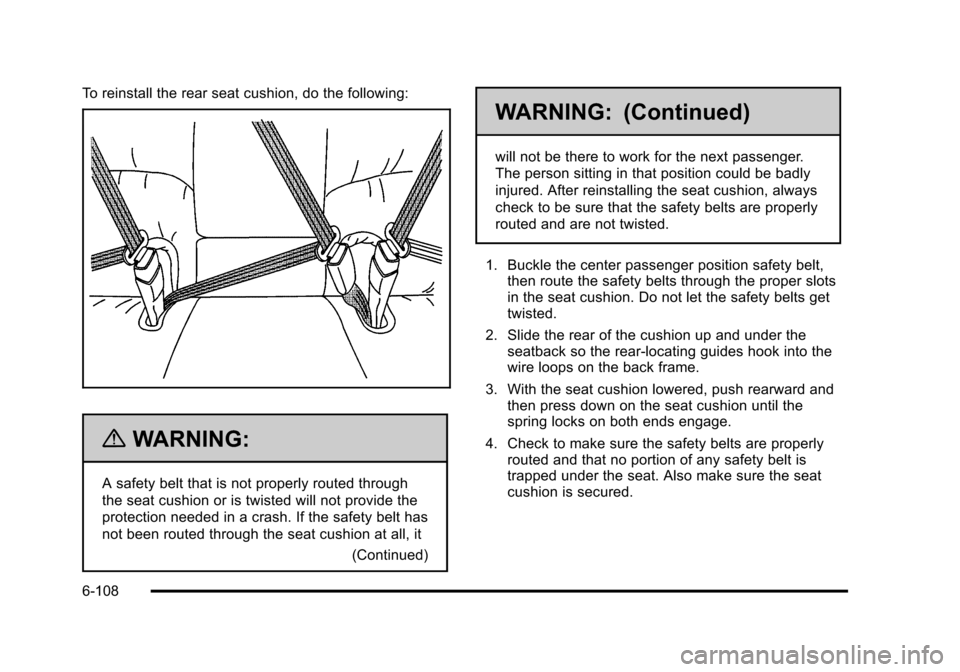
To reinstall the rear seat cushion, do the following:
{WARNING:
A safety belt that is not properly routed through
the seat cushion or is twisted will not provide the
protection needed in a crash. If the safety belt has
not been routed through the seat cushion at all, it(Continued)
WARNING: (Continued)
will not be there to work for the next passenger.
The person sitting in that position could be badly
injured. After reinstalling the seat cushion, always
check to be sure that the safety belts are properly
routed and are not twisted.
1. Buckle the center passenger position safety belt, then route the safety belts through the proper slots
in the seat cushion. Do not let the safety belts get
twisted.
2. Slide the rear of the cushion up and under the seatback so the rear-locating guides hook into the
wire loops on the back frame.
3. With the seat cushion lowered, push rearward and then press down on the seat cushion until the
spring locks on both ends engage.
4. Check to make sure the safety belts are properly routed and that no portion of any safety belt is
trapped under the seat. Also make sure the seat
cushion is secured.
6-108
Page 444 of 470

Black plate (8,1)Cadillac DTS Owner Manual - 2011
Coverage
Services are provided up to 5 years/160 000 km
(100,000 miles), whichever comes first.
In the U.S., anyone driving the vehicle is covered. In
Canada, a person driving the vehicle without permission
from the owner is not covered.
Roadside Service is not a part of the New Vehicle
Limited Warranty. Cadillac and General Motors of
Canada Limited reserve the right to make any changes
or discontinue the Roadside Service program at any
time without notification.
Cadillac and General Motors of Canada Limited reserve
the right to limit services or payment to an owner or
driver if they decide the claims are made too often,
or the same type of claim is made many times.
Cadillac Owner Privileges™
.Emergency Fuel Delivery:Delivery of enough
fuel for the vehicle to get to the nearest service
station.
.Lock‐Out Service: Service to unlock the vehicle
if you are locked out. A remote unlock may be
available if you have OnStar
®. For security
reasons, the driver must present identification
before this service is given.
.Emergency Tow From a Public Road or
Highway: Tow to the nearest Cadillac dealer for
warranty service, or if the vehicle was in a crash
and cannot be driven. Assistance is also given
when the vehicle is stuck in the sand, mud,
or snow.
.Flat Tire Change: Service to change a flat tire
with spare tire. The spare tire, if equipped, must be
in good condition and properly inflated. It is your
responsibility for the repair or replacement of the
tire if it is not covered by the warranty.
.Battery Jump Start: Service to jump start a dead
battery.
.Trip Routing Service: Detailed maps of North
America are provided when requested either with
the most direct route or the most scenic route.
Additional travel information is also available. Allow
three weeks for delivery.
.Trip Interruption Benefits and Service: If your
trip is interrupted due to a warranty failure,
incidental expenses may be reimbursed during the
5 years/160 000 km (100,000 miles) Powertrain
warranty period. Items considered are hotel,
meals, and rental car.
8-8
Page 454 of 470

Black plate (18,1)Cadillac DTS Owner Manual - 2011
GM will not access this data or share it with others
except: with the consent of the vehicle owner or, if the
vehicle is leased, with the consent of the lessee; in
response to an official request of police or similar
government office; as part of GM's defense of litigation
through the discovery process; or, as required by law.
Data that GM collects or receives may also be used for
GM research needs or may be made available to others
for research purposes, where a need is shown and the
data is not tied to a specific vehicle or vehicle owner.
OnStar®
If your vehicle is equipped with an active OnStar
system, that system may also record data in crash or
near crash‐like situations. The OnStar Terms and
Conditions provides information on data collection and
use and is available in the OnStar glove box kit, at
www.onstar.com (U.S.) or www.onstar.ca (Canada),
or by pressing the
Qbutton and speaking to an
advisor.
Navigation System
If the vehicle has a navigation system, use of the
system may result in the storage of destinations,
addresses, telephone numbers, and other trip
information. Refer to the navigation system operating
manual for information on stored data and for deletion
instructions.
Radio Frequency
Identification (RFID)
RFID technology is used in some vehicles for functions
such as tire pressure monitoring and ignition system
security, as well as in connection with conveniences
such as key fobs for remote door locking/unlocking and
starting, and in-vehicle transmitters for garage door
openers. RFID technology in GM vehicles does not use
or record personal information or link with any other GM
system containing personal information.
Radio Frequency Statement
This vehicle has systems that operate on a radio
frequency that comply with Part 15 of the Federal
Communications Commission (FCC) rules and with
Industry Canada Standards RSS‐210/220/310.
Operation is subject to the following two conditions:
1. The device may not cause interference.
2. The device must accept any interference received, including interference that may cause undesired
operation of the device.
Changes or modifications to any of these systems by
other than an authorized service facility could void
authorization to use this equipment.
8-18