light CADILLAC DTS 2011 1.G Workshop Manual
[x] Cancel search | Manufacturer: CADILLAC, Model Year: 2011, Model line: DTS, Model: CADILLAC DTS 2011 1.GPages: 470, PDF Size: 4.72 MB
Page 189 of 470

Black plate (27,1)Cadillac DTS Owner Manual - 2011
.The exterior lamp control is turned to any setting
except AUTO.
When this occurs, IntelliBeam is disabled until the
control is turned back to the AUTO position.
.The IntelliBeam system is turned off at the inside
rearview mirror.
IntelliBeam might not turn off the high-beams if the
system cannot detect other vehicle's lamps because of
any of the following:
.The other vehicle's lamp(s) are missing, damaged,
obstructed from view, or otherwise undetected.
.The other vehicle's lamp(s) are covered with dirt,
snow, and/or road spray.
.The other vehicle's lamp(s) cannot be detected
due to dense exhaust, smoke, fog, snow, road
spray, mist, or other airborne obstructions.
.Your vehicle's windshield is dirty, cracked,
or obstructed by something that blocks the view of
the IntelliBeam light sensor.
.Your vehicle's windshield is covered with ice, dirt,
haze, or other obstructions.
.Your vehicle is loaded such that the front end of
the vehicle points upward, causing the IntelliBeam
sensor to aim high and not detect headlamps and
taillamps.
.You are driving on winding or hilly roads. You might need to manually disable or cancel the
high-beam headlamps by turning the low-beam
headlamps on, if any of the above conditions exist.
Disabling and Resetting IntelliBeam at the
Rearview Mirror
IntelliBeam can be disabled by using the controls on the
inside rearview mirror.
AUTO
3(On/Off):
Press this button on the inside
rearview mirror to disable the system. The IntelliBeam
indicator turns off and does not come back on until the
IntelliBeam button is pressed again.
When IntelliBeam has turned on the high-beams, pull or
push the high-beam stalk. This will disable IntelliBeam.
The IntelliBeam indicator on the mirror turns off. To turn
IntelliBeam back on, press the IntelliBeam button on the
mirror.
A different sensitivity setting is available for dealer
diagnostics. This is done by pushing and holding this
button for 20 seconds until the IntelliBeam indicator light
flashes three times. If you accidentally activate this, the
vehicle' s setting automatically is reset when the ignition
is turned off and then on again.
4-27
Page 190 of 470

Black plate (28,1)Cadillac DTS Owner Manual - 2011
Cleaning the IntelliBeam Light Sensor
The light sensor is located
on the inside of the
vehicle in front of the
inside rearview mirror.
Clean the light sensor window, periodically, using glass
cleaner on a soft cloth. Gently wipe the sensor window.
Do not spray glass cleaner directly on the surface of the
sensor window.
Wiper Activated Headlamps
This feature activates the headlamps and parking lamps
after the windshield wipers are turned on and have
completed eight wipe cycles within four minutes.
When the ignition is turned to LOCK/OFF, the
wiper-activated headlamps immediately turn off. The
wiper-activated headlamps also turn off if the windshield
wipers are turned off.
Headlamps on Reminder
A warning chime will sound if the exterior lamp control
is left on in either the headlamp or parking lamp position
and the driver's door is opened with the ignition off.
Daytime Running Lamps (DRL)
Daytime Running Lamps (DRL) can make it easier for
others to see the front of your vehicle during the day.
Fully functional daytime running lamps are required on
all vehicles first sold in Canada.
The DRL system makes the turn signal lamps come on
when the following conditions are met:
.It is still daylight and the ignition is on.
.The exterior lamp control is in the off position.
.The transmission is not in P (Park) (United
States only).
.The light sensor is covered or not detecting light.
See “Sensors” underDual Climate Control System
on page 4‑34.
When DRL are on, no other exterior lamps such as the
parking lamps, taillamps, etc. will be on when the DRL
are being used. The instrument panel will not be lit up
either.
When automatic lighting is on and it is dark enough
outside, the turn signal lamps turn off and normal
low-beam headlamp operation occurs.
4-28
Page 191 of 470

Black plate (29,1)Cadillac DTS Owner Manual - 2011
When automatic lighting is on and it is bright enough
outside, the regular lamps go off, and the DRL takes
over. If the vehicle is started in a dark garage, the
automatic headlamp system comes on immediately.
Once you leave the garage, it will take approximately
one minute for the automatic headlamp system to
change to DRL if there is light outside. During that
delay, the instrument panel cluster may not be as bright
as usual. Make sure the instrument panel brightness
knob is in the full bright position. SeeInstrument Panel
Brightness on page 4‑30.
Turning on automatic lighting or the headlamps will
deactivate the DRL. If the parking lamps or the fog
lamps were turned on instead, the DRL will still
deactivate.
To idle the vehicle with the DRL off at night, turn off
automatic lighting and shift the transmission into
P (Park). Placing the vehicle in P (Park) disables the
DRL. The DRL will stay off until the vehicle is shifted
out of P (Park).
To drive the vehicle with the DRL off, turn off automatic
lighting and manually turn on the parking lamps or fog
lamps, if the vehicle has them.
The regular headlamp system should be turned on
when needed.Fog Lamps
The fog lamps button is on the exterior lamps control to
the left of the steering column.
#(Fog Lamps): Press to turn the fog lamps on or off.
A light comes on in the instrument panel cluster when
the fog lamps are in use. See Instrument Panel Cluster
on page 4‑45. The ignition must be in the ON/RUN
position for the fog lamps to work.
The fog lamps will go off when the headlamps are
changed to high-beam.
Some localities have laws that require the headlamps to
be on along with the fog lamps.
Cornering Lamps
The cornering lamps come on when the headlamps or
parking lamps are on and you signal a turn with the
multifunction lever. They provide more light for
cornering.
4-29
Page 192 of 470

Black plate (30,1)Cadillac DTS Owner Manual - 2011
Exterior Lighting Battery Saver
If the exterior lamp button has been left on, the exterior
lamps will turn off about 10 minutes after the ignition is
turned to LOCK/OFF and a door has been opened. This
protects against draining the battery if the headlamps or
parking lamps are accidentally left on. If the lamps need
to be left on for more than 10 minutes, use the exterior
lamp control to turn the lamps back on after the ignition
is turned to LOCK/OFF and any door is opened.
Instrument Panel Brightness
D(Instrument Panel Brightness): This feature
controls the brightness of the instrument panel and
footwell lights, if equipped.
The button for this control is located below the exterior
lamps control.
Push the button in and release to extend the button.
Turn the button clockwise or counterclockwise to
brighten or dim the lights.
Courtesy Lamps
The courtesy lamps are located on the headliner above
the rear seat. These lamps come on by turning the
instrument panel brightness knob fully clockwise or
when any door is opened and it is dark outside. Puddle
lamps are located on the bottom of the front and rear
door trim.
Professional vehicles have an additional dome lamp
and also opera lamps.
Entry Lighting
This feature turns on the courtesy lamps and the
backlighting for the door switches and the exterior lamp
control when a door is opened or if the remote keyless
entry transmitter unlock button is pressed. If activated
due to the transmitter, the lighting remains active for
about 40 seconds. Since the entry lighting system uses
the light sensor, it must be dark outside in order for the
courtesy lamps to turn on. The courtesy lamps turn off
approximately 25 seconds after the last door is closed.
They will dim to off if the ignition key is turned to ON/
RUN, or immediately deactivate if the power locks are
activated.
4-30
Page 193 of 470
Black plate (31,1)Cadillac DTS Owner Manual - 2011
Parade Dimming
This feature prohibits dimming of the digital displays
and backlighting during daylight hours when the key is
in the ignition and the headlamps are on. This feature is
fully automatic. When the light sensor reads darkness
outside and the parking lamps are active, the digital
displays can be adjusted by turning the instrument
panel brightness knob counterclockwise to dim and
clockwise to brighten lighting.
Reading Lamps
The reading lamps are located on the overhead console
on the headliner and in the rear door opening. These
lamps come on automatically when any door is opened
and it is dark outside.
For manual operation, press the button to turn them on.
Press it again to turn them off.
If the reading lamps are left on, they automatically shut
off 10 minutes after the ignition has been turned off.
Footwell Lamps
For vehicles with footwell lamps, they are located under
the instrument panel and at the rear of the front seats.
These lamps provide soft light to the front and rear floor
areas. They dim with the instrument panel cluster lights.Footwell lighting brightness can be adjusted with the
instrument panel brightness control located below the
exterior lamps control. See
Instrument Panel Brightness
on page 4‑30. The footwell lights will turn off before the
instrument panel lights are at their lowest level of
brightness.
Battery Load Management
This feature monitors the vehicle's electrical load and
determines when the battery is in a heavy discharge
condition. During times of high electrical loading, the
engine may idle at a higher revolutions per minute (rpm)
setting than normal to make sure the battery charges.
High electrical loads may occur when several of the
following are on: headlamps, high beams, fog lamps,
rear window defogger, the climate control fan at high
speeds, heated seats and engine cooling fans.
If the battery continues to discharge, even with the
engine idling at a higher rpm setting, some electrical
loads will automatically be reduced. When this occurs,
the rear window defogger may take slightly longer to
clear the glass, the heated seats may not get as warm
as they usually do and the climate control fan may
cut back to a lower speed. For more battery saving
information, see “Battery Saver Active Message” under
DIC Warnings and Messages on page 4‑65.
4-31
Page 194 of 470
Black plate (32,1)Cadillac DTS Owner Manual - 2011
Electric Power Management
The vehicle has Electric Power Management (EPM) that
estimates the battery's temperature and state of charge.
It then adjusts the voltage for best performance and
extended life of the battery.
When the battery's state of charge is low, the voltage
is raised slightly to quickly bring the charge back up.
When the state of charge is high, the voltage is lowered
slightly to prevent overcharging. If the vehicle has a
voltmeter gauge or a voltage display on the Driver
Information Center (DIC), you may see the voltage
move up or down. This is normal. If there is a problem,
an alert will be displayed.
The battery can be discharged at idle if the electrical
loads are very high. This is true for all vehicles. This is
because the generator (alternator) may not be spinning
fast enough at idle to produce all the power that is
needed for very high electrical loads.
A high electrical load occurs when several of the
following are on, such as: headlamps, high beams, fog
lamps, rear window defogger, climate control fan at high
speed, heated seats, engine cooling fans, trailer loads,
and loads plugged into accessory power outlets.EPM works to prevent excessive discharge of the
battery. It does this by balancing the generator's output
and the vehicle's electrical needs. It can increase
engine idle speed to generate more power, whenever
needed. It can temporarily reduce the power demands
of some accessories.
Normally, these actions occur in steps or levels, without
being noticeable. In rare cases at the highest levels
of corrective action, this action may be noticeable to
the driver. If so, a Driver Information Center (DIC)
message might be displayed, such as BATTERY
SAVER ACTIVE, BATTERY VOLTAGE LOW, or
LOW BATTERY. If this message is displayed, it is
recommended that the driver reduce the electrical loads
as much as possible. See
DIC Warnings and Messages
on page 4‑65.
Inadvertent Power Battery Saver
This feature protects the vehicle battery against
drainage from the interior lamps, trunk lamp, glove box
lamp, or the garage door opener. When the ignition is
turned off, the power to these features automatically
turns off after 10 minutes. Power is restored for an
additional 10 minutes if any door or trunk is opened,
or the courtesy lamp switch is turned on.
4-32
Page 198 of 470

Black plate (36,1)Cadillac DTS Owner Manual - 2011
If the AUTO position is selected on the fan or mode
control, the system automatically controls the air
conditioning compressor. The A/C compressor will run
automatically even at cool outside temperatures in order
to dehumidify the air. The A/C indicator light is lit when
the system is operating automatically, even at near
freezing outside temperatures. Press
#on the fan
control to turn off the A/C. For improved window
clearing performance in defog or defrost modes, the
A/C compressor runs automatically.
h(AUTO RECIRCULATION): If the AUTO position is
selected on either the fan or air delivery mode control,
the system automatically controls the air inlet to supply
fresh outside air or recirculate the interior air to cool the
car faster. The light on the recirculation button will come
on when the system changes to recirculation. Outside
air can be forced by pressing
hwhen the light is lit.
For vehicles without rear climate controls, press
:to
force outside air. The next time AUTO fan or mode is
selected, the air inlet will reset back to AUTO operation.
Manual Operation
9(Off): Turns the entire climate control system off.
Outside air still enters the vehicle and is directed to the
floor. The airflow direction and temperature can be
adjusted, as indicated below.
If the temperature is adjusted while the system is off,
the display will light to show the current settings.
w x(Driver's Temperature Controls): Press the up
or down buttons next to the fan control to manually
increase or decrease the temperature inside the
vehicle.
w x(Passenger's Temperature Controls): Press the
up or down buttons next to the air delivery mode control
to manually increase or decrease the temperature for
the front passenger. If the passenger climate control
system is off, pressing one of these buttons turns it on.
9(Fan Control): Turn clockwise or counterclockwise
to increase or decrease the fan speed. Turning this
control completely counterclockwise will turn on the
automatic fan operation. If the airflow seems low when
the fan speed is at the highest setting, the passenger
compartment air filter may need to be replaced. See
Passenger Compartment Air Filter on page 4‑42.
4-36
Page 199 of 470

Black plate (37,1)Cadillac DTS Owner Manual - 2011
Air Delivery Mode Control:Turn clockwise or
counterclockwise to change the current airflow mode.
Select one of the following:
AUTO: Turns on the automatic delivery mode
operation.
F (Vent): Air is directed to the instrument panel outlets.
* (Bi-Level): Air is divided between the instrument
panel and the floor outlets. In automatic operation,
cooler air is directed to the upper outlets and warmer air
to the floor outlets.
7 (Floor): Air is directed to the floor outlets with
some air directed to the side window outlets and the
windshield.
If recirculation is selected, it only stays on for
three minutes to reduce windshield fogging.
W(Floor/Defog): This mode clears the windows of
fog or moisture. Air is directed to the floor outlets,
with some air going to the side window outlets and
windshield. When selected, the system turns off
recirculation and runs the air conditioning compressor
unless the outside temperature is at or below freezing.
The recirculation mode cannot be selected while in the
floor/defog mode.
0(Defrost): This mode clears the windshield of fog
or frost more quickly. Air is directed to the windshield
and side window outlets. When selected, the system
automatically turns off recirculation and runs the
air conditioning compressor, unless the outside
temperature is at or below freezing. Recirculation
cannot be selected while in the defrost mode. Do not
drive the vehicle until all the windows are clear.
For professional vehicles, air will be allowed to flow
through the rear outlets. For quicker defrost, press the
AUX button on the front climate control system so that
the light is not lit.
#(Air Conditioning): Press to turn the air
conditioning system on or off and override the
automatic system. When in AUTO, the air conditioning
compressor comes on automatically, as necessary.
To avoid window fogging on rainy and humid days at
temperatures above freezing, run the air conditioning.
The air conditioning system removes moisture from
the air, so a small amount of water may drip under the
vehicle while idling or after turning off the engine. This
is normal.
4-37
Page 200 of 470

Black plate (38,1)Cadillac DTS Owner Manual - 2011
:(Outside Air):Press to turn the outside air mode
on or off. An indicator light comes on to show it is on.
Air is pulled from outside the vehicle. Pressing
?will
cancel this mode.
? (Recirculation): Press to turn the recirculation
mode on or off. An indicator light below the button
comes on to show that this mode is on. This mode
recirculates and helps to quickly cool the air inside the
vehicle. It can be used to prevent outside air and odors
from entering the vehicle. This mode cannot be selected
while in the defog or defrost modes. If you try to select
the recirculation mode, the indicator light flashes
three times and turns off.
Operation in this mode during periods of high humidity
and cool outside temperatures may result in increased
window fogging. If window fogging is experienced,
select the defrost mode.
AUX: For vehicles with a rear climate control system,
press to turn the rear climate control fan on for
automatic operation. After the AUX button is pressed,
the indicator light comes on. Press the button again to
turn the auxiliary fan off. See Rear Climate Control
System on page 4‑40. PASS (Passenger Climate Control):
Press to turn the
passenger climate control systems on or off. When the
passenger climate control system is on, the passenger
temperature setting is displayed. The temperature
selected by the front passenger also controls the rear
system air temperature unless the rear seat passengers
select their own comfort setting.
If the PASS button is pressed to turn the passenger
temperature setting off, the driver's temperature knob
will control the temperature for the entire vehicle.
Rear Window Defogger
The rear window defogger uses a warming grid to
remove fog or frost from the rear window.
<(Rear Defogger): Press to turn the rear window
defogger on or off. Be sure to clear as much snow from
the rear window as possible. The rear window defogger
will turn off approximately 20 minutes after the button
is pressed if the vehicle is moving at slower vehicle
speeds. At higher vehicle speeds, the rear defogger
may stay on continuously. Each additional press will run
the defogger for approximately 10 minutes.
4-38
Page 203 of 470
Black plate (41,1)Cadillac DTS Owner Manual - 2011
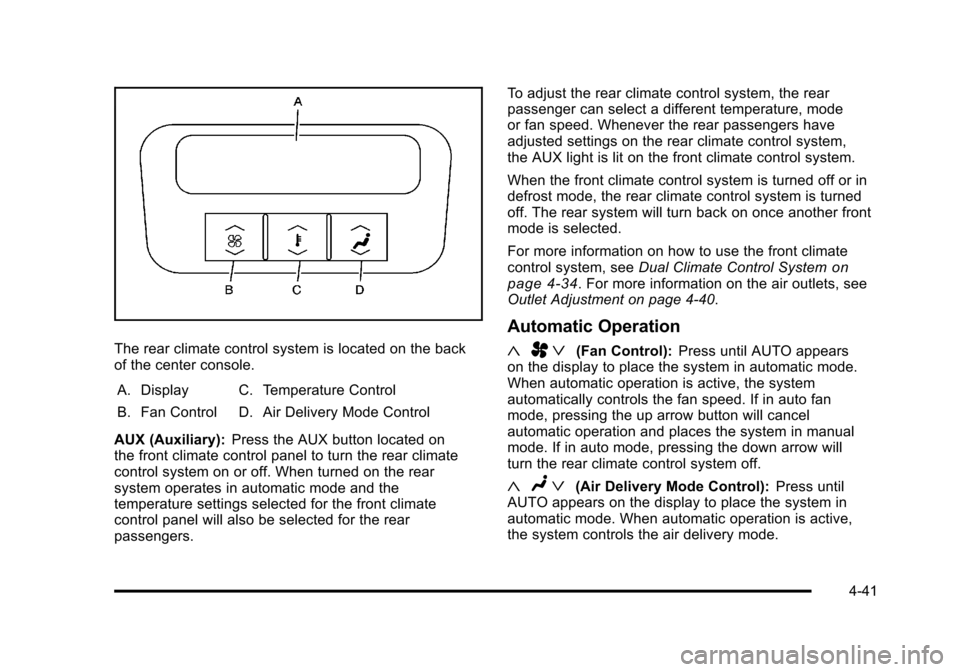
The rear climate control system is located on the back
of the center console.A. Display
B. Fan Control C. Temperature Control
D. Air Delivery Mode Control
AUX (Auxiliary): Press the AUX button located on
the front climate control panel to turn the rear climate
control system on or off. When turned on the rear
system operates in automatic mode and the
temperature settings selected for the front climate
control panel will also be selected for the rear
passengers. To adjust the rear climate control system, the rear
passenger can select a different temperature, mode
or fan speed. Whenever the rear passengers have
adjusted settings on the rear climate control system,
the AUX light is lit on the front climate control system.
When the front climate control system is turned off or in
defrost mode, the rear climate control system is turned
off. The rear system will turn back on once another front
mode is selected.
For more information on how to use the front climate
control system, see
Dual Climate Control System
on
page 4‑34. For more information on the air outlets, see
Outlet Adjustment on page 4‑40.
Automatic Operation
« A ª(Fan Control): Press until AUTO appears
on the display to place the system in automatic mode.
When automatic operation is active, the system
automatically controls the fan speed. If in auto fan
mode, pressing the up arrow button will cancel
automatic operation and places the system in manual
mode. If in auto mode, pressing the down arrow will
turn the rear climate control system off.
« Nª(Air Delivery Mode Control): Press until
AUTO appears on the display to place the system in
automatic mode. When automatic operation is active,
the system controls the air delivery mode.
4-41