lock CADILLAC DTS 2011 1.G Repair Manual
[x] Cancel search | Manufacturer: CADILLAC, Model Year: 2011, Model line: DTS, Model: CADILLAC DTS 2011 1.GPages: 470, PDF Size: 4.72 MB
Page 186 of 470

Black plate (24,1)Cadillac DTS Owner Manual - 2011
Using ACC on Hills and When Towing a
Trailer
How well ACC will work on hills and when towing a
trailer depends on your vehicle's speed, vehicle load,
traffic conditions and the steepness of the hills. It may
not detect a vehicle in your lane while driving on hills.
When going up steep hills, you may want to use the
accelerator pedal to maintain your vehicle's speed.
When going downhill, especially when towing a trailer,
you may want to brake to keep your speed down.
Applying the brake disengages the system. You may
choose not to use ACC on steep hills, especially when
towing a trailer.
Disengaging ACC
To turn off the system, apply the brake pedal, press the
cancel button, or press the ACC button.
Erasing Set Speed Memory
Press the ACC button or turn the ignition off.
Other Messages
There are three additional messages that may appear
on the DIC. They are SERVICE RADAR CRUISE,
RADAR CRUISE NOT READY and CLEAN RADAR.
These messages will appear to indicate a problem
with the ACC. SeeDIC Warnings and Messages
on
page 4‑65for more information.
Cleaning the System
The radar can become blocked by snow, ice, or dirt.
If so, you may need to turn off the engine and clean the
lens. Remember, do not use ACC in icy conditions,
or when visibility is low, such as in fog, rain or snow.
The emblem/lens is located in the center of the grille.
To clean the emblem/lens, wipe the surface with a soft
cloth. After cleaning the emblem/lens, try to engage the
ACC. If you are unable to do so, see your dealer.
4-24
Page 189 of 470

Black plate (27,1)Cadillac DTS Owner Manual - 2011
.The exterior lamp control is turned to any setting
except AUTO.
When this occurs, IntelliBeam is disabled until the
control is turned back to the AUTO position.
.The IntelliBeam system is turned off at the inside
rearview mirror.
IntelliBeam might not turn off the high-beams if the
system cannot detect other vehicle's lamps because of
any of the following:
.The other vehicle's lamp(s) are missing, damaged,
obstructed from view, or otherwise undetected.
.The other vehicle's lamp(s) are covered with dirt,
snow, and/or road spray.
.The other vehicle's lamp(s) cannot be detected
due to dense exhaust, smoke, fog, snow, road
spray, mist, or other airborne obstructions.
.Your vehicle's windshield is dirty, cracked,
or obstructed by something that blocks the view of
the IntelliBeam light sensor.
.Your vehicle's windshield is covered with ice, dirt,
haze, or other obstructions.
.Your vehicle is loaded such that the front end of
the vehicle points upward, causing the IntelliBeam
sensor to aim high and not detect headlamps and
taillamps.
.You are driving on winding or hilly roads. You might need to manually disable or cancel the
high-beam headlamps by turning the low-beam
headlamps on, if any of the above conditions exist.
Disabling and Resetting IntelliBeam at the
Rearview Mirror
IntelliBeam can be disabled by using the controls on the
inside rearview mirror.
AUTO
3(On/Off):
Press this button on the inside
rearview mirror to disable the system. The IntelliBeam
indicator turns off and does not come back on until the
IntelliBeam button is pressed again.
When IntelliBeam has turned on the high-beams, pull or
push the high-beam stalk. This will disable IntelliBeam.
The IntelliBeam indicator on the mirror turns off. To turn
IntelliBeam back on, press the IntelliBeam button on the
mirror.
A different sensitivity setting is available for dealer
diagnostics. This is done by pushing and holding this
button for 20 seconds until the IntelliBeam indicator light
flashes three times. If you accidentally activate this, the
vehicle' s setting automatically is reset when the ignition
is turned off and then on again.
4-27
Page 190 of 470

Black plate (28,1)Cadillac DTS Owner Manual - 2011
Cleaning the IntelliBeam Light Sensor
The light sensor is located
on the inside of the
vehicle in front of the
inside rearview mirror.
Clean the light sensor window, periodically, using glass
cleaner on a soft cloth. Gently wipe the sensor window.
Do not spray glass cleaner directly on the surface of the
sensor window.
Wiper Activated Headlamps
This feature activates the headlamps and parking lamps
after the windshield wipers are turned on and have
completed eight wipe cycles within four minutes.
When the ignition is turned to LOCK/OFF, the
wiper-activated headlamps immediately turn off. The
wiper-activated headlamps also turn off if the windshield
wipers are turned off.
Headlamps on Reminder
A warning chime will sound if the exterior lamp control
is left on in either the headlamp or parking lamp position
and the driver's door is opened with the ignition off.
Daytime Running Lamps (DRL)
Daytime Running Lamps (DRL) can make it easier for
others to see the front of your vehicle during the day.
Fully functional daytime running lamps are required on
all vehicles first sold in Canada.
The DRL system makes the turn signal lamps come on
when the following conditions are met:
.It is still daylight and the ignition is on.
.The exterior lamp control is in the off position.
.The transmission is not in P (Park) (United
States only).
.The light sensor is covered or not detecting light.
See “Sensors” underDual Climate Control System
on page 4‑34.
When DRL are on, no other exterior lamps such as the
parking lamps, taillamps, etc. will be on when the DRL
are being used. The instrument panel will not be lit up
either.
When automatic lighting is on and it is dark enough
outside, the turn signal lamps turn off and normal
low-beam headlamp operation occurs.
4-28
Page 192 of 470

Black plate (30,1)Cadillac DTS Owner Manual - 2011
Exterior Lighting Battery Saver
If the exterior lamp button has been left on, the exterior
lamps will turn off about 10 minutes after the ignition is
turned to LOCK/OFF and a door has been opened. This
protects against draining the battery if the headlamps or
parking lamps are accidentally left on. If the lamps need
to be left on for more than 10 minutes, use the exterior
lamp control to turn the lamps back on after the ignition
is turned to LOCK/OFF and any door is opened.
Instrument Panel Brightness
D(Instrument Panel Brightness): This feature
controls the brightness of the instrument panel and
footwell lights, if equipped.
The button for this control is located below the exterior
lamps control.
Push the button in and release to extend the button.
Turn the button clockwise or counterclockwise to
brighten or dim the lights.
Courtesy Lamps
The courtesy lamps are located on the headliner above
the rear seat. These lamps come on by turning the
instrument panel brightness knob fully clockwise or
when any door is opened and it is dark outside. Puddle
lamps are located on the bottom of the front and rear
door trim.
Professional vehicles have an additional dome lamp
and also opera lamps.
Entry Lighting
This feature turns on the courtesy lamps and the
backlighting for the door switches and the exterior lamp
control when a door is opened or if the remote keyless
entry transmitter unlock button is pressed. If activated
due to the transmitter, the lighting remains active for
about 40 seconds. Since the entry lighting system uses
the light sensor, it must be dark outside in order for the
courtesy lamps to turn on. The courtesy lamps turn off
approximately 25 seconds after the last door is closed.
They will dim to off if the ignition key is turned to ON/
RUN, or immediately deactivate if the power locks are
activated.
4-30
Page 193 of 470
Black plate (31,1)Cadillac DTS Owner Manual - 2011
Parade Dimming
This feature prohibits dimming of the digital displays
and backlighting during daylight hours when the key is
in the ignition and the headlamps are on. This feature is
fully automatic. When the light sensor reads darkness
outside and the parking lamps are active, the digital
displays can be adjusted by turning the instrument
panel brightness knob counterclockwise to dim and
clockwise to brighten lighting.
Reading Lamps
The reading lamps are located on the overhead console
on the headliner and in the rear door opening. These
lamps come on automatically when any door is opened
and it is dark outside.
For manual operation, press the button to turn them on.
Press it again to turn them off.
If the reading lamps are left on, they automatically shut
off 10 minutes after the ignition has been turned off.
Footwell Lamps
For vehicles with footwell lamps, they are located under
the instrument panel and at the rear of the front seats.
These lamps provide soft light to the front and rear floor
areas. They dim with the instrument panel cluster lights.Footwell lighting brightness can be adjusted with the
instrument panel brightness control located below the
exterior lamps control. See
Instrument Panel Brightness
on page 4‑30. The footwell lights will turn off before the
instrument panel lights are at their lowest level of
brightness.
Battery Load Management
This feature monitors the vehicle's electrical load and
determines when the battery is in a heavy discharge
condition. During times of high electrical loading, the
engine may idle at a higher revolutions per minute (rpm)
setting than normal to make sure the battery charges.
High electrical loads may occur when several of the
following are on: headlamps, high beams, fog lamps,
rear window defogger, the climate control fan at high
speeds, heated seats and engine cooling fans.
If the battery continues to discharge, even with the
engine idling at a higher rpm setting, some electrical
loads will automatically be reduced. When this occurs,
the rear window defogger may take slightly longer to
clear the glass, the heated seats may not get as warm
as they usually do and the climate control fan may
cut back to a lower speed. For more battery saving
information, see “Battery Saver Active Message” under
DIC Warnings and Messages on page 4‑65.
4-31
Page 196 of 470
Black plate (34,1)Cadillac DTS Owner Manual - 2011
When adding electrical equipment, be sure to follow
the proper installation instructions included with the
equipment. SeeAdd-On Electrical Equipment
on
page 6‑103.
Notice: Hanging heavy equipment from the power
outlet can cause damage not covered by the vehicle
warranty. The power outlets are designed for
accessory power plugs only, such as cell phone
charge cords.
Analog Clock
The analog clock is located on the instrument panel
above the radio. The clock is not connected with any
other vehicle system and runs by itself. To adjust the
clock:
1. Locate the adjustment button directly below the clock face.
2. Push and hold the adjustment button to advance the clock hands. Holding the button down will
cause the clock to advance faster. Release the
button before reaching the desired time.
3. Push and release the button to increase the time by one minute increments until the desired time is
reached.
Climate Controls
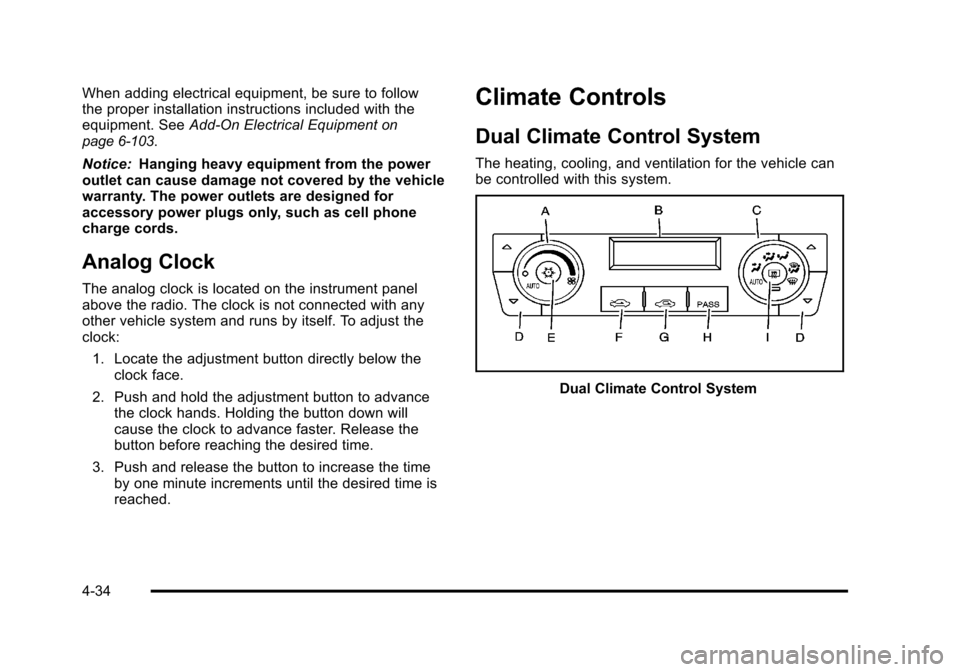
Dual Climate Control System
The heating, cooling, and ventilation for the vehicle can
be controlled with this system.
Dual Climate Control System
4-34
Page 198 of 470

Black plate (36,1)Cadillac DTS Owner Manual - 2011
If the AUTO position is selected on the fan or mode
control, the system automatically controls the air
conditioning compressor. The A/C compressor will run
automatically even at cool outside temperatures in order
to dehumidify the air. The A/C indicator light is lit when
the system is operating automatically, even at near
freezing outside temperatures. Press
#on the fan
control to turn off the A/C. For improved window
clearing performance in defog or defrost modes, the
A/C compressor runs automatically.
h(AUTO RECIRCULATION): If the AUTO position is
selected on either the fan or air delivery mode control,
the system automatically controls the air inlet to supply
fresh outside air or recirculate the interior air to cool the
car faster. The light on the recirculation button will come
on when the system changes to recirculation. Outside
air can be forced by pressing
hwhen the light is lit.
For vehicles without rear climate controls, press
:to
force outside air. The next time AUTO fan or mode is
selected, the air inlet will reset back to AUTO operation.
Manual Operation
9(Off): Turns the entire climate control system off.
Outside air still enters the vehicle and is directed to the
floor. The airflow direction and temperature can be
adjusted, as indicated below.
If the temperature is adjusted while the system is off,
the display will light to show the current settings.
w x(Driver's Temperature Controls): Press the up
or down buttons next to the fan control to manually
increase or decrease the temperature inside the
vehicle.
w x(Passenger's Temperature Controls): Press the
up or down buttons next to the air delivery mode control
to manually increase or decrease the temperature for
the front passenger. If the passenger climate control
system is off, pressing one of these buttons turns it on.
9(Fan Control): Turn clockwise or counterclockwise
to increase or decrease the fan speed. Turning this
control completely counterclockwise will turn on the
automatic fan operation. If the airflow seems low when
the fan speed is at the highest setting, the passenger
compartment air filter may need to be replaced. See
Passenger Compartment Air Filter on page 4‑42.
4-36
Page 199 of 470

Black plate (37,1)Cadillac DTS Owner Manual - 2011
Air Delivery Mode Control:Turn clockwise or
counterclockwise to change the current airflow mode.
Select one of the following:
AUTO: Turns on the automatic delivery mode
operation.
F (Vent): Air is directed to the instrument panel outlets.
* (Bi-Level): Air is divided between the instrument
panel and the floor outlets. In automatic operation,
cooler air is directed to the upper outlets and warmer air
to the floor outlets.
7 (Floor): Air is directed to the floor outlets with
some air directed to the side window outlets and the
windshield.
If recirculation is selected, it only stays on for
three minutes to reduce windshield fogging.
W(Floor/Defog): This mode clears the windows of
fog or moisture. Air is directed to the floor outlets,
with some air going to the side window outlets and
windshield. When selected, the system turns off
recirculation and runs the air conditioning compressor
unless the outside temperature is at or below freezing.
The recirculation mode cannot be selected while in the
floor/defog mode.
0(Defrost): This mode clears the windshield of fog
or frost more quickly. Air is directed to the windshield
and side window outlets. When selected, the system
automatically turns off recirculation and runs the
air conditioning compressor, unless the outside
temperature is at or below freezing. Recirculation
cannot be selected while in the defrost mode. Do not
drive the vehicle until all the windows are clear.
For professional vehicles, air will be allowed to flow
through the rear outlets. For quicker defrost, press the
AUX button on the front climate control system so that
the light is not lit.
#(Air Conditioning): Press to turn the air
conditioning system on or off and override the
automatic system. When in AUTO, the air conditioning
compressor comes on automatically, as necessary.
To avoid window fogging on rainy and humid days at
temperatures above freezing, run the air conditioning.
The air conditioning system removes moisture from
the air, so a small amount of water may drip under the
vehicle while idling or after turning off the engine. This
is normal.
4-37
Page 202 of 470

Black plate (40,1)Cadillac DTS Owner Manual - 2011
In order to prevent false temperature readings at
startup, the displayed temperature will not change until
the following occurs:
.Vehicle speed is above 16 km/h (10 mph) for
5 minutes.
.Vehicle speed is above 51 km/h (32 mph) for 2 and
a half minutes.
The climate control system uses the information from
these sensors to maintain your comfort setting by
adjusting the outlet temperature, fan speed, and the
air delivery mode. The system may also supply cooler
air to the side of the vehicle facing the sun. The
recirculation mode will also be used as needed to
maintain cool outlet temperatures.
Outlet Adjustment
For the front outlets, use the thumbwheel located below
each outlet to change the direction of the airflow. Use
the thumbwheel located next to the outlets to shut the
airflow or to open the outlets and re-direct the air.
For the rear outlets, slide the lever left or right and up or
down to change the direction of the airflow.
Operation Tips
.Clear away any ice, snow or leaves from the air
inlets at the base of the windshield that may block
the flow of air into your vehicle.
.Use of non-GM approved hood deflectors may
adversely affect the performance of the system.
.Keep the path under the front seats clear of
objects to help circulate the air inside of your
vehicle more effectively.
Rear Climate Control System
For vehicles with a rear climate control system, the rear
seat passengers can adjust the direction of the airflow,
fan speed and temperature for the rear seating area.
This system also works with the main climate control
system in the vehicle.
4-40
Page 213 of 470

Black plate (51,1)Cadillac DTS Owner Manual - 2011
Antilock Brake System (ABS)
Warning Light
For vehicles with the
Antilock Brake System
(ABS), this light comes on
briefly when the engine is
started.
If it does not, have the vehicle serviced by your dealer.
If the system is working normally the indicator light then
goes off.
If the ABS light stays on, turn the ignition off. If the light
comes on while driving, stop as soon as it is safely
possible and turn the ignition off. Then start the engine
again to reset the system. If the ABS light stays on,
or comes on again while driving, the vehicle needs
service. If the regular brake system warning light is not
on, the vehicle still has brakes, but not antilock brakes.
If the regular brake system warning light is also on, the
vehicle does not have antilock brakes and there is a
problem with the regular brakes. See Brake System
Warning Light on page 4‑50. For vehicles with a Driver Information Center (DIC), see
DIC Warnings and Messages
on page 4‑65for all
brake related DIC messages.
Traction Control System (TCS)
Warning Light
This warning light comes
on briefly while starting
the engine.
If it does not, have the vehicle serviced by your dealer.
If the system is working normally the indicator light will
then go off.
If it stays on, or comes on while driving, there may be a
problem with the traction control system and the vehicle
needs service. When this warning light is on, the
system will not limit wheel spin.
If the traction control system warning light comes on
and stays on when the system is turned on, the vehicle
needs service. See Traction Control System (TCS)
on
page 5‑6for more information.
4-51